

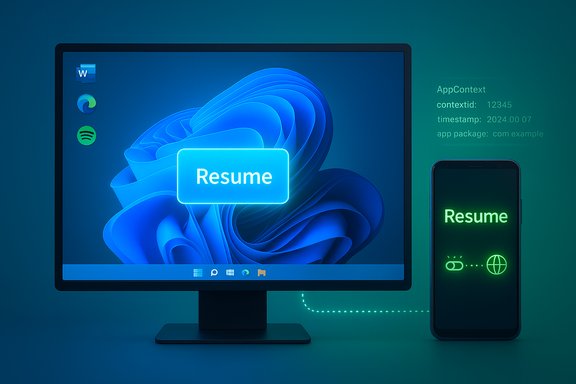
Windows 11 can now quietly hand off what you’re doing on an Android phone straight to your PC — and in practice it looks less like gimmickry and more like the kind of continuity people have wanted for years. The latest Windows 11 Insider Preview (Build 26220.7271, KB5070307) introduces a resume‑from‑phone experience that uses the Link to Windows companion, Microsoft’s Continuity SDK and a lightweight metadata format called AppContext to surface a single‑click resume action on the Windows taskbar. For users who hop between devices during the day, that taskbar prompt can reopen cloud documents, browser tabs or supported app sessions on the desktop without manual link copying, email or clumsy mirroring — a meaningful step toward the cross‑device flow Apple users have long enjoyed, but executed for the fragmented Android ecosystem.
Background
Microsoft’s approach to phone‑to‑PC continuity has evolved in stages: notification mirroring and SMS reply, file and photo transfer, then app streaming and limited handoffs (for example audio resume with Spotify). The new Cross Device Resume capability builds on that lineage and formalizes a developer path for phones and Android apps to tell Windows “this is what the user is doing — reopen it here.” The mechanism is intentionally small: partner apps integrate the Continuity SDK on Android, publish an ephemeral AppContext describing the activity, and Link to Windows forwards that to Windows’ Cross Device Experience Host (CDEH). Windows then decides the best handler — a native desktop app via URI/protocol handler or a browser fallback — and surfaces a taskbar resume affordance.This is being trialed in the Windows Insider Dev/Beta rings via Build 26220.7271 (KB5070307). The rollout is gated and incremental: the resume affordance appears only when the phone and PC are paired, Link to Windows is allowed to run in the background, and the partner app is approved to use the resume API.
How the resume‑from‑phone feature actually works
The plumbing: AppContext, Link to Windows and CDEH
- The cross‑device handshake revolves around AppContext, a concise metadata packet that describes what should be resumed: a unique contextId, creation timestamp, app package ID, a title and either an intent URI (deep link) or a weblink pointing to the resource.
- An Android app that wants to offer resume initializes the Continuity SDK, waits for a handshake callback from Link to Windows, and then sends AppContext objects when a resumable activity is active.
- Link to Windows acts as the broker on the phone, forwarding AppContext to Windows. The Cross Device Experience Host (CDEH) on the PC consumes the packet and resolves the appropriate target (desktop app protocol, installed app handler, or browser weblink).
- AppContext objects are ephemeral by design — their lifetime is short (default maximum for ongoing scenarios is five minutes) to keep prompts timely and to limit risk if a context is leaked or stale.
Developer onboarding and restrictions
- The Continuity SDK is a Limited Access Feature. Developers and OEMs must apply for enrollment and approval to interoperate with Link to Windows.
- Android prerequisites for partner apps include a minimum Android SDK target and specific Link to Windows versions; on the Windows side, apps must understand and accept protocol/URI activations to be resumed properly.
- The SDK provides manifest metadata and APIs for sending AppContext, updating or deleting it when sessions end, and handling validation callbacks.
What this enables for users: practical scenarios
- Seamless transfer of online Office files: Open a Word, Excel or PowerPoint file in the M365 Copilot Android app on a supported phone, walk to your desk, and the same online file can reopen on Windows — in desktop Office if installed, or in the browser as a fallback.
- One‑click browser handoff: Certain OEM browsers (notably Vivo’s browser in early tests) can prompt the Windows taskbar and open the exact tab in your desktop browser with a single click.
- Audio and media resume: Spotify was an earlier example of resume support; the same pattern allows music and podcast playback to continue on PC from the phone’s session.
- Quick app installation fallback: If a resume prompt targets a desktop app that isn’t installed, Windows can guide the user to install it (one‑click Store flow) and then continue the session.
What’s in Build 26220.7271 (KB5070307)
- The Insider release bundles the resume experiments with several other refinements: a cleaner File Explorer context menu, an optional File Explorer background preloading toggle to reduce perceived launch latency, early Point‑in‑Time Restore (PITR) options, and voice‑typing improvements. The cross‑device resume functionality is an explicit expansion of previously tested continuity behaviors.
- To actually see resume in action you must be on the Dev or Beta Insider channels and have the Mobile devices pairing and Resume toggles enabled on your PC. Even then, the feature is server‑gated and will not necessarily appear immediately for every Insider.
Device and app support — current state and limits
- At present the resume scenarios being surfaced in Insider previews were observed to work with phones from certain OEMs: Samsung, Honor, Huawei, Oppo and Vivo. That list reflects which manufacturers had integrated the Continuity SDK and completed the necessary vendor approvals during the initial rollout.
- Supported app scenarios in early testing include:
- M365 Copilot for online Word/Excel/PowerPoint documents
- Vivo Browser tab handoff to PC default browser
- Spotify (audio resume) and similar partner apps that have integrated the Continuity SDK
- Not supported: local/offline files stored only on the phone, since the resume pipeline requires a sharable endpoint (URI/weblink) to re‑open the content on the desktop. iOS/iPhone is not supported by this Android‑focused SDK model.
Setup and quick start (Insider Preview)
- Join Windows Insider (Dev or Beta) and install Windows 11 Insider Preview Build 26220.7271 (KB5070307).
- On your PC go to Settings > Bluetooth & devices > Mobile devices and turn on Allow this PC to access your mobile devices.
- Click Manage devices, pair your Android phone and make sure the Microsoft account on both devices is the same where required by apps like Spotify.
- On your phone install or update Link to Windows and the partner app (for example M365 Copilot, Vivo Browser). Allow Link to Windows to run in the background and grant necessary permissions.
- In the Manage devices entry for your phone on Windows, confirm the Resume toggle is enabled for that device.
- Trigger a supported activity on the phone (open an online Office file in M365 Copilot, play Spotify, or open a page in a supported OEM browser) and look for the small Resume card on the taskbar. Click it to continue on PC.
Privacy, security and enterprise controls
Microsoft’s design choices try to balance convenience with risk reduction:- AppContext is intentionally small and short‑lived (default lifetime capped at minutes) to reduce both exposure and the chance of stale actions being resumed on the wrong device.
- Resume works by publishing a pointer (URI/weblink or deep intent) — the desktop launches that target rather than remotely executing phone state. That limits the amount of raw data shared across devices.
- The Continuity SDK is a Limited Access Feature; Microsoft requires enrollment and validation for apps and OEMs, which reduces risk from unvetted parties.
- Administrators and power users can control the behavior: the Mobile devices → Resume toggle on Windows is user‑visible and can be disabled, and typical enterprise MDM/Group Policy controls that block Phone Link or cross‑device features will also prevent resume from functioning.
- Link to Windows must run in the background on the phone, which raises battery and background‑app policy considerations for mobile device management.
- Metadata can still contain sensitive pointers. If a resume AppContext references a private document URL or an authenticated web endpoint, correct access control and expiry are essential. App developers and IT teams must ensure AppContext URIs require appropriate authentication and respect lifecycle and revocation semantics.
- Background services on phones are subject to OEM battery management. If Link to Windows is suspended by the phone to save power, resume prompts will fail.
- Server‑side gating and partner approvals mean inconsistent availability. Users may be frustrated if the feature works on one device but not on another due to OEM or app integration status.
Why Microsoft’s approach matters (and where it falls short)
Strengths- The resume model is pragmatic and efficient: by sharing metadata instead of full state, the system reduces bandwidth, preserves local device autonomy and allows Windows to open content in a native, powerful desktop context.
- The developer SDK and vetting process set a reasonable gate for quality and security — only approved apps get access to resume APIs, reducing accidental or malicious abuse.
- Integrating Copilot’s mobile sessions with desktop apps (for example desktop Office opening the same M365 Copilot document) leverages installed productivity tools to deliver a richer continued experience than a simple web fallback.
- Platform fragmentation on Android makes universal handoff hard. OEM cooperation, app updates and background service policies will determine how widely and reliably this works.
- Offline files and local-only data are not resumable under the current model — the system requires a URI/weblink endpoint. That restricts utility for many real‑world workflows where users work with device‑resident documents.
- The gating of access (Limited Access Feature) means the UX will feel piecemeal at first; users with unsupported phones will be left out while Microsoft builds partner relationships.
- Privacy and enterprise policy complexity: administrators need clear, centralized controls to enable or block the capability at scale. While toggles exist, centralized MDM guidance will be required for broad enterprise adoption.
Copilot in Edge: shopping, price tracking and proactive recommendations
The cross‑device resume story sits alongside Microsoft’s broader push to make Copilot the connective tissue across Windows, Edge and mobile. Copilot in Edge has been retooled as a shopping assistant with features like price comparison, price history, price tracking, cashback prompts and product insights — surfaced inside the Copilot sidebar and, in some markets, proactively notifying users of better deals.Key points to understand:
- Copilot in Edge consolidates prior shopping tools into one conversational, AI‑driven experience. Users can see price history charts, set price alerts and ask follow‑ups inside the same pane.
- Proactive deal detection and cashback notifications are rolling out regionally (initially concentrated in the US) and require the user to be signed into a Microsoft account and to opt in to connected experiences.
- The combination of resume handoff and Copilot in Edge creates a scenario where a product page or document started on a phone can be resumed on PC and immediately benefit from Copilot’s shopping insights — a seamless shopper flow.
Developer perspective: what to do if you want resume support
- Integrate the Continuity SDK and publish AppContext objects for resumable activities. Ensure your app’s manifest includes the required metadata and that you handle initialize/deinitialize, send/delete AppContext semantics correctly.
- Design resume flows to use authenticated, short‑lived URIs or intent URIs so resumed actions remain secure and require appropriate authorization.
- Expect an approval process. Microsoft treats resume as a limited capability; plan for integration validation, testing with Link to Windows and cooperation with OEM partners for deep OS integration.
Troubleshooting and real‑world tips
- Confirm you’re running the same Microsoft account across phone and PC where required by the partner app (Spotify is a common example).
- Keep Link to Windows and your partner apps updated on the phone. Allow Link to Windows to run in the background to avoid being interrupted by battery‑saving policies.
- On Windows, verify Settings > Bluetooth & devices > Mobile devices and ensure Allow this PC to access your mobile devices is switched on and the device’s Resume toggle is enabled.
- If resume doesn’t appear, remember that the feature is server‑gated; identical device configurations may still behave differently while Microsoft stages the rollout.
- For enterprises, check Group Policy and MDM settings that may disable Phone Link or related cross‑device features. Disabling Phone Link on the device will also block the resume prompts.
What to watch next
- Broader OEM adoption: expansion to more phone manufacturers (Pixel, Xiaomi, Motorola and others) would make resume truly useful across the Android market. That requires both technical integration and commercial coordination.
- Expanded app support: more third‑party apps adopting the Continuity SDK will increase usefulness. The limited access onboarding process is a choke point Microsoft needs to optimize.
- Enterprise management: clearer administrative policies and MDM templates for large organizations to control cross‑device resume will determine how widely IT leaders allow this feature in business fleets.
- Privacy controls: straightforward toggles and consent flows for Copilot‑related proactive suggestions and for what metadata can be shared will be key to mainstream acceptance.
- Offline file handling: unless the model evolves to support secure, authenticated transfer of local file state (with proper user consent and encryption), many workflows will remain blocked.
Conclusion
Windows 11’s new resume‑from‑phone feature signals a deliberate shift: Microsoft is building a platform for continuity rather than a single app trick. The combination of Link to Windows, the Continuity SDK and the AppContext handshake gives developers and OEMs a clear, secure model to move activities between Android and Windows. At a practical level, the experience can feel genuinely useful — opening a document or browser tab on the PC exactly where you left off on your phone is less disruptive than the alternatives.That said, the rollout is cautious and incomplete. The resume model’s current constraints — limited OEM and app support, online‑only document requirements, and gated developer access — mean most users won’t feel the benefit immediately. Privacy, battery management and enterprise policy considerations also require careful attention.
For people who rely on a mixed device workflow, the resume affordance is worth watching and testing on Insider builds. For developers and IT pros, it’s time to evaluate integration or policy stances: the technical foundation is now in place, and the next year will determine if Microsoft can turn a promising experiment into a reliable, widely supported cross‑device productivity platform.
Source: thedailyjagran.com Windows 11’s New Resume-From-Phone Feature Makes Android And PC Work Seamlessly Together
