

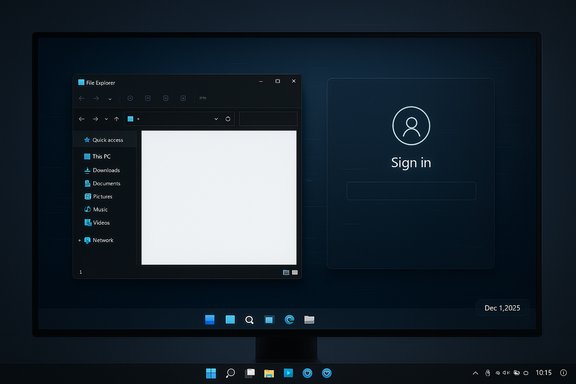
Microsoft has quietly acknowledged and patched two of the most aggravating Windows 11 regressions that have been plaguing users over the last few weeks: a race-condition that could cause explorer.exe (and therefore the taskbar and Start menu) to stop responding after certain notifications, and a launch-time micro‑stutter seen on very high‑resolution or high‑refresh displays when apps or games query supported display modes. The fixes arrive in the December 1, 2025 optional preview update (KB5070311, OS builds 26200.7309 and 26100.7309), but the same preview also introduces a pair of visual regressions—bright white flashes in File Explorer dark mode and an invisible ‘password’ icon on the sign-in screen—that elevate this to a mixed bag for anyone deciding whether to install now or wait for the December Patch Tuesday rollup on December 9, 2025.
Microsoft’s recent preview underscores an operational trade‑off the Windows ecosystem continues to navigate: faster, modular updates that deliver functionality quickly can also increase the surface area for timing‑sensitive regressions. KB5070311 fixes two high‑visibility user pain points, but it also reminds administrators and power users that previews are previews: useful for early remediation and testing, but best deployed methodically and with a rollback plan.
Source: Windows Latest Microsoft confirms Windows 11's taskbar/explorer crashes and stuttering in games during launch, rolls out fixes
 Background
Why this matters now
Windows servicing in 2025 has been unusually eventful: modularized XAML/AppX shell components, frequent cumulatives, and expanded telemetry have accelerated feature delivery but also exposed timing and compatibility wrinkles in real deployments. That context matters because the taskbar/explorer failures and the game-launch micro‑stutter are not random one‑off crashes — they are symptoms of interactions between Windows servicing, UI packaging, and device-specific subsystems like display enumeration and driver stacks. Microsoft’s KB entries and community testing both show these are real, reproducible problems for a subset of devices and usage patterns, and the company has started to roll mitigations in the preview channel while a more broadly distributed fix is scheduled for the regular December update cycle.The updates in question
- KB5070311 — Preview (December 1, 2025), OS builds 26200.7309 (25H2) and 26100.7309 (24H2). This non‑security update bundles quality fixes and feature refinements and includes the explorer.exe/notification fix, display/enumeration improvements, and several other bug fixes. Microsoft also documents known issues for this build (File Explorer white flash in dark mode; invisible sign‑in icons).
- KB5071142 — Servicing Stack Update (SSU) that ships alongside the preview; the combined package is a single LCU+SSU rollup where the LCU contains the fixes and the SSU ensures the servicing stack remains reliable. Microsoft’s KB explains how to uninstall the LCU (DISM commands) if necessary.
What Microsoft fixed (and how they describe it)
Explorer.exe / Taskbar crashes after notifications
Microsoft’s release notes explicitly list a fix for a condition where “explorer.exe might stop responding (leading to the taskbar becoming unresponsive) after certain notifications.” The company’s language is succinct and does not disclose a root‑cause analysis beyond the symptom and the remediation shipped in KB5070311, but Microsoft verifies the behavior is addressed in the preview. Community reproductions and forum threads align with that claim: affected users have reported sudden taskbar disappearance and explorer reloads that correlate with notification arrival or session state. Why this is important: explorer.exe is the single most visible shell process in Windows. When it hangs or crashes, the taskbar, Start menu, File Explorer windows and system tray become unreliable or disappear, creating an immediate, high-impact productivity failure that demands urgent remediation in both consumer and managed environments.Micro‑stutter during app/game launch on very high‑resolution monitors
The KB notes also call out an improvement to how Windows handles apps querying monitors for "their full list of supported modes." Microsoft says that under very high‑resolution/high‑refresh configurations, the query process could lead to a momentary stutter at launch — the gameplay/frame rate itself was not harmed once the title was running, but the perceived smoothness during launch or mode switching could be degraded. The preview claims to smooth that interaction by improving the mode‑query path. In real terms, this describes a timing or blocking operation that creates a brief hitch when the display enumeration occurs (for example, when a game queries supported resolutions and refresh rates). Because modern games and display drivers often perform a full modes enumeration at startup, a slower path can create that 100–500ms jolt users notice as a micro‑stutter.Other notable fixes in KB5070311
- Brightness slider reset bug on some all‑in‑one PCs corrected.
- Fixed spurious "Unsupported graphics card detected" messages that could appear even when a supported GPU was present.
- Search indexer and SMB search issues addressed.
What KB5070311 also breaks (known regressions)
File Explorer white flash in dark mode
Microsoft lists a Known Issue: after installing KB5070311 File Explorer may briefly flash a white screen when opened in dark mode or when certain File Explorer actions are performed (opening a new tab, switching panes, etc.. Independent outlets—Windows Central, BleepingComputer and PureInfoTech—reproduced and amplified this problem, and Microsoft confirmed it in the KB. Users in dark environments report the flash is visually jarring; in extreme cases it’s disorienting. Microsoft says it is working on a fix.Invisible password icon on the sign‑in screen
The preview also documents that the UI control used to select password/pin/other sign‑in options may render invisibly (though it still responds to hover/click), which is an accessibility/usability regression. Microsoft’s guidance is a temporary workaround: hover and click the expected area until the visual is restored. The issue is notable because it affects secure sign‑in flows and shared systems where users rely on visual affordances to choose a method.Technical analysis: what likely happened
Explorer.exe and notifications — a black‑box symptom
Microsoft’s notes do not provide a precise root‑cause for the notification-related explorer.exe instability; they only specify the symptom and the fact it is fixed in KB5070311. Community reproductions sometimes link the crash to unread notifications sitting in the Action Center, while other traces suggest that some types of notifications trigger a shell path that can fail due to timing with modularized XAML/AppX components. Because the official explanation is limited and Microsoft didn’t publish a detailed stack trace or code change log, any definitive assertion about the underlying code path would be speculation. Treat claims about the precise trigger (e.g., "unread notifications caused it") as plausible but unverified unless Microsoft or a trusted vendor publishes a technical post‑mortem.Display enumeration and launch‑time stutter
The stutter description is consistent with a blocking or slow path in monitor mode enumeration. When an app queries the display driver and monitor EDID or detailed mode lists on ultra‑wide / 4K@240Hz displays, an inefficient or serialized enumeration that interacts with drivers could delay the main thread briefly. The preview’s wording—“Performance has been improved when apps query monitors for their full list of supported modes”—strongly implies that Microsoft optimized the path (likely reduced blocking I/O or batched requests) so the enumeration completes faster and avoids a UI hitch. This also explains why the stutter is concentrated at launch time and rarely affects in‑game frame rates once the display mode is negotiated.The bigger picture: modular shell and timing races
This month’s wave of fixes and advisories sits on top of an earlier, higher‑impact provisioning regression (KB5072911) that revealed how moving shell components into updatable XAML/AppX packages creates a delicate registration step during servicing. If package registration lags behind shell process startup, XAML activations can fail and shell processes crash or render blank UI. That registration race is the same architectural tension that makes notification-handling or newly updated UI views more fragile during first sign‑in and provisioning workflows; in large fleets and non‑persistent VDI that race can produce mass failures. Microsoft documented KB5072911 and provided temporary mitigations while a permanent fix is developed. The family of issues here shares a common theme: faster feature delivery and modular packaging improve agility, but they also demand more precise ordering guarantees during servicing.Cross‑checks and evidence (what we verified)
- Microsoft’s KB5070311 release notes explicitly list the explorer.exe/notifiation fix, the display enumeration improvement, and the File Explorer white‑flash known issue.
- Independent reporting from BleepingComputer and Windows Central reproduces and confirms the white‑flash problem and the invisible sign‑in icon behaviour, matching Microsoft’s documented Known Issues.
- Multiple community threads and forum digests recorded the explorer/taskbar crashes and have been used by Microsoft to triage and ship the preview fix; archived forum/reporting also shows the broader pattern of provisioning‑related shell failures dating back to July 2025 (KB5062553 → KB5072911).
- The display enumeration improvement (stutter at launch on very high‑resolution monitors) is documented by Microsoft in the KB and corroborated by several regional tech outlets that republished the release notes.
Practical guidance for users and admins
Consumers and enthusiasts (recommendation)
- If you are a power user or troubleshooting one of the affected symptoms (taskbar crashes, SMB search failures, unsupported‑GPU false positives, or launch‑time stutter on a high‑end display), the optional KB5070311 preview may be worth installing now to get the immediate fixes. Confirm your system is backed up and be prepared to roll back if you encounter the File Explorer white flash or other regressions.
- If you are content with system stability and rely on dark mode, shared sign‑in UX, or manage devices for users who might be disturbed by a bright flash, delay the preview and wait for the December Patch Tuesday rollup scheduled for December 9, 2025. Patch Tuesday updates are generally more thoroughly validated and often fold preview fixes into more stable cumulative packages.
Enterprise and IT operators (recommendation)
- Treat KB5070311 as a targeted remediation for high‑impact symptoms but do not deploy broadly without testing in staging. The preview contains useful fixes but also carries known UI regressions and the SSU/LCU combination can complicate rollback.
- Validate provisioning and VDI images—especially non‑persistent pools—against KB5072911 mitigations; re‑registration of AppX/XAML packages and synchronous logon scripts are documented temporary workarounds if you still see shell failures during imaging.
- If you must remove the LCU from a machine, use DISM to identify and remove the package; running wusa.exe /uninstall will not work on the combined SSU+LCU package. Microsoft documents DISM as the supported removal path for the LCU. Example sequence (confirm package names before running):
- DISM /online /get-packages | findstr KB5070311
- DISM /online /remove-package /packagename:<package_name>
- Reboot and validate.
Gamers and workstation power users
- If you experienced the October/November regressions where gaming performance dropped on some NVIDIA systems, remember that vendor driver hotfixes (e.g., NVIDIA’s hotfix driver) and the recent Microsoft preview both aim to mitigate that class of problems. Confirm driver compatibility (install vendor hotfixes only from official vendor pages) and test your critical titles after installing the OS preview. Community reports indicate mixed results depending on GPU, driver, anti‑cheat middleware and game title, so test before deploying at scale.
Risks and remaining unknowns
- Microsoft’s KB fixes are explicit about symptoms but terse about root causes. That leaves a residual risk: without a detailed post‑mortem, administrators cannot be certain that the symptom is fully closed for every hardware/driver/config combination. Proceed with measured testing and maintain rollback plans.
- The preview’s File Explorer white flash and invisible sign‑in icon are real regressions with accessibility implications. Users with photosensitive conditions or those relying on visual sign‑in cues may be negatively impacted; IT teams should weigh this when deciding whether to force the preview across a fleet.
- The gaming/display fixes reduce launch‑time stutters but cannot substitute for driver-level problems. If you see crashes, black screens or severe FPS drops, pursue GPU vendor guidance (driver hotfixes/rollbacks) in parallel with OS updates. Historical incidents earlier in the year show that performance regressions after cumulatives can require both OS and driver adjustments.
- KB removal complexity: because the preview includes an SSU and the LCU together, plain wusa.exe uninstalls often fail. Removing the LCU requires DISM commands and careful change control; improper removal may leave the system in a partially updated state. Microsoft documents the removal steps but this remains a technical operation that merits testing before a broad rollback.
Timeline & what to expect next
- December 1, 2025 — Microsoft released the KB5070311 preview (OS builds 26200.7309 / 26100.7309) containing the explorer/notification fix, display enumeration improvements, and known issues like the File Explorer white flash.
- December 9, 2025 — The next Patch Tuesday (second Tuesday of December) is scheduled and will be the likeliest candidate for a more polished cumulative that folds in the preview fixes (or a corrected version) for wider distribution; many administrators should prefer to wait for that rollup after validating in staging.
- Ongoing — Microsoft continues to track the provisioning XAML registration race and has published KB5072911 with temporary mitigations; expect follow-up servicing to harden registration ordering and reduce first‑logon fragility in future cumulatives.
Bottom line (concise summary)
KB5070311 delivers important fixes for a painful explorer/taskbar crash scenario and reduces launch‑time micro‑stutter on very high‑end displays, but it is not a pure win: the preview also ships visible regressions (File Explorer white flash in dark mode and an invisible password icon) that may be unacceptable on shared and accessibility‑sensitive systems. For home users and enthusiasts experiencing the specific bugs the preview addresses, installing KB5070311 after backing up is reasonable; for enterprises and anyone relying on dark mode sign‑in UX, the prudent path is to stage test now and delay broad deployment until the December 9 Patch Tuesday cumulative, which will be more stable and will likely incorporate additional fixes.Quick reference: How to check and roll back (high‑level)
- Check your build: Settings → System → About → OS build. If you see 26200.7309 or 26100.7309, KB5070311 is installed.
- If you must remove the LCU: use DISM to enumerate installed packages and remove the LCU package; wusa.exe /uninstall will not work on the combined SSU+LCU package. Confirm package names before removing.
- Test gaming performance after installing OS updates by measuring average FPS and 1%/0.1% lows with tools like CapFrameX or in‑game overlays; if you see severe regressions, consult your GPU vendor for hotfix drivers as well.
Microsoft’s recent preview underscores an operational trade‑off the Windows ecosystem continues to navigate: faster, modular updates that deliver functionality quickly can also increase the surface area for timing‑sensitive regressions. KB5070311 fixes two high‑visibility user pain points, but it also reminds administrators and power users that previews are previews: useful for early remediation and testing, but best deployed methodically and with a rollback plan.
Source: Windows Latest Microsoft confirms Windows 11's taskbar/explorer crashes and stuttering in games during launch, rolls out fixes
