

Microsoft’s Windows Delivery Optimization feature can download update and Store content from other PCs and, depending on configuration, upload cached update data from your machine to other devices on your local network or the broader internet. That is not a bug, a breach, or a conspiracy; it is a deliberate piece of Windows plumbing. But the backlash captured by XDA’s latest warning about “Microsoft using my PC to update yours” lands because it touches the oldest Windows grievance in a newer, sharper form: Windows still too often treats the PC as a managed endpoint first and a user-owned machine second.
The charitable version of Delivery Optimization is easy to understand. Windows updates are large, Microsoft ships them to an enormous installed base, and many homes and offices now have more than one Windows device. If one machine has already downloaded a cumulative update, letting nearby machines reuse pieces of it can reduce duplicate traffic and make patching more resilient on slow or unreliable connections.
The less charitable version is also easy to understand. A user buys a laptop, pays for broadband, opens Task Manager or a router dashboard, and discovers that Windows may be spending upload bandwidth on Microsoft’s distribution problem. The practical setting is small; the philosophical setting is enormous.
Delivery Optimization is not new, and it is not inherently sinister. Microsoft describes it as a cloud-managed downloader for Windows content, capable of pulling updates, apps, and other Microsoft-delivered packages from traditional servers, local peers, internet peers, or enterprise cache infrastructure. In plain English, it is a peer-assisted content delivery system for Windows.
That design makes obvious sense in enterprise IT. If a company has hundreds or thousands of machines receiving the same Windows feature update, Office content, driver payload, or Store-delivered component, it is wasteful for every device to fetch identical bits across the WAN. Branch offices, classrooms, labs, retail stores, and shared workspaces can all benefit from local peering when it is deliberately configured and monitored.
The feature also has a reasonable home-user story. A household with three Windows laptops and a desktop gaming PC does not necessarily need four separate internet downloads of the same update. Local-network sharing can be faster, cheaper, and kinder to constrained connections, especially where broadband caps still exist or where connectivity is spotty.
But Windows does not exist in a vacuum of network theory. It exists on machines whose owners have watched updates break printers, rearrange defaults, revive unwanted settings, and arrive on schedules that feel more convenient for Redmond than for the person at the keyboard. Against that history, even a well-engineered optimization can look like another quiet assumption that the PC is available for Microsoft’s use unless the user says otherwise.
Download speeds have improved dramatically in much of the broadband market, but upload remains the bottleneck for video calls, cloud backups, livestreaming, remote desktop sessions, game streaming, and large file transfers. A 10 Mbps upload load is trivial on a fiber line and painful on an asymmetric cable plan. Even smaller background transfers can make a connection feel broken if they arrive during a meeting or a multiplayer session.
Microsoft’s intended mitigation is that Delivery Optimization is supposed to be intelligent. It can throttle, it can observe connection type, and Windows exposes controls for limiting or disabling peer participation. Metered connections also change behavior, which matters for capped broadband, mobile hotspots, and other constrained links.
The problem is that “intelligent background activity” is exactly the category of Windows behavior that power users have learned to distrust. When a user cannot immediately tell whether the spike is Windows Update, Microsoft Store, OneDrive, Defender, Edge, telemetry, a driver package, or Delivery Optimization, the explanation “don’t worry, Windows manages it” does not reassure. It sounds like a vendor telling the user to stop looking behind the curtain.
Security-minded users should still care about how such systems validate content, but this is not Napster for your Documents folder. Windows updates are signed, content is checked, and the sharing model is built around update payloads rather than arbitrary user data. The scary version of the story — that strangers are browsing your machine for files — is not what Microsoft’s design does.
Yet privacy is not the only axis of trust. The stronger objection is consent, resource control, and visibility. Users do not need to believe their files are being leaked to be irritated that their bandwidth may be used for a platform-scale distribution scheme.
That is why the feature generates such durable outrage. Microsoft can accurately say that Delivery Optimization does not expose personal files and still miss the complaint. The complaint is that Windows has normalized background behaviors that users discover after the fact, then asks them to appreciate the architecture.
For a home user, “my desktop helps update my laptop” feels different from “my desktop helps update a stranger’s laptop.” The first is a convenience. The second feels like conscription, even if the actual traffic is limited, encrypted, validated, and throttled.
For administrators, the same distinction applies at a larger scale. Delivery Optimization can be part of a sensible update strategy when paired with policy, reporting, cache servers, Microsoft Intune, Configuration Manager, or Windows Update for Business. In that world, the organization is choosing to use its own network resources to reduce duplicate downloads and improve patch compliance.
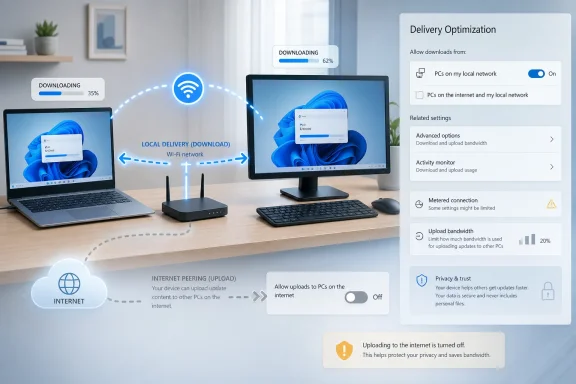
Microsoft does expose that middle ground in Windows 11. Users can allow downloads from other PCs but limit them to devices on the local network. That is the setting many multi-PC households should consider before reaching for a total shutoff, because it preserves the useful part of the technology without volunteering upload bandwidth to internet peers.
The trouble is that Windows settings language still struggles to communicate stakes. “Allow downloads from other PCs” sounds like a download setting, but the practical effect includes upload participation too. The wording is technically defensible but emotionally evasive. If a feature can send update data from my PC to other PCs, the switch should say so with unmistakable clarity.
The more delicate recommendation concerns Background Intelligent Transfer Service, better known as BITS. BITS is a long-standing Windows component that applications can use to move files in the background, resume interrupted transfers, and throttle activity so foreground work remains responsive. Windows Update has used it historically, and other Microsoft components and applications may depend on it.
That makes BITS a poor first target for anyone trying to tame Windows Update traffic. Disabling Delivery Optimization’s peer sharing is a narrow change. Disabling or crippling BITS is a broader intervention with more potential side effects. It may break or complicate update flows, Store behavior, security signature delivery, management tooling, or third-party software that expects the service to exist.
There is a familiar genre of Windows advice that treats every background service as bloat until proven otherwise. Sometimes that instinct is useful; Windows does carry decades of compatibility layers, scheduled tasks, and vendor conveniences. But BITS is not just an optional mascot for Delivery Optimization. It is infrastructure.
The better hierarchy is simple: change the visible Delivery Optimization setting first, use bandwidth limits if you want more control, mark truly constrained connections as metered, and only consider service-level surgery if you are diagnosing a specific, persistent problem. Randomly disabling plumbing because a blog post mentioned it is how users trade a bandwidth annoyance for a future troubleshooting mystery.
That reputation was earned over many years. Updates have broken printers, triggered driver regressions, caused game performance complaints, changed UI behaviors, and occasionally forced emergency workarounds from Microsoft. Most updates install uneventfully, but the failures are memorable because they arrive through a mechanism users cannot fully opt out of without increasing security risk.
This matters because modern Windows asks users to tolerate a lot of invisible maintenance. The operating system updates itself, the Microsoft Store updates apps, Defender updates definitions, OneDrive syncs, Edge maintains itself, Widgets and web experiences refresh, and account-linked services look for opportunities to reassert defaults. Any one of these might be defensible. Together they form the ambient hum that makes users suspicious.
Delivery Optimization is caught in that broader narrative. It is not merely a downloader; it is one more example of Windows doing work in the background on terms the user may not have consciously accepted. The more Microsoft automates, the more it needs transparency. The more it relies on defaults, the more those defaults become a statement of priorities.
In a managed environment, update delivery has always been a balancing act. Centralize too much and you create bottlenecks. Let every endpoint fetch directly from the internet and you may saturate WAN links. Delay updates too aggressively and you increase exposure to known vulnerabilities. Push too aggressively and you increase the blast radius of a bad patch.
Delivery Optimization fits Microsoft’s broader move away from traditional on-premises update control and toward cloud-managed Windows servicing. Windows Update for Business, Intune, Autopatch-style thinking, and cloud-first endpoint management all assume that the endpoint is not merely a passive recipient of IT’s decisions. It is part of a managed service fabric.
That is useful when the organization is prepared for it. Policies can define download modes, restrict peering groups, limit bandwidth, use connected cache, and align update behavior with business requirements. A school district, call center, or distributed retailer may reasonably prefer peer-assisted delivery over repeated downloads from Microsoft’s edge.
But the consumer controversy still bleeds into the enterprise conversation because employees bring expectations from home and home users borrow language from IT. If Windows feels presumptuous on a personal laptop, it is harder for Microsoft to sell the same architectural impulse as enlightened management at work. Trust is not partitioned as cleanly as product teams might like.
That response is accurate but incomplete. Discoverability is not the same as informed consent. A setting can be available and still be poorly understood by the majority of users affected by it.
Most people do not browse Windows Update advanced options after setting up a PC. They accept the defaults, install a browser, sign into apps, and get on with life. If a default permits behavior that many users would find surprising once explained, Microsoft should not hide behind the existence of a toggle.
There is also a language problem. “Delivery Optimization” is classic platform jargon: bloodless, abstract, and vendor-centered. It describes Microsoft’s goal, not the user-visible behavior. “Share Windows update files with other PCs” would be less elegant and more honest.
The best settings are not merely switches. They are explanations at the point of decision. A user should be able to tell, without reading a support document, whether Windows may upload update data to internet peers, whether local devices are included, whether data caps are respected, and where to see recent activity. Windows has improved on this front over the years, but the recurring wave of articles warning users about the feature suggests the message still is not landing.
That does not make the complaint irrational. The bandwidth number is only the measurable part of a deeper ownership dispute. Users are asking whether the operating system should assume permission to use locally paid resources for ecosystem-level efficiency.
Microsoft can argue that the ecosystem benefit returns to users in the form of faster updates, lower server strain, and improved reliability. That is not nonsense. Distributed systems often work precisely because participants contribute a little capacity for shared resilience.
But Windows is not a volunteer protocol run by hobbyists. It is the dominant commercial desktop operating system, bundled with machines, licensed through OEMs, attached to Microsoft accounts, and increasingly tied to cloud services. When that operating system borrows resources, the power relationship matters.
A user who installs a peer-to-peer game launcher or a Linux package mirror helper understands the trade. A user who discovers upload traffic under a blandly named Windows component may not. The difference is not packets; it is permission.
Yet the metered-connection model also exposes a design weakness. It asks users to classify the network so Windows can infer restraint. That is a reasonable engineering model, but it is an indirect way to answer a direct preference: should this PC ever upload Microsoft update content to other PCs?
Many users do not think of their home broadband as “metered,” even when upload contention matters. A connection can be unlimited and still fragile. A household can have no data cap and still suffer when a background upload collides with remote work, telehealth, cloud gaming, or a child’s class video call.
The modern home network is no longer a casual pipe for web browsing. It is an office, entertainment venue, classroom, security system, and sometimes a medical lifeline. Operating systems need to treat bandwidth not simply as a billing category but as a quality-of-life resource.
That is where Delivery Optimization’s controls should evolve. Users should not have to choose between blanket trust and blanket disablement. Windows should make upload participation visible, schedule-aware, and easily bounded in human terms. “Never upload to internet peers during active hours” is more meaningful than a buried percentage slider. “Local network only” should be presented as the safe default for ordinary households, not as an option users learn about from a warning article.
Microsoft’s challenge is that Windows is both a personal tool and a strategic platform. The company wants it to be secure, cloud-connected, AI-ready, commercially useful, and manageable at global scale. Users want it to launch their apps, respect their choices, and stay out of the way.
Those goals are not mutually exclusive. A secure, well-managed OS can also be respectful. But respect is usually visible in defaults, wording, reversibility, and restraint. Delivery Optimization’s internet peering option may be technically benign, but it lands in a product culture that too often assumes users will accept defaults they would not have chosen if asked plainly.
This is why the phrase “my PC” does so much work in the XDA framing. It is not just possessive; it is a boundary. Users are not merely endpoint nodes in a content distribution graph. They are people who bought hardware, pay for electricity and connectivity, and increasingly depend on their machines for work and life.
Microsoft does not need to abandon Delivery Optimization to acknowledge that. It needs to present the feature less like an invisible efficiency layer and more like a resource-sharing decision that belongs to the owner or administrator.
For a multi-PC household with a good router and no internal trust concerns, local-network sharing is the better compromise. It can reduce duplicate downloads without turning the home connection into an internet peer. This is especially reasonable for families with several Windows 11 laptops, a desktop, and perhaps a handheld gaming PC that all receive similar packages.
For power users with limited upload, latency-sensitive workloads, or data caps, the answer is more aggressive. Turn off internet peering, consider local-only only if it actually helps, set the connection as metered where appropriate, and review Delivery Optimization’s advanced bandwidth controls rather than jumping immediately to disabling Windows services.
For managed environments, the consumer Settings app is not the strategy. Group Policy, MDM policy, Intune, Configuration Manager, Windows Update for Business, and connected cache planning are the proper tools. Delivery Optimization should be treated as part of update architecture, not as a random endpoint behavior discovered after the WAN link melts.
The common thread is intentionality. Delivery Optimization is useful when someone responsible for the machine or network chooses it. It is resented when it feels like something Windows quietly chose on their behalf.
Windows needs to explain itself better. It needs fewer euphemisms, fewer post-install surprises, and fewer defaults that feel like they were selected by growth teams, cloud economics, or fleet administrators rather than by someone imagining a person sitting at a home desk with a choppy video call.
A better Windows setup flow would ask a plain question: “Do you want this PC to share Windows update files with other devices?” It would offer three choices in clear order: no sharing, local network only, or local network and internet. It would describe upload use in the same sentence as download benefits. It would let users change the choice later and show recent activity in a way that ordinary humans can understand.
That would not satisfy everyone. Some users will disable anything that smells like peer-to-peer networking. Some administrators will override consumer-style choices with policy. Some enthusiasts will still strip services to the studs after every install. But an honest prompt would move the argument from suspicion to preference.
Microsoft has the engineering talent to do this. What it often lacks is the willingness to surrender a little default advantage in exchange for long-term trust.
The practical response is straightforward:
Delivery Optimization will probably remain part of Windows because the logic behind it is sound and the scale problem it addresses is real. But the next phase of Windows cannot simply be more automation, more cloud mediation, and more background intelligence hidden behind friendlier labels. If Microsoft wants users to accept a PC that is constantly connected, updated, and managed, it has to make the bargain visible: what Windows is doing, whose resources it is using, and how easily the owner can say no.
The charitable version of Delivery Optimization is easy to understand. Windows updates are large, Microsoft ships them to an enormous installed base, and many homes and offices now have more than one Windows device. If one machine has already downloaded a cumulative update, letting nearby machines reuse pieces of it can reduce duplicate traffic and make patching more resilient on slow or unreliable connections.
The less charitable version is also easy to understand. A user buys a laptop, pays for broadband, opens Task Manager or a router dashboard, and discovers that Windows may be spending upload bandwidth on Microsoft’s distribution problem. The practical setting is small; the philosophical setting is enormous.
 Microsoft Built a Sensible Network Feature Into an Operating System With a Trust Deficit
Delivery Optimization is not new, and it is not inherently sinister. Microsoft describes it as a cloud-managed downloader for Windows content, capable of pulling updates, apps, and other Microsoft-delivered packages from traditional servers, local peers, internet peers, or enterprise cache infrastructure. In plain English, it is a peer-assisted content delivery system for Windows.That design makes obvious sense in enterprise IT. If a company has hundreds or thousands of machines receiving the same Windows feature update, Office content, driver payload, or Store-delivered component, it is wasteful for every device to fetch identical bits across the WAN. Branch offices, classrooms, labs, retail stores, and shared workspaces can all benefit from local peering when it is deliberately configured and monitored.
The feature also has a reasonable home-user story. A household with three Windows laptops and a desktop gaming PC does not necessarily need four separate internet downloads of the same update. Local-network sharing can be faster, cheaper, and kinder to constrained connections, especially where broadband caps still exist or where connectivity is spotty.
But Windows does not exist in a vacuum of network theory. It exists on machines whose owners have watched updates break printers, rearrange defaults, revive unwanted settings, and arrive on schedules that feel more convenient for Redmond than for the person at the keyboard. Against that history, even a well-engineered optimization can look like another quiet assumption that the PC is available for Microsoft’s use unless the user says otherwise.
The Upload Is the Part Users Notice, Even If the Download Is the Point
The XDA piece frames Delivery Optimization around a visceral complaint: Windows Update is annoying enough when it consumes resources for your patches, and worse when it appears to use your machine to help patch someone else’s. That framing is emotionally effective because upload bandwidth is still the scarce half of many consumer connections.Download speeds have improved dramatically in much of the broadband market, but upload remains the bottleneck for video calls, cloud backups, livestreaming, remote desktop sessions, game streaming, and large file transfers. A 10 Mbps upload load is trivial on a fiber line and painful on an asymmetric cable plan. Even smaller background transfers can make a connection feel broken if they arrive during a meeting or a multiplayer session.
Microsoft’s intended mitigation is that Delivery Optimization is supposed to be intelligent. It can throttle, it can observe connection type, and Windows exposes controls for limiting or disabling peer participation. Metered connections also change behavior, which matters for capped broadband, mobile hotspots, and other constrained links.
The problem is that “intelligent background activity” is exactly the category of Windows behavior that power users have learned to distrust. When a user cannot immediately tell whether the spike is Windows Update, Microsoft Store, OneDrive, Defender, Edge, telemetry, a driver package, or Delivery Optimization, the explanation “don’t worry, Windows manages it” does not reassure. It sounds like a vendor telling the user to stop looking behind the curtain.
Privacy Is Not the Main Objection, and Microsoft Knows It
Microsoft’s privacy position on Delivery Optimization is straightforward: the feature shares update and app packages, not personal documents, photos, emails, or private user files. That distinction matters. A peer-assisted update system that exposed personal data would be a catastrophe; Delivery Optimization is not that.Security-minded users should still care about how such systems validate content, but this is not Napster for your Documents folder. Windows updates are signed, content is checked, and the sharing model is built around update payloads rather than arbitrary user data. The scary version of the story — that strangers are browsing your machine for files — is not what Microsoft’s design does.
Yet privacy is not the only axis of trust. The stronger objection is consent, resource control, and visibility. Users do not need to believe their files are being leaked to be irritated that their bandwidth may be used for a platform-scale distribution scheme.
That is why the feature generates such durable outrage. Microsoft can accurately say that Delivery Optimization does not expose personal files and still miss the complaint. The complaint is that Windows has normalized background behaviors that users discover after the fact, then asks them to appreciate the architecture.
The Local Network Option Is the Compromise Microsoft Should Have Led With
The cleanest defense of Delivery Optimization is not internet peering. It is local-network peering. Let one device in a home or office download the update, then let other devices on the same network reuse it. That model aligns the benefit with the person or organization providing the resources.For a home user, “my desktop helps update my laptop” feels different from “my desktop helps update a stranger’s laptop.” The first is a convenience. The second feels like conscription, even if the actual traffic is limited, encrypted, validated, and throttled.
For administrators, the same distinction applies at a larger scale. Delivery Optimization can be part of a sensible update strategy when paired with policy, reporting, cache servers, Microsoft Intune, Configuration Manager, or Windows Update for Business. In that world, the organization is choosing to use its own network resources to reduce duplicate downloads and improve patch compliance.
Microsoft does expose that middle ground in Windows 11. Users can allow downloads from other PCs but limit them to devices on the local network. That is the setting many multi-PC households should consider before reaching for a total shutoff, because it preserves the useful part of the technology without volunteering upload bandwidth to internet peers.
The trouble is that Windows settings language still struggles to communicate stakes. “Allow downloads from other PCs” sounds like a download setting, but the practical effect includes upload participation too. The wording is technically defensible but emotionally evasive. If a feature can send update data from my PC to other PCs, the switch should say so with unmistakable clarity.
XDA’s Advice Is Mostly Right, But BITS Is the Trap Door
The practical instruction in the XDA piece is familiar: open Settings, go to Windows Update, choose Advanced options, open Delivery Optimization, and turn off “Allow downloads from other PCs.” Alternatively, leave it enabled but restrict it to local-network devices. For most users who object to internet peering, that is the correct place to start.The more delicate recommendation concerns Background Intelligent Transfer Service, better known as BITS. BITS is a long-standing Windows component that applications can use to move files in the background, resume interrupted transfers, and throttle activity so foreground work remains responsive. Windows Update has used it historically, and other Microsoft components and applications may depend on it.
That makes BITS a poor first target for anyone trying to tame Windows Update traffic. Disabling Delivery Optimization’s peer sharing is a narrow change. Disabling or crippling BITS is a broader intervention with more potential side effects. It may break or complicate update flows, Store behavior, security signature delivery, management tooling, or third-party software that expects the service to exist.
There is a familiar genre of Windows advice that treats every background service as bloat until proven otherwise. Sometimes that instinct is useful; Windows does carry decades of compatibility layers, scheduled tasks, and vendor conveniences. But BITS is not just an optional mascot for Delivery Optimization. It is infrastructure.
The better hierarchy is simple: change the visible Delivery Optimization setting first, use bandwidth limits if you want more control, mark truly constrained connections as metered, and only consider service-level surgery if you are diagnosing a specific, persistent problem. Randomly disabling plumbing because a blog post mentioned it is how users trade a bandwidth annoyance for a future troubleshooting mystery.
Windows Update’s Reputation Makes Every Hidden Lever Look Guilty
Delivery Optimization would be less controversial if Windows Update were loved. It is not. Even users who accept the need for rapid patching tend to describe Windows Update as something they endure rather than something they trust.That reputation was earned over many years. Updates have broken printers, triggered driver regressions, caused game performance complaints, changed UI behaviors, and occasionally forced emergency workarounds from Microsoft. Most updates install uneventfully, but the failures are memorable because they arrive through a mechanism users cannot fully opt out of without increasing security risk.
This matters because modern Windows asks users to tolerate a lot of invisible maintenance. The operating system updates itself, the Microsoft Store updates apps, Defender updates definitions, OneDrive syncs, Edge maintains itself, Widgets and web experiences refresh, and account-linked services look for opportunities to reassert defaults. Any one of these might be defensible. Together they form the ambient hum that makes users suspicious.
Delivery Optimization is caught in that broader narrative. It is not merely a downloader; it is one more example of Windows doing work in the background on terms the user may not have consciously accepted. The more Microsoft automates, the more it needs transparency. The more it relies on defaults, the more those defaults become a statement of priorities.
The Enterprise Version of the Story Is Less Outraged and More Interesting
Among IT pros, Delivery Optimization is not primarily a privacy scare. It is a traffic-management tool. The question is not whether peer distribution is morally acceptable; it is whether it is predictable, supportable, measurable, and compatible with the organization’s network design.In a managed environment, update delivery has always been a balancing act. Centralize too much and you create bottlenecks. Let every endpoint fetch directly from the internet and you may saturate WAN links. Delay updates too aggressively and you increase exposure to known vulnerabilities. Push too aggressively and you increase the blast radius of a bad patch.
Delivery Optimization fits Microsoft’s broader move away from traditional on-premises update control and toward cloud-managed Windows servicing. Windows Update for Business, Intune, Autopatch-style thinking, and cloud-first endpoint management all assume that the endpoint is not merely a passive recipient of IT’s decisions. It is part of a managed service fabric.
That is useful when the organization is prepared for it. Policies can define download modes, restrict peering groups, limit bandwidth, use connected cache, and align update behavior with business requirements. A school district, call center, or distributed retailer may reasonably prefer peer-assisted delivery over repeated downloads from Microsoft’s edge.
But the consumer controversy still bleeds into the enterprise conversation because employees bring expectations from home and home users borrow language from IT. If Windows feels presumptuous on a personal laptop, it is harder for Microsoft to sell the same architectural impulse as enlightened management at work. Trust is not partitioned as cleanly as product teams might like.
The Setting Is Easy to Change, Which Is Not the Same as Being Easy to Understand
Microsoft defenders often respond to Delivery Optimization complaints with a shrug: the setting is right there. In Windows 11, it is not buried in the registry. You can search for Delivery Optimization, open the relevant page, and choose whether to allow peer downloads. You can also choose local-only behavior.That response is accurate but incomplete. Discoverability is not the same as informed consent. A setting can be available and still be poorly understood by the majority of users affected by it.
Most people do not browse Windows Update advanced options after setting up a PC. They accept the defaults, install a browser, sign into apps, and get on with life. If a default permits behavior that many users would find surprising once explained, Microsoft should not hide behind the existence of a toggle.
There is also a language problem. “Delivery Optimization” is classic platform jargon: bloodless, abstract, and vendor-centered. It describes Microsoft’s goal, not the user-visible behavior. “Share Windows update files with other PCs” would be less elegant and more honest.
The best settings are not merely switches. They are explanations at the point of decision. A user should be able to tell, without reading a support document, whether Windows may upload update data to internet peers, whether local devices are included, whether data caps are respected, and where to see recent activity. Windows has improved on this front over the years, but the recurring wave of articles warning users about the feature suggests the message still is not landing.
The Bandwidth Argument Is Smaller Than the Ownership Argument
For many users, Delivery Optimization will not matter much in practice. Their connections are uncapped, their upload speeds are adequate, and the amount of data shared may be modest. Some will never notice it. Others will benefit indirectly from faster or more reliable updates.That does not make the complaint irrational. The bandwidth number is only the measurable part of a deeper ownership dispute. Users are asking whether the operating system should assume permission to use locally paid resources for ecosystem-level efficiency.
Microsoft can argue that the ecosystem benefit returns to users in the form of faster updates, lower server strain, and improved reliability. That is not nonsense. Distributed systems often work precisely because participants contribute a little capacity for shared resilience.
But Windows is not a volunteer protocol run by hobbyists. It is the dominant commercial desktop operating system, bundled with machines, licensed through OEMs, attached to Microsoft accounts, and increasingly tied to cloud services. When that operating system borrows resources, the power relationship matters.
A user who installs a peer-to-peer game launcher or a Linux package mirror helper understands the trade. A user who discovers upload traffic under a blandly named Windows component may not. The difference is not packets; it is permission.
The Metered Connection Escape Hatch Helps, But It Also Reveals the Problem
Microsoft’s documentation says Delivery Optimization behaves differently on metered or capped connections. That is important and welcome. Users on mobile hotspots, limited fixed wireless plans, satellite connections, or data-capped broadband should not have to police every background transfer manually.Yet the metered-connection model also exposes a design weakness. It asks users to classify the network so Windows can infer restraint. That is a reasonable engineering model, but it is an indirect way to answer a direct preference: should this PC ever upload Microsoft update content to other PCs?
Many users do not think of their home broadband as “metered,” even when upload contention matters. A connection can be unlimited and still fragile. A household can have no data cap and still suffer when a background upload collides with remote work, telehealth, cloud gaming, or a child’s class video call.
The modern home network is no longer a casual pipe for web browsing. It is an office, entertainment venue, classroom, security system, and sometimes a medical lifeline. Operating systems need to treat bandwidth not simply as a billing category but as a quality-of-life resource.
That is where Delivery Optimization’s controls should evolve. Users should not have to choose between blanket trust and blanket disablement. Windows should make upload participation visible, schedule-aware, and easily bounded in human terms. “Never upload to internet peers during active hours” is more meaningful than a buried percentage slider. “Local network only” should be presented as the safe default for ordinary households, not as an option users learn about from a warning article.
Windows 11 Keeps Asking for the Benefit of the Doubt It Has Not Earned
The Delivery Optimization debate joins a larger list of Windows 11 frustrations: account nudges, Edge prompts, Start menu recommendations, Copilot placement, advertising-like surfaces, telemetry anxieties, and the recurring sense that Microsoft is optimizing Windows for engagement as much as utility. Not every complaint is equally serious, but the pattern is real.Microsoft’s challenge is that Windows is both a personal tool and a strategic platform. The company wants it to be secure, cloud-connected, AI-ready, commercially useful, and manageable at global scale. Users want it to launch their apps, respect their choices, and stay out of the way.
Those goals are not mutually exclusive. A secure, well-managed OS can also be respectful. But respect is usually visible in defaults, wording, reversibility, and restraint. Delivery Optimization’s internet peering option may be technically benign, but it lands in a product culture that too often assumes users will accept defaults they would not have chosen if asked plainly.
This is why the phrase “my PC” does so much work in the XDA framing. It is not just possessive; it is a boundary. Users are not merely endpoint nodes in a content distribution graph. They are people who bought hardware, pay for electricity and connectivity, and increasingly depend on their machines for work and life.
Microsoft does not need to abandon Delivery Optimization to acknowledge that. It needs to present the feature less like an invisible efficiency layer and more like a resource-sharing decision that belongs to the owner or administrator.
The Sensible Setting Depends on Whose Network You Are Protecting
For a single-PC household, disabling peer sharing is the obvious low-risk choice. Windows will still get updates from Microsoft. The machine simply will not participate in peer upload and download exchange with other PCs. If the user never needed the sharing benefit, nothing meaningful is lost.For a multi-PC household with a good router and no internal trust concerns, local-network sharing is the better compromise. It can reduce duplicate downloads without turning the home connection into an internet peer. This is especially reasonable for families with several Windows 11 laptops, a desktop, and perhaps a handheld gaming PC that all receive similar packages.
For power users with limited upload, latency-sensitive workloads, or data caps, the answer is more aggressive. Turn off internet peering, consider local-only only if it actually helps, set the connection as metered where appropriate, and review Delivery Optimization’s advanced bandwidth controls rather than jumping immediately to disabling Windows services.
For managed environments, the consumer Settings app is not the strategy. Group Policy, MDM policy, Intune, Configuration Manager, Windows Update for Business, and connected cache planning are the proper tools. Delivery Optimization should be treated as part of update architecture, not as a random endpoint behavior discovered after the WAN link melts.
The common thread is intentionality. Delivery Optimization is useful when someone responsible for the machine or network chooses it. It is resented when it feels like something Windows quietly chose on their behalf.
The Real Fix Is Not Another Toggle, But a More Honest Windows
The recurring media cycle around Delivery Optimization tells us something important. The feature itself is well documented, configurable, and defensible. Yet users keep rediscovering it as if it were a hidden scandal. That means the failure is not merely technical; it is editorial.Windows needs to explain itself better. It needs fewer euphemisms, fewer post-install surprises, and fewer defaults that feel like they were selected by growth teams, cloud economics, or fleet administrators rather than by someone imagining a person sitting at a home desk with a choppy video call.
A better Windows setup flow would ask a plain question: “Do you want this PC to share Windows update files with other devices?” It would offer three choices in clear order: no sharing, local network only, or local network and internet. It would describe upload use in the same sentence as download benefits. It would let users change the choice later and show recent activity in a way that ordinary humans can understand.
That would not satisfy everyone. Some users will disable anything that smells like peer-to-peer networking. Some administrators will override consumer-style choices with policy. Some enthusiasts will still strip services to the studs after every install. But an honest prompt would move the argument from suspicion to preference.
Microsoft has the engineering talent to do this. What it often lacks is the willingness to surrender a little default advantage in exchange for long-term trust.
The Windows Update Bargain Needs Cleaner Terms
Delivery Optimization is a useful technology wrapped in a trust problem. It can reduce duplicated downloads, improve update reliability, and help managed fleets distribute large Microsoft payloads more efficiently. It can also surprise users who do not expect their PCs to upload update data to other devices.The practical response is straightforward:
- Users who do not want peer sharing should turn off “Allow downloads from other PCs” under Windows Update’s Delivery Optimization settings.
- Households with several Windows machines should consider limiting the feature to devices on the local network instead of disabling it outright.
- Users on capped, mobile, or fragile connections should mark those connections as metered and review bandwidth limits before assuming Windows will behave politely.
- BITS should not be disabled casually, because it is broader Windows transfer infrastructure and may affect more than Delivery Optimization.
- Administrators should manage Delivery Optimization through policy and update architecture rather than relying on each endpoint’s consumer settings.
- Microsoft should rename and reframe the setting so upload participation is explicit rather than implied.
Delivery Optimization will probably remain part of Windows because the logic behind it is sound and the scale problem it addresses is real. But the next phase of Windows cannot simply be more automation, more cloud mediation, and more background intelligence hidden behind friendlier labels. If Microsoft wants users to accept a PC that is constantly connected, updated, and managed, it has to make the bargain visible: what Windows is doing, whose resources it is using, and how easily the owner can say no.
References
- Primary source: XDA
Published: Wed, 03 Jun 2026 21:30:22 GMT
Windows updates are already bad, but even worse when Microsoft uses my PC to update yours
Your PC is part of Microsoft's update distribution network — whether you agreed to it or not www.xda-developers.com
- Official source: support.microsoft.com
Windows Update Delivery Optimization and privacy | Microsoft Support
Find answers to frequently asked questions about Windows Update Delivery Optimization.support.microsoft.com - Official source: learn.microsoft.com
What is Delivery Optimization? | Microsoft Learn
This article provides information about Delivery Optimization, a peer-to-peer distribution method in Windows 10 and Windows 11.learn.microsoft.com - Official source: microsoft.com
Download Background Intelligent Transfer Service Version 1.5 (Client Component) from Official Microsoft Download Center
BITS is a system service that applications can use to transfer files asynchronously between a client and an HTTP server.www.microsoft.com - Related coverage: tomsguide.com
Windows is using your internet to update other people’s PCs — disable this hidden setting to speed up your connection | Tom's Guide
Microsoft uses other Windows PCs to distribute Windows Updates but fortunately you can disable this setting and maximize your computer's bandwidth.www.tomsguide.com - Official source: techcommunity.microsoft.com

Can I turn off windows update/advance options/delivery optimization allow downloads from other pcs | Microsoft Community Hub
Our system engineer is complaining about all our windows 10 and 11 pcs using update deliver optimization and allowing downloads from other pcs on the...
techcommunity.microsoft.com
- Official source: blogs.windows.com
Using Background Intelligent Transfer Service (BITS) from .NET
About BITS and downloading and uploading files Programs nowadays often need to download files and data from the internet – maybe they need new content, new configurations, or the latest updates. The Windows Background Intelligent Transfer Service (BITS) is an easy way for programs to ask Windows...blogs.windows.com - Related coverage: memstechtips.com
How To Disable Windows Update Delivery Optimization (3 Methods)
Disable Windows Update Delivery Optimization on Windows 10/11 with Settings, Group Policy, or a registry tweak. Stop background bandwidth uploads.memstechtips.com - Official source: answers.microsoft.com
Background Intelligent Transfer Service problem. - Microsoft Q&A
Hi everyone, Can somebody explain why Background Intelligent Transfer Service which is important to Window Update keep return to Manual and stop running after it started running for 1-2 minutes even I set it to Automatic mode but it still stopped…answers.microsoft.com - Related coverage: windowscentral.com
How to prevent the uploading of updates to other PCs on Windows 10 | Windows Central
In this guide, we'll show you the steps to stop Windows 10 from uploading updates to other computers on the internet.www.windowscentral.com - Related coverage: der-windows-papst.de
- Related coverage: finance-admin.law.columbia.edu
