

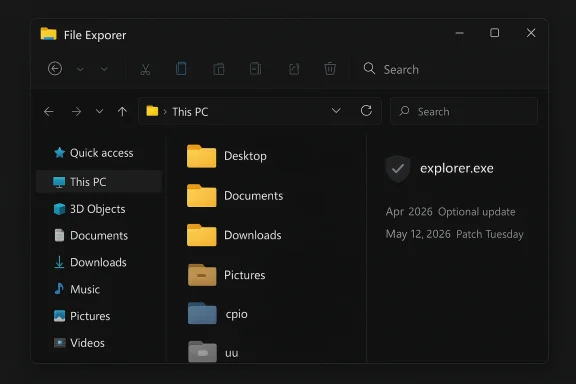
Microsoft’s latest Windows 11 preview does something that long-time users have been asking for in plain English: it makes File Explorer feel less like a bottleneck and more like a core part of the operating system again. In Windows 11 Build 26200.8313, the company is fixing the dark mode white-flash bug, improving Explorer reliability, and expanding native archive support to formats such as cpio, uu, xar, and nupkg. Just as importantly, Microsoft says these changes are headed toward the general public in the April 2026 optional update and, for those who skip that, the May 12, 2026 Patch Tuesday release.
For years, File Explorer has sat at the center of one of Windows’ most persistent tensions: it is both a basic utility and a symbolic test of whether Microsoft still sweats the details. When Explorer is slow, crashes, or flashes white in dark mode, users do not blame an obscure subsystem. They blame Windows itself, because Explorer is the face of file handling, navigation, and the everyday rhythm of the desktop. That is why this update matters far beyond its bullet points.
Microsoft’s recent messaging around Windows 11 has suggested a shift back toward core OS quality. That matters because the company has spent much of the Windows 11 era layering in Copilot experiences, AI-first workflows, and consumer-facing features. Those are not irrelevant, but they do not help if opening a folder still feels sluggish or if dark mode still blinds the user with a flash of white. The new File Explorer work is, in that sense, a repair job on credibility as much as it is on code.
The release cadence also tells the story. Build 26200.8313 is in the Release Preview Channel, which is usually where Microsoft validates near-final changes before they go to the broader public. Microsoft’s own release notes confirm that the update is shipping for Windows 11 versions 24H2 and 25H2, and that it includes the new Explorer fixes, new archive support, and a “preview anyway” option for downloaded files.
For Windows watchers, the timing is notable. Microsoft has spent the past year steadily tuning File Explorer in smaller increments, including dark mode work, preview-pane refinements, and archive-handling fixes in earlier Insider builds. The new release looks less like a one-off feature drop and more like the culmination of a long cleanup campaign aimed at the most frequently used window in Windows.
The second major change is performance. Microsoft is not merely preloading File Explorer in the background this time, which would have been a band-aid. Instead, it appears to have made the app itself more responsive, especially on first launch after boot. That distinction matters because background preloading can hide symptoms without fixing the underlying responsiveness issues users actually feel.
Microsoft also says the update improves the reliability of the explorer.exe process itself. That has downstream consequences, because Explorer is not just a window; it is tied to the taskbar, system tray, and various shell surfaces that users interact with every minute. If Explorer is more stable, the broader desktop feels more stable too.
That kind of mismatch is particularly jarring because it breaks the contract of dark mode. Dark mode is not just an aesthetic choice; for many users it is a comfort setting, a battery-saving habit, and part of a broader expectation that the UI will be coherent. When a core shell component flashes white, it signals incomplete integration, even if the issue lasts only a fraction of a second.
There is also a broader reason this matters now. Windows 11 has often been criticized for inconsistent visual treatment across legacy surfaces and newer UI layers. Every remaining white flash in a dark theme reminds users that some parts of the shell still feel patched together rather than natively unified. Removing those flashes helps the OS feel more intentional.
The inclusion of nupkg is especially practical because it ties directly to the Microsoft developer ecosystem. NuGet packages are central to.NET development, dependency management, and internal package workflows. Being able to extract or inspect them in Explorer without extra tooling saves time and lowers friction for common tasks.
It also matters for the long tail of archive formats that are not always top of mind until you need them. cpio and xar are not household names, but they show that Microsoft is thinking beyond the usual ZIP-and-RAR worldview. That is a subtle but important signal: Explorer is being nudged toward being a more complete file utility rather than just a launcher for more specialized tools.
This is one of the most important parts of the update because it addresses the difference between a polished feature and a dependable platform. A file manager can look beautiful, but if it destabilizes the shell, the entire experience degrades. Microsoft appears to be treating Explorer less like a standalone app and more like the central piece of Windows architecture that it actually is.
That means reliability work pays dividends beyond the obvious File Explorer window. It can improve confidence in clicking around, closing windows, and navigating multiple file locations without worrying that the shell will stall or collapse in response. That kind of confidence is hard to market, but it is easy to feel.
That is a useful balance between security and convenience. Windows has always tried to warn users about potentially unsafe files, but warnings that are too rigid can become productivity obstacles. A controlled “preview anyway” action lets Microsoft preserve the caution while reducing the need for awkward detours.
The inclusion of this feature in Explorer also reinforces how much Microsoft wants the shell to be the place where users complete ordinary tasks. Rather than pushing people into external programs, the company is trying to make the built-in shell more capable, while still keeping the right safety checkpoints in place.
The release preview path also tells us Microsoft considers these changes fairly mature. Features that make it to Release Preview are usually beyond the “we might scrap this” stage and are more about final validation, telemetry, and last-minute fixes. In practical terms, that means the new File Explorer behavior is close to what ordinary Windows 11 users should expect in May.
This split matters because Explorer is one of the few components whose quality is visible to everyone, but whose rollout can still vary widely in managed environments. The good news is that once the fixes are in the servicing channel, IT can judge them as stability improvements rather than experimental UI tweaks.
There is also a competitive angle. Windows does not need to out-innovate every rival with clever tricks in the shell. It needs to remain the most dependable general-purpose desktop platform for work, school, and power users. A faster, more stable, more visually coherent File Explorer helps reinforce that value proposition in a way Copilot banners never could.
Microsoft seems to understand that every unnecessary friction point in Explorer creates a narrative problem larger than the bug itself. People do not say, “my shell paint pipeline has a transient issue.” They say Windows feels messy. Fixing Explorer is therefore as much a branding repair as a technical one.
Some of those changes were clearly strategic. Microsoft wanted File Explorer to do more than navigate folders; it wanted it to surface recommended content, cloud state, collaboration cues, and AI-assisted actions. Those goals are not inherently bad, but they made the shell feel busier while leaving some basic rendering and performance issues unresolved. The result was a product that often looked future-facing while still behaving like a legacy component in the places that mattered most.
That history matters because it demonstrates Microsoft has not been ignoring Explorer; it has been chipping away at its rough edges for months. The new 26200.8313 build is notable because it bundles several of those threads into one broader quality pass. In other words, this is not just a cosmetic refresh. It is the payoff of a sustained cleanup effort.
What will matter most is consistency. A single build can fix a white flash, but sustained improvement across dark mode, preview handling, archive support, and shell stability is what actually changes the reputation of the platform. That is the standard Microsoft now has to meet.
Source: Windows Latest Microsoft is giving Windows 11 File Explorer a speed boost, dark mode fix, and reducing explorer.exe crashes
 Overview
For years, File Explorer has sat at the center of one of Windows’ most persistent tensions: it is both a basic utility and a symbolic test of whether Microsoft still sweats the details. When Explorer is slow, crashes, or flashes white in dark mode, users do not blame an obscure subsystem. They blame Windows itself, because Explorer is the face of file handling, navigation, and the everyday rhythm of the desktop. That is why this update matters far beyond its bullet points.Microsoft’s recent messaging around Windows 11 has suggested a shift back toward core OS quality. That matters because the company has spent much of the Windows 11 era layering in Copilot experiences, AI-first workflows, and consumer-facing features. Those are not irrelevant, but they do not help if opening a folder still feels sluggish or if dark mode still blinds the user with a flash of white. The new File Explorer work is, in that sense, a repair job on credibility as much as it is on code.
The release cadence also tells the story. Build 26200.8313 is in the Release Preview Channel, which is usually where Microsoft validates near-final changes before they go to the broader public. Microsoft’s own release notes confirm that the update is shipping for Windows 11 versions 24H2 and 25H2, and that it includes the new Explorer fixes, new archive support, and a “preview anyway” option for downloaded files.
For Windows watchers, the timing is notable. Microsoft has spent the past year steadily tuning File Explorer in smaller increments, including dark mode work, preview-pane refinements, and archive-handling fixes in earlier Insider builds. The new release looks less like a one-off feature drop and more like the culmination of a long cleanup campaign aimed at the most frequently used window in Windows.
What Microsoft is changing
The headline improvements are straightforward, but their effect is bigger than the list suggests. Microsoft says it is removing the white flash that appears when File Explorer opens in dark mode with This PC as the landing page, or when the Details pane is resized. That sounds cosmetic, but it directly affects perceived polish, especially for users who keep Windows in dark mode all day.The second major change is performance. Microsoft is not merely preloading File Explorer in the background this time, which would have been a band-aid. Instead, it appears to have made the app itself more responsive, especially on first launch after boot. That distinction matters because background preloading can hide symptoms without fixing the underlying responsiveness issues users actually feel.
Why these changes matter
Explorer is launched constantly, so even modest speed gains accumulate into a meaningful quality-of-life improvement. A half-second shaved off startup may not sound dramatic in isolation, but repeated dozens of times a day it becomes a practical productivity gain. And on low-end hardware, where File Explorer has often felt especially heavy, that improvement can be the difference between “tolerable” and “annoying.”Microsoft also says the update improves the reliability of the explorer.exe process itself. That has downstream consequences, because Explorer is not just a window; it is tied to the taskbar, system tray, and various shell surfaces that users interact with every minute. If Explorer is more stable, the broader desktop feels more stable too.
- Faster launch times should be most visible after a cold boot.
- Dark mode flashes are finally being addressed in the common This PC workflow.
- Explorer reliability should reduce collateral taskbar weirdness.
- The fix is already in Release Preview, which usually suggests it is close to final form.
Dark mode finally gets a proper fix
The dark mode flash issue has been one of those Windows irritations that seems minor until you live with it every day. If your system theme is dark, then opening Explorer should feel visually consistent. Instead, users have often seen a brief burst of white before the darker interface fully paints itself, especially when opening from This PC or switching around the Details pane.That kind of mismatch is particularly jarring because it breaks the contract of dark mode. Dark mode is not just an aesthetic choice; for many users it is a comfort setting, a battery-saving habit, and part of a broader expectation that the UI will be coherent. When a core shell component flashes white, it signals incomplete integration, even if the issue lasts only a fraction of a second.
From cosmetic bug to trust issue
Microsoft has already taken multiple swings at dark mode in File Explorer over the last several Insider cycles. Earlier builds brought more consistent dark mode behavior to dialogs like copy, move, delete, and Folder Options. This new fix is part of the same arc, but it tackles one of the most visible remaining leaks in the experience.There is also a broader reason this matters now. Windows 11 has often been criticized for inconsistent visual treatment across legacy surfaces and newer UI layers. Every remaining white flash in a dark theme reminds users that some parts of the shell still feel patched together rather than natively unified. Removing those flashes helps the OS feel more intentional.
What users will notice
The improvement is not dramatic in the cinematic sense. It is better than that: it is the kind of refinement that quietly improves every interaction without calling attention to itself. That is exactly what good platform work looks like.- Opening File Explorer in dark mode should feel less abrupt.
- Switching folders from This PC should stop producing the white flicker.
- Resizing the Details pane should no longer expose the old repaint problem.
- The overall impression should be more finished and less transitional.
Archive support gets broader and more useful
Microsoft is also expanding File Explorer’s native archive support to include uu, cpio, xar, and NuGet packages (.nupkg). This is one of those additions that looks niche on paper but can be genuinely useful for developers, administrators, and anyone who routinely handles software distribution files or packaging formats. The fact that Microsoft is broadening support inside Explorer rather than relying entirely on third-party utilities is a sign that it sees native shell integration as part of Windows’ value proposition again.The inclusion of nupkg is especially practical because it ties directly to the Microsoft developer ecosystem. NuGet packages are central to.NET development, dependency management, and internal package workflows. Being able to extract or inspect them in Explorer without extra tooling saves time and lowers friction for common tasks.
Why native archive handling matters
Windows has historically benefited when it can handle common file formats without leaving the shell. Native support reduces context switching, makes basic tasks feel simpler, and shrinks the number of decisions users need to make. That is particularly valuable in enterprise environments, where security restrictions may limit what can be installed and where administrators prefer predictable tools over a patchwork of third-party compressors.It also matters for the long tail of archive formats that are not always top of mind until you need them. cpio and xar are not household names, but they show that Microsoft is thinking beyond the usual ZIP-and-RAR worldview. That is a subtle but important signal: Explorer is being nudged toward being a more complete file utility rather than just a launcher for more specialized tools.
Practical impact by user type
For consumers, the benefit is convenience. For developers, it is workflow efficiency. For IT teams, it can reduce support friction because the native shell can inspect more package types without additional software.- Less need for third-party archivers in simple cases.
- Better compatibility with developer and package formats.
- Fewer security objections from installing extra tools.
- More predictable behavior across managed Windows devices.
Explorer reliability and shell stability
Microsoft says the update improves the reliability of explorer.exe-related processes and reduces cases where they stop unexpectedly after a File Explorer window is closed. That sounds technical, but the impact can be very visible. When Explorer is unhappy, users can experience taskbar lag, flaky system tray flyouts, issues in Task View, and general shell instability that feels like the desktop is losing its footing.This is one of the most important parts of the update because it addresses the difference between a polished feature and a dependable platform. A file manager can look beautiful, but if it destabilizes the shell, the entire experience degrades. Microsoft appears to be treating Explorer less like a standalone app and more like the central piece of Windows architecture that it actually is.
Why shell reliability is bigger than Explorer alone
Windows users often underestimate how much of the desktop environment hangs off Explorer. The taskbar, folders, context surfaces, and certain window-management behaviors are all intertwined with shell processes. When those processes misbehave, the symptoms can appear in places that seem unrelated at first glance.That means reliability work pays dividends beyond the obvious File Explorer window. It can improve confidence in clicking around, closing windows, and navigating multiple file locations without worrying that the shell will stall or collapse in response. That kind of confidence is hard to market, but it is easy to feel.
A sign of maturity
In mature operating systems, the best updates often are not the flashy ones. They are the ones that remove friction from the routines people perform hundreds of times a week. This release feels like Microsoft acknowledging that a stable shell is not a luxury feature; it is a prerequisite for everything else the company wants to do on Windows.Preview pane and download safety
Another small but meaningful addition is the new “preview anyway” button for files downloaded from the internet. The feature is aimed at the File Explorer preview pane, which normally treats internet-downloaded content cautiously. Microsoft is effectively giving users a way to proceed after the warning, instead of forcing them into a full workaround or a different app just to inspect a file quickly.That is a useful balance between security and convenience. Windows has always tried to warn users about potentially unsafe files, but warnings that are too rigid can become productivity obstacles. A controlled “preview anyway” action lets Microsoft preserve the caution while reducing the need for awkward detours.
Security versus convenience
This change is interesting because it reflects a broader trend in operating system UX: users want guardrails, not dead ends. If every warning becomes an absolute block, users lose trust in the system or learn to work around it unsafely. If every warning is too easy to dismiss, the warning loses meaning. The best compromise is an informed choice, and that appears to be what Microsoft is aiming for here.The inclusion of this feature in Explorer also reinforces how much Microsoft wants the shell to be the place where users complete ordinary tasks. Rather than pushing people into external programs, the company is trying to make the built-in shell more capable, while still keeping the right safety checkpoints in place.
The bigger picture
This feature is not likely to headline a press release on its own, but it fits the direction Microsoft is taking: more functionality in the shell, fewer unnecessary interruptions, and more respect for the fact that users know what they are doing. That said, the success of the feature will depend on how clear the warning language remains.- Safer than disabling protections outright.
- More convenient than forcing a separate app.
- Useful for quick file inspection.
- Dependent on careful UX design to avoid abuse.
Timing, rollout, and who gets it first
Microsoft says the changes in Build 26200.8313 will roll out to the public through the April 2026 optional update, with the rest arriving in the May 2026 Patch Tuesday cycle for users who skip optional updates. That is a familiar Windows delivery pattern, but it is worth noting because many consumers never install optional previews and may assume they are missing out when the features do not show up immediately.The release preview path also tells us Microsoft considers these changes fairly mature. Features that make it to Release Preview are usually beyond the “we might scrap this” stage and are more about final validation, telemetry, and last-minute fixes. In practical terms, that means the new File Explorer behavior is close to what ordinary Windows 11 users should expect in May.
Consumer versus enterprise timing
Consumers who keep Windows updated routinely will likely see the changes sooner, especially if they install optional updates. Enterprises, on the other hand, may wait for the cumulative Patch Tuesday package or even longer if they use staged deployment rings. That means the same File Explorer improvements will arrive on different schedules depending on policy, not just Microsoft’s release date.This split matters because Explorer is one of the few components whose quality is visible to everyone, but whose rollout can still vary widely in managed environments. The good news is that once the fixes are in the servicing channel, IT can judge them as stability improvements rather than experimental UI tweaks.
Why the date matters
Microsoft’s reference to the May 12, 2026 Patch Tuesday matters because it sets expectations for when these fixes should become broadly available. When companies and home users know the date, they can decide whether to wait for the standard cadence or take the optional route. Clarity is valuable here because File Explorer issues are annoying enough that many users will genuinely want the earliest stable fix.Why Microsoft is focusing on File Explorer now
File Explorer is the perfect place for Microsoft to show that it is serious about the basics. The company has been signaling that it wants Windows development to feel more grounded, with less emphasis on scattered AI garnish and more attention to the components people actually touch all day. Explorer, along with the taskbar and Settings, is one of those defining surfaces. If Microsoft gets these right, the rest of the operating system benefits from the goodwill.There is also a competitive angle. Windows does not need to out-innovate every rival with clever tricks in the shell. It needs to remain the most dependable general-purpose desktop platform for work, school, and power users. A faster, more stable, more visually coherent File Explorer helps reinforce that value proposition in a way Copilot banners never could.
The lesson of mundane improvements
The most important thing about this update is that it is unshowy. That may sound like faint praise, but it is exactly what users want from foundational software. A file manager should not surprise you. It should open quickly, render correctly, and stay out of the way.Microsoft seems to understand that every unnecessary friction point in Explorer creates a narrative problem larger than the bug itself. People do not say, “my shell paint pipeline has a transient issue.” They say Windows feels messy. Fixing Explorer is therefore as much a branding repair as a technical one.
Enterprise value
For enterprises, these changes are attractive because they reduce support incidents tied to shell instability and visual glitches. For consumers, they make the OS feel less old in the places that still reveal its age. In both cases, the benefit is trust.- Less user-visible glitching.
- Fewer help-desk tickets about shell oddities.
- Better alignment with dark mode expectations.
- A stronger baseline for future UI work.
Historical context: how File Explorer got here
Windows 11’s File Explorer has been on a long, uneven modernization path. Microsoft introduced a redesigned home experience, new command bar behavior, details-pane improvements, and deeper integration with cloud content over several releases. But each step forward has often come with reminders that Explorer still straddles old and new design eras.Some of those changes were clearly strategic. Microsoft wanted File Explorer to do more than navigate folders; it wanted it to surface recommended content, cloud state, collaboration cues, and AI-assisted actions. Those goals are not inherently bad, but they made the shell feel busier while leaving some basic rendering and performance issues unresolved. The result was a product that often looked future-facing while still behaving like a legacy component in the places that mattered most.
A long trail of incremental fixes
Recent Insider builds show a consistent pattern of dark mode refinement, archive handling fixes, and reliability work. Build 26120.6972, for example, included dark mode improvements and fixes for archive extraction edge cases. Other releases fixed specific File Explorer glitches, including white toolbars, broken previews, and inconsistent dialog styling.That history matters because it demonstrates Microsoft has not been ignoring Explorer; it has been chipping away at its rough edges for months. The new 26200.8313 build is notable because it bundles several of those threads into one broader quality pass. In other words, this is not just a cosmetic refresh. It is the payoff of a sustained cleanup effort.
The implication
If Microsoft keeps this up, File Explorer could become one of the more convincing examples of Windows 11’s maturation. If it does not, users will remember the progress, but they will also remember how long the obvious issues lingered. That is the burden of being the default file manager in the world’s most widely used desktop OS.Strengths and Opportunities
This update is strongest where Windows users are most sensitive: launch speed, dark mode consistency, and everyday shell reliability. Those are the kinds of improvements that immediately affect perception, even if the underlying code changes are invisible. They also give Microsoft an opportunity to prove that it can still polish the fundamentals while continuing to add useful capabilities.- Faster first-launch behavior can improve daily productivity.
- Dark mode fixes restore trust in Windows 11’s visual consistency.
- Broader archive support makes Explorer more useful for technical users.
- Improved explorer.exe reliability should reduce shell-related annoyance.
- “Preview anyway” adds convenience without fully abandoning safety.
- Release Preview validation suggests the changes are close to shipping.
- Enterprise environments may benefit from fewer support incidents.
Risks and Concerns
The biggest risk is expectation management. Users who have been burned by repeated Explorer regressions may not care that a fix is “in Release Preview” until they see it hold up on their own machines. There is also the possibility that these improvements will be uneven across hardware types, especially on older or low-end PCs where Explorer performance problems have been most noticeable.- Performance gains may vary depending on hardware and workload.
- Insider stability does not guarantee identical retail behavior.
- New archive support could expose fresh edge cases.
- Security messaging around previewing downloaded files must stay clear.
- Enterprise deployment delays may leave managed PCs behind for weeks or months.
- Visual fixes can regress if later UI changes reintroduce repaint issues.
- Users may still judge Windows holistically, not feature-by-feature.
Looking Ahead
The next few weeks will tell us whether Microsoft is entering a more disciplined Windows phase or simply shipping another well-meaning round of shell fixes. The difference is important. If File Explorer keeps getting faster, cleaner, and more reliable across upcoming builds, it will suggest that Microsoft is genuinely prioritizing the parts of Windows that define everyday use. If regressions reappear, users will quickly conclude that the company is still treating Explorer as a patchwork project.What will matter most is consistency. A single build can fix a white flash, but sustained improvement across dark mode, preview handling, archive support, and shell stability is what actually changes the reputation of the platform. That is the standard Microsoft now has to meet.
- Watch for retail rollout timing in the April optional update and May Patch Tuesday.
- Watch whether dark mode fixes remain stable on different hardware.
- Watch whether archive support expands beyond the current list.
- Watch for additional Explorer performance tuning in future Insider builds.
- Watch whether Microsoft continues emphasizing core UX quality over flashy extras.
Source: Windows Latest Microsoft is giving Windows 11 File Explorer a speed boost, dark mode fix, and reducing explorer.exe crashes
