

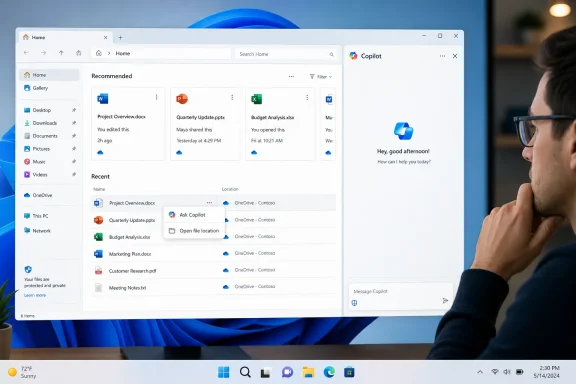
Microsoft is testing another Copilot entry point in Windows 11, this time inside File Explorer Home, where hovering over a file can reveal an Ask Copilot command alongside the genuinely practical Open file location shortcut. The idea is straightforward: select a recently used or recommended file, send it to the Copilot app, and begin asking questions without first opening the document. The reality is less convincing, because early testing reportedly produces an ordinary Copilot launch with little or no awareness of the selected file—an awkward result that revives the debate over whether Microsoft is adding AI where it solves a problem or simply where space remains available.
Microsoft has spent several years trying to transform Copilot from a web chatbot into a defining layer of the Windows experience. The company’s strategy has moved through several forms, beginning with a taskbar-accessible assistant, shifting into a standalone app, and then expanding through contextual commands attached to files, screenshots, images, search results, application previews, and other parts of the interface.
That history matters because the new File Explorer button is not an isolated experiment. It is part of a broader attempt to make Copilot available at the moment a user encounters content, rather than requiring that person to open the assistant, manually attach a file, and explain what help is needed.
That architectural change gave Microsoft more freedom to improve Copilot independently of major Windows releases. It also weakened the argument that every Copilot shortcut was a deeply integrated operating-system capability, because many of those shortcuts ultimately did little more than launch a separate application.
Once Home became a recommendation surface, contextual actions were a logical next step. A user may see a document without knowing its original folder, making Open file location valuable, while Microsoft sees the same surface as an opportunity to offer AI-assisted summarization and analysis.
Its appearance in current Release Preview testing therefore looks more like a renewed or expanded deployment than the birth of an entirely new concept. That distinction is important: Microsoft has had time to refine the handoff, so a button that still opens Copilot without carrying meaningful file context deserves greater scrutiny than a rough prototype in an early experimental channel.
This placement makes the feature relatively discreet. It does not permanently consume toolbar space, add a large sidebar, or replace familiar file-management controls, but it still introduces another branded AI touchpoint into one of Windows’ most frequently used components.
The operation is deterministic, local, fast, and easy to verify. Copilot analysis is more complicated because it can involve file compatibility, account eligibility, cloud services, application state, network connectivity, privacy policy, and model limitations.
A staged release also means absence is not evidence that the feature has been removed, just as presence does not guarantee that it is ready for broad deployment. Microsoft can pause, modify, or reverse the server-controlled rollout without issuing a completely new operating-system build.
Release Preview software can contain bugs, but the Release Preview channel sits close to production. Users reasonably expect features appearing there to have moved beyond basic wiring failures, especially when similar concepts have already circulated through preview builds for months.
Without that transfer, the interaction creates more work. The user must locate the file again, drag it into Copilot or use an attachment picker, wait for upload or processing, and then formulate a prompt—precisely the friction the shortcut was supposed to eliminate.
Opening an apparently empty Copilot conversation creates ambiguity. Users cannot tell whether the file was attached invisibly, whether Copilot has permission to read it, whether processing failed, or whether the button never transferred the file at all.
Release Preview normally serves as the final proving ground for updates that Microsoft is considering for public delivery. A context-sensitive command that cannot reliably maintain context should remain behind a stronger experimental boundary until its behavior is dependable.
Microsoft’s Copilot app supports a defined group of common upload formats, including several image, document, spreadsheet, structured-data, and text types. That is useful, but it remains only a small subset of what Windows users store and manage.
Even here, reliability depends on document structure. Scanned PDFs may need optical character recognition, complex layouts can produce incorrect reading order, and embedded charts or footnotes may not receive the same attention as ordinary body text.
The duplication raises a product-design question. If several applications offer nearly identical image-analysis commands, Microsoft must explain why each entry point exists and ensure users can disable redundant ones without uninstalling the entire assistant.
A large spreadsheet may exceed processing limits or lose essential context when converted for model consumption. Copilot could summarize a visible subset while users mistakenly believe it analyzed the entire workbook, creating a dangerous gap between perceived and actual coverage.
The responsible design would disable the command for unsupported items or replace it with a precise explanation. Presenting an active button that leads to a generic chatbot encourages trial-and-error rather than confidence.
Users therefore need to know whether selecting Ask Copilot uploads a copy, grants temporary access, uses an already synchronized cloud version, or processes some information locally. A polished animation cannot substitute for that transparency.
Microsoft should display a concise disclosure before the first transfer and provide persistent access to more detailed information. Users should never have to infer data movement from network activity or privacy documentation discovered after the event.
The feature’s account model is therefore crucial. Microsoft needs reliable separation between consumer Copilot, Microsoft 365 Copilot, managed Entra ID identities, and files governed by enterprise data-protection rules.
Good consent design should answer four questions before sensitive data leaves the machine:
Microsoft subsequently highlighted the removal of some Copilot buttons from apps such as Photos and Snipping Tool. Against that backdrop, adding another shortcut to File Explorer may appear contradictory even if the company believes file analysis is a stronger use case.
File Explorer could satisfy that standard because files are the raw material users want an assistant to summarize and interpret. However, the integration must perform substantially better than a generic launcher if it is to demonstrate the selectivity Microsoft has promised.
The reported behavior falls short of that definition. Even if the underlying issue is temporary, it shows how easily contextual AI can become superficial when the shell integration and assistant application are not operating as a coherent system.
A global switch could coexist with more granular controls for users who want Copilot in some applications but not others. Without such options, “intentional AI” remains Microsoft’s judgment rather than the user’s choice.
The problem is discoverability versus clutter. A hover-only action is discreet enough not to dominate File Explorer, yet users who need it may never notice it, while users opposed to Copilot may resent its presence once they do.
File Explorer should not expose the same-looking command and then deliver dramatically different outcomes without warning. Eligibility, limits, and premium requirements need to appear before the user commits to the workflow.
The feature should expose an accessible command name, announce whether the file is supported, and avoid relying on pointer hover as the only discovery mechanism. Otherwise, an ostensibly assistive capability could exclude users who might benefit most.
For administrators, the important question is not whether the button exists. It is whether they can control its availability, account scope, data path, auditability, and interaction with organizational classifications.
A consumer-oriented toggle is not sufficient for regulated environments. Enterprises require enforceable settings that survive updates and cannot be casually reversed by standard users.
Microsoft can reduce that burden by building diagnostic messages into the interface. A generic failure that silently opens Copilot transfers the troubleshooting cost from the product to users and administrators.
The opportunity is strongest when Copilot can respect existing permissions and ground answers in approved organizational content. That is a more defensible enterprise proposition than attaching an arbitrary local file to a consumer chatbot.
Windows gives Microsoft a significant distribution advantage. File Explorer is already installed, already trusted with navigation, and already aware of local and synchronized content.
That context could make Windows Copilot materially more useful than a browser tab. It also raises the stakes, because misuse of operating-system context can feel invasive in ways that ordinary website interactions do not.
Each nonfunctional or redundant button teaches users to ignore the Copilot logo. That outcome would undermine Microsoft’s broader strategy by turning a potentially useful assistant into visual furniture.
Hybrid processing could then reserve cloud models for more demanding questions. Such an approach would improve responsiveness, reduce unnecessary uploads, and make Copilot+ PC hardware more relevant to everyday file management.
The priority should be making every click predictable. Users need to know what will happen before Copilot opens and what happened if the analysis cannot proceed.
If Windows sends extracted content rather than the original file, the interface should say so. If the file is cloud-backed, Copilot should indicate whether it is using the synchronized local copy or an online version.
Compatibility must account for more than the extension. Password protection, corruption, encryption, digital rights management, macro-enabled content, and incomplete cloud synchronization can all prevent meaningful analysis.
At minimum, Microsoft should support three modes: enabled everywhere, enabled only when explicitly invoked through the Copilot app, and disabled across Windows shell surfaces.
Microsoft’s next decisions will reveal whether this is a serious workflow investment or another briefly tested Copilot surface.
Any public rollout before this basic requirement is met would be premature. Release Preview feedback should help Microsoft identify whether the reported failure is device-specific, account-specific, or inherent to the current implementation.
Documentation should also explain how complex spreadsheets, scanned documents, encrypted files, and offline cloud placeholders are treated. These edge cases will define real-world reliability.
Enterprise policies should arrive at the same time as consumer controls, not months later. Administrators should not need to discover undocumented registry values after deployment begins.
Users should therefore avoid assuming that installing a particular build guarantees access. Microsoft increasingly separates operating-system binaries from feature activation, making rollout status as important as the displayed build number.
The company should not allow AI integration to distract from File Explorer’s core responsibilities. Copying, moving, searching, previewing, and organizing files must remain faster and more dependable than any attached assistant.
Microsoft may indeed have found another place to put Copilot, but the more important question is whether it has found a place where Copilot earns its keep. File Explorer offers unusually rich context and could support useful document, image, and data workflows, yet a button that opens an unaware chatbot is not integration—it is advertising with an extra click. If Microsoft can deliver a reliable file handoff, transparent data controls, realistic compatibility boundaries, strong enterprise policy, and a straightforward disable switch, Ask Copilot could become a modest but worthwhile convenience; if not, it will stand as another reminder that making AI available everywhere is much easier than making it valuable anywhere.
 Background
Microsoft has spent several years trying to transform Copilot from a web chatbot into a defining layer of the Windows experience. The company’s strategy has moved through several forms, beginning with a taskbar-accessible assistant, shifting into a standalone app, and then expanding through contextual commands attached to files, screenshots, images, search results, application previews, and other parts of the interface.That history matters because the new File Explorer button is not an isolated experiment. It is part of a broader attempt to make Copilot available at the moment a user encounters content, rather than requiring that person to open the assistant, manually attach a file, and explain what help is needed.
From Windows sidebar to standalone application
The original Windows Copilot experience appeared as an operating-system sidebar with limited control over settings and access to the same conversational capabilities Microsoft was building into Bing. Over time, Microsoft decoupled the assistant from the Windows shell and distributed it as an app that could be updated through the Microsoft Store.That architectural change gave Microsoft more freedom to improve Copilot independently of major Windows releases. It also weakened the argument that every Copilot shortcut was a deeply integrated operating-system capability, because many of those shortcuts ultimately did little more than launch a separate application.
File Explorer’s expanding role
File Explorer Home has also evolved beyond its traditional role as a gateway to drives and folders. Windows 11 increasingly uses Home to show recently opened items, frequently used content, recommended files, cloud-backed documents, and activity tied to Microsoft accounts.Once Home became a recommendation surface, contextual actions were a logical next step. A user may see a document without knowing its original folder, making Open file location valuable, while Microsoft sees the same surface as an opportunity to offer AI-assisted summarization and analysis.
This capability has a longer preview history
The idea of showing Ask Copilot when hovering over content in File Explorer Home is not entirely new. Microsoft documented similar hover actions in earlier preview work, initially limiting availability by account type, market, and gradual rollout status.Its appearance in current Release Preview testing therefore looks more like a renewed or expanded deployment than the birth of an entirely new concept. That distinction is important: Microsoft has had time to refine the handoff, so a button that still opens Copilot without carrying meaningful file context deserves greater scrutiny than a rough prototype in an early experimental channel.
What Microsoft Is Adding to File Explorer
The proposed interaction appears inside File Explorer Home rather than throughout every folder. When the pointer hovers over an eligible file card or recommendation, Windows can display quick actions that include opening the item’s actual location and asking Copilot about it.This placement makes the feature relatively discreet. It does not permanently consume toolbar space, add a large sidebar, or replace familiar file-management controls, but it still introduces another branded AI touchpoint into one of Windows’ most frequently used components.
The intended workflow
In principle, the user journey should require only a few steps:- The user opens File Explorer and remains on the Home page.
- The user hovers over a recent, recommended, or otherwise surfaced file.
- Windows displays contextual shortcuts for that item.
- The user selects Ask Copilot.
- Copilot opens with the file attached or otherwise available as conversational context.
- The user requests a summary, explanation, comparison, extraction, or transformation.
Why “Open file location” is easier to justify
The neighboring Open file location command solves a concrete navigation problem. File Explorer Home can surface an item independently of its directory, and users often need to reach the containing folder to rename related files, inspect adjacent content, make a copy, or understand a project’s structure.The operation is deterministic, local, fast, and easy to verify. Copilot analysis is more complicated because it can involve file compatibility, account eligibility, cloud services, application state, network connectivity, privacy policy, and model limitations.
Availability remains controlled
The capability is being distributed through a gradual rollout rather than enabled for every Release Preview device simultaneously. Microsoft routinely uses configuration flags and staged deployments, meaning two PCs on the same Windows build can expose different features.A staged release also means absence is not evidence that the feature has been removed, just as presence does not guarantee that it is ready for broad deployment. Microsoft can pause, modify, or reverse the server-controlled rollout without issuing a completely new operating-system build.
Why the Current Behavior Is a Problem
Reports that the button merely opens Copilot without attaching or recognizing the chosen file expose the central weakness of this design. A contextual command must preserve context; otherwise, it is simply a more complicated launcher.Release Preview software can contain bugs, but the Release Preview channel sits close to production. Users reasonably expect features appearing there to have moved beyond basic wiring failures, especially when similar concepts have already circulated through preview builds for months.
Context is the entire product
A generic Copilot window is already accessible through the taskbar, Start menu, keyboard shortcuts, and other Windows surfaces. File Explorer adds value only if it tells Copilot, in an understandable and permission-conscious way, this is the file the user wants to discuss.Without that transfer, the interaction creates more work. The user must locate the file again, drag it into Copilot or use an attachment picker, wait for upload or processing, and then formulate a prompt—precisely the friction the shortcut was supposed to eliminate.
Silent failure is worse than explicit failure
If a file type is unsupported, Windows should say so before launching Copilot. If the file is too large, protected by organizational policy, unavailable offline, encrypted, or still syncing, the interface should explain the limitation.Opening an apparently empty Copilot conversation creates ambiguity. Users cannot tell whether the file was attached invisibly, whether Copilot has permission to read it, whether processing failed, or whether the button never transferred the file at all.
Release Preview raises expectations
Microsoft’s Insider channels exist to expose unfinished work, but each channel implies a different level of maturity. Experimental and Beta builds may contain substantial interface changes, incomplete behavior, and features that never ship.Release Preview normally serves as the final proving ground for updates that Microsoft is considering for public delivery. A context-sensitive command that cannot reliably maintain context should remain behind a stronger experimental boundary until its behavior is dependable.
The File-Type Challenge
File Explorer manages an enormous range of content, from plain text and photographs to virtual machine disks, database files, archives, executables, encrypted containers, design projects, source code repositories, and proprietary industry formats. A command labeled Ask Copilot risks implying broader competence than the assistant can deliver.Microsoft’s Copilot app supports a defined group of common upload formats, including several image, document, spreadsheet, structured-data, and text types. That is useful, but it remains only a small subset of what Windows users store and manage.
Documents are the most natural use case
Word documents, text files, PDFs, and other text-heavy formats fit the interaction well. Copilot may be able to summarize a report, identify major themes, explain unfamiliar terminology, extract action items, or answer a question about a particular section.Even here, reliability depends on document structure. Scanned PDFs may need optical character recognition, complex layouts can produce incorrect reading order, and embedded charts or footnotes may not receive the same attention as ordinary body text.
Images offer immediate but imperfect value
For photographs and screenshots, Copilot can potentially describe visible content, extract text, explain an error message, identify major objects, or suggest edits. This resembles capabilities already available through Photos, Snipping Tool, Copilot Vision, and other Windows AI experiences.The duplication raises a product-design question. If several applications offer nearly identical image-analysis commands, Microsoft must explain why each entry point exists and ensure users can disable redundant ones without uninstalling the entire assistant.
Spreadsheets expose the limits
An.xlsx file can range from a tiny household budget to a multi-sheet financial model with macros, external data connections, hidden rows, formulas, charts, pivot tables, and hundreds of thousands of cells. Treating both as equally suitable for one-click analysis is unrealistic.A large spreadsheet may exceed processing limits or lose essential context when converted for model consumption. Copilot could summarize a visible subset while users mistakenly believe it analyzed the entire workbook, creating a dangerous gap between perceived and actual coverage.
Binary and specialist formats need clear boundaries
Copilot should not pretend to understand every file simply because File Explorer can display it. Executables, disk images, CAD projects, media-editing timelines, encrypted archives, and application-specific databases require dedicated parsers and often specialized domain knowledge.The responsible design would disable the command for unsupported items or replace it with a precise explanation. Presenting an active button that leads to a generic chatbot encourages trial-and-error rather than confidence.
Privacy, Permissions, and Data Handling
A file-manager integration is more sensitive than a shortcut in a general-purpose app. File Explorer sits at the boundary between personal content, corporate documents, removable storage, network shares, synchronized cloud files, and protected system data.Users therefore need to know whether selecting Ask Copilot uploads a copy, grants temporary access, uses an already synchronized cloud version, or processes some information locally. A polished animation cannot substitute for that transparency.
Local does not necessarily mean local processing
A file stored on the PC may still need to be transmitted to an online service for analysis. The fact that a command begins in File Explorer can create a false impression that Windows is performing the work locally, particularly on PCs marketed around neural processing units and on-device AI.Microsoft should display a concise disclosure before the first transfer and provide persistent access to more detailed information. Users should never have to infer data movement from network activity or privacy documentation discovered after the event.
Organizational data requires stricter controls
Enterprise administrators may prohibit unapproved uploads, restrict consumer Microsoft accounts, apply sensitivity labels, or require that content remain within a managed tenant. A personal Copilot session must not become an accidental route around those policies.The feature’s account model is therefore crucial. Microsoft needs reliable separation between consumer Copilot, Microsoft 365 Copilot, managed Entra ID identities, and files governed by enterprise data-protection rules.
Consent must be specific
A user clicking Ask Copilot is expressing an intention to discuss a file, but Windows should still make the scope of access clear. The assistant may need only extracted text, a generated preview, or selected metadata rather than the entire original file.Good consent design should answer four questions before sensitive data leaves the machine:
- Windows should identify exactly which file is being sent or opened for analysis.
- Windows should explain which account and Copilot service will process it.
- Windows should state whether a copy is uploaded and how long it may be retained.
- Windows should provide an immediate cancellation path before processing begins.
Microsoft’s New “Less AI Clutter” Message
The File Explorer addition arrives during a period in which Microsoft has publicly promised to become more selective about Copilot integration. In March 2026, the company said it would reduce unnecessary AI entry points and focus on experiences that are useful, intentional, and well crafted.Microsoft subsequently highlighted the removal of some Copilot buttons from apps such as Photos and Snipping Tool. Against that backdrop, adding another shortcut to File Explorer may appear contradictory even if the company believes file analysis is a stronger use case.
Reduction does not mean retreat
Microsoft has not promised to remove Copilot from Windows. Its stated direction is to concentrate AI in places where context can make the assistant more effective while cutting repetitive or distracting controls.File Explorer could satisfy that standard because files are the raw material users want an assistant to summarize and interpret. However, the integration must perform substantially better than a generic launcher if it is to demonstrate the selectivity Microsoft has promised.
Craft is measured by failure handling
A well-crafted feature does not merely work in a carefully chosen demonstration. It communicates compatibility, respects policy, handles unsupported content gracefully, preserves user context, and provides predictable results when connectivity or account state changes.The reported behavior falls short of that definition. Even if the underlying issue is temporary, it shows how easily contextual AI can become superficial when the shell integration and assistant application are not operating as a coherent system.
User control remains essential
Microsoft’s quality push has emphasized less noise, fewer distractions, and more control. An obvious way to honor that commitment would be a supported setting that disables Copilot recommendations and buttons across Windows without requiring registry modifications or third-party tools.A global switch could coexist with more granular controls for users who want Copilot in some applications but not others. Without such options, “intentional AI” remains Microsoft’s judgment rather than the user’s choice.
Consumer Impact
For home users, the integration is unlikely to transform everyday computing, but it could become useful for a narrow group of common tasks. Students, household administrators, job seekers, and people managing personal documents may appreciate a faster way to summarize or interrogate content.The problem is discoverability versus clutter. A hover-only action is discreet enough not to dominate File Explorer, yet users who need it may never notice it, while users opposed to Copilot may resent its presence once they do.
Where it could save time
A working implementation could help consumers:- Copilot could summarize a long lease, manual, school document, or insurance letter before the user opens it in another application.
- It could explain a screenshot containing an error message or unfamiliar settings panel.
- It could extract dates, tasks, names, and other details from supported documents.
- It could compare a small number of related files if multi-file context becomes available.
- It could help users locate the purpose of ambiguously named documents without launching several applications.
Subscription and account confusion
Windows users already face a crowded Copilot naming landscape. Capabilities can vary according to whether someone uses a free Microsoft account, a Microsoft 365 consumer subscription, a work account, a Copilot license, or a particular PC class.File Explorer should not expose the same-looking command and then deliver dramatically different outcomes without warning. Eligibility, limits, and premium requirements need to appear before the user commits to the workflow.
Accessibility considerations
Contextual AI can improve accessibility when it describes images, summarizes dense text, or explains complex material in simpler language. A hover-driven interface, however, must also work through keyboard navigation, touch, voice access, screen readers, and high-contrast configurations.The feature should expose an accessible command name, announce whether the file is supported, and avoid relying on pointer hover as the only discovery mechanism. Otherwise, an ostensibly assistive capability could exclude users who might benefit most.
Enterprise Impact
Businesses will judge the feature less by novelty and more by governance, supportability, and measurable productivity. An employee asking Copilot to summarize a policy document could save time, but an employee unknowingly sending sensitive data to an unmanaged service could create legal and security exposure.For administrators, the important question is not whether the button exists. It is whether they can control its availability, account scope, data path, auditability, and interaction with organizational classifications.
Policy management must arrive first
Microsoft should provide documented Group Policy and mobile device management controls before broad deployment. Administrators need to disable the File Explorer command independently, restrict it to approved identities, or remove Copilot entirely where organizational requirements demand it.A consumer-oriented toggle is not sufficient for regulated environments. Enterprises require enforceable settings that survive updates and cannot be casually reversed by standard users.
Support desks will inherit the ambiguity
If the feature behaves differently according to file type, licensing, region, account, synchronization state, and rollout flag, help desks will receive difficult tickets. “Ask Copilot does nothing” may describe a bug, unsupported content, missing entitlement, blocked network traffic, policy enforcement, or an incomplete staged rollout.Microsoft can reduce that burden by building diagnostic messages into the interface. A generic failure that silently opens Copilot transfers the troubleshooting cost from the product to users and administrators.
Managed productivity could be meaningful
In a properly governed Microsoft 365 environment, File Explorer context could become valuable. Employees frequently encounter files through recent-item lists or shared cloud locations and may want immediate answers without locating the associated Teams conversation, SharePoint site, or Office application.The opportunity is strongest when Copilot can respect existing permissions and ground answers in approved organizational content. That is a more defensible enterprise proposition than attaching an arbitrary local file to a consumer chatbot.
The Competitive and Strategic Picture
Microsoft is not alone in trying to connect generative AI to user files. Operating-system vendors, cloud-storage providers, productivity suites, and third-party desktop assistants all want to become the interface through which people search, summarize, and transform personal information.Windows gives Microsoft a significant distribution advantage. File Explorer is already installed, already trusted with navigation, and already aware of local and synchronized content.
The operating system owns the context
A standalone chatbot knows only what users type or upload. An operating system can potentially understand which file is selected, which application is active, what permissions apply, where content is stored, and what action the user is attempting.That context could make Windows Copilot materially more useful than a browser tab. It also raises the stakes, because misuse of operating-system context can feel invasive in ways that ordinary website interactions do not.
Distribution cannot replace quality
Microsoft can place Copilot throughout Windows faster than competitors can persuade users to install separate tools. Yet ubiquitous placement does not guarantee adoption, and repeated low-value encounters may damage trust.Each nonfunctional or redundant button teaches users to ignore the Copilot logo. That outcome would undermine Microsoft’s broader strategy by turning a potentially useful assistant into visual furniture.
Local AI remains the long-term opportunity
The strongest version of this feature would perform at least some tasks locally: identifying the file type, extracting metadata, generating a safe preview, determining whether the content is supported, and perhaps summarizing smaller files on capable hardware.Hybrid processing could then reserve cloud models for more demanding questions. Such an approach would improve responsiveness, reduce unnecessary uploads, and make Copilot+ PC hardware more relevant to everyday file management.
How Microsoft Could Improve the Feature
The concept does not need to be abandoned, but it requires clearer boundaries and a more disciplined interface. Microsoft should treat File Explorer as a trusted system component rather than another promotional surface.The priority should be making every click predictable. Users need to know what will happen before Copilot opens and what happened if the analysis cannot proceed.
Build a real file-aware handoff
The Copilot app should open with a visible attachment card showing the file name, type, size, location category, and processing status. It should never appear as an empty conversation after a contextual launch.If Windows sends extracted content rather than the original file, the interface should say so. If the file is cloud-backed, Copilot should indicate whether it is using the synchronized local copy or an online version.
Filter by compatibility
Microsoft should maintain an explicit allowlist of supported formats and apply sensible size limits. The command can be hidden or disabled for unsupported content, with an explanation available through a tooltip or status message.Compatibility must account for more than the extension. Password protection, corruption, encryption, digital rights management, macro-enabled content, and incomplete cloud synchronization can all prevent meaningful analysis.
Offer task-specific prompts
Instead of dropping users into a blank chat, Copilot could present actions suited to the file:- Summarize this document would be appropriate for text-heavy files.
- Extract dates and action items would help with reports and meeting notes.
- Describe this image would fit photos and screenshots.
- Explain this data structure could apply to JSON or CSV content.
- Identify unusual values might help with small, clearly bounded datasets.
Provide comprehensive controls
Windows should include a dedicated page for Copilot integration settings. Users and administrators should be able to control File Explorer, taskbar, app-specific, visual-analysis, and sharing entry points separately.At minimum, Microsoft should support three modes: enabled everywhere, enabled only when explicitly invoked through the Copilot app, and disabled across Windows shell surfaces.
Strengths and Opportunities
The File Explorer integration has plausible benefits if Microsoft resolves the broken or incomplete handoff and communicates its limits honestly.- The feature can reduce application switching. Users could obtain a summary or explanation without opening a full editor, browser, or productivity application.
- File Explorer provides relevant context. Windows already knows which item the user selected, allowing Copilot to begin with more information than a generic chat session.
- The hover design limits permanent clutter. The command remains less intrusive than a fixed toolbar button or automatically opened sidebar.
- Cloud-file integration could streamline work. OneDrive and Microsoft 365 content may be especially suitable because Microsoft can apply existing identity, permission, and governance systems.
- Accessibility use cases are credible. Image descriptions, simplified explanations, and document summaries can help users interact with difficult content.
- Local processing could improve privacy and speed. Copilot+ hardware creates an opportunity to perform compatibility checks and lighter analysis without sending every file to the cloud.
- The feature could make File Explorer Home more purposeful. Recommended files become more than passive shortcuts when paired with useful, contextual actions.
Risks and Concerns
The current implementation also creates substantial product, privacy, and trust risks that Microsoft should address before general availability.- A broken context transfer makes the command redundant. Launching Copilot without the selected file provides no meaningful advantage over existing shortcuts.
- Unsupported formats can create misleading expectations. File Explorer’s universal scope does not mean Copilot has universal analytical capability.
- Large files may receive incomplete analysis. Users could mistake a partial summary for a comprehensive review of a workbook, report, or dataset.
- Cloud processing may be insufficiently obvious. Starting from a local file-manager surface could obscure when content leaves the device.
- Enterprise information could cross account boundaries. Poor identity handling may expose managed files to consumer services or unapproved processing.
- Another Copilot button could weaken Microsoft’s quality message. Adding a questionable entry point shortly after promising fewer unnecessary integrations invites skepticism.
- Inconsistent rollout complicates support. Identical Windows versions may expose different controls, creating confusion for users and administrators.
- The lack of a simple disable option undermines choice. Users should not need unsupported tweaks to remove an AI command they do not intend to use.
- Repeated low-quality integrations can cause Copilot fatigue. Users may ignore valuable AI features after encountering too many superficial or unreliable prompts.
What to Watch Next
The latest Windows 11 Release Preview builds for versions 24H2 and 25H2 are close enough to public servicing that this feature could appear on stable PCs through a future cumulative update. That does not guarantee arrival on the next Patch Tuesday, because staged Windows features can remain dormant, expand slowly, or be paused independently of the underlying update.Microsoft’s next decisions will reveal whether this is a serious workflow investment or another briefly tested Copilot surface.
Whether the handoff starts working reliably
The first test is simple: clicking Ask Copilot must open a conversation that visibly includes the selected file. Microsoft should also preserve the selection when Copilot is already running rather than opening an unrelated window or resetting the session.Any public rollout before this basic requirement is met would be premature. Release Preview feedback should help Microsoft identify whether the reported failure is device-specific, account-specific, or inherent to the current implementation.
Whether Microsoft documents supported content
A formal compatibility list, size limits, account requirements, regional restrictions, and known limitations would make the feature easier to evaluate. Vague claims that Copilot can “ask questions about files” are not enough for a file manager that handles practically every type of digital content.Documentation should also explain how complex spreadsheets, scanned documents, encrypted files, and offline cloud placeholders are treated. These edge cases will define real-world reliability.
Whether users receive an off switch
A visible setting would demonstrate that Microsoft’s 2026 emphasis on choice and control extends to new Copilot integrations. The most useful design would allow users to disable File Explorer AI actions without removing Copilot entirely.Enterprise policies should arrive at the same time as consumer controls, not months later. Administrators should not need to discover undocumented registry values after deployment begins.
Whether Microsoft ships it broadly
The feature’s gradual rollout means timing will vary. Even after the associated cumulative update reaches stable Windows 11 installations, Microsoft may enable the command only for selected accounts, languages, regions, or hardware configurations.Users should therefore avoid assuming that installing a particular build guarantees access. Microsoft increasingly separates operating-system binaries from feature activation, making rollout status as important as the displayed build number.
Whether File Explorer performance remains the priority
Microsoft has also promised faster launching, smoother navigation, reduced flicker, more dependable context menus, and better reliability for file operations. Those improvements matter to virtually every Windows user, while Copilot file analysis will remain optional or irrelevant for many.The company should not allow AI integration to distract from File Explorer’s core responsibilities. Copying, moving, searching, previewing, and organizing files must remain faster and more dependable than any attached assistant.
Microsoft may indeed have found another place to put Copilot, but the more important question is whether it has found a place where Copilot earns its keep. File Explorer offers unusually rich context and could support useful document, image, and data workflows, yet a button that opens an unaware chatbot is not integration—it is advertising with an extra click. If Microsoft can deliver a reliable file handoff, transparent data controls, realistic compatibility boundaries, strong enterprise policy, and a straightforward disable switch, Ask Copilot could become a modest but worthwhile convenience; if not, it will stand as another reminder that making AI available everywhere is much easier than making it valuable anywhere.
References
- Primary source: Neowin
Published: 2026-07-21T20:14:01+00:00
Microsoft found yet another place to put Copilot inside Windows 11 | Neowin
If you can't get enough of Copilot inside your apps and services, Microsoft has found yet another place for it inside Windows 11. www.neowin.net
- Official source: support.microsoft.com
File Explorer in Windows | Microsoft Support
Find and open File Explorer in Windows, and customize Quick access by pinning and removing files and folders.support.microsoft.com - Official source: blogs.windows.com
Copilot on Windows: Semantic Search and new home begin rolling out to Windows Insiders
Hello Windows Insiders, we are excited to begin rolling out a new update for the Microsoft Copilot app on Windows that introduces the following changes and improvements: Semantic file search*, available on Copilot+ PCs, is a smarterblogs.windows.com - Official source: adoption.microsoft.com
- Related coverage: windowscentral.com
Windows 11 Insider’s latest features for September 2025 | Windows Central
Windows 11 previews have introduced several changes during the first two weeks of September, and here's all you need to know.www.windowscentral.com - Related coverage: techradar.com
Windows 11 is getting these two nifty AI upgrades for Copilot+ PCs – and one change that might really annoy people | TechRadar
Voice dictation and webcam goodness – but a potential fly in the File Explorer ointmentwww.techradar.com