

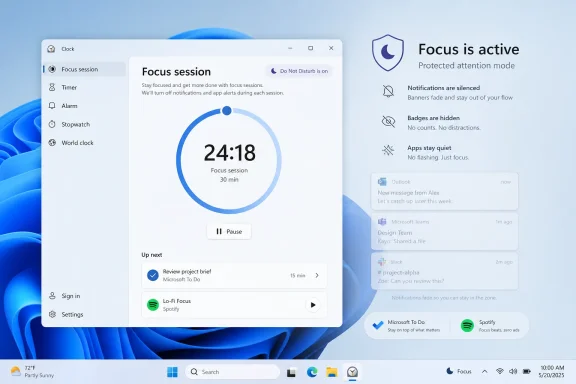
Microsoft’s Windows 11 Focus feature gives users a built-in Pomodoro-style timer through the Clock app, automatically enabling Do Not Disturb, hiding taskbar badges and flashing alerts, and optionally integrating Microsoft To Do and Spotify during timed work sessions. That makes the How-To Geek argument less a productivity tip than an indictment of Windows’ own product design: Microsoft already ships a useful attention-management system, then buries it where many users will never look. In an operating system increasingly eager to sell Copilot, OneDrive storage, widgets, and Microsoft 365 upsells, Focus is the rare feature that asks for nothing except your attention back. The irony is that one of Windows 11’s most humane productivity tools may be the one Microsoft promotes the least.
The modern productivity economy runs on a strange premise: your computer creates the distraction, and then you pay another app to tame it. Pomodoro timers, website blockers, ambient music apps, calendar overlays, and minimalist task managers all orbit the same problem. Knowledge work now happens inside machines designed to interrupt knowledge work.
Windows 11’s Focus feature is Microsoft’s unusually practical answer to that problem. It is not glamorous. It does not promise an AI-generated daily plan, a neuroscience-backed flow state, or a gamified streak economy. It starts a timer, suppresses notifications, quiets visible taskbar nags, and gives you a defined span in which Windows agrees to stop waving its arms.
That simplicity is the point. Most Pomodoro apps replicate a kitchen timer with a subscription wrapper. Windows Focus goes a step further because it is part of the operating system itself. A third-party timer can tell you when 25 minutes have passed; Windows can also tell Teams, Mail, Slack, browsers, and other attention-seeking software to wait their turn.
That is the feature’s real advantage. The timer is almost incidental. The deeper value is that Focus uses the operating system’s privileged position to enforce a temporary truce between the user and the notification layer.
In practice, most users do not need the canonical 25-minute interval. Writers may prefer 45-minute drafts. Developers may want 60 or 90 minutes to avoid breaking mental state. Students may need shorter bursts when wrestling with dense material. The timer matters less than the bargain: for this span of time, one task gets priority.
Windows Focus recognizes that reality better than many purist productivity systems. It allows users to adjust session duration and include breaks rather than treating the original Pomodoro format as doctrine. That matters because the ideal work interval is not universal; it depends on job type, attention span, meeting density, and fatigue.
The stronger interpretation of Focus is not “Windows includes a Pomodoro timer.” It is that Windows includes a system-level attention boundary. That boundary is more useful than a stopwatch because it changes the behavior of the environment around the user.
When a Focus session begins, Windows can automatically enable Do Not Disturb. It can stop notification banners from appearing. It can suppress taskbar badges and flashing app icons, two of the most persistent low-grade distractions in desktop computing. These are not exotic interventions, but they attack the problem at the layer where the problem is created.
A phone timer sitting next to a laptop cannot stop Outlook from flashing. A browser extension cannot reliably silence desktop notifications across the whole machine. A boutique productivity app may offer beautiful charts and pleasing sounds, but it cannot always govern Windows’ own notification center. Focus can, because Microsoft owns the plumbing.
That is why the How-To Geek framing lands: paying for a productivity app while ignoring Focus may be redundant for many Windows users. Not all users, certainly. But for the common case — “I need to work for a while without being poked by my own PC” — the built-in tool is unusually well positioned.
The Clock app, in particular, carries historical baggage. Users open it for alarms, timers, and world clocks, not for workflow design. Calling Focus a Clock feature undersells it. It is like putting a firewall inside Calculator: technically accessible, conceptually misplaced.
Microsoft has spent years teaching users to expect Windows productivity features in Settings, Task View, Snap Layouts, PowerToys, Microsoft 365, Edge, Teams, and now Copilot. Focus sits awkwardly between all of them. It is part notification control, part time management, part task management, and part behavioral nudge.
That ambiguity helps explain why users miss it. Windows 11 is not quiet about many things. It promotes Microsoft accounts, cloud backup, Edge defaults, widgets, ads in unexpected surfaces, and AI integrations with considerable enthusiasm. Focus, by contrast, is modest to the point of self-sabotage.
Focus largely avoids that trap. Its core loop is boring in the best possible way: choose a duration, start the session, work until it ends. If the user wants more, the Clock app can show session history, integrate Microsoft To Do tasks, and connect Spotify audio. But the basic mode remains plain.
That restraint is important because productivity software often fails by becoming emotionally demanding. The user starts managing the system instead of doing the work. A timer that requires tagging, categorizing, syncing, reviewing, and optimizing every session becomes a second job.
Windows Focus is strongest when treated as infrastructure rather than a productivity lifestyle. It does not need to know whether the session was “deep work,” “admin,” “learning,” or “creative.” It only needs to hold the line long enough for the user to do something without interruption.
Notifications are not neutral. Even when ignored, they impose a cognitive cost. A banner in the corner, a badge on the taskbar, or a flashing app icon all create tiny unresolved questions. Who needs me? Is something broken? Did I miss a deadline? Should I check now or later?
Focus reduces that tax by making interruption deferral automatic. The user does not have to manually silence every app before starting work. Windows creates a temporary protected space, then restores normal life afterward. That small automation is the difference between an intention and a habit.
There is also a psychological advantage. A Focus session gives users permission not to respond immediately. In many workplaces, the most damaging norm is not actual urgency but simulated urgency — the expectation that every notification deserves instant acknowledgment. A timed session reframes delayed response as an intentional work mode, not negligence.
Focus suppresses taskbar badges and flashing during sessions, and that may be its most underrated behavior. The Windows taskbar is always visible for many users. It sits at the edge of cognition, quietly turning software state into ambient anxiety. A red badge on a chat app can derail a paragraph before the user has consciously decided to check it.
This is where OS-level focus beats self-discipline. Telling users to ignore flashing icons is a weak answer to a design problem. Better to stop the flashing in the first place. A distraction that never appears does not require willpower.
The desktop operating system has spent decades improving multitasking. Focus is a tacit admission that multitasking has overshot. The next productivity frontier is not opening more windows faster; it is making fewer things demand attention at the wrong time.
Spotify integration is more debatable but understandable. Many people use music, ambient sound, or noise to create a ritual around work. If starting a session also starts a focus playlist, the feature becomes less like a stopwatch and more like a work-mode switch.
Still, these integrations should not be mistaken for the core value. The danger for Microsoft is that optional integrations make Focus look like a lifestyle feature rather than a system feature. The more it appears to be about playlists and task tiles, the easier it is for serious users to dismiss it as another consumer flourish.
The best version of Focus is not “Clock plus Spotify.” It is “Windows enters a state where distraction is deprioritized.” Microsoft should treat that as a first-class operating system mode, not an accessory inside a timekeeping app.
Windows Focus does not replace all of that. It is not a full productivity suite. It is not a time-tracking system. It is not a project-management layer. It is not designed for managers to audit output, which is probably a virtue.
But the absence of those features is also why it may be healthier for many users. A shocking amount of productivity software is purchased in the hope that tooling will substitute for prioritization. Focus does not solve the hard problem of choosing what matters. It only protects the choice once made.
That makes it a better default recommendation than yet another app. Before installing a timer with a subscription screen and a motivational mascot, Windows users should try the tool that already controls the notification system they are trying to escape.
At the same time, enterprise work is full of exceptions. Some alerts must break through. Security notifications, incident-response messages, executive communications, helpdesk escalations, and operational monitoring may be too important to defer. A blanket focus mode can create anxiety if users do not understand what is silenced and what remains allowed.
The answer is not to avoid Focus, but to configure notification policy with intent. Windows already allows notification controls and priority behavior around Do Not Disturb. Organizations should document how Focus interacts with approved communication channels instead of leaving workers to discover it during a missed message scare.
There is also a cultural issue. If a workplace expects instant response to every Teams ping, Focus becomes performative. The feature only works when teams accept that not every message is synchronous. Technology can suppress the banner; it cannot fix a management culture that treats interruption as proof of productivity.
Focus solves an everyday problem immediately. It is understandable in one sentence. It does not require a new model, subscription, or corporate vision deck. It does not ask users to trust generated output. It simply helps them stop being interrupted.
That makes Microsoft’s relative quietness around Focus puzzling. If Windows is supposed to be the place where work happens, attention management should be as prominent as window snapping. The ability to arrange work is useful; the ability to protect work is essential.
A more confident Microsoft would put Focus closer to the center of Windows. It would surface it during setup for work and school devices. It would explain it in the notification center. It would offer sensible presets for writing, meetings, study, coding, and personal time. It would make the feature feel like a core productivity mode rather than a hidden tab in Clock.
That may disappoint people looking for stronger behavioral controls. But it is also consistent with the nature of a general-purpose PC. Windows is not a monastic writing machine. It is a flexible platform where the same device may run Excel, Steam, Visual Studio, Photoshop, Outlook, and a dozen browser profiles.
The better criticism is that Focus could do more without becoming oppressive. It could make recurring focus schedules easier. It could integrate more clearly with calendar availability. It could provide per-session app allowlists or notification exceptions in a more approachable way. It could make the end-of-session review cleaner, helping users triage what arrived instead of dumping them back into the same notification pile.
Still, the restraint is preferable to the alternative. Productivity tools that become too controlling often create workarounds. Focus succeeds when it nudges rather than polices.
That does not make Focus useless. It means the feature should be part of a broader ritual. Starting a Focus session on Windows works best when paired with putting the phone face down, enabling a mobile focus mode, or moving the device out of reach. The desktop can only defend its own perimeter.
This is where third-party ecosystems sometimes have an advantage. Apple’s Focus modes can coordinate across devices in a tightly controlled ecosystem. Cross-platform productivity services may sync timers and states more broadly. Windows Focus is strongest on the Windows machine itself, but modern distraction is rarely confined to one device.
Even so, the PC remains the center of many workdays. If Windows can remove a large share of desktop interruptions, that is a meaningful win. Perfect silence is not required for better concentration; fewer interruptions are enough.
A timer should not need a monthly fee for most users. Nor should a basic focus history, task selection, or work-break cycle. When the operating system provides these primitives, the burden shifts to third-party apps to justify their complexity.
That does not mean all paid tools are scams. A consultant tracking client hours has different needs from a student writing an essay. A team coordinating deep-work blocks across time zones may need shared infrastructure. A user with serious distraction issues may benefit from aggressive blocking that Windows Focus does not attempt.
But the default should change. The first recommendation for a Windows 11 user should not be “download another app.” It should be “try the focus mode your PC already has.” If that is insufficient, then look for specialized tools.
For years, Windows has been optimized around availability. Apps stay connected. Notifications arrive instantly. The taskbar advertises state. Background services sync continuously. Collaboration tools collapse distance. These capabilities are useful, but they also create a work environment where everything is always potentially urgent.
Focus introduces scarcity back into the system. For a defined period, the user’s attention is not generally available. That is a small but radical idea inside software built to maximize responsiveness.
The feature is also a reminder that good operating-system design is not only about capability. It is about timing. The right alert at the wrong moment is still a bad experience. Focus gives Windows a way to recognize that user attention has context.
For Microsoft, the lesson is more uncomfortable. The company has already built a feature that aligns with how people actually work, but it has not given that feature the status it deserves. Focus should be treated as a visible Windows productivity pillar, not a pleasant surprise found by people poking around Settings.
Source: How-To Geek Stop paying for productivity apps—Windows already has a better Pomodoro timer built-in
 Windows Already Built the App People Keep Downloading
The modern productivity economy runs on a strange premise: your computer creates the distraction, and then you pay another app to tame it. Pomodoro timers, website blockers, ambient music apps, calendar overlays, and minimalist task managers all orbit the same problem. Knowledge work now happens inside machines designed to interrupt knowledge work.Windows 11’s Focus feature is Microsoft’s unusually practical answer to that problem. It is not glamorous. It does not promise an AI-generated daily plan, a neuroscience-backed flow state, or a gamified streak economy. It starts a timer, suppresses notifications, quiets visible taskbar nags, and gives you a defined span in which Windows agrees to stop waving its arms.
That simplicity is the point. Most Pomodoro apps replicate a kitchen timer with a subscription wrapper. Windows Focus goes a step further because it is part of the operating system itself. A third-party timer can tell you when 25 minutes have passed; Windows can also tell Teams, Mail, Slack, browsers, and other attention-seeking software to wait their turn.
That is the feature’s real advantage. The timer is almost incidental. The deeper value is that Focus uses the operating system’s privileged position to enforce a temporary truce between the user and the notification layer.
The Pomodoro Timer Was Never Really About Tomatoes
The Pomodoro Technique is usually described in terms of its famous rhythm: 25 minutes of work, five minutes of rest, repeated until a longer break. The tomato-shaped kitchen timer that inspired the name gave the method its branding, but not its power. The power comes from making a commitment small enough to keep and rigid enough to protect.In practice, most users do not need the canonical 25-minute interval. Writers may prefer 45-minute drafts. Developers may want 60 or 90 minutes to avoid breaking mental state. Students may need shorter bursts when wrestling with dense material. The timer matters less than the bargain: for this span of time, one task gets priority.
Windows Focus recognizes that reality better than many purist productivity systems. It allows users to adjust session duration and include breaks rather than treating the original Pomodoro format as doctrine. That matters because the ideal work interval is not universal; it depends on job type, attention span, meeting density, and fatigue.
The stronger interpretation of Focus is not “Windows includes a Pomodoro timer.” It is that Windows includes a system-level attention boundary. That boundary is more useful than a stopwatch because it changes the behavior of the environment around the user.
The Operating System Is the Only Place This Feature Truly Belongs
The reason Windows Focus can outperform many standalone Pomodoro apps is architectural. A timer app runs beside the operating system. Focus runs through it. That distinction sounds technical, but it changes the user experience completely.When a Focus session begins, Windows can automatically enable Do Not Disturb. It can stop notification banners from appearing. It can suppress taskbar badges and flashing app icons, two of the most persistent low-grade distractions in desktop computing. These are not exotic interventions, but they attack the problem at the layer where the problem is created.
A phone timer sitting next to a laptop cannot stop Outlook from flashing. A browser extension cannot reliably silence desktop notifications across the whole machine. A boutique productivity app may offer beautiful charts and pleasing sounds, but it cannot always govern Windows’ own notification center. Focus can, because Microsoft owns the plumbing.
That is why the How-To Geek framing lands: paying for a productivity app while ignoring Focus may be redundant for many Windows users. Not all users, certainly. But for the common case — “I need to work for a while without being poked by my own PC” — the built-in tool is unusually well positioned.
Microsoft’s Best Productivity Feature Is Hidden in Plain Sight
The problem is discoverability. Focus exists in Settings. It exists in the Clock app. It can be started from the notification area. But for many people, those are not natural places to look for a serious productivity feature.The Clock app, in particular, carries historical baggage. Users open it for alarms, timers, and world clocks, not for workflow design. Calling Focus a Clock feature undersells it. It is like putting a firewall inside Calculator: technically accessible, conceptually misplaced.
Microsoft has spent years teaching users to expect Windows productivity features in Settings, Task View, Snap Layouts, PowerToys, Microsoft 365, Edge, Teams, and now Copilot. Focus sits awkwardly between all of them. It is part notification control, part time management, part task management, and part behavioral nudge.
That ambiguity helps explain why users miss it. Windows 11 is not quiet about many things. It promotes Microsoft accounts, cloud backup, Edge defaults, widgets, ads in unexpected surfaces, and AI integrations with considerable enthusiasm. Focus, by contrast, is modest to the point of self-sabotage.
The Feature Works Because It Is Boring
There is a temptation in productivity software to add ceremony. Dashboards. Badges. Graphs. Habit streaks. Achievement animations. AI summaries. Weekly reviews. The tool that begins as an aid to concentration eventually becomes another object of concentration.Focus largely avoids that trap. Its core loop is boring in the best possible way: choose a duration, start the session, work until it ends. If the user wants more, the Clock app can show session history, integrate Microsoft To Do tasks, and connect Spotify audio. But the basic mode remains plain.
That restraint is important because productivity software often fails by becoming emotionally demanding. The user starts managing the system instead of doing the work. A timer that requires tagging, categorizing, syncing, reviewing, and optimizing every session becomes a second job.
Windows Focus is strongest when treated as infrastructure rather than a productivity lifestyle. It does not need to know whether the session was “deep work,” “admin,” “learning,” or “creative.” It only needs to hold the line long enough for the user to do something without interruption.
Do Not Disturb Is the Killer Feature, Not the Countdown
The visible timer gets the attention because it is easy to understand. But Do Not Disturb is the real engine. A countdown without notification control is just a promise the user makes to themselves. A countdown with notification control is a promise the machine helps enforce.Notifications are not neutral. Even when ignored, they impose a cognitive cost. A banner in the corner, a badge on the taskbar, or a flashing app icon all create tiny unresolved questions. Who needs me? Is something broken? Did I miss a deadline? Should I check now or later?
Focus reduces that tax by making interruption deferral automatic. The user does not have to manually silence every app before starting work. Windows creates a temporary protected space, then restores normal life afterward. That small automation is the difference between an intention and a habit.
There is also a psychological advantage. A Focus session gives users permission not to respond immediately. In many workplaces, the most damaging norm is not actual urgency but simulated urgency — the expectation that every notification deserves instant acknowledgment. A timed session reframes delayed response as an intentional work mode, not negligence.
The Taskbar Is a Distraction Machine Wearing a Productivity Costume
Windows users often think of notifications as pop-up banners, but the taskbar is just as important. Badges and flashing icons are designed to pull attention sideways. They are useful when something genuinely requires action. They are corrosive when every app believes it deserves the same visual priority.Focus suppresses taskbar badges and flashing during sessions, and that may be its most underrated behavior. The Windows taskbar is always visible for many users. It sits at the edge of cognition, quietly turning software state into ambient anxiety. A red badge on a chat app can derail a paragraph before the user has consciously decided to check it.
This is where OS-level focus beats self-discipline. Telling users to ignore flashing icons is a weak answer to a design problem. Better to stop the flashing in the first place. A distraction that never appears does not require willpower.
The desktop operating system has spent decades improving multitasking. Focus is a tacit admission that multitasking has overshot. The next productivity frontier is not opening more windows faster; it is making fewer things demand attention at the wrong time.
The To Do and Spotify Integrations Are Useful, but They Are Not the Story
Microsoft To Do integration makes conceptual sense. A focus session should have an object: write the memo, close the ticket, study chapter four, reconcile the spreadsheet. Letting users select tasks inside the Clock app can reduce friction for those already living in Microsoft’s task ecosystem.Spotify integration is more debatable but understandable. Many people use music, ambient sound, or noise to create a ritual around work. If starting a session also starts a focus playlist, the feature becomes less like a stopwatch and more like a work-mode switch.
Still, these integrations should not be mistaken for the core value. The danger for Microsoft is that optional integrations make Focus look like a lifestyle feature rather than a system feature. The more it appears to be about playlists and task tiles, the easier it is for serious users to dismiss it as another consumer flourish.
The best version of Focus is not “Clock plus Spotify.” It is “Windows enters a state where distraction is deprioritized.” Microsoft should treat that as a first-class operating system mode, not an accessory inside a timekeeping app.
A Free Tool Still Has a Cost
There are reasons some users will still prefer dedicated productivity apps. Cross-platform workers may want the same timer on Windows, macOS, Linux, iOS, Android, and the web. Teams may want shared reporting. Freelancers may need billable time tracking. Some users want website blocking, app blocking, analytics, keyboard shortcuts, project tagging, or integrations with Notion, Todoist, Jira, Trello, and calendar tools.Windows Focus does not replace all of that. It is not a full productivity suite. It is not a time-tracking system. It is not a project-management layer. It is not designed for managers to audit output, which is probably a virtue.
But the absence of those features is also why it may be healthier for many users. A shocking amount of productivity software is purchased in the hope that tooling will substitute for prioritization. Focus does not solve the hard problem of choosing what matters. It only protects the choice once made.
That makes it a better default recommendation than yet another app. Before installing a timer with a subscription screen and a motivational mascot, Windows users should try the tool that already controls the notification system they are trying to escape.
The Enterprise Angle Is Less Cozy
For IT departments, Focus is both welcome and limited. It gives employees a native way to reduce interruptions without installing unapproved third-party software. That matters in locked-down environments where consumer productivity apps may raise privacy, compliance, or support concerns.At the same time, enterprise work is full of exceptions. Some alerts must break through. Security notifications, incident-response messages, executive communications, helpdesk escalations, and operational monitoring may be too important to defer. A blanket focus mode can create anxiety if users do not understand what is silenced and what remains allowed.
The answer is not to avoid Focus, but to configure notification policy with intent. Windows already allows notification controls and priority behavior around Do Not Disturb. Organizations should document how Focus interacts with approved communication channels instead of leaving workers to discover it during a missed message scare.
There is also a cultural issue. If a workplace expects instant response to every Teams ping, Focus becomes performative. The feature only works when teams accept that not every message is synchronous. Technology can suppress the banner; it cannot fix a management culture that treats interruption as proof of productivity.
Microsoft Should Promote Focus More Than It Promotes AI Tricks
Windows 11 is now crowded with Microsoft’s strategic ambitions. Copilot, cloud account integration, Edge hooks, Microsoft 365 services, and AI-branded features increasingly compete for surface area. Some of those tools are useful. Many are still searching for the exact everyday problem they solve.Focus solves an everyday problem immediately. It is understandable in one sentence. It does not require a new model, subscription, or corporate vision deck. It does not ask users to trust generated output. It simply helps them stop being interrupted.
That makes Microsoft’s relative quietness around Focus puzzling. If Windows is supposed to be the place where work happens, attention management should be as prominent as window snapping. The ability to arrange work is useful; the ability to protect work is essential.
A more confident Microsoft would put Focus closer to the center of Windows. It would surface it during setup for work and school devices. It would explain it in the notification center. It would offer sensible presets for writing, meetings, study, coding, and personal time. It would make the feature feel like a core productivity mode rather than a hidden tab in Clock.
The Feature’s Weakness Is That It Trusts Users to Find Discipline
Focus is not magic. It cannot stop a user from opening a browser tab, checking a phone, or deciding that a five-minute break should become a 40-minute scroll. It does not know whether the active app is Word or YouTube. It does not force the user into a locked-down environment.That may disappoint people looking for stronger behavioral controls. But it is also consistent with the nature of a general-purpose PC. Windows is not a monastic writing machine. It is a flexible platform where the same device may run Excel, Steam, Visual Studio, Photoshop, Outlook, and a dozen browser profiles.
The better criticism is that Focus could do more without becoming oppressive. It could make recurring focus schedules easier. It could integrate more clearly with calendar availability. It could provide per-session app allowlists or notification exceptions in a more approachable way. It could make the end-of-session review cleaner, helping users triage what arrived instead of dumping them back into the same notification pile.
Still, the restraint is preferable to the alternative. Productivity tools that become too controlling often create workarounds. Focus succeeds when it nudges rather than polices.
The Real Competition Is the Phone Beside the Keyboard
There is one obvious weakness in any Windows-based attention system: the user’s phone. A PC can silence desktop notifications, but it cannot stop the slab of glass next to the keyboard from lighting up with the same messages. For many people, the phone is the primary interruption engine.That does not make Focus useless. It means the feature should be part of a broader ritual. Starting a Focus session on Windows works best when paired with putting the phone face down, enabling a mobile focus mode, or moving the device out of reach. The desktop can only defend its own perimeter.
This is where third-party ecosystems sometimes have an advantage. Apple’s Focus modes can coordinate across devices in a tightly controlled ecosystem. Cross-platform productivity services may sync timers and states more broadly. Windows Focus is strongest on the Windows machine itself, but modern distraction is rarely confined to one device.
Even so, the PC remains the center of many workdays. If Windows can remove a large share of desktop interruptions, that is a meaningful win. Perfect silence is not required for better concentration; fewer interruptions are enough.
The Subscription Economy Made Simple Tools Feel More Valuable Than They Are
The popularity of paid Pomodoro apps says something about the software market. Developers deserve to be paid, and many independent productivity tools are thoughtful, polished, and worth supporting. But the category also shows how easily simple utilities become subscription products.A timer should not need a monthly fee for most users. Nor should a basic focus history, task selection, or work-break cycle. When the operating system provides these primitives, the burden shifts to third-party apps to justify their complexity.
That does not mean all paid tools are scams. A consultant tracking client hours has different needs from a student writing an essay. A team coordinating deep-work blocks across time zones may need shared infrastructure. A user with serious distraction issues may benefit from aggressive blocking that Windows Focus does not attempt.
But the default should change. The first recommendation for a Windows 11 user should not be “download another app.” It should be “try the focus mode your PC already has.” If that is insufficient, then look for specialized tools.
The Windows Productivity Story Is Better When It Gets Smaller
Microsoft often talks about productivity in expansive terms: more intelligence, more integration, more cloud, more automation. Focus suggests the opposite lesson. Sometimes productivity improves when the operating system does less.For years, Windows has been optimized around availability. Apps stay connected. Notifications arrive instantly. The taskbar advertises state. Background services sync continuously. Collaboration tools collapse distance. These capabilities are useful, but they also create a work environment where everything is always potentially urgent.
Focus introduces scarcity back into the system. For a defined period, the user’s attention is not generally available. That is a small but radical idea inside software built to maximize responsiveness.
The feature is also a reminder that good operating-system design is not only about capability. It is about timing. The right alert at the wrong moment is still a bad experience. Focus gives Windows a way to recognize that user attention has context.
The Hidden Timer Deserves a Place on the Main Stage
The most concrete lesson for users is simple: Focus is worth trying before paying for another productivity utility. It will not fit every workflow, and it will not replace serious time tracking or blocking tools, but it handles the common case with less overhead than many alternatives.For Microsoft, the lesson is more uncomfortable. The company has already built a feature that aligns with how people actually work, but it has not given that feature the status it deserves. Focus should be treated as a visible Windows productivity pillar, not a pleasant surprise found by people poking around Settings.
- Windows 11 Focus sessions can be started from Settings, the notification area, or the Clock app.
- A Focus session can automatically enable Do Not Disturb so notification banners and sounds do not interrupt work.
- Windows can hide taskbar badges and flashing app icons during a session, which gives Focus an advantage over ordinary timer apps.
- The Clock app can support breaks, session duration choices, Microsoft To Do tasks, and Spotify playback for users who want a fuller routine.
- Focus is best understood as an operating-system attention mode, not merely as Microsoft’s version of a Pomodoro timer.
- Users who need cross-device sync, aggressive app blocking, team reporting, or billable time tracking may still need a dedicated third-party tool.
Source: How-To Geek Stop paying for productivity apps—Windows already has a better Pomodoro timer built-in
