

After four weeks of matched testing on a Windows 11 Pro 25H2 gaming laptop, MakeUseOf found that Windows Game Mode barely changed average frame rates but substantially improved the worst moments in two CPU- or background-sensitive workloads, making the strongest case for leaving the feature enabled. The result cuts through years of contradictory advice because it shows that Game Mode is not primarily an FPS booster. It is a resource-management safeguard designed to protect a running game when Windows, browsers, voice chat, recording tools, and other applications begin competing for the same hardware. The most useful number, therefore, is not the highest frame rate Game Mode can produce but the lowest frame rate it can prevent.
Game Mode has accumulated the peculiar reputation of a Windows feature that must either transform a PC or sabotage it. One camp expects free performance simply because Microsoft placed a gaming switch in Settings; the other treats “Disable Game Mode” as a nearly universal answer to stuttering, crashes, or unexplained frame-rate problems.
MakeUseOf writer Afam Onyimadu tested those assumptions by playing the same games at the same settings and resolutions with Game Mode enabled for two weeks and disabled for another two weeks. CapFrameX was used to record and analyze frame times, while real gameplay sessions supplemented canned benchmark loops so that momentary performance problems would not disappear inside a tidy average.
The test system was representative of a capable but constrained gaming laptop rather than an unlimited desktop benchmark rig: an Intel Core i7-13700H, an RTX 4060 Laptop GPU with 8GB of VRAM, and 16GB of dual-channel DDR5-5200 memory. It ran Windows 11 Pro 25H2, placing the experiment firmly in the modern hybrid-processor era in which Windows must decide not only which process runs next but whether its threads belong on performance or efficiency cores.
That hardware choice matters. A laptop RTX 4060 can be pushed to its graphics ceiling, 16GB of memory can become crowded when a browser and Discord remain open, and the Core i7-13700H gives Windows a heterogeneous collection of cores to manage. In other words, this was precisely the kind of system on which operating-system scheduling might matter without becoming the sole determinant of performance.
The conclusion was neither miraculous nor catastrophic. Average frame rates increased slightly in all four games with Game Mode enabled, but most of those changes were too small to establish the feature as a conventional performance upgrade. The important gains appeared lower in the distribution, where background contention and scheduling delays turn otherwise fast games into uneven ones.
Game Mode is a floor, not a turbo button. That is both the central finding of the test and the best way to understand why years of Game Mode arguments have so often talked past the feature’s actual purpose.
Cyberpunk 2077 provides the control case. At 1080p Ultra with DLSS Quality, the RTX 4060 Laptop GPU was doing the limiting work, and Game Mode could not schedule its way around a saturated graphics processor. Average performance moved from 82.4 to 82.9 FPS, while the 1% low rose from 61.7 to 62.1 FPS.
Those differences are functionally negligible. They do not indicate that Game Mode is harmful, but they also do not give it meaningful work to perform. When the GPU is already at its practical ceiling, prioritizing game threads cannot conjure additional shader throughput, memory bandwidth, or graphics power.
Shadow of the Tomb Raider told a similar story from a more balanced position. Its average increased from 114.7 to 115.2 FPS, and its 1% low moved from 82.1 to 83.0 FPS. Game Mode again produced no penalty, but the system apparently was not under enough competing pressure for prioritization to become visibly important.
The CPU-bound Counter-Strike 2 result begins to reveal the feature’s real value. Average performance rose only from 245.1 to 246.8 FPS, a change few players could identify by watching an FPS counter. The 1% low, however, climbed from 142.3 to 154.6 FPS, which MakeUseOf characterized as a 9% jump.
That distinction is especially important in a competitive game. An average near 245 FPS can coexist with abrupt interruptions, delayed frames, or inconsistent delivery, and a high average does not reimburse a player for the hitch that occurs during a critical encounter. Better lows do not necessarily make the game look faster in a benchmark summary, but they can make input and motion feel more dependable.
As Onyimadu put it, “Game Mode stopped the system from choking; it didn't actually make the system faster.” That sentence is a more precise description of Windows gaming optimization than the usual promise of “higher FPS,” because it separates throughput from stability.
Forza Horizon 5 made that separation impossible to ignore. With Edge and Discord open, its average increased moderately from 94.6 to 96.1 FPS, but the 1% low leapt from 48.2 to 71.5 FPS. The PC was not transformed into a more powerful machine; it became substantially better at protecting the game from other work taking place on the same machine.
The difference between a 48.2 FPS and 71.5 FPS low is not merely something an analysis tool can detect. It crosses the line between a conspicuous slowdown and a much less disruptive variation, particularly when the average remains in the mid-90s. The off-state result describes a game that is generally fast but occasionally feels much slower than its headline number suggests.
This is why the Forza test is the most important result in the set. It does not prove that every game will gain the same protection, but it demonstrates the condition under which Game Mode’s design becomes useful: limited memory, active background applications, and a workload shared across CPU, GPU, and operating-system resources.
The 1% low is intended to expose part of that lower-performance tail. It is not a complete account of every hitch, nor does it identify the cause of a slowdown, but it is more sensitive than the average to the bad moments players describe as stutter, judder, hesitation, or unevenness.
CapFrameX is well suited to that analysis because it records frame times rather than relying solely on a visible FPS counter. The free, open-source Windows tool can compare captures, graph frame-time behavior, and calculate multiple performance metrics. That gives the tester a view of how frames were delivered, not simply how many were produced over the entire run.
This distinction changes how Game Mode should be judged. If the feature’s job is to reserve attention for the foreground game and reduce interference from background activity, its success may appear as fewer slow frames while the average remains essentially stationary. A test concerned only with average FPS could therefore conclude that Game Mode does nothing even when it has materially improved playability.
That pattern is visible across the four results. The average increases were 0.5 FPS in Cyberpunk 2077, 1.7 FPS in Counter-Strike 2, 0.5 FPS in Shadow of the Tomb Raider, and 1.5 FPS in Forza Horizon 5. Nothing there supports marketing Game Mode as a source of free rendering performance.
The lows, however, reveal two categories. GPU-bound and balanced tests changed little because the operating system apparently had little scheduling crisis to resolve. CPU-bound Counter-Strike 2 and background-loaded Forza Horizon 5 improved much more clearly, suggesting that the feature’s benefit scales with the amount and type of resource competition.
This interpretation is consistent with Microsoft’s historical description of Game Mode. Microsoft has explained that the feature gives a game priority or more exclusive access to resources and that the resulting improvement depends on the number and impact of other activities running on the PC. That is a conditional promise, not a blanket claim that every game will render more frames.
It also echoes earlier independent testing. PCWorld’s testing of the feature on Windows 10 found little value when games ran without significant background competition, but potentially meaningful improvements when demanding background processes were introduced on a resource-constrained system. The modern MakeUseOf results do not overturn that older work so much as show that the same basic design logic remains visible on newer Windows software and hybrid hardware.
The debate has persisted partly because testers have not always asked the same question. “Does Game Mode raise maximum or average performance?” and “Does Game Mode protect games from background contention?” are different experiments. The first often produces an uninteresting answer; the second is where the feature can justify its existence.
“Game Mode doesn't touch the hardware ceiling,” Onyimadu wrote. “It prioritizes game threads and ensures that, while actively gaming, no background processes hog CPU resources.”
That claim explains why graphics-heavy tests frequently produce disappointing Game Mode comparisons. If GPU utilization is the bottleneck and background CPU activity is not delaying the rendering pipeline, changing CPU-side priorities has little room to affect the result. The correct interpretation is not that Game Mode has failed but that the tested workload did not need the protection it offers.
This is also why players should distrust universal optimization guides. A setting that helps a CPU-limited esports title while Discord, browser tabs, and capture software are running may do nothing for a graphically intensive single-player game at Ultra settings. The bottleneck determines which intervention can matter.
If the GPU is saturated, lowering graphics settings, adjusting ray tracing, changing resolution or upscaling settings, and checking graphics drivers are more relevant than toggling Game Mode. If the CPU is overloaded by game logic and background processes, Game Mode has a more plausible route to improvement. If memory pressure is forcing applications to compete aggressively, closing unnecessary software may accomplish more than any scheduling hint.
The Forza test is especially instructive because the 16GB system was being asked to keep Edge and Discord active alongside the game. Sixteen gigabytes remains workable for many gaming systems, but it leaves less margin once browsers, launchers, overlays, chat clients, security tools, synchronization software, and recording applications accumulate.
Game Mode cannot replace missing physical memory. What it can do is influence which work receives priority when the system becomes crowded, reducing the likelihood that the game’s important threads will be delayed by less urgent background activity. The resulting gain appears not as a new hardware ceiling but as a more stable floor.
That makes the feature particularly relevant to mainstream gaming laptops and older or lower-specification systems. High-end desktop test benches are useful for comparing processors and GPUs, but they can inadvertently remove the very contention Game Mode is designed to manage. A machine with abundant memory, a powerful CPU, and a clean benchmark environment may show almost no effect because it has already engineered away the problem.
Modern Intel mobile processors combine performance cores and efficiency cores, giving Windows more complex scheduling choices than on a uniform CPU. Intel Thread Director supplies the operating system with hardware-level guidance about running threads, while the Windows scheduler decides how workloads should be distributed.
In principle, demanding foreground work can be directed toward faster cores while less urgent background activity is handled elsewhere. In practice, early hybrid scheduling behavior could place a game’s important work on a slower efficiency core or otherwise make poor decisions about which threads deserved the most capable resources.
That could manifest as stutter even when average CPU utilization looked reasonable. Users would toggle Game Mode, observe a change, and understandably associate the symptom with the visible Windows gaming feature. Yet the deeper issue could be the scheduler’s handling of the processor’s mixed core types rather than Game Mode’s basic goal of prioritizing games.
According to MakeUseOf, about two years of scheduler updates have closed much of that gap. The publication argues that current Windows Thread Director behavior is more effective at assigning work between performance and efficiency cores than it was when the most persistent anti-Game Mode advice took hold.
The careful reading is not that all scheduler problems have disappeared. PC hardware combinations, firmware, games, anti-cheat systems, drivers, overlays, power profiles, and vendor utilities create too many variables for that claim. It is that a troubleshooting recommendation born in one software and hardware moment may no longer deserve to be the default response in another.
“Disable Game Mode” survives because simple fixes travel faster than their original conditions. Once a setting has been blamed for stutter, every later case of stutter becomes an opportunity to repeat the same remedy, even when the actual cause is a driver regression, shader compilation, an overlay, background recording, storage activity, thermal throttling, or a game-specific bug.
This is a familiar problem in Windows support culture. Advice becomes ritualized: disable a security feature, change a power plan, edit the registry, turn off a scheduler option, or remove a gaming service. The change may help one configuration, but the context falls away as it is copied into videos, forum posts, and optimization scripts.
The modern evidence supports a narrower rule. Game Mode should not be immune from troubleshooting, but neither should it be treated as the first suspect. A reproducible problem that disappears only when the feature is disabled is meaningful evidence; a decades-old optimization checklist is not.
Real PCs are rarely sterile. Discord remains connected, Edge or another browser holds several tabs, launchers update libraries, cloud clients synchronize files, RGB utilities poll hardware, security software scans activity, and capture tools wait for a hotkey. Streamers add encoding, chat, alerts, audio routing, and recording to the mix.
The mixed-load Forza Horizon 5 test therefore resembles everyday PC gaming more closely than the cleanest benchmark loop. Its improvement does not mean Game Mode will always raise 1% lows from the high 40s into the 70s. It shows that background competition can create a severe consistency penalty and that Game Mode can, under the right conditions, contain part of it.
That is especially relevant for players who multitask by habit. A gamer using a second display for video, maintaining an active voice channel, or leaving numerous browser tabs open is not running the same workload as a reviewer testing a game immediately after a clean boot. Advice derived from the latter environment may underestimate the value of operating-system prioritization in the former.
Streaming and recording provide an even stronger case. Those activities add persistent CPU, GPU, memory, storage, and encoding demands rather than an occasional background interruption. Game Mode cannot guarantee that an undersized system will cope, but its priority logic is aligned with the need to keep the game responsive while supporting work continues around it.
The feature may also matter more as a PC ages. Hardware that once had generous headroom can become constrained by newer games, larger browsers, more elaborate launchers, and increasingly complex background services. An optimization that appears irrelevant on a new machine may become useful when available margin narrows.
This explains why blanket benchmark conclusions are unsatisfying. Game Mode’s benefit is not a fixed percentage attached to Windows. It is a response to contention, and contention depends on the game, settings, hardware, background workload, memory capacity, thermal behavior, and scheduling environment.
The practical recommendation is therefore less dramatic than either side of the controversy would prefer: leave the feature enabled unless repeatable evidence on a particular machine shows that it causes a particular problem. Its best-case benefit may be meaningful, while this test found no meaningful performance penalty in the workloads where it had little to contribute.
Laptop performance can be influenced by power limits, temperatures, fan behavior, firmware, battery settings, and manufacturer control software. The source material does not establish that each of those factors was held perfectly constant across the entire four-week period, so small differences in average FPS should not be overinterpreted.
The sequence also matters. Game Mode was used for two weeks and then disabled for two weeks, rather than being rapidly alternated under laboratory conditions. Game updates, driver changes, Windows servicing, ambient temperature, or application behavior could reportedly introduce variation over that period, even with matched game settings.
That limitation makes the large Forza low-frame-rate difference more interesting than the half-frame average changes elsewhere, but it does not make it universally reproducible. A stronger follow-up would include repeated captures in alternating states, controlled background workloads, multiple memory capacities, several CPU architectures, and desktop as well as laptop systems.
The benchmark set also cannot answer whether a specific game, anti-cheat implementation, capture utility, or unusual processor configuration will react badly to Game Mode. PC gaming remains too heterogeneous for four applications to clear every edge case.
Still, limited evidence can be useful when its conclusion is appropriately bounded. All four games produced slightly higher averages with Game Mode on, two showed nearly unchanged lows, and two showed clearer low-frame-rate improvements. Nothing in the supplied results supports the claim that Game Mode generally wrecks performance on this Windows 11 Pro 25H2 system.
Nor do the results justify promising a broad FPS increase. The feature was most valuable when it had a scheduling problem to solve. That is a much more credible finding than either “Game Mode boosts games” or “Game Mode should always be disabled.”
MakeUseOf recommends checking graphics drivers, closing overlays, and determining whether background recording software is active before treating Game Mode as the primary suspect. Those steps target common sources of interference more directly.
Overlays can hook into rendering or presentation paths. Recording tools can consume encoding, graphics, memory, and storage resources. Drivers can introduce regressions that affect only certain APIs, games, or hardware combinations. Background applications can create the exact contention Game Mode is intended to reduce, but they can also exceed what prioritization alone can repair.
Administrators and support technicians should distinguish between a configuration test and a permanent recommendation. Disabling Game Mode temporarily can be a valid A/B test. Telling every user to leave it disabled indefinitely requires stronger, machine-specific evidence.
The same discipline should apply to power plans, hardware-accelerated scheduling options, security features, overlays, and vendor performance utilities. Change one variable, reproduce the workload, capture frame-time data, and revert the change if it does not produce a repeatable benefit. Otherwise troubleshooting becomes a pile of simultaneous tweaks with no reliable diagnosis.
CapFrameX or another frame-time capture tool can help turn a subjective complaint into comparable evidence. The objective is not merely to see whether the average changes but to examine whether the slow-frame tail, frame-time spikes, or consistency improves under the same scene and workload.
It rests instead on asymmetry. In the supplied tests, the downside was negligible, while the upside under CPU or background pressure was more substantial. A setting that costs essentially nothing in one scenario and protects frame-time consistency in another makes sense as a default.
Users with weaker CPUs, limited system memory, or substantial background activity have the strongest reason to keep it enabled. Discord, browser tabs, streaming software, and recording tools increase the possibility that Windows must choose between game-critical work and less urgent tasks.
Users with powerful systems and clean gaming environments may see no measurable difference. That does not require disabling the feature; it merely means the PC has enough headroom that Game Mode’s intervention is rarely visible.
There will still be exceptions. A particular game, driver, firmware combination, or utility may behave differently, and a properly controlled comparison should overrule generic advice on the affected machine. The default recommendation should not become a prohibition against testing.
Onyimadu’s final assessment captures the necessary restraint: “My testing didn't prove Game Mode a miracle or a disaster; it's just another Windows setting you can generally leave alone.” That may sound anticlimactic, but it is a more useful answer than another optimization myth.
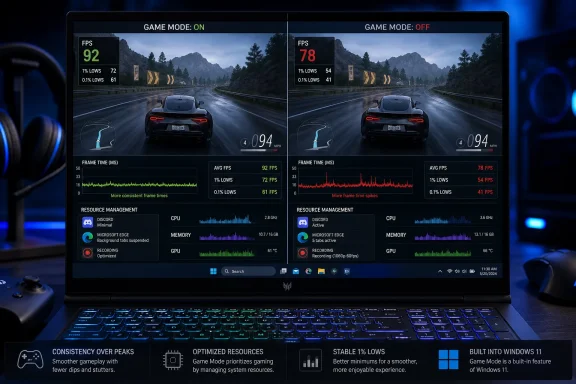 Windows Game Mode Wins by Refusing to Lose
Game Mode has accumulated the peculiar reputation of a Windows feature that must either transform a PC or sabotage it. One camp expects free performance simply because Microsoft placed a gaming switch in Settings; the other treats “Disable Game Mode” as a nearly universal answer to stuttering, crashes, or unexplained frame-rate problems.MakeUseOf writer Afam Onyimadu tested those assumptions by playing the same games at the same settings and resolutions with Game Mode enabled for two weeks and disabled for another two weeks. CapFrameX was used to record and analyze frame times, while real gameplay sessions supplemented canned benchmark loops so that momentary performance problems would not disappear inside a tidy average.
The test system was representative of a capable but constrained gaming laptop rather than an unlimited desktop benchmark rig: an Intel Core i7-13700H, an RTX 4060 Laptop GPU with 8GB of VRAM, and 16GB of dual-channel DDR5-5200 memory. It ran Windows 11 Pro 25H2, placing the experiment firmly in the modern hybrid-processor era in which Windows must decide not only which process runs next but whether its threads belong on performance or efficiency cores.
That hardware choice matters. A laptop RTX 4060 can be pushed to its graphics ceiling, 16GB of memory can become crowded when a browser and Discord remain open, and the Core i7-13700H gives Windows a heterogeneous collection of cores to manage. In other words, this was precisely the kind of system on which operating-system scheduling might matter without becoming the sole determinant of performance.
The conclusion was neither miraculous nor catastrophic. Average frame rates increased slightly in all four games with Game Mode enabled, but most of those changes were too small to establish the feature as a conventional performance upgrade. The important gains appeared lower in the distribution, where background contention and scheduling delays turn otherwise fast games into uneven ones.
Game Mode is a floor, not a turbo button. That is both the central finding of the test and the best way to understand why years of Game Mode arguments have so often talked past the feature’s actual purpose.
Four Games Expose Four Different Bottlenecks
The benchmark suite was small, but its workload selection was more revealing than a long list of games tested under identical conditions. Cyberpunk 2077 represented a GPU-bound scenario, Counter-Strike 2 stressed the CPU, Shadow of the Tomb Raider supplied a more balanced workload, and Forza Horizon 5 was tested with Microsoft Edge and Discord open to create a mixed real-world load.| Game and settings | Workload | Game Mode OFF, avg / 1% low | Game Mode ON, avg / 1% low | Practical result |
|---|---|---|---|---|
| Cyberpunk 2077, 1080p Ultra, DLSS Quality | GPU-bound | 82.4 / 61.7 FPS | 82.9 / 62.1 FPS | Effectively unchanged |
| Counter-Strike 2, 1080p competitive settings | CPU-bound | 245.1 / 142.3 FPS | 246.8 / 154.6 FPS | Similar average, stronger lows |
| Shadow of the Tomb Raider, 1080p Highest, DX12 | Balanced | 114.7 / 82.1 FPS | 115.2 / 83.0 FPS | Effectively unchanged |
| Forza Horizon 5, 1080p Extreme, Edge and Discord open | Mixed load | 94.6 / 48.2 FPS | 96.1 / 71.5 FPS | Major improvement in consistency |
Those differences are functionally negligible. They do not indicate that Game Mode is harmful, but they also do not give it meaningful work to perform. When the GPU is already at its practical ceiling, prioritizing game threads cannot conjure additional shader throughput, memory bandwidth, or graphics power.
Shadow of the Tomb Raider told a similar story from a more balanced position. Its average increased from 114.7 to 115.2 FPS, and its 1% low moved from 82.1 to 83.0 FPS. Game Mode again produced no penalty, but the system apparently was not under enough competing pressure for prioritization to become visibly important.
The CPU-bound Counter-Strike 2 result begins to reveal the feature’s real value. Average performance rose only from 245.1 to 246.8 FPS, a change few players could identify by watching an FPS counter. The 1% low, however, climbed from 142.3 to 154.6 FPS, which MakeUseOf characterized as a 9% jump.
That distinction is especially important in a competitive game. An average near 245 FPS can coexist with abrupt interruptions, delayed frames, or inconsistent delivery, and a high average does not reimburse a player for the hitch that occurs during a critical encounter. Better lows do not necessarily make the game look faster in a benchmark summary, but they can make input and motion feel more dependable.
As Onyimadu put it, “Game Mode stopped the system from choking; it didn't actually make the system faster.” That sentence is a more precise description of Windows gaming optimization than the usual promise of “higher FPS,” because it separates throughput from stability.
Forza Horizon 5 made that separation impossible to ignore. With Edge and Discord open, its average increased moderately from 94.6 to 96.1 FPS, but the 1% low leapt from 48.2 to 71.5 FPS. The PC was not transformed into a more powerful machine; it became substantially better at protecting the game from other work taking place on the same machine.
The difference between a 48.2 FPS and 71.5 FPS low is not merely something an analysis tool can detect. It crosses the line between a conspicuous slowdown and a much less disruptive variation, particularly when the average remains in the mid-90s. The off-state result describes a game that is generally fast but occasionally feels much slower than its headline number suggests.
This is why the Forza test is the most important result in the set. It does not prove that every game will gain the same protection, but it demonstrates the condition under which Game Mode’s design becomes useful: limited memory, active background applications, and a workload shared across CPU, GPU, and operating-system resources.
Average FPS Has Been Hiding the Argument
PC gaming advice still places disproportionate emphasis on average FPS because it produces a clean, easy-to-rank number. Yet an average can hide a great deal of unpleasant behavior. A benchmark may report 100 FPS whether its frames arrive consistently or whether long frames repeatedly interrupt much faster ones.The 1% low is intended to expose part of that lower-performance tail. It is not a complete account of every hitch, nor does it identify the cause of a slowdown, but it is more sensitive than the average to the bad moments players describe as stutter, judder, hesitation, or unevenness.
CapFrameX is well suited to that analysis because it records frame times rather than relying solely on a visible FPS counter. The free, open-source Windows tool can compare captures, graph frame-time behavior, and calculate multiple performance metrics. That gives the tester a view of how frames were delivered, not simply how many were produced over the entire run.
This distinction changes how Game Mode should be judged. If the feature’s job is to reserve attention for the foreground game and reduce interference from background activity, its success may appear as fewer slow frames while the average remains essentially stationary. A test concerned only with average FPS could therefore conclude that Game Mode does nothing even when it has materially improved playability.
That pattern is visible across the four results. The average increases were 0.5 FPS in Cyberpunk 2077, 1.7 FPS in Counter-Strike 2, 0.5 FPS in Shadow of the Tomb Raider, and 1.5 FPS in Forza Horizon 5. Nothing there supports marketing Game Mode as a source of free rendering performance.
The lows, however, reveal two categories. GPU-bound and balanced tests changed little because the operating system apparently had little scheduling crisis to resolve. CPU-bound Counter-Strike 2 and background-loaded Forza Horizon 5 improved much more clearly, suggesting that the feature’s benefit scales with the amount and type of resource competition.
This interpretation is consistent with Microsoft’s historical description of Game Mode. Microsoft has explained that the feature gives a game priority or more exclusive access to resources and that the resulting improvement depends on the number and impact of other activities running on the PC. That is a conditional promise, not a blanket claim that every game will render more frames.
It also echoes earlier independent testing. PCWorld’s testing of the feature on Windows 10 found little value when games ran without significant background competition, but potentially meaningful improvements when demanding background processes were introduced on a resource-constrained system. The modern MakeUseOf results do not overturn that older work so much as show that the same basic design logic remains visible on newer Windows software and hybrid hardware.
The debate has persisted partly because testers have not always asked the same question. “Does Game Mode raise maximum or average performance?” and “Does Game Mode protect games from background contention?” are different experiments. The first often produces an uninteresting answer; the second is where the feature can justify its existence.
Microsoft Cannot Schedule Around a Saturated GPU
The Cyberpunk result draws a useful boundary around what Game Mode is not. It is not an overclock, a driver optimization, an upscaler, a frame-generation system, or a way to increase the physical limits of a GPU. It cannot create more VRAM, increase a laptop’s graphics power budget, or make an already saturated rendering pipeline accept additional work.“Game Mode doesn't touch the hardware ceiling,” Onyimadu wrote. “It prioritizes game threads and ensures that, while actively gaming, no background processes hog CPU resources.”
That claim explains why graphics-heavy tests frequently produce disappointing Game Mode comparisons. If GPU utilization is the bottleneck and background CPU activity is not delaying the rendering pipeline, changing CPU-side priorities has little room to affect the result. The correct interpretation is not that Game Mode has failed but that the tested workload did not need the protection it offers.
This is also why players should distrust universal optimization guides. A setting that helps a CPU-limited esports title while Discord, browser tabs, and capture software are running may do nothing for a graphically intensive single-player game at Ultra settings. The bottleneck determines which intervention can matter.
If the GPU is saturated, lowering graphics settings, adjusting ray tracing, changing resolution or upscaling settings, and checking graphics drivers are more relevant than toggling Game Mode. If the CPU is overloaded by game logic and background processes, Game Mode has a more plausible route to improvement. If memory pressure is forcing applications to compete aggressively, closing unnecessary software may accomplish more than any scheduling hint.
The Forza test is especially instructive because the 16GB system was being asked to keep Edge and Discord active alongside the game. Sixteen gigabytes remains workable for many gaming systems, but it leaves less margin once browsers, launchers, overlays, chat clients, security tools, synchronization software, and recording applications accumulate.
Game Mode cannot replace missing physical memory. What it can do is influence which work receives priority when the system becomes crowded, reducing the likelihood that the game’s important threads will be delayed by less urgent background activity. The resulting gain appears not as a new hardware ceiling but as a more stable floor.
That makes the feature particularly relevant to mainstream gaming laptops and older or lower-specification systems. High-end desktop test benches are useful for comparing processors and GPUs, but they can inadvertently remove the very contention Game Mode is designed to manage. A machine with abundant memory, a powerful CPU, and a clean benchmark environment may show almost no effect because it has already engineered away the problem.
Hybrid CPUs Made Old Troubleshooting Advice Difficult to Kill
MakeUseOf’s experiment was motivated by a curiosity dating back to 2022, when complaints about Game Mode and stuttering were widespread enough that disabling the feature became common advice. The complaints were not necessarily imaginary, but the attribution was often too simple.Modern Intel mobile processors combine performance cores and efficiency cores, giving Windows more complex scheduling choices than on a uniform CPU. Intel Thread Director supplies the operating system with hardware-level guidance about running threads, while the Windows scheduler decides how workloads should be distributed.
In principle, demanding foreground work can be directed toward faster cores while less urgent background activity is handled elsewhere. In practice, early hybrid scheduling behavior could place a game’s important work on a slower efficiency core or otherwise make poor decisions about which threads deserved the most capable resources.
That could manifest as stutter even when average CPU utilization looked reasonable. Users would toggle Game Mode, observe a change, and understandably associate the symptom with the visible Windows gaming feature. Yet the deeper issue could be the scheduler’s handling of the processor’s mixed core types rather than Game Mode’s basic goal of prioritizing games.
According to MakeUseOf, about two years of scheduler updates have closed much of that gap. The publication argues that current Windows Thread Director behavior is more effective at assigning work between performance and efficiency cores than it was when the most persistent anti-Game Mode advice took hold.
The careful reading is not that all scheduler problems have disappeared. PC hardware combinations, firmware, games, anti-cheat systems, drivers, overlays, power profiles, and vendor utilities create too many variables for that claim. It is that a troubleshooting recommendation born in one software and hardware moment may no longer deserve to be the default response in another.
“Disable Game Mode” survives because simple fixes travel faster than their original conditions. Once a setting has been blamed for stutter, every later case of stutter becomes an opportunity to repeat the same remedy, even when the actual cause is a driver regression, shader compilation, an overlay, background recording, storage activity, thermal throttling, or a game-specific bug.
This is a familiar problem in Windows support culture. Advice becomes ritualized: disable a security feature, change a power plan, edit the registry, turn off a scheduler option, or remove a gaming service. The change may help one configuration, but the context falls away as it is copied into videos, forum posts, and optimization scripts.
The modern evidence supports a narrower rule. Game Mode should not be immune from troubleshooting, but neither should it be treated as the first suspect. A reproducible problem that disappears only when the feature is disabled is meaningful evidence; a decades-old optimization checklist is not.
The Forza Result Is the Case Most PC Gamers Actually Live In
Benchmark labs generally seek repeatability by closing background applications and minimizing noise. That is appropriate when the goal is to isolate the performance of a CPU or GPU, but it produces an unusually sterile Windows environment.Real PCs are rarely sterile. Discord remains connected, Edge or another browser holds several tabs, launchers update libraries, cloud clients synchronize files, RGB utilities poll hardware, security software scans activity, and capture tools wait for a hotkey. Streamers add encoding, chat, alerts, audio routing, and recording to the mix.
The mixed-load Forza Horizon 5 test therefore resembles everyday PC gaming more closely than the cleanest benchmark loop. Its improvement does not mean Game Mode will always raise 1% lows from the high 40s into the 70s. It shows that background competition can create a severe consistency penalty and that Game Mode can, under the right conditions, contain part of it.
That is especially relevant for players who multitask by habit. A gamer using a second display for video, maintaining an active voice channel, or leaving numerous browser tabs open is not running the same workload as a reviewer testing a game immediately after a clean boot. Advice derived from the latter environment may underestimate the value of operating-system prioritization in the former.
Streaming and recording provide an even stronger case. Those activities add persistent CPU, GPU, memory, storage, and encoding demands rather than an occasional background interruption. Game Mode cannot guarantee that an undersized system will cope, but its priority logic is aligned with the need to keep the game responsive while supporting work continues around it.
The feature may also matter more as a PC ages. Hardware that once had generous headroom can become constrained by newer games, larger browsers, more elaborate launchers, and increasingly complex background services. An optimization that appears irrelevant on a new machine may become useful when available margin narrows.
This explains why blanket benchmark conclusions are unsatisfying. Game Mode’s benefit is not a fixed percentage attached to Windows. It is a response to contention, and contention depends on the game, settings, hardware, background workload, memory capacity, thermal behavior, and scheduling environment.
The practical recommendation is therefore less dramatic than either side of the controversy would prefer: leave the feature enabled unless repeatable evidence on a particular machine shows that it causes a particular problem. Its best-case benefit may be meaningful, while this test found no meaningful performance penalty in the workloads where it had little to contribute.
One Laptop Cannot Settle Every Game Mode Dispute
The month-long structure gives the MakeUseOf experiment more real-world texture than a handful of back-to-back benchmark passes, but it does not turn one laptop into a universal verdict. The hardware, game selection, background applications, and Windows installation define the scope of the conclusion.Laptop performance can be influenced by power limits, temperatures, fan behavior, firmware, battery settings, and manufacturer control software. The source material does not establish that each of those factors was held perfectly constant across the entire four-week period, so small differences in average FPS should not be overinterpreted.
The sequence also matters. Game Mode was used for two weeks and then disabled for two weeks, rather than being rapidly alternated under laboratory conditions. Game updates, driver changes, Windows servicing, ambient temperature, or application behavior could reportedly introduce variation over that period, even with matched game settings.
That limitation makes the large Forza low-frame-rate difference more interesting than the half-frame average changes elsewhere, but it does not make it universally reproducible. A stronger follow-up would include repeated captures in alternating states, controlled background workloads, multiple memory capacities, several CPU architectures, and desktop as well as laptop systems.
The benchmark set also cannot answer whether a specific game, anti-cheat implementation, capture utility, or unusual processor configuration will react badly to Game Mode. PC gaming remains too heterogeneous for four applications to clear every edge case.
Still, limited evidence can be useful when its conclusion is appropriately bounded. All four games produced slightly higher averages with Game Mode on, two showed nearly unchanged lows, and two showed clearer low-frame-rate improvements. Nothing in the supplied results supports the claim that Game Mode generally wrecks performance on this Windows 11 Pro 25H2 system.
Nor do the results justify promising a broad FPS increase. The feature was most valuable when it had a scheduling problem to solve. That is a much more credible finding than either “Game Mode boosts games” or “Game Mode should always be disabled.”
Troubleshooting Should Follow the Bottleneck, Not the Folklore
When a game stutters, toggling a single switch is appealing because it is fast, reversible, and easy to explain. But an unexplained improvement after changing Game Mode does not automatically reveal why the problem occurred, and an unexplained failure to improve does not eliminate other Windows-level causes.MakeUseOf recommends checking graphics drivers, closing overlays, and determining whether background recording software is active before treating Game Mode as the primary suspect. Those steps target common sources of interference more directly.
Overlays can hook into rendering or presentation paths. Recording tools can consume encoding, graphics, memory, and storage resources. Drivers can introduce regressions that affect only certain APIs, games, or hardware combinations. Background applications can create the exact contention Game Mode is intended to reduce, but they can also exceed what prioritization alone can repair.
Administrators and support technicians should distinguish between a configuration test and a permanent recommendation. Disabling Game Mode temporarily can be a valid A/B test. Telling every user to leave it disabled indefinitely requires stronger, machine-specific evidence.
The same discipline should apply to power plans, hardware-accelerated scheduling options, security features, overlays, and vendor performance utilities. Change one variable, reproduce the workload, capture frame-time data, and revert the change if it does not produce a repeatable benefit. Otherwise troubleshooting becomes a pile of simultaneous tweaks with no reliable diagnosis.
CapFrameX or another frame-time capture tool can help turn a subjective complaint into comparable evidence. The objective is not merely to see whether the average changes but to examine whether the slow-frame tail, frame-time spikes, or consistency improves under the same scene and workload.
Action checklist for admins
- Keep Game Mode enabled as the baseline configuration unless a reproducible application-specific issue points elsewhere.
- Update and verify GPU drivers before attributing stutter to Windows game prioritization.
- Disable third-party overlays and background recording tools one at a time during testing.
- Reproduce the issue with browsers, Discord, launchers, and synchronization clients closed, then add them back individually.
- Capture average FPS and 1% lows with CapFrameX rather than relying only on an on-screen counter.
- Compare Game Mode on and off under the same game settings, power conditions, background load, and test scene.
- Document exceptions by game and device instead of deploying a universal Game Mode-off policy.
“Leave It On” Is the Sensible Default, Not a Guarantee
The most defensible conclusion from the MakeUseOf results is also the least sensational: leave the feature on. That recommendation does not depend on claiming that Game Mode improves every game, because the GPU-bound and balanced results plainly show that it often changes very little.It rests instead on asymmetry. In the supplied tests, the downside was negligible, while the upside under CPU or background pressure was more substantial. A setting that costs essentially nothing in one scenario and protects frame-time consistency in another makes sense as a default.
Users with weaker CPUs, limited system memory, or substantial background activity have the strongest reason to keep it enabled. Discord, browser tabs, streaming software, and recording tools increase the possibility that Windows must choose between game-critical work and less urgent tasks.
Users with powerful systems and clean gaming environments may see no measurable difference. That does not require disabling the feature; it merely means the PC has enough headroom that Game Mode’s intervention is rarely visible.
There will still be exceptions. A particular game, driver, firmware combination, or utility may behave differently, and a properly controlled comparison should overrule generic advice on the affected machine. The default recommendation should not become a prohibition against testing.
Onyimadu’s final assessment captures the necessary restraint: “My testing didn't prove Game Mode a miracle or a disaster; it's just another Windows setting you can generally leave alone.” That may sound anticlimactic, but it is a more useful answer than another optimization myth.
What the Numbers Change for Windows Gamers
The month of testing does not turn Game Mode into essential performance software, but it does clarify where the setting belongs in a modern Windows configuration. Its role is defensive: protect the active game from resource competition without pretending to raise the machine’s physical limits.- Average FPS changed only slightly across all four tested games.
- GPU-bound Cyberpunk 2077 received virtually no benefit because Game Mode could not remove the graphics bottleneck.
- Counter-Strike 2 gained a 9% improvement in 1% lows despite barely changing its average.
- Forza Horizon 5 showed the strongest result when Edge and Discord created a mixed background load.
- Systems with 16GB of memory, weaker CPUs, or active streaming and recording workloads have more to gain.
- “Disable Game Mode” remains a test worth trying in a reproducible case, not a universal optimization rule.
References
- Primary source: MakeUseOf
Published: Sun, 12 Jul 2026 20:00:17 GMT
I tested Windows Game Mode on and off for a month — here’s what the benchmarks actually showed
A month of frame-time data settled an old Windows argument. www.makeuseof.com
- Official source: learn.microsoft.com
Remove background task resource restrictions | Microsoft Learn
Allow enterprise background tasks unrestricted access to computer resources.learn.microsoft.com - Related coverage: pcworld.com
Tested: Windows 10's Game Mode makes unplayable games playable—sometimes | PCWorld
Windows 10's Game Mode won't improve performance on every PC, but when it does, it can make a massive difference.www.pcworld.com - Official source: support.microsoft.com
Understand and explore Windows Settings | Microsoft Support
Learn how to explore Windows settings using a keyboard and screen reader.support.microsoft.com - Related coverage: intel.com
- Related coverage: forums.flightsimulator.com
TESTED: Game mode and Hardware Accelerated GPU Scheduling (HAGS) - Hardware & Peripherals - Microsoft Flight Simulator Forums
After trying to research and finding only opinions with little-to-no evidence one way or the other, I decided to test this morning, to try and establish what affect, if any, the Windows feature “Game Mode” and “Hardware … forums.flightsimulator.com
- Related coverage: bottleneckcalculator.us.com
Windows Game Mode: Does It Still Work in 2026?
Honest testing results: Does Windows Game Mode actually improve gaming performance in 2026? Real benchmarks with RTX 50-series and Ryzen 9000 hardware.bottleneckcalculator.us.com - Related coverage: tomshardware.com
Tested: Default Windows VBS Setting Slows Games Up to 10%, Even on RTX 4090 | Tom's Hardware
Virtualization Based Security (VBS) has a big impact on frame rates.www.tomshardware.com - Official source: microsoft.com
laptop-illustration
Online conversation. Successful confident african american man, executive, company manager, ceo, sits on modern office, has business negotiation with colleagues by video call using laptop, smilingwww.microsoft.com
