

Microsoft’s Xbox Mode for Windows 11 reduced RAM use in recent Linus Tech Tips testing published in mid-June 2026, but it produced little to no frame-rate improvement in games including Forza Horizon 5, Cyberpunk 2077, and Doom: The Dark Ages. That is the uncomfortable early verdict on Microsoft’s latest attempt to make Windows feel less like a general-purpose desktop and more like a purpose-built gaming platform. The feature appears to solve part of the Windows gaming problem, but not the part most players instinctively measure. Memory savings are real; the performance story is still mostly theoretical.
Xbox Mode is not a new operating system. It is a new front door into Windows 11, designed to make a PC behave more like a console when the user wants to play games rather than manage windows, tray icons, launchers, update prompts, and background clutter. The feature, previously discussed as the Xbox full-screen experience, gives Windows a controller-friendly shell that foregrounds the Xbox app, game libraries, Game Bar, and switching between gaming experiences.
That matters because Microsoft is trying to close one of the most persistent gaps between Windows PCs and dedicated consoles: the simple act of picking up a controller and getting into a game without wrestling the desktop. For years, Windows has had the software compatibility advantage, but not the appliance-like discipline of a console. Xbox Mode is Microsoft’s admission that “it runs Windows” is both the platform’s greatest strength and its most obvious liability.
The Linus Tech Tips test is important because it pokes directly at the expectation Microsoft has allowed to form around the feature. If Xbox Mode disables or delays some desktop components, if it trims startup activity, and if it frees memory, then many users assume it should also make games run faster. The test suggests that assumption is, at least for now, too simple.
In a gaming desktop with enough CPU, GPU, and memory headroom, reclaiming RAM does not automatically produce higher frame rates. Windows can be messy and still not be the bottleneck. That distinction is going to frustrate anyone hoping Xbox Mode would be a magic switch, but it is exactly the distinction Microsoft needs to confront if it wants this feature to become more than a full-screen launcher.
That result will disappoint anyone who hoped Microsoft had quietly found two or three free performance tiers hidden inside Windows services. But the test does not prove Xbox Mode is useless. It proves something narrower and more technically plausible: on the tested hardware, in the tested games, the bottleneck was not the set of desktop processes Xbox Mode reduced.
This is where the argument around Windows “bloat” often gets sloppy. A background process consuming memory at idle is not the same as a background process actively stealing frame time from a game. RAM usage looks bad in screenshots because it is easy to measure, but modern operating systems aggressively cache, preload, suspend, and reclaim memory. Free memory is not always wasted memory, and used memory is not always stolen performance.
The more interesting part of the test is that Xbox Mode appears to do what Microsoft said it would do: reduce the amount of general desktop baggage present during a gaming session. That is a platform hygiene improvement. It may help low-memory devices, handhelds, shared-memory graphics systems, and machines with aggressive OEM utilities. But on a well-provisioned PC running a GPU-bound game, it may simply make Task Manager look cleaner without changing the frame counter.
Steam Deck succeeded by hiding the computer at the moments when the user did not want a computer. It boots into a game-first interface. It resumes smoothly. It exposes compatibility layers when necessary but does not force the desktop metaphor into every interaction. It makes Linux, of all things, feel less fiddly than Windows on a couch or handheld.
That is the context in which Xbox Mode should be judged. Microsoft is not merely chasing five extra frames per second in Forza. It is trying to make Windows credible on devices where the desktop is an obstacle: handhelds, living-room PCs, docked gaming tablets, and eventually perhaps whatever hybrid Xbox-PC hardware strategy the company pursues next.
On those devices, the user experience problem and the resource problem overlap. A handheld with 16GB of shared memory, a modest APU, limited power budget, and a small display is much less forgiving than a tower PC with a discrete graphics card. A few hundred megabytes here, a few startup services there, a launcher left in the background, an overlay misbehaving after resume — these can matter more when the device is thermally and electrically constrained.
That is why the Linus Tech Tips result should not be read as “Xbox Mode failed.” It should be read as “Xbox Mode is not yet a performance mode in the way gamers imagined.” It is closer to a discipline layer, an attempt to make Windows behave less like a multitasking office workstation during play. That is valuable, but Microsoft has to be careful about letting the market believe discipline is the same thing as speed.
But memory savings have diminishing returns. If a system has enough RAM for the game, the OS, the driver stack, the launcher, and the usual background tasks, then freeing additional memory may not improve average frame rate at all. It might help with stutter, asset streaming, resume behavior, or worst-case lows in specific scenarios, but those are harder to capture than a simple average FPS chart.
This is where Xbox Mode’s future will likely be decided. If Microsoft wants the feature to matter to enthusiasts, it needs to show improvements in the metrics that actually hurt: one-percent lows, shader compilation stutter, inconsistent frame pacing, resume failures, battery drain, and launcher overhead. Average FPS is the bluntest instrument in the room. It is also the one gamers understand fastest.
The current test suggests Microsoft has trimmed visible fat without yet changing the metabolic rate. That is still useful, but it is not a revolution. A cleaner gaming shell is welcome; a cleaner gaming shell that also reduces stutter, improves suspend-resume, and makes handheld battery life less chaotic would be a platform shift.
Microsoft should be judged against the second standard, not the first. The company has spent years telling developers and players that Windows is the center of PC gaming. If that is true, then Windows has to become better at behaving like a gaming runtime when games are the only thing the user cares about.
That ecosystem is why Windows remains the default choice for PC gaming. It runs the games. It runs the launchers. It runs the anti-cheat systems. It supports the obscure peripherals, RGB software, capture tools, mod managers, Discord overlays, GPU tuning apps, and old executables that define PC gaming as a culture rather than just a catalog. SteamOS has made astonishing progress, but Windows still owns the compatibility argument.
Yet that same openness is also why Windows feels heavy. Every OEM wants a resident service. Every peripheral vendor wants an updater. Every game launcher wants to start with the system. Every overlay wants a hook. Every security product wants to inspect the world. By the time the player launches a game, Windows may be carrying a decade of accumulated assumptions about multitasking, notifications, telemetry, indexing, cloud sync, and enterprise manageability.
Xbox Mode is Microsoft trying to impose a gaming posture on that chaos. The question is whether a posture is enough. If the desktop session is still fundamentally alive underneath, then Xbox Mode may remain a better interface rather than a substantially different runtime.
That does not make it pointless. It makes it politically and technically difficult. Microsoft has to improve gaming performance without breaking the Windows compatibility model that made Windows indispensable. Valve, by contrast, can make sharper tradeoffs because SteamOS is designed around a narrower idea of what the device is for.
Microsoft rarely has that luxury. Windows 11 has to serve gamers, accountants, developers, schools, hospitals, call centers, government agencies, creators, and OEM partners. A Windows gaming feature that disables too much risks breaking the very assumptions users and developers depend on. A Windows gaming feature that disables too little risks becoming cosmetic.
That tension is visible in Xbox Mode. The feature wants to say, “This is your console now.” But the platform underneath still says, “This is a PC, and anything might be installed.” The result is a compromise: a console-like surface over a desktop-class operating system.
Valve’s challenge is different. SteamOS must keep expanding compatibility, especially around multiplayer anti-cheat and non-Steam storefronts. The more games and services work without user intervention, the more credible Linux becomes as a default gaming environment. Every anti-cheat holdout and launcher problem still pushes users back toward Windows.
But Microsoft should not take comfort in that. Compatibility moats erode slowly, then suddenly feel less decisive. Proton and the broader Linux gaming stack have already moved the conversation from “Can Linux run games?” to “Which games still do not run well?” That is a radically different competitive landscape from a decade ago.
This is where shaving memory may matter more than desktop tests suggest. Handheld gaming PCs often use integrated graphics that share system memory. They operate within tight thermal envelopes. They depend on careful power management. They are more likely to expose the cost of background tasks because there is less spare capacity to absorb them.
If Xbox Mode can make Windows handhelds boot into a controller-first environment, reduce startup clutter, keep launchers under control, and improve suspend-resume reliability, it can improve the product even without raising average FPS. The user may not care whether Cyberpunk runs three frames faster if the device feels more console-like every time it wakes.
Still, Microsoft cannot stop there. The handheld market has taught users to value the entire session: pick up, resume, play, suspend, charge, update, and return later. Windows is still too often optimized around “the game runs once launched,” while SteamOS is optimized around “the device exists to play games.” Xbox Mode is the bridge between those philosophies, but a bridge is not a destination.
The danger for Microsoft is that OEMs will ship more handhelds that advertise Xbox Mode as the Windows answer to SteamOS, only for buyers to discover that the answer is mostly a launcher with some background trimming. That would make the feature feel over-marketed before it has matured.
Frame pacing often matters more than average frame rate. A game that averages 90 FPS but stutters during traversal can feel worse than one locked smoothly at 60. Shader compilation behavior, storage streaming, driver scheduling, overlay conflicts, and background CPU spikes can all shape the experience without showing up cleanly in a simple benchmark.
Xbox Mode’s promise should be measured against those pain points. Does it reduce the number of background wakeups? Does it prevent storefronts from updating during play? Does it tame notification interruptions? Does it improve the reliability of controller focus? Does it reduce post-resume weirdness? Does it make low-memory systems less prone to hitching?
Those are less glamorous questions, but they are more important. If Xbox Mode is only judged by whether a high-end desktop gains average FPS in three or four games, the feature will look smaller than it may become. If Microsoft cannot show progress on the experiential metrics, however, then the feature really will be smaller than the company needs it to be.
The smartest version of Xbox Mode would not promise miracles. It would promise predictability. For PC gamers, especially those on handhelds and living-room systems, predictability may be the more valuable commodity.
That second goal demands deeper integration. Microsoft would need to coordinate the Xbox app, Game Bar, Windows Update, graphics drivers, power profiles, Store services, third-party launchers, DirectStorage, shader handling, AutoSR-style features, and security boundaries into something that behaves like one system. That is much harder than launching a full-screen UI.
It also requires messaging discipline. Microsoft should avoid implying that Xbox Mode is a universal performance booster unless it can back that up across diverse hardware and games. The feature’s early value is better framed as reduced friction and lower overhead. The performance gains, if they come, are likely to be conditional: more visible on constrained systems, less visible on desktops with abundant resources.
That distinction matters because PC gamers are unusually good at punishing vague claims. If a feature says “optimized,” they will benchmark it. If it says “performance,” they will measure it. If it says “console-like,” they will compare it to a console and to Steam Deck. Microsoft cannot win with vibes alone.
The better path is to be specific. Say which background tasks are reduced. Say how much memory is typically saved. Say which devices benefit most. Say whether the goal is average FPS, frame pacing, power draw, wake reliability, or controller usability. The more Xbox Mode becomes a measurable engineering project rather than a branding exercise, the more credibility it will earn.
The company should not be embarrassed that memory savings did not automatically become higher frame rates. That is how computers work. It should be concerned, however, if users expected more because the broader Windows gaming narrative has been allowed to blur interface, optimization, and performance into one promise.
The practical lesson for users is simple: do not install or enable Xbox Mode expecting a guaranteed frame-rate upgrade on a conventional gaming PC. If your system already has enough RAM and your games are GPU-bound, you may see no visible performance difference. If you use a handheld, a low-memory laptop, or a system burdened by startup utilities, the feature may still improve the experience in ways that do not show up as average FPS.
For administrators and power users, Xbox Mode is also a sign of where Windows client design is heading. Microsoft is increasingly willing to create task-specific surfaces on top of Windows rather than asking every device to begin at the desktop. That is a major philosophical shift, even if this particular implementation remains immature.
Microsoft still owns the broadest PC gaming platform, and that is not changing overnight. But Windows dominance is no longer enough to end the argument. SteamOS has shown that gamers will accept a different compatibility model if the device feels better, behaves more consistently, and gets them into games with less friction. Xbox Mode is Microsoft’s answer, but the first serious performance look suggests it is still an opening move rather than a checkmate. The next versions need to prove that a console-style Windows can do more than save memory; they need to prove that Windows can finally get out of the gamer’s way.
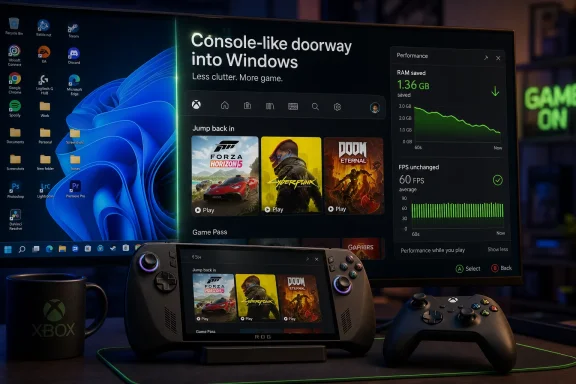 Microsoft Has Built a Console Doorway Into a Desktop House
Xbox Mode is not a new operating system. It is a new front door into Windows 11, designed to make a PC behave more like a console when the user wants to play games rather than manage windows, tray icons, launchers, update prompts, and background clutter. The feature, previously discussed as the Xbox full-screen experience, gives Windows a controller-friendly shell that foregrounds the Xbox app, game libraries, Game Bar, and switching between gaming experiences.That matters because Microsoft is trying to close one of the most persistent gaps between Windows PCs and dedicated consoles: the simple act of picking up a controller and getting into a game without wrestling the desktop. For years, Windows has had the software compatibility advantage, but not the appliance-like discipline of a console. Xbox Mode is Microsoft’s admission that “it runs Windows” is both the platform’s greatest strength and its most obvious liability.
The Linus Tech Tips test is important because it pokes directly at the expectation Microsoft has allowed to form around the feature. If Xbox Mode disables or delays some desktop components, if it trims startup activity, and if it frees memory, then many users assume it should also make games run faster. The test suggests that assumption is, at least for now, too simple.
In a gaming desktop with enough CPU, GPU, and memory headroom, reclaiming RAM does not automatically produce higher frame rates. Windows can be messy and still not be the bottleneck. That distinction is going to frustrate anyone hoping Xbox Mode would be a magic switch, but it is exactly the distinction Microsoft needs to confront if it wants this feature to become more than a full-screen launcher.
The Benchmark Result Is Less Damning Than It Looks, and More Revealing
The headline finding is easy to summarize: Xbox Mode used less RAM, but the games did not meaningfully run faster. In Forza Horizon 5 at 1080p with maximum graphics settings and upscaling disabled, the frame rates were effectively the same between the standard Windows 11 desktop and Xbox Mode. At 1440p, the same pattern held. Cyberpunk 2077 and Doom: The Dark Ages reportedly showed either no meaningful gap or differences small enough to be invisible during normal play.That result will disappoint anyone who hoped Microsoft had quietly found two or three free performance tiers hidden inside Windows services. But the test does not prove Xbox Mode is useless. It proves something narrower and more technically plausible: on the tested hardware, in the tested games, the bottleneck was not the set of desktop processes Xbox Mode reduced.
This is where the argument around Windows “bloat” often gets sloppy. A background process consuming memory at idle is not the same as a background process actively stealing frame time from a game. RAM usage looks bad in screenshots because it is easy to measure, but modern operating systems aggressively cache, preload, suspend, and reclaim memory. Free memory is not always wasted memory, and used memory is not always stolen performance.
The more interesting part of the test is that Xbox Mode appears to do what Microsoft said it would do: reduce the amount of general desktop baggage present during a gaming session. That is a platform hygiene improvement. It may help low-memory devices, handhelds, shared-memory graphics systems, and machines with aggressive OEM utilities. But on a well-provisioned PC running a GPU-bound game, it may simply make Task Manager look cleaner without changing the frame counter.
Microsoft’s Real Rival Is Not the Frame Counter, It Is Friction
The comparison with Valve’s SteamOS is unavoidable, but it is often framed too narrowly. SteamOS is not threatening Windows because it always wins every benchmark. It is threatening Windows because it makes a handheld gaming PC feel like a coherent product rather than a clever compromise.Steam Deck succeeded by hiding the computer at the moments when the user did not want a computer. It boots into a game-first interface. It resumes smoothly. It exposes compatibility layers when necessary but does not force the desktop metaphor into every interaction. It makes Linux, of all things, feel less fiddly than Windows on a couch or handheld.
That is the context in which Xbox Mode should be judged. Microsoft is not merely chasing five extra frames per second in Forza. It is trying to make Windows credible on devices where the desktop is an obstacle: handhelds, living-room PCs, docked gaming tablets, and eventually perhaps whatever hybrid Xbox-PC hardware strategy the company pursues next.
On those devices, the user experience problem and the resource problem overlap. A handheld with 16GB of shared memory, a modest APU, limited power budget, and a small display is much less forgiving than a tower PC with a discrete graphics card. A few hundred megabytes here, a few startup services there, a launcher left in the background, an overlay misbehaving after resume — these can matter more when the device is thermally and electrically constrained.
That is why the Linus Tech Tips result should not be read as “Xbox Mode failed.” It should be read as “Xbox Mode is not yet a performance mode in the way gamers imagined.” It is closer to a discipline layer, an attempt to make Windows behave less like a multitasking office workstation during play. That is valuable, but Microsoft has to be careful about letting the market believe discipline is the same thing as speed.
RAM Savings Are the First Step, Not the Prize
The memory reduction is the clearest win. Xbox Mode can trim the Windows session by avoiding or delaying parts of the normal desktop experience, which can leave more RAM available for games. That is a sensible engineering direction, especially as modern games grow larger, shader pipelines become more complex, and PC launchers multiply like weeds.But memory savings have diminishing returns. If a system has enough RAM for the game, the OS, the driver stack, the launcher, and the usual background tasks, then freeing additional memory may not improve average frame rate at all. It might help with stutter, asset streaming, resume behavior, or worst-case lows in specific scenarios, but those are harder to capture than a simple average FPS chart.
This is where Xbox Mode’s future will likely be decided. If Microsoft wants the feature to matter to enthusiasts, it needs to show improvements in the metrics that actually hurt: one-percent lows, shader compilation stutter, inconsistent frame pacing, resume failures, battery drain, and launcher overhead. Average FPS is the bluntest instrument in the room. It is also the one gamers understand fastest.
The current test suggests Microsoft has trimmed visible fat without yet changing the metabolic rate. That is still useful, but it is not a revolution. A cleaner gaming shell is welcome; a cleaner gaming shell that also reduces stutter, improves suspend-resume, and makes handheld battery life less chaotic would be a platform shift.
Microsoft should be judged against the second standard, not the first. The company has spent years telling developers and players that Windows is the center of PC gaming. If that is true, then Windows has to become better at behaving like a gaming runtime when games are the only thing the user cares about.
The Desktop Is Still Winning Inside Xbox Mode
The central problem is architectural. Xbox Mode may look like a console interface, but it still sits on top of Windows. That means the Win32 universe remains underneath it, with its drivers, services, update machinery, security model, overlays, input layers, vendor utilities, and storefronts. Microsoft can hide the desktop; it cannot wish away the ecosystem that made Windows dominant.That ecosystem is why Windows remains the default choice for PC gaming. It runs the games. It runs the launchers. It runs the anti-cheat systems. It supports the obscure peripherals, RGB software, capture tools, mod managers, Discord overlays, GPU tuning apps, and old executables that define PC gaming as a culture rather than just a catalog. SteamOS has made astonishing progress, but Windows still owns the compatibility argument.
Yet that same openness is also why Windows feels heavy. Every OEM wants a resident service. Every peripheral vendor wants an updater. Every game launcher wants to start with the system. Every overlay wants a hook. Every security product wants to inspect the world. By the time the player launches a game, Windows may be carrying a decade of accumulated assumptions about multitasking, notifications, telemetry, indexing, cloud sync, and enterprise manageability.
Xbox Mode is Microsoft trying to impose a gaming posture on that chaos. The question is whether a posture is enough. If the desktop session is still fundamentally alive underneath, then Xbox Mode may remain a better interface rather than a substantially different runtime.
That does not make it pointless. It makes it politically and technically difficult. Microsoft has to improve gaming performance without breaking the Windows compatibility model that made Windows indispensable. Valve, by contrast, can make sharper tradeoffs because SteamOS is designed around a narrower idea of what the device is for.
Valve’s Advantage Is Coherence, Not Just Linux
SteamOS benefits from being opinionated. It does not need to be the best environment for spreadsheets, domain management, Adobe workflows, enterprise VPN clients, and obscure USB devices. It needs to be excellent at making a Steam library feel native on a handheld. That narrower mission gives Valve permission to simplify.Microsoft rarely has that luxury. Windows 11 has to serve gamers, accountants, developers, schools, hospitals, call centers, government agencies, creators, and OEM partners. A Windows gaming feature that disables too much risks breaking the very assumptions users and developers depend on. A Windows gaming feature that disables too little risks becoming cosmetic.
That tension is visible in Xbox Mode. The feature wants to say, “This is your console now.” But the platform underneath still says, “This is a PC, and anything might be installed.” The result is a compromise: a console-like surface over a desktop-class operating system.
Valve’s challenge is different. SteamOS must keep expanding compatibility, especially around multiplayer anti-cheat and non-Steam storefronts. The more games and services work without user intervention, the more credible Linux becomes as a default gaming environment. Every anti-cheat holdout and launcher problem still pushes users back toward Windows.
But Microsoft should not take comfort in that. Compatibility moats erode slowly, then suddenly feel less decisive. Proton and the broader Linux gaming stack have already moved the conversation from “Can Linux run games?” to “Which games still do not run well?” That is a radically different competitive landscape from a decade ago.
The Handheld PC Is the Battlefield Microsoft Cannot Ignore
Xbox Mode makes the most sense on handhelds. A full Windows desktop on a seven- or eight-inch screen is powerful in the abstract and irritating in practice. Touch targets are small, controller navigation is inconsistent, sleep behavior can be unpredictable, and desktop pop-ups feel absurd when the device is supposed to act like a portable console.This is where shaving memory may matter more than desktop tests suggest. Handheld gaming PCs often use integrated graphics that share system memory. They operate within tight thermal envelopes. They depend on careful power management. They are more likely to expose the cost of background tasks because there is less spare capacity to absorb them.
If Xbox Mode can make Windows handhelds boot into a controller-first environment, reduce startup clutter, keep launchers under control, and improve suspend-resume reliability, it can improve the product even without raising average FPS. The user may not care whether Cyberpunk runs three frames faster if the device feels more console-like every time it wakes.
Still, Microsoft cannot stop there. The handheld market has taught users to value the entire session: pick up, resume, play, suspend, charge, update, and return later. Windows is still too often optimized around “the game runs once launched,” while SteamOS is optimized around “the device exists to play games.” Xbox Mode is the bridge between those philosophies, but a bridge is not a destination.
The danger for Microsoft is that OEMs will ship more handhelds that advertise Xbox Mode as the Windows answer to SteamOS, only for buyers to discover that the answer is mostly a launcher with some background trimming. That would make the feature feel over-marketed before it has matured.
Average FPS Is the Wrong Place to Declare Victory
The obsession with frame rates is understandable. FPS is easy to chart, easy to argue over, and easy to turn into a headline. But a gaming operating system succeeds or fails in more dimensions than average performance.Frame pacing often matters more than average frame rate. A game that averages 90 FPS but stutters during traversal can feel worse than one locked smoothly at 60. Shader compilation behavior, storage streaming, driver scheduling, overlay conflicts, and background CPU spikes can all shape the experience without showing up cleanly in a simple benchmark.
Xbox Mode’s promise should be measured against those pain points. Does it reduce the number of background wakeups? Does it prevent storefronts from updating during play? Does it tame notification interruptions? Does it improve the reliability of controller focus? Does it reduce post-resume weirdness? Does it make low-memory systems less prone to hitching?
Those are less glamorous questions, but they are more important. If Xbox Mode is only judged by whether a high-end desktop gains average FPS in three or four games, the feature will look smaller than it may become. If Microsoft cannot show progress on the experiential metrics, however, then the feature really will be smaller than the company needs it to be.
The smartest version of Xbox Mode would not promise miracles. It would promise predictability. For PC gamers, especially those on handhelds and living-room systems, predictability may be the more valuable commodity.
Microsoft Must Decide Whether Xbox Mode Is a Shell or a Strategy
Right now, Xbox Mode sits awkwardly between interface feature and platform strategy. As an interface feature, it is easy to understand: make Windows friendlier with a controller, center the game library, and reduce some background activity. As a platform strategy, it has to do much more: reshape Windows into a credible gaming-first environment that can compete with SteamOS on handhelds and perhaps support Microsoft’s broader Xbox hardware ambitions.That second goal demands deeper integration. Microsoft would need to coordinate the Xbox app, Game Bar, Windows Update, graphics drivers, power profiles, Store services, third-party launchers, DirectStorage, shader handling, AutoSR-style features, and security boundaries into something that behaves like one system. That is much harder than launching a full-screen UI.
It also requires messaging discipline. Microsoft should avoid implying that Xbox Mode is a universal performance booster unless it can back that up across diverse hardware and games. The feature’s early value is better framed as reduced friction and lower overhead. The performance gains, if they come, are likely to be conditional: more visible on constrained systems, less visible on desktops with abundant resources.
That distinction matters because PC gamers are unusually good at punishing vague claims. If a feature says “optimized,” they will benchmark it. If it says “performance,” they will measure it. If it says “console-like,” they will compare it to a console and to Steam Deck. Microsoft cannot win with vibes alone.
The better path is to be specific. Say which background tasks are reduced. Say how much memory is typically saved. Say which devices benefit most. Say whether the goal is average FPS, frame pacing, power draw, wake reliability, or controller usability. The more Xbox Mode becomes a measurable engineering project rather than a branding exercise, the more credibility it will earn.
The Early Verdict Leaves Microsoft With Homework, Not a Disaster
There is a temptation to turn this result into a binary verdict: Xbox Mode failed because FPS did not rise, or Xbox Mode succeeded because RAM use fell. Neither reading is sufficient. The real story is that Microsoft has delivered an early version of a necessary idea, and the first public testing suggests the idea is still ahead of the implementation.The company should not be embarrassed that memory savings did not automatically become higher frame rates. That is how computers work. It should be concerned, however, if users expected more because the broader Windows gaming narrative has been allowed to blur interface, optimization, and performance into one promise.
The practical lesson for users is simple: do not install or enable Xbox Mode expecting a guaranteed frame-rate upgrade on a conventional gaming PC. If your system already has enough RAM and your games are GPU-bound, you may see no visible performance difference. If you use a handheld, a low-memory laptop, or a system burdened by startup utilities, the feature may still improve the experience in ways that do not show up as average FPS.
For administrators and power users, Xbox Mode is also a sign of where Windows client design is heading. Microsoft is increasingly willing to create task-specific surfaces on top of Windows rather than asking every device to begin at the desktop. That is a major philosophical shift, even if this particular implementation remains immature.
The Numbers Say Less Than the Product Does
The immediate facts are concrete, but the implications are broader than one benchmark run. Xbox Mode is a useful experiment because it reveals what Microsoft thinks Windows gaming must become: less cluttered, more controller-native, more appliance-like, and more defensible against SteamOS.- Xbox Mode appears to reduce RAM usage compared with the standard Windows 11 desktop environment.
- Recent testing did not show a meaningful average frame-rate gain in Forza Horizon 5, Cyberpunk 2077, or Doom: The Dark Ages.
- The lack of FPS improvement does not prove the feature is useless, because memory savings may matter more on handhelds, low-memory systems, and shared-memory graphics devices.
- Microsoft’s biggest competitive challenge is not simply performance, but the smoother end-to-end gaming experience SteamOS provides on handheld hardware.
- Xbox Mode needs clearer messaging and deeper system-level optimization if it is going to be seen as more than a full-screen Xbox app with fewer background tasks.
Microsoft still owns the broadest PC gaming platform, and that is not changing overnight. But Windows dominance is no longer enough to end the argument. SteamOS has shown that gamers will accept a different compatibility model if the device feels better, behaves more consistently, and gets them into games with less friction. Xbox Mode is Microsoft’s answer, but the first serious performance look suggests it is still an opening move rather than a checkmate. The next versions need to prove that a console-style Windows can do more than save memory; they need to prove that Windows can finally get out of the gamer’s way.
References
- Primary source: 디지털투데이
Published: Fri, 19 Jun 2026 05:51:55 GMT
Windows 11 Xbox Mode cuts memory use but performance unchanged
Windows 11's Xbox Mode, a gaming-focused interface under development by Microsoft, reduced memory use in a recent comparison test but did not show a clear improvement in game performance. Linus Tech Tips tested two PCs with identical specifications, comparing the standard Windows 11 desktop...www.digitaltoday.co.kr - Related coverage: techradar.com
Microsoft still has an uphill battle against Valve's SteamOS — Windows 11's Xbox mode saves on RAM usage, but apparently doesn't help with gaming performance | TechRadar
And it still hasn't fully rolled out yet...www.techradar.com - Related coverage: notebookcheck.org
Según se informa, el modo Xbox de Windows 11 consume menos memoria RAM que la versión estándar de Windows 11, pero esto no se traduce en un mayor rendimiento en los juegos - NotebookCheck.org News
Los usuarios de Windows 11 ya pueden acceder directamente a un nuevo «modo Xbox». El modo Xbox sustituye la interfaz de usuario habitual de Windows 11 por una interfaz adaptada al mando que permite integrar varias tiendas de videojuegos, como Steam y Epic. El modo Xbox también libera algunos... www.notebookcheck.org
- Related coverage: techspot.com
Microsoft's full-screen Xbox experience is now available to Windows 11 Insiders | TechSpot
Microsoft recently announced a new Canary build within the Windows Insider Program. While not particularly groundbreaking in terms of features, Windows 11 Canary Build 29570.1000 does include...www.techspot.com - Related coverage: lttlabs.com
We Tried Xbox Mode | LTT Labs
Welcome to LTT Labs - your go-to destination for all things tech. Explore comprehensive test results, insightful commentary, and the latest analysis in hardware.www.lttlabs.com - Related coverage: windowscentral.com
“Xbox Mode is here”: Microsoft rolls out console-style experience on Windows 11, barely meeting its own deadline | Windows Central
Xbox Mode launches with support for aggregated game libraries, quick switching to desktop, and reduced background tasks to improve overall gaming performance.www.windowscentral.com
- Related coverage: guidingtech.com
Xbox Mode Is Coming to Your PC – Here’s What to Expect - Guiding Tech
Xbox PC Mode is a shell for Windows 11 that makes your PC behave more like a console. Here’s what it exactly does and how it works.www.guidingtech.com
- Related coverage: windowslatest.com
Tested: First look at the new Xbox Mode for Windows 11 PCs with console-style gaming UI
Microsoft confirms Xbox Mode for Windows 11 PCs coming in 2026, and I tested the new console-style gaming interface on a Windows PC www.windowslatest.com
- Related coverage: techrepublic.com
Microsoft Plans ‘Xbox Mode’ for Windows 11 PCs Starting in April
Microsoft says Xbox mode is coming to Windows 11 in April, bringing a console-style interface, faster game loading tools, and a unified PC strategy.www.techrepublic.com
- Related coverage: gamespot.com
Xbox Mode, Formerly Xbox Full Screen Experience, Finally Launches On Windows 11 In April - GameSpot
Xbox Mode, formerly known as Xbox Fullscreen Experience, will start shipping on Windows 11 in April.www.gamespot.com - Related coverage: allthings.how
Xbox FSE (Full Screen Experience) on Windows 11: Setup, controls, and performance
Learn how the Xbox full screen experience works on handhelds and PCs, how to turn it on, and what to expect day to day.allthings.how - Related coverage: signal65.com
