

Microsoft’s latest guidance for Windows 11 gaming rigs reframes what “modern” means for PC players: the company has published a clear, practical set of hardware targets that map entry-level, mid-range, and high-end machines to real-world play (1080p, 1440p, and 4K/ultra). The guidance is framed as performance targets rather than hard compatibility gates, but it’s tightly coupled to Windows 11 features—DirectStorage, modern DirectX shader models, and the new handheld/console‑style experiences Microsoft is pushing—so the recommendations also double as an upgrade roadmap for anyone building or refreshing a PC this year.
Microsoft’s public materials on gaming and Windows 11 have converged around two ideas: first, platform-level features (DirectStorage, improved scheduler/power behavior for handhelds, the Xbox Full Screen Experience) materially change the way modern games perform; and second, developers and Microsoft are increasingly treating Windows 11 as the baseline for those benefits. The Windows 11 system requirements page explicitly links DirectStorage to NVMe storage and modern DirectX GPU capabilities, making storage and GPU selection central to the performance story. At the same time, recent publisher and industry guidance has standardized on three practical tiers for gamers—entry / playable, mid-range / comfortable (60 FPS), and high-end / competitive or 4K—and Microsoft’s hardware guidance mirrors that approach with recommended CPU, GPU, display and storage pairings meant to deliver consistent experiences at each target. Multiple outlets and community summaries have repeatedly reported the same tiered format and practical recommendations.
At the same time, the shift toward Windows 11 as the normative baseline and the growing use of firmware‑level attestation for anti‑cheat create real compatibility and upgrade friction for some users. For many, the decision is straightforward: upgrade components (or buy new) and take the platform benefits. For others—especially multi‑boot, Linux enthusiasts, or owners of older-but-capable hardware—the path forward will require compromises or workarounds.
Overall, the guidance is constructive: it clarifies expectations, points players at the parts that matter (GPU + NVMe + 16 GB RAM baseline), and ties hardware choices to measurable play outcomes (1080p/60, 1440p/144, 4K/60). But it also highlights the reality of modern PC gaming: the convenience of platform-level speed and fidelity increasingly depends on a coordinated stack—OS, storage, GPU, drivers, and sometimes OEMs. Plan upgrades accordingly, and if you value future-proofing, prioritize NVMe boot/game drives, 16–32 GB dual‑channel RAM, and a GPU matched to your monitor’s refresh/resolution target.
(Important: some SKU‑level recommendations reported in press summaries are illustrative and can change as Microsoft and game publishers refine guidance; treat model examples as class markers rather than immutable compatibility gates.
Source: Windows Report Microsoft Publishes New Windows 11 Gaming Requirements for Modern PCs
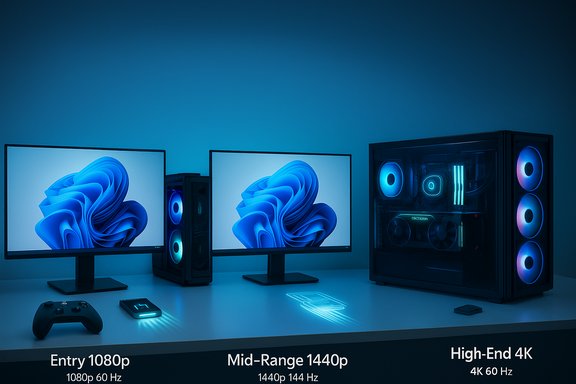 Background / Overview
Microsoft’s public materials on gaming and Windows 11 have converged around two ideas: first, platform-level features (DirectStorage, improved scheduler/power behavior for handhelds, the Xbox Full Screen Experience) materially change the way modern games perform; and second, developers and Microsoft are increasingly treating Windows 11 as the baseline for those benefits. The Windows 11 system requirements page explicitly links DirectStorage to NVMe storage and modern DirectX GPU capabilities, making storage and GPU selection central to the performance story. At the same time, recent publisher and industry guidance has standardized on three practical tiers for gamers—entry / playable, mid-range / comfortable (60 FPS), and high-end / competitive or 4K—and Microsoft’s hardware guidance mirrors that approach with recommended CPU, GPU, display and storage pairings meant to deliver consistent experiences at each target. Multiple outlets and community summaries have repeatedly reported the same tiered format and practical recommendations.What Microsoft (and the coverage) recommends: the practical targets
Microsoft’s high‑level guidance — as reported and summarized by industry coverage — organises expected hardware into three buckets. These are performance targets you should aim for depending on which resolution and frame‑rate envelope you want to hit.Entry level — solid 1080p play
- Typical CPU suggestion: modern 4‑core parts such as AMD Ryzen 5 5600 or Intel Core i5‑12400.
- Typical GPU suggestion: cards in the GTX 1660 Super to Radeon RX 6600 class.
- Practical outcome: smooth 1080p gaming with reasonable settings; a few compromises on highest texture pools or ray tracing.
This tier is targeted at players who want reliable 1080p results without the expense of current‑generation flagship silicon. The public summaries framing these targets treat the CPU/GPU SKUs as representative of class performance rather than a rigid list.
Mid range — 1080p high / 1440p capable
- CPU guidance: 6‑core parts such as Ryzen 5 7600 or Intel Core i5‑13600K.
- GPU guidance: NVIDIA RTX 3060 Ti, RTX 4060 Ti, or AMD Radeon RX 6700 XT.
- Practical outcome: high quality 1080p at stable 60+ FPS, comfortable 1440p play with upscaling or tuned settings.
This tier is Microsoft’s practical sweet spot — a balance of price and longevity for most players who want high‑quality visuals at mainstream resolutions.
High end / 4K and competitive
- CPU guidance: at least eight cores—examples given are Ryzen 7 7800X3D and Intel Core i7‑13700K.
- GPU guidance: NVIDIA RTX 4080 or AMD Radeon RX 7900 XTX (or equivalent).
- Practical outcome: native 4K/60 or 1440p at very high refresh rates; ideal for content creators, streamers, or players who demand maximum fidelity.
If 4K, ray tracing, and high refresh competitive play are your objectives, this is the box to check—expect high power draw, noise budgets, and a need for strong cooling and PSU overhead.
Displays and responsiveness: refresh rates, response times, panel tech
Microsoft’s materials and the reporting that distilled them stress that display choice matters for perceived smoothness and competitive responsiveness:- Refresh rate: the guidance suggests 144 Hz as a strong baseline for modern gaming; competitive players benefit from 165–240 Hz panels for the smoothest motion and lowest input latency.
- Response time: aim for 1–3 ms GtG/MPRT where possible to reduce ghosting and motion blur.
- Panel tech:
- IPS for color accuracy and wide viewing angles.
- VA for deeper contrast and cheaper high‑contrast panels.
- OLED / WOLED / QD‑OLED for the best contrast and near‑instant response, at a premium and with burn‑in considerations on long workloads.
Those display recommendations are the practical translation of what players actually perceive: refresh rate and response time matter for fluid motion and competitive feel, while panel type affects image quality and HDR performance. Note that Microsoft’s push around handhelds and the Full Screen Experience amplifies the need for OEMs to balance refresh, battery, and thermals on small devices.
Memory, storage, and why NVMe + DirectStorage matters
- Memory: 16 GB is called out as sufficient for most modern games; 32 GB is recommended for heavy modding, content creation, or extensive background multitasking.
- Storage: Microsoft and the ecosystem recommend using NVMe SSDs, and many publishers suggest 1 TB as a practical starting point for modern game libraries (some titles still require substantially more for AAA installs).
- DirectStorage: Microsoft’s platform-level storage acceleration requires an NVMe SSD (using the standard NVM Express controller) and a DirectX12 GPU with Shader Model 6.0 support to unlock the asset streaming benefits. DirectStorage reduces CPU decompression overhead by letting the GPU and storage controller feed assets directly into GPU memory, which improves load times and reduces texture pop‑in.
- DirectStorage is an OS/driver/hardware stack: your drive, controller driver, GPU, and the game itself must all support the feature to see the benefits.
- While early iterations of the requirement mentioned a 1 TB minimum for NVMe, Microsoft updated the guidance to remove a hard capacity floor—NVMe presence and proper controller/driver support matter more than an absolute capacity number. That nuance matters when planning upgrades.
Handhelds, the Xbox Full Screen Experience, and ARM support
Microsoft’s 2025 gaming push explicitly covers handheld devices and improved ARM support:- The Xbox Full Screen Experience (FSE) is a controller‑first, full‑screen session posture layered on top of Windows 11 to reduce desktop overhead and make handheld Windows PCs feel more console-like. Early OEM partners include ASUS (ROG Xbox Ally family), MSI (preview), and other handheld makers; Microsoft is rolling FSE out in staged Insider/OEM previews. FSE trims background services and prioritizes a game-focused shell to improve responsiveness on thermally limited devices.
- ARM and NPU-enabled devices: Microsoft is investing in Auto Super Resolution and optimized shader delivery on devices with NPUs (Copilot+ PCs) to upscale effectively and accelerate AI-driven image improvements on Windows 11. This expands the practical viability of ARM-based Windows handheld devices for playable experiences, especially when paired with Microsoft’s cross‑stack scheduler and thermal tuning.
Strengths of Microsoft’s approach
- Practical, tiered guidance. Translating hardware into performance targets is more useful than abstract minimums. Players can choose the experience they want (1080p/60, 1440p/144, 4K/60) and buy toward that goal.
- Platform-level performance wins. DirectStorage, Advanced Shader Delivery (precompiled shader bundles), and FSE are changes that reduce “first‑run hitches”, I/O stalls, and background noise that historically hurt PC play. These are OS-level improvements that benefit many titles at once.
- Clarity for upgrade planning. By pairing concrete CPU/GPU examples with storage and display advice, Microsoft’s guidance (as reported) makes it easier to plan balanced upgrades instead of chasing a single part.
- Handheld friendliness. FSE and scheduler/power tuning acknowledge the rise of handheld Windows gaming devices and aim to make the user experience consistent across desktops, laptops, and pocket devices.
Key risks and trade-offs
- Windows 11 dependency and compatibility friction. Many publishers and Microsoft itself treat Windows 11 as the baseline for next‑gen features. That’s technically sensible, but it creates compatibility friction for users on Windows 10 or older motherboards without TPM/UEFI features. Expect some players to face required firmware changes (enable fTPM/PTT, convert MBR→GPT) or hardware replacement.
- Anti‑cheat and firmware attestations. Recent game launches have required TPM 2.0 and UEFI Secure Boot for anti‑cheat attestation; that raises the bar for older hardware and complicates multi‑boot or Linux/Proton users who need to play modern multiplayer. This is a security benefit but a compatibility cost.
- Cost and thermals. Moving to the mid/high tiers (RTX 40‑series, RX 7000‑series, Zen4/X3D CPUs) means higher power and cooling requirements, and a higher entry cost for truly comfortable 1440p/4K play. Small form factor and handheld enthusiasts will need to balance thermals, noise and battery life aggressively.
- Unverified SKU lists vs. classes. The CPU/GPU model names that populate guideposts are illustrative. Microsoft and publishers often cite SKU examples to show class performance—not to create a definitive compatibility blacklist. Treat SKU lists as representative rather than absolute. If a publisher or Microsoft later formalises exact SKU gates, that would be a different (and stricter) matter.
Practical upgrade checklist (for readers who want the fastest path to a modern Windows 11 gaming rig)
- Verify OS and firmware:
- Run the PC Health Check or check Settings → System → About to confirm Windows 11 readiness.
- In Windows, run tpm.msc to confirm TPM version and msinfo32 to ensure UEFI + Secure Boot if you intend to run titles that enforce firmware attestation.
- Prioritise a balanced GPU/CPU pairing:
- For 1080p: a modern 4‑core/6‑thread CPU and a midrange GPU (GTX 1660 class or RX 6600) are sufficient.
- For 1440p / high settings: aim for a 6‑core+ CPU and an RTX 3060 Ti / RX 6700 XT class card.
- For 4K/competitive: invest in an 8‑core+ CPU and an RTX 4080 / RX 7900 XTX class GPU.
- Choose NVMe storage:
- Use an NVMe SSD for the OS and your largest / most‑played game installs to unlock DirectStorage benefits; 1 TB is a practical starting point for many libraries. Confirm that the drive uses the standard Microsoft NVMe controller if required by specific vendor guidance.
- Right‑size RAM:
- 16 GB dual‑channel is the baseline. Use 32 GB if you stream, heavily mod, or do parallel content work.
- Pick a display that matches your GPU:
- Match refresh rate and resolution to expected FPS (e.g., 144 Hz for high‑FPS 1080p builds, 120–144 Hz 1440p for mid/high builds, 120 Hz+ 4K for flagship cards); favour IPS for color or OLED for contrast where budgets allow.
- Test and update drivers/firmware:
- Keep GPU drivers, motherboard BIOS, and SSD firmware current; follow vendor guidance where publishers list recommended driver builds at launch.
Cost and upgrade economics (brief, practical view)
- Entry‑level modern rigs (CPU ~i5/Ryzen 5 non‑X, GPU ~RX 6600/GTX 1660 Super, 16 GB RAM, 1 TB NVMe, 600W PSU) are typically a reasonable investment versus buying last‑generation flagship cards at inflated prices.
- Mid‑range builds that hit 1440p/60+ will often be a step up in cost but provide the best long‑term value for most gamers—expect GPU and CPU to represent >60% of the cost.
- High‑end 4K/competitive rigs (RTX 4080 / 7900 XTX + 7800X3D/i7‑13700K + 32 GB + high‑end NVMe + 850W+/AIO cooling) push into premium pricing—including PSU, cooling and case—and are the least cost‑efficient for raw FPS per dollar but essential for top‑tier fidelity.
How publishers, Microsoft, and players should behave next
- Publishers: clearly label which Windows features (DirectStorage, required driver builds, required firmware attestation) are essential vs. optional in their system sheets. That transparency reduces day‑one confusion.
- Microsoft: continue publishing precise, testable hardware/driver guidance for platform features (DirectStorage controller/driver specifics, FSE availability by OEM/device), and maintain a clear compatibility page for handheld/OEM gating.
- PC builders and upgradeers: target classes not exact SKUs; verify whether a publisher enforces an OS or firmware gate and plan for the extra steps (enable TPM, update BIOS, convert disk to GPT) before launch day.
Final assessment — what this means for Windows gamers
Microsoft’s updated, tiered guidance is a useful, actionable reckoning of where PC gaming stands in 2025: modern features like DirectStorage and shader delivery produce measurable benefits, but only when the whole stack (OS, storage, GPU, drivers) lines up. The recommendations are pragmatic and reflect real‑world performance envelopes—builds should be designed to hit a performance target, not just match a checklist of parts. That advice helps buyers choose balanced systems instead of chasing headline parts.At the same time, the shift toward Windows 11 as the normative baseline and the growing use of firmware‑level attestation for anti‑cheat create real compatibility and upgrade friction for some users. For many, the decision is straightforward: upgrade components (or buy new) and take the platform benefits. For others—especially multi‑boot, Linux enthusiasts, or owners of older-but-capable hardware—the path forward will require compromises or workarounds.
Overall, the guidance is constructive: it clarifies expectations, points players at the parts that matter (GPU + NVMe + 16 GB RAM baseline), and ties hardware choices to measurable play outcomes (1080p/60, 1440p/144, 4K/60). But it also highlights the reality of modern PC gaming: the convenience of platform-level speed and fidelity increasingly depends on a coordinated stack—OS, storage, GPU, drivers, and sometimes OEMs. Plan upgrades accordingly, and if you value future-proofing, prioritize NVMe boot/game drives, 16–32 GB dual‑channel RAM, and a GPU matched to your monitor’s refresh/resolution target.
(Important: some SKU‑level recommendations reported in press summaries are illustrative and can change as Microsoft and game publishers refine guidance; treat model examples as class markers rather than immutable compatibility gates.
Source: Windows Report Microsoft Publishes New Windows 11 Gaming Requirements for Modern PCs
