

Microsoft’s Windows 11 is quietly preparing to add system-level haptic feedback — a new “Haptic signals” setting has appeared as a hidden UI stub in recent Insider preview builds, promising subtle vibrations when you snap windows, align objects, drag between panes, and perform other small UI actions. This is more than a cosmetic flourish: the OS-side controls, coupled with Microsoft’s existing haptics APIs and vendor hardware, signal a deliberate effort to treat tactile output as a first‑class feedback channel across pens, touchpads, and capable mice.
Windows already includes platform plumbing for haptic devices. Microsoft’s developer documentation defines device classes, HID descriptors, and the SimpleHapticsController model that allows hosts and devices to exchange waveform lists, intensity parameters, and feature reports. That same documentation underpins the difference between device‑initiated haptics (the device triggers its own vibrations) and host‑initiated haptics (the OS or app tells the device to play specific waveforms). The company also published a Haptic Pen Implementation Guide and a Haptic Touchpad Implementation Guide that explain the required HID semantics and feature reports for compliant peripherals. What’s new: an explicit Settings surface for “Haptic signals” has been found inside Windows 11 Insider Preview builds (reported around build 26220.x / KB5070300). The UI strings describe a toggle and an intensity slider, and sample copy reads, in essence, “Feel subtle vibrations when you snap windows, align objects, and more.” The control appears under Bluetooth & devices → Touchpad / Mouse in Settings, but it is currently hidden by default, hardware‑gated, and not yet broadly functional for many Insiders. Community sleuths discovered the strings; outlets and forums mirrored the find and dissected the implications.
Key benefits:
For users who already enjoy high‑quality haptic trackpads or haptic peripherals, a system‑level contract could be a big win — offering silent confirmation, improved accessibility, and a more tactile desktop. For the broader Windows ecosystem, success will hinge on vendor cooperation and solid driver engineering. Until the feature is broadly enabled and validated by hands‑on reviews and OEM driver support, the Settings entry remains a cautious but promising preview of a more tactile Windows.
Conclusion
Microsoft’s quiet move to surface haptic controls in Settings signals intention, not immediate ubiquity: the OS is preparing the plumbing that will let pens, precision touchpads, and vibration‑capable mice deliver short, meaningful tactile cues for UI events. The technical foundation is already present in Microsoft’s docs; the missing pieces are vendor firmware and drivers, plus careful UX and privacy guardrails. If Microsoft and hardware partners get the tuning and rollout strategy right, system haptics could become one of the most palpable — and pleasantly surprising — refinements to the Windows desktop in years.
Source: Pocket-lint Microsoft is getting serious about haptics in Windows 11, and I’m on board
 Background / Overview
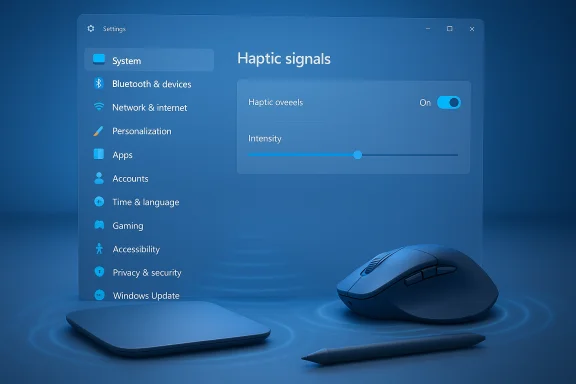
Windows already includes platform plumbing for haptic devices. Microsoft’s developer documentation defines device classes, HID descriptors, and the SimpleHapticsController model that allows hosts and devices to exchange waveform lists, intensity parameters, and feature reports. That same documentation underpins the difference between device‑initiated haptics (the device triggers its own vibrations) and host‑initiated haptics (the OS or app tells the device to play specific waveforms). The company also published a Haptic Pen Implementation Guide and a Haptic Touchpad Implementation Guide that explain the required HID semantics and feature reports for compliant peripherals. What’s new: an explicit Settings surface for “Haptic signals” has been found inside Windows 11 Insider Preview builds (reported around build 26220.x / KB5070300). The UI strings describe a toggle and an intensity slider, and sample copy reads, in essence, “Feel subtle vibrations when you snap windows, align objects, and more.” The control appears under Bluetooth & devices → Touchpad / Mouse in Settings, but it is currently hidden by default, hardware‑gated, and not yet broadly functional for many Insiders. Community sleuths discovered the strings; outlets and forums mirrored the find and dissected the implications. What surfaced in Insider builds
The visible UI fragments
- A global Haptic signals toggle (on/off) exposed in Settings.
- A Signal intensity slider allowing users to tune vibration strength.
- Apparent separation between haptic clicks (the tactile “click” on a haptic touchpad) and haptic signals (event-driven pulses tied to UI actions).
Build context and Microsoft confirmation (partial)
The new strings were observed around Windows 11 Insider Preview Build 26220.x (delivered with KB5070300 in Dev and Beta channels). While the Settings stub itself is a community discovery, Microsoft’s official Insider release notes for recent builds explicitly mention another haptics area: pens that support haptic feedback will now deliver tactile responses for certain UI interactions (for example, hovering over close buttons or snapping/resizing windows). That official mention confirms Microsoft is actively expanding system-level haptics across input classes.Why this matters: the UX case for system haptics
Haptic feedback is a low‑attention, non‑visual confirmation channel that has proven value on mobile devices and in gaming controllers. Translating that to the desktop gives Windows an additional sensory cue for micro‑interactions that are otherwise only visually indicated.Key benefits:
- Immediate, silent confirmation — short pulses can confirm snap, alignment, or drag completion without popping up dialogs or making sounds.
- Perceived polish — well‑tuned micro‑vibrations make interactions feel snappy and intentional, increasing perceived responsiveness.
- Accessibility — tactile cues supplement visual and audio channels for users with low vision or attention differences.
- Platform consistency — an OS‑level setting and APIs reduces vendor fragmentation by creating a canonical contract for haptic events.
The technical underpinnings: how host‑initiated haptics work
Microsoft’s implementation model separates two modes:- Device‑initiated haptics: the peripheral detects an event (e.g., press/release) and triggers its own waveform. This is common for haptic “click” simulation on many precision trackpads.
- Host‑initiated haptics: the OS issues a request (via standard reports in the HID layer) to play a named waveform at a specified intensity and duration; the device exposes which waveforms it supports via GET_FEATURE reports and then accepts host output reports to trigger them.
Hardware ecosystem: who’s ready and who’s not
- Built‑in haptic touchpads (Surface, high‑end OEMs): Microsoft’s Surface family has shipped precision haptic touchpads for multiple generations, and many premium laptops from other OEMs now include solid‑state haptics. Those devices are the natural first targets for an OS‑level waves + intensity model.
- Haptic mice (Logitech et al.: Peripheral makers have started shipping mice with dedicated haptic actuators. Logitech’s MX Master 4 is a prominent example: it includes a “Haptic Sense” panel and exposes customizable haptic behavior through Logi Options+. The MX Master 4 and similarly capable peripherals could respond to OS requests if vendors expose the hooks required by the Windows haptics contract.
- Third‑party trackpads and accessories: As vendor products appear with haptic modules, those vendors will need to implement the HID descriptors and driver support Microsoft specifies. Until that happens, the Settings UI will remain a no‑op on many systems.
Strengths and opportunities
- Unified control surface: Users will benefit from a central place to manage haptics across input devices, avoiding fragmented vendor-only controls.
- Developer potential: App developers and creative tool vendors could map meaningful events (alignment snaps, task completion, tool switches) to tactile cues via standardized APIs.
- Accessibility gains: With per‑app or per‑event opt-outs and intensity tuning, haptics can augment accessibility features.
- Encourages hardware innovation: An OS-level contract can motivate peripheral makers to ship higher‑quality actuators and firmware that comply with host‑initiated waveform semantics.
Risks, pitfalls, and technical trade‑offs
- Fragmentation of feel: Two devices can both be “haptic” yet feel very different. Without careful vendor tuning and shared baseline waveforms, the same OS event might yield inconsistent sensations across devices. Microsoft’s guides mitigate this risk but cannot fully eliminate vendor variance.
- Power and noise: Actuators consume power and may make audible noise. Vendors will need to balance intensity with battery life and acoustic leakage, especially on lap use.
- Driver reliability: Haptics traverse firmware, driver, and OS stacks — failures can cause missing or spurious feedback. Early community reports show some intermittent issues on haptic devices historically; a system‑level rollout will require robust driver hardening.
- Privacy surface if calibration uses audio: There are patent and design proposals that discuss acoustic calibration (microphone‑based) to tune tactile output; any use of microphones for closed‑loop calibration raises privacy considerations and enterprise policy questions. Independent validation and clear privacy controls are necessary before such approaches roll out.
- Potential “UX creep”: Haptics are intimate. Unchecked or aggressive vibration patterns could annoy users if apps weaponize the channel for attention‑seeking notifications. A sensible platform policy (global toggle, app consent, sensible defaults) is required.
OEM, driver, and developer implications
For OEM engineering teams:- Implement the required HID SimpleHapticsController collections and feature reports per Microsoft’s guidance.
- Expose a reliable list of supported waveforms and intensity ranges.
- Test against thermal, power, and mechanical variability so vibration timing and amplitude remain consistent.
- Ensure low‑latency pathways for host‑initiated requests.
- Expose SET_FEATURE/GET_FEATURE reports for intensity and waveform enumeration.
- Harden code paths to prevent missed pulses and debounce artifacts.
- Map haptics to meaningful events only (completion, alignment, mode switches).
- Respect OS global settings and offer per‑app opt‑outs.
- Keep vibrations subtle by default and avoid repetitive or intrusive patterns.
Timeline, rollout, and how to test (practical notes)
- The Settings strings were discovered around Insider Preview Build 26220.x (KB5070300) and reported across several outlets and forums. The UI currently acts as a stub/plumbing rather than a broadly enabled, functional capability for most Insiders. Microsoft’s Insider releases often contain hidden UI surfaces that are gated via server‑side rollouts and dependent on OEM driver updates.
- Microsoft’s official Insider release notes did confirm haptic responses for pens in recent builds — explicitly calling out tactile responses for certain UI interactions — which strengthens the likelihood that the OS is committing to system-level haptics across input classes.
- Community tools such as ViVeTool have historically been used to reveal hidden UI strings, but forcing feature flags can be risky and often does not enable complete runtime support because firmware and drivers may be missing. Proceed with caution: do not enable experimental flags on production hardware without backups and understanding the risks.
- Confirm Windows Update shows the relevant Insider build (check Settings → Windows Update).
- Look under Settings → Bluetooth & devices → Touchpad (or Mouse) for a Haptic signals entry.
- If present and active, you’ll see a toggle and an intensity slider; if not present, the device likely lacks a haptic actuator or the feature remains gated.
What to watch next
- Insider builds: Watch Windows Insider release notes and Dev/Beta channel builds for the Haptic signals setting to transition from hidden stub to enabled experience.
- OEM driver updates: Firmware and driver changelogs from Surface, Dell, Lenovo, HP, and peripheral vendors will indicate when hardware is prepared to accept host‑initiated haptic calls.
- Documentation & privacy policies: If acoustic calibration or microphone use becomes part of the haptic story, Microsoft and OEMs must publish detailed privacy controls and opt‑out mechanisms.
- Independent reviews: Real‑world tests by reviewers and accessibility specialists will reveal whether the feature is genuinely helpful, consistent, and unobtrusive.
- Developer APIs and sample waveforms: Look for guidance and sample waveform libraries that app developers can use to deliver consistent sensations across devices.
Final analysis: promising, but hardware is the hard part
Microsoft’s emergence of a Haptic signals Settings surface represents a meaningful shift: the company is moving from device‑ and vendor‑level haptic support toward platform‑level coordination. The presence of UI plumbing in Insider builds, coupled with official notes about haptic pens and the established Windows haptics documentation, creates a credible path to a unified haptic experience for Windows input devices. However, the real value of system haptics depends on a chain of hardware, firmware, driver, and UX decisions outside the OS itself. Without consistent actuator quality, vendor adherence to the HID contract, and careful tuning, haptics risk being inconsistent, power‑hungry, or intrusive. Microsoft’s inclusion of a global toggle and intensity slider is a correct design decision that acknowledges these risks upfront.For users who already enjoy high‑quality haptic trackpads or haptic peripherals, a system‑level contract could be a big win — offering silent confirmation, improved accessibility, and a more tactile desktop. For the broader Windows ecosystem, success will hinge on vendor cooperation and solid driver engineering. Until the feature is broadly enabled and validated by hands‑on reviews and OEM driver support, the Settings entry remains a cautious but promising preview of a more tactile Windows.
Conclusion
Microsoft’s quiet move to surface haptic controls in Settings signals intention, not immediate ubiquity: the OS is preparing the plumbing that will let pens, precision touchpads, and vibration‑capable mice deliver short, meaningful tactile cues for UI events. The technical foundation is already present in Microsoft’s docs; the missing pieces are vendor firmware and drivers, plus careful UX and privacy guardrails. If Microsoft and hardware partners get the tuning and rollout strategy right, system haptics could become one of the most palpable — and pleasantly surprising — refinements to the Windows desktop in years.
Source: Pocket-lint Microsoft is getting serious about haptics in Windows 11, and I’m on board
