

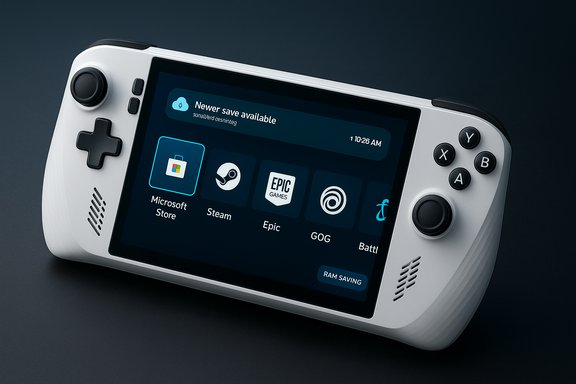
Microsoft’s quietly rolling update to Windows 11 Insider build 26220.7271 quietly fixes one of handheld gaming’s most nagging UX problems: you can now see whether your most recent save is already backed up to the cloud before you load a game.
Background
Microsoft introduced the Xbox Full‑Screen Experience (FSE) as a controller‑first, console‑style shell overlay for Windows 11 handhelds when the ROG Xbox Ally launched. The idea was simple: strip away the productivity parts of Windows that aren’t useful when you’re gaming on a small handheld screen, free up system resources, and give players a dashboard that aggregates games across storefronts and services. That approach has expanded beyond OEM‑specific hardware, and Microsoft has begun testing FSE more widely on Windows 11 through the Insider program. That larger rollout is arriving in the Windows Insider Preview Build 26220.7271, and with it Microsoft has added a deceptively small but meaningful piece of feedback: an at‑a‑glance cloud save status indicator in the Xbox full‑screen launcher. The change addresses a real-world pain point for anyone who plays a game across multiple devices — handheld to desktop, console to PC, or between two handhelds — and wants confidence that their latest session actually made it to the cloud.What changed in Build 26220.7271
A new cloud‑save status UI in Xbox FSE
Open a game’s page inside the Xbox Full‑Screen Experience and you’ll now see a small, explicit indicator showing whether the latest save is present in the cloud. If you’ve played on another device and a newer save exists online, the interface surfaces a clear note that a “newer save is available” and offers the user a chance to sync before launching. When you quit a game, the FSE also displays the exact upload time of the most recent cloud save so you can leave the session assured your progress is backed up. This is the feature that Build 26220.7271 brings to Insiders. The UI change isn’t limited to first‑party titles. The FSE aggregates games from multiple PC storefronts — Microsoft Store, Steam, Epic Games Store, GOG, Ubisoft, Battle.net — and presents them in a controller‑friendly catalogue, meaning cloud‑save visibility is available where the Xbox service holds or federates save metadata. That makes the feature broadly useful to players who keep libraries across launchers.Why this matters
The addition of an upload timestamp and “new save” flag targets the exact moment where players typically lose progress: switching devices mid‑session or powering down before the client completes an upload. Historically, there’s been no single, reliable place to check cloud sync status for Xbox network saves on PC; the new indicator reduces guessing and the manual ritual of leaving apps running “just in case.” For people who juggle handheld and desktop play, that clarity can prevent hours of lost progress and the associated frustration.Technical deep dive: how FSE helps games and where cloud saves fit
What FSE actually does under the hood
The Xbox Full‑Screen Experience is not merely a visual skin. When enabled, Windows suppresses the traditional Explorer shell and a range of background services that are irrelevant to a controller‑first gaming session. Microsoft’s testing shows this can free approximately 2GB of RAM on typical handheld configurations, which translates into more headroom for GPU drivers, shader caches, and game processes — a particularly meaningful gain on systems with 16GB of RAM or less. It also reduces idle power draw when the device sleeps, which helps battery life in handheld scenarios. The mode functions as a separate session environment: you can boot straight into the Xbox app as the “home” interface, use the controller to navigate, and switch back to the normal Windows desktop if necessary. Microsoft designed the FSE to be a focused, minimal environment optimized for touch and gamepad operation while keeping the underlying Windows capability and compatibility intact.Where cloud saves are stored and what that indicator can (and cannot) tell you
It’s important to understand what the FSE’s cloud save indicator actually surfaces. For games that use Xbox cloud saves (the save sync mechanism offered by Xbox Live services and PlayFab integrations), the launcher can query Xbox Live metadata and report whether the most recent upload timestamp on the network is newer than the local save timestamp. That’s why, for Xbox‑integrated titles or PlayFab‑backed save systems, the indicator can reliably say “new save available” or show a precise upload time after quitting. However, not every PC game uses Xbox cloud saves. Steam, Epic, GOG, Ubisoft, and other storefronts have their own save systems — some cloud‑backed, some local only. The Xbox FSE will only show network save status for titles where it can access or aggregate cloud metadata through the Xbox service or where the store exposes compatible hooks. That means players should not assume universal coverage: the indicator is valuable but not omnipotent. When a title relies solely on a developer’s custom cloud or local saves, the Xbox FSE may be blind to that state. This limitation is critical to understand to avoid misplaced trust.Compatibility and rollout details
- Availability: The FSE expansion and cloud‑save indicator are rolling out through the Windows Insider Preview Build 26220.7271 to Dev and Beta channel participants, phased across devices. Not every Insider will see it immediately; Microsoft is deploying the feature gradually.
- Supported devices: Initially targeted at handhelds (ROG Ally family, MSI Claw, Xbox Ally hardware), the FSE preview is also being extended to laptops, tablets, and desktops for Insiders to test. Ultimately, Microsoft intends the FSE to be available more broadly on Windows 11 devices.
- Store compatibility: The FSE integrates games from multiple storefronts into one launcher experience; however, cloud save visibility depends on the specific save backend used by each title. For Xbox‑backed titles and PlayFab integrations the new indicator will work as expected; for other store ecosystems it will work only where save metadata is available to the Xbox app.
How to try it (Insider path)
- Join the Xbox Insider Program and opt into the PC Gaming Preview via the Xbox Insider Hub.
- Join the Windows Insider Program and select the Beta or Dev channel.
- Update to the Windows Insider Preview Build 26220.7271 (or later).
- In Windows 11, go to Settings > Gaming > Full screen experience and enable the Xbox full‑screen experience (or choose it as the home app).
Practical benefits for handheld PC gamers
- Immediate visibility into cloud sync state reduces the risk of lost progress when switching devices or shutting down a session.
- The upload timestamp gives closure after a play session: you can confirm the save was uploaded before powering down or switching networks.
- The FSE’s memory and process suppression frees resources that are often scarce on handheld hardware, which can improve framerates and reduce stutters in memory‑hungry titles.
- Controller‑first navigation across multiple launchers makes the experience feel closer to a console dashboard, which helps handheld players who prefer not to use touch, mouse, or keyboard.
Critical analysis — strengths, caveats, and risks
Strengths
- Clarity and UX parity: Steam has long provided explicit cloud sync indicators; Xbox FSE catching up is a meaningful quality‑of‑life win. The upload timestamp is a small UI tweak with outsized user value.
- Performance wins on constrained hardware: Reclaiming ~2GB of RAM and trimming background activity matters on 8–16GB handhelds, and Microsoft’s telemetry suggests notable idle power savings when a device sleeps from FSE mode. That potentially extends usable battery life mid‑session.
- Unified launcher experience: Aggregating titles from multiple storefronts and surfacing cloud status centrally reduces friction in multi‑launcher libraries, which describes most PC‑handheld setups today.
Caveats and risks
- Not universal — be cautious with assumptions: The indicator only reports what the Xbox service can see. Games that use proprietary cloud systems or only local saves won’t show accurate status in the FSE. Assuming universal coverage risks data loss. This limitation should be made explicit to users; until it is, the UI could create a false sense of security for some games.
- Race conditions and conflict resolution: Cloud syncs are subject to timing and conflict rules. If you play on two devices simultaneously and both update saves before a full sync can occur, the launcher can alert you that there’s a newer remote save — but resolving conflicts still requires care. The indicator does not replace robust conflict resolution workflows; it only surfaces timestamps. Players should still confirm which save they want to keep when prompted.
- Partial rollout and QA: Features in Insider builds are preview releases and come with bugs. Early testers have reported spotty behavior and difficulty enabling FSE on some systems — Microsoft is still refining compatibility across OEM builds and third‑party launchers. Expect teething issues and don’t rely on preview builds for critical data until the feature is broadly released.
- Power state edge cases: If a handheld is configured to sleep aggressively on close or to cut network connections quickly when idle, uploads triggered at shutdown may fail. The FSE upload timestamp is only authoritative if the device had a stable network long enough to complete the transfer. Users should be trained to look for the upload confirmation before leaving a session, or configure their device to stay online briefly after quitting. Community reporting historically confirms this is a frequent source of lost saves.
- Privacy/telemetry considerations: Centralizing save‑status metadata and tighter Xbox app integration increases the surface of telemetry and cross‑service data. For most users this is unobjectionable, but privacy‑minded players should be aware that more metadata is being aggregated across launchers and devices. Microsoft’s official communications emphasize user control, but the combination of cross‑store aggregation and cloud services warrants scrutiny.
Flagging unverifiable claims
Multiple third‑party writeups and experimental reports claim the FSE will “magically” sync every store’s saves or that it resolves all cross‑device save problems. Those are overstatements. The presence of a cloud‑save indicator is verifiable in preview builds and has been confirmed by insiders and multiple coverage outlets, but assertions that the FSE universally alters how every third‑party launcher handles saves are not fully verifiable at this time. Where sources rely on early hands‑on tests or roadmap leaks, treat the cross‑store compatibility claim as progress toward a solution, not a completed guarantee.Best practices for players (how to avoid bad outcomes)
- Leave the game open and connected to the network for a minute after quitting to allow any pending upload to complete.
- Watch the new upload timestamp in the Xbox FSE after quitting; treat it as the canonical confirmation that the cloud has a copy.
- If you’re switching devices, open the target device’s Xbox FSE and check for the “newer save available” note before launching.
- For titles that don’t use Xbox cloud saves, maintain manual backups of save files when possible, or use third‑party sync tools if you depend on cross‑device continuity.
- Avoid playing the same save on two devices simultaneously until you’ve verified reliable sync behavior for that title; if you must, make explicit manual saves with versioned filenames.
Broader implications for the handheld PC ecosystem
Microsoft’s push with FSE is an attempt to close the usability gap between dedicated console ecosystems (where cloud saves, UI, and controller integration are solved problems) and the fragmentary PC landscape. A more polished, controller‑first Windows experience reduces the advantage that SteamOS and Linux‑centric handheld stacks held in the handheld niche and could make Windows more attractive for OEMs building gaming‑first hardware. The FSE’s memory savings and streamlined boot posture are also meaningful to OEM design decisions about RAM and thermals. For developers and platform partners, the FSE becomes another UX surface to respect: if studios implement or integrate with PlayFab Game Saves and Xbox services, their titles can gain visibility and smoother handoffs across devices. Microsoft’s recent developer tooling and PlayFab updates indicate investment in cross‑platform save services, which could reduce fragmentation over time — but adoption and integration will take months to years to mature across the entire PC catalog.How Microsoft’s move stacks up against the competition
- Steam’s desktop client long offered clear cloud sync indicators and conflict prompts; Microsoft’s update narrows that gap for titles that choose Xbox cloud services as their backend.
- Valve’s SteamOS remains attractive for users who want a baked‑in, console‑like frontend for PC games; Microsoft’s FSE brings a comparable console‑style shell to Windows, but with the advantage of broader PC compatibility and first‑party service integration. The two approaches will likely remain competitive rather than redundant.
- For cross‑platform play and cross‑save scenarios (PC ↔ console), Microsoft’s PlayFab and Xbox services are positioning themselves as a developer‑friendly way to synchronize progress across ecosystems; the FSE indicator is a user‑facing sign that the underlying service work is underway. Developers still need to opt‑in and implement appropriate save conflict rules.
What to watch next
- Broader rollout: Watch for the FSE and cloud‑save indicator to graduate from Insider preview to general availability across Windows 11 devices; this move will increase the feature’s real‑world reliability as a larger pool of devices receives it.
- Store integration and PlayFab adoption: Track developer adoption of PlayFab Game Saves and Xbox save APIs; greater adoption will expand the cloud‑save indicator’s coverage across the PC game catalogue.
- UX edge cases and community feedback: The Feedback Hub and Insiders channels will surface the most common failure modes (failed uploads, false positives, store compatibility gaps). Early reports and community threads will be useful for gauging the feature’s maturity and Microsoft’s responsiveness.
- Power management refinements: Microsoft and OEMs may tweak sleep and network behavior so uploads complete reliably even when devices go into low‑power states — an important follow‑up to the initial indicator rollout.
Conclusion
The new cloud‑save status indicator inside the Xbox Full‑Screen Experience may be a small UI tweak on the surface, but it addresses a disproportionately painful problem in handheld and cross‑device PC gaming: uncertainty about whether your progress is safe. Rolling this into the FSE — a mode that already frees memory and trims background processes to improve handheld performance — is a pragmatic way to make Windows 11 handheld gaming feel more dependable and console‑like. The feature isn’t a cure‑all: it depends on the save backends games use, and it arrives first as an Insider preview, so users should test it cautiously. Still, for anyone who switches between machines frequently, the ability to see a “new save available” message and confirm an upload timestamp will quickly feel indispensable.For players, the practical takeaway is simple: use the indicator as your confirmation tool, but also adopt careful session habits (wait for upload timestamps, avoid rapid sleep after quitting) until the feature reaches wide availability and cross‑store coverage improves. For Microsoft and developers, the work is only beginning — integrating save systems, reducing edge‑case failures, and ensuring consistent behavior across thousands of PC titles will take time. The direction, however, is unmistakably right: a more transparent, user‑friendly cloud save experience is one of those small product changes that meaningfully reduces anxiety and improves the day‑to‑day experience of PC handheld gaming.
Source: Gizchina.com Microsoft now let’s Windows 11 handhelds check cloud-save status
