

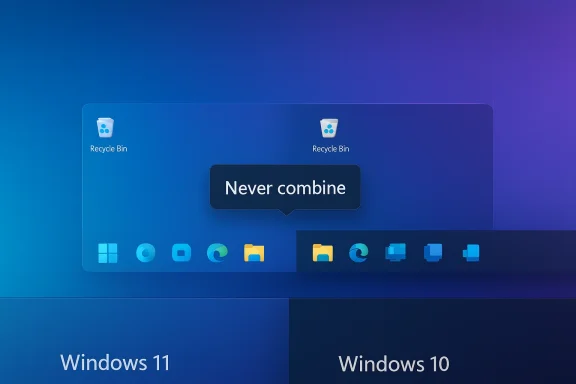
Microsoft appears to be quietly rewriting a stubborn chapter in its Windows migration story: Insider Preview builds are shipping an option to never combine taskbar buttons and to show labels, effectively restoring a core Windows 10 taskbar behavior that many users have long insisted was essential to their workflow. That change — simple in appearance but substantial in consequence — arrives at a moment of urgency: Windows 10 reached end of support on October 14, 2025, and Microsoft is racing to convert a sizeable installed base while avoiding the backlash that slowed Windows 11 adoption in earlier years.
But this is also a moment of accountability. Restoring a setting is corrective; preventing the problem in the first place would have been better. For Microsoft, the lesson is straightforward: build with user workflows in mind, validate major changes with the communities that rely on those workflows, and treat configurability as a first‑class product goal. For Windows 10 holdouts and IT decision‑makers, the new taskbar controls remove one valid upgrade objection — but they should still plan migrations around compatibility, security, and hardware realities, not aesthetic concessions alone.
Source: WebProNews Microsoft’s Olive Branch to Windows 10 Loyalists: How the Return of a Beloved Feature Could Reshape the Windows 11 Adoption Battle
 Background
The taskbar that split a user base
When Windows 11 debuted in 2021 it brought a pronounced visual and interaction shift: centered icons, rounded corners, tighter visual density and a redesigned shell. One of the more consequential omissions was the ability to ungroup taskbar buttons and display labels — a feature Windows 10 users had relied on for fast window identification and rapid context switching. That omission mattered more than marketing copy would suggest because it directly affected how power users, IT pros, and accessibility-minded people work. The reaction was immediate and sustained, transforming a UI choice into a major talking point about the product’s real-world usability.Why this is not just nostalgia
Ungrouped taskbar buttons with labels let you scan windows by name rather than by icon or hover-preview. For people juggling many windows — spreadsheet analysts, developers, systems administrators, and journalists — the marginal time saved per switch compounds into real productivity gains. The complaint was not merely aesthetic; it was functional. When Microsoft removed that behavior, third‑party developers and power users built and adopted workarounds, signaling a broad mismatch between design priorities and user needs.What the Insider builds actually show
“Never combined” and the return of labels
Microsoft’s Windows Insider Blog announced the initial roll-out of a “never combined mode” in Dev Channel preview builds, describing the feature as an early return of a much‑requested behavior: each window appears as a distinct taskbar item with its label visible. The setting appears under Settings > Personalization > Taskbar > Taskbar behaviors, exposing a straightforward drop‑down with options like Always, When taskbar is full, and Never — the latter restoring Windows 10‑like behavior. This capability began reaching Insiders in mid‑2023 and has been iterated in follow‑on previews.Testing, bugs and rough edges
Insider feedback shows the feature arrived early and imperfect: titles can be truncated, multi‑monitor behaviors needed tuning, and Microsoft initially delivered the UI before full functional parity. Still, the important signal is that Microsoft put the controls back in user hands rather than forcing a single, uncustomizable taskbar model. Community reports and Microsoft Q&A threads traced the feature’s evolution — from “present but not fully functional” to broadly available within the Dev Channel’s flighting — a classic Microsoft cadence of iterative delivery and feedback-driven fixes.The tactical calculus: why now?
October 14, 2025: a hard deadline
Microsoft’s official stance is unambiguous: Windows 10 reached end of support on October 14, 2025. After that date, mainstream security updates and technical assistance for consumer Windows 10 devices ceased unless a device is enrolled in Extended Security Updates (ESU). That calendar creates a natural migration pressure: enterprises must plan migrations or pay for ESU, while consumers must weigh hardware replacement, paid ESU, or a risky stay‑put strategy. Microsoft’s product choices now carry migration‑level implications, and easing the friction of upgrading is a clear priority.Still a big installed base
Even with steady Windows 11 growth throughout 2024 and 2025, data from independent analytics services show Windows 10 continued to command a meaningful share of Windows desktops into late 2025. Multiple outlets reporting on StatCounter trends documented Windows 11 passing Windows 10 mid‑2025, then fluctuating afterward — underscoring that a substantial cohort of Windows 10 machines remained to be migrated. In other words, Microsoft cannot treat holdouts as a small fringe; they represent millions of endpoints that affect corporate procurement, support overhead, and the company’s ecosystem narrative.The third‑party pressure valve: community tools that forced the issue
StartAllBack, ExplorerPatcher, Shell Frosting
A vibrant ecosystem of third‑party tools stepped into the gap left by Microsoft’s initial taskbar design choices. Tools such as StartAllBack and ExplorerPatcher provided users with an immediate path to restore the Windows 10 taskbar experience — ungrouping icons, reintroducing text labels, and even repositioning the taskbar — while smaller utilities like Shell Frosting and other community projects experimented with quick toggles for the behavior. These tools saw tens of thousands of downloads and widespread coverage because they solved a daily pain point faster than waiting for Microsoft’s roadmap. Their popularity created an ongoing, public reminder that the native taskbar was not meeting expectations.Why third‑party solutions matter to Microsoft
When users install third‑party UI patches, two things happen: first, the company’s product roadmap is effectively outsourced to community maintainers; second, support complexity rises as organizations contend with non‑standard shells in their fleets. Both outcomes are costly for Microsoft — in reputation and in support burden. Restoring functionality natively reduces the incentive to patch the OS externally and helps align Microsoft’s upgrade narrative with user reality.History repeats: Microsoft has backtracked before
The taskbar labels restoration follows an earlier concession: the return of drag‑and‑drop support to the taskbar. Drag‑and‑drop — another familiar Windows 10 convenience — was removed at Windows 11 launch and later restored in the 2022 feature update (22H2). That episode established a precedent: Microsoft will reintroduce missing behaviors when user pain is loud and widespread enough. The difference with ungrouping labels is scale; taskbar grouping had become a foundational anti‑Windows‑11 talking point that influenced how millions perceived the upgrade.What this change actually means for users and admins
For individual users
- Immediate relief for power users who rely on labels for context switching.
- Fewer reasons to keep the machine on Windows 10 solely for taskbar behavior.
- Less need for third‑party utilities that can introduce instability or security concerns.
For IT departments and enterprise deployments
- One fewer usability justification for policy to block upgrades.
- Reduced configuration drift because native OS controls replace community patches.
- Migration planning still must contend with application compatibility, hardware requirements (TPM 2.0, Secure Boot, supported CPU lists), and training — this feature alone doesn't eliminate those costs.
Risks, trade‑offs and the longer lesson
Design consistency vs. user control
Microsoft’s initial Windows 11 taskbar choices were motivated by a design vision: a cleaner, less cluttered UI that scales better across device types. Re‑introducing legacy behaviors risks fragmenting that vision and can complicate ongoing feature work if the team must support multiple behavior modes. There’s a legitimate engineering cost to preserving both modern, minimalist UX and classic workflows. Executed well, though, configurable options are a mature way to reconcile design integrity with real‑world needs.Fragmentation of user experiences
Restoring features selectively in response to vocal communities can create expectations that every removed behavior will eventually return, which may slow the company’s ability to make necessary innovations. Conversely, ignoring proven user workflows damages trust. The safest path is transparent, explicit configurability with well‑documented defaults and accessible switches — exactly the model Microsoft seems to be moving toward with these Insider settings.The migration calendar is still unforgiving
Restoring labels reduces one source of friction but does not fix fundamental compatibility or hardware barriers. Windows 11 continues to enforce TPM 2.0, Secure Boot, and supported CPU minimums — constraints that keep certain older PCs off the upgrade path unless enterprises pursue special approvals or consumers accept unsupported installs. In short, this is a helpful olive branch, not a migration panacea.A look at the messaging and psychology
Why the taskbar became a proxy argument
The taskbar conversation crystallized into a broader narrative: users saw Windows 11’s early rigidity as Microsoft prioritizing form over function. Taskbar grouping was easy for outsiders to point at — a visible change with a measurable impact on productivity. That made it a useful symbol in debates about Microsoft’s design priorities and its approach to feedback. Restoring the option offers a tangible sign the company hears users, and that matters for sentiment even beyond functional benefit.The cost of listening slowly
The wider lesson is procedural: Microsoft’s internal feedback loops historically require volume and persistence to drive reversal. This slow‑burn loop wastes goodwill and invites workarounds that complicate the ecosystem. If Microsoft can shorten that loop — by triaging widely upvoted Feedback Hub requests faster or enabling toggles earlier in the cycle — it will avoid future cycles of public frustration and third‑party patchwork.Practical guidance: what Windows 10 holdouts should consider now
- Audit hardware compatibility early. Confirm TPM 2.0, UEFI/Secure Boot, and CPU compatibility before assuming an upgrade path; Microsoft’s documentation and the Windows 11 upgrade tools remain the authoritative checks.
- Test the Insider or updated retail builds in a lab or VM to validate app compatibility and to try the “Never combine” option before mass deployment. Insider builds surface the controls early but are not guaranteed stable.
- Avoid third‑party shell patches in production fleets. They are great stopgaps but introduce support complexity; prefer native settings as they arrive.
- For enterprises facing many incompatible endpoints, factor ESU costs, hardware refresh cycles, and application modernization scheduling into a multi‑year plan rather than a single‑month scramble. Microsoft’s ESU options exist but are a temporary bridge.
Strategic takeaways for Microsoft and the ecosystem
- Restoring options is necessary but not sufficient. Microsoft still must show it can anticipate and build for power workflows rather than relying on corrective measures after launch.
- The presence of third‑party restorations is both a warning and an asset: it demonstrates user demand and creative community capacity, but it also highlights governance and support risks.
- The migration challenge is multifaceted: design concessions help, but hardware requirements, application compatibility, and enterprise procurement cycles are the primary levers that will determine the pace of Windows 11 adoption.
- Finally, the episode underlines the value of configurability: when platforms are flexible, they can house multiple user mental models and reduce friction for the broadest possible user base.
Conclusion
Microsoft’s decision to test an option that restores ungrouped taskbar buttons and labels in Windows 11 Insider builds is small on the surface and large in its implications. It’s a public recognition that the company misjudged a core productivity preference and that user experience is not optional if you expect broad platform migration. With Windows 10’s October 14, 2025 end‑of‑support date behind us, the timing makes commercial sense: every restored feature reduces resistance and makes upgrading slightly less costly in user time and agony.But this is also a moment of accountability. Restoring a setting is corrective; preventing the problem in the first place would have been better. For Microsoft, the lesson is straightforward: build with user workflows in mind, validate major changes with the communities that rely on those workflows, and treat configurability as a first‑class product goal. For Windows 10 holdouts and IT decision‑makers, the new taskbar controls remove one valid upgrade objection — but they should still plan migrations around compatibility, security, and hardware realities, not aesthetic concessions alone.
Source: WebProNews Microsoft’s Olive Branch to Windows 10 Loyalists: How the Return of a Beloved Feature Could Reshape the Windows 11 Adoption Battle
