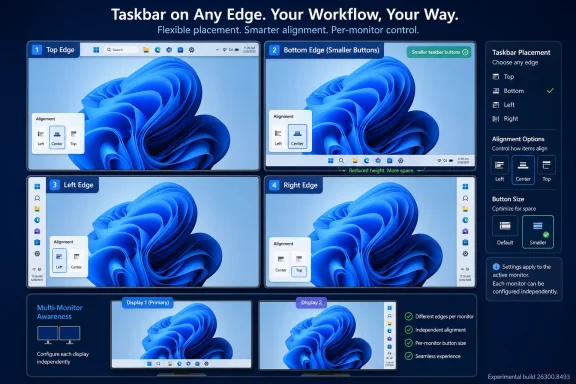
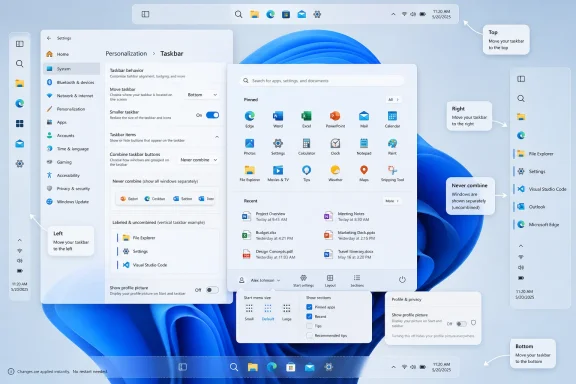
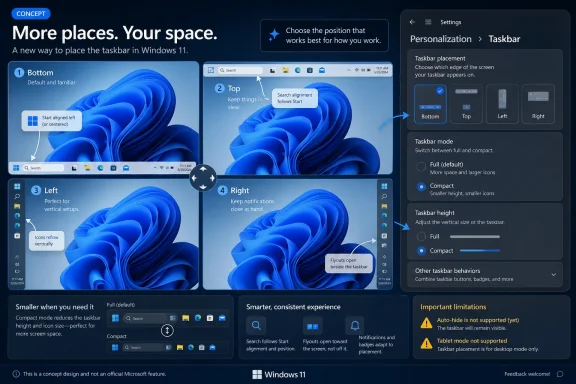
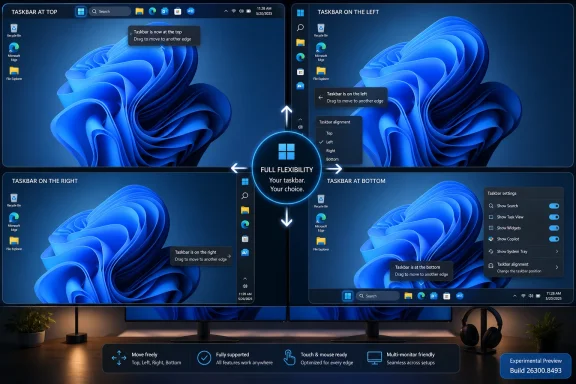
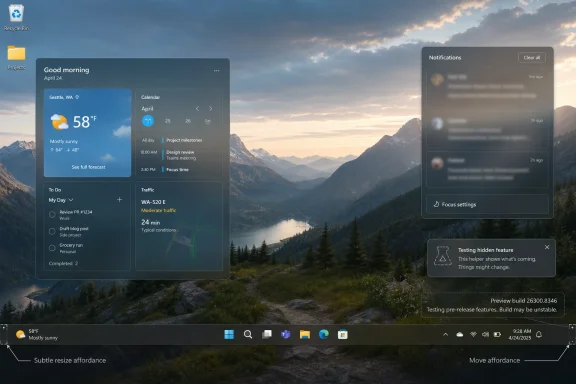
Microsoft is testing early code for a Windows 10-style smaller Windows 11 taskbar in preview build 26300.8346, restoring a customization path it removed when Windows 11 launched in 2021. The feature is unfinished and hidden, but its appearance matters because the taskbar has become the symbol of Windows 11’s larger credibility problem. Microsoft is no longer merely adding polish; it is quietly walking back one of the operating system’s original design bets.
Windows 11’s taskbar was supposed to be the clean break. Centered icons, simplified behavior, a tidier system tray, and fewer knobs were all part of the pitch: modern Windows would be calmer because it would expose less of its machinery. The trouble was that the machinery was exactly what many Windows users depended on.
The removal of resizing and repositioning controls in 2021 was not a minor aesthetic choice. For desktop users with ultrawide monitors, vertical workflows, accessibility needs, multi-monitor habits, or muscle memory built over decades, the taskbar was not decoration. It was infrastructure.
That is why the newly spotted smaller taskbar work in build 26300.8346 carries more weight than its tiny weather icon suggests. Microsoft already added a setting that shrinks taskbar buttons in Windows 11, but that is not the same thing as shrinking the taskbar itself. Windows 10’s model changed the size of the whole strip; Windows 11’s current option mostly changes the furniture inside the same room.
The distinction sounds fussy until you remember who Windows is for. Windows is not iPadOS. It is the operating system of accountants with three monitors, developers with vertical taskbars, dispatchers with dense trays, gamers with overlays, and admins who still know exactly where every pixel of their desktop is supposed to be. When Microsoft took away those pixels, users noticed.
What Microsoft appears to be building is closer to the Windows 10 model: a taskbar whose physical height can change, with resize behavior that may involve dragging at the taskbar edge. That would be a meaningful correction, because it restores a user-controlled surface rather than simply offering another themed preset.
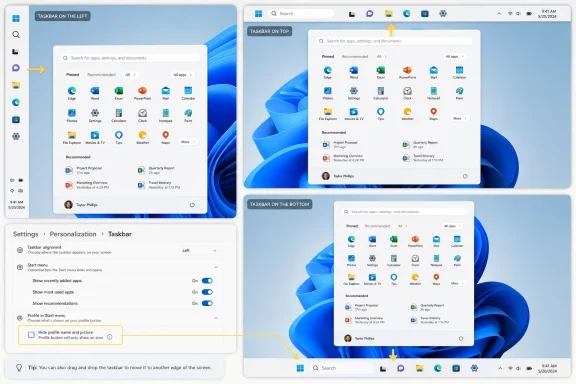
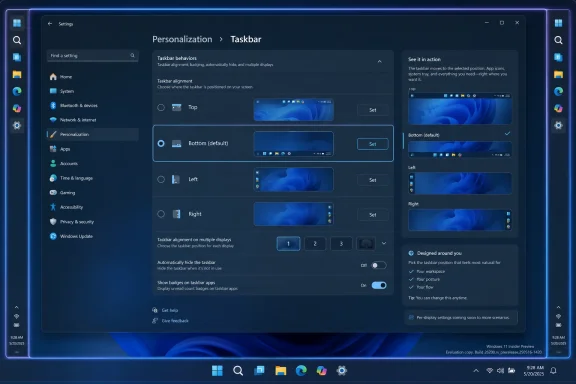
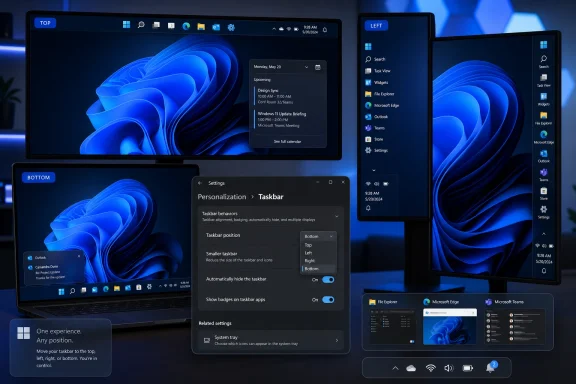
The movable taskbar follows the same pattern. Microsoft has already acknowledged that taskbar customization is coming, and early preview builds have reportedly shown partial movement support. Top, left, right, bottom: those locations are not nostalgia. They are layout choices that let Windows adapt to the display rather than forcing every display to adapt to Windows.
The irony is that Microsoft had this right for decades. The company did not need to invent taskbar customization in 2026. It needed to remember why it existed.
The 2021 taskbar removed too much at once. Drag-and-drop support was missing at launch, then returned after user backlash. Taskbar labels and uncombined buttons eventually made their way back. Now the smaller and movable taskbar work suggests Microsoft is completing the long, awkward loop back toward the operating system it tried to outgrow.
This is not simply a story about nostalgia for Windows 10. Windows 10 itself was hardly beloved in every corner of the community, and many of its settings surfaces were messy compromises. But it understood something Windows 11 initially downplayed: desktop users tolerate inconsistency better than helplessness.
A rough-edged option that solves a real workflow problem is often better than a pristine interface that refuses to. The Windows audience has been saying that for five years. Microsoft, belatedly, appears to be listening.
Skepticism was justified. Microsoft has made “we heard you” noises before, only to let Windows drift back into a vehicle for account prompts, ads, Edge nudges, Teams hooks, OneDrive entanglement, and whatever strategic priority happened to be fashionable in Redmond that quarter. Windows users have learned to distinguish apology from delivery.
But the weeks since that pledge have produced actual movement. The April 30 optional preview update, KB5083631, arrived for Windows 11 versions 24H2 and 25H2 with OS builds 26100.8328 and 26200.8328. Microsoft’s release notes and surrounding reporting point to explorer.exe reliability work, File Explorer fixes, taskbar flyout improvements, system tray loading improvements, Windows Hello reliability improvements, and other quality-of-life changes.
That does not make Windows 11 fixed. It does, however, make the taskbar news more credible. A one-off hidden toggle can be dismissed as experimentation; a hidden toggle inside a wider quality campaign looks more like strategy.
That is why the April update’s explorer.exe reliability work deserves attention. A movable, resizable taskbar is only useful if the shell around it behaves predictably. If taskbar flyouts lag, the tray stalls, or File Explorer flashes white in dark mode, customization becomes lipstick on a cranky subsystem.
Microsoft’s current Windows 11 effort appears to understand that the shell experience cannot be separated into neat product-management boxes. The Start menu, taskbar, File Explorer, widgets, notifications, Copilot hooks, and update prompts all compete for the same user patience. Improve one while the others remain noisy, and the whole desktop still feels wrong.
That is where the smaller taskbar becomes part of a bigger repair job. It is not enough to restore a Windows 10 checkbox. Microsoft has to make the shell feel like it belongs to the user again.
For enthusiasts, that cost became a test of whether Microsoft still respected desktop conventions. For IT pros, it was another example of change management imposed from above. For ordinary users, it was simpler: something that used to work no longer did.
The taskbar also exposed the limits of telemetry-driven design. If most users never move their taskbar, the spreadsheet says the feature is expendable. But the users who do move it may be among the most invested, vocal, and operationally dependent Windows customers Microsoft has. A feature can be statistically niche and strategically important at the same time.
That is the lesson Windows keeps relearning. Power users are not always representative, but they are often predictive. When they complain that a platform is becoming less flexible, less local, and less respectful of established workflows, mainstream frustration usually follows later in softer language.
Some users need larger targets. Others need more vertical space. A smaller taskbar on a compact laptop can make room for spreadsheets, code editors, browser windows, remote sessions, or creative tools. A vertical taskbar on an ultrawide monitor can turn wasted horizontal space into useful navigation.
The best accessibility and productivity features often look like customization rather than accommodation. They let users shape the environment around their bodies, displays, and tasks without forcing them to declare a special need. Windows was historically strong here because it accumulated options over time, sometimes messily, but often usefully.
Windows 11’s mistake was assuming that modernity required subtraction. A more mature version of Windows 11 would keep the cleaner defaults while restoring the escape hatches. That seems to be where Microsoft is now heading.
Windows 11’s interface has spent too much time acting like a billboard for Microsoft’s internal priorities. Start menu recommendations, account prompts, Edge pushes, OneDrive nudges, Microsoft 365 upsells, Copilot surfacing, and widget content have all contributed to the sense that the OS is not merely serving the user. It is negotiating with them.
Taskbar customization and reduced promotion are linked by the same underlying principle. Users want Windows to stop taking liberties. They want the desktop to be stable, predictable, and shaped by their choices rather than Microsoft’s quarterly strategy.
That does not mean Microsoft should remove all cloud integration or AI features. Many users benefit from OneDrive, Microsoft 365, Phone Link, Copilot, and cross-device workflows. The problem is not capability; it is insistence. Windows becomes irritating when every useful service arrives with the posture of a campaign.
Microsoft now appears to be refining that approach. The company still wants AI in Windows, but the newer language emphasizes deliberate placement and genuinely useful experiences. That is a quieter, more defensible strategy than coating the shell in Copilot dust.
For Windows users, this is less about whether AI belongs in the OS and more about whether AI displaces fundamentals. Nobody wants a chatbot in the corner if File Explorer stutters, the taskbar is less capable than it was in 2019, and updates interrupt work at the wrong moment. The base layer has to be trustworthy before the assistant layer earns attention.
That is why the smaller taskbar news lands differently in 2026 than it would have in 2023. It suggests Microsoft may be reordering priorities: fix the desktop first, then layer intelligence where it helps.
Still, Microsoft’s broader 2026 Windows push addresses several enterprise pain points. Better update controls, fewer restarts, improved driver reliability, stronger shell stability, and a less distracting out-of-box experience are not cosmetic. They affect deployment confidence.
The Windows 10 end-of-support pressure also hangs over this story. Microsoft wants more holdouts to move to Windows 11, and many of those holdouts are not waiting because the taskbar is too tall. They are waiting because Windows 11 has not always made a persuasive case that the migration improves daily work.
Restoring familiar controls will not by itself unlock every upgrade. But it removes one more emotional objection. In IT, emotional objections matter because they become political objections. If users hate the new desktop, the migration team hears about it.
Microsoft’s own channel structure complicates interpretation. Dev, Beta, Release Preview, Canary, and experimental build tracks can carry different code paths and different levels of readiness. A hidden feature in one branch may be a proof of concept, a staged rollout, or a temporary artifact.
That said, this taskbar work fits too neatly into Microsoft’s public roadmap to dismiss. The company has said taskbar customization is coming. Reporting indicates movable behavior is already partially present. The smaller taskbar bits are now appearing alongside documentation references. That is not a guarantee, but it is a pattern.
The correct stance is therefore guarded optimism. Users should not bet their deployment schedules on it. But they can reasonably read it as evidence that Microsoft’s 2026 Windows correction is moving beyond blog-post contrition.
The Start menu is one of those features where latency is emotional. A 300-millisecond delay does not sound catastrophic in a lab report, but repeated dozens of times a day it teaches the user that the system is dragging its feet. Search delays, recommendation loading, web-connected behavior, and inconsistent input response all compound the feeling.
A native, more responsive Start experience would support Microsoft’s larger “craft” argument. Craft is not just rounded corners and mica materials. It is whether the thing you click responds when you click it, whether dark mode stays dark, whether search respects your intent, and whether UI surfaces feel like parts of the same operating system.
The smaller taskbar, then, is only one piece of a larger shell repair. If Microsoft restores sizing but leaves Start sluggish, the win will be partial. If it restores sizing while making Start, Explorer, the tray, and updates feel calmer, Windows 11 may finally start to feel less like a redesign imposed from above and more like an operating system settling into itself.
The right lesson is not that every old behavior must return exactly as it was. The right lesson is that removal should be earned. If Microsoft takes away a long-standing feature, the replacement must be clearly better, not merely cleaner. Windows 11’s original taskbar failed that test for many users.
A modern Windows taskbar can be simpler by default and still more configurable beneath the surface. It can expose common controls in Settings while keeping advanced policies for organizations. It can support touch-friendly layouts without forcing desktop users into wasted space. These are solvable design problems.
The return of the smaller taskbar suggests Microsoft is no longer treating Windows 10 behavior as an embarrassment. It is treating it as institutional knowledge.
Source: Windows Latest Microsoft finally begins testing Windows 10-like smaller taskbar for Windows 11 after removing it in 2021
 Microsoft’s Taskbar Retreat Is Really a Trust Story
Windows 11’s taskbar was supposed to be the clean break. Centered icons, simplified behavior, a tidier system tray, and fewer knobs were all part of the pitch: modern Windows would be calmer because it would expose less of its machinery. The trouble was that the machinery was exactly what many Windows users depended on.The removal of resizing and repositioning controls in 2021 was not a minor aesthetic choice. For desktop users with ultrawide monitors, vertical workflows, accessibility needs, multi-monitor habits, or muscle memory built over decades, the taskbar was not decoration. It was infrastructure.
That is why the newly spotted smaller taskbar work in build 26300.8346 carries more weight than its tiny weather icon suggests. Microsoft already added a setting that shrinks taskbar buttons in Windows 11, but that is not the same thing as shrinking the taskbar itself. Windows 10’s model changed the size of the whole strip; Windows 11’s current option mostly changes the furniture inside the same room.
The distinction sounds fussy until you remember who Windows is for. Windows is not iPadOS. It is the operating system of accountants with three monitors, developers with vertical taskbars, dispatchers with dense trays, gamers with overlays, and admins who still know exactly where every pixel of their desktop is supposed to be. When Microsoft took away those pixels, users noticed.
The Small Taskbar Is a Small Admission
The early implementation reportedly shows a smaller Widgets presentation, including a reduced weather icon, and Windows Latest says references to dedicated settings for resizing and smaller taskbar behavior are already present in documentation it has seen. The feature is not ready for normal use, and nobody should confuse hidden preview bits with a shipping promise. But hidden bits are often where Windows strategy leaks before marketing catches up.What Microsoft appears to be building is closer to the Windows 10 model: a taskbar whose physical height can change, with resize behavior that may involve dragging at the taskbar edge. That would be a meaningful correction, because it restores a user-controlled surface rather than simply offering another themed preset.
The movable taskbar follows the same pattern. Microsoft has already acknowledged that taskbar customization is coming, and early preview builds have reportedly shown partial movement support. Top, left, right, bottom: those locations are not nostalgia. They are layout choices that let Windows adapt to the display rather than forcing every display to adapt to Windows.
The irony is that Microsoft had this right for decades. The company did not need to invent taskbar customization in 2026. It needed to remember why it existed.
Windows 11’s Original Sin Was Confusing Simplicity With Control
Windows 11 launched with an argument embedded in its interface: fewer options would produce a better experience. That view has merit in consumer software, especially when legacy settings become a dumping ground for indecision. But Windows is not just consumer software. It is a professional workstation platform, a gaming platform, a managed enterprise estate, and a hobbyist playground, all at once.The 2021 taskbar removed too much at once. Drag-and-drop support was missing at launch, then returned after user backlash. Taskbar labels and uncombined buttons eventually made their way back. Now the smaller and movable taskbar work suggests Microsoft is completing the long, awkward loop back toward the operating system it tried to outgrow.
This is not simply a story about nostalgia for Windows 10. Windows 10 itself was hardly beloved in every corner of the community, and many of its settings surfaces were messy compromises. But it understood something Windows 11 initially downplayed: desktop users tolerate inconsistency better than helplessness.
A rough-edged option that solves a real workflow problem is often better than a pristine interface that refuses to. The Windows audience has been saying that for five years. Microsoft, belatedly, appears to be listening.
The March Reset Changed the Context
The timing matters. On March 20, Microsoft published a broad Windows quality pledge centered on performance, reliability, and craft. The company promised faster File Explorer behavior, lower resource usage, more intentional Copilot integration, fewer distracting experiences, better update controls, and renewed attention to user feedback.Skepticism was justified. Microsoft has made “we heard you” noises before, only to let Windows drift back into a vehicle for account prompts, ads, Edge nudges, Teams hooks, OneDrive entanglement, and whatever strategic priority happened to be fashionable in Redmond that quarter. Windows users have learned to distinguish apology from delivery.
But the weeks since that pledge have produced actual movement. The April 30 optional preview update, KB5083631, arrived for Windows 11 versions 24H2 and 25H2 with OS builds 26100.8328 and 26200.8328. Microsoft’s release notes and surrounding reporting point to explorer.exe reliability work, File Explorer fixes, taskbar flyout improvements, system tray loading improvements, Windows Hello reliability improvements, and other quality-of-life changes.
That does not make Windows 11 fixed. It does, however, make the taskbar news more credible. A one-off hidden toggle can be dismissed as experimentation; a hidden toggle inside a wider quality campaign looks more like strategy.
Explorer.exe Is Where the Desktop Either Wins or Loses
For longtime Windows users, “File Explorer improvements” can sound like boilerplate. Every release claims to make File Explorer faster, and every release seems to find new ways to make opening folders feel like a negotiation. But explorer.exe is not just the file manager. It underpins the desktop shell, taskbar, system tray, context menus, and many of the small interactions that decide whether Windows feels responsive or tired.That is why the April update’s explorer.exe reliability work deserves attention. A movable, resizable taskbar is only useful if the shell around it behaves predictably. If taskbar flyouts lag, the tray stalls, or File Explorer flashes white in dark mode, customization becomes lipstick on a cranky subsystem.
Microsoft’s current Windows 11 effort appears to understand that the shell experience cannot be separated into neat product-management boxes. The Start menu, taskbar, File Explorer, widgets, notifications, Copilot hooks, and update prompts all compete for the same user patience. Improve one while the others remain noisy, and the whole desktop still feels wrong.
That is where the smaller taskbar becomes part of a bigger repair job. It is not enough to restore a Windows 10 checkbox. Microsoft has to make the shell feel like it belongs to the user again.
The Taskbar Became the Referendum Microsoft Did Not Want
No single Windows feature should carry this much symbolic weight, yet the taskbar does because Microsoft made it central to Windows 11’s identity. The centered icons were the visual shorthand for the new OS. The simplified settings were part of the message. The missing controls were the cost.For enthusiasts, that cost became a test of whether Microsoft still respected desktop conventions. For IT pros, it was another example of change management imposed from above. For ordinary users, it was simpler: something that used to work no longer did.
The taskbar also exposed the limits of telemetry-driven design. If most users never move their taskbar, the spreadsheet says the feature is expendable. But the users who do move it may be among the most invested, vocal, and operationally dependent Windows customers Microsoft has. A feature can be statistically niche and strategically important at the same time.
That is the lesson Windows keeps relearning. Power users are not always representative, but they are often predictive. When they complain that a platform is becoming less flexible, less local, and less respectful of established workflows, mainstream frustration usually follows later in softer language.
A Smaller Taskbar Is Also an Accessibility Feature
It is tempting to frame taskbar resizing as a power-user indulgence. That misses the point. Desktop density is not just about taste; it is about visual comfort, motor habits, screen size, and the kind of work being done.Some users need larger targets. Others need more vertical space. A smaller taskbar on a compact laptop can make room for spreadsheets, code editors, browser windows, remote sessions, or creative tools. A vertical taskbar on an ultrawide monitor can turn wasted horizontal space into useful navigation.
The best accessibility and productivity features often look like customization rather than accommodation. They let users shape the environment around their bodies, displays, and tasks without forcing them to declare a special need. Windows was historically strong here because it accumulated options over time, sometimes messily, but often usefully.
Windows 11’s mistake was assuming that modernity required subtraction. A more mature version of Windows 11 would keep the cleaner defaults while restoring the escape hatches. That seems to be where Microsoft is now heading.
The Ads Retreat May Matter as Much as the Taskbar Return
Microsoft’s March pledge also touched the more combustible issue of promotion inside Windows. The company has said it wants a calmer experience with fewer unnecessary distractions and more curated Copilot integration. That is careful language, but the direction is notable.Windows 11’s interface has spent too much time acting like a billboard for Microsoft’s internal priorities. Start menu recommendations, account prompts, Edge pushes, OneDrive nudges, Microsoft 365 upsells, Copilot surfacing, and widget content have all contributed to the sense that the OS is not merely serving the user. It is negotiating with them.
Taskbar customization and reduced promotion are linked by the same underlying principle. Users want Windows to stop taking liberties. They want the desktop to be stable, predictable, and shaped by their choices rather than Microsoft’s quarterly strategy.
That does not mean Microsoft should remove all cloud integration or AI features. Many users benefit from OneDrive, Microsoft 365, Phone Link, Copilot, and cross-device workflows. The problem is not capability; it is insistence. Windows becomes irritating when every useful service arrives with the posture of a campaign.
Copilot Is Being Repositioned From Everywhere to Somewhere
The promised reduction of unnecessary Copilot integration is one of the more interesting signals in Microsoft’s reset. For the past two years, AI has been treated across the industry as a universal solvent: put it in search, put it in Notepad, put it in Paint, put it in screenshots, put it in settings, put it on the keyboard. The result was visibility, not always utility.Microsoft now appears to be refining that approach. The company still wants AI in Windows, but the newer language emphasizes deliberate placement and genuinely useful experiences. That is a quieter, more defensible strategy than coating the shell in Copilot dust.
For Windows users, this is less about whether AI belongs in the OS and more about whether AI displaces fundamentals. Nobody wants a chatbot in the corner if File Explorer stutters, the taskbar is less capable than it was in 2019, and updates interrupt work at the wrong moment. The base layer has to be trustworthy before the assistant layer earns attention.
That is why the smaller taskbar news lands differently in 2026 than it would have in 2023. It suggests Microsoft may be reordering priorities: fix the desktop first, then layer intelligence where it helps.
Enterprise IT Will Judge the Delivery, Not the Demo
For managed environments, the return of taskbar flexibility is welcome but not decisive. Enterprises care about consistency, policy control, upgrade predictability, and supportability. A movable taskbar that behaves differently across channels or arrives without proper management controls could create as many helpdesk tickets as it solves.Still, Microsoft’s broader 2026 Windows push addresses several enterprise pain points. Better update controls, fewer restarts, improved driver reliability, stronger shell stability, and a less distracting out-of-box experience are not cosmetic. They affect deployment confidence.
The Windows 10 end-of-support pressure also hangs over this story. Microsoft wants more holdouts to move to Windows 11, and many of those holdouts are not waiting because the taskbar is too tall. They are waiting because Windows 11 has not always made a persuasive case that the migration improves daily work.
Restoring familiar controls will not by itself unlock every upgrade. But it removes one more emotional objection. In IT, emotional objections matter because they become political objections. If users hate the new desktop, the migration team hears about it.
Preview Builds Are Promises Written in Pencil
There is a reason to be cautious. Windows preview builds are full of experiments that never ship, features that ship late, and features that ship changed beyond recognition. Build 26300.8346 showing early smaller-taskbar elements does not mean every Windows 11 user will see the finished control next month.Microsoft’s own channel structure complicates interpretation. Dev, Beta, Release Preview, Canary, and experimental build tracks can carry different code paths and different levels of readiness. A hidden feature in one branch may be a proof of concept, a staged rollout, or a temporary artifact.
That said, this taskbar work fits too neatly into Microsoft’s public roadmap to dismiss. The company has said taskbar customization is coming. Reporting indicates movable behavior is already partially present. The smaller taskbar bits are now appearing alongside documentation references. That is not a guarantee, but it is a pattern.
The correct stance is therefore guarded optimism. Users should not bet their deployment schedules on it. But they can reasonably read it as evidence that Microsoft’s 2026 Windows correction is moving beyond blog-post contrition.
The Start Menu Rewrite Could Be the Sleeper Fix
One of the most consequential reported changes is not the taskbar at all. Microsoft is said to be moving more of the Start menu experience toward WinUI 3 and away from the current implementation that many users experience as sluggish or inconsistent. If that work lands well, it could do more for Windows 11’s perceived speed than a dozen benchmark-friendly optimizations.The Start menu is one of those features where latency is emotional. A 300-millisecond delay does not sound catastrophic in a lab report, but repeated dozens of times a day it teaches the user that the system is dragging its feet. Search delays, recommendation loading, web-connected behavior, and inconsistent input response all compound the feeling.
A native, more responsive Start experience would support Microsoft’s larger “craft” argument. Craft is not just rounded corners and mica materials. It is whether the thing you click responds when you click it, whether dark mode stays dark, whether search respects your intent, and whether UI surfaces feel like parts of the same operating system.
The smaller taskbar, then, is only one piece of a larger shell repair. If Microsoft restores sizing but leaves Start sluggish, the win will be partial. If it restores sizing while making Start, Explorer, the tray, and updates feel calmer, Windows 11 may finally start to feel less like a redesign imposed from above and more like an operating system settling into itself.
Windows 10 Is Still the Ghost in the Machine
The phrase “Windows 10-like” is doing a lot of work here. It is shorthand for a design philosophy that Windows 11 initially rejected and now seems to be selectively re-adopting. But Microsoft has to be careful not to turn Windows 11 into an apology tour for Windows 10.The right lesson is not that every old behavior must return exactly as it was. The right lesson is that removal should be earned. If Microsoft takes away a long-standing feature, the replacement must be clearly better, not merely cleaner. Windows 11’s original taskbar failed that test for many users.
A modern Windows taskbar can be simpler by default and still more configurable beneath the surface. It can expose common controls in Settings while keeping advanced policies for organizations. It can support touch-friendly layouts without forcing desktop users into wasted space. These are solvable design problems.
The return of the smaller taskbar suggests Microsoft is no longer treating Windows 10 behavior as an embarrassment. It is treating it as institutional knowledge.
The Repair Job Is Finally Visible on the Desktop
The concrete picture now looks better than it did a few months ago, even if the work remains unfinished. Microsoft has publicly committed to Windows 11 quality improvements in 2026, shipped an April optional update with shell reliability work, and appears to be actively testing the taskbar controls users have demanded since launch.- Microsoft is testing early smaller-taskbar code in Windows 11 build 26300.8346, but the feature is hidden and unfinished.
- The existing Windows 11 setting for smaller taskbar buttons is not the same as the Windows 10-style smaller taskbar now being developed.
- Microsoft has publicly promised broader Windows 11 quality improvements, including performance, reliability, File Explorer responsiveness, and more intentional Copilot integration.
- The April 2026 optional preview update KB5083631 brought Windows 11 builds 26100.8328 and 26200.8328 with multiple reliability and shell improvements.
- Movable and resizable taskbar work matters because it restores user agency, not merely a familiar visual style.
- The real test will be whether Microsoft ships these changes broadly, manages them cleanly, and resists replacing old annoyances with new promotions.
Source: Windows Latest Microsoft finally begins testing Windows 10-like smaller taskbar for Windows 11 after removing it in 2021