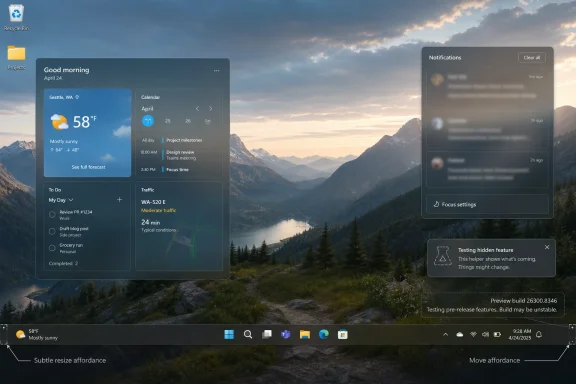
Microsoft is testing early code for a Windows 10-style smaller Windows 11 taskbar in preview build 26300.8346, restoring a customization path it removed when Windows 11 launched in 2021. The feature is unfinished and hidden, but its appearance matters because the taskbar has become the symbol of Windows 11’s larger credibility problem. Microsoft is no longer merely adding polish; it is quietly walking back one of the operating system’s original design bets.

Futuristic Windows desktop dashboard over a mountain sunrise landscape with weather, calendar, and notifications.Microsoft’s Taskbar Retreat Is Really a Trust Story​

Windows 11’s taskbar was supposed to be the clean break. Centered icons, simplified behavior, a tidier system tray, and fewer knobs were all part of the pitch: modern Windows would be calmer because it would expose less of its machinery. The trouble was that the machinery was exactly what many Windows users depended on.
The removal of resizing and repositioning controls in 2021 was not a minor aesthetic choice. For desktop users with ultrawide monitors, vertical workflows, accessibility needs, multi-monitor habits, or muscle memory built over decades, the taskbar was not decoration. It was infrastructure.
That is why the newly spotted smaller taskbar work in build 26300.8346 carries more weight than its tiny weather icon suggests. Microsoft already added a setting that shrinks taskbar buttons in Windows 11, but that is not the same thing as shrinking the taskbar itself. Windows 10’s model changed the size of the whole strip; Windows 11’s current option mostly changes the furniture inside the same room.
The distinction sounds fussy until you remember who Windows is for. Windows is not iPadOS. It is the operating system of accountants with three monitors, developers with vertical taskbars, dispatchers with dense trays, gamers with overlays, and admins who still know exactly where every pixel of their desktop is supposed to be. When Microsoft took away those pixels, users noticed.

The Small Taskbar Is a Small Admission​

The early implementation reportedly shows a smaller Widgets presentation, including a reduced weather icon, and Windows Latest says references to dedicated settings for resizing and smaller taskbar behavior are already present in documentation it has seen. The feature is not ready for normal use, and nobody should confuse hidden preview bits with a shipping promise. But hidden bits are often where Windows strategy leaks before marketing catches up.
What Microsoft appears to be building is closer to the Windows 10 model: a taskbar whose physical height can change, with resize behavior that may involve dragging at the taskbar edge. That would be a meaningful correction, because it restores a user-controlled surface rather than simply offering another themed preset.
The movable taskbar follows the same pattern. Microsoft has already acknowledged that taskbar customization is coming, and early preview builds have reportedly shown partial movement support. Top, left, right, bottom: those locations are not nostalgia. They are layout choices that let Windows adapt to the display rather than forcing every display to adapt to Windows.
The irony is that Microsoft had this right for decades. The company did not need to invent taskbar customization in 2026. It needed to remember why it existed.

Windows 11’s Original Sin Was Confusing Simplicity With Control​

Windows 11 launched with an argument embedded in its interface: fewer options would produce a better experience. That view has merit in consumer software, especially when legacy settings become a dumping ground for indecision. But Windows is not just consumer software. It is a professional workstation platform, a gaming platform, a managed enterprise estate, and a hobbyist playground, all at once.
The 2021 taskbar removed too much at once. Drag-and-drop support was missing at launch, then returned after user backlash. Taskbar labels and uncombined buttons eventually made their way back. Now the smaller and movable taskbar work suggests Microsoft is completing the long, awkward loop back toward the operating system it tried to outgrow.
This is not simply a story about nostalgia for Windows 10. Windows 10 itself was hardly beloved in every corner of the community, and many of its settings surfaces were messy compromises. But it understood something Windows 11 initially downplayed: desktop users tolerate inconsistency better than helplessness.
A rough-edged option that solves a real workflow problem is often better than a pristine interface that refuses to. The Windows audience has been saying that for five years. Microsoft, belatedly, appears to be listening.

The March Reset Changed the Context​

The timing matters. On March 20, Microsoft published a broad Windows quality pledge centered on performance, reliability, and craft. The company promised faster File Explorer behavior, lower resource usage, more intentional Copilot integration, fewer distracting experiences, better update controls, and renewed attention to user feedback.
Skepticism was justified. Microsoft has made “we heard you” noises before, only to let Windows drift back into a vehicle for account prompts, ads, Edge nudges, Teams hooks, OneDrive entanglement, and whatever strategic priority happened to be fashionable in Redmond that quarter. Windows users have learned to distinguish apology from delivery.
But the weeks since that pledge have produced actual movement. The April 30 optional preview update, KB5083631, arrived for Windows 11 versions 24H2 and 25H2 with OS builds 26100.8328 and 26200.8328. Microsoft’s release notes and surrounding reporting point to explorer.exe reliability work, File Explorer fixes, taskbar flyout improvements, system tray loading improvements, Windows Hello reliability improvements, and other quality-of-life changes.
That does not make Windows 11 fixed. It does, however, make the taskbar news more credible. A one-off hidden toggle can be dismissed as experimentation; a hidden toggle inside a wider quality campaign looks more like strategy.

Explorer.exe Is Where the Desktop Either Wins or Loses​

For longtime Windows users, “File Explorer improvements” can sound like boilerplate. Every release claims to make File Explorer faster, and every release seems to find new ways to make opening folders feel like a negotiation. But explorer.exe is not just the file manager. It underpins the desktop shell, taskbar, system tray, context menus, and many of the small interactions that decide whether Windows feels responsive or tired.
That is why the April update’s explorer.exe reliability work deserves attention. A movable, resizable taskbar is only useful if the shell around it behaves predictably. If taskbar flyouts lag, the tray stalls, or File Explorer flashes white in dark mode, customization becomes lipstick on a cranky subsystem.
Microsoft’s current Windows 11 effort appears to understand that the shell experience cannot be separated into neat product-management boxes. The Start menu, taskbar, File Explorer, widgets, notifications, Copilot hooks, and update prompts all compete for the same user patience. Improve one while the others remain noisy, and the whole desktop still feels wrong.
That is where the smaller taskbar becomes part of a bigger repair job. It is not enough to restore a Windows 10 checkbox. Microsoft has to make the shell feel like it belongs to the user again.

The Taskbar Became the Referendum Microsoft Did Not Want​

No single Windows feature should carry this much symbolic weight, yet the taskbar does because Microsoft made it central to Windows 11’s identity. The centered icons were the visual shorthand for the new OS. The simplified settings were part of the message. The missing controls were the cost.
For enthusiasts, that cost became a test of whether Microsoft still respected desktop conventions. For IT pros, it was another example of change management imposed from above. For ordinary users, it was simpler: something that used to work no longer did.
The taskbar also exposed the limits of telemetry-driven design. If most users never move their taskbar, the spreadsheet says the feature is expendable. But the users who do move it may be among the most invested, vocal, and operationally dependent Windows customers Microsoft has. A feature can be statistically niche and strategically important at the same time.
That is the lesson Windows keeps relearning. Power users are not always representative, but they are often predictive. When they complain that a platform is becoming less flexible, less local, and less respectful of established workflows, mainstream frustration usually follows later in softer language.

A Smaller Taskbar Is Also an Accessibility Feature​

It is tempting to frame taskbar resizing as a power-user indulgence. That misses the point. Desktop density is not just about taste; it is about visual comfort, motor habits, screen size, and the kind of work being done.
Some users need larger targets. Others need more vertical space. A smaller taskbar on a compact laptop can make room for spreadsheets, code editors, browser windows, remote sessions, or creative tools. A vertical taskbar on an ultrawide monitor can turn wasted horizontal space into useful navigation.
The best accessibility and productivity features often look like customization rather than accommodation. They let users shape the environment around their bodies, displays, and tasks without forcing them to declare a special need. Windows was historically strong here because it accumulated options over time, sometimes messily, but often usefully.
Windows 11’s mistake was assuming that modernity required subtraction. A more mature version of Windows 11 would keep the cleaner defaults while restoring the escape hatches. That seems to be where Microsoft is now heading.

The Ads Retreat May Matter as Much as the Taskbar Return​

Microsoft’s March pledge also touched the more combustible issue of promotion inside Windows. The company has said it wants a calmer experience with fewer unnecessary distractions and more curated Copilot integration. That is careful language, but the direction is notable.
Windows 11’s interface has spent too much time acting like a billboard for Microsoft’s internal priorities. Start menu recommendations, account prompts, Edge pushes, OneDrive nudges, Microsoft 365 upsells, Copilot surfacing, and widget content have all contributed to the sense that the OS is not merely serving the user. It is negotiating with them.
Taskbar customization and reduced promotion are linked by the same underlying principle. Users want Windows to stop taking liberties. They want the desktop to be stable, predictable, and shaped by their choices rather than Microsoft’s quarterly strategy.
That does not mean Microsoft should remove all cloud integration or AI features. Many users benefit from OneDrive, Microsoft 365, Phone Link, Copilot, and cross-device workflows. The problem is not capability; it is insistence. Windows becomes irritating when every useful service arrives with the posture of a campaign.

Copilot Is Being Repositioned From Everywhere to Somewhere​

The promised reduction of unnecessary Copilot integration is one of the more interesting signals in Microsoft’s reset. For the past two years, AI has been treated across the industry as a universal solvent: put it in search, put it in Notepad, put it in Paint, put it in screenshots, put it in settings, put it on the keyboard. The result was visibility, not always utility.
Microsoft now appears to be refining that approach. The company still wants AI in Windows, but the newer language emphasizes deliberate placement and genuinely useful experiences. That is a quieter, more defensible strategy than coating the shell in Copilot dust.
For Windows users, this is less about whether AI belongs in the OS and more about whether AI displaces fundamentals. Nobody wants a chatbot in the corner if File Explorer stutters, the taskbar is less capable than it was in 2019, and updates interrupt work at the wrong moment. The base layer has to be trustworthy before the assistant layer earns attention.
That is why the smaller taskbar news lands differently in 2026 than it would have in 2023. It suggests Microsoft may be reordering priorities: fix the desktop first, then layer intelligence where it helps.

Enterprise IT Will Judge the Delivery, Not the Demo​

For managed environments, the return of taskbar flexibility is welcome but not decisive. Enterprises care about consistency, policy control, upgrade predictability, and supportability. A movable taskbar that behaves differently across channels or arrives without proper management controls could create as many helpdesk tickets as it solves.
Still, Microsoft’s broader 2026 Windows push addresses several enterprise pain points. Better update controls, fewer restarts, improved driver reliability, stronger shell stability, and a less distracting out-of-box experience are not cosmetic. They affect deployment confidence.
The Windows 10 end-of-support pressure also hangs over this story. Microsoft wants more holdouts to move to Windows 11, and many of those holdouts are not waiting because the taskbar is too tall. They are waiting because Windows 11 has not always made a persuasive case that the migration improves daily work.
Restoring familiar controls will not by itself unlock every upgrade. But it removes one more emotional objection. In IT, emotional objections matter because they become political objections. If users hate the new desktop, the migration team hears about it.

Preview Builds Are Promises Written in Pencil​

There is a reason to be cautious. Windows preview builds are full of experiments that never ship, features that ship late, and features that ship changed beyond recognition. Build 26300.8346 showing early smaller-taskbar elements does not mean every Windows 11 user will see the finished control next month.
Microsoft’s own channel structure complicates interpretation. Dev, Beta, Release Preview, Canary, and experimental build tracks can carry different code paths and different levels of readiness. A hidden feature in one branch may be a proof of concept, a staged rollout, or a temporary artifact.
That said, this taskbar work fits too neatly into Microsoft’s public roadmap to dismiss. The company has said taskbar customization is coming. Reporting indicates movable behavior is already partially present. The smaller taskbar bits are now appearing alongside documentation references. That is not a guarantee, but it is a pattern.
The correct stance is therefore guarded optimism. Users should not bet their deployment schedules on it. But they can reasonably read it as evidence that Microsoft’s 2026 Windows correction is moving beyond blog-post contrition.

The Start Menu Rewrite Could Be the Sleeper Fix​

One of the most consequential reported changes is not the taskbar at all. Microsoft is said to be moving more of the Start menu experience toward WinUI 3 and away from the current implementation that many users experience as sluggish or inconsistent. If that work lands well, it could do more for Windows 11’s perceived speed than a dozen benchmark-friendly optimizations.
The Start menu is one of those features where latency is emotional. A 300-millisecond delay does not sound catastrophic in a lab report, but repeated dozens of times a day it teaches the user that the system is dragging its feet. Search delays, recommendation loading, web-connected behavior, and inconsistent input response all compound the feeling.
A native, more responsive Start experience would support Microsoft’s larger “craft” argument. Craft is not just rounded corners and mica materials. It is whether the thing you click responds when you click it, whether dark mode stays dark, whether search respects your intent, and whether UI surfaces feel like parts of the same operating system.
The smaller taskbar, then, is only one piece of a larger shell repair. If Microsoft restores sizing but leaves Start sluggish, the win will be partial. If it restores sizing while making Start, Explorer, the tray, and updates feel calmer, Windows 11 may finally start to feel less like a redesign imposed from above and more like an operating system settling into itself.

Windows 10 Is Still the Ghost in the Machine​

The phrase “Windows 10-like” is doing a lot of work here. It is shorthand for a design philosophy that Windows 11 initially rejected and now seems to be selectively re-adopting. But Microsoft has to be careful not to turn Windows 11 into an apology tour for Windows 10.
The right lesson is not that every old behavior must return exactly as it was. The right lesson is that removal should be earned. If Microsoft takes away a long-standing feature, the replacement must be clearly better, not merely cleaner. Windows 11’s original taskbar failed that test for many users.
A modern Windows taskbar can be simpler by default and still more configurable beneath the surface. It can expose common controls in Settings while keeping advanced policies for organizations. It can support touch-friendly layouts without forcing desktop users into wasted space. These are solvable design problems.
The return of the smaller taskbar suggests Microsoft is no longer treating Windows 10 behavior as an embarrassment. It is treating it as institutional knowledge.

The Repair Job Is Finally Visible on the Desktop​

The concrete picture now looks better than it did a few months ago, even if the work remains unfinished. Microsoft has publicly committed to Windows 11 quality improvements in 2026, shipped an April optional update with shell reliability work, and appears to be actively testing the taskbar controls users have demanded since launch.
  • Microsoft is testing early smaller-taskbar code in Windows 11 build 26300.8346, but the feature is hidden and unfinished.
  • The existing Windows 11 setting for smaller taskbar buttons is not the same as the Windows 10-style smaller taskbar now being developed.
  • Microsoft has publicly promised broader Windows 11 quality improvements, including performance, reliability, File Explorer responsiveness, and more intentional Copilot integration.
  • The April 2026 optional preview update KB5083631 brought Windows 11 builds 26100.8328 and 26200.8328 with multiple reliability and shell improvements.
  • Movable and resizable taskbar work matters because it restores user agency, not merely a familiar visual style.
  • The real test will be whether Microsoft ships these changes broadly, manages them cleanly, and resists replacing old annoyances with new promotions.
The most encouraging thing about this moment is not that Windows 11 may get a smaller taskbar. It is that Microsoft appears to be relearning the difference between a simplified desktop and a diminished one. If the company follows through, 2026 could be the year Windows 11 stops asking users to forgive what it removed and starts proving that modernization can coexist with control.

Source: Windows Latest Microsoft finally begins testing Windows 10-like smaller taskbar for Windows 11 after removing it in 2021
 

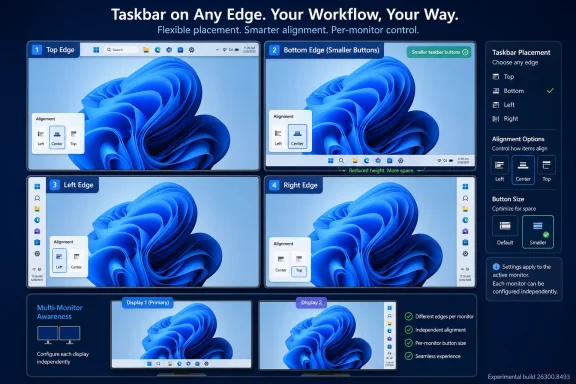
Microsoft began rolling out Windows 11 Experimental build 26300.8493 on May 15, 2026, giving Windows Insiders the ability to place the taskbar on the top, left, right, or bottom edge of the screen and to enable a smaller taskbar button mode. The change is not just a nostalgic checkbox for Windows 10 holdouts. It is Microsoft admitting, belatedly but unmistakably, that Windows 11’s clean-sheet taskbar design took away too much agency from the people who use Windows most intensely. The real story is less about where the taskbar sits and more about whether Microsoft has learned to treat customization as infrastructure rather than clutter.

Windows taskbar placement UI shows options for top/bottom/left/right and per-monitor alignment controls on blue screens.Microsoft Reopens a Door It Should Not Have Closed​

Windows 11 arrived with a taskbar that looked simpler, fresher, and more centered — literally and philosophically. It also arrived with a shorter fuse for anyone who had built years of muscle memory around vertical layouts, small buttons, labels, and a desktop shaped by work rather than by marketing screenshots. For many users, the bottom-only taskbar was not a design opinion; it was a demotion.
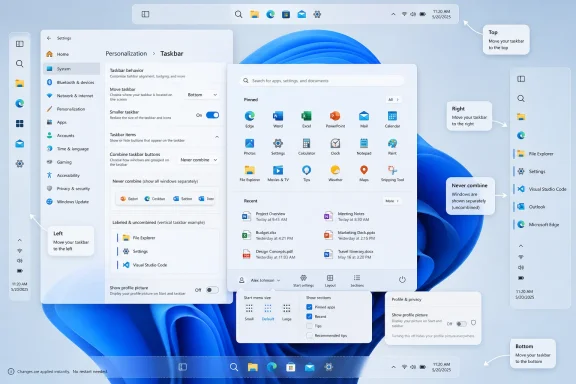
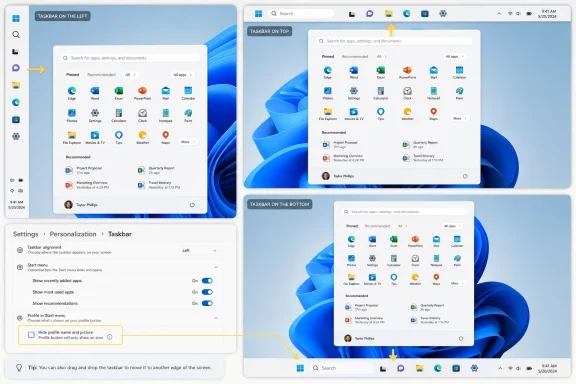
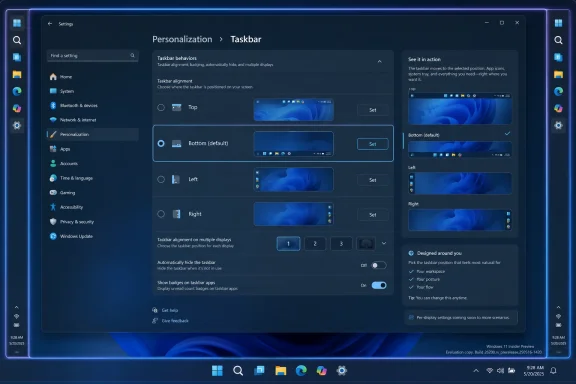
The new Experimental Channel rollout restores the ability to position the taskbar on any edge of the screen. That means top, bottom, left, and right placements are now part of the official Insider story again, not just a registry hack, third-party shell replacement, or forum thread full of workarounds. Microsoft is also pairing the change with alignment controls for each orientation, so a vertical taskbar can be top-aligned or centered while a horizontal taskbar can be left-aligned or centered.
That detail matters because it suggests Microsoft is not merely bolting a legacy behavior back onto the Windows 11 shell. The company is trying to make the Windows 11-era taskbar model work across orientations, with Start, Search, and flyouts appearing relative to the taskbar’s location. If the taskbar is at the top, Start opens from the top. If it is on the side, Windows needs to behave as though that side is a first-class home for the shell rather than an awkward exception.
The return is gradual, and it is limited to Insiders on the Experimental Channel for now. That caveat should temper expectations. Experimental builds are where Microsoft can test, retract, and revise without making a promise to the broader Windows 11 installed base.

The Taskbar Became a Symbol Because It Was Never Just a Bar​

The Windows taskbar is one of those interface elements that becomes invisible only when it works. It is a launcher, a switcher, a notification surface, a clock, a system status strip, and a persistent map of the user’s current work. When Microsoft changes it, the company is not rearranging furniture; it is rewiring a daily habit.
That is why the missing Windows 11 taskbar options generated such durable frustration. Users were not simply asking for retro styling. They were asking for a layout that matched ultrawide monitors, coding workflows, dense multitasking, remote desktop sessions, vertical document work, and multi-monitor setups where a bottom bar can feel like wasted space.
A vertical taskbar is especially useful on modern displays because horizontal pixels are usually more abundant than vertical ones. Developers, spreadsheet users, writers, and admins staring at logs often care about seeing a few more rows of content. On a laptop, a shorter or side-mounted taskbar can feel less like customization and more like reclaiming screen real estate Microsoft had appropriated.
The original Windows 11 design treated consistency as the higher virtue. The new Experimental work suggests Microsoft has reached a more mature conclusion: consistency is useful only when it does not flatten legitimate differences in how people use PCs. Windows is not a phone OS with one dominant posture. It is a sprawling workbench, and the taskbar is one of its load-bearing beams.

The Smaller Taskbar Is the Quietly Practical Half of the Update​

The smaller taskbar option may generate less nostalgic energy than top and side placement, but it may prove just as important. Windows 11’s default taskbar is visually calm, but it is also physically expensive on smaller screens. The larger hit targets and spacing make sense for touch and modern design language, yet they can feel indulgent on 13-inch laptops and compact tablets running desktop applications.
Microsoft’s new “Show smaller taskbar buttons” option is meant to reduce the height of the taskbar and shrink the icons. Crucially, the company says the mode does not require a restart or sign-out, which makes it feel like a real preference rather than a hidden system personality. Users can move between spacious and compact layouts depending on device, context, and tolerance for density.
This is the kind of option Windows 11 needed from the beginning. Microsoft often frames simplification as a way to reduce confusion, but the absence of a setting does not make the underlying need disappear. It merely pushes users toward unsupported tools, brittle tweaks, and resentment.
There is also a subtle shift in tone here. Microsoft is not saying the roomier Windows 11 taskbar was wrong. It is saying that one size does not fit every device or every user. That is a healthier design posture for a platform whose strength has always been its range.

Experimental Means Real, Not Finished​

The Experimental Channel label is doing a lot of work. Microsoft’s May 15 build lineup included Experimental build 26300.8493 for the taskbar changes, while other Experimental-branded builds such as 28020.2134 for 26H1 and 29591.1000 for future platforms did not include the same taskbar work. In other words, even inside the new Insider structure, the feature matrix is not uniform.
That fragmentation is not necessarily a problem, but it does mean testers need to read the fine print. Windows Insider builds are increasingly less like a simple ladder from risky to stable and more like a set of controlled experiments with different code bases, feature flags, and rollout rings. A feature appearing in one Experimental build does not guarantee that it appears in every branch with the word “Experimental” attached.
Microsoft is also rolling the feature out gradually. Some Insiders may install the right build and still not see the option immediately. That is frustrating for enthusiasts who expect a build number to equal a feature set, but it is now normal Windows development practice. Feature rollout is as much about telemetry and staged exposure as it is about shipping bits.
The unfinished pieces are significant. Auto-hide and the tablet-optimized taskbar are not yet supported in alternate positions. Touch gestures are still in progress. Search boxes are not supported in alternate positions and appear as a search icon for now. Those omissions are not cosmetic; they reveal how deeply the bottom taskbar assumption had been baked into the Windows 11 shell.

Microsoft Is Relearning the Difference Between Simplicity and Control​

Windows 11’s early taskbar strategy reflected a familiar Microsoft impulse: simplify the visible surface, remove edge cases, and rebuild later if enough people complain. The problem is that desktop users often live in those edge cases. The power of Windows has always come from its ability to adapt to messy, specific, long-lived workflows.
This is where Microsoft’s language about avoiding accidental taskbar movement becomes revealing. The company says it is focused on delivering core functionality while keeping the experience simple, predictable, and free from accidental movement. That is a reasonable product goal, but it also explains how Windows 11 got here in the first place.
Legacy Windows allowed a kind of casual malleability that could be both empowering and chaotic. Users could unlock the taskbar, drag it around, resize it, and sometimes accidentally strand it somewhere they did not intend. Windows 11 overcorrected by making the taskbar feel like a fixed appliance. The new approach appears to split the difference: movement through Settings, not by accidental drag.
That choice will annoy some veterans who liked the old direct manipulation model. Still, it is a defensible compromise if Microsoft executes it well. Settings-based customization is discoverable, reversible, and less likely to generate support calls from someone who unknowingly dragged the taskbar to the side while cleaning a trackpad.
The risk is that Microsoft uses “predictable” as a euphemism for “limited.” The company says it is evaluating different taskbar positions per monitor and drag and drop. Those are not fringe requests. Multi-monitor users often want different layouts on different screens, and drag-and-drop behavior remains part of how many people expect a desktop shell to work.

Start Menu Changes Point to a Larger Retreat From Forced Curation​

The taskbar is not the only shell component under reconsideration. Microsoft is also preparing to simplify Start menu customization, including easier ways to turn off the “Recommended” and “All” sections and keep a more pinned-app-focused layout. Privacy-conscious users will also be able to hide their name and profile picture in Start.
That may sound unrelated to taskbar placement, but the philosophy is the same. Windows 11’s Start menu has long been a battleground between user intent and Microsoft’s desire to curate, suggest, and surface. The more the Start menu behaves like a promotional or algorithmic space, the less it feels like the user’s own command center.
A pinned-only Start menu is not a radical idea. It is the logical endpoint for users who know what they launch and do not want Windows guessing. For enterprise environments, shared machines, privacy-sensitive users, and anyone who records screens or presents frequently, hiding personal identity elements also makes practical sense.
Microsoft’s renewed attention to Start and taskbar personalization suggests the company understands that the shell is where trust is won or lost. Users may forgive a hidden settings page or a redesigned dialog. They are less forgiving when the elements they touch hundreds of times a day feel less under their control.

The Enterprise Angle Is Less Nostalgia Than Predictability​

For IT departments, alternate taskbar positions are not primarily about taste. They are about user support, migration friction, and whether Windows 11 can absorb the habits of a Windows 10 fleet without forcing every employee through unnecessary retraining. A small change multiplied across thousands of desktops becomes a help desk story.
The inability to reproduce familiar layouts has been one of Windows 11’s quiet adoption irritants. Some organizations standardize heavily and may not care where individual users want the taskbar. Others support specialized teams with multi-monitor desks, engineering workstations, trading setups, or accessibility needs where layout flexibility is not optional.
The Experimental rollout does not immediately solve that. Admins should not treat build 26300.8493 as a deployment signal for production. But it does indicate that Microsoft is investing engineering time in one of the most visible sources of Windows 11 resistance. That matters for long-term migration planning, especially as Windows 10’s consumer and mainstream support story continues to push organizations toward Windows 11.
The enterprise question will eventually become policy. Can these taskbar positions be managed cleanly? Can organizations set defaults while allowing user override? Will layout choices roam consistently? Will multi-monitor behavior be stable enough for hot-desking, docking stations, and remote sessions? The feature is welcome, but the administrative story will determine whether it is merely pleasing or operationally useful.

The Insider Channel Shuffle Makes the Signal Harder to Read​

The arrival of this feature also lands during Microsoft’s transition to a new Windows Insider channel structure. The company has been moving toward clearer Beta and Experimental experiences, but the short-term effect is a landscape where labels, build numbers, and feature availability require careful parsing. That is not unusual for Insider testing, but it complicates coverage and user expectations.
The important distinction is that Experimental is not a promise of imminent release. It is a place where Microsoft can try features that may land, change, or disappear. The taskbar work feels more likely than many experiments because Microsoft has publicly framed it as a response to sustained user demand, but timing remains uncertain.
Windows enthusiasts have learned not to treat Insider features as guarantees. Microsoft has previewed, paused, redesigned, and abandoned ideas before. The safer reading is that alternate taskbar positions are now on an official path, not that they are certain to arrive in the next general Windows 11 update exactly as tested.
That distinction matters because taskbar behavior touches too many surfaces to rush. Start, Search, notifications, system tray behavior, animations, snapping, touch, accessibility, and multi-monitor logic all intersect with taskbar placement. A buggy vertical taskbar would not feel like a beta blemish; it would feel like the shell itself had lost its bearings.

Third-Party Tweaks Filled the Gap Microsoft Left Behind​

One reason this announcement has weight is that users did not wait patiently for Microsoft. The Windows customization ecosystem has spent the Windows 11 era patching holes left by the redesigned taskbar and Start menu. Shell tools, registry tweaks, and commercial utilities became the practical answer for users who wanted old affordances back.
That ecosystem is both a strength and an embarrassment for Microsoft. It shows the vitality of Windows as a modifiable platform, but it also highlights how many basic preferences were missing from the official product. When moving a taskbar requires trusting unsupported code or waiting for a third-party update after every Windows change, the operating system has failed at something fundamental.
Microsoft does not need to clone every Windows 10 behavior. Some old features were messy, underused, or difficult to maintain. But the company does need to recognize the difference between cruft and capability. Taskbar placement was capability.
The broader lesson is that removing a power-user feature is not free just because most users never touch it. The users who do touch it are often the people others rely on: admins, developers, enthusiasts, support staff, and the family member who fixes everyone’s PC. Annoying that cohort has consequences beyond telemetry percentages.

The Design Challenge Is Making Vertical Feel Native​

Restoring a vertical taskbar is easy to describe and hard to execute. A vertical bar changes the geometry of the desktop. It changes where users expect flyouts, how labels fit, how app groups expand, how badges display, how touch targets work, and how system tray elements occupy space.
Microsoft says users will be able to use “Never combine” with labels in vertical mode, allowing each app window to appear as a separate labeled button. That is an especially important concession to productivity users. Icons alone may look cleaner, but labels are faster when several windows from the same app are open.
The search box limitation shows the complexity. On a horizontal taskbar, a search box can consume width. On a vertical taskbar, that model does not translate cleanly, so Microsoft is falling back to a search icon for now. That is the right interim decision, but it underscores that alternate orientation cannot simply rotate the existing design.
Animation and flyout direction also matter more than they sound. If the Start menu opens from the wrong visual anchor, the desktop feels uncanny. If tooltips or jump lists appear awkwardly, the feature feels like a compatibility mode. For alternate taskbar positions to survive beyond Insider testing, they need to feel designed, not merely permitted.

The Multi-Monitor Problem Is Waiting in the Wings​

Microsoft’s mention of different taskbar positions per monitor may be the most interesting future-looking detail. Multi-monitor setups are where taskbar philosophy gets complicated. A laptop panel, a portrait monitor, and an ultrawide display do not necessarily want the same shell layout.
Today’s announcement does not deliver per-monitor positioning. It merely says Microsoft is evaluating it. But that evaluation is essential if the company wants to satisfy the users most likely to care about alternate positions in the first place.
A single global taskbar position is better than bottom-only. It is not the end state for serious desktop setups. A developer may want a vertical taskbar on a landscape ultrawide and a bottom taskbar on a laptop display. An admin may want the primary monitor clean and the secondary monitor to carry status and switching. A trader or analyst may want labels on one display and compact icons on another.
The hard part is making that configurable without creating a settings maze. Microsoft’s post-Windows 11 design instincts push toward simplicity, but the hardware reality pushes toward nuance. The quality of the final implementation will depend on whether Microsoft can expose the right amount of control without burying users in abstract display-management logic.

The Windows 11 Shell Is Entering Its Correction Phase​

The taskbar change fits a broader pattern in Windows 11’s maturation. Microsoft launched with a strong visual thesis: cleaner surfaces, centered defaults, simplified menus, and a more modern design system. Over time, the company has had to restore, rework, or rethink pieces where that thesis collided with desktop reality.
This is not necessarily a failure. Operating systems age through correction. The first version expresses a product team’s priorities; later versions reveal what users actually needed. Windows 11 is now far enough into its life that Microsoft can no longer frame missing taskbar options as transitional rough edges.
The correction phase is also happening under pressure. Enthusiasts have grown more skeptical of Windows changes that appear to prioritize promotion, cloud hooks, or AI surfaces over everyday usability. In that climate, a taskbar option becomes symbolic proof that Microsoft is still listening to mundane feedback.
That symbolism can be powerful, but only if it is followed by follow-through. The company cannot declare victory because a feature reaches the Experimental Channel. It needs to carry the work through reliability testing, accessibility polish, policy support, and stable release.

The Most Important Button Is the One Microsoft Did Not Add​

There is a temptation to read the new taskbar controls as a pure restoration story: Windows 11 lost something, Windows 11 is getting it back, users win. The better reading is more complicated. Microsoft is not restoring the past wholesale; it is deciding which old freedoms fit inside a more managed, settings-driven Windows shell.
That distinction will define the next phase of Windows customization. Users may get more choices, but those choices will likely be mediated through structured settings rather than free-form desktop manipulation. Microsoft wants personalization without chaos, and it wants flexibility without support nightmares.
That is understandable. Windows runs on too many devices, in too many environments, for every legacy interaction to remain sacred. But Microsoft should be careful not to confuse controlled customization with meaningful customization. A checkbox that arrives three years late is useful; a system that respects user agency from the beginning is better.
The taskbar’s return to the screen edges is therefore both welcome and cautionary. It is welcome because it restores a practical feature that should never have disappeared. It is cautionary because it shows how long it can take for obvious user pain to overcome a design simplification.

The Build Number Matters Less Than the Direction of Travel​

For testers who want the feature now, the practical detail is straightforward: the alternate taskbar position options are rolling out with Experimental build 26300.8493, found under Settings, Personalization, Taskbar, and Taskbar behaviors. The smaller taskbar button option lives in the same general neighborhood. The rollout is gradual, so availability may not be immediate even on the correct build.
The limits are equally important. Alternate positions do not yet support every taskbar mode. Touch behavior is incomplete. Some taskbar experiences are icon-only in alternate orientations. Other Experimental builds released the same day do not necessarily include the feature.
That is the nature of this moment: exciting, but not settled. Anyone installing an Experimental build on a daily driver should understand what they are signing up for. The point of this channel is to expose unfinished work to users willing to tolerate rough edges.
Still, the direction is meaningful. Microsoft is investing in desktop ergonomics rather than merely adding another feed, prompt, or cloud-connected surface. For Windows users who have spent years asking for the operating system to focus again on the basics, that is no small thing.

The Edge of the Screen Is Now a Test of Trust​

Microsoft’s taskbar reversal gives Windows users something concrete to watch over the next several months.
  • Windows 11 Experimental build 26300.8493 restores official testing for taskbar placement on the top, bottom, left, and right edges of the screen.
  • The smaller taskbar option is aimed at users who want more vertical space, especially on laptops and smaller displays.
  • Alternate positions remain unfinished, with auto-hide, tablet-optimized behavior, touch gestures, and search box support still limited or in progress.
  • The feature is rolling out gradually, so not every Insider on the right build will necessarily see it at once.
  • Microsoft is also preparing Start menu personalization changes that point to a wider retreat from one-size-fits-all shell design.
  • The long-term value for IT pros will depend on stability, multi-monitor support, policy controls, and whether the feature graduates from Experimental without losing its usefulness.
This is a small feature only if one mistakes the taskbar for decoration. For many Windows users, it is the operating system’s handshake — the first thing they touch, the thing they glance at all day, and the place where Microsoft’s design philosophy becomes unavoidable. By bringing alternate positions back, Microsoft is acknowledging that Windows 11’s future cannot be built only around cleaner defaults; it also has to make room for the people who know exactly how they want their PCs to work.

Source: Thurrott.com Windows Insiders on the Experimental Channel Can Try Alternative Taskbar Positions
 

Microsoft began testing a Windows 11 taskbar and Start menu overhaul on May 15, 2026, in the Windows Insider Experimental channel, adding options to move the taskbar to the top, left, or right of the screen and to use a smaller taskbar layout. That is the factual fix; the larger story is Microsoft retreating from one of Windows 11’s most stubborn design bets. After years of telling users, in effect, that the new shell knew better than they did, Windows is rediscovering an old truth: the desktop is not a phone home screen, and efficiency often looks messy. The return of taskbar freedom is not nostalgia winning a culture war; it is Microsoft admitting that trust in Windows is built one small affordance at a time.

Windows 11 Settings shows taskbar personalization with Left/Right/Top/Bottom layout options on the desktop.Microsoft’s Clean Slate Finally Meets the People Who Use It​

Windows 11 launched with a visual argument. The centered taskbar, simplified Start menu, rounded surfaces, and stripped-down context menus were all part of a project to make Windows feel less like an accreted 35-year-old utility belt and more like a modern consumer operating system. In screenshots, it worked.
On real desks, the story was more complicated. Windows users are not a single audience; they are gamers with ultrawide monitors, accountants with three displays, admins remoting into servers, developers with vertical panels, and laptop owners squeezing every pixel out of a 13-inch screen. For many of them, the taskbar was never decoration. It was muscle memory.
That is why the inability to move the Windows 11 taskbar landed so badly. Windows 10 and earlier versions let users drag or configure the taskbar to sit at the top or either side of the screen. Windows 11 did not merely hide that option; it rebuilt the shell in a way that made the old behavior absent. The effect was jarring because the removed feature was not exotic. It was one of those background freedoms that made Windows feel like Windows.
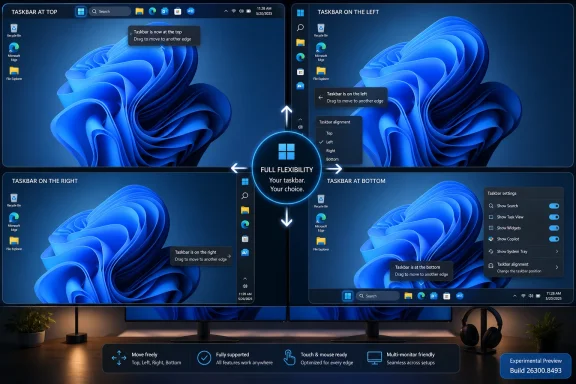
Microsoft’s new test build reverses that decision in plain terms. Users in the Experimental channel can choose bottom, top, left, or right taskbar positions through Settings. The company says flyouts, animations, tooltips, small taskbar mode, and “never combine” behavior should continue to work across those placements. That last detail matters because a movable taskbar without the surrounding behaviors would be a cosmetic concession, not a restoration of utility.

The Vertical Taskbar Was Never Just a Preference​

It is easy to trivialize this as a niche complaint. Most people leave the taskbar at the bottom, and Microsoft has long had telemetry suggesting the bottom placement dominates. But interface decisions made solely by majority behavior tend to punish the users who rely most intensely on the product.
The vertical taskbar has always been a power-user feature because modern displays are wide. A taskbar on the left or right edge can preserve vertical space for documents, code, timelines, spreadsheets, browsers, and remote desktop sessions. On a 16:9 laptop panel, losing pixels at the bottom can feel more expensive than losing a strip along the side.
There is also a workflow argument. A vertical taskbar with labels and uncombined windows can serve as a compact window switcher, especially for people who keep many instances of the same app open. Microsoft’s own description of the new behavior emphasizes that vertical placement with labels makes each app window easier to identify at a glance. That is not a theme setting. That is information architecture.
The older Windows taskbar was not elegant by modern design standards, but it was astonishingly adaptable. It could be dragged, resized, crowded, labeled, auto-hidden, or turned into something that looked ugly but worked. Windows 11’s first version treated that adaptability as technical debt. Many users treated its removal as a breach of contract.

The Smaller Taskbar Is a Bigger Signal Than It Looks​

The new compact taskbar option may prove just as important as movement. Microsoft says the default taskbar remains unchanged, but the smaller mode reduces icon size and taskbar height to recover screen space, particularly on smaller devices. That is a modest sentence with an entire product philosophy buried inside it.
Windows 11 has often looked best on spacious, high-DPI hardware. On constrained screens, the same design language can feel padded to a fault. Touch-friendly spacing, centered layouts, and large visual targets are defensible in a hybrid operating system, but they become frustrating when the device is a clamshell laptop, the user has a mouse, and the work involves dense information.
A smaller taskbar acknowledges that the “one comfortable default” approach has limits. It gives Microsoft a way to preserve the mainstream Windows 11 look while letting users opt into a tighter shell. That is the correct compromise: do not make the default hostile to new users, but do not pretend expert users are wrong for wanting density.
This distinction matters for IT departments too. Admins rarely care whether an interface is pretty in isolation. They care whether users can find the same controls every day, whether screen sharing exposes unnecessary personal information, whether remote support becomes harder, and whether a new OS causes a wave of “where did my thing go?” tickets. A smaller and movable taskbar will not solve Windows 11’s enterprise adoption headaches by itself, but it removes one avoidable objection.

Start Menu Customization Shows Microsoft Learning the Same Lesson Twice​

The Start menu changes follow the same arc. Microsoft is testing a more adjustable Start experience, including size choices and controls over which sections appear. Users can reportedly create a minimal Start menu focused on pinned apps, preserve access to recent files, or keep a fuller all-in-one layout.
That is a quiet rebuke of Windows 11’s original Start menu. The design was simple, centered, and tidy, but it also treated different workflows as variations on one template. The “Recommended” area became a particular irritant because it occupied valuable space even for users who did not want Windows surfacing files or apps there.
Renaming “Recommended” to “Recent” is more than a copy edit. “Recommended” implies editorial judgment by the operating system. “Recent” describes a mechanical function the user can understand and evaluate. In an era when Windows is already under scrutiny for promoted content, AI integrations, account nudges, and cloud tie-ins, that semantic shift matters.
Microsoft has been learning, sometimes the hard way, that users react differently to software that helps them remember what they did and software that appears to decide what they should do next. The former feels like a tool. The latter feels like a sales surface. If the Start menu is going to surface files and apps, calling that behavior “Recent” is cleaner, more honest, and less irritating.

The Privacy Tweaks Are Small Because the Problem Is Familiar​

The ability to hide the user’s profile photo and account name from Start sounds minor until you picture the real contexts where Windows is used. People present from personal laptops. Consultants screen-share with clients. Teachers project their desktops. Admins record troubleshooting sessions. A visible account name is not usually a catastrophe, but it is one more bit of unnecessary exposure.
Windows has become increasingly account-aware over the last decade. Microsoft accounts, OneDrive integration, profile photos, Microsoft 365 hooks, Copilot surfaces, and cross-device features all make the PC feel less like a sealed local machine and more like a node in a cloud identity graph. That has benefits, but it also raises the cost of casual disclosure.
A toggle to hide identity elements does not transform Windows privacy. It does, however, show that Microsoft understands embarrassment and exposure as product problems, not just compliance issues. The best privacy features are often boring. They reduce the number of times a user has to remember to prepare the machine before someone else sees it.
The same principle applies to Start menu section controls. If users can turn off parts of Start they do not use, the menu becomes less like a feed and more like a launcher. Windows does not need every surface to be personalized in the algorithmic sense. Sometimes personalization means letting the user remove the thing.

The Experimental Channel Makes This a Promise With an Asterisk​

There is an important caveat: this is not a general release. The taskbar changes are in the Windows Insider Experimental channel, which exists precisely because Microsoft wants a place for earlier, less-settled feature testing. Experimental is not the same thing as “shipping next Patch Tuesday.”
That matters because Windows Insider features can change, stall, arrive gradually, or be pulled back. Microsoft’s recent Insider program changes are designed to make testing more transparent, including clearer channel identities and feature flags, but the basic rule remains: a feature in a preview build is not a contract with production users.
Even so, this test carries more weight than the average shell experiment. Microsoft has publicly framed taskbar and Start improvements as part of a broader quality push. The company is not merely trying a new animation or icon; it is addressing a highly visible regression that has followed Windows 11 since launch. Killing this work now would be more damaging than never testing it.
For WindowsForum readers, the practical advice is straightforward. Enthusiasts with spare hardware or disposable VMs can test the new behavior, but production systems should wait. The Experimental channel is where you go to evaluate Microsoft’s direction, not where you go to stabilize your daily workstation.

Windows 11’s Real Problem Was Never Only Missing Features​

The temptation is to declare victory: the taskbar moves again, therefore Microsoft listened, therefore Windows 11 is fixed. That is too neat. Windows 11’s troubled reputation among enthusiasts was never about one missing setting alone.
It was about cumulative friction. The taskbar lost behaviors. The Start menu became less flexible. Context menus required extra clicks. Default app controls changed. Microsoft pushed account sign-ins harder. Widgets mixed utility with content. AI features arrived before many users had asked for them. Each individual decision could be defended; together, they created the impression that Windows was becoming less deferential to its owner.
The movable taskbar became symbolic because it was so easy to explain. A user could do this before. A user could not do it now. The new version looked cleaner but did less. That is the kind of regression people remember.
Microsoft now appears to be correcting the symbol. The harder work is correcting the pattern. If Windows 11 becomes more configurable in the shell while continuing to add unwanted surfaces elsewhere, the goodwill will be short-lived. If, instead, the taskbar and Start changes mark a wider shift toward reversibility, density, and user control, this could be a meaningful turn.

Enterprise IT Sees a Different Kind of Win​

For enterprise administrators, taskbar placement itself may not be the headline. Many organizations standardize layouts, restrict personalization, or train users around defaults. But the return of options still matters because Windows migrations succeed or fail on perceived disruption.
The Windows 10-to-Windows 11 transition has been unusually entangled with hardware requirements, security baselines, app compatibility testing, and user retraining. Anything that makes Windows 11 feel less alien reduces resistance. That is especially true now that Windows 10 is past its mainstream comfort zone and organizations are weighing upgrade timelines, extended support costs, and device refresh cycles.
The Start menu controls may be more consequential in managed environments. A cleaner, less cluttered Start experience can reduce confusion for frontline workers, shared machines, kiosks, classrooms, and VDI deployments. If Microsoft exposes enough policy control, admins could shape Start into a predictable launcher rather than a semi-personalized panel.
There is also a support benefit. Many help desk scripts assume stable shell geography. Users who prefer a left-side taskbar, labels, or a compact layout are often the same users who notice when a migration breaks their flow. Giving those users sanctioned controls reduces the need for unsupported registry hacks, third-party shell replacements, or “just live with it” resentment.

Third-Party Shell Tools Won Because Microsoft Left a Vacuum​

One uncomfortable backdrop to this story is the popularity of third-party tools that restore or replace Windows shell behavior. Utilities such as Start11, StartAllBack, ExplorerPatcher, Windhawk mods, and others have thrived because Windows 11 removed or constrained choices people still wanted. These tools are not just customization toys; for some users, they are migration enablers.
That should sting inside Microsoft. When users install system-level shell modifications immediately after upgrading, they are voting against the default experience. They are also taking on fragility, because shell hooks can break after cumulative updates or Insider builds. The existence of a lively customization ecosystem is healthy; its necessity is an indictment.
By bringing back taskbar movement and Start menu controls natively, Microsoft can reclaim some of that territory. Native support is usually more reliable, more accessible, easier to manage, and less likely to break after an update. It also signals that user preferences do not have to live in an adversarial layer outside the operating system.
Still, Microsoft should not confuse “we restored some options” with “we made the third-party tools irrelevant.” Power users will always want more: richer Start layouts, deeper taskbar density controls, classic context menu behavior, advanced window management, and less cloud-connected furniture. The lesson is not that Microsoft must implement every tweak. The lesson is that removing familiar flexibility creates a market for someone else to give it back.

The Design Team’s Original Trade-Off Was Understandable and Wrong​

It is worth granting Microsoft the strongest version of its argument. Rebuilding the Windows shell is hard. Supporting four taskbar positions means more layout states, more animation paths, more flyout geometry, more accessibility testing, more localization issues, more multi-monitor edge cases, and more app assumptions to validate. The old Windows shell carried decades of complexity, and Windows 11 was partly an attempt to escape it.
That engineering reality does not make the original removal wise. Operating systems are not judged only by what is cleanest to implement. They are judged by whether they preserve the affordances users build their work around. When an OS update removes a workflow and offers no equivalent, the user does not experience reduced complexity. The user experiences loss.
The better path would have been gradual modernization with compatibility for established behaviors. If a feature is too hard to rebuild by launch, say so and publish a roadmap. If telemetry shows it is used by a minority, treat that as a prioritization signal, not a moral verdict. Minority features can still be disproportionately important.
Microsoft now seems to be arriving at that position. The new taskbar work suggests the company has spent the engineering effort it once deferred. That is welcome, but it also raises the obvious question: if the feature was valuable enough to restore five years into the Windows 11 era, why was it acceptable to remove without a credible replacement in the first place?

The Windows Quality Push Has to Survive Shipping​

Microsoft has been talking more openly this year about Windows quality, performance, reliability, and user trust. That is not accidental. Windows is under pressure from multiple directions: aging Windows 10 fleets, increasingly capable Macs, Chromebooks in education, cloud desktops, Linux among developers, and user fatigue with prompts, ads, and AI surfaces.
The company’s challenge is that trust is not rebuilt by slogans. It is rebuilt when updates stop breaking workflows, when settings remain where users expect them, when performance improves on existing hardware, and when new features feel optional rather than imposed. The taskbar change fits that trust-building model because it gives control back instead of demanding attention.
But shipping quality is different from preview quality. The restored taskbar needs to behave correctly with multiple monitors, DPI scaling, tablet postures, auto-hide, remote sessions, accessibility tools, app badges, overflow, system tray flyouts, Copilot entry points, and notification areas. A half-working vertical taskbar would be worse than a delayed one because it would confirm the suspicion that Microsoft restored the checkbox without honoring the workflow.
The Start menu faces a similar test. If Microsoft lets users resize it but keeps pushing promotional content into it, the customization story will ring hollow. If section toggles are buried, reset after updates, or unavailable to admins, they will feel like decoration. The implementation has to be boringly dependable.

The Win for Users Is Control, Not Nostalgia​

The most interesting thing about this update is that it is not a retreat to Windows 10. Windows 11’s taskbar and Start menu are not simply reverting to the old shell. Microsoft is trying to reintroduce flexibility inside the newer design system, with modern flyouts, animations, scaling, and Settings integration.
That is the right target. Nostalgia can identify what people miss, but it cannot be the whole product strategy. The old Windows shell had plenty of clutter, inconsistency, and odd historical baggage. The goal should not be to freeze Windows in 2015 or 2009. The goal should be to preserve the user agency that made those older versions feel adaptable.
In that sense, this is a more mature version of Windows 11’s original ambition. A modern desktop does not have to be rigid. A cleaner interface does not have to be less capable. A design system can support defaults for casual users and depth for experts without treating the latter as an embarrassment.
If Microsoft internalizes that, the taskbar fix could become a template. Make the default sane. Make advanced options discoverable but not intrusive. Let users turn off what they do not want. Avoid pretending that telemetry majorities define everyone’s needs. Above all, do not remove a long-standing capability unless the replacement is genuinely better.

The Desktop Gets Its Levers Back​

Microsoft’s latest Insider build does not magically resolve every grievance Windows 11 users have accumulated, but it does give the desktop back several controls that never should have disappeared.
  • The taskbar can now be tested at the bottom, top, left, or right of the screen in the Windows Insider Experimental channel.
  • The smaller taskbar option is designed to recover screen space without changing the default experience for everyone else.
  • The restored taskbar behavior is meant to work with related features such as labels, “never combine,” tooltips, flyouts, and animations.
  • The Start menu is moving toward user-controlled layouts, including options to reduce or remove sections users do not want.
  • The shift from “Recommended” to “Recent” suggests Microsoft understands that transparent labels matter when Windows surfaces files and apps.
  • The privacy-oriented ability to hide profile identity from Start is small, but it fits a broader need for Windows to be less revealing during shared-screen work.
The taskbar’s return to the sides and top of the screen is not a revolution, and that is precisely why it matters. Windows is at its best when it lets ordinary users ignore complexity and lets demanding users shape it. Microsoft spent the first years of Windows 11 trying to prove that a simpler shell could be a better shell; now it has to prove that a modern shell can still be a personal one.

Source: Digital Trends Microsoft is finally fixing the most annoying thing about Windows 11
 

Microsoft began rolling out Windows 11 Experimental Preview Build 26300.8493 on May 15, 2026, giving Windows Insiders the ability to place the taskbar at the bottom, top, left, or right edge of the screen and to enable a genuinely smaller taskbar. That sounds like a small settings change until you remember what Windows 11 took away at launch. The taskbar was not merely redesigned in 2021; it was narrowed, centralized, and stripped of habits that millions of Windows users had built over decades. Microsoft is now admitting, in the slow language of Insider builds, that the clean-slate taskbar was too clean for its own good.

Windows 11 concept screenshot showing customizable taskbar placement options (bottom, top, left, right).Microsoft Finally Reopens a Door It Nailed Shut​

The new taskbar controls are not yet a general Windows 11 update, and they are not even guaranteed to arrive unchanged. They are in the Experimental channel, Microsoft’s early-preview lane for features that may shift, stall, or disappear before production. But their existence matters because this is no longer a registry hack, a third-party Start menu workaround, or a “maybe someday” answer in a feedback thread.
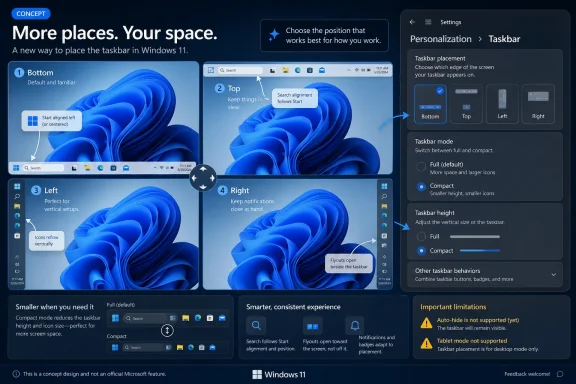
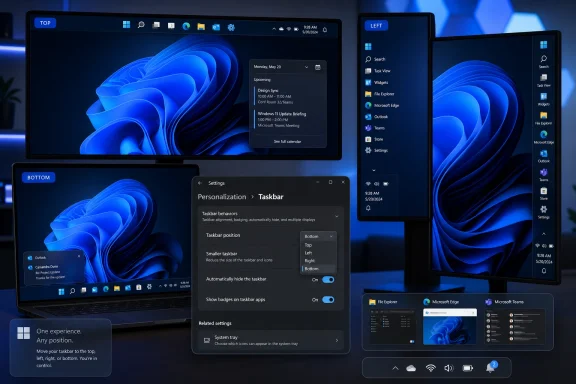
Users can now choose the taskbar edge from Settings, placing it at the bottom, top, left, or right. Microsoft says the supporting interface elements — Start, Search, tooltips, flyouts, and animations — are supposed to open relative to the chosen taskbar position. That last clause is the real engineering work, because a vertical taskbar is not just a horizontal taskbar rotated ninety degrees; every adjacent UI surface has to know where it lives.
The company is also adding alignment controls. A vertical taskbar can place icons toward the top or keep them centered, while a horizontal taskbar can keep them left-aligned or centered. That means Microsoft is not merely restoring the old Windows 10 behavior in the most literal sense; it is trying to reconcile the centered Windows 11 aesthetic with the workstation logic of older Windows desktops.
The smaller taskbar option is similarly more meaningful than the label suggests. Earlier Windows 11 preview work had reduced icon size without fully giving users back the denser bar they remembered. This new setting reduces both icons and taskbar height, making it closer to the old “small taskbar buttons” behavior that mattered on laptops, virtual machines, remote desktops, and any display where every vertical pixel has a job.

The Windows 11 Taskbar Was Always a Productivity Argument​

The fight over the Windows 11 taskbar was never really about nostalgia. It was about whether the operating system should assume that most people work the same way. Microsoft bet that a simplified, centered, visually consistent taskbar would make Windows 11 feel modern; many longtime users saw the same move as an avoidable regression dressed up as design discipline.
That distinction matters because Windows is not an appliance OS. It lives on ultrawide monitors, tiny notebooks, trading desks, classrooms, kiosks, gaming rigs, remote admin consoles, and enterprise fleets where “default” is rarely the same as “correct.” A taskbar on the left edge of a widescreen monitor can be a rational use of space. A smaller taskbar on a 13-inch laptop can be the difference between seeing one more row in Excel and constantly scrolling.
When Windows 11 launched, Microsoft also removed or delayed other familiar taskbar behaviors, including the ability to ungroup taskbar buttons and show labels. Those features eventually returned, but the pacing was telling. The company spent years rebuilding capabilities that had already existed, while users filled the gap with Start11, ExplorerPatcher, StartAllBack, registry edits, and a small cottage industry of “make Windows 11 behave like Windows again” utilities.
That is why the movable taskbar’s return carries emotional weight beyond the feature itself. Windows users are used to change, but they are less forgiving when change feels like the removal of agency. A desktop operating system can be opinionated, but when it becomes prescriptive about muscle memory, it starts to feel less like a platform and more like a showroom.

Five Years Later, the Design Debt Comes Due​

Microsoft’s delay was not necessarily laziness. Windows 11’s taskbar was substantially rebuilt, and the company has repeatedly implied that alternate taskbar positions were more complicated than flipping an old switch. The difficulty is believable: system trays, notification areas, flyouts, jump lists, live previews, window grouping, touch affordances, Widgets, Copilot entry points, and Search all have placement assumptions baked into them.
But from the user’s side, the engineering explanation never fully resolved the product problem. If Microsoft chose to ship a new taskbar before it could match the old one’s basic flexibility, then the missing features were not an unfortunate accident. They were part of the launch trade-off.
That trade-off aged poorly because Windows 11 did not arrive as a radical simplification of computing. It arrived as Windows, with the same Win32 apps, the same enterprise management needs, the same registry, the same shell heritage, and the same users who expected to put things where they wanted them. The more familiar the rest of the OS remained, the stranger the taskbar’s inflexibility looked.
The new Experimental build is therefore less a dramatic innovation than a repayment plan. Microsoft is restoring options that many users never accepted as optional. The company can frame this as listening to feedback, and that is fair enough, but it is also cleaning up a design debt incurred when Windows 11 prioritized polish over completeness.

The Smaller Taskbar Is the Quietly Bigger Win​

Moving the taskbar will get the attention because it is visible and symbolic. The smaller taskbar may have the broader day-to-day impact. For many users, especially laptop owners, the default Windows 11 taskbar has always felt too tall for the amount of information it carries.
A compact taskbar is not just about aesthetics. It creates more room for applications, reduces wasted chrome, and makes Windows feel less like it is reserving a strip of the display for itself. On small screens, that matters immediately; on large screens, it helps users who prefer dense layouts and lower visual friction.
The important detail is that Microsoft says this version reduces taskbar height as well as icon size. That is the difference between a cosmetic toggle and a functional one. A smaller icon inside the same oversized taskbar is not a compact mode; it is a visual mismatch. A shorter taskbar, by contrast, gives screen real estate back to the user.
The setting also does not require a restart or sign-out, which is how this kind of preference should work in 2026. Windows has too often treated shell changes as if they were infrastructure migrations. If Microsoft wants users to experiment with layout, density, and placement, those changes need to feel reversible and immediate.

The Catch Is Written in the Unsupported Cases​

This is still preview software, and the limitations are not minor. Microsoft says auto-hide is not yet supported in alternate taskbar positions. The tablet-optimized taskbar is also not supported there. Touch gestures are still being worked on, and Search boxes do not appear in alternate positions for now, with Windows falling back to a Search icon.
Those omissions show why the feature took time and why it may still take more. A bottom taskbar is the path of least resistance for modern Windows shell design. Move it to the side and suddenly every assumption has to be tested: where the Start menu opens, how previews animate, how touch targets behave, how notification overflow works, and whether accessibility tooling reads the layout correctly.
For desktop traditionalists, the missing auto-hide support may sting most. Auto-hide and vertical placement often belong to the same class of user: someone trying to maximize workspace and minimize shell intrusion. A vertical taskbar without auto-hide is useful, but it is not the full return of classic flexibility.
For tablet and convertible users, the gap is different. Windows 11 has spent years trying to look more comfortable on touch devices without becoming Windows 8 again. A movable taskbar that does not yet mesh with touch gestures is a reminder that the desktop and tablet personalities of Windows still do not always evolve together.

Start Menu Changes Show Microsoft Is Still Renaming the Furniture​

The same Insider update also adjusts the Start menu, adding separate toggles for Pinned, Recommended, and All sections. Microsoft is also renaming Recommended to Recent, a small change that reveals how awkward the original label had become. “Recommended” suggested judgment or promotion; “Recent” more accurately describes recently installed apps and recently opened files.
That renaming is not trivial because Windows 11’s Start menu has long suffered from a trust problem. Users are more tolerant of local recency than opaque recommendation. A section that shows what you just installed or opened can be useful. A section that appears to mix usefulness, cloud suggestions, and Microsoft’s product priorities invites suspicion.
Giving users separate toggles is part of the same larger correction as the taskbar work. Microsoft is conceding that personalization cannot stop at wallpaper and accent colors. If Start is the launch surface and the taskbar is the persistent surface, both need to respect the user’s workflow instead of forcing everyone into a single house style.
Still, this is Microsoft, so skepticism is warranted. Windows 11 has repeatedly mixed genuine usability improvements with nudges toward Microsoft accounts, Edge, Bing, Widgets, Copilot, and cloud surfaces. The more control Microsoft gives users over Start and taskbar layout, the more visible any remaining promotional behavior becomes.

The Insider Channel Is a Promise With an Escape Clause​

The most important practical warning is simple: this is not shipping to everyone today. It is rolling out to Windows Insiders in the Experimental channel, and Microsoft is using controlled feature rollout mechanisms. Even people on the right build may not see the same set of toggles at the same time.
That matters for users tempted to jump into Experimental just to get a vertical or smaller taskbar. Insider builds are not merely early access; they are test environments. Microsoft explicitly reserves the right to change, remove, or never ship features that appear there. A machine you rely on for work should not be treated as a theme park ride for shell features.
The build itself is based on Windows 11 version 25H2 via an enablement package, with the Experimental build number 26300.8493. That versioning detail is useful because it places the taskbar work inside Microsoft’s broader 2026 Insider reshuffling, where channel names and build lines are changing. In other words, this is part of a larger preview-program transition, not a clean public release milestone.
For enthusiasts, that is manageable. For IT departments, it is another reason to wait for a stable channel and policy documentation. Custom taskbar positions sound like personal preference, but in managed environments, shell consistency affects training, support scripts, screenshots, help desk workflows, and user expectation.

Enterprise IT Will Care Less About Nostalgia Than Supportability​

In business environments, the return of taskbar placement will be welcomed only if it can be controlled, documented, and deployed predictably. Administrators do not want a thousand bespoke desktops unless they have intentionally allowed them. They want to know whether these settings roam, whether they can be enforced, whether they break after feature updates, and whether they interact cleanly with existing Start and taskbar layout policies.
Windows 10-era taskbar customization had years of institutional knowledge behind it. Windows 11 reset much of that practical memory. If Microsoft is now restoring flexibility, it needs to provide management surfaces that match the feature’s importance, not merely consumer-facing Settings toggles.
There is also a support angle around alternate positions. A vertical taskbar changes the location of Start, Search, system tray, notification affordances, and running apps. That can be wonderful for power users and maddening for help desks walking nontechnical users through a problem over the phone. The freedom is good; the administrative story determines whether it scales.
The same is true for the smaller taskbar. In a fleet of mixed display sizes, compact mode may be a quality-of-life improvement. In accessibility-sensitive environments, it may create smaller targets that are inappropriate for some users. Microsoft’s challenge is to make the feature flexible without turning it into another setting that enterprises have to chase reactively.

Third-Party Shell Tools Just Lost Some Leverage, Not Their Reason to Exist​

The return of these features will not kill the custom Start menu ecosystem. It will, however, remove one of the easiest sales pitches those tools had. For years, the argument was blunt: install this utility if you want Windows 11 to stop fighting your taskbar preferences.
But third-party tools have never survived on one missing toggle alone. They offer deeper Start menu layouts, richer right-click behavior, classic Explorer affordances, configurable search experiences, and a level of shell control Microsoft is unlikely to expose. If anything, Microsoft’s slow restoration of individual features may clarify the difference between “I need the old taskbar position” and “I want a fundamentally different Windows shell.”
There is also a trust dimension. Some users moved to third-party tools because Microsoft removed features they depended on. Even if Microsoft brings those features back, those users may not immediately return to stock Windows. The lesson they learned was not merely that Windows 11 lacked a setting; it was that Microsoft was willing to remove one.
That is the reputational cost of redesign by subtraction. Restoring the feature repairs the product, but it does not automatically repair confidence. Power users remember how long they had to wait.

The Real Test Is Whether Microsoft Stops Treating Choice as Clutter​

The broader Windows 11 story has been a tug-of-war between simplicity and control. Microsoft wants an operating system that looks coherent in marketing images, works across input modes, and can carry new services like Copilot without feeling bolted together. Users want an operating system that gets out of the way, especially when they already know how they like to work.
Those goals are not mutually exclusive, but Windows 11 often behaved as if they were. It confused fewer visible options with better design. It assumed that cleaning up the interface meant taking decisions away, rather than organizing them so ordinary users are not overwhelmed and advanced users are not blocked.
The new taskbar controls suggest a healthier model. Keep the default simple. Let the default remain centered, bottom-aligned, and visually modern. But do not pretend that the default is the only legitimate workflow.
This is especially important as Windows becomes more service-driven. The more Microsoft adds cloud search, AI surfaces, widgets, recommendations, account prompts, and ambient notification experiences, the more users need confidence that the desktop still belongs to them. Taskbar placement is a small arena for a much larger question: who gets final say over the shape of the workspace?

The Build That Finally Says “Your Desktop” Again​

This preview does not finish the job, but it changes the direction of travel. The practical facts are straightforward, and they matter precisely because the feature has been missing for so long.
  • Windows 11 Experimental Preview Build 26300.8493 began rolling out on May 15, 2026, with alternate taskbar placement for the bottom, top, left, and right edges of the screen.
  • The smaller taskbar option now reduces both icon size and taskbar height, making it more useful than earlier compact-icon behavior.
  • Alternate positions currently have limitations, including no auto-hide support, no tablet-optimized taskbar support, unfinished touch gesture support, and Search icon fallback where the full Search box is unavailable.
  • The update also brings Start menu controls for Pinned, Recent, and All sections, with Recommended being renamed to Recent.
  • The feature is in the Experimental channel and subject to controlled rollout, so it should not be treated as a production guarantee or a reason to move a primary work PC onto Insider builds.
The question now is not whether Microsoft can restore old Windows features. Clearly, it can. The question is whether it can relearn the product instinct that made those features valuable in the first place: Windows succeeds when it offers a strong default without mistaking that default for the user’s only acceptable choice.
Microsoft’s movable and smaller taskbar is late, unfinished, and still fenced inside preview builds, but it is also a welcome correction to one of Windows 11’s most unnecessary self-inflicted wounds. If the company follows through into stable releases, with proper management controls and fewer arbitrary exclusions, this could mark a quieter but more important shift in Windows design: not a retreat to the past, but a renewed willingness to let the desktop be shaped by the people who actually use it.

Source: VideoCardz.com https://videocardz.com/newz/microso...1-users-move-the-taskbar-and-make-it-smaller/
 

Microsoft began rolling out Windows 11 Experimental Preview Build 26300.8493 on May 15, 2026, giving Windows Insiders an official way to move the taskbar to the top, left, right, or bottom of the screen. The change sounds almost comically small until you remember that Windows 11 launched in 2021 by removing exactly this kind of long-standing desktop flexibility. For nearly five years, users have treated the missing movable taskbar as shorthand for a broader complaint: Windows 11 looked cleaner, but it often felt less like their PC. Now Microsoft is trying to prove that the operating system can become more personal without retreating entirely into the past.

Promotional graphic showing Windows 11 taskbar can be moved to top, left, right, or bottom with settings.Microsoft Finally Admits the Bottom Edge Was Not Sacred​

The Windows taskbar has always been more than a strip of icons. It is muscle memory, workflow architecture, and, for many people, the single most visible contract between Windows and the user. When Microsoft fixed it to the bottom of the screen in Windows 11, the decision was framed as part of a modernized shell, but it landed like a downgrade for anyone who had spent years running a vertical taskbar or parking it at the top like a desktop control bar.
That is why this Insider change matters beyond the narrow mechanics of taskbar placement. Microsoft is not merely adding a setting. It is walking back one of the most symbolic losses in the Windows 11 transition, a loss that power users, accessibility-minded users, ultrawide monitor owners, and multi-monitor workers have been complaining about since launch.
The new setting lives where ordinary users would expect it: Settings, Personalization, Taskbar, Taskbar behaviors. From there, Insiders can choose the bottom, top, left, or right edge of the screen. Microsoft is also adapting tooltips, flyouts, animations, Start, Search, and related taskbar surfaces so the taskbar behaves like a supported feature rather than a registry trick held together by hope.
That distinction is important. Windows users have never lacked hacks, third-party utilities, and shell replacement tools. What they lacked was Microsoft’s blessing, and with it the reasonable expectation that core desktop behavior would survive updates, scale properly, and work consistently across monitors.

Windows 11’s Clean Slate Had a Cost​

Windows 11 arrived with a redesigned taskbar and Start menu that prioritized visual simplicity over legacy configurability. Centered icons, a simplified context menu, a reworked system tray, and a more touch-friendly posture all made sense if Microsoft’s objective was to produce a calmer, more modern desktop. The trouble was that Windows is not an appliance OS. It is the working surface for hundreds of millions of very different people doing very different things.
The old Windows 10 taskbar was not elegant, but it was flexible. Users could move it, resize it, stack it with decades of habits, and bend it to odd monitor setups. Windows 11 replaced much of that with a narrower design philosophy: fewer exposed choices, more controlled presentation, and fewer ancient affordances inherited from previous shell architectures.
That tradeoff was always going to alienate the people who treat the desktop as a toolbench. For them, taskbar placement is not decorative. A left-side taskbar on a wide display can preserve vertical space. A top taskbar can align with application menu bars and browser tabs. A right-side taskbar can make sense in multi-monitor setups where the inner edge is crowded or where a user wants the taskbar away from the primary interaction zone.
Microsoft’s defense, when the criticism first erupted, was that supporting every old taskbar mode in the new shell was not free. Flyouts, animations, app layout assumptions, notification positioning, touch behavior, and snapping all had to be reconciled with alternate edges. That was a real engineering argument, but it did not make the user experience feel any less reduced.

The Experimental Channel Becomes Microsoft’s Apology Lab​

The timing is not accidental. Microsoft has been reshaping the Windows Insider Program, and the Experimental channel is meant to be the place where unfinished, feedback-driven features appear before they are ready for broad deployment. That makes the movable taskbar a perfect candidate. It is highly visible, emotionally loaded, and technically risky enough that Microsoft needs real-world testing before it declares victory.
Experimental is also a convenient political space inside Windows development. Microsoft can say it is listening without promising that every implementation detail will ship unchanged. If a flyout misbehaves on a vertical taskbar, if an animation feels wrong, or if a multi-monitor edge case breaks expectations, the company can iterate before the feature reaches the more conservative channels.
Build 26300.8493 is based on Windows 11 version 25H2 via an enablement package, which suggests this work is tied to the current Windows 11 line rather than some distant reboot. That matters because users have heard many vague promises about “coming soon” personalization features. Seeing the setting arrive in an actual Insider build moves the story from roadmap theater to testable software.
Still, Experimental means what it says. Microsoft has repeatedly used Insider channels to test features that change, stall, or vanish. The correct reading is not “the movable taskbar is guaranteed for every Windows 11 PC next month.” The correct reading is that Microsoft has crossed the most important threshold: it is now shipping supported code to users outside the company.

The Small Taskbar Is the Other Half of the Concession​

The headline feature is placement, but the smaller taskbar mode may prove just as important in day-to-day use. Windows 11’s default taskbar has often felt oversized on laptops and cramped displays, especially when combined with thicker title bars, large spacing, and the OS’s broader preference for visual breathing room. Microsoft’s new small taskbar option gives users smaller icons, a shorter bar, and more vertical space for applications.
That is a practical admission that density still matters. Windows 11 has often behaved as though every user is on a high-resolution display with plenty of screen real estate. In the real world, people use 13-inch laptops, remote desktops, virtual machines, budget monitors, and window-heavy workflows where every row of pixels counts.
The small taskbar also reinforces the larger theme of this update: Microsoft is no longer treating personalization as merely wallpaper, colors, and light-versus-dark mode. Placement, density, alignment, and interruption level are productivity settings. They determine how much the operating system demands attention and how much it gets out of the way.
The key challenge will be consistency. A small taskbar that works only at the bottom would feel like another half-measure. Microsoft says most customization settings, including small taskbar and never-combine taskbar icons, should work across taskbar locations. That is the right ambition, because power users are not asking for one restored checkbox; they are asking for a coherent desktop model.

Flyouts Are Where the Real Engineering Battle Lives​

Moving the taskbar itself is not the hardest part. The harder work is making everything attached to it feel native wherever the taskbar goes. Start, Search, Quick Settings, notifications, jump lists, previews, Widgets, Copilot surfaces, overflow menus, and system tray interactions all have to appear from the correct edge and respect the user’s chosen layout.
This is where earlier hacks fell apart. Registry tweaks could force the taskbar to the top, but flyouts might animate from the wrong place, overlap awkwardly, or behave unpredictably after updates. Third-party tools could provide impressive workarounds, but they also sat in the blast radius of every shell change Microsoft shipped.
A supported movable taskbar requires Microsoft to revisit assumptions baked into the Windows 11 shell. If the taskbar is vertical, icon alignment needs different logic. If it is at the top, menus cannot blindly assume a bottom-origin animation. If users combine vertical placement with small icons and multiple displays, the shell has to remain boring in the best possible way.
That boringness is the product. Nobody wants to think about the taskbar once it is configured. The success condition is not that enthusiasts cheer on day one; it is that six months later a left-side taskbar feels so normal that users forget it was ever missing.

The Start Menu Still Carries Windows 11’s Trust Problem​

Taskbar placement arrives alongside broader Start and taskbar personalization work, and that pairing is revealing. Microsoft knows that Windows 11’s shell complaints are not isolated. The Start menu, recommendations, pinned apps, newly installed apps, account prompts, search behavior, widgets, and promotional surfaces have all contributed to the perception that Windows 11 sometimes serves Microsoft’s priorities before the user’s.
The company’s current messaging emphasizes listening to feedback, reducing distractions, and making Windows feel more personal. That is exactly the right language, but it collides with years of user experience choices that trained people to be skeptical. A movable taskbar helps, but it does not erase frustration over suggested content, account nudges, cloud-service promotion, and inconsistent settings migrations.
This is why the taskbar change is strategically useful for Microsoft. It is concrete. It is visible. It is a feature users can point to and say, “That thing I asked for is actually back.” In a platform where many changes feel abstract, AI-branded, or cloud-tethered, moving a taskbar is refreshingly mechanical.
But Microsoft should not mistake symbolic progress for full trust repair. The users who cared enough to demand top and side taskbars are often the same users who notice every unwanted recommendation, every reset default, and every feature that seems designed more for engagement metrics than productivity.

The Power User Vote Still Matters​

It is fashionable to dismiss desktop customization complaints as nostalgia from a loud minority. That is a mistake. Power users are not always numerically dominant, but they shape perception, support families and offices, write guides, administer fleets, file bugs, and decide whether Windows feels like a platform worth investing in.
The movable taskbar became a credibility test precisely because it was so basic. If Microsoft would not restore a decades-old taskbar option after years of feedback, what did that say about the value of Feedback Hub votes, Insider complaints, and public criticism? The answer now appears to be that Microsoft did hear the demand, but only after a long and damaging delay.
For IT pros, the issue is less emotional but still relevant. Standardized layouts matter in managed environments, and not every organization wants users freely moving core shell elements. But the return of the feature could help certain accessibility, kiosk, remote work, and specialized workstation scenarios. The key enterprise question will be whether Microsoft exposes adequate policy controls and whether the setting behaves predictably under provisioning and profile migration.
Administrators will also want to know how this interacts with Start layout policies, taskbar pinning, multi-monitor setups, and shell stability across cumulative updates. Consumer enthusiasm is one thing; enterprise acceptance requires boring documentation, reliable controls, and no surprises after Patch Tuesday.

Windows 10’s Shadow Is Still Long​

This change lands months before Windows 10’s consumer end-of-support milestone fades from memory, and that context is unavoidable. For many users, Windows 11 has not been a simple upgrade. It has been a negotiation: accept new hardware requirements, accept a different shell, accept changed defaults, and hope the benefits outweigh the annoyances.
By restoring a Windows 10-era behavior, Microsoft is implicitly acknowledging that some of what it removed was not clutter. It was user agency. The Windows 11 design reset may have made the OS cleaner, but cleanliness is not the same as capability.
There is a lesson here for whatever Windows becomes next. Microsoft can modernize without flattening every sharp edge. A mature desktop OS should be able to hide complexity from casual users while leaving serious configuration available to those who know why they want it. The answer to legacy sprawl is not always deletion; sometimes it is better organization.
Windows has survived for decades because it can be made strange. It runs in labs, studios, schools, factories, trading desks, gaming rooms, medical offices, and improvised home setups with monitors mounted in ways no designer anticipated. A taskbar that moves is not a relic. It is a small concession to the fact that Windows lives in the real world.

The New Setting Will Be Judged by Its Rough Edges​

The first wave of Insider testing should be watched carefully. The obvious bugs will involve flyout placement, animation direction, system tray overflow, notification alignment, and multi-monitor behavior. Less obvious issues may appear with touch, pen input, right-to-left languages, scaling, remote sessions, and accessibility tools.
There is also the question of discoverability. If Microsoft hides the feature too deeply, casual users who miss it may never find it. If Microsoft surfaces it too aggressively, it risks confusing users who do not need the option. Settings, Personalization, Taskbar, Taskbar behaviors is a reasonable compromise, but the company should make sure Windows Search can find the setting with plain-language queries like “move taskbar to top.”
Then there is the migration story. Users who relied on third-party tools may want to return to native behavior, but they will need confidence that Microsoft’s implementation is good enough. If the official feature is polished, it could reduce the need for shell utilities. If it is buggy or limited, it may simply create another split between supported settings and enthusiast workarounds.
Microsoft should resist the temptation to declare the job finished too early. The first version needs to work, but the broader restoration of taskbar confidence will require refinement over several releases.

Microsoft’s Desktop Strategy Is Becoming Less Absolutist​

The movable taskbar joins a broader pattern in Microsoft’s recent Windows messaging: fewer intrusive widgets, more flexible update behavior, performance and reliability work, and personalization features that respond to years of complaints. The company is not abandoning its Windows 11 design language, but it appears to be softening the absolutism of the original release.
That is healthy. Windows does not need to return to the chaotic peak of every option being exposed everywhere. But it also cannot afford to become a decorative launcher for Microsoft services. The most successful version of Windows 11 would be one that keeps the cleaner foundation while restoring the practical flexibility users lost in the transition.
This is also a reminder that AI is not the only story in Windows. Copilot may dominate Microsoft’s strategic narrative, but the daily experience of Windows is still shaped by taskbars, Start menus, File Explorer, updates, notifications, and performance. Users judge the platform less by keynote demos than by whether the machine behaves the way they expect when they sit down to work.
A movable taskbar will not sell a new PC. It will not make an NPU more useful. It will not change the economics of Microsoft 365 or Azure. But it can make Windows feel a little more like a personal computer again, and that is not a minor thing.

The Top-Edge Taskbar Is a Small Fix With a Long Memory​

The practical implications are straightforward, but the emotional ones explain why this story has traveled so far. Microsoft removed a familiar control, spent years hearing about it, and is now restoring it through the Insider pipeline. That chronology matters because it shows both the weakness and the strength of modern Windows development: user feedback can still win, but sometimes only after the damage becomes part of the product’s reputation.
  • Windows 11 Experimental Preview Build 26300.8493 adds supported taskbar placement at the bottom, top, left, and right edges of the screen.
  • The setting is currently for Windows Insiders in the Experimental channel, so production users should wait rather than rely on hacks or assume immediate rollout.
  • Microsoft is also testing a smaller taskbar mode that reduces icon size and gives applications more vertical space.
  • The real test will be whether Start, Search, flyouts, animations, system tray behavior, and multi-monitor setups work reliably in every taskbar position.
  • The change is significant because it reverses one of the most criticized Windows 11 shell regressions and signals a more flexible approach to desktop personalization.
The return of the movable taskbar will not settle every argument about Windows 11, and it will not magically turn skeptics into evangelists. But it is the kind of user-facing concession Microsoft needs to make more often: specific, practical, and rooted in how people actually use their PCs. If the company follows through with polish, policy support, and the same humility across the rest of the shell, this small strip of pixels could mark a larger shift away from Windows as a managed experience and back toward Windows as a configurable workspace.

Source: Thurrott.com Windows 11 Taskbar on top - Thurrott.com
 

Microsoft began testing a movable and smaller Windows 11 taskbar on May 15, 2026, in Windows 11 Insider Preview Build 26300.8493 for the Experimental channel, restoring customization options that Windows users lost when Windows 11 replaced the old taskbar in 2021. The change is not merely cosmetic. It is Microsoft conceding, five years late, that the Windows desktop is still a workplace as much as it is a showroom. And in Windows, the difference between polish and paternalism often comes down to whether the user can move a strip of icons out of the way.

Desk setup with dual monitors showing a project overview and code editor, plus keyboard, mouse, and Windows UI panel.Microsoft Finally Stops Treating the Taskbar as Furniture​

Windows 11’s original taskbar was one of the clearest examples of the operating system’s early bargain: users got a cleaner, calmer, more centered interface, but they gave up knobs that had accumulated over decades. The Start button moved, the taskbar became visually heavier, and familiar behaviors disappeared. For casual users, the changes were often just a matter of taste. For power users, multi-monitor workers, developers, and administrators who had tuned muscle memory around older Windows versions, the taskbar felt less like a redesign than a downgrade with nicer icons.
The new Experimental build changes that equation. Microsoft is now testing the ability to place the Windows 11 taskbar on the top, bottom, left, or right edge of the screen. It is also testing a smaller taskbar mode with reduced height and smaller app icons, aimed at users who want more usable screen space.
That sounds like a restoration, and in practical terms it is. But the implementation also reveals how much Windows 11’s taskbar was rebuilt around a narrower design model. This is not the old Windows 10 taskbar simply reappearing under a coat of Mica. It is a modern Windows 11 component being taught, slowly and imperfectly, to behave like the Windows shell used to behave by default.
The distinction matters because it explains both the delay and the bugs. Microsoft did not just hide a setting in 2021 and wait five years to turn it back on. It shipped a redesigned taskbar that lacked whole categories of behavior users considered basic. Now the company is retrofitting those expectations into the newer shell architecture while trying not to make the desktop feel like a pile of legacy code wearing a Windows 11 mask.

The Lost Feature Became a Trust Problem​

The argument over moving the taskbar was never really about whether most people put it on the left edge of the screen. Most probably did not. The bigger issue was that Windows had trained its users to expect the desktop to be negotiable. You could change the position of the taskbar, combine or uncombine buttons, resize elements, show labels, hide system icons, and bend the shell toward your workflow.
Windows 11 arrived with a different posture. It was visually coherent but behaviorally prescriptive. The taskbar was locked to the bottom. Some familiar context menu and system tray affordances changed. The Start menu was simplified into something less configurable than the Windows 10 version it replaced. The operating system felt more composed, but also less willing to be interrupted by the people using it.
That tension became a symbol for a wider complaint: Microsoft seemed more interested in funneling users through its preferred experiences than in preserving the small freedoms that made Windows Windows. The company was pushing Microsoft accounts, Edge prompts, widgets, recommendations, Copilot entry points, and cloud-connected surfaces while telling longtime users that certain local interface preferences were no longer priorities.
So when Microsoft now says taskbar position is one of the most-requested features and begins restoring it, the technical feature lands with emotional baggage. Users are not just getting a vertical taskbar. They are getting an admission that the earlier dismissal was wrong, or at least badly calibrated.
The taskbar is prime real estate. It sits in the user’s peripheral vision all day. When Microsoft changes it, users notice immediately. When Microsoft removes options from it, users interpret that as a statement about control.

Experimental Means Real, Not Ready​

The new taskbar work is arriving in the Experimental channel, which is important. Microsoft’s Insider channel reshuffle has made Experimental the place for earlier, less settled Windows features. That makes this build meaningful but not a promise that the same experience will land unchanged in a stable Windows 11 release next month.
In Build 26300.8493, users can move the taskbar through Settings rather than by dragging it directly to another screen edge. The relevant path is under Personalization, Taskbar, and Taskbar behaviors. That is a more deliberate model than the old click-and-drag approach, and it fits Microsoft’s stated concern about avoiding accidental movement.
There is a trade-off here. A setting is safer, especially on touch devices, shared PCs, and managed environments. But it is also less immediate. Windows veterans remember being able to unlock the taskbar and throw it to another edge in seconds. The new method makes repositioning feel like a configuration choice rather than a physical manipulation of the desktop.
That is Windows 11 in miniature. Microsoft is restoring flexibility, but it is restoring it inside a more controlled design vocabulary. The user gets the option back. The operating system keeps the choreography.

The Side Taskbar Is a Productivity Feature, Not a Nostalgia Act​

A vertical taskbar looks like nostalgia if you imagine every Windows user on a 16:9 desktop monitor with a handful of apps pinned. It looks much more practical when you consider how people actually work in 2026. Laptops remain constrained vertically. Ultrawide monitors create horizontal abundance. Developers, writers, analysts, and administrators often want more vertical room for code, logs, documents, spreadsheets, terminals, browser tabs, and remote sessions.
Moving the taskbar to the left or right edge can reclaim vertical pixels that matter more than horizontal ones. That is especially true on smaller laptops where the Windows 11 taskbar’s default height has always felt a little indulgent. On a compact notebook, every persistent strip of interface competes with content.
A top taskbar serves a different crowd. Some users prefer the menu-bar-like alignment of controls at the top of the screen. Others built habits around top-mounted taskbars in older Windows releases or on multi-OS setups. The specific preference matters less than the principle: Windows should not assume the default is the only reasonable arrangement.
The new implementation reportedly adapts many flyouts to the chosen edge. Start, Search, Quick Settings, language controls, overflow surfaces, and related elements are meant to appear relative to the taskbar’s new location. That is the crucial detail. A movable taskbar that still opens half its UI from the bottom-right corner would be a hack, not a restoration.
Still, the current preview is not complete. Some flyouts and notification behaviors remain tied to older assumptions, and Microsoft has acknowledged that pieces of the experience are still in progress. That is exactly why this belongs in Experimental. Users who install it expecting the full Windows 10 taskbar reborn will find rough edges.

The Smaller Taskbar May Matter More Than the Movable One​

The movable taskbar will get the headlines because it represents the most obvious reversal. But the compact taskbar may matter more in daily use. Windows 11’s default taskbar is visually comfortable, touch-friendly, and consistent with the operating system’s softer design. It is also too tall for many users who spend their day inside dense desktop applications.
The smaller taskbar mode reduces taskbar height and shrinks app icons. It also hides the date from the system clock, a small but telling concession to space. Microsoft is also experimenting with behavior that lets Windows switch to a compact presentation when the taskbar fills with apps, a more adaptive approach that recognizes crowded desktops as a normal condition rather than a power-user edge case.
This is the kind of customization Windows 11 needed from the beginning. It does not undermine the default design. It simply acknowledges that a 13-inch laptop, a 27-inch monitor, a tablet, and a virtual desktop session are not the same environment. A modern shell should adapt to density, not merely to theme color.
There is a second-order benefit as well. Smaller taskbar icons reduce the pressure to hide the taskbar entirely. Auto-hide has always been a compromise: useful when space is tight, annoying when the animation lags, triggers accidentally, or fails to appear in remote and multi-monitor scenarios. A compact always-visible taskbar can be a better balance for users who want both space and predictability.
The catch is that preview builds still have broken pieces. Reports indicate that the Win + X menu and right-click Start menu behavior may not work correctly in the current compact mode. Auto-hide animation, touch-optimized taskbar behavior, and gesture support also need work in non-default positions. For a feature defined by muscle memory, those bugs are not minor. They are the experience.

Microsoft’s New Insider Channel Is Part of the Story​

The arrival of this feature in Experimental is not just a footnote. Microsoft recently began reorganizing the Windows Insider Program, moving the old Dev Channel toward an Experimental identity and sharpening Beta as the place for features closer to retail release. That gives Microsoft more room to test visible shell changes without implying they are nearly finished.
That is useful for the taskbar because shell work is uniquely unforgiving. A broken optional feature in Paint or Notepad can annoy users. A broken taskbar can make the entire operating system feel unstable. It affects launching apps, switching windows, reading notifications, using system tray icons, invoking quick settings, interacting with multiple monitors, and navigating with touch.
The Experimental channel gives Microsoft a proving ground for the parts of Windows users touch constantly. It also gives the company a way to show progress without immediately committing to a general availability date. That is politically useful after years of criticism over Windows 11’s missing customization features.
But Experimental also creates a messaging challenge. If Microsoft uses early-channel releases to demonstrate that it is listening, it must be clear about what is unfinished. Enthusiasts can tolerate bugs if they understand the deal. Mainstream users cannot be expected to install an Insider build just to get a taskbar feature that may break context menus or touch gestures.
For administrators, the message is simpler: do not treat this as a deployment feature yet. Watch it, test it in labs if relevant, and prepare for policy questions later. But do not confuse a morale-boosting preview with a managed desktop capability.

The Old Windows 10 Comparison Cuts Both Ways​

It is tempting to say Windows 11 is finally catching up to Windows 10. In one sense, that is true. Windows 10 allowed taskbar placement on different screen edges, offered smaller taskbar buttons, supported labels and uncombined buttons, and generally treated the taskbar as a mature, configurable component. Windows 11 shipped without several of those options.
But Windows 10 also carried years of accumulated complexity. Its taskbar could be powerful and messy in equal measure. Microsoft’s Windows 11 redesign was, at least in theory, an attempt to simplify a surface that had become visually and technically overloaded. The failure was not that Microsoft wanted a cleaner taskbar. The failure was that it treated cleanliness and configurability as mutually exclusive.
The current preview suggests a better path. The default can remain simple. The settings can expose deeper choices. The shell can preserve a coherent design while giving serious users back the tools they need. That is not a radical idea. It is the operating system equivalent of progressive disclosure, and Windows has relied on it for decades.
The harder problem is maintaining quality across every combination. A bottom taskbar with centered icons is one layout. A left-side compact taskbar with labels, never-combine behavior, multiple monitors, different DPI scaling, auto-hide, touch input, right-to-left languages, and remote desktop is another thing entirely. Multiply that by shell flyouts, notification placement, accessibility tools, and enterprise policies, and the old feature suddenly looks less trivial.
That complexity does not excuse the original omission. But it does explain why restoring the feature properly takes more than flipping a registry value.

The Flyout Problem Shows Why the Shell Is Hard​

A taskbar is not just a bar. It is an anchor for the rest of the shell. Move it, and every attached behavior has to understand where it lives. Start should open from the edge that contains Start. Search should feel physically connected to the icon that launched it. Quick Settings and notification surfaces should not appear as if they forgot where the taskbar went.
This is where preview builds expose architectural assumptions. If a flyout remains tied to the bottom-right corner while the taskbar sits on the left edge, users immediately perceive the system as unfinished. The animation may be smooth, the acrylic may be pretty, and the icons may be aligned, but the mental model breaks.
Microsoft appears to have much of this adaptation underway, but not all of it is complete. Calendar and notification placement, touch gestures, auto-hide behavior, and tablet-optimized states are exactly the kinds of details that separate a nostalgic checkbox from a shippable Windows feature.
For IT pros, these details matter because users file tickets based on perceived inconsistency. If a feature enters stable Windows with obvious shell misalignment, help desks will hear about it. If it interacts badly with docking stations, display scaling, or multi-monitor layouts, administrators will disable or discourage it. A movable taskbar only succeeds if it becomes boring.
That is the paradox of shell work. The more successful it is, the less anyone thinks about it.

Goodwill Is Useful, but It Is Not a Strategy​

There is a broader Microsoft story here. Over the last several years, Windows 11 criticism has clustered around a few themes: performance regressions, aggressive promotion of Microsoft services, reduced local control, inconsistent UI modernization, and features that seemed designed around Microsoft’s priorities rather than the user’s. The taskbar became one visible battleground in that larger war.
Restoring taskbar movement and compact sizing will generate goodwill because it is concrete. It is not a vague promise to improve quality. It is not another AI button. It is not a settings page with friendlier wording. It is a thing users asked for, withheld long enough to become a grievance, now reappearing in working preview form.
But goodwill fades if it is not part of a pattern. Microsoft cannot rebuild trust one resurrected feature at a time while continuing to irritate users elsewhere with ads, defaults, nags, and half-finished interface migrations. A movable taskbar is a sign that the company can listen. It is not proof that listening has become the operating principle.
The better reading is that Windows leadership understands the symbolic value of fixing annoyances enthusiasts have been shouting about for years. That is smart. Enthusiasts are not the whole Windows market, but they shape the conversation around Windows quality. They are the people relatives ask for upgrade advice, the admins who influence fleet policy, the developers who notice friction, and the forum regulars who document every regression.
When those users say Windows 11 is getting better, that matters. When they say Microsoft still does not get it, that matters too.

Enterprise IT Will Wait for Policies, Predictability, and Proof​

For managed environments, movable and compact taskbars are not automatically a blessing. More customization can mean happier users, but it can also mean more variation to support. In locked-down desktops, classrooms, call centers, kiosks, and regulated environments, consistency is often more valuable than personal preference.
The likely enterprise question is not whether the feature exists, but whether it can be controlled. Administrators will want to know if taskbar position and compact mode can be configured through policy, provisioning, MDM, or registry-backed settings. They will also want to know how the feature behaves across upgrades, new profiles, multi-monitor setups, and remote sessions.
There is also a training dimension. If one user’s taskbar is on the left, another’s is at the top, and another’s is compact with labels enabled, internal documentation becomes slightly harder. That is manageable in knowledge-worker environments and undesirable in standardized frontline deployments.
Still, the return of these options could help enterprise Windows in subtler ways. Developers and IT staff often run dense workflows on laptops and ultrawides. Giving them back vertical taskbars and smaller icons can improve perceived productivity without requiring third-party shell tools. That matters because third-party taskbar replacements, while beloved by some enthusiasts, are awkward in managed environments where shell stability and update compatibility are paramount.
Native support is almost always easier to defend than a fleet of unofficial workarounds. Microsoft should want users to stop patching Windows into shape with tools that may break after cumulative updates. The way to make that happen is to ship the missing functionality itself.

The Start Menu Still Looms Over the Taskbar Win​

The taskbar is only half of the old complaint. The Start menu remains a sore point for many Windows 11 users. Microsoft has improved it over time, but it still carries the scars of the original redesign: reduced density, limited layout control, recommended content that many users never wanted, and a sense that the menu is partly a launcher and partly a Microsoft-controlled suggestion surface.
A better taskbar makes Windows 11 feel less rigid, but it does not fully solve the shell. The Start menu and taskbar are experienced together. If Start remains less configurable than users expect, the restored taskbar will feel like an important concession rather than a complete course correction.
That is why Microsoft’s framing around quality and personalization deserves scrutiny. Personalization cannot mean only changing where the taskbar sits. It has to mean giving users meaningful control over the surfaces they use dozens or hundreds of times a day. That includes Start layout, recommendations, search behavior, notification surfaces, widgets, and account prompts.
The company does not have to make Windows 11 look like Windows 7 or Windows 10. In fact, it should not. But it does need to stop treating user control as technical debt by default. Some options are clutter. Others are identity.
The taskbar’s return to mobility is encouraging because it lands on the right side of that line.

The Repair Job Microsoft Chose Because Users Would Not Drop It​

This preview gives Windows users several concrete signals, even before the feature reaches a stable release:
  • Windows 11 is now testing native taskbar placement on the top, bottom, left, and right edges of the screen.
  • The feature is currently in the Experimental channel, so it should be treated as early preview work rather than production-ready functionality.
  • The smaller taskbar mode reduces icon size and taskbar height, which may be more useful day to day than moving the taskbar for many laptop users.
  • Some shell behaviors remain unfinished, including parts of auto-hide, touch optimization, gestures, and specific flyouts or context menus.
  • Microsoft is choosing a Settings-based model for taskbar position, which favors predictability over the older drag-to-edge behavior.
  • The change is best understood as part of a broader effort to rebuild confidence in Windows 11 quality, not as a standalone miracle fix.
The most interesting thing about the updated taskbar is not that Microsoft found the time to add old options back. It is that the company appears to have recognized that small desktop freedoms carry disproportionate weight in Windows culture. The Windows shell is where Microsoft’s grand strategy meets a user trying to get work done before lunch, and for years that meeting has too often felt adversarial. If this preview becomes a polished, policy-aware, stable feature, it will not erase Windows 11’s trust deficit. But it will mark a useful shift: from telling users which workflows matter to admitting that the desktop still belongs, at least partly, to them.

Source: Neowin Closer look at the updated taskbar in Windows 11: movable, resizable
 

On May 15, 2026, Microsoft began rolling out Windows 11 preview changes that let Experimental-channel Insiders move the taskbar to the top, bottom, left, or right edge and customize Start menu sections, sizing, and profile visibility. That is the factual headline; the real story is more embarrassing and more important. Microsoft is not inventing a new Windows interface so much as negotiating its way back to old Windows virtues. After years of telling users that Windows 11’s cleaner design justified fewer choices, Redmond is rediscovering that the desktop’s power has always come from letting people make it ugly, efficient, personal, and theirs.

Windows 11 settings showing taskbar placement options with app menu previews on the desktop.Microsoft’s Great Taskbar Retreat Is Finally Underway​

The Windows 11 taskbar has been a symbol of Microsoft’s modern desktop problem since launch. It looked calmer than Windows 10’s, lined up nicely for screenshots, and fit the rounded-corner visual language Microsoft wanted to sell. But it also broke habits that had survived multiple generations of Windows, including the ability to put the taskbar somewhere other than the bottom of the screen.
That omission was never a niche complaint in the way Microsoft sometimes implied. Developers with vertical monitors, administrators juggling remote sessions, ultrawide users who value vertical pixels, and anyone who had trained muscle memory around a top or side taskbar all lost a workflow overnight. Third-party utilities filled the gap because Windows itself had stopped doing what Windows users expected.
The new preview finally reverses that decision. In the Experimental channel, the taskbar can be placed on any screen edge, with alignment options that adapt to horizontal and vertical layouts. Flyouts such as Start and Search are also designed to appear from the taskbar’s new location rather than pretending the desktop still revolves around the bottom edge.
That detail matters because moving the taskbar is not just a cosmetic toggle. If Start still opened from the bottom while the taskbar sat on the left, the feature would feel bolted on rather than restored. Microsoft appears to understand that a movable taskbar has to behave like a first-class layout mode, not like a registry hack with a settings page.

The Missing Feature Was the Message​

Windows 11’s launch-era taskbar was not merely unfinished; it expressed a product philosophy. Microsoft prioritized a controlled, centered, simplified desktop over the messy flexibility that had long defined Windows. The company may have believed it was modernizing the OS, but to many users it felt like Windows had been redesigned by people who did not use Windows all day.
That perception became especially damaging because the missing options were not obscure. Older versions of Windows let users move the taskbar, show labels, avoid combined buttons, and arrange the shell around their work. Windows 11 arrived with a prettier face and a thinner bag of tricks.
The company has spent years adding back pieces of that older competence. “Never combine” taskbar buttons returned. Labels returned. More Start menu controls trickled in. Now taskbar placement is coming back too, and the pattern is hard to miss: Windows 11 is slowly becoming acceptable by restoring things Windows already knew how to do.
There is a charitable interpretation. Microsoft rebuilt major shell components and needed time to reintroduce complex features without dragging old code forward. There is also a less charitable one: Microsoft shipped a desktop OS before its most important desktop surfaces were functionally mature. Both can be true.

Start Menu Control Becomes a Privacy Feature, Not Just a Preference​

The Start menu changes are less visually dramatic than a vertical taskbar, but they may matter more to everyday users. Microsoft says it is adding section-level toggles for Pinned, Recommended, and All, along with a separate control for file recommendations. That distinction addresses one of Windows 11’s most persistent irritations: changing Start often means changing behavior elsewhere.
Today, hiding Recommended can have effects beyond the Start menu, including interactions with recent files and jump lists. The new approach promises a cleaner separation. A user should be able to remove recent file suggestions from Start without making File Explorer less useful.
That is not just tidiness. It is a privacy issue. Plenty of Windows users share screens, present in meetings, stream, teach, troubleshoot, or work in shared environments where a supposedly helpful recommendation becomes an accidental disclosure. The option to hide your name and profile picture in Start belongs in the same category.
Microsoft’s best argument here is not that Start will become more customizable. It is that Start will become less presumptuous. The operating system should not assume that every recent document, account identity, or suggested item is safe to surface in the middle of a workflow.

The Smaller Taskbar Is Really About Screen Economics​

The new smaller taskbar option sounds modest, but it cuts into one of the biggest practical complaints about modern Windows design. Windows 11 often feels tuned for ideal hardware: high-resolution panels, roomy displays, modern aspect ratios, and users who do not mind spacious UI chrome. But Windows runs on everything from cheap school laptops to compact work machines to aging corporate fleets.
On those systems, every pixel taken by the shell is a pixel not available to a browser, spreadsheet, terminal, remote desktop window, or line-of-business app. A smaller taskbar gives back space without requiring the user to scale the entire interface down. It is the kind of practical compromise Windows has historically been good at.
This is also where Microsoft’s design ambitions collide with its installed base. Windows cannot behave like a boutique operating system for a narrow class of premium devices. It has to serve people who bought whatever laptop procurement approved, whatever mini PC fits behind a monitor, or whatever machine survived the last budget cycle.
A smaller taskbar says Microsoft is at least listening to the utilitarian side of its audience again. The desktop is not a showroom. It is a workbench.

Experimental Means Hope, Not a Shipping Date​

The catch is that these changes are not rolling out to everyone today. They are in the Windows Insider Experimental channel, which exists precisely so Microsoft can test features that may change, slip, or fail to ship in their current form. Anyone treating this as a stable-channel release is getting ahead of the facts.
Microsoft has also signaled that more visual polish, performance optimization, and fixes are still needed. That should surprise nobody. A movable taskbar touches animations, flyouts, notification areas, touch behavior, multi-monitor layouts, accessibility, window management, and countless assumptions baked into apps and shell components.
The limitations matter too. Preview reporting indicates that some experiences, such as auto-hide and tablet-optimized behavior in alternate positions, are not yet fully supported. That does not make the work meaningless, but it does remind us that a feature users remember as simple may be complicated inside a redesigned shell.
For cautious users, the advice is obvious: do not move a production machine into an experimental Windows branch just because the taskbar can move. For IT departments, the better move is to watch how quickly Microsoft fixes edge cases and whether policy controls arrive alongside the consumer-facing settings.

The Insider Program Is Becoming Microsoft’s Public Repair Shop​

The timing of this feature matters because Microsoft has recently been reshaping the Windows Insider Program around more explicit experimentation. The Experimental channel gives Microsoft a place to test visible, user-facing changes without implying they are nearly ready for broad deployment. That is healthier than smuggling half-finished behavior into channels where users expect more stability.
But it also turns Windows enthusiasts into public witnesses for Microsoft’s product priorities. When a long-requested feature appears in Experimental, it is not just a test; it is a statement that the company has accepted the complaint as legitimate. The movable taskbar is now no longer a fringe wish. It is officially on Microsoft’s roadmap of repair.
That creates pressure. Once users see a familiar capability working in preview, patience narrows. If Microsoft takes too long, or ships a partial version that lacks polish, the story will quickly turn from “Microsoft listened” to “Microsoft still cannot finish the shell.”
This is the trap Microsoft built for itself by removing long-standing features. Restoring trust takes longer than restoring code. Users do not merely want the option back; they want evidence that Windows will not casually discard their workflows again.

The AI Detour May Have Helped Windows Remember Its Job​

OC3D frames the change with a sharp suggestion: missing AI targets may have been good for Windows 11 users. That is speculative, but the broader point lands. Microsoft has spent the last several years pushing AI into almost every product narrative, and Windows has often looked like a platform being prepared for Copilot first and users second.
The backlash to that strategy has been real. Windows users have complained about ads, recommendations, account nudges, cloud prompts, hardware requirements, and AI features that feel more strategically important to Microsoft than operationally useful to customers. Against that backdrop, a movable taskbar feels almost radical because it is so plainly user-driven.
There is no grand AI story in letting someone put the taskbar on the left. There is no subscription upsell in hiding a profile picture from Start. There is no cloud synergy in separating file recommendations from jump lists. These are boring features in the best possible sense: local, practical, visible, and tied to daily friction.
If Microsoft is serious about improving Windows quality in 2026, this is the right kind of work. Not because taskbar placement is the most important feature in computing, but because it proves the company can still care about the parts of Windows people touch hundreds of times a day.

Windows 11’s Original Sin Was Treating Familiarity as Technical Debt​

Every major Windows redesign faces the same temptation: call the old ways clutter, call the new way clarity, and wait for users to adapt. Sometimes that works. Users do not need every legacy control forever, and Windows has accumulated plenty of cruft over the decades.
But the taskbar and Start menu are not minor artifacts. They are the front door, the dashboard, and the muscle-memory engine of the Windows desktop. Changing them is not like moving a settings page. It changes how users begin tasks, switch contexts, recover from interruption, and orient themselves.
Windows 11 confused consistency with simplification. Centered icons and a cleaner Start menu created a tidier default, but Microsoft went further by removing the escape hatches that let users reject the default. That is where design discipline became design arrogance.
The new preview is therefore more than a feature update. It is a partial admission that familiarity is not automatically technical debt. Sometimes it is infrastructure.

Third-Party Tools Won Because Microsoft Left Money on the Table​

The years-long market for Start menu and taskbar replacement tools is one of the clearest indictments of Windows 11’s early shell decisions. Utilities such as Start11, ExplorerPatcher, Windhawk mods, and other customization tools did not become popular because users were desperate to theme every pixel. They became popular because Microsoft removed practical configuration options.
That ecosystem will not disappear overnight. Third-party tools still offer deeper customization than Microsoft is likely to support, and some users will always want more control than the stock shell provides. But the return of core options narrows the reason ordinary users need to modify Windows just to feel at home.
This is good for security and manageability. Shell-modifying tools can be excellent, but they also introduce update risks, compatibility headaches, and support ambiguity. In enterprise environments, a native setting is almost always preferable to a workaround maintained outside Microsoft’s servicing model.
It is also good for Microsoft’s credibility. A company that owns the platform should not depend on hobbyists and small software vendors to restore basic desktop ergonomics. Third parties should extend Windows, not rescue it.

Enterprise IT Will Care About Control More Than Nostalgia​

For administrators, the emotional satisfaction of a movable taskbar is secondary. The real questions are whether these settings can be managed, whether defaults can be standardized, and whether changes create support complexity. A user who moves the taskbar to the left may be happier; a help desk that has to troubleshoot inconsistent layouts across a fleet may be less thrilled.
Microsoft will need to think beyond the Settings app. Group Policy, mobile device management controls, provisioning behavior, multi-user environments, and accessibility documentation all matter if these features are to be enterprise-ready. A customization option that cannot be governed is not fully mature in Windows’ most important market.
At the same time, enterprise IT should not dismiss the productivity angle. Persistent labels, vertical taskbars, and predictable Start behavior can help users who live in dense multitasking environments. The point of managed Windows should not be to freeze everyone into the least flexible configuration possible.
The best outcome is policy-backed choice. Let organizations set sane defaults, prevent chaos where necessary, and still allow departments or power users to opt into layouts that make their work faster. Windows has always been strongest when it gives IT control without treating users as decorative accessories.

The Start Menu Still Has to Earn Back Trust​

The Start menu is harder to fix than the taskbar because its problem is not just missing customization. It is suspicion. Many users see Recommended, suggested apps, cloud prompts, and account surfaces as places where Microsoft’s business interests leak into the operating system.
That is why section-level toggles are important but not sufficient. Users need to believe that when they turn something off, it stays off. They need confidence that a “recommended” area is not a future advertising slot waiting for a policy change. They need local files, cloud documents, Store suggestions, and web results to be clearly separated rather than blended into a vague feed of Microsoft-curated relevance.
The option to hide name and profile photo is a small but telling concession. It acknowledges that Start is not always a private surface. In hybrid work, streaming, education, and support contexts, the screen is often shared, recorded, projected, or observed.
Microsoft’s challenge is to make Start useful without making it nosy. That is a harder design problem than adding a size selector, but it is the one that will determine whether users actually embrace the new controls.

The Repair Job Is Bigger Than One Preview Build​

It would be easy to overpraise Microsoft for restoring features that arguably should never have disappeared. That would let the company grade itself on a curve it created. The more useful reading is that Windows 11 is entering a repair phase, and this preview build shows where the repairs are most visible.
The taskbar is becoming more adaptable. The Start menu is becoming less rigid. The shell is moving back toward user agency after an extended detour through polished constraint. These are positive developments, but they are not a full redemption arc.
File Explorer performance, Settings sprawl, account pressure, update reliability, search quality, default app friction, and the balance between local computing and cloud services all remain live issues. Windows 11’s reputation was not damaged by one missing taskbar option. It was damaged by a pattern of decisions that made the OS feel less like a tool and more like a strategy document.
That is why this update matters beyond the people who wanted a left-side taskbar. It suggests Microsoft may be relearning that Windows quality is not only measured in boot times, security baselines, or AI integration. It is measured in the absence of daily annoyance.

The Old Windows Bargain Comes Back Into View​

The historic bargain of Windows was simple: Microsoft provided the broad platform, and users made it fit their lives. That bargain tolerated inconsistency, odd configurations, and decades of compatibility compromises because the payoff was enormous. Windows could be a gaming rig, a hospital terminal, a developer workstation, a classroom laptop, a factory controller, or an accountant’s spreadsheet machine.
Windows 11 strained that bargain by narrowing the acceptable ways to use the desktop. It was never as locked down as a mobile OS, but it borrowed some of that sensibility: fewer knobs, cleaner defaults, more insistence that users accept the intended experience. The pushback was predictable because Windows users are not a monolith, and many of them actively dislike being treated as one.
Restoring taskbar placement is a symbolic reversal of that narrowing. It says the desktop can again bend around the user rather than the other way around. The Start menu controls say something similar, though more quietly: not every surface needs to show every Microsoft-approved section all the time.
This is the direction Windows should take. Not endless nostalgia, not a full retreat to Windows 10, and not a refusal to modernize. The goal should be a modern shell with old-school respect for user control.

The Preview Delivers a Verdict Microsoft Should Not Ignore​

The concrete meaning of this preview is narrow, but the strategic meaning is broad. Microsoft is testing a set of changes that directly address some of the loudest Windows 11 complaints, and the reaction is likely to be shaped by relief as much as excitement.
  • Windows 11 Experimental-channel Insiders are beginning to receive taskbar placement options for the top, bottom, left, and right edges of the screen.
  • The taskbar changes include alignment behavior and flyouts that follow the taskbar’s new position rather than remaining anchored to the old bottom-edge model.
  • Microsoft is adding Start menu controls for hiding or showing major sections, separating Start file recommendations from recent-file behavior elsewhere, and choosing Start menu size.
  • The option to hide the user’s name and profile picture in Start is a practical privacy improvement for screen sharing, streaming, presenting, and support sessions.
  • These features are still preview work, so users should expect missing polish, performance tuning, and possible behavior changes before any broad release.
  • The larger lesson is that Microsoft gains more goodwill from restoring daily workflow control than from forcing another layer of strategic product messaging into Windows.
Microsoft should treat the response to this preview as a warning as much as a win. Users are pleased because the company is giving back control they once had, not because it has discovered some dazzling new interface frontier. If Windows 11 is going to become the OS Microsoft wants people to choose rather than merely inherit, this has to be the beginning of a broader course correction: fewer imposed assumptions, more durable settings, and a desktop that remembers its first job is to get out of the user’s way.

References​

  1. Primary source: OC3D
    Published: Mon, 18 May 2026 09:49:11 GMT
  2. Related coverage: windowscentral.com
  3. Official source: blogs.windows.com
  4. Related coverage: windowslatest.com
  5. Related coverage: abit.ee
  6. Related coverage: moneycontrol.com
 

Microsoft began testing movable Windows 11 taskbar positions on May 15, 2026, in new Windows Insider Preview builds, restoring the ability to dock the taskbar to the top, left, right, or bottom edge of the desktop after removing that flexibility at Windows 11’s 2021 launch. That is the small, stubborn fact at the center of a much larger Windows story. Five years after Windows 11 asked users to accept a cleaner but narrower desktop, Microsoft is now admitting that polish was not a substitute for choice. The taskbar is coming back to its older, more flexible self because Windows users never stopped noticing what had been taken away.

Windows 11 Settings screen showing Taskbar personalization options and preview layouts.Microsoft Finally Learns That Familiarity Is a Feature​

Windows 11’s taskbar was supposed to be the visual anchor for a modernized operating system. Centered icons, a simplified tray, a reworked Start button, and softened surfaces gave Microsoft a cleaner canvas after years of Windows 10’s utilitarian sprawl. The company did not merely repaint the old shell; it rebuilt parts of the experience and used that rebuild to cut away behaviors it considered legacy.
That decision aged badly. The missing ability to move the taskbar was never the only complaint, but it became a symbol for the broader frustration with Windows 11: Microsoft had made the desktop prettier by making it less accommodating. For a user who has spent years with a vertical taskbar on a wide monitor, or a top-mounted taskbar that matches an old muscle-memory workflow, the new design did not feel streamlined. It felt confiscated.
The latest Insider work reverses one of those choices. In Settings, testers can now select the taskbar’s position along the bottom, top, left, or right edge of the screen. Microsoft is also testing per-position behavior, so icon alignment, labels, and grouping choices can vary depending on where the taskbar sits.
That last detail matters. A left-side taskbar is not just a bottom taskbar rotated 90 degrees; it changes how app icons, labels, flyouts, and peripheral UI need to behave. If Microsoft gets this right, it will not merely restore an old checkbox. It will acknowledge that different screen shapes and working styles deserve first-class treatment.

The Windows 11 Taskbar Was a Rebuild With a Memory Problem​

The original Windows 11 taskbar was controversial because it broke a long bargain between Microsoft and its most loyal desktop users. Windows has always carried an enormous amount of behavioral baggage, and much of that baggage is exactly why people trust it. You can dislike the inconsistency of Windows and still depend on the fact that old habits usually survive the next version.
Windows 11 disrupted that expectation. At launch, the taskbar could not be moved to the top or sides. Drag-and-drop support was missing. Context-menu behavior was reduced. Labels and ungrouping options were gone. For many users, the desktop had become less powerful in ways that had little to do with security, performance, or modern hardware.
Some of those omissions were fixed relatively quickly. Others lingered through multiple annual update cycles, leaving the impression that Microsoft had underestimated how much advanced users cared about the shell. The taskbar is not decorative trim. It is the launchpad, the switcher, the notification surface, the system tray, and the always-visible map of what a user is doing.
The technical explanation has always been understandable but unsatisfying. Windows 11’s taskbar was not a simple continuation of the Windows 10 implementation. Rebuilding a core shell component means old behaviors often have to be reimplemented rather than merely re-enabled. But users do not experience architectural debt as architecture; they experience it as a missing feature.
That is why this change lands with a strange mixture of relief and irritation. It is good that Microsoft is doing the work. It is also fair to ask why one of the most basic forms of desktop customization needed half a decade to become testable again.

A Vertical Taskbar Is Not Nostalgia on an Ultrawide Monitor​

The easiest mistake is to treat movable taskbars as a sentimental request from people who simply dislike change. There is some nostalgia here, as there always is with Windows. But the functional argument for alternate taskbar positions has only become stronger since Windows 11 launched.
Modern displays are wide. Ultrawide monitors are common in developer, financial, creative, and administrative setups. Even ordinary laptop panels have trended toward layouts where vertical space is more precious than horizontal space. A bottom taskbar consumes height from documents, terminals, browsers, spreadsheets, remote desktop sessions, and management consoles.
A left or right taskbar uses the part of the screen many users can better spare. It also creates a natural stack for window labels, particularly when labels are enabled and apps are not combined. For people juggling many windows in the same application family, this is not cosmetic; it changes how quickly they can identify and switch work.
Top-mounted taskbars have their own constituency. Some users prefer having controls near browser tabs, menu bars, and application ribbons. Others simply built years of muscle memory around a top taskbar and never found Windows 11’s bottom-only design comfortable. The point is not that one arrangement is objectively best. The point is that Windows historically did not force a single answer.
This is where Microsoft’s current implementation sounds more serious than a grudging restoration. Remembering different settings for different positions suggests the company understands that taskbar placement affects the whole interaction model. A vertical taskbar with centered icons, grouped windows, and no labels is a different thing from a vertical taskbar with top-aligned icons and visible names.

The Missing Pieces Show How Hard the Shell Still Is​

The preview is not complete. Microsoft says alternate taskbar positions do not yet support auto-hide. The tablet-optimized taskbar is not supported in those positions either. Touch gestures and the Search box are also missing for now, and Microsoft is still evaluating additional capabilities such as different taskbar positions per monitor.
Those caveats are not trivial. Auto-hide is a core behavior for users who want maximum screen space. Touch support matters on convertibles and tablets, where a side-mounted or top-mounted shell element can create entirely different reach and gesture problems. The Search box is one of Microsoft’s preferred entry points into Windows services, cloud search, and increasingly AI-assisted flows.
The multi-monitor issue may be the most revealing. Power users do not merely want to move the taskbar; many want different taskbars to behave differently on different screens. A vertical taskbar on an ultrawide primary display and a bottom taskbar on a laptop panel is a perfectly sensible arrangement. If Microsoft stops at one global setting, it will have restored the headline feature while leaving a chunk of the pro audience unsatisfied.
Still, unfinished is not the same as unserious. Shell work is full of edge cases: flyouts, notification toasts, system-tray overflow, clock placement, language indicators, accessibility tools, focus behavior, drag targets, snapped windows, remote sessions, and tablet posture changes. The fact that Microsoft is exposing the work now through Insider builds is an implicit request for the community to find the weird parts before they reach production.
That is the right venue for this kind of change. A movable taskbar is not the sort of feature that can be validated by a few internal demos. It has to be lived with by people who have unusual monitor layouts, old workflows, third-party tools, enterprise restrictions, and strong opinions about pixels.

Start Menu Repair Is Part of the Same Retreat From Minimalism​

The taskbar grabs the headline because it is visible all day, but Microsoft’s broader theme is personalization. The company is also continuing to adjust Start, Widgets, taskbar badging, and other shell behaviors that have drawn criticism since Windows 11 arrived. The pattern is clear: the first version of Windows 11 emphasized visual coherence, while the current wave of changes tries to give back control.
That does not mean Microsoft is abandoning its Windows 11 design language. Rounded corners, centered layouts, translucent panels, and simplified surfaces are still the baseline. The shift is subtler and more important: Microsoft appears to be separating modern appearance from reduced agency. A cleaner UI does not have to mean fewer choices.
The Start menu is a good example of the tension. Windows 11 replaced Live Tiles with a more static grid and a recommendation area, pushing the experience toward launcher-plus-feed rather than the customizable dashboard Windows 10 offered. Some users appreciated the cleaner structure. Others saw it as yet another place where Microsoft had traded density and control for a more managed, less expressive interface.
The new taskbar options do not solve every Start complaint, but they indicate a broader course correction. Windows users are willing to accept new defaults. They are much less forgiving when Microsoft removes the ability to reject those defaults. In a platform this old and this widely deployed, personalization is not clutter. It is compatibility with human behavior.

The Insider Program Becomes a Sentiment Barometer​

Microsoft’s Insider Program has always been a strange hybrid of testing lab, marketing channel, and public suggestion box. For major shell changes, it now serves another purpose: a sentiment barometer. If a taskbar feature lights up Insider forums, Reddit threads, and tech sites, Microsoft gets a fast read on whether it is rebuilding trust or reopening old wounds.
That is why the timing matters. Windows 11 is no longer new. It is the mainstream Windows release, and Windows 10’s consumer support deadline has already forced many holdouts to make migration plans. Microsoft is trying to improve the experience not at launch, but at the moment when more reluctant users are being pushed toward it.
The company has also spent the last two years talking aggressively about AI PCs, Copilot integration, Recall, and new silicon requirements. Those are strategically important to Microsoft, but they are not always the things everyday Windows users ask for first. The return of movable taskbars is modest by comparison, yet it may do more for goodwill than another AI surface in the shell.
That is because this is a feature whose value is immediately legible. Users do not need to understand a model, a cloud service, or a subscription bundle. They know whether the taskbar can sit where they want it. They know whether labels are back. They know whether Windows respects the way they work.
The Insider rollout lets Microsoft position the change as collaborative rather than apologetic. But the subtext is obvious: the community was right to complain. The old behavior was useful, and removing it made Windows worse for a meaningful group of users.

Enterprise IT Will Welcome the Choice and Fear the Timing​

For administrators, the return of taskbar flexibility is both welcome and faintly exhausting. On one hand, restoring familiar behaviors can reduce friction for Windows 10 migrations. On the other hand, shell changes are never just shell changes in managed environments. They affect training, documentation, support scripts, screenshots, help-desk playbooks, accessibility accommodations, and user expectations.
A movable taskbar may seem minor compared with patch compliance or identity security, but desktop consistency matters in large organizations. If employees can position taskbars differently, support teams may face more variation when walking users through instructions. If admins lock the experience down, they may inherit complaints from users who know the option exists at home.
Microsoft will need to expose the right management controls if this reaches general availability. Group Policy, MDM settings, provisioning behavior, and default layout tooling all matter. Enterprises will not want a personalization improvement to become another unmanaged variable during a broader Windows 11 rollout.
There is also the question of release cadence. Insider features can appear, shift, disappear, or arrive later than enthusiasts expect. IT shops should not plan production standards around a preview capability until Microsoft documents its channel path and administrative controls. The correct enterprise reaction is interest, not immediate dependency.
Still, the direction is useful. Windows 11 adoption in business settings has been slowed by hardware requirements, application validation, user training, and the simple reality that Windows 10 worked well enough. Restoring familiar shell options removes one more small but emotionally charged objection.

Accessibility Was Always Part of the Taskbar Argument​

Alternate taskbar placement is often framed as a power-user preference, but accessibility is part of the story. Not every user interacts with a desktop in the same physical way. A taskbar at the bottom of a screen may be inconvenient for users with certain motor patterns, display arrangements, magnification settings, or assistive workflows.
A left or right taskbar can reduce pointer travel for some setups. A top taskbar can make controls easier to reach depending on window placement and input device. Visible labels can help users who struggle to distinguish icons quickly. Ungrouped windows can reduce cognitive load when many documents or sessions are open.
This is where Microsoft’s missing touch and tablet support becomes more than a checklist item. If the company wants alternate taskbar positions to be a full Windows feature rather than a desktop enthusiast feature, it has to work across input modes. Windows is still used on laptops, convertibles, tablets, kiosks, shared workstations, and remote environments. Shell flexibility that collapses outside the classic mouse-and-keyboard desktop will feel unfinished.
The best version of this restoration treats personalization as an accessibility-adjacent principle. Users should be able to make the interface fit their bodies, screens, attention patterns, and jobs. That is a stronger argument than nostalgia, and it is one Microsoft should embrace more openly.

The AI Era Still Needs a Better Taskbar​

The timing of this change is almost comic. Microsoft is pushing Windows as an AI platform, talking about Copilot, local models, neural processing units, and a future in which the PC becomes more context-aware. Yet one of the most celebrated new Windows developments in 2026 is the return of a taskbar behavior that existed long before Windows 11.
That contrast is not embarrassing because the old feature is small. It is embarrassing because it reveals how often platform companies overestimate the value of strategic narratives and underestimate the value of daily ergonomics. AI may change how people use PCs. But every one of those AI experiences still has to live inside a shell that users either trust or resent.
A better taskbar also matters for AI integration itself. If Microsoft wants Copilot and related features to become ambient parts of Windows, the taskbar and Start menu will be prime real estate. Users who already feel that Microsoft uses the shell to promote services rather than serve workflows will be skeptical of new buttons, badges, and feeds. Restoring user control is a prerequisite for earning permission to add more.
That is why the return of taskbar positioning is not merely a backward-looking repair. It is a test of whether Microsoft can modernize Windows without treating the user’s desktop as a company-owned billboard. If the shell becomes more flexible at the same time it becomes more intelligent, Microsoft has a chance to make Windows 11 feel less imposed and more adaptable.
The company’s recent moves around quieter Widgets and taskbar behavior point in the same direction. Less noise, more control, and fewer forced assumptions are exactly what Windows needs if Microsoft wants users to accept larger changes elsewhere.

The Real Win Is Not the Left Taskbar, but the Admission​

The most important thing about this preview is not that the taskbar can move left. It is that Microsoft has conceded, in product form, that Windows 11’s original simplification went too far. Companies rarely say that plainly. They say they are responding to feedback, improving quality, or making experiences more personal. The result is what matters.
Windows 11 launched with a confidence that sometimes bordered on paternalism. The centered taskbar, simplified Start menu, and reduced options suggested that Microsoft believed it could define a more modern desktop by trimming the old one. That belief was not entirely wrong; Windows did need visual and structural cleanup. But the company confused cleanup with constraint.
The restored taskbar options show a more mature approach. Make the default clean. Make the advanced paths available. Let the person who never touches Settings enjoy the simplified desktop, and let the person with three monitors and twenty open windows build the workspace they need.
That should be the model for Windows more broadly. The operating system is too large, too old, and too widely used for one ideal workflow. Microsoft can guide, but it should be cautious about forbidding. Every time it removes an old affordance, it should be certain the replacement is not merely prettier but genuinely better.
This episode is a reminder that regressions have long tails. A feature removed in 2021 can still shape perception in 2026. For some users, Windows 11 has spent its entire life feeling like an upgrade that asked them to give something up.

The Five-Year Wait Leaves Microsoft With a Short Checklist​

The preview build is a promising turn, but Microsoft has not finished the job simply by putting the taskbar on four edges. The restored feature needs to arrive broadly, behave predictably, and respect the messy reality of Windows hardware and workplaces. A half-return would only remind users why they were annoyed in the first place.
  • Microsoft is now testing top, bottom, left, and right taskbar positions in Windows 11 Insider Preview builds released on May 15, 2026.
  • The new implementation can remember different taskbar behaviors for different positions, including alignment, labels, and grouping preferences.
  • Auto-hide, tablet-optimized mode, touch gestures, and the Search box are not yet supported in alternate taskbar positions.
  • Multi-monitor users may still have to wait for per-display taskbar positioning, which Microsoft says it is evaluating.
  • The change is best understood as part of a larger Windows 11 course correction toward restoring user control after several launch-era regressions.
  • Enterprises should watch the feature closely but wait for production documentation and management controls before building standards around it.
The lesson is not that every Windows 10 behavior must return forever. The lesson is that Microsoft’s desktop succeeds when it combines modern defaults with escape hatches for the people who live in Windows all day. If the company carries that philosophy into Start, Widgets, Copilot, and the rest of the shell, this long-delayed taskbar repair may be remembered less as a belated apology and more as the moment Windows 11 finally became comfortable being Windows again.

References​

  1. Primary source: Ars Technica
    Published: Mon, 18 May 2026 16:03:02 GMT
  2. Related coverage: windowscentral.com
  3. Official source: blogs.windows.com
  4. Related coverage: windowslatest.com
  5. Related coverage: techradar.com
 

Microsoft began rolling out movable and smaller Windows 11 taskbar options to Windows Insiders in the Experimental channel on May 15, 2026, letting testers place the taskbar on the top, bottom, left, or right edge of the screen through Settings. The change restores one of the most conspicuous pieces of customization removed when Windows 11 arrived in October 2021. It is not merely a nostalgia feature; it is Microsoft conceding that a modernized shell still has to respect the way people actually arrange their workspaces.

Multiple Windows 11 screens show taskbar personalization settings across desktops, laptops, and tablets.Microsoft Finally Gives the Taskbar Back Its Geography​

For nearly five years, the Windows 11 taskbar has been a strangely immovable object in an operating system otherwise obsessed with personalization. Users could change wallpapers, themes, widgets, virtual desktops, Start menu pins, and increasingly a parade of AI-adjacent settings, but the strip of UI they touched dozens or hundreds of times a day had to live at the bottom of the screen.
That rigidity was always a bigger symbolic problem than Microsoft seemed willing to admit. Windows has never been beloved because every default is perfect. It has been tolerated, customized, scripted, hacked, repaired, and bent into shape because it usually lets users make the machine fit the job.
The new Insider build changes that posture. The taskbar can now sit on any screen edge, and Microsoft says Start, Search, flyouts, icons, labels, and alignment options adapt to the chosen position. A top taskbar opens Start from the top; a vertical taskbar can show labeled buttons when “Never combine” is enabled; and a new smaller taskbar mode reduces icon and bar size without requiring a restart or sign-out.
This is the sort of feature that sounds minor only if you never missed it. For users who lived with a left-side taskbar on ultrawide monitors, a top taskbar on stacked displays, or a vertical taskbar on portrait screens, Windows 11’s launch-era design was not a clean break. It was a downgrade with rounded corners.

The Windows 11 Redesign Mistook Simplification for Progress​

When Windows 11 launched on October 5, 2021, Microsoft framed the new desktop as calmer, more centered, and more approachable. The taskbar icons moved to the middle by default, the Start menu lost its live-tile sprawl, and the shell adopted a more visually consistent design language. Some of that work was defensible; Windows 10 had accumulated a decade’s worth of mismatched ideas.
But simplification has a cost when it removes power from users who had already solved their own workflows. Windows 11 did not just change the default taskbar location. It eliminated the supported option to move the taskbar to the top or sides, leaving users with unsupported registry edits, third-party shell replacements, or resignation.
That mattered because the taskbar is not decorative. It is Windows’ launchpad, switcher, notification surface, system tray, clock, status board, and muscle-memory anchor. Moving it is not equivalent to changing an accent color; it changes the geometry of how a user moves through the operating system.
Microsoft’s original calculation appeared to be that a cleaner, more controlled shell would justify the loss. The reaction suggested otherwise. Feedback Hub complaints, forum threads, Reddit posts, utility recommendations, and years of how-to articles turned the missing movable taskbar into a running example of Windows 11’s tendency to sand down old affordances before replacing them with equally useful modern versions.

A Small Setting Became a Referendum on Trust​

The taskbar controversy endured because it became shorthand for a larger frustration: Microsoft was asking users to migrate to Windows 11 while making familiar behaviors worse or unavailable. The company eventually restored taskbar drag-and-drop, reintroduced some taskbar label and ungrouping options, and continued refining Start. But the movable taskbar remained absent long enough to feel less like a backlog item and more like a philosophy.
That philosophy was uncomfortable for longtime Windows users. Windows has always had opinionated defaults, but it also historically tolerated eccentric configurations. A person could run a taskbar on the left, stack multiple monitors vertically, use old Control Panel dialogs, pin strange utilities, and build a working environment that looked nothing like Microsoft’s marketing screenshots.
Windows 11, especially in its early releases, felt more curated. That was not automatically bad; polish and consistency were overdue. The problem was that Microsoft treated certain forms of user control as clutter, even when those controls served practical accessibility, productivity, and ergonomic needs.
The return of taskbar positioning is therefore a quiet admission. Microsoft is not saying the Windows 11 launch design was wrong in every respect. It is saying, through product work rather than apology, that the shell needs to absorb old flexibility into the new design rather than pretend that flexibility was the problem.

The New Taskbar Is Not Just the Old One Bolted Back On​

The encouraging detail in Microsoft’s Insider rollout is that this does not appear to be a crude resurrection of the Windows 10 implementation. The company says flyouts and interface elements respond to the taskbar’s location, icon alignment can be changed for each orientation, and vertical layouts support separate labeled window buttons when taskbar combining is disabled.
That matters because Windows 11’s taskbar was not simply Windows 10’s taskbar with a skin. Microsoft rebuilt major parts of the shell, which helps explain why features that looked obvious to users were not trivial to bring back. A movable taskbar has to coordinate with Start, Search, notifications, quick settings, window previews, touch behavior, multi-monitor handling, and accessibility expectations.
The first Insider version is still incomplete. Microsoft says auto-hide and the tablet-optimized taskbar are not yet supported in alternate positions. Touch gestures for alternate positions are still being worked on. Search boxes do not yet appear in non-bottom positions and fall back to a search icon.
Those caveats are important because they keep expectations grounded. This is not yet a general-availability feature, and administrators should not read the Insider rollout as a deployment signal. But the direction is clear: Microsoft is trying to make taskbar mobility a first-class Windows 11 behavior, not an unsupported hack that breaks every other flyout.

The Smaller Taskbar Solves a Different Problem With the Same Root​

The compact taskbar option is the sibling feature that may matter just as much in daily use. Windows 11’s default taskbar is roomy, touch-friendly, and visually consistent, but on smaller laptops and high-DPI displays it can feel unnecessarily tall. On ultrawide monitors, the problem is often horizontal organization; on compact notebooks, it is vertical space.
The new smaller taskbar mode gives users smaller icons and a shorter bar. Microsoft’s own framing is pragmatic: some users need every pixel they can get. That is especially true for developers, spreadsheet users, remote desktop sessions, browser-heavy workflows, and anyone working on a 13-inch laptop with multiple stacked toolbars in their applications.
This is where Microsoft’s earlier design instincts collided with the reality of PC diversity. Windows runs on tablets, handhelds, small laptops, giant monitors, multi-display battlestations, kiosks, virtual machines, and cloud PCs. A single generous default may be sensible, but a single forced geometry is not.
The smaller taskbar also signals that Microsoft is listening to a class of complaints that are easy to dismiss as fussy. Desktop users often care about pixels because pixels are where work happens. A few dozen vertical pixels reclaimed from the shell can mean another line of code, another row in Excel, or less scrolling in a remote console window.

Multi-Monitor Users Were Always the Canary​

The strongest case for taskbar positioning has never been aesthetics. It has been multi-monitor ergonomics. Windows users have spent years arranging displays above, below, beside, and around one another, and the best taskbar location depends heavily on that physical layout.
A bottom taskbar makes sense on a single landscape monitor. It makes less sense when a secondary display sits above the primary screen, where a top-mounted taskbar can reduce travel and match the user’s visual flow. On portrait monitors, a side taskbar can preserve vertical reading space while using horizontal space that would otherwise be less valuable.
This is why the missing feature irritated power users so reliably. The people most likely to notice the regression were also the people most likely to influence upgrade sentiment: developers, sysadmins, support technicians, creators, and Windows enthusiasts who maintain multiple machines. They were not asking Microsoft to invent a new paradigm. They were asking Microsoft not to break a layout they had used for years.
There is still an unresolved wrinkle here. Microsoft says it is evaluating different taskbar positions per monitor, but that capability is not part of the initial release. For some multi-monitor users, that is the real prize: bottom on the main display, left on a portrait side display, top on an overhead monitor. Until Windows 11 supports per-monitor taskbar positioning, the feature remains useful but not fully restored.

Start Menu Changes Show the Same Course Correction​

The taskbar work is arriving alongside planned Start menu changes, and the pairing is not accidental. Microsoft says Insiders will get more direct controls over Start sections, including independent toggles for Pinned, Recommended, and All. The Recommended section is also being renamed to Recent, which better describes what it usually contains.
That rename is a small but revealing retreat. “Recommended” always carried a faint whiff of algorithmic ambition, as if Windows were curating the user’s next action. “Recent” is more modest, more literal, and less likely to be mistaken for advertising or unwanted suggestion logic.
The upcoming Start controls also address a long-running annoyance: turning off file recommendations in Start has been entangled with recent files elsewhere in Windows. Microsoft says the new model will separate those controls, allowing users to remove file suggestions from Start without breaking recent-file behavior in File Explorer and jump lists.
This is exactly the kind of distinction that matters to real users and rarely photographs well in launch demos. A presenter may want to hide their account name, profile photo, or recent files while sharing a screen. A developer may want a minimal pinned-app launcher. A general user may want recently installed apps but not document history. Windows 11 is finally moving toward letting those preferences coexist.

The Timing Is Not a Coincidence​

The calendar gives this change extra weight. Windows 10 reached end of support on October 14, 2025, ending free mainstream security updates for the operating system that many users preferred precisely because it retained familiar desktop behaviors. Microsoft has spent years encouraging migration to Windows 11, but the final stretch after Windows 10’s end of support made the upgrade argument harder to avoid.
That pressure cuts both ways. Users who delayed moving to Windows 11 often did so because of hardware requirements, application compatibility, enterprise validation, habit, or dislike of the new interface. Removing upgrade blockers now is not charity; it is product strategy.
Microsoft needs Windows 11 to feel less like an imposed redesign and more like the supported future of the Windows desktop. Restoring old capabilities helps reduce the emotional tax of upgrading. It tells holdouts that they may not have to abandon every carefully tuned behavior to stay secure and supported.
The irony is that the movable taskbar’s return may have been more valuable had it arrived earlier. For years, Microsoft allowed a small but visible regression to become a proxy battle over whether Windows 11 respected advanced users. Bringing it back in 2026 is welcome, but it also highlights how long the company let the complaint stand.

Insiders Get the First Draft, Not the Final Word​

For now, this is an Insider feature in the Experimental channel, not a production promise with a public release date. That distinction matters. Windows Insider features can change, roll out gradually, pause, move channels, or arrive in stable Windows later than expected.
The Experimental channel branding also suggests Microsoft is deliberately testing shell behavior before making broader commitments. That is wise. A taskbar that can live on every edge of the screen touches too many subsystems to treat as a cosmetic switch. Bugs in flyout placement, touch input, display scaling, accessibility focus order, or multi-monitor behavior would quickly turn a victory lap into another round of complaints.
Administrators should watch the feature but not plan around it yet. Enterprises typically care less about whether a taskbar can sit on the left than whether the shell remains predictable across managed fleets. Group Policy, MDM exposure, default layout provisioning, user profile migration, and support documentation will determine whether this becomes a manageable enterprise feature or mostly a consumer customization win.
For enthusiasts, though, the calculus is simpler. If you are already testing Insider builds, the new taskbar settings are exactly the kind of feature worth trying on secondary hardware. If you rely on your PC for daily work, the stable channel remains the safer place to wait.

The Real Win Is Microsoft Remembering the Desktop Is a Tool​

The movable taskbar will inevitably be mocked as Microsoft “inventing” a feature Windows already had. That criticism is fair as far as it goes, but it misses the more interesting point. The Windows 11 team is now doing the harder work of reconciling the redesigned shell with the flexibility that made the old shell useful.
That is a healthier direction than simply insisting users accept the new defaults. It also suggests Microsoft has learned from the past few years of Windows sentiment, where AI features, account nudges, Start menu content, Edge prompts, and shell regressions have often been received as evidence that the company’s priorities are not aligned with its most loyal users.
The taskbar is an unusually good test case because it cannot be dismissed as a niche developer feature. Everyone sees it. Everyone uses it. Everyone develops habits around it. When Microsoft gets the taskbar wrong, Windows feels wrong.
Getting it right does not require Microsoft to abandon design discipline. The default can remain centered and bottom-aligned. The experience can be polished, predictable, and visually modern. But the operating system should also have enough humility to let users move the furniture.

The Windows 11 Shell Starts Paying Down Its Debt​

The practical lesson is not that every Windows 10 behavior must return unchanged. Some old behaviors were confusing, inconsistent, or tied to legacy code Microsoft understandably wanted to leave behind. The lesson is that removing a mature workflow creates debt, and that debt compounds when users are given no supported alternative.
The movable taskbar was one of the most visible debts in Windows 11. Drag-and-drop on the taskbar was another. Start menu flexibility, taskbar labels, notification behavior, and File Explorer performance all became part of the same running negotiation between Microsoft’s design agenda and users’ accumulated expectations.
In that context, the May 2026 Insider rollout looks like part of a broader repair campaign. Microsoft has been talking more openly about Windows quality, performance, reliability, and craft. Bringing back taskbar movement and improving Start controls gives that language a concrete user-facing example.
The risk is that Microsoft treats this as a box checked rather than a principle rediscovered. Windows users do not merely want the return of one setting. They want confidence that future redesigns will not casually remove productive behaviors, leave them missing for years, and then reintroduce them as evidence of responsiveness.

The Taskbar’s Return Changes the Upgrade Conversation​

The most immediate beneficiaries are users with strong layout preferences. Someone who avoided Windows 11 because the taskbar could not move now has a reason to watch Insider builds and, eventually, stable releases. That does not solve every Windows 11 objection, but it removes a surprisingly emotional one.
The upgrade conversation after Windows 10’s end of support is no longer theoretical. Millions of users and organizations have already had to decide whether to move to Windows 11, pay for extended security updates where available, replace hardware, or accept unsupported risk. In that environment, even small restored features can affect the perceived cost of migration.
For IT pros, the feature is also a reminder to separate interface annoyance from operational readiness. A movable taskbar will not fix unsupported CPUs, application testing queues, driver problems, or user training needs. But it may reduce help desk friction among users who expect Windows 11 to behave more like the Windows they already know.
For Microsoft, this is the kind of concession that costs little in marketing terms but may return a lot in goodwill. The company does not have to run a campaign about taskbar geography. It simply has to ship the feature cleanly, document its limitations, and keep improving it until it feels boring.

The Concrete Things Windows Users Should Watch Now​

The Insider rollout is promising, but the details will determine whether this becomes a satisfying restoration or another half-finished shell option. The next few builds should reveal how seriously Microsoft is treating edge cases, multi-monitor setups, and input modes beyond the classic mouse-and-keyboard desktop.
  • The movable taskbar is currently an Experimental channel Insider feature, not a generally available Windows 11 feature.
  • The supported positions are bottom, top, left, and right, with Start and related flyouts adapting to the taskbar’s location.
  • The smaller taskbar option reduces icon and taskbar size to reclaim screen space, and Microsoft says it does not require a restart or sign-out.
  • Auto-hide, tablet-optimized taskbar behavior, some touch gestures, and search box support in alternate positions are not complete in the first rollout.
  • Per-monitor taskbar positioning is still only being evaluated, which means complex multi-display layouts may not yet get the flexibility users want most.
  • Start menu changes are expected to follow, including section-level controls, a renamed Recent area, Start size settings, and privacy options for the user profile display.
Microsoft’s decision to restore movable and smaller taskbar options does not erase the frustration that made them necessary, but it does mark a better phase for Windows 11: one in which the company appears more willing to blend modern design with old-fashioned user control. If the feature survives Insider testing, gains per-monitor polish, and reaches stable builds without new compromises, the Windows desktop will feel a little less like a showroom and a little more like a workplace again.

References​

  1. Primary source: Dignited
    Published: Tue, 19 May 2026 18:19:37 GMT
  2. Related coverage: techradar.com
  3. Related coverage: tomshardware.com
  4. Related coverage: windowscentral.com
  5. Related coverage: windowslatest.com
  6. Related coverage: howtogeek.com
 

Back
Top