

Microsoft’s latest Insider preview — distributed as KB5074157 and identified as Build 26220.7653 — quietly stitches together a set of modest but meaningful improvements to Windows 11: modernized Account Settings dialogs rebuilt on WinUI, native support for .webp desktop backgrounds, and faster Copilot prompt suggestions in Click to Do, all delivered as part of a controlled, enablement-style rollout to Insiders.
Windows 11’s development continues to be iterative rather than revolutionary. Microsoft is shipping this update as part of the 25H2 preview stream (the 26220. family) and uses an enablement-package model combined with Controlled Feature Rollout* (CFR). That means the cumulative binary (KB5074157 / Build 26220.7653) is broadly distributed to Insider machines, while visible features are gated server-side and ramped to devices gradually. The practical effect: installing the KB updates system binaries, but the new UI or Copilot behaviors may not appear until Microsoft flips the rollout flag for that device. This particular build was first published to the Beta Channel and later made available to Dev Insiders as the same binary, creating a short window during which channel switches are possible without a clean install. Microsoft explicitly warns that once Dev advances to a higher build the migration window will close. Those channel mechanics matter for testers and IT teams who plan pilot rollouts.
KB5074157 (Build 26220.7653) is a classic example of iterative product work: not flashy, but meaningful in daily use — a set of incremental refinements that quietly improve consistency, reduce friction, and ready the platform for larger UI and AI investments to come.
Source: Windows Report https://windowsreport.com/windows-1...n-account-settings-ui-webp-wallpaper-support/
 Background / Overview
Windows 11’s development continues to be iterative rather than revolutionary. Microsoft is shipping this update as part of the 25H2 preview stream (the 26220. family) and uses an enablement-package model combined with Controlled Feature Rollout* (CFR). That means the cumulative binary (KB5074157 / Build 26220.7653) is broadly distributed to Insider machines, while visible features are gated server-side and ramped to devices gradually. The practical effect: installing the KB updates system binaries, but the new UI or Copilot behaviors may not appear until Microsoft flips the rollout flag for that device. This particular build was first published to the Beta Channel and later made available to Dev Insiders as the same binary, creating a short window during which channel switches are possible without a clean install. Microsoft explicitly warns that once Dev advances to a higher build the migration window will close. Those channel mechanics matter for testers and IT teams who plan pilot rollouts. What’s new in KB5074157 (Build 26220.7653) — Quick summary
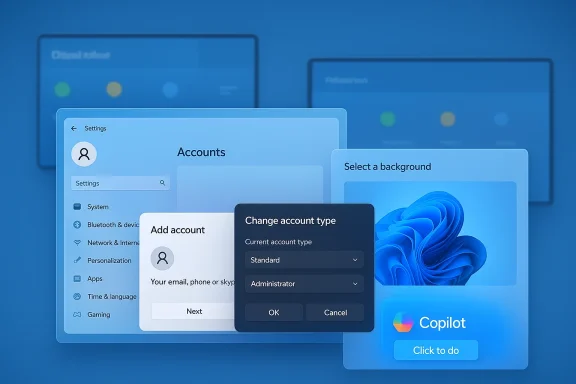
- Modern Account Settings UI: Several dialogs in Settings > Accounts > Other users (notably Add account and Change account type) have been reimplemented with WinUI and now respect Light/Dark theme modes. This is a visual and accessibility-focused refresh intended to eliminate legacy “jank” from small but frequent dialogs.
- WebP wallpaper support: You can now set .webp raster images directly as desktop backgrounds via Settings > Personalization > Desktop Background, removing the need for manual conversion to JPG/PNG for web-sourced wallpapers.
- Click to Do / Copilot speedups: On Copilot+ eligible devices, Copilot prompt suggestions now load instantly in the Click to Do overlay; Microsoft is gating the initial rollout and excludes some regions (EEA and China) at first.
- Reliability and bug fixes: A batch of fixes targets taskbar auto-hide anomalies, Start menu/Notification Center/Quick Settings click failures, Bluetooth battery reporting, Settings crashes when interacting with audio devices, login/lock-screen icon issues, and several explorer.exe/startup app hang scenarios. Known issues remain in some niche areas (Xbox Full Screen Experience, secondary-monitor black-screen reports, intermittent system tray visibility).
Deep dive: Modern Account Settings UI — What changed and why it matters
The technical shift
Microsoft rebuilt several high-frequency dialog surfaces under Settings > Accounts > Other users using WinUI 3 controls and sheet-style presentation. The updated flows adopt modern spacing, typography, and theme-aware controls, yielding a consistent appearance with the rest of the Settings app. The dialogs now respect system Light/Dark modes and present a system-modal sheet that matches other modern Windows 11 interactions.Practical benefits
- Visual consistency: The dialogs no longer feel like mismatched legacy fragments. This reduces cognitive friction for both consumers and administrators who frequently add or change accounts.
- Dark mode parity: Bright legacy popups that clashed with dark desktops are replaced by theme-aware dialogs, improving perceived polish and reducing eye strain in low-light setups.
- Accessibility improvements: Modern WinUI controls generally provide more reliable semantic roles for assistive tools and more predictable keyboard focus behavior, although full accessibility validation is still required in broader testing.
Caveats and administrative considerations
- Visibility is gated: The new dialogs are staged and may be visible only on machines with particular configurations (for example, devices with domain-joined work or school accounts). This gating complicates one-size-fits-all test plans.
- Automation and UI tests: Scripts, UI automation, RPA flows, or management tooling that rely on exact dialog titles, window classes, or legacy element hierarchies may break. IT teams must validate and update automation against the preview build.
WebP wallpaper support — Small change, outsized convenience
What changed
The Desktop Background picker in Settings > Personalization now accepts .webp raster images as first-class wallpaper assets. The user experience is unchanged from setting JPG/PNG files: browse, choose Picture, select the .webp file and apply. This removes a recurring annoyance for users who download wallpapers from the web where WebP is now common.Why WebP matters
- Better compression: WebP typically provides smaller file sizes at comparable visual quality to JPG/PNG. That helps save disk space and reduces network sync costs for wallpaper services.
- Workflow simplification: Creators and users no longer need to maintain parallel JPG/PNG versions for compatibility; a single WebP asset is often sufficient.
- Enterprise benefits: MDM and Group Policy wallpaper deployments can distribute smaller image payloads when WebP is supported on target devices.
Unverified internals and open questions
Microsoft’s release notes document that WebP can be used as wallpaper, but they don’t disclose internal implementation details. It’s currently unverified whether the shell now decodes WebP natively at render time, or whether Windows transcodes WebP into an internal bitmap cache before display. That detail affects caching behavior, disk usage, memory footprint, and potential driver/GPU interactions on low-end hardware — and therefore should be treated as an area requiring hands-on validation. Claims about precise decode paths or cache behavior are not confirmed in the public notes and should be flagged as provisional until Microsoft publishes deeper technical documentation.Click to Do and Copilot prompt speedups — UX responsiveness for AI flows
What’s improved
On devices entitled to Copilot+ experiences, the Copilot prompt suggestion tiles in Click to Do now appear instantly, trimming latency and making brief AI-driven interactions feel snappier. Microsoft limits the initial rollout by region and entitlement checks, and the improvement is being staged with CFR.Why it matters
- Smaller latency improves adoption: When suggestions appear immediately, users perceive the Copilot integration as a viable, productive helper rather than a slow gimmick.
- Hardware and entitlement gating: Microsoft’s gate keeps the improvement tightly scoped to devices and markets where backend and legal constraints permit, but it means testers outside the initial rollout may not see the change.
Testing notes
- Confirm that the Microsoft 365 Copilot app (where relevant) is present and up to date.
- Validate Click to Do workflows on Copilot+ hardware and compare latency before and after the update.
- Note the regional exclusions (EEA, China) when building cross-region test matrices.
Fixes and known issues — What to expect in daily use
KB5074157 bundles a wide array of quality fixes aimed at everyday friction points:- Taskbar auto-hide invocation issues have been addressed.
- Start menu, Notification Center, and Quick Settings click-to-open failures have been mitigated.
- Bluetooth device battery reporting has been corrected for affected adapters.
- Settings app crashes tied to audio device interactions were fixed.
- Login/lock-screen icon problems and Start menu memory leak mitigation are included.
- Secondary-monitor black-screen reports have been logged and remain under investigation.
- Xbox Full Screen Experience (FSE) retains some open problems in specific configurations.
- Some apps may intermittently fail to show system tray icons.
Enterprise and IT guidance — How to approach KB5074157
This preview update is not intended for general production deployment. IT pros should treat KB5074157 as a pilot candidate and follow a staged validation plan:- Validate on non-production hardware: Use lab devices or a small pilot fleet enrolled in the Insider Beta/Dev channel with the “Get the latest updates as soon as they are available” toggle enabled.
- Test automation and provisioning: Confirm Group Policy, MDM, imaging, and wallpaper-packaging scripts can handle .webp files and that any format filters are updated accordingly.
- Sanity-check RPA and accessibility flows: Update UI automation or assistive-technology test suites to account for WinUI-based dialog changes to prevent brittle test or production automation from failing.
- Monitor telemetry and Feedback Hub: Use built-in telemetry and ask pilot users to file Feedback Hub entries for reproducible problems — Microsoft uses this data when widening CFR ramps.
Risks, unknowns, and things to watch
- CFR fragmentation: Controlled rollouts mean two identical devices can behave differently. Test plans and helpdesk scripts must account for this non-determinism when building reproducible checks.
- Automation brittleness: UI automation that targets specific window classes or legacy element trees may break with WinUI dialogs. Update and rebaseline automated tests and RPA bots.
- Undocumented implementation details: The internal decode/transcode behavior for WebP wallpapers is not publicly documented. This is an important implementation detail for caching and memory usage; consider it unverified until Microsoft publishes deeper notes.
- Video wallpaper expectations: Community sleuthing in earlier flights revealed experimental traces of video wallpaper support, but KB5074157 does not ship a supported, documented video-wallpaper feature. Any claims about native video wallpaper power efficiency or broad codec support are anecdotal and device-dependent — treat them skeptically until Microsoft releases an official feature with documentation.
How to get KB5074157 and test it safely
- Enroll a test machine in the Windows Insider Program Beta or Dev Channel and enable the option to receive the latest updates as soon as they become available. Microsoft published the build notes and the Dev Channel announcement indicating the availability window and channel switching guidance.
- Apply the update via Settings > Windows Update (it appears as KB5074157 / Build 26220.7653). Remember that the visible features may be gated by server-side flags — installing the KB may not immediately surface the new dialogs or Copilot behavior if your device hasn’t been included in the rollout.
- When testing:
- Validate Account > Other users flows for both local and work/school account scenarios.
- Confirm that .webp wallpapers can be set and persisted across reboots and theme switches.
- Measure Click to Do latency on Copilot-eligible hardware before and after the update.
- Re-run UI automation and RPA tasks that touch account dialogs or personalization flows.
Final analysis — Why this update matters
KB5074157 is not a transformational release. Instead, it’s a pragmatic, quality-focused update that removes friction for everyday tasks and continues Microsoft’s long-term program to consolidate UI under WinUI. The modern Account Settings UI and WebP wallpaper support are small but cumulative wins: they make daily interactions cleaner and help align Windows with modern web-native formats. The Copilot latency improvements reflect Microsoft’s ongoing effort to make AI features feel immediate and reliable. For enthusiasts and testers, the update is a welcome polish. For administrators, it’s a reminder that platform modernization often carries short-term operational costs — validation, automation updates, and attention to controlled rollouts are essential. The most load-bearing claims in the public notes are cross-verified across Microsoft’s Insider blog and independent outlets; however, internal implementation details (for wallpaper caching and decode behavior, or potential low-level video wallpaper mechanics) remain unverified without hands-on tests or deeper platform documentation. Treat those claims as provisional until Microsoft publishes additional technical notes or ships a fully supported video-wallpaper feature.KB5074157 (Build 26220.7653) is a classic example of iterative product work: not flashy, but meaningful in daily use — a set of incremental refinements that quietly improve consistency, reduce friction, and ready the platform for larger UI and AI investments to come.
Source: Windows Report https://windowsreport.com/windows-1...n-account-settings-ui-webp-wallpaper-support/
