

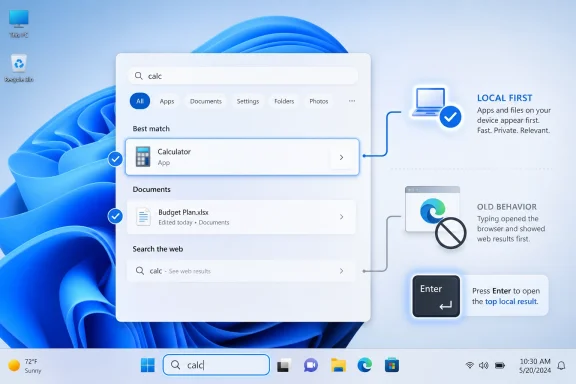
Microsoft is testing a Windows 11 Search change in Insider Experimental Preview Build 26300.8493 that should make local apps and files appear ahead of Bing-powered web suggestions when they are the better match for what the user typed. The fix sounds small because the failure is small: a click that should open an app instead opens Edge. But that click is also a daily referendum on whether Windows still understands the PC sitting in front of it. For years, Microsoft treated Search as a portal; users mostly wanted it to be a switchboard.
The Windows Search problem has never been that web results exist. It is that web results have too often behaved as if they are entitled to the first seat at the table, even when the user is plainly asking for something already installed, indexed, or saved locally.
Anyone who has typed the name of an app, seen the right-looking result, hit Enter, and been dumped into an Edge tab knows the irritation. It is not catastrophic. It is worse in a subtler way: it trains users not to trust one of the operating system’s most basic interaction patterns.
Search is now how many people use Windows. The Start menu is less a menu than a command line for normal humans: press the Windows key, type three letters, launch the thing. When that loop fails, the operating system feels less like a tool and more like an argument.
Microsoft’s new test in Build 26300.8493 aims directly at that failure. The company says it has started making the Windows Search Box more relevant, beginning with apps and files, so they more reliably appear ahead of web suggestions when local content is the stronger match. That wording is careful, but the concession is obvious. The ranking was wrong often enough that it needed to be fixed.
That tuning made sense only from the perspective of Microsoft’s broader platform strategy. Windows is not just an operating system in Redmond’s planning documents. It is a surface for Edge, Bing, Microsoft 365, Copilot, Store recommendations, account prompts, and cloud services. Search sits at the center of that surface because it captures intent at the moment before the user acts.
The trouble is that user intent in Windows Search is usually boring. People want Notepad, Device Manager, a PDF, a spreadsheet, a setting, or the folder they forgot they created. They are not always looking for a web answer, and they are definitely not asking for a browser detour when the local answer is already obvious.
That distinction matters because Windows is still the default workspace for a huge number of businesses, schools, developers, and home users. A consumer web portal can afford to be opportunistic. A desktop operating system has to be dependable.
That is the right fix, at least in principle. A modern PC search box can reasonably include local files, installed apps, settings, recent documents, organizational content, cloud files, and web suggestions. The problem is not breadth. The problem is priority.
A good Windows Search experience should behave like a competent assistant who understands context. If the user types “calc,” Calculator should win. If the user types the name of a local spreadsheet, that file should win. If the user types a broad factual query, then the web can enter the room.
This sounds simple, but it is exactly where Windows 11 has too often stumbled. The machine should not need perfect spelling, exact filenames, or ritualistic search categories to find what is already on the disk. Search becomes valuable when it absorbs human sloppiness without turning every typo into a Bing query.
That should temper the applause. Windows users have seen plenty of good ideas in preview channels that arrived slowly, unevenly, or with caveats attached. Enterprise administrators in particular know that “Microsoft is testing” and “Microsoft has fixed” are not the same sentence.
Still, the direction is worth taking seriously because it fits a broader pattern. Microsoft has spent much of the Windows 11 era sanding down complaints that should arguably never have shipped in the first place: taskbar regressions, slower context menus, File Explorer inconsistencies, update friction, and Start menu oddities. Search relevance belongs in that same bucket.
The company appears to understand that Windows 11’s reputation problem is not one giant missing feature. It is the accumulation of tiny betrayals. A right-click that takes too long, a taskbar that does less than before, a file operation that feels slower than it should, a search box that opens the web instead of the app.
The taskbar became the symbol of that tradeoff. It looked modern, but longtime behaviors were missing or constrained. File Explorer gained visual polish, then spent release after release catching up on responsiveness and consistency. The Start menu became simpler, but not always more useful.
Search followed the same arc. Microsoft had a grander idea of what it should be, but many users experienced that ambition as clutter. The product wanted to be a gateway to everything. The user wanted to open Excel.
This is why the new Search change resonates beyond its narrow release note. It is another sign that Microsoft is learning, slowly and sometimes grudgingly, that Windows users judge the operating system by repeated muscle-memory actions. If those actions feel fast and predictable, users forgive a lot. If they feel hijacked, the whole system feels worse.
Administrators can often manage web suggestions through policy, registry settings, or enterprise configuration. But the more Windows requires policy surgery to behave like a local-first desktop, the more friction Microsoft creates for the people responsible for deploying it at scale. Defaults matter because defaults are what most users experience and what support teams must explain.
A help desk ticket that begins with “Search opened a browser instead of my app” is not a strategic cloud engagement. It is wasted time. Multiply that across departments, shared machines, VDI environments, classrooms, and locked-down corporate images, and a minor annoyance becomes operational noise.
Microsoft has to be especially careful here because Windows Search now touches multiple layers: local indexing, Start menu results, File Explorer, Settings, Microsoft Search in work or school environments, and cloud-backed content. That integration can be powerful when it behaves. When it misfires, it becomes another reason for administrators to disable, restrict, or route around Microsoft’s preferred experience.
The best enterprise feature is often not a dashboard or an AI sidebar. It is the absence of surprise.
But AI does not solve the ranking problem by magic. If anything, it raises the stakes. A system that understands fuzzier queries also has more opportunities to infer the wrong intent, surface the wrong source, or steer the user toward a Microsoft service when the local answer would have been enough.
The future of Windows Search should not be a binary fight between local and web. It should be a hierarchy of intent. The operating system should know when it is being used as an app launcher, when it is being used as a file finder, when it is being used as a settings shortcut, and when it is being used as an internet search box.
That hierarchy is what Apple’s Spotlight, third-party launchers, and many Linux desktop search tools have trained users to expect. The computer should answer locally first when the request is local. Only then should it widen the search radius.
Every modern platform owner faces the same temptation. Once you control the search box, you can promote services, shape behavior, gather signals, and blur the line between user command and vendor suggestion. On phones, that tension is familiar. On Windows, it feels more invasive because the PC remains a general-purpose machine with decades of local-first expectations behind it.
That history still matters. Windows users tolerate change when it makes the machine better at their work. They resent change when it turns basic actions into monetizable pathways.
The Search fix in Build 26300.8493 is therefore more than a tweak to relevance. It is a small retreat from a web-first instinct that never matched how people actually use the Start menu. Microsoft is not abandoning Bing integration, but it is at least acknowledging that Bing should not beat Notepad on Notepad’s home turf.
 Microsoft Finally Admits Search Is a Door, Not a Billboard
The Windows Search problem has never been that web results exist. It is that web results have too often behaved as if they are entitled to the first seat at the table, even when the user is plainly asking for something already installed, indexed, or saved locally.Anyone who has typed the name of an app, seen the right-looking result, hit Enter, and been dumped into an Edge tab knows the irritation. It is not catastrophic. It is worse in a subtler way: it trains users not to trust one of the operating system’s most basic interaction patterns.
Search is now how many people use Windows. The Start menu is less a menu than a command line for normal humans: press the Windows key, type three letters, launch the thing. When that loop fails, the operating system feels less like a tool and more like an argument.
Microsoft’s new test in Build 26300.8493 aims directly at that failure. The company says it has started making the Windows Search Box more relevant, beginning with apps and files, so they more reliably appear ahead of web suggestions when local content is the stronger match. That wording is careful, but the concession is obvious. The ranking was wrong often enough that it needed to be fixed.
The Bing-First Habit Was Always a Product Decision
There is a temptation to describe bad Windows Search results as a technical glitch, but that lets Microsoft off too easily. Search ranking is product policy expressed as code. If a local executable loses to a web suggestion, the system is not merely confused; it has been tuned to value one type of answer too highly.That tuning made sense only from the perspective of Microsoft’s broader platform strategy. Windows is not just an operating system in Redmond’s planning documents. It is a surface for Edge, Bing, Microsoft 365, Copilot, Store recommendations, account prompts, and cloud services. Search sits at the center of that surface because it captures intent at the moment before the user acts.
The trouble is that user intent in Windows Search is usually boring. People want Notepad, Device Manager, a PDF, a spreadsheet, a setting, or the folder they forgot they created. They are not always looking for a web answer, and they are definitely not asking for a browser detour when the local answer is already obvious.
That distinction matters because Windows is still the default workspace for a huge number of businesses, schools, developers, and home users. A consumer web portal can afford to be opportunistic. A desktop operating system has to be dependable.
The Fix Is About Ranking, Not Removing the Web
The most important part of the current test is what Microsoft is not doing. Web results are not being removed from Windows Search. The company is changing the order in which results appear when a local app or file is a better match.That is the right fix, at least in principle. A modern PC search box can reasonably include local files, installed apps, settings, recent documents, organizational content, cloud files, and web suggestions. The problem is not breadth. The problem is priority.
A good Windows Search experience should behave like a competent assistant who understands context. If the user types “calc,” Calculator should win. If the user types the name of a local spreadsheet, that file should win. If the user types a broad factual query, then the web can enter the room.
This sounds simple, but it is exactly where Windows 11 has too often stumbled. The machine should not need perfect spelling, exact filenames, or ritualistic search categories to find what is already on the disk. Search becomes valuable when it absorbs human sloppiness without turning every typo into a Bing query.
Insider Builds Are Promises, Not Products
There is a catch: this is an Insider Experimental build, not a mainstream Windows 11 update. Build 26300.8493 is part of Microsoft’s test pipeline, and features in these builds can change, roll out gradually, disappear, or arrive months later in a modified form.That should temper the applause. Windows users have seen plenty of good ideas in preview channels that arrived slowly, unevenly, or with caveats attached. Enterprise administrators in particular know that “Microsoft is testing” and “Microsoft has fixed” are not the same sentence.
Still, the direction is worth taking seriously because it fits a broader pattern. Microsoft has spent much of the Windows 11 era sanding down complaints that should arguably never have shipped in the first place: taskbar regressions, slower context menus, File Explorer inconsistencies, update friction, and Start menu oddities. Search relevance belongs in that same bucket.
The company appears to understand that Windows 11’s reputation problem is not one giant missing feature. It is the accumulation of tiny betrayals. A right-click that takes too long, a taskbar that does less than before, a file operation that feels slower than it should, a search box that opens the web instead of the app.
Windows 11 Is Being Repaired in Public
Windows 11’s evolution has increasingly looked like a long public repair job. Microsoft launched an operating system with a cleaner visual language and stricter hardware requirements, but also with removed affordances and rough edges that power users noticed immediately.The taskbar became the symbol of that tradeoff. It looked modern, but longtime behaviors were missing or constrained. File Explorer gained visual polish, then spent release after release catching up on responsiveness and consistency. The Start menu became simpler, but not always more useful.
Search followed the same arc. Microsoft had a grander idea of what it should be, but many users experienced that ambition as clutter. The product wanted to be a gateway to everything. The user wanted to open Excel.
This is why the new Search change resonates beyond its narrow release note. It is another sign that Microsoft is learning, slowly and sometimes grudgingly, that Windows users judge the operating system by repeated muscle-memory actions. If those actions feel fast and predictable, users forgive a lot. If they feel hijacked, the whole system feels worse.
The Enterprise Angle Is Trust, Not Nostalgia
For IT departments, this is not primarily about nostalgia for Windows 7 or annoyance at Bing. It is about trust in default behavior.Administrators can often manage web suggestions through policy, registry settings, or enterprise configuration. But the more Windows requires policy surgery to behave like a local-first desktop, the more friction Microsoft creates for the people responsible for deploying it at scale. Defaults matter because defaults are what most users experience and what support teams must explain.
A help desk ticket that begins with “Search opened a browser instead of my app” is not a strategic cloud engagement. It is wasted time. Multiply that across departments, shared machines, VDI environments, classrooms, and locked-down corporate images, and a minor annoyance becomes operational noise.
Microsoft has to be especially careful here because Windows Search now touches multiple layers: local indexing, Start menu results, File Explorer, Settings, Microsoft Search in work or school environments, and cloud-backed content. That integration can be powerful when it behaves. When it misfires, it becomes another reason for administrators to disable, restrict, or route around Microsoft’s preferred experience.
The best enterprise feature is often not a dashboard or an AI sidebar. It is the absence of surprise.
AI Search Raises the Stakes
Microsoft’s larger search ambitions are not going away. The company has been pushing more natural-language and AI-assisted search experiences across Windows, especially on newer hardware. In theory, that could make local discovery far better: users could describe a file, a photo, or a setting without knowing its exact name.But AI does not solve the ranking problem by magic. If anything, it raises the stakes. A system that understands fuzzier queries also has more opportunities to infer the wrong intent, surface the wrong source, or steer the user toward a Microsoft service when the local answer would have been enough.
The future of Windows Search should not be a binary fight between local and web. It should be a hierarchy of intent. The operating system should know when it is being used as an app launcher, when it is being used as a file finder, when it is being used as a settings shortcut, and when it is being used as an internet search box.
That hierarchy is what Apple’s Spotlight, third-party launchers, and many Linux desktop search tools have trained users to expect. The computer should answer locally first when the request is local. Only then should it widen the search radius.
The Small Fix That Reveals the Big Tension
The irony is that Microsoft does know how to build useful search. Windows has long had the pieces: indexing, file metadata, app shortcuts, settings search, recent activity, and enterprise connectors. The problem is not capability. It is restraint.Every modern platform owner faces the same temptation. Once you control the search box, you can promote services, shape behavior, gather signals, and blur the line between user command and vendor suggestion. On phones, that tension is familiar. On Windows, it feels more invasive because the PC remains a general-purpose machine with decades of local-first expectations behind it.
That history still matters. Windows users tolerate change when it makes the machine better at their work. They resent change when it turns basic actions into monetizable pathways.
The Search fix in Build 26300.8493 is therefore more than a tweak to relevance. It is a small retreat from a web-first instinct that never matched how people actually use the Start menu. Microsoft is not abandoning Bing integration, but it is at least acknowledging that Bing should not beat Notepad on Notepad’s home turf.
A More Useful Windows Starts With Fewer Detours
The lesson from this change is concrete enough to state plainly. Windows 11 does not need to be reinvented to feel better; it needs to stop interrupting obvious workflows.- Windows Search is being adjusted so local apps and files are more likely to appear above web suggestions when they are the stronger match.
- The change is currently tied to an Insider Experimental build, so mainstream users should treat it as a preview of direction rather than a delivered fix.
- Web results are not disappearing from Windows Search, but Microsoft appears to be rebalancing their priority.
- The fix matters because Search is effectively the modern Start menu for many users.
- For administrators, better default ranking could reduce support friction and the need to harden Windows against Microsoft’s own web integrations.
- The broader test is whether Microsoft can make Windows 11 feel faster and more predictable without using every surface to promote adjacent services.
References
- Primary source: Digital Trends
Published: Thu, 21 May 2026 14:02:30 GMT
Microsoft is fixing a Windows 11 search issue that has probably troubled you a dozen times - Digital Trends
Windows 11 Search may finally stop sending you to Bing when you are just trying to find local files on your PC. Microsoft is testing a fix that gives local results better priority.www.digitaltrends.com - Related coverage: techradar.com
Microsoft is fixing one of the most baffling things about Windows 11 — 'spam' in search results | TechRadar
Why didn't this happen long before now? Search mewww.techradar.com - Related coverage: windowscentral.com
The 13 biggest Windows 11 changes from early May — and why these updates matter for how the OS evolves through the rest of 2026 | Windows Central
Microsoft is reshaping Windows 11 with practical fixes users have wanted for years.www.windowscentral.com - Related coverage: windowslatest.com
Microsoft says Windows 11's Search will stop forcing web over your apps and local files in most cases
Windows 11's Search bar on the taskbar often prioritizes web results over apps and files, but that might soon change. www.windowslatest.com
- Related coverage: pcworld.com
Microsoft acknowledges Windows 11's search problems, working on a fix | PCWorld
Windows 11's Start menu search is slow and inconsistent. Microsoft confirms fixes are coming, including a unified search update.www.pcworld.com - Related coverage: tweaktown.com
After years of complaints, Microsoft is finally working to improve Windows 11 Search
Product head of Windows Shell experience confirms Microsoft is working on a 'simpler and less distracting' search experience for Windows 11. www.tweaktown.com
- Related coverage: pureinfotech.com
Microsoft confirms major Windows 11 Search improvements are on the way - Pureinfotech
Microsoft confirms major Windows 11 Search updates, improving speed, accuracy, and focus while cutting clutter and unreliable results. pureinfotech.com
- Official source: support.microsoft.com
Find what you need with Microsoft Search | Microsoft Support
Find what you need with Microsoft Searchsupport.microsoft.com - Related coverage: windowsnews.ai
Windows 11 Insider Experimental Build 26300.8493 Unlocks Long-Awaited Taskbar Customization and Privacy Controls - Windows News
Microsoft delivers taskbar edge placement, small icons, and Start menu privacy toggles in Windows 11 Insider Experimental Build 26300.8493—tested in Canary...windowsnews.ai - Related coverage: thecommunity.ru
Анонс Windows 11 Insider Preview Build 26300.8493 (канал Experimental) » thecommunity.ru | Community
Microsoft выпустила новую предварительную сборку Windows 11 под номером 26300.8493 для участников программы Windows Insider на канале Experimental. Полный номер сборки: 10.0.26300.8493.ge_prerelease_im.260505-1109. Для инсайдеров с включённым переключателем «Получайте последние обновления, какthecommunity.ru - Related coverage: techspot.com
Microsoft promises smarter, faster search with AI in Windows 11, but don't hold your breath | TechSpot
Windows Search has long been one of the least enticing features of modern Windows systems, and this has remained true for a very long time. Microsoft recently...www.techspot.com - Related coverage: tech.slashdot.org
Microsoft Testing Adjustable Taskbar, Start Menu In Windows 11 - Slashdot
Microsoft is testing long-requested Windows 11 customization options, including a resizable taskbar, smaller taskbar buttons, and a more configurable Start menu that lets users reduce recommended content. BleepingComputer reports: Starting with Windows 11 Insider Preview Build 26300.8493, the...tech.slashdot.org
