

Microsoft’s Windows 11 Experimental Preview Build 26300.8376, released to Insiders on May 8, 2026, changes File Explorer so large files show readable MB and GB sizes in Details view while also testing the return of missing right-click actions such as Refresh and Print. That sounds minor until you remember how much of Windows is muscle memory. File Explorer is not a showcase app; it is the floor users stand on. When Microsoft gets the floor wrong, even small cracks become daily irritants.
The useful thing about this change is not that Windows can now tell the difference between kilobytes and gigabytes. The useful thing is that Microsoft appears to be conceding, slowly and in fragments, that the Windows 11 shell became too clever for its own good. A context menu that hides common verbs and a file list that renders an 8GB ISO as a wall of digits are not modern design wins. They are design debts, and Build 26300.8376 is another payment.
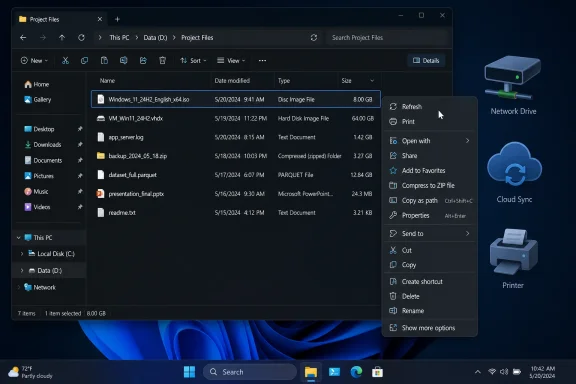
The headline annoyance is wonderfully mundane: File Explorer’s Details view has long displayed file sizes in kilobytes, even when the number stopped being human-readable. An 8GB file could appear as roughly 8,388,608KB, which is mathematically accurate and practically hostile. Anyone who has scanned a downloads folder full of ISO images, VM disks, installers, database exports, or game archives knows the problem immediately.
The new behavior in Build 26300.8376 uses more appropriate units such as KB, MB, and GB. That means File Explorer is finally doing what users expected from a file manager in 2026: turning raw values into information. It is not a power-user feature. It is the sort of formatting decision that makes a list useful at a glance.
There is a certain comedy in calling this a feature. Windows has spent decades teaching users that Explorer is the canonical place to understand files, yet one of the most basic columns in its most utilitarian view required mental conversion for large items. For administrators and enthusiasts, that conversion was never impossible. It was merely unnecessary friction repeated hundreds of times.
This is also why the change matters more than its size suggests. A file manager is not judged only by whether it can perform an operation. It is judged by whether it reduces hesitation. When the Size column starts speaking in the same units users already use elsewhere, it makes the system feel less like a database front end and more like a tool.
But Microsoft’s solution created a new kind of friction. The modern menu looked cleaner, but common actions were moved, hidden, or pushed behind “Show more options.” Refresh, Print, and other familiar verbs became harder to reach in places where users expected them to be immediate. The complaint was not nostalgia for ugliness. It was about speed.
Refresh is a perfect example because it is not glamorous. It is the button people hit when Explorer is lagging behind reality: a network share has changed, a sync folder has not caught up, a removable drive has appeared, a script has generated output, or a folder view simply looks stale. Hiding that action from the main File Explorer context menu did not make Windows more elegant. It made Windows feel less direct.
Print is similar, though more workflow-specific. For users who still print documents from Explorer rather than opening each file first, the right-click Print command is a small but real convenience. Removing it from the first-level modern menu meant the redesigned shell was asking users to pay an extra click tax for a task Windows had supported plainly for years.
A clean menu can be worse than a crowded one if it hides the wrong things. Users do not right-click a file because they want to admire spacing, corner radius, or icon alignment. They right-click because they intend to act. If the action is not where the user’s hand expects it, the interface has failed in the moment that matters.
Microsoft had defensible reasons for starting over. The legacy context menu was inconsistent, and third-party additions could slow it down or turn it into a vertical billboard. The modern menu also gave Microsoft a chance to create a more predictable top-level experience, especially for touch and pen users. In theory, that is the kind of cleanup Windows badly needed.
In practice, the redesign often felt like a half-migration. Users were shown a modern surface but kept one escape hatch away from the old one. “Show more options” became a symbol of Windows 11’s shell strategy: remove clutter by moving it somewhere else, then require users to remember which world contains the command they need.
That split-brain design is especially noticeable for IT pros, because administrative work is full of repetitive, precise actions. The extra menu layer does not merely annoy; it compounds. One more click across one machine is trivial. One more click across hundreds of interactions per week becomes part of the operating system’s personality.
Still, the Experimental label cuts both ways. It confirms that these changes are real in Microsoft’s testing pipeline, but it does not guarantee that every detail will land unchanged for mainstream Windows 11 users. Reports indicate Microsoft expects broader availability in the coming weeks, but Windows Insider history is full of features that arrived late, changed shape, or disappeared during flighting.
That distinction matters because File Explorer changes can be deceptively risky. A new unit display sounds simple until localization, sorting, column widths, accessibility tools, scripts, and enterprise images enter the picture. A context-menu addition sounds easy until Microsoft has to reconcile file type handlers, policies, old shell verbs, and performance.
The more interesting signal is not the precise date. It is the direction. Microsoft is continuing to tune the Windows 11 shell away from its original “minimal first” posture and toward a more pragmatic compromise. The company is no longer acting as if hiding common commands is automatically an improvement.
That makes Explorer a trust surface. Users may forgive experimentation in Widgets, Copilot sidebars, Start menu recommendations, or bundled apps they never open. They are less forgiving when the file manager changes a routine they perform dozens of times a day. Explorer is where people touch their work.
The Windows 11 era has been full of these trust negotiations. Microsoft has added tabs, refreshed visuals, cloud-backed Home views, gallery experiences, modernized dialogs, and performance experiments. Some of those changes are valuable. Others have fed the perception that the shell is being treated as a product canvas rather than as infrastructure.
That perception is dangerous for Microsoft because Windows’ strongest constituency is not made up of people who love Windows unconditionally. It is made up of people who know it deeply, depend on it heavily, and resent being slowed down by it. A small regression in Explorer can do more reputational damage than a flashy new feature can repair.
This is not an argument that every old command deserves first-class placement. The old Windows context menu was not sacred scripture. It was a long-running negotiation between the operating system, applications, drivers, compression tools, cloud sync clients, antivirus products, and hardware vendors. Much of it needed discipline.
But discipline is not deletion. A good context menu should distinguish between clutter and utility. Refresh, Print, Open, Rename, Copy as path, compression actions, sharing, and file-specific verbs all compete for space, but they do not all carry the same frequency or urgency. Microsoft’s challenge is to make the modern menu adaptive without making it unpredictable.
The risk is that Windows 11 ends up chasing complaints one command at a time. Today Refresh and Print return. Tomorrow another missing verb becomes the forum thread of the week. That is better than ignoring users, but it is not the same as having a coherent shell philosophy.
The larger enterprise concern is predictability. Administrators do not need File Explorer to be exciting. They need it to be teachable, scriptable where possible, stable across builds, and consistent enough that documentation does not rot every few months. A UI improvement that changes user behavior still has deployment consequences.
That is one reason Microsoft’s gradual approach makes sense. Shell changes are not like adding a new inbox app. They affect training materials, screenshots, remote support scripts, accessibility workflows, and user expectations. Even a small context-menu adjustment can matter in a company where support staff guide users over the phone or through remote sessions.
At the same time, IT departments should welcome Microsoft’s willingness to restore obvious commands. The worst version of Windows modernization is the one that insists every complaint is resistance to change. Sometimes users are not clinging to the past. Sometimes they are pointing out that the past solved a real problem.
This is especially true in 2026, as Windows development increasingly blends enablement packages, controlled feature rollouts, Insider rings, and staged availability. A build number alone is no longer a simple promise that a feature will appear on every PC by a fixed date. Two machines on the same nominal Windows version can still have different feature states depending on rollout controls.
For enthusiasts, that means the usual advice applies: do not install an Experimental build on a primary machine just to get a better Size column or a restored right-click command. The change is worth applauding, not worth destabilizing a daily driver. Experimental builds exist because the shell still needs proving.
For administrators, the right move is to track the feature, update internal notes when it reaches stable channels, and avoid promising users a specific date until Microsoft ships it broadly. The practical benefits are real, but they are not urgent enough to justify treating preview behavior as production behavior.
This is not necessarily failure. Large operating systems modernize by accretion, not revolution. Windows carries decades of compatibility assumptions, and no design team can replace all of that in one release without breaking someone’s world. Iteration is the price of supporting both casual users and power users on the same desktop.
But Microsoft’s lesson should be sharper than “listen to feedback.” The lesson is that Windows’ core tools are not marketing surfaces. File Explorer, the taskbar, the Start menu, Settings, Run, and the context menu are operating-system infrastructure. Their success is measured in reduced thought, not increased novelty.
The Size column change embodies that principle. It does not ask users to learn anything. It simply makes the existing view more intelligible. That is the best kind of Windows improvement: one that disappears into the work.
Source: PCWorld Windows 11's File Explorer is finally fixing an annoying file size quirk
The useful thing about this change is not that Windows can now tell the difference between kilobytes and gigabytes. The useful thing is that Microsoft appears to be conceding, slowly and in fragments, that the Windows 11 shell became too clever for its own good. A context menu that hides common verbs and a file list that renders an 8GB ISO as a wall of digits are not modern design wins. They are design debts, and Build 26300.8376 is another payment.
 File Explorer’s New Math Is Really an Admission About Readability
The headline annoyance is wonderfully mundane: File Explorer’s Details view has long displayed file sizes in kilobytes, even when the number stopped being human-readable. An 8GB file could appear as roughly 8,388,608KB, which is mathematically accurate and practically hostile. Anyone who has scanned a downloads folder full of ISO images, VM disks, installers, database exports, or game archives knows the problem immediately.The new behavior in Build 26300.8376 uses more appropriate units such as KB, MB, and GB. That means File Explorer is finally doing what users expected from a file manager in 2026: turning raw values into information. It is not a power-user feature. It is the sort of formatting decision that makes a list useful at a glance.
There is a certain comedy in calling this a feature. Windows has spent decades teaching users that Explorer is the canonical place to understand files, yet one of the most basic columns in its most utilitarian view required mental conversion for large items. For administrators and enthusiasts, that conversion was never impossible. It was merely unnecessary friction repeated hundreds of times.
This is also why the change matters more than its size suggests. A file manager is not judged only by whether it can perform an operation. It is judged by whether it reduces hesitation. When the Size column starts speaking in the same units users already use elsewhere, it makes the system feel less like a database front end and more like a tool.
The Context Menu Retreat Continues
The other half of the story is the slow restoration of missing right-click commands. Windows 11’s redesigned context menu was meant to simplify a menu that had become crowded, inconsistent, and frequently abused by third-party shell extensions. That was a legitimate problem. The old menu could become a junk drawer.But Microsoft’s solution created a new kind of friction. The modern menu looked cleaner, but common actions were moved, hidden, or pushed behind “Show more options.” Refresh, Print, and other familiar verbs became harder to reach in places where users expected them to be immediate. The complaint was not nostalgia for ugliness. It was about speed.
Refresh is a perfect example because it is not glamorous. It is the button people hit when Explorer is lagging behind reality: a network share has changed, a sync folder has not caught up, a removable drive has appeared, a script has generated output, or a folder view simply looks stale. Hiding that action from the main File Explorer context menu did not make Windows more elegant. It made Windows feel less direct.
Print is similar, though more workflow-specific. For users who still print documents from Explorer rather than opening each file first, the right-click Print command is a small but real convenience. Removing it from the first-level modern menu meant the redesigned shell was asking users to pay an extra click tax for a task Windows had supported plainly for years.
Windows 11’s Design Problem Was Never Just Aesthetic
The Windows 11 context menu controversy has often been framed as a clash between old and new UI. That understates the issue. The deeper problem is that Microsoft treated cleanliness as if it were synonymous with usability.A clean menu can be worse than a crowded one if it hides the wrong things. Users do not right-click a file because they want to admire spacing, corner radius, or icon alignment. They right-click because they intend to act. If the action is not where the user’s hand expects it, the interface has failed in the moment that matters.
Microsoft had defensible reasons for starting over. The legacy context menu was inconsistent, and third-party additions could slow it down or turn it into a vertical billboard. The modern menu also gave Microsoft a chance to create a more predictable top-level experience, especially for touch and pen users. In theory, that is the kind of cleanup Windows badly needed.
In practice, the redesign often felt like a half-migration. Users were shown a modern surface but kept one escape hatch away from the old one. “Show more options” became a symbol of Windows 11’s shell strategy: remove clutter by moving it somewhere else, then require users to remember which world contains the command they need.
That split-brain design is especially noticeable for IT pros, because administrative work is full of repetitive, precise actions. The extra menu layer does not merely annoy; it compounds. One more click across one machine is trivial. One more click across hundreds of interactions per week becomes part of the operating system’s personality.
The Experimental Channel Is Doing What Stable Windows Cannot
Build 26300.8376 belongs to Microsoft’s Experimental preview track, which is exactly where this sort of change belongs. The company can test shell behavior, measure failures, and reverse course before shipping to the broad population. The caution is warranted because File Explorer is too central to treat casually.Still, the Experimental label cuts both ways. It confirms that these changes are real in Microsoft’s testing pipeline, but it does not guarantee that every detail will land unchanged for mainstream Windows 11 users. Reports indicate Microsoft expects broader availability in the coming weeks, but Windows Insider history is full of features that arrived late, changed shape, or disappeared during flighting.
That distinction matters because File Explorer changes can be deceptively risky. A new unit display sounds simple until localization, sorting, column widths, accessibility tools, scripts, and enterprise images enter the picture. A context-menu addition sounds easy until Microsoft has to reconcile file type handlers, policies, old shell verbs, and performance.
The more interesting signal is not the precise date. It is the direction. Microsoft is continuing to tune the Windows 11 shell away from its original “minimal first” posture and toward a more pragmatic compromise. The company is no longer acting as if hiding common commands is automatically an improvement.
The File Manager Is Becoming a Battleground for Trust
For Windows enthusiasts, File Explorer occupies an odd place. It is one of the most-used apps on the system and one of the least-loved. Every attempt to modernize it is judged not against some abstract design ideal, but against decades of accumulated habits.That makes Explorer a trust surface. Users may forgive experimentation in Widgets, Copilot sidebars, Start menu recommendations, or bundled apps they never open. They are less forgiving when the file manager changes a routine they perform dozens of times a day. Explorer is where people touch their work.
The Windows 11 era has been full of these trust negotiations. Microsoft has added tabs, refreshed visuals, cloud-backed Home views, gallery experiences, modernized dialogs, and performance experiments. Some of those changes are valuable. Others have fed the perception that the shell is being treated as a product canvas rather than as infrastructure.
That perception is dangerous for Microsoft because Windows’ strongest constituency is not made up of people who love Windows unconditionally. It is made up of people who know it deeply, depend on it heavily, and resent being slowed down by it. A small regression in Explorer can do more reputational damage than a flashy new feature can repair.
The Return of Refresh Is a Small Victory for Muscle Memory
Refresh returning to modern File Explorer context menus is a tiny change with outsized symbolism. It says Microsoft has heard, or at least measured, that some verbs are too fundamental to bury. Users should not need a legacy menu to perform an action that has been part of the Windows reflex set for generations.This is not an argument that every old command deserves first-class placement. The old Windows context menu was not sacred scripture. It was a long-running negotiation between the operating system, applications, drivers, compression tools, cloud sync clients, antivirus products, and hardware vendors. Much of it needed discipline.
But discipline is not deletion. A good context menu should distinguish between clutter and utility. Refresh, Print, Open, Rename, Copy as path, compression actions, sharing, and file-specific verbs all compete for space, but they do not all carry the same frequency or urgency. Microsoft’s challenge is to make the modern menu adaptive without making it unpredictable.
The risk is that Windows 11 ends up chasing complaints one command at a time. Today Refresh and Print return. Tomorrow another missing verb becomes the forum thread of the week. That is better than ignoring users, but it is not the same as having a coherent shell philosophy.
Enterprise IT Will Care Less About the Icons Than the Friction
In managed environments, the practical effect of these changes is modest but real. Readable file sizes reduce mistakes when users are comparing installers, logs, exports, or disk images. A direct Print option can preserve old document workflows. Refresh in the expected place can reduce help-desk explanations that begin with, “Click Show more options first.”The larger enterprise concern is predictability. Administrators do not need File Explorer to be exciting. They need it to be teachable, scriptable where possible, stable across builds, and consistent enough that documentation does not rot every few months. A UI improvement that changes user behavior still has deployment consequences.
That is one reason Microsoft’s gradual approach makes sense. Shell changes are not like adding a new inbox app. They affect training materials, screenshots, remote support scripts, accessibility workflows, and user expectations. Even a small context-menu adjustment can matter in a company where support staff guide users over the phone or through remote sessions.
At the same time, IT departments should welcome Microsoft’s willingness to restore obvious commands. The worst version of Windows modernization is the one that insists every complaint is resistance to change. Sometimes users are not clinging to the past. Sometimes they are pointing out that the past solved a real problem.
The “Soon” Problem Still Hangs Over Every Insider Improvement
The PCWorld report frames these changes as coming soon to all users, based on reporting from Windows Latest. That is plausible, but “soon” in Windows development should always be read with caution. Microsoft can A/B test features, hold them behind feature flags, delay them for quality reasons, or ship them only to certain channels before broader rollout.This is especially true in 2026, as Windows development increasingly blends enablement packages, controlled feature rollouts, Insider rings, and staged availability. A build number alone is no longer a simple promise that a feature will appear on every PC by a fixed date. Two machines on the same nominal Windows version can still have different feature states depending on rollout controls.
For enthusiasts, that means the usual advice applies: do not install an Experimental build on a primary machine just to get a better Size column or a restored right-click command. The change is worth applauding, not worth destabilizing a daily driver. Experimental builds exist because the shell still needs proving.
For administrators, the right move is to track the feature, update internal notes when it reaches stable channels, and avoid promising users a specific date until Microsoft ships it broadly. The practical benefits are real, but they are not urgent enough to justify treating preview behavior as production behavior.
Microsoft Is Fixing Symptoms of a Larger Shell Strategy
The File Explorer updates fit a broader Windows 11 pattern: Microsoft redesigns a legacy surface, users discover that the new version is prettier but less complete, and then Microsoft spends subsequent releases restoring missing affordances. The modern Run dialog, context menu refinements, keyboard navigation fixes, File Explorer performance work, and now file-size formatting all belong to that same slow correction.This is not necessarily failure. Large operating systems modernize by accretion, not revolution. Windows carries decades of compatibility assumptions, and no design team can replace all of that in one release without breaking someone’s world. Iteration is the price of supporting both casual users and power users on the same desktop.
But Microsoft’s lesson should be sharper than “listen to feedback.” The lesson is that Windows’ core tools are not marketing surfaces. File Explorer, the taskbar, the Start menu, Settings, Run, and the context menu are operating-system infrastructure. Their success is measured in reduced thought, not increased novelty.
The Size column change embodies that principle. It does not ask users to learn anything. It simply makes the existing view more intelligible. That is the best kind of Windows improvement: one that disappears into the work.
The Small Fixes Say More Than the Feature Demos
The concrete lesson from Build 26300.8376 is that Microsoft’s most welcome Windows improvements are often the least theatrical. Users do not always need a new experience. They need the old experience to stop getting in the way.- File Explorer’s Details view is being tested with file sizes shown in KB, MB, and GB instead of forcing large values into kilobytes.
- Microsoft is testing the return of Refresh to the modern File Explorer right-click menu, expanding an action that previously appeared more naturally on the desktop.
- Print is reportedly returning to the first-level modern context menu for supported files, reducing reliance on the legacy “Show more options” path.
- The changes are present in Windows 11 Experimental Preview Build 26300.8376, so mainstream rollout timing may still vary.
- The broader story is not the individual commands, but Microsoft’s ongoing retreat from a context-menu redesign that prioritized visual simplicity over everyday speed.
Source: PCWorld Windows 11's File Explorer is finally fixing an annoying file size quirk
