

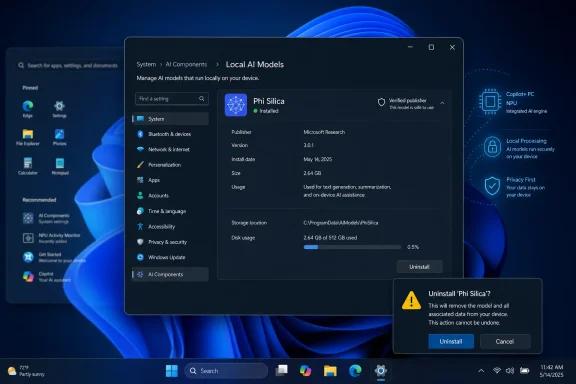
Windows 11 Insider Experimental Preview Build 26300.8553 reportedly includes a hidden Settings page that lets testers inspect installed local AI models and uninstall at least one of them, Phi Silica, on supported Copilot+ PCs. That sounds like a small Settings tweak, but it cuts into a much larger Windows argument: Microsoft has spent two years making AI feel increasingly native to the operating system while giving users comparatively little say over what lands on disk. If this experiment ships, it will not end that argument. It will, however, mark a useful admission that local AI components are software, and software installed by the platform still needs visibility, lifecycle controls, and an exit ramp.
The interesting part of this reported change is not that Windows 11 may gain another page in Settings. Windows is full of pages in Settings, many of them half-migrations from Control Panel, some of them more decorative than decisive. The interesting part is that Microsoft appears to be testing a dedicated management surface for AI models with the kind of metadata administrators expect from ordinary software: publisher, version, install date, size, and usage.
That matters because Microsoft has increasingly described on-device AI as infrastructure. Phi Silica is not just another app tile; it is a small language model optimized for the neural processing units inside Copilot+ PCs and used to support local language intelligence across Windows features and apps. Microsoft’s support material frames these components as part of the operating system foundation for privacy-preserving, low-latency AI tasks.
But the more Microsoft leans on that infrastructure argument, the more important it becomes to expose the infrastructure clearly. A local model may run on the device rather than in the cloud, but that does not make it invisible to governance, storage planning, vulnerability management, or user consent. If Windows Update can install and update model packages, Windows Settings should be able to identify and remove at least some of them.
The reported page does not appear to be officially announced, and Pureinfotech had to enable it manually on a test system. That puts it squarely in the “promising but provisional” bucket. Still, hidden Windows features often reveal product intent before the marketing copy catches up, and this one points in a direction many Windows users have been asking for: less mystery around the AI substrate Microsoft is adding underneath familiar desktop workflows.
That makes it more consequential than a bundled consumer app, even if it occupies less emotional space than Recall. Microsoft’s pitch for Copilot+ PCs depends on the idea that a modern Windows machine should have a local AI layer, much as it has a graphics stack, a security stack, and a browser engine. Developers can target that layer, Windows features can call into it, and Microsoft can service it through update channels.
The catch is that users and administrators do not experience this as an abstraction. They see update entries, disk usage, background components, and new Settings categories. They see features arrive with names that suggest intelligence, assistance, summarization, indexing, and recall. Some welcome that. Others see an operating system broadening its mandate without asking whether the device owner wants the broader mandate.
Copilot+ PCs sharpen the issue because they make AI hardware part of the Windows purchasing story. A neural processing unit sitting idle is a marketing problem for Microsoft and OEMs. A neural processing unit fed by opaque model packages is a trust problem for users. The model management page is therefore more than a nicety; it is a pressure valve between hardware ambition and user control.
Inventory alone is useful. It lets a curious user confirm what is installed and gives an administrator a starting point for documentation. But inventory without action can also be infuriating. It says, in effect, “Here is the thing we put on your PC; no, you cannot meaningfully manage it here.”
The uninstall button changes the tone. It does not necessarily mean Microsoft is abandoning its strategy of embedding AI throughout Windows. More likely, it means the company recognizes that AI components need the same basic product hygiene as other platform elements. Users may tolerate automatic installation more readily when they can later remove, repair, or audit what was installed.
There is also a regulatory and enterprise subtext. Microsoft sells Windows into environments where software inventories, data handling assumptions, and change control are not optional rituals. A hidden Settings page in an Insider build is not an enterprise control plane, but it suggests Microsoft is building the plumbing that could later be exposed through policy, provisioning, or management tools.
The deeper complaint is asymmetry. Microsoft can add an AI component through Windows Update, tie it to system features, and describe it as part of the modern Windows experience. The user, meanwhile, often has to discover it after the fact, search for workarounds, or decide whether a PowerShell script from the internet is worth the risk. That is not a healthy management model for a platform as widely deployed as Windows.
This asymmetry has been visible in the broader backlash to Windows AI features. Recall became the most obvious example because it touched privacy nerves directly, but it was not the only one. Copilot buttons, AI-powered search, app-level AI additions, and local model updates all contribute to the feeling that Windows is evolving around a bet the user did not necessarily make.
A clean uninstall path does not resolve every privacy or trust question. Removing Phi Silica may break or disable features that depend on local language processing, and Microsoft will need to explain those dependencies plainly. But even that trade-off is healthier when it is explicit. The user should not have to choose between blind acceptance and unsupported surgery.
But “runs locally” is not a magic phrase that ends the governance conversation. Local models still have versions. They still receive updates. They still may have bugs, performance regressions, security implications, licensing questions, and compatibility boundaries. They can change system behavior even when no cloud service is involved.
For home users, governance may simply mean knowing what is installed and being able to remove it. For IT departments, it means asset visibility, policy enforcement, deployment rings, rollback options, and documentation. For developers, it means understanding which models are present and what happens when the user uninstalls them.
That is why the metadata reportedly shown in the new Settings page matters. Publisher, version, installation date, size, and usage are not glamour features. They are the boring details that turn AI from a mystical platform promise into manageable software. Windows needs more of that boring detail, not less.
That contrast is useful. Microsoft is trying to modernize Windows in two directions at once. One direction is ergonomic: make Start, Search, taskbar behavior, and touch interaction less rigid. The other direction is architectural: make Windows a home for AI models, AI APIs, and Copilot+ experiences.
The AI model management page sits between those efforts. It is a Settings improvement in the service of a platform strategy. It does not generate text, summarize a document, or create an image. It simply gives the user a place to see and potentially remove the machinery that enables those experiences.
That may be why it feels more important than the feature count suggests. Windows users do not only judge new features by what they can do. They judge them by whether the operating system still feels accountable to the person sitting at the keyboard. A Settings page with an uninstall button is accountability in miniature.
The difference this time is that AI carries a heavier payload of user suspicion. A browser engine or sync client can be controversial, but most users understand its category. A local language model is harder to reason about. It raises immediate questions: What does it process? When does it run? Which apps can call it? Can it be disabled? Can it be removed? Will Windows reinstall it?
Microsoft can answer some of those questions technically, but technical answers do not always repair product trust. Trust is built when the controls match the claims. If Microsoft says local AI is privacy-preserving and user-benefiting, it should not be afraid to show the components, document their purpose, and allow removal when feasible.
There will be limits. Some AI components may become dependencies for core Windows experiences, and Microsoft may choose not to make every package removable. But limits should be stated, not discovered through grayed-out buttons and failed removal attempts. The more Windows behaves like an AI platform, the more it needs platform-grade transparency.
Enterprise IT will want to know whether AI components can be blocked, deferred, inventoried, approved, or removed through supported management channels. They will want Intune settings, Group Policy or configuration service provider hooks, PowerShell support, update classifications, and clear reporting. They will also want to know which Windows features degrade when a model is absent.
This is especially important because AI components are tied to hardware capability. A mixed fleet may include Qualcomm, Intel, and AMD Copilot+ PCs alongside older Windows 11 devices with no qualifying NPU. Microsoft already ships different Phi Silica updates for different processor platforms and Windows versions. That complexity is manageable, but only if Microsoft treats model servicing as a first-class administrative domain.
There is also a procurement angle. Organizations considering Copilot+ PCs need to know whether local AI features can be governed in line with internal policy. If the answer is “mostly, but only after Microsoft decides what Settings page to expose,” cautious IT shops will hesitate. If the answer is “yes, with documented controls,” Copilot+ hardware becomes easier to justify.
But fragmentation can be useful when it reflects user choice. Windows has always run across absurdly varied hardware and software configurations. Microsoft already supports systems with and without touch, pens, discrete GPUs, biometric cameras, virtualization features, and enterprise security modules. AI should not be treated as uniquely sacred.
The right model is graceful degradation. If an app or Windows feature depends on Phi Silica, it should say so. If the model is missing, the feature should offer to reinstall it, use an alternative path where appropriate, or explain why the option is unavailable. That is not a failure of platform strategy; it is mature dependency management.
In fact, making AI components removable could improve adoption among skeptics. Users who know they can undo a change are more likely to try it. Administrators who know they can roll back a model are more likely to pilot it. Control is not the enemy of experimentation. It is often the condition that makes experimentation safe.
That explanation needs to be practical. A component page should not simply list “Phi Silica” and assume the user knows whether that is a model, a runtime, an app dependency, or a brand name. It should describe what the component does, which Windows features use it, whether it runs locally, what data it can process, how large it is, and what removal changes.
The reported page appears to move in that direction by surfacing usage and package details. But Microsoft should avoid the trap of building a decorative dashboard that looks transparent while withholding meaningful choices. The presence of one uninstallable model would be a start, not a destination.
The company should also be careful with language. “AI Components” is technically accurate, but it can become a dumping ground phrase. If components include models, runtimes, execution layers, and feature packages, the UI needs to distinguish among them. Users do not need a machine-learning course, but they do need to know what kind of thing they are managing.
A third-party debloating script can remove the wrong package, break updates, trip security tools, or leave the system in a configuration Microsoft never tests. That risk does not make users foolish for seeking control. It makes the absence of supported controls more costly. When official software does not provide a clean switch, unofficial switches proliferate.
Microsoft should read that as product feedback, not merely resistance to AI. Many Windows enthusiasts are not rejecting every local model on principle. They are rejecting surprise installations, ambiguous dependencies, and the sense that the operating system is being used as a distribution channel for strategic priorities rather than user-chosen capabilities.
A supported uninstall path can drain some energy from the script ecosystem. It will not satisfy everyone, especially those who want a completely AI-free Windows image. But it gives ordinary users and cautious administrators a safer baseline. In Windows, safer baselines are often the difference between manageable customization and brittle folklore.
That does not mean model management should be buried in Device Manager. It means Microsoft should treat these components as serviced, inspectable, and supportable parts of the system. If a Phi Silica update improves latency or changes behavior, users should be able to see that. If a bad update causes failures, administrators should have rollback options and known-issue documentation.
The analogy also highlights the danger of overpromising. A driver update can unlock performance, but it can also break a workflow. An AI model update can improve summarization, but it can also change output quality, resource usage, or feature compatibility. Calling these components “AI” should not exempt them from ordinary operational rigor.
For WindowsForum readers, this is where the story becomes practical. The question is not whether Phi Silica is good or bad in the abstract. The question is whether Windows gives you enough control to run the system you intend to run. If the answer improves from “not really” to “yes, for some models,” that is progress worth noting and scrutinizing.
Defaults matter because most users never change them. An uninstall button is valuable, but it is downstream from the decision to install the component in the first place. Microsoft will likely argue that Copilot+ PCs should include the local models needed for their advertised experiences. That is a reasonable product position. It is not the only reasonable governance position.
The best compromise is visible default installation with durable opt-out. If a device is marketed as a Copilot+ PC, Windows can include the necessary AI stack. But the user or administrator should be able to remove eligible components, understand the consequences, and trust that removal will not be silently reversed except where a future update clearly asks for consent or policy permits it.
Microsoft’s credibility here will depend on behavior more than UI. Windows users have long memories for settings that reset after updates, apps that return after removal, and promotional surfaces that reappear under new names. If AI model uninstall becomes another decorative control that Windows later ignores, it will worsen the trust problem it was meant to solve.
The Windows AI era was never going to be settled by one Settings page, and Build 26300.8553 is still an experimental preview rather than a promise. But an uninstall button for Phi Silica would be a meaningful concession to the reality that users do not experience AI as a slogan; they experience it as files, updates, processes, features, and risk. If Microsoft wants local AI to become a trusted layer of Windows, it should keep moving in this direction: show the models, explain the dependencies, respect removal, and let control become part of the pitch rather than an afterthought.
 Microsoft’s AI Push Finally Meets the Uninstall Button
The interesting part of this reported change is not that Windows 11 may gain another page in Settings. Windows is full of pages in Settings, many of them half-migrations from Control Panel, some of them more decorative than decisive. The interesting part is that Microsoft appears to be testing a dedicated management surface for AI models with the kind of metadata administrators expect from ordinary software: publisher, version, install date, size, and usage.That matters because Microsoft has increasingly described on-device AI as infrastructure. Phi Silica is not just another app tile; it is a small language model optimized for the neural processing units inside Copilot+ PCs and used to support local language intelligence across Windows features and apps. Microsoft’s support material frames these components as part of the operating system foundation for privacy-preserving, low-latency AI tasks.
But the more Microsoft leans on that infrastructure argument, the more important it becomes to expose the infrastructure clearly. A local model may run on the device rather than in the cloud, but that does not make it invisible to governance, storage planning, vulnerability management, or user consent. If Windows Update can install and update model packages, Windows Settings should be able to identify and remove at least some of them.
The reported page does not appear to be officially announced, and Pureinfotech had to enable it manually on a test system. That puts it squarely in the “promising but provisional” bucket. Still, hidden Windows features often reveal product intent before the marketing copy catches up, and this one points in a direction many Windows users have been asking for: less mystery around the AI substrate Microsoft is adding underneath familiar desktop workflows.
Phi Silica Is the Test Case Because Copilot+ PCs Changed the Boundary
Phi Silica is a good first candidate for this debate because it sits at the boundary between Windows as operating system and Windows as AI runtime. It is not the Copilot chat app, which users increasingly understand as a removable application. It is also not merely a cloud shortcut. It is a local model component designed to run on Copilot+ hardware and provide language capabilities to Windows and applications through on-device APIs.That makes it more consequential than a bundled consumer app, even if it occupies less emotional space than Recall. Microsoft’s pitch for Copilot+ PCs depends on the idea that a modern Windows machine should have a local AI layer, much as it has a graphics stack, a security stack, and a browser engine. Developers can target that layer, Windows features can call into it, and Microsoft can service it through update channels.
The catch is that users and administrators do not experience this as an abstraction. They see update entries, disk usage, background components, and new Settings categories. They see features arrive with names that suggest intelligence, assistance, summarization, indexing, and recall. Some welcome that. Others see an operating system broadening its mandate without asking whether the device owner wants the broader mandate.
Copilot+ PCs sharpen the issue because they make AI hardware part of the Windows purchasing story. A neural processing unit sitting idle is a marketing problem for Microsoft and OEMs. A neural processing unit fed by opaque model packages is a trust problem for users. The model management page is therefore more than a nicety; it is a pressure valve between hardware ambition and user control.
The Hidden Page Says Microsoft Understands the Optics
The reported AI Components interface appears to expand on the basic Settings view already present in Windows 11, where users can see AI-related components installed on supported devices. The newer version reportedly goes further by exposing more detailed information and, crucially, an uninstall option for Phi Silica. That difference moves the feature from inventory to agency.Inventory alone is useful. It lets a curious user confirm what is installed and gives an administrator a starting point for documentation. But inventory without action can also be infuriating. It says, in effect, “Here is the thing we put on your PC; no, you cannot meaningfully manage it here.”
The uninstall button changes the tone. It does not necessarily mean Microsoft is abandoning its strategy of embedding AI throughout Windows. More likely, it means the company recognizes that AI components need the same basic product hygiene as other platform elements. Users may tolerate automatic installation more readily when they can later remove, repair, or audit what was installed.
There is also a regulatory and enterprise subtext. Microsoft sells Windows into environments where software inventories, data handling assumptions, and change control are not optional rituals. A hidden Settings page in an Insider build is not an enterprise control plane, but it suggests Microsoft is building the plumbing that could later be exposed through policy, provisioning, or management tools.
The Real Complaint Was Never Just Disk Space
It is tempting to frame this as a bloatware story: Microsoft installs AI models, users want to reclaim storage, and Settings may finally provide the broom. Storage is part of the story, especially as model files become common across browsers, productivity apps, and operating systems. But disk space is not the deepest complaint.The deeper complaint is asymmetry. Microsoft can add an AI component through Windows Update, tie it to system features, and describe it as part of the modern Windows experience. The user, meanwhile, often has to discover it after the fact, search for workarounds, or decide whether a PowerShell script from the internet is worth the risk. That is not a healthy management model for a platform as widely deployed as Windows.
This asymmetry has been visible in the broader backlash to Windows AI features. Recall became the most obvious example because it touched privacy nerves directly, but it was not the only one. Copilot buttons, AI-powered search, app-level AI additions, and local model updates all contribute to the feeling that Windows is evolving around a bet the user did not necessarily make.
A clean uninstall path does not resolve every privacy or trust question. Removing Phi Silica may break or disable features that depend on local language processing, and Microsoft will need to explain those dependencies plainly. But even that trade-off is healthier when it is explicit. The user should not have to choose between blind acceptance and unsupported surgery.
Local AI Needs Local Governance
Microsoft’s strongest argument for Phi Silica is that on-device AI can be more private and responsive than cloud-only AI. If a language task runs locally on a Copilot+ PC, data may not need to leave the machine, latency can fall, and offline scenarios become plausible. For developers and accessibility features, that can be genuinely valuable.But “runs locally” is not a magic phrase that ends the governance conversation. Local models still have versions. They still receive updates. They still may have bugs, performance regressions, security implications, licensing questions, and compatibility boundaries. They can change system behavior even when no cloud service is involved.
For home users, governance may simply mean knowing what is installed and being able to remove it. For IT departments, it means asset visibility, policy enforcement, deployment rings, rollback options, and documentation. For developers, it means understanding which models are present and what happens when the user uninstalls them.
That is why the metadata reportedly shown in the new Settings page matters. Publisher, version, installation date, size, and usage are not glamour features. They are the boring details that turn AI from a mystical platform promise into manageable software. Windows needs more of that boring detail, not less.
The Insider Build Is Doing Double Duty
Build 26300.8553 was already notable for more conventional Windows improvements. Reports around the build mention expanded Start menu customization, better Search behavior through substring matching, and touch swipe gestures for revealing the taskbar when it is docked in a nonstandard position. Those are the kinds of changes that speak to everyday Windows friction rather than Microsoft’s AI road map.That contrast is useful. Microsoft is trying to modernize Windows in two directions at once. One direction is ergonomic: make Start, Search, taskbar behavior, and touch interaction less rigid. The other direction is architectural: make Windows a home for AI models, AI APIs, and Copilot+ experiences.
The AI model management page sits between those efforts. It is a Settings improvement in the service of a platform strategy. It does not generate text, summarize a document, or create an image. It simply gives the user a place to see and potentially remove the machinery that enables those experiences.
That may be why it feels more important than the feature count suggests. Windows users do not only judge new features by what they can do. They judge them by whether the operating system still feels accountable to the person sitting at the keyboard. A Settings page with an uninstall button is accountability in miniature.
Microsoft Has Been Here Before
Windows has a long history of turning optional software into platform plumbing and then spending years negotiating the fallout. Internet Explorer, OneDrive, Edge, Teams integrations, widgets, and consumer app bundles have all forced Microsoft to define where the operating system ends and bundled services begin. AI components are the latest version of that old argument, but with higher sensitivity.The difference this time is that AI carries a heavier payload of user suspicion. A browser engine or sync client can be controversial, but most users understand its category. A local language model is harder to reason about. It raises immediate questions: What does it process? When does it run? Which apps can call it? Can it be disabled? Can it be removed? Will Windows reinstall it?
Microsoft can answer some of those questions technically, but technical answers do not always repair product trust. Trust is built when the controls match the claims. If Microsoft says local AI is privacy-preserving and user-benefiting, it should not be afraid to show the components, document their purpose, and allow removal when feasible.
There will be limits. Some AI components may become dependencies for core Windows experiences, and Microsoft may choose not to make every package removable. But limits should be stated, not discovered through grayed-out buttons and failed removal attempts. The more Windows behaves like an AI platform, the more it needs platform-grade transparency.
Enterprise IT Will Want Policy, Not Just a Button
For enthusiasts, the uninstall option is the headline. For administrators, it is only the beginning. A button in Settings is useful on one machine; it is not a fleet-management strategy for thousands of PCs across regions, compliance regimes, and hardware classes.Enterprise IT will want to know whether AI components can be blocked, deferred, inventoried, approved, or removed through supported management channels. They will want Intune settings, Group Policy or configuration service provider hooks, PowerShell support, update classifications, and clear reporting. They will also want to know which Windows features degrade when a model is absent.
This is especially important because AI components are tied to hardware capability. A mixed fleet may include Qualcomm, Intel, and AMD Copilot+ PCs alongside older Windows 11 devices with no qualifying NPU. Microsoft already ships different Phi Silica updates for different processor platforms and Windows versions. That complexity is manageable, but only if Microsoft treats model servicing as a first-class administrative domain.
There is also a procurement angle. Organizations considering Copilot+ PCs need to know whether local AI features can be governed in line with internal policy. If the answer is “mostly, but only after Microsoft decides what Settings page to expose,” cautious IT shops will hesitate. If the answer is “yes, with documented controls,” Copilot+ hardware becomes easier to justify.
Uninstalling Models Could Break the AI Promise in Useful Ways
There is an obvious tension in letting users remove AI models from a platform sold on AI. If Phi Silica enables local language features, uninstalling it may disable or degrade the very experiences Microsoft wants reviewers, developers, and customers to notice. From a product manager’s perspective, that looks like fragmentation.But fragmentation can be useful when it reflects user choice. Windows has always run across absurdly varied hardware and software configurations. Microsoft already supports systems with and without touch, pens, discrete GPUs, biometric cameras, virtualization features, and enterprise security modules. AI should not be treated as uniquely sacred.
The right model is graceful degradation. If an app or Windows feature depends on Phi Silica, it should say so. If the model is missing, the feature should offer to reinstall it, use an alternative path where appropriate, or explain why the option is unavailable. That is not a failure of platform strategy; it is mature dependency management.
In fact, making AI components removable could improve adoption among skeptics. Users who know they can undo a change are more likely to try it. Administrators who know they can roll back a model are more likely to pilot it. Control is not the enemy of experimentation. It is often the condition that makes experimentation safe.
The Settings App Is Becoming the Trust Surface
Microsoft has spent years trying to make Settings the modern face of Windows configuration, even as Control Panel continues to haunt the operating system like an elderly relative who refuses to move out. For AI, Settings has a chance to be more than a replacement UI. It can become the place where Windows explains itself.That explanation needs to be practical. A component page should not simply list “Phi Silica” and assume the user knows whether that is a model, a runtime, an app dependency, or a brand name. It should describe what the component does, which Windows features use it, whether it runs locally, what data it can process, how large it is, and what removal changes.
The reported page appears to move in that direction by surfacing usage and package details. But Microsoft should avoid the trap of building a decorative dashboard that looks transparent while withholding meaningful choices. The presence of one uninstallable model would be a start, not a destination.
The company should also be careful with language. “AI Components” is technically accurate, but it can become a dumping ground phrase. If components include models, runtimes, execution layers, and feature packages, the UI needs to distinguish among them. Users do not need a machine-learning course, but they do need to know what kind of thing they are managing.
The Third-Party Script Era Is a Warning Sign
One reason this reported feature matters is that Windows users have already been building their own escape hatches. Guides and scripts that remove or disable AI features exist because the official controls have felt incomplete, fragmented, or temporary. Some of those scripts may be useful. They also carry obvious risks.A third-party debloating script can remove the wrong package, break updates, trip security tools, or leave the system in a configuration Microsoft never tests. That risk does not make users foolish for seeking control. It makes the absence of supported controls more costly. When official software does not provide a clean switch, unofficial switches proliferate.
Microsoft should read that as product feedback, not merely resistance to AI. Many Windows enthusiasts are not rejecting every local model on principle. They are rejecting surprise installations, ambiguous dependencies, and the sense that the operating system is being used as a distribution channel for strategic priorities rather than user-chosen capabilities.
A supported uninstall path can drain some energy from the script ecosystem. It will not satisfy everyone, especially those who want a completely AI-free Windows image. But it gives ordinary users and cautious administrators a safer baseline. In Windows, safer baselines are often the difference between manageable customization and brittle folklore.
The AI Stack Needs the Same Discipline as Drivers
One useful way to think about local AI models is not as apps but as something closer to drivers or codecs: specialized components that expose hardware or software capability to the rest of the system. Drivers are not glamorous, but Windows users understand that they need versioning, rollback, compatibility notes, and vendor accountability. AI models need an equivalent discipline.That does not mean model management should be buried in Device Manager. It means Microsoft should treat these components as serviced, inspectable, and supportable parts of the system. If a Phi Silica update improves latency or changes behavior, users should be able to see that. If a bad update causes failures, administrators should have rollback options and known-issue documentation.
The analogy also highlights the danger of overpromising. A driver update can unlock performance, but it can also break a workflow. An AI model update can improve summarization, but it can also change output quality, resource usage, or feature compatibility. Calling these components “AI” should not exempt them from ordinary operational rigor.
For WindowsForum readers, this is where the story becomes practical. The question is not whether Phi Silica is good or bad in the abstract. The question is whether Windows gives you enough control to run the system you intend to run. If the answer improves from “not really” to “yes, for some models,” that is progress worth noting and scrutinizing.
The Next Windows Fight Is About Defaults
If Microsoft ships this feature broadly, the next dispute will be about defaults. Will AI models be installed automatically on all supported Copilot+ PCs? Will removal survive feature updates? Will Windows reinstall a model when a dependent feature is enabled? Will enterprises be able to deploy Windows images without these components unless explicitly approved?Defaults matter because most users never change them. An uninstall button is valuable, but it is downstream from the decision to install the component in the first place. Microsoft will likely argue that Copilot+ PCs should include the local models needed for their advertised experiences. That is a reasonable product position. It is not the only reasonable governance position.
The best compromise is visible default installation with durable opt-out. If a device is marketed as a Copilot+ PC, Windows can include the necessary AI stack. But the user or administrator should be able to remove eligible components, understand the consequences, and trust that removal will not be silently reversed except where a future update clearly asks for consent or policy permits it.
Microsoft’s credibility here will depend on behavior more than UI. Windows users have long memories for settings that reset after updates, apps that return after removal, and promotional surfaces that reappear under new names. If AI model uninstall becomes another decorative control that Windows later ignores, it will worsen the trust problem it was meant to solve.
A Small Door Opens in Microsoft’s Walled AI Room
The reported build does not justify triumphalism, but it does offer a few concrete signals about where Windows AI management may be heading.- Windows 11 appears to be moving from merely listing AI components toward giving users limited control over specific installed models.
- Phi Silica is the first meaningful test case because it is a local Copilot+ PC language model rather than a simple chat app shortcut.
- The feature is still hidden and experimental, so users should not assume it will ship unchanged or appear in the next public Windows release.
- Microsoft’s automatic servicing of AI model components makes metadata such as version, publisher, install date, size, and usage operationally important.
- Enterprise customers will need policy-based controls before this becomes more than a useful consumer-facing transparency feature.
- The value of the uninstall button will depend on whether Windows respects the user’s choice across updates and clearly explains feature dependencies.
The Windows AI era was never going to be settled by one Settings page, and Build 26300.8553 is still an experimental preview rather than a promise. But an uninstall button for Phi Silica would be a meaningful concession to the reality that users do not experience AI as a slogan; they experience it as files, updates, processes, features, and risk. If Microsoft wants local AI to become a trusted layer of Windows, it should keep moving in this direction: show the models, explain the dependencies, respect removal, and let control become part of the pitch rather than an afterthought.
References
- Primary source: TechSpot
Published: Tue, 02 Jun 2026 19:28:00 GMT
Loading…
www.techspot.com - Related coverage: pureinfotech.com
Loading…
pureinfotech.com - Related coverage: windowscentral.com
Loading…
www.windowscentral.com - Official source: learn.microsoft.com
Loading…
learn.microsoft.com - Official source: support.microsoft.com
- Related coverage: tomshardware.com
Admins finally get the power to uninstall Microsoft Copilot on Windows 11 Pro, Enterprise, and EDU versions — devices must meet specific conditions to allow the removal of the AI app
One less bloatware on Windows 11.www.tomshardware.com

- Related coverage: download.intel.com
Loading…
download.intel.com - Official source: microsoft.com
Loading…
www.microsoft.com - Related coverage: techxplore.com
Loading…
techxplore.com - Related coverage: micorsosoft.com
Loading…
www.micorsosoft.com - Official source: blogs.windows.com

Improving Windows quality: Making Taskbar and Start more personal
In our commitment to Windows quality, we outlined our plans to deliver improvements in performance, reliability, and craft. We are also committed to blogs.windows.com
