

Microsoft released Windows 11 Experimental builds 28020.2075 and 29585.1000 on May 8, 2026, with build 29585.1000 adding new hardware IDs for the Microsoft Internet Protocol Print driver ahead of July’s planned printer driver ranking change. That single line item is more important than the usual Insider-build grab bag of keyboard tweaks, font fixes, and reliability notes. It shows Microsoft moving from policy announcement to plumbing work in its long campaign to make Windows prefer its built-in IPP printing stack over legacy third-party printer drivers. For anyone who has ever had a “simple” printer deployment turn into an archaeology dig through vendor packages, this is both overdue modernization and a fresh source of operational anxiety.
The Experimental channel is where Microsoft can make platform changes without pretending they are ready for every desk, kiosk, lab, and accounting department. Build 29585.1000 is not a consumer-facing release, and no one should read it as a sudden breaking change for production Windows 11 PCs. But the appearance of new hardware IDs for
Driver ranking is one of those Windows mechanisms most users never see until it goes wrong. When Windows detects hardware, it must decide which driver is the best match, and that decision depends on identifiers, signatures, ranking logic, availability through Windows Update, and sometimes the vendor software stack sitting beside it. Microsoft’s upcoming change is designed to make the built-in IPP class driver win more often when Windows is choosing how to install a printer.
That is why the hardware ID change matters. Microsoft is preparing the inbox driver to present itself more effectively in the matching process before the July 1, 2026 ranking change takes effect. This is not the glamorous part of platform modernization, but it is the part that determines whether the modernization actually happens.
The rest of build 29585.1000 reads like a normal Insider note. Voice typing on the touch keyboard gets a cleaner presentation, Japanese IME reliability improves with Administrator Protection enabled, and a sign-in persistence bug is fixed. Build 28020.2075, aimed at Windows 11 version 26H1, improves ADLaM keyboard reliability, clipboard history performance, and font rendering for several scripts. Useful work, certainly, but the printer item is the one with a calendar attached.
What is changing is the default gravity of the Windows printing ecosystem. Since Windows 10 version 21H2, Microsoft has supported Mopria-compliant printers over network and USB connections through its Microsoft IPP Class Driver. The company’s position is that modern printers should not require a traditional vendor driver package, a bundle of utilities, and a separate update trail just to print a document.
That is a defensible technical goal. Printing has long been one of the least elegant pieces of Windows administration, especially in environments with mixed fleets, old multifunction devices, vendor-specific finishing options, and driver packages that outlive the operating systems they were designed for. The less code Windows needs from every printer vendor, the smaller the compatibility and security surface becomes.
But Microsoft is not just making a technical argument. It is using policy and ranking order to reshape vendor behavior. When Windows begins preferring the IPP inbox class driver, manufacturers that still rely on legacy V3 or V4 driver experiences will have to justify why their software should remain in the path of installation rather than beside it as a support app or optional package.
A year later, on July 1, 2027, Microsoft plans to stop allowing third-party printer driver updates through Windows Update except for security-related fixes. That does not mean every old printer turns into e-waste on July 2. It does mean the Windows Update pipeline is being narrowed from a general vendor driver distribution mechanism into something much closer to a security-maintenance path.
For home users, the difference may be invisible if the printer is modern, Mopria-compliant, and used for basic output. They may plug in or discover a printer, Windows may bind it to the IPP driver, and printing may simply work. In that best-case future, the user never sees a driver download page, a vendor updater, or a tray utility that insists on launching at startup.
For IT departments, the change is less tidy. Printers are not just printers in managed environments. They are badge-release systems, stapling and finishing stations, scan-to-email endpoints, fax holdouts, label printers, accounting-code enforcers, and line-of-business dependencies that often sit outside the clean design assumptions of the client OS team.
That architecture makes sense in Microsoft’s broader Windows strategy. Move device-specific user experience out of deep system components. Keep the core OS path more standardized. Reduce the amount of third-party code operating in privileged, historically fragile parts of the system.
The problem is that printer vendors historically used drivers not only to make hardware work, but to expose the entire commercial logic of their devices. Toner status, secure print, mailbox routing, hole punching, booklet layout, color policies, department codes, finishing trays, scan workflows, and fleet management hooks have all lived somewhere in the old stack. Some of that can move cleanly into modern app layers; some of it will not.
This is where the optimistic Microsoft story and the sysadmin reality diverge. Microsoft sees a cleaner platform. Administrators see the possibility of yet another matrix: printers that work with IPP but lose features, printers that need vendor packages for full capability, printers that are technically supported but unpleasant to deploy, and printers whose vendor documentation lags behind Microsoft’s platform policy.
A more standardized printing path is easier to reason about. If the inbox driver handles common print behavior and device customization moves into a more constrained app model, Microsoft can reduce the number of privileged components that vary from vendor to vendor. That does not make printing magically safe, but it narrows the blast radius.
There is also a servicing argument. Windows Update has been asked to serve too many masters: OS patches, firmware, hardware drivers, third-party device fixes, and compatibility rescue missions for hardware that may no longer be actively maintained. By limiting new third-party printer driver publication and eventually restricting most updates, Microsoft is telling the ecosystem that Windows Update is not an indefinite museum for every print stack ever shipped.
The pain is that security logic rarely aligns with replacement cycles. Printers and copiers stay in service for years because they are expensive, leased, embedded in workflows, and often “good enough” long after their software model has become obsolete. Microsoft can be right about the architecture and still create headaches for organizations that cannot refresh a fleet on Redmond’s preferred schedule.
Build 29585.1000 is a good example because the visible user-facing change is modest. New hardware IDs for an inbox driver will not make a splash in screenshots. It will not produce a new Settings page, a taskbar button, or a consumer controversy by itself.
But hardware IDs are how Windows identifies and matches devices. A change there can shape what users get by default months later. If the July ranking policy is the rule, this build is part of the machinery that lets the rule operate.
That is why WindowsForum readers should pay attention to small Insider notes. The important Windows changes are not always the ones with the prettiest demos. Sometimes they are buried in release notes as a driver identifier, a policy default, a signing condition, or a servicing cutoff.
That episode should make everyone cautious about both extremes. It is wrong to tell users that every older printer is doomed overnight. It is also wrong to wave away the change as meaningless because existing drivers can still be installed.
The real shift is in defaults, distribution, and future approvals. New legacy driver submissions are constrained. Existing Windows Update drivers are moving toward limited servicing. The built-in IPP driver is being positioned to win installation decisions. Those are not theatrical changes; they are how platforms migrate without showing users a single dramatic “unsupported” dialog.
Microsoft’s challenge is to communicate the distinction without sounding evasive. Users hear “your printer will still work” and assume nothing will change. Administrators hear “driver ranking order modified” and know that subtle changes in driver selection can break deployment assumptions, support scripts, image baselines, and vendor-recommended install flows.
Some manufacturers are better prepared than others. Large enterprise print vendors have been publishing guidance around Windows Protected Print Mode, IPP, Universal Print, Print Support Apps, and the changing role of traditional drivers. Smaller device makers, niche label-printer vendors, and older multifunction hardware lines may be less ready.
The most interesting tension is not between Microsoft and users. It is between Microsoft and the vendors whose hardware value propositions depend on custom software behaviors. If those features cannot be expressed well through the modern platform, customers will blame Windows when the feature disappears, even if the deeper issue is vendor reliance on an aging driver model.
This is where procurement teams should get sharper. A printer bought in 2026 should not be evaluated only on price per page and toner availability. It should be evaluated on its modern Windows support story: IPP behavior, Mopria compliance, scan support, Print Support App quality, ARM64 support, and whether the vendor can explain deployment without falling back on a legacy driver package as the only credible answer.
Protected Print Mode is the purist version of Microsoft’s strategy. It reduces legacy attack surface by allowing only Mopria-certified printers and blocking third-party drivers. That is attractive for security-minded organizations, especially where printing needs are ordinary and device fleets are modern.
The catch is that printing needs are often not ordinary. A school district, law firm, hospital, factory floor, or municipal office may have print workflows that depend on specialized finishing, scanning, authentication, or document routing. For those environments, Protected Print Mode can be less a toggle than a migration project.
The new Insider build does not force Protected Print Mode on everyone. But by strengthening the IPP driver’s position in normal driver matching, Microsoft is making the default Windows experience look more like the protected model over time. It is a softer path to the same destination.
This is especially true on ARM64 Windows PCs, where traditional driver availability has often been a weak point. Microsoft’s documentation leaves room for native ARM64 printer drivers under certain signing conditions, but the broader direction is obvious: class-driver support reduces the dependence on every vendor compiling, signing, and maintaining every architecture-specific package.
The change also helps with the “driver download trap” that still plagues consumer support. Users searching the web for a printer driver often land on outdated vendor pages, regional support sites, suspicious driver portals, or bundled utilities that install more than expected. A competent inbox path is not just cleaner; it is safer.
Still, home users with older specialty printers should not assume perfection. Photo printers, label printers, receipt printers, and older multifunction devices may depend on vendor utilities for features beyond basic output. The printer may still print, but the experience may not be identical.
Testing should include fresh installs, not only existing machines. A device that continues working after an upgrade may behave differently when added to a clean Windows 11 installation after ranking changes take effect. That distinction is easy to miss and hard to explain to users.
Print servers also deserve scrutiny. Many organizations still use centralized queues with packaged drivers, Group Policy deployment, vendor universal drivers, or scripts inherited from previous Windows generations. Microsoft’s client-side ranking preference may not invalidate those approaches overnight, but it changes the assumptions around what Windows will choose when it has options.
The other practical step is vendor pressure. IT teams should ask manufacturers directly which models are fully supported through Microsoft’s IPP class driver, which features require vendor software, how scanning works over network and USB, and what the vendor’s plan is for Windows 11 and Windows Server 2025 over the next two years. If the answer sounds vague, that vagueness is itself a risk.
Source: Neowin Microsoft ushers in next stage of Windows 11 printer driver support in new build
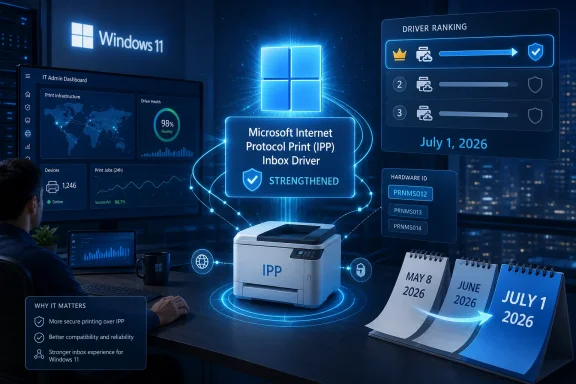 Microsoft Moves the Printer Fight From Roadmap to Code
The Experimental channel is where Microsoft can make platform changes without pretending they are ready for every desk, kiosk, lab, and accounting department. Build 29585.1000 is not a consumer-facing release, and no one should read it as a sudden breaking change for production Windows 11 PCs. But the appearance of new hardware IDs for prnms012, the Microsoft IPP print driver, is a meaningful marker.Driver ranking is one of those Windows mechanisms most users never see until it goes wrong. When Windows detects hardware, it must decide which driver is the best match, and that decision depends on identifiers, signatures, ranking logic, availability through Windows Update, and sometimes the vendor software stack sitting beside it. Microsoft’s upcoming change is designed to make the built-in IPP class driver win more often when Windows is choosing how to install a printer.
That is why the hardware ID change matters. Microsoft is preparing the inbox driver to present itself more effectively in the matching process before the July 1, 2026 ranking change takes effect. This is not the glamorous part of platform modernization, but it is the part that determines whether the modernization actually happens.
The rest of build 29585.1000 reads like a normal Insider note. Voice typing on the touch keyboard gets a cleaner presentation, Japanese IME reliability improves with Administrator Protection enabled, and a sign-in persistence bug is fixed. Build 28020.2075, aimed at Windows 11 version 26H1, improves ADLaM keyboard reliability, clipboard history performance, and font rendering for several scripts. Useful work, certainly, but the printer item is the one with a calendar attached.
The Old Printer Model Is Being Retired by Preference, Not by Explosion
Microsoft has spent years trying to explain that it is not simply “killing printers.” That distinction matters because the practical reality is messier than the headline version. Existing vendor-supplied printer drivers can still be installed, existing Microsoft-signed drivers already in the market are not being blocked from installation, and manufacturers can still provide separate installation packages.What is changing is the default gravity of the Windows printing ecosystem. Since Windows 10 version 21H2, Microsoft has supported Mopria-compliant printers over network and USB connections through its Microsoft IPP Class Driver. The company’s position is that modern printers should not require a traditional vendor driver package, a bundle of utilities, and a separate update trail just to print a document.
That is a defensible technical goal. Printing has long been one of the least elegant pieces of Windows administration, especially in environments with mixed fleets, old multifunction devices, vendor-specific finishing options, and driver packages that outlive the operating systems they were designed for. The less code Windows needs from every printer vendor, the smaller the compatibility and security surface becomes.
But Microsoft is not just making a technical argument. It is using policy and ranking order to reshape vendor behavior. When Windows begins preferring the IPP inbox class driver, manufacturers that still rely on legacy V3 or V4 driver experiences will have to justify why their software should remain in the path of installation rather than beside it as a support app or optional package.
The Timeline Gives Enterprises Warning, Not Comfort
The staged plan began in September 2023, when Microsoft announced the end-of-servicing plan for third-party legacy Windows printer drivers. The next major step arrived on January 15, 2026, when new printer drivers for Windows 11 and Windows Server 2025 stopped being published to Windows Update by default, with existing drivers still eligible for updates on a case-by-case basis. The July 1, 2026 step is the ranking change: Windows will prefer the Microsoft IPP inbox class driver.A year later, on July 1, 2027, Microsoft plans to stop allowing third-party printer driver updates through Windows Update except for security-related fixes. That does not mean every old printer turns into e-waste on July 2. It does mean the Windows Update pipeline is being narrowed from a general vendor driver distribution mechanism into something much closer to a security-maintenance path.
For home users, the difference may be invisible if the printer is modern, Mopria-compliant, and used for basic output. They may plug in or discover a printer, Windows may bind it to the IPP driver, and printing may simply work. In that best-case future, the user never sees a driver download page, a vendor updater, or a tray utility that insists on launching at startup.
For IT departments, the change is less tidy. Printers are not just printers in managed environments. They are badge-release systems, stapling and finishing stations, scan-to-email endpoints, fax holdouts, label printers, accounting-code enforcers, and line-of-business dependencies that often sit outside the clean design assumptions of the client OS team.
“Driverless” Printing Still Has Drivers
The marketing language around modern printing can be slippery. IPP-based printing is often described as driverless, but Windows still needs a driver; the point is that the driver is a generic inbox class driver rather than a custom vendor package. The customization layer moves away from traditional driver code and toward Print Support Apps distributed through the Microsoft Store.That architecture makes sense in Microsoft’s broader Windows strategy. Move device-specific user experience out of deep system components. Keep the core OS path more standardized. Reduce the amount of third-party code operating in privileged, historically fragile parts of the system.
The problem is that printer vendors historically used drivers not only to make hardware work, but to expose the entire commercial logic of their devices. Toner status, secure print, mailbox routing, hole punching, booklet layout, color policies, department codes, finishing trays, scan workflows, and fleet management hooks have all lived somewhere in the old stack. Some of that can move cleanly into modern app layers; some of it will not.
This is where the optimistic Microsoft story and the sysadmin reality diverge. Microsoft sees a cleaner platform. Administrators see the possibility of yet another matrix: printers that work with IPP but lose features, printers that need vendor packages for full capability, printers that are technically supported but unpleasant to deploy, and printers whose vendor documentation lags behind Microsoft’s platform policy.
The Security Argument Is Real, Even If the Timing Hurts
Microsoft’s push away from legacy printer drivers is not happening in a vacuum. The Windows print subsystem has been a recurring security headache, and the industry has not forgotten how quickly printer-related vulnerabilities can become enterprise incidents. Every old driver model that keeps accumulating vendor code, compatibility patches, and administrative exceptions becomes a tempting place for risk to hide.A more standardized printing path is easier to reason about. If the inbox driver handles common print behavior and device customization moves into a more constrained app model, Microsoft can reduce the number of privileged components that vary from vendor to vendor. That does not make printing magically safe, but it narrows the blast radius.
There is also a servicing argument. Windows Update has been asked to serve too many masters: OS patches, firmware, hardware drivers, third-party device fixes, and compatibility rescue missions for hardware that may no longer be actively maintained. By limiting new third-party printer driver publication and eventually restricting most updates, Microsoft is telling the ecosystem that Windows Update is not an indefinite museum for every print stack ever shipped.
The pain is that security logic rarely aligns with replacement cycles. Printers and copiers stay in service for years because they are expensive, leased, embedded in workflows, and often “good enough” long after their software model has become obsolete. Microsoft can be right about the architecture and still create headaches for organizations that cannot refresh a fleet on Redmond’s preferred schedule.
The Experimental Channel Is Now a Policy Early-Warning System
The Windows Insider Program used to be understood mostly as a feature preview pipeline. These days, it is also a policy detection system. When Microsoft lands a low-level change in an Experimental or Canary-style build, administrators should treat it as evidence that a roadmap item is leaving the slide deck and entering the operating system.Build 29585.1000 is a good example because the visible user-facing change is modest. New hardware IDs for an inbox driver will not make a splash in screenshots. It will not produce a new Settings page, a taskbar button, or a consumer controversy by itself.
But hardware IDs are how Windows identifies and matches devices. A change there can shape what users get by default months later. If the July ranking policy is the rule, this build is part of the machinery that lets the rule operate.
That is why WindowsForum readers should pay attention to small Insider notes. The important Windows changes are not always the ones with the prettiest demos. Sometimes they are buried in release notes as a driver identifier, a policy default, a signing condition, or a servicing cutoff.
Microsoft’s Messaging Has Already Had One Printer Scare
Microsoft’s printer transition has been complicated by confusion earlier this year over whether Windows 11 was ending support for legacy V3 and V4 printer drivers outright. The company later clarified that Windows had not ended support for legacy printer drivers, and that printers working today should continue to work. The correction mattered because the roadmap language had implied a harder cutoff than Microsoft said it intended.That episode should make everyone cautious about both extremes. It is wrong to tell users that every older printer is doomed overnight. It is also wrong to wave away the change as meaningless because existing drivers can still be installed.
The real shift is in defaults, distribution, and future approvals. New legacy driver submissions are constrained. Existing Windows Update drivers are moving toward limited servicing. The built-in IPP driver is being positioned to win installation decisions. Those are not theatrical changes; they are how platforms migrate without showing users a single dramatic “unsupported” dialog.
Microsoft’s challenge is to communicate the distinction without sounding evasive. Users hear “your printer will still work” and assume nothing will change. Administrators hear “driver ranking order modified” and know that subtle changes in driver selection can break deployment assumptions, support scripts, image baselines, and vendor-recommended install flows.
The Vendor Burden Is About to Become More Visible
Printer manufacturers now have less room to hide behind Windows Update as the default delivery channel for their legacy stacks. If a device truly needs vendor-specific software, the manufacturer will need to document it, package it, support it, and explain why the modern IPP path is insufficient. That may be healthy for the ecosystem, but it will expose weak vendor support models.Some manufacturers are better prepared than others. Large enterprise print vendors have been publishing guidance around Windows Protected Print Mode, IPP, Universal Print, Print Support Apps, and the changing role of traditional drivers. Smaller device makers, niche label-printer vendors, and older multifunction hardware lines may be less ready.
The most interesting tension is not between Microsoft and users. It is between Microsoft and the vendors whose hardware value propositions depend on custom software behaviors. If those features cannot be expressed well through the modern platform, customers will blame Windows when the feature disappears, even if the deeper issue is vendor reliance on an aging driver model.
This is where procurement teams should get sharper. A printer bought in 2026 should not be evaluated only on price per page and toner availability. It should be evaluated on its modern Windows support story: IPP behavior, Mopria compliance, scan support, Print Support App quality, ARM64 support, and whether the vendor can explain deployment without falling back on a legacy driver package as the only credible answer.
Windows Protected Print Mode Is the Bigger Shadow
The driver ranking change also sits near another Microsoft printing push: Windows Protected Print Mode. That mode is designed to remove reliance on third-party print drivers and use the modern Windows print stack more strictly. It is not the same thing as the July ranking change, but both point in the same direction.Protected Print Mode is the purist version of Microsoft’s strategy. It reduces legacy attack surface by allowing only Mopria-certified printers and blocking third-party drivers. That is attractive for security-minded organizations, especially where printing needs are ordinary and device fleets are modern.
The catch is that printing needs are often not ordinary. A school district, law firm, hospital, factory floor, or municipal office may have print workflows that depend on specialized finishing, scanning, authentication, or document routing. For those environments, Protected Print Mode can be less a toggle than a migration project.
The new Insider build does not force Protected Print Mode on everyone. But by strengthening the IPP driver’s position in normal driver matching, Microsoft is making the default Windows experience look more like the protected model over time. It is a softer path to the same destination.
Home Users May Get the Best Version of This Future
For ordinary Windows users, the transition could be a rare improvement in the printer experience. The best printer setup is the one that does not feel like setup. If Windows can discover a modern printer, install a reliable inbox driver, and expose enough controls without dragging in a vendor software suite, most people will be better off.This is especially true on ARM64 Windows PCs, where traditional driver availability has often been a weak point. Microsoft’s documentation leaves room for native ARM64 printer drivers under certain signing conditions, but the broader direction is obvious: class-driver support reduces the dependence on every vendor compiling, signing, and maintaining every architecture-specific package.
The change also helps with the “driver download trap” that still plagues consumer support. Users searching the web for a printer driver often land on outdated vendor pages, regional support sites, suspicious driver portals, or bundled utilities that install more than expected. A competent inbox path is not just cleaner; it is safer.
Still, home users with older specialty printers should not assume perfection. Photo printers, label printers, receipt printers, and older multifunction devices may depend on vendor utilities for features beyond basic output. The printer may still print, but the experience may not be identical.
Enterprise IT Should Start Testing Before July, Not After It
The right response for administrators is not panic; it is inventory. Organizations should identify printer models, current driver types, deployment methods, print server configurations, and feature dependencies before the July ranking change becomes a troubleshooting ticket storm. The most dangerous printers are not necessarily the oldest ones; they are the ones whose business-critical features quietly depend on a legacy driver behavior no one has documented.Testing should include fresh installs, not only existing machines. A device that continues working after an upgrade may behave differently when added to a clean Windows 11 installation after ranking changes take effect. That distinction is easy to miss and hard to explain to users.
Print servers also deserve scrutiny. Many organizations still use centralized queues with packaged drivers, Group Policy deployment, vendor universal drivers, or scripts inherited from previous Windows generations. Microsoft’s client-side ranking preference may not invalidate those approaches overnight, but it changes the assumptions around what Windows will choose when it has options.
The other practical step is vendor pressure. IT teams should ask manufacturers directly which models are fully supported through Microsoft’s IPP class driver, which features require vendor software, how scanning works over network and USB, and what the vendor’s plan is for Windows 11 and Windows Server 2025 over the next two years. If the answer sounds vague, that vagueness is itself a risk.
The Fine Print Is Where the Printer Fleet Lives
The concrete lesson from build 29585.1000 is that Microsoft is executing the printer transition in layers. The policy dates are public, but the mechanics arrive through builds like this one, with identifiers and ranking preparation appearing before users see the result. The organizations that fare best will be the ones that treat this as a deployment change rather than a news item.- Microsoft’s new Experimental build adds hardware IDs to the IPP print driver in preparation for the July 1, 2026 driver ranking change.
- Existing legacy printer drivers are not being blocked from installation simply because of this build or the current servicing plan.
- Windows Update is becoming a less permissive distribution channel for new and updated third-party legacy printer drivers.
- The Microsoft IPP inbox class driver is being positioned as the preferred default for modern printer installation.
- Administrators should test clean printer installs, feature completeness, scan behavior, and vendor support paths before the ranking change reaches production.
- Printer purchasing decisions now need to include modern Windows support as a first-class requirement, not a footnote.
Source: Neowin Microsoft ushers in next stage of Windows 11 printer driver support in new build
