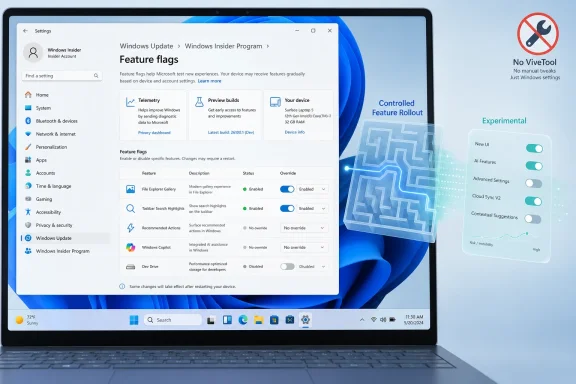
Microsoft has added a Feature flags page to Windows 11’s Insider settings in the Experimental experience, letting testers on supported preview builds enable or disable announced experimental features from Settings instead of relying on third-party tools such as ViveTool. That sounds like a small control-panel addition, but it is really a concession: the Insider Program’s old promise of “try what’s next” had become less reliable than its marketing. The new page does not end Microsoft’s appetite for staged rollouts, hidden switches, or A/B testing. It does, however, draw a brighter line between features Microsoft is willing to discuss publicly and experiments it still wants to keep behind the curtain.
For years, Windows Insiders have lived with a peculiar contradiction. They could install unstable preview builds, accept rough edges, and volunteer feedback, only to discover that the feature announced in the build notes was not actually present on their machine.
That was not usually a bug. It was the predictable result of Microsoft’s Controlled Feature Rollout system, a mechanism designed to expose features to subsets of users while the company measured reliability, engagement, and feedback. In theory, CFR made Windows development safer. In practice, it often made the Insider Program feel arbitrary.
The new Feature flags page is Microsoft’s attempt to make that bargain less maddening. If a feature has been officially announced and is eligible for the page, an Insider can override the rollout state and turn it on. They can also turn it off, or choose no override and let Windows decide.
That last option matters. Microsoft is not replacing experimentation with a giant “give me everything” switch. It is giving testers a more transparent way to participate in the experiments Microsoft is already willing to acknowledge.
ViveTool’s popularity was never just about impatience. It was a symptom of the gap between Windows as a continuously serviced platform and Windows as a product users can understand. Microsoft would publish build notes, enthusiasts would compare screenshots, and then some machines would get the new behavior while others would not. In that environment, a third-party feature ID toggle was not a hack so much as a translation layer.
The Feature flags page effectively acknowledges that Microsoft lost control of that conversation. If power users are going to toggle preview features anyway, Microsoft would rather give them a supported-looking surface than watch every announcement become a scavenger hunt through command-line incantations and feature IDs.
But this is not the death of ViveTool. The new page is limited to visible, announced features. Anything buried in a build but not yet discussed publicly may still require third-party tools or internal knowledge to expose. Microsoft is opening the front door for invited guests, not handing out keys to the lab.
The important change is not merely the naming. Microsoft says it is ending gradual feature rollouts for announced features in the new Beta experience. If Microsoft announces a feature in Beta and a tester installs that update, the feature should be present. There may still be small variations within the feature, but the basic “why don’t I have the thing in the blog post?” problem is supposed to go away.
That is a meaningful shift because it treats predictability as part of quality. Insiders are not just crash-report generators; they are people trying to understand the product’s direction. When the program hides the ball too aggressively, it degrades the feedback Microsoft receives because testers cannot reliably discuss the same software.
Experimental remains the wilder channel. It is where features may change, stall, disappear, or never ship. That is exactly where a Feature flags page makes the most sense, because the audience is more likely to understand the risks and more likely to want agency.
The page does not promise that every dormant feature in a build will be listed. It does not promise that a feature enabled today will survive tomorrow’s update. It does not promise that retail Windows users will ever see this interface. At the moment, this is an Insider mechanism aimed at announced experimental features, not a new consumer philosophy for Windows.
That distinction is critical for administrators and serious testers. A setting that appears in an Insider build is not necessarily a policy surface. A toggle that works on one preview build is not necessarily a supported deployment method. The page may make experimentation easier, but it does not turn experimental features into production features.
Microsoft’s language around the change also leaves room for telemetry-driven caution. Features can still be staged, measured, changed, or withheld. The difference is that in Beta, announced features should arrive by default, while in Experimental, testers get a more direct way to force exposure when Microsoft has put the feature on the list.
That matters more than it sounds. If a new File Explorer behavior, Settings page, taskbar experiment, or AI-assisted workflow is available only to an invisible subset of devices, feedback becomes noisy. One tester reports a bug. Another cannot reproduce it. A third uses ViveTool to force the feature on, possibly in a state Microsoft did not intend to evaluate. The discussion becomes less about the feature and more about access to the feature.
A Settings-based override improves that loop. It gives users a sanctioned path to turn something on, test it, and turn it off again. It also gives Microsoft a cleaner story when collecting feedback: this was not a hidden bit flipped by a third-party tool but an announced experiment exposed through Windows itself.
For WindowsForum readers, that changes how preview coverage should be interpreted. If a feature is listed under Feature flags, it is fair game for practical testing. If it requires ViveTool, it remains closer to spelunking than evaluation.
But the more consequential promise may be Microsoft’s change to Beta. Ending gradual rollouts for announced Beta features is an attempt to make that channel feel less like a casino and more like a preview ring. For users who want to see what is coming soon without living at the bleeding edge, that is the healthier model.
Beta has often suffered from identity drift. It was supposed to be safer than Dev, but still subject to the same “some users will see this first” rollout dynamics. That made it awkward for users who wanted early access but not the uncertainty of internal experimentation.
By saying that announced Beta features should be present when the update is installed, Microsoft is making a practical promise: Beta is for near-term validation, not discovery archaeology. That does not make Beta production-safe. It does make it easier to recommend to people who want to evaluate upcoming Windows behavior without chasing hidden switches.
That is clearer than the old channel names in some ways, but it also asks users to understand two axes at once: how experimental they want the experience to be, and which Windows core version they are actually testing. For enthusiasts, that is a welcome precision. For casual Insiders, it could become another source of confusion.
The Feature flags page sits inside that new structure. According to current reporting and Microsoft’s own rollout notes, it appears under Settings, Windows Update, Windows Insider Program, with the relevant controls exposed for users in the Experimental experience. Users can choose enabled, disabled, or no override for listed features, apply changes, and restart.
That flow is more civilized than a third-party command line, but it is still Insider territory. Anyone expecting a stable Windows 11 machine to acquire a universal experimental-features console should lower expectations.
This is, in part, Windows catching up to the reality of its own servicing model. Windows is no longer defined only by big numbered releases. Features arrive through cumulative updates, enablement packages, Store app updates, component updates, and server-side switches. The old idea that installing a build tells you exactly what experience you will have has been eroding for years.
That erosion has produced genuine user frustration. Windows can change beneath people in subtle ways, and preview users can receive different combinations of features while still claiming to be on the same build. A Feature flags page does not solve the entire problem, but it does admit that version numbers alone are no longer enough.
This is also a reputational repair job. Microsoft has spent the last several Windows cycles asking users to accept more continuous change, more cloud-connected behavior, and more AI-inflected experimentation. If the company wants that model to feel legitimate, it must give testers more visibility into what is being tested.
An Insider feature flag is useful for lab validation. It can help a desktop engineering team see how a coming Windows behavior interacts with line-of-business applications, accessibility tooling, security products, shell extensions, or help-desk documentation. It can also help training teams prepare screenshots and user guidance before a feature becomes broadly available.
But it should not be treated as a supportable enterprise control. If Microsoft has not documented a policy, management setting, or servicing commitment for a feature, then a flag in an Insider page is just that: a preview override. It may disappear. It may change semantics. It may be superseded by a different rollout plan.
The real enterprise value comes if Microsoft extends this philosophy into clearer release communications and stronger administrative controls. IT departments do not need a consumer-facing toggle for every experiment. They need to know what is coming, when it becomes default, how long it can be deferred, and whether it can be managed at scale.
That is probably intentional. Microsoft has good reasons to avoid giving every Insider a one-click path to every unfinished component. Some features are not ready for feedback. Some are dependent on services or app versions not yet available. Some may be abandoned before they are announced.
The enthusiast counterargument is also reasonable: if the code is on the machine, users will investigate it. Windows has always had a culture of discovery, and Microsoft benefits from that energy even when it complains about the methods. ViveTool will remain the tool of choice for people who want to go beyond the supported preview surface.
The difference now is that there is a middle ground. Users who simply want the feature Microsoft already wrote about should not need to behave like reverse engineers. Users who want to spelunk can still spelunk, but Microsoft is no longer forcing everyone into that posture.
That is a subtle but important change. The Windows Insider Program used to feel like something attached to Windows Update. You joined a channel, received builds, and filed feedback. Now the Settings app is becoming a more active control plane for selecting experiences, choosing core versions, moving between rings, and overriding feature availability.
If Microsoft executes well, this could make the Insider Program more approachable without dumbing it down. A tester should not need a spreadsheet of build numbers and feature IDs to understand what they are opting into. The operating system should explain the available paths.
If Microsoft executes poorly, Settings will become yet another glossy wrapper around ambiguity. The risk is that users see toggles without enough context: what the feature does, how stable it is, what dependencies it has, and whether disabling it truly restores previous behavior. A feature flag without meaningful explanation is just a more official mystery switch.
The new model is better because it aligns incentives. Insiders want access and control. Microsoft wants telemetry and feedback without chaos. A Settings-based feature override gives both sides more of what they need, provided the list is maintained honestly and the language around each flag is clear.
The remaining challenge is consistency. If Microsoft announces a feature and then fails to expose it through the new controls, frustration will return quickly. If the page becomes a dumping ground of poorly described toggles, users will again turn to community tools and forum lore.
For now, the change is best understood as a trust-building measure. It does not make Windows less experimental. It makes the experiment less invisible.
Source: gHacks Windows 11 Adds Feature Flags Page to Insider Program for Enabling Experimental Features Without ViveTool - gHacks Tech News
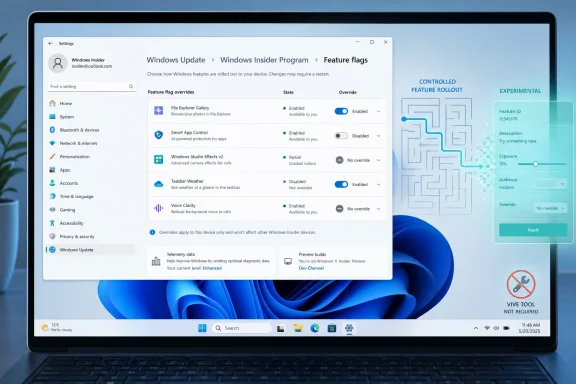 Microsoft Turns the Feature Lottery Into a Settings Page
For years, Windows Insiders have lived with a peculiar contradiction. They could install unstable preview builds, accept rough edges, and volunteer feedback, only to discover that the feature announced in the build notes was not actually present on their machine.That was not usually a bug. It was the predictable result of Microsoft’s Controlled Feature Rollout system, a mechanism designed to expose features to subsets of users while the company measured reliability, engagement, and feedback. In theory, CFR made Windows development safer. In practice, it often made the Insider Program feel arbitrary.
The new Feature flags page is Microsoft’s attempt to make that bargain less maddening. If a feature has been officially announced and is eligible for the page, an Insider can override the rollout state and turn it on. They can also turn it off, or choose no override and let Windows decide.
That last option matters. Microsoft is not replacing experimentation with a giant “give me everything” switch. It is giving testers a more transparent way to participate in the experiments Microsoft is already willing to acknowledge.
ViveTool Became Popular Because Windows Was Too Opaque
The obvious subtext here is ViveTool. For a certain class of Windows enthusiast, ViveTool has become as familiar as Device Manager or Group Policy Editor: not an official Windows component, but a practical tool for poking the operating system into revealing features Microsoft has already shipped in dormant form.ViveTool’s popularity was never just about impatience. It was a symptom of the gap between Windows as a continuously serviced platform and Windows as a product users can understand. Microsoft would publish build notes, enthusiasts would compare screenshots, and then some machines would get the new behavior while others would not. In that environment, a third-party feature ID toggle was not a hack so much as a translation layer.
The Feature flags page effectively acknowledges that Microsoft lost control of that conversation. If power users are going to toggle preview features anyway, Microsoft would rather give them a supported-looking surface than watch every announcement become a scavenger hunt through command-line incantations and feature IDs.
But this is not the death of ViveTool. The new page is limited to visible, announced features. Anything buried in a build but not yet discussed publicly may still require third-party tools or internal knowledge to expose. Microsoft is opening the front door for invited guests, not handing out keys to the lab.
The Insider Program Is Being Rewritten Around Trust
The Feature flags page is part of a broader Insider Program reshuffle that Microsoft announced in April 2026. The old channel structure, which had grown increasingly difficult to explain, is being simplified around two main experiences: Experimental and Beta. Experimental replaces much of what enthusiasts associated with Dev and Canary-style early testing, while Beta is meant to preview features closer to release.The important change is not merely the naming. Microsoft says it is ending gradual feature rollouts for announced features in the new Beta experience. If Microsoft announces a feature in Beta and a tester installs that update, the feature should be present. There may still be small variations within the feature, but the basic “why don’t I have the thing in the blog post?” problem is supposed to go away.
That is a meaningful shift because it treats predictability as part of quality. Insiders are not just crash-report generators; they are people trying to understand the product’s direction. When the program hides the ball too aggressively, it degrades the feedback Microsoft receives because testers cannot reliably discuss the same software.
Experimental remains the wilder channel. It is where features may change, stall, disappear, or never ship. That is exactly where a Feature flags page makes the most sense, because the audience is more likely to understand the risks and more likely to want agency.
A Toggle Is Not the Same Thing as a Contract
There is a temptation to overread this as Microsoft embracing user control. That would be too generous. Feature flags in Windows Settings are still Microsoft-defined, Microsoft-curated, and Microsoft-limited.The page does not promise that every dormant feature in a build will be listed. It does not promise that a feature enabled today will survive tomorrow’s update. It does not promise that retail Windows users will ever see this interface. At the moment, this is an Insider mechanism aimed at announced experimental features, not a new consumer philosophy for Windows.
That distinction is critical for administrators and serious testers. A setting that appears in an Insider build is not necessarily a policy surface. A toggle that works on one preview build is not necessarily a supported deployment method. The page may make experimentation easier, but it does not turn experimental features into production features.
Microsoft’s language around the change also leaves room for telemetry-driven caution. Features can still be staged, measured, changed, or withheld. The difference is that in Beta, announced features should arrive by default, while in Experimental, testers get a more direct way to force exposure when Microsoft has put the feature on the list.
The Real Win Is Reproducibility
The most practical benefit is reproducibility. Windows enthusiasts and IT pros can finally talk about announced preview features with fewer caveats about whether a particular machine was blessed by the rollout system.That matters more than it sounds. If a new File Explorer behavior, Settings page, taskbar experiment, or AI-assisted workflow is available only to an invisible subset of devices, feedback becomes noisy. One tester reports a bug. Another cannot reproduce it. A third uses ViveTool to force the feature on, possibly in a state Microsoft did not intend to evaluate. The discussion becomes less about the feature and more about access to the feature.
A Settings-based override improves that loop. It gives users a sanctioned path to turn something on, test it, and turn it off again. It also gives Microsoft a cleaner story when collecting feedback: this was not a hidden bit flipped by a third-party tool but an announced experiment exposed through Windows itself.
For WindowsForum readers, that changes how preview coverage should be interpreted. If a feature is listed under Feature flags, it is fair game for practical testing. If it requires ViveTool, it remains closer to spelunking than evaluation.
The Beta Channel Gets the More Important Promise
The Feature flags page will get the attention because it is tangible. You can screenshot it. You can toggle it. You can explain it in a quick how-to.But the more consequential promise may be Microsoft’s change to Beta. Ending gradual rollouts for announced Beta features is an attempt to make that channel feel less like a casino and more like a preview ring. For users who want to see what is coming soon without living at the bleeding edge, that is the healthier model.
Beta has often suffered from identity drift. It was supposed to be safer than Dev, but still subject to the same “some users will see this first” rollout dynamics. That made it awkward for users who wanted early access but not the uncertainty of internal experimentation.
By saying that announced Beta features should be present when the update is installed, Microsoft is making a practical promise: Beta is for near-term validation, not discovery archaeology. That does not make Beta production-safe. It does make it easier to recommend to people who want to evaluate upcoming Windows behavior without chasing hidden switches.
The New Channel Map Still Has Sharp Edges
Microsoft’s revised Insider scheme also introduces complexity of its own. Experimental is not a single thing in the old sense; users may also select underlying Windows core versions, such as 25H2 or 26H1, depending on hardware and eligibility. There is also a Future Platforms option for the earliest platform development work, which is not aligned with a retail Windows release.That is clearer than the old channel names in some ways, but it also asks users to understand two axes at once: how experimental they want the experience to be, and which Windows core version they are actually testing. For enthusiasts, that is a welcome precision. For casual Insiders, it could become another source of confusion.
The Feature flags page sits inside that new structure. According to current reporting and Microsoft’s own rollout notes, it appears under Settings, Windows Update, Windows Insider Program, with the relevant controls exposed for users in the Experimental experience. Users can choose enabled, disabled, or no override for listed features, apply changes, and restart.
That flow is more civilized than a third-party command line, but it is still Insider territory. Anyone expecting a stable Windows 11 machine to acquire a universal experimental-features console should lower expectations.
Microsoft Is Learning From the Browser Wars
Feature flags are not new in software. Browsers have used them for years, developer platforms rely on them constantly, and cloud services are built around progressive exposure. The novelty is not the mechanism. The novelty is Microsoft surfacing it inside Windows in a way ordinary Insiders can see.This is, in part, Windows catching up to the reality of its own servicing model. Windows is no longer defined only by big numbered releases. Features arrive through cumulative updates, enablement packages, Store app updates, component updates, and server-side switches. The old idea that installing a build tells you exactly what experience you will have has been eroding for years.
That erosion has produced genuine user frustration. Windows can change beneath people in subtle ways, and preview users can receive different combinations of features while still claiming to be on the same build. A Feature flags page does not solve the entire problem, but it does admit that version numbers alone are no longer enough.
This is also a reputational repair job. Microsoft has spent the last several Windows cycles asking users to accept more continuous change, more cloud-connected behavior, and more AI-inflected experimentation. If the company wants that model to feel legitimate, it must give testers more visibility into what is being tested.
Where IT Pros Should Draw the Line
For administrators, the lesson is not “start using Feature flags.” The lesson is to separate evaluation from deployment with more discipline than ever.An Insider feature flag is useful for lab validation. It can help a desktop engineering team see how a coming Windows behavior interacts with line-of-business applications, accessibility tooling, security products, shell extensions, or help-desk documentation. It can also help training teams prepare screenshots and user guidance before a feature becomes broadly available.
But it should not be treated as a supportable enterprise control. If Microsoft has not documented a policy, management setting, or servicing commitment for a feature, then a flag in an Insider page is just that: a preview override. It may disappear. It may change semantics. It may be superseded by a different rollout plan.
The real enterprise value comes if Microsoft extends this philosophy into clearer release communications and stronger administrative controls. IT departments do not need a consumer-facing toggle for every experiment. They need to know what is coming, when it becomes default, how long it can be deferred, and whether it can be managed at scale.
The Hidden Features Will Stay Hidden
The continued role of ViveTool is worth stating plainly. Feature flags will reduce the need for third-party tools only for the class of features Microsoft has publicly announced and chosen to expose. It will not satisfy users who want to discover every half-built shell experiment, every dormant Settings page, or every internal prototype that happens to be present in a build.That is probably intentional. Microsoft has good reasons to avoid giving every Insider a one-click path to every unfinished component. Some features are not ready for feedback. Some are dependent on services or app versions not yet available. Some may be abandoned before they are announced.
The enthusiast counterargument is also reasonable: if the code is on the machine, users will investigate it. Windows has always had a culture of discovery, and Microsoft benefits from that energy even when it complains about the methods. ViveTool will remain the tool of choice for people who want to go beyond the supported preview surface.
The difference now is that there is a middle ground. Users who simply want the feature Microsoft already wrote about should not need to behave like reverse engineers. Users who want to spelunk can still spelunk, but Microsoft is no longer forcing everyone into that posture.
The Settings App Becomes the New Insider Control Plane
There is a broader design story here, too. Microsoft has spent years moving more Windows controls into Settings while leaving power-user and administrative features scattered across legacy consoles, policy editors, command-line tools, and web documentation. The Feature flags page continues that migration, but with a twist: Settings is not just where users configure Windows as it exists; it is becoming where they negotiate Windows as it is being built.That is a subtle but important change. The Windows Insider Program used to feel like something attached to Windows Update. You joined a channel, received builds, and filed feedback. Now the Settings app is becoming a more active control plane for selecting experiences, choosing core versions, moving between rings, and overriding feature availability.
If Microsoft executes well, this could make the Insider Program more approachable without dumbing it down. A tester should not need a spreadsheet of build numbers and feature IDs to understand what they are opting into. The operating system should explain the available paths.
If Microsoft executes poorly, Settings will become yet another glossy wrapper around ambiguity. The risk is that users see toggles without enough context: what the feature does, how stable it is, what dependencies it has, and whether disabling it truly restores previous behavior. A feature flag without meaningful explanation is just a more official mystery switch.
Microsoft’s New Bargain With Testers Is Better, Not Perfect
The Feature flags page should be welcomed, but not romanticized. It is a pragmatic fix to a self-inflicted problem: Microsoft’s rollout machinery became so opaque that even its most dedicated testers could not reliably experience the features they were asked to evaluate.The new model is better because it aligns incentives. Insiders want access and control. Microsoft wants telemetry and feedback without chaos. A Settings-based feature override gives both sides more of what they need, provided the list is maintained honestly and the language around each flag is clear.
The remaining challenge is consistency. If Microsoft announces a feature and then fails to expose it through the new controls, frustration will return quickly. If the page becomes a dumping ground of poorly described toggles, users will again turn to community tools and forum lore.
For now, the change is best understood as a trust-building measure. It does not make Windows less experimental. It makes the experiment less invisible.
The Flag Page Finally Gives Insiders a Map of Microsoft’s Maze
The practical story is simple: Microsoft is reducing the distance between an announced Insider feature and a tester’s ability to try it. That should make preview builds less frustrating for enthusiasts and more useful for professionals evaluating upcoming changes.- The new Feature flags page is aimed at announced experimental features in the Windows 11 Insider Program, especially within the Experimental experience.
- Each listed feature can be enabled, disabled, or left with no override so Windows can manage availability through its normal rollout logic.
- The change reduces the need for ViveTool when a feature has been publicly announced, but it does not expose every hidden or unfinished feature in a build.
- Microsoft says the new Beta experience will no longer gradually roll out announced features, meaning Beta testers should receive the features described in update communications.
- IT pros should treat the page as a lab and evaluation tool, not as a production management interface or enterprise policy replacement.
- The larger Insider Program overhaul moves Microsoft toward clearer channels, with Experimental for earlier work and Beta for features closer to release.
Source: gHacks Windows 11 Adds Feature Flags Page to Insider Program for Enabling Experimental Features Without ViveTool - gHacks Tech News