

PCMag’s latest Windows 11 Insider guide explains how users can join Microsoft’s free preview program, choose between the new Experimental and Beta testing tracks, install early Windows builds on a spare PC or virtual machine, send feedback, and later unenroll the device. The piece is nominally a how-to, but the bigger story is Microsoft’s attempt to make Windows testing feel less like a maze and more like a contract. After years of Canary, Dev, Beta, and Release Preview ambiguity, the company is trying to sell Insiders a simpler bargain: tell us how much risk you want, and we will stop making the channel names do so much hidden work. That is a useful change, but it does not make pre-release Windows safe, predictable, or appropriate for a daily driver.
The Windows Insider Program has always had an identity problem. It is part enthusiast playground, part telemetry funnel, part enterprise early-warning system, and part public relations stage for features Microsoft may or may not ever ship. That mix was manageable when “preview build” mostly meant a new Start menu behavior or Settings page tweak, but it became harder to parse as Windows 11 development spread across AI features, kernel-level platform changes, hardware enablement, app experiments, and staggered feature rollouts.
The old four-channel model looked orderly on paper. Canary was the wild frontier, Dev was for active development, Beta was closer to release, and Release Preview was the last stop before broad deployment. In practice, the distinctions blurred. Features could appear in Beta before Dev, Dev builds could carry changes that never graduated, and Canary sometimes tested platform plumbing rather than visible user-facing features.
That confusion mattered because the channel name was not just branding. It determined how easy it was to leave, how likely a clean install might become necessary, and how much breakage a user had implicitly accepted. Microsoft’s new split into Experimental and Beta is an acknowledgment that the old vocabulary had accumulated too much historical baggage.
PCMag’s guide captures the consumer-facing result: if you want early, evolving features, choose Experimental; if you want preview code closer to public release, choose Beta. That is a cleaner story. It is also the story Microsoft needed to tell years ago.
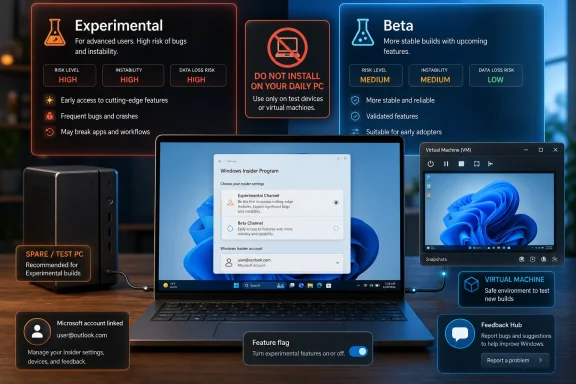
Yet the simplification should not be mistaken for a magic eraser. Experimental is not one monolithic lane. Microsoft is also using specialized Experimental tracks tied to different platform milestones, including future Windows platform work and hardware-related development. That means the friendly label can still sit on top of very different engineering realities.
For Windows enthusiasts, that is part of the fun. For IT pros, it is precisely the problem. A build that previews a user-interface feature and a build that tests platform changes for future silicon may both be “Experimental,” but they carry different risk profiles. The label reduces the number of doors; it does not make every room behind the door equally safe.
The Beta channel is more straightforward, but it is still pre-release Windows. A Beta build can include feature rollouts, regressions, driver oddities, policy changes, and compatibility surprises. The word “Beta” may sound familiar and manageable, but on a production workstation it still means you have volunteered to be downstream of Microsoft’s development process rather than downstream of its finished servicing process.
A spare PC remains the cleanest option. It gives Windows Update, firmware, drivers, sleep states, graphics stacks, and peripherals something close to real hardware without threatening your work machine. It also lets you discover whether a build breaks the exact sort of device you care about, which is the point of testing in the first place.
Virtual machines are the second-best option and often the most convenient. VMware Workstation Pro and Oracle VM VirtualBox can run Windows 11 test environments, and modern virtualization tools increasingly understand Windows 11’s TPM and Secure Boot expectations. A VM is excellent for exploring Settings changes, inbox apps, interface experiments, and administrative behavior.
But a VM is not a full substitute for hardware. GPU behavior, power management, Bluetooth, docking stations, biometric login, and some driver paths behave differently under virtualization. If your goal is curiosity, a VM is fine. If your goal is readiness for deployment across real fleets, you eventually need real machines.
The account is not just a login token. It anchors the Insider enrollment, connects the device to the chosen preview experience, and gives Microsoft a path for feedback, diagnostics, and build targeting. Optional diagnostic data may need to be enabled before the device can participate, which is not an incidental checkbox for privacy-minded users.
That tradeoff is defensible. Microsoft cannot run a public preview program without data about crashes, hangs, compatibility failures, and user complaints. The company needs signal from varied hardware and software combinations long before a build reaches general availability.
Still, users should understand the bargain. Insider participation is not merely early access; it is early access in exchange for testing labor and diagnostic visibility. You get the new toys first because Microsoft gets to learn from your machine first.
For virtual machines, the ISO route is usually the least painful. Create the VM, attach the ISO, ensure TPM and Secure Boot requirements are satisfied where needed, and install Windows normally. Once the base installation is activated and updated, the Insider enrollment can happen from within Settings.
For spare physical PCs, bootable USB still has advantages. It tests the machine’s actual storage controller, firmware path, network hardware, and driver behavior. That matters if you are trying to determine whether a particular laptop or desktop class is ready for upcoming Windows changes.
Activation remains a practical consideration. A test installation still needs a valid license or digital entitlement. The Insider Program is not a free Windows licensing loophole, and treating it as one is a good way to confuse testing with piracy.
The notable new wrinkle is the appearance of Feature flags in the Insider settings flow for some Experimental users. This matters because it changes the psychology of preview testing. Instead of merely receiving whatever Microsoft decides to roll out to your device, testers may be able to opt into specific experimental experiences before they are broadly enabled.
That is a better fit for how Windows development already works. Microsoft has long used controlled feature rollouts, hidden enablement packages, and staged deployments. Giving Insiders a more visible mechanism for choosing experimental experiences makes the program feel less arbitrary.
It may also produce better feedback. A user who deliberately enables a feature knows what changed and can report on it with context. A user who wakes up to a mysteriously altered shell experience often starts from annoyance rather than analysis.
For Windows, this is especially important because the operating system is no longer a single annual pile of features. It is a constantly serviced platform with inbox apps, cloud-connected experiences, Copilot integrations, Settings migrations, Store-delivered components, security baselines, driver changes, and enterprise policy surfaces all moving at once.
Feature flags let Microsoft decouple “the bits are installed” from “the experience is live.” That can reduce disruption, but it also makes the Insider experience harder to compare across devices. Two machines on the same build number may not behave identically if flags differ.
That is why the new Insider model is more honest but not necessarily less complex. The complexity has moved from channel names into feature exposure. For power users, that is a fair trade. For casual testers, it means screenshots from one Insider PC may not match another Insider PC even when both appear to be on the same release.
Feedback Hub is imperfect. It can feel like shouting into a warehouse. Duplicate reports pile up, votes do not guarantee action, and some long-running complaints seem to survive from one Windows era to the next. But it remains the official place where users can describe reproducible failures, attach diagnostics, and amplify issues other testers have already found.
The most useful feedback is specific. “The new Start menu is bad” is cathartic but weak. “On build X, with taskbar icons left-aligned, clicking the far-left edge fails to open Start unless the pointer is moved two pixels inward” is the kind of report that can become an engineering fix.
That distinction matters for WindowsForum readers. The Insider Program is most valuable when experienced users behave less like pundits and more like testers. A good bug report is not a complaint with a screenshot; it is a breadcrumb trail an engineer can follow.
Microsoft’s new model tries to soften that problem. The company has been moving toward easier transitions between Experimental, Beta, and Release Preview when devices are on compatible core versions. In plain English, Microsoft wants fewer cases where curiosity forces a clean install.
That is a meaningful improvement, especially for enthusiasts who test on secondary machines but still care about keeping apps and settings intact. It also matters for small IT shops and consultants who use Insider builds to preview what is coming without maintaining a full lab infrastructure.
But the careful phrase is “in most cases.” Windows build trains still matter. If a device has moved onto a development branch that is ahead of public code, there may be no graceful downgrade path. The old rule survives: if you cannot afford to reinstall, you cannot afford to enroll recklessly.
That creates an interesting branding tension. Microsoft wants a simpler Insider story, but the enterprise world still needs a last-mile preview lane. Administrators are not usually looking to test a speculative File Explorer experiment; they want to know whether next month’s cumulative update, driver package, or servicing change will break line-of-business machines.
For that audience, Beta can still be too early and Experimental is often irrelevant. Release Preview is where Windows testing starts to resemble change management rather than hobbyist exploration. It is less exciting, but it is where risk becomes operationally meaningful.
The danger is that a simplified public narrative may flatten those distinctions. “Experimental or Beta” is a good consumer guide. It is not the whole deployment story.
That makes clarity more than a usability feature. If Microsoft wants users to trust Windows change, it needs them to understand where change comes from, how risky it is, and how to reverse it. Confusing channel names were not the root cause of Windows frustration, but they contributed to the sense that the operating system’s development process was opaque even to enthusiasts.
The new Insider model says, implicitly, that Microsoft knows the old map stopped helping. Experimental is where ideas are volatile. Beta is where future Windows becomes more concrete. Feature flags are where users can choose to step closer to the blast radius.
That is a better grammar for preview software. Whether Microsoft follows through with predictable behavior is the real test.
That intelligence should live in a lab, not in production. Even a small organization can maintain a handful of test devices that mirror common hardware profiles. A laptop with integrated graphics, a desktop with discrete graphics, a docked workstation, and a VM tied to standard enterprise images can surface a surprising amount of trouble before Patch Tuesday or a feature update does.
The new Beta channel is likely the more useful default for this work. Experimental may be valuable for watching Microsoft’s direction, especially around platform changes, Copilot integration, and interface experiments. But Beta is closer to the zone where “this might affect my users soon” becomes a reasonable assumption.
The distinction is strategic. Experimental helps IT understand Microsoft’s intent. Beta helps IT prepare for Microsoft’s impact.
The sharper labels also make personal risk easier to calibrate. If you want to be first, choose Experimental and accept churn. If you want early but less chaotic exposure, choose Beta. If you want stability, stay out of the Insider Program or use Release Preview only when you have a clear reason.
That does not remove the usual hazards. Apps may misbehave. Drivers may regress. Battery life may suffer. UI changes may come and go. A feature you love may vanish because Microsoft was measuring engagement, compatibility, or reliability rather than enthusiasm.
That last point is worth stressing. The Insider Program is not a promise factory. It is a testing ground, and testing grounds are full of things that never reach the road.
The article’s most valuable contribution is its cautionary framing. It does not romanticize Insider builds as a harmless way to “get features early.” It recommends a spare PC, dual-boot setup, or VM because even the more stable preview path is still unfinished software.
Where the larger story goes beyond a how-to is in Microsoft’s timing. The company is not merely changing labels; it is trying to repair the user experience around preview participation. The fact that such repair is necessary says a lot about how complicated Windows servicing has become.
The Insider Program used to be a side door into future Windows. Now it is a public interface for Microsoft’s entire development philosophy. A cleaner door helps, but what matters is what users find after they walk through it.
Source: PCMag Become an Insider: How to Check Out Early Versions of Windows 11
 Microsoft Finally Admits the Old Insider Map Was Too Clever
The Windows Insider Program has always had an identity problem. It is part enthusiast playground, part telemetry funnel, part enterprise early-warning system, and part public relations stage for features Microsoft may or may not ever ship. That mix was manageable when “preview build” mostly meant a new Start menu behavior or Settings page tweak, but it became harder to parse as Windows 11 development spread across AI features, kernel-level platform changes, hardware enablement, app experiments, and staggered feature rollouts.The old four-channel model looked orderly on paper. Canary was the wild frontier, Dev was for active development, Beta was closer to release, and Release Preview was the last stop before broad deployment. In practice, the distinctions blurred. Features could appear in Beta before Dev, Dev builds could carry changes that never graduated, and Canary sometimes tested platform plumbing rather than visible user-facing features.
That confusion mattered because the channel name was not just branding. It determined how easy it was to leave, how likely a clean install might become necessary, and how much breakage a user had implicitly accepted. Microsoft’s new split into Experimental and Beta is an acknowledgment that the old vocabulary had accumulated too much historical baggage.
PCMag’s guide captures the consumer-facing result: if you want early, evolving features, choose Experimental; if you want preview code closer to public release, choose Beta. That is a cleaner story. It is also the story Microsoft needed to tell years ago.
The Two-Channel Pitch Is Simpler, Not Simple
The appeal of the new arrangement is obvious. “Experimental” says what Dev and Canary often meant but did not always communicate clearly. “Beta” says what cautious testers want to hear: still unfinished, but closer to something Microsoft expects regular users to see.Yet the simplification should not be mistaken for a magic eraser. Experimental is not one monolithic lane. Microsoft is also using specialized Experimental tracks tied to different platform milestones, including future Windows platform work and hardware-related development. That means the friendly label can still sit on top of very different engineering realities.
For Windows enthusiasts, that is part of the fun. For IT pros, it is precisely the problem. A build that previews a user-interface feature and a build that tests platform changes for future silicon may both be “Experimental,” but they carry different risk profiles. The label reduces the number of doors; it does not make every room behind the door equally safe.
The Beta channel is more straightforward, but it is still pre-release Windows. A Beta build can include feature rollouts, regressions, driver oddities, policy changes, and compatibility surprises. The word “Beta” may sound familiar and manageable, but on a production workstation it still means you have volunteered to be downstream of Microsoft’s development process rather than downstream of its finished servicing process.
The Best Insider PC Is One You Can Afford to Break
PCMag’s most important advice is also the least glamorous: do not install Insider builds on the Windows environment you depend on. That warning deserves to be printed in 72-point type at the top of every Insider signup page. Preview operating systems are not lifestyle accessories; they are controlled risk.A spare PC remains the cleanest option. It gives Windows Update, firmware, drivers, sleep states, graphics stacks, and peripherals something close to real hardware without threatening your work machine. It also lets you discover whether a build breaks the exact sort of device you care about, which is the point of testing in the first place.
Virtual machines are the second-best option and often the most convenient. VMware Workstation Pro and Oracle VM VirtualBox can run Windows 11 test environments, and modern virtualization tools increasingly understand Windows 11’s TPM and Secure Boot expectations. A VM is excellent for exploring Settings changes, inbox apps, interface experiments, and administrative behavior.
But a VM is not a full substitute for hardware. GPU behavior, power management, Bluetooth, docking stations, biometric login, and some driver paths behave differently under virtualization. If your goal is curiosity, a VM is fine. If your goal is readiness for deployment across real fleets, you eventually need real machines.
The Microsoft Account Requirement Is Part of the Deal
Joining the Insider Program requires a Microsoft account, and PCMag walks readers through the expected sequence: create or use an account, register for Windows Insider access, then link that account inside Windows under Settings. That is mechanically simple, but it also shows how deeply Windows testing is now tied to Microsoft’s identity and telemetry model.The account is not just a login token. It anchors the Insider enrollment, connects the device to the chosen preview experience, and gives Microsoft a path for feedback, diagnostics, and build targeting. Optional diagnostic data may need to be enabled before the device can participate, which is not an incidental checkbox for privacy-minded users.
That tradeoff is defensible. Microsoft cannot run a public preview program without data about crashes, hangs, compatibility failures, and user complaints. The company needs signal from varied hardware and software combinations long before a build reaches general availability.
Still, users should understand the bargain. Insider participation is not merely early access; it is early access in exchange for testing labor and diagnostic visibility. You get the new toys first because Microsoft gets to learn from your machine first.
Downloading Windows 11 Is the Easy Part
The installation path is familiar to anyone who has built a Windows test lab in the past decade. Microsoft’s Windows 11 download page provides the Media Creation Tool for bootable USB media and a multi-edition ISO for those who want to install directly into a VM or keep reusable installation media handy. PCMag’s preference for the ISO is sensible because it gives testers more flexibility.For virtual machines, the ISO route is usually the least painful. Create the VM, attach the ISO, ensure TPM and Secure Boot requirements are satisfied where needed, and install Windows normally. Once the base installation is activated and updated, the Insider enrollment can happen from within Settings.
For spare physical PCs, bootable USB still has advantages. It tests the machine’s actual storage controller, firmware path, network hardware, and driver behavior. That matters if you are trying to determine whether a particular laptop or desktop class is ready for upcoming Windows changes.
Activation remains a practical consideration. A test installation still needs a valid license or digital entitlement. The Insider Program is not a free Windows licensing loophole, and treating it as one is a good way to confuse testing with piracy.
The Insider Settings Page Becomes the New Control Room
Once Windows 11 is installed, the key path is Settings, Windows Update, Windows Insider Program. That is where users link the Microsoft account, choose the channel, enable required diagnostics, and begin receiving preview builds. Microsoft has spent years moving more of Windows servicing into Settings, and the Insider experience now follows that gravitational pull.The notable new wrinkle is the appearance of Feature flags in the Insider settings flow for some Experimental users. This matters because it changes the psychology of preview testing. Instead of merely receiving whatever Microsoft decides to roll out to your device, testers may be able to opt into specific experimental experiences before they are broadly enabled.
That is a better fit for how Windows development already works. Microsoft has long used controlled feature rollouts, hidden enablement packages, and staged deployments. Giving Insiders a more visible mechanism for choosing experimental experiences makes the program feel less arbitrary.
It may also produce better feedback. A user who deliberately enables a feature knows what changed and can report on it with context. A user who wakes up to a mysteriously altered shell experience often starts from annoyance rather than analysis.
Feature Flags Make Windows Testing More Honest
The phrase feature flag sounds developer-ish, but the concept is simple: code can be present without being active for everyone. Microsoft can ship a build containing multiple unfinished capabilities and then turn specific pieces on for selected testers, selected channels, or users who opt in. That is how modern software ships without every experiment becoming a public commitment.For Windows, this is especially important because the operating system is no longer a single annual pile of features. It is a constantly serviced platform with inbox apps, cloud-connected experiences, Copilot integrations, Settings migrations, Store-delivered components, security baselines, driver changes, and enterprise policy surfaces all moving at once.
Feature flags let Microsoft decouple “the bits are installed” from “the experience is live.” That can reduce disruption, but it also makes the Insider experience harder to compare across devices. Two machines on the same build number may not behave identically if flags differ.
That is why the new Insider model is more honest but not necessarily less complex. The complexity has moved from channel names into feature exposure. For power users, that is a fair trade. For casual testers, it means screenshots from one Insider PC may not match another Insider PC even when both appear to be on the same release.
Feedback Hub Is Still the Program’s Moral Center
The PCMag guide ends where every Insider guide should end: Feedback Hub. Installing preview builds without sending feedback is not wrong, exactly, but it turns the program into a spectator sport. Microsoft’s entire pitch depends on users finding problems before the broader Windows population does.Feedback Hub is imperfect. It can feel like shouting into a warehouse. Duplicate reports pile up, votes do not guarantee action, and some long-running complaints seem to survive from one Windows era to the next. But it remains the official place where users can describe reproducible failures, attach diagnostics, and amplify issues other testers have already found.
The most useful feedback is specific. “The new Start menu is bad” is cathartic but weak. “On build X, with taskbar icons left-aligned, clicking the far-left edge fails to open Start unless the pointer is moved two pixels inward” is the kind of report that can become an engineering fix.
That distinction matters for WindowsForum readers. The Insider Program is most valuable when experienced users behave less like pundits and more like testers. A good bug report is not a complaint with a screenshot; it is a breadcrumb trail an engineer can follow.
Leaving the Program Has Always Been the Trapdoor
For years, the scariest part of joining the Insider Program was not entering; it was leaving. Depending on the channel, build number, and timing, getting back to stable Windows could require waiting for the public release train to catch up or wiping the machine and reinstalling. That made Insider enrollment feel less like a toggle and more like a tattoo.Microsoft’s new model tries to soften that problem. The company has been moving toward easier transitions between Experimental, Beta, and Release Preview when devices are on compatible core versions. In plain English, Microsoft wants fewer cases where curiosity forces a clean install.
That is a meaningful improvement, especially for enthusiasts who test on secondary machines but still care about keeping apps and settings intact. It also matters for small IT shops and consultants who use Insider builds to preview what is coming without maintaining a full lab infrastructure.
But the careful phrase is “in most cases.” Windows build trains still matter. If a device has moved onto a development branch that is ahead of public code, there may be no graceful downgrade path. The old rule survives: if you cannot afford to reinstall, you cannot afford to enroll recklessly.
Release Preview Is the Ghost in the New Machine
The PCMag article frames the simplified choice as Experimental versus Beta, which is the most important consumer-facing change. But Release Preview still matters in the broader Windows testing ecosystem. It remains the more conservative place for validating updates, drivers, and features that are close to general availability.That creates an interesting branding tension. Microsoft wants a simpler Insider story, but the enterprise world still needs a last-mile preview lane. Administrators are not usually looking to test a speculative File Explorer experiment; they want to know whether next month’s cumulative update, driver package, or servicing change will break line-of-business machines.
For that audience, Beta can still be too early and Experimental is often irrelevant. Release Preview is where Windows testing starts to resemble change management rather than hobbyist exploration. It is less exciting, but it is where risk becomes operationally meaningful.
The danger is that a simplified public narrative may flatten those distinctions. “Experimental or Beta” is a good consumer guide. It is not the whole deployment story.
The Insider Program Is Now Part of Windows’ Trust Problem
The Insider overhaul arrives at a delicate time for Windows. Microsoft is asking users to accept a faster-moving operating system that increasingly blends local computing, cloud services, AI features, advertising-adjacent surfaces, and background servicing. The preview program is one of the few places where that bargain can be tested before it lands on everyone else’s desktop.That makes clarity more than a usability feature. If Microsoft wants users to trust Windows change, it needs them to understand where change comes from, how risky it is, and how to reverse it. Confusing channel names were not the root cause of Windows frustration, but they contributed to the sense that the operating system’s development process was opaque even to enthusiasts.
The new Insider model says, implicitly, that Microsoft knows the old map stopped helping. Experimental is where ideas are volatile. Beta is where future Windows becomes more concrete. Feature flags are where users can choose to step closer to the blast radius.
That is a better grammar for preview software. Whether Microsoft follows through with predictable behavior is the real test.
IT Pros Should Treat Insider Builds as Intelligence, Not Inventory
For sysadmins, the right way to use Insider builds is not to chase novelty. It is to gather intelligence. Preview builds can reveal policy changes, UI migrations, driver deprecations, inbox app behavior, default app changes, and update flow adjustments long before they hit managed users.That intelligence should live in a lab, not in production. Even a small organization can maintain a handful of test devices that mirror common hardware profiles. A laptop with integrated graphics, a desktop with discrete graphics, a docked workstation, and a VM tied to standard enterprise images can surface a surprising amount of trouble before Patch Tuesday or a feature update does.
The new Beta channel is likely the more useful default for this work. Experimental may be valuable for watching Microsoft’s direction, especially around platform changes, Copilot integration, and interface experiments. But Beta is closer to the zone where “this might affect my users soon” becomes a reasonable assumption.
The distinction is strategic. Experimental helps IT understand Microsoft’s intent. Beta helps IT prepare for Microsoft’s impact.
Enthusiasts Get a Cleaner Playground With Sharper Edges
For Windows enthusiasts, this is mostly good news. The old channel structure often forced users to understand Microsoft’s internal development vocabulary before they could make a reasonable choice. Experimental and Beta are easier to explain to a friend, a forum reader, or a YouTube audience.The sharper labels also make personal risk easier to calibrate. If you want to be first, choose Experimental and accept churn. If you want early but less chaotic exposure, choose Beta. If you want stability, stay out of the Insider Program or use Release Preview only when you have a clear reason.
That does not remove the usual hazards. Apps may misbehave. Drivers may regress. Battery life may suffer. UI changes may come and go. A feature you love may vanish because Microsoft was measuring engagement, compatibility, or reliability rather than enthusiasm.
That last point is worth stressing. The Insider Program is not a promise factory. It is a testing ground, and testing grounds are full of things that never reach the road.
The PCMag Guide Gets the Mechanics Right, but the Stakes Are Bigger
As a practical walkthrough, PCMag’s guide is useful. It tells readers to create a test environment, join with a Microsoft account, download Windows 11 installation media or an ISO, enroll the device through Settings, pick a channel, install preview updates, use Feedback Hub, and unenroll when finished. That is the right sequence.The article’s most valuable contribution is its cautionary framing. It does not romanticize Insider builds as a harmless way to “get features early.” It recommends a spare PC, dual-boot setup, or VM because even the more stable preview path is still unfinished software.
Where the larger story goes beyond a how-to is in Microsoft’s timing. The company is not merely changing labels; it is trying to repair the user experience around preview participation. The fact that such repair is necessary says a lot about how complicated Windows servicing has become.
The Insider Program used to be a side door into future Windows. Now it is a public interface for Microsoft’s entire development philosophy. A cleaner door helps, but what matters is what users find after they walk through it.
The New Insider Bargain in Plain WindowsForum English
The practical advice for readers is not complicated, but it is easy to ignore when a shiny build promises early access. The new Insider model lowers the cognitive cost of joining; it does not lower the technical risk enough to justify carelessness.- Install Insider builds only on a spare PC, a virtual machine, or a test partition you are prepared to rebuild.
- Choose Experimental when you want the earliest and least settled Windows changes, not when you want a reliable preview of the next public release.
- Choose Beta when you want a closer look at features and fixes that are more likely to reach ordinary Windows 11 users.
- Enable diagnostic data and use Feedback Hub if you want to participate meaningfully rather than merely consume unfinished builds.
- Keep backups and installation media ready before enrolling, because leaving preview code can still become messy depending on the build path.
- Treat Insider builds as evidence of Microsoft’s direction, not as a guarantee that any specific feature will ship unchanged.
Source: PCMag Become an Insider: How to Check Out Early Versions of Windows 11
