

Microsoft has quietly added a new “Haptic signals” entry into Windows 11 Insider previews, and the hidden setting — discovered in Build 26220.7070 (delivered as KB5070300) — strongly suggests the OS is preparing system-level tactile feedback for devices with haptic trackpads and other haptic-capable peripherals.
Microsoft published Windows 11 Insider Preview Build 26220.7070 to the Dev and Beta Channels as part of KB5070300; the official release notes confirm the build and its distribution path. In that same build, community investigators uncovered a hidden Settings surface labeled Haptic signals that includes a global toggle and an intensity slider, and copy that reads, in essence: “Feel subtle vibrations when you snap windows, align objects, and more.” This discovery is notable because Microsoft’s platform already includes haptic APIs and implementation guidance for precision touchpads and pen devices; the company has published developer and hardware guidance covering touchpad feedback and intensity controls, which matches the controls visible in the preview Settings UI.
Source: Gadgets 360 https://www.gadgets360.com/laptops/...trackpads-expected-latest-build-leak-9613680/
 Background
Microsoft published Windows 11 Insider Preview Build 26220.7070 to the Dev and Beta Channels as part of KB5070300; the official release notes confirm the build and its distribution path. In that same build, community investigators uncovered a hidden Settings surface labeled Haptic signals that includes a global toggle and an intensity slider, and copy that reads, in essence: “Feel subtle vibrations when you snap windows, align objects, and more.” This discovery is notable because Microsoft’s platform already includes haptic APIs and implementation guidance for precision touchpads and pen devices; the company has published developer and hardware guidance covering touchpad feedback and intensity controls, which matches the controls visible in the preview Settings UI. What was found in Build 26220.7070 (KB5070300)
Hidden Settings and UI strings
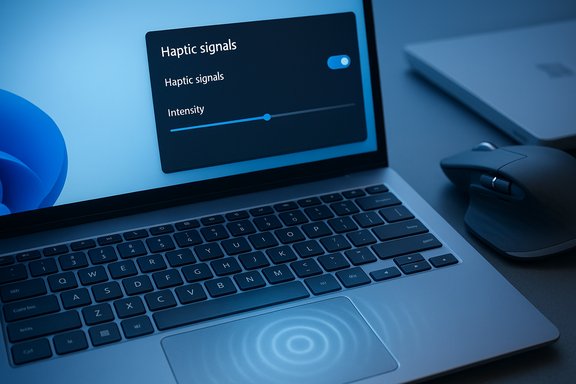
Insider sleuths found a Settings panel (currently hidden by default) that exposes:- A global toggle to enable or disable system-level haptic signals.
- A slider labeled “Signal intensity” to adjust vibration strength.
- Separate controls distinguishing haptic clicks (the simulated click you feel when pressing a haptic touchpad) from haptic signals (event-driven pulses tied to UI actions).
Functional status
At the time of the preview sightings the UI strings and Settings surface were visible only to a subset of Insiders or discoverable using community tools; the underlying tactile engine is not broadly functional for most users yet. Microsoft often plants UI plumbing in Insider builds while driver and OEM support are still under development, so the presence of the setting is a strong indicator of intent but not proof of immediate general availability.Why this matters: UX and platform implications
Haptic feedback is a low-attention, non-visual confirmation channel that can make desktop interactions feel sharper and more immediate — the same design rationale that made smartphone haptics common. On a PC, well-scoped micro‑vibrations can confirm discrete UI events (for example, when a window snaps into place) without forcing visual focus or adding intrusive sounds. Early reporting and Microsoft’s platform guides indicate the company intends haptics to serve precisely these quick, discrete confirmations. Benefits developers, designers and users should expect if this ships as seen in previews:- Immediate non-visual confirmation for multi-window workflows (snap/align/drag actions).
- Perceived responsiveness and polish — tactile micro-cues amplify the feeling of snappy, deliberate interactions.
- Accessibility improvements — tactile cues can supplement visual and audio channels for users with low vision or in noisy/quiet environments when done with care.
Which hardware will benefit first?
Surface and haptic trackpads
Microsoft’s Surface devices have long shipped with solid-state, precision haptic touchpads that simulate clicks by sending vibration patterns to actuators. Product pages for Surface Laptop Studio and recent Surface Laptop models list large precision haptic touchpads that provide tactile feedback, making Surface devices logical early adopters for any system-level haptic signals.Third‑party peripherals (Logitech and others)
Peripherals already exist that include haptic actuators — the Logitech MX Master 4 is a prominent example with a dedicated haptic module and a vendor-managed haptics configuration experience in Logi Options+. Logitech documents the MX Master 4’s haptic behavior, custom intensity settings and app/plugin integrations in its support materials. That demonstrates that third-party mice can accept software-directed haptic commands on Windows today, at least in vendor-specific tooling. However, whether Windows’ new “Haptic signals” will automatically target external mice like the MX Master 4 or remain confined initially to built-in haptic trackpads is still uncertain and depends on driver support and OEM/vendor cooperation. Early reporting flags this as an open question rather than a guaranteed behavior.Technical underpinnings — how Microsoft can make this work
System-level haptics require coordination across three layers:- Hardware/firmware that can generate haptic waveforms (piezo actuators, LRAs, ERMs, or other response engines).
- Device drivers and firmware interfaces that advertise capabilities to Windows and expose a programmatic control surface (for example, a SimpleHapticsController-like abstraction).
- OS-level components that map UI events (snap, align, drag) to short haptic patterns, honor intensity/power settings, and expose user controls in Settings.
UX design and accessibility considerations
Where haptics help most
- Snap Layout completion: brief pulse when a window locks into a tile.
- Alignment guides: micro-pulse when objects or elements snap into alignment.
- Drag boundary crossing: tactile confirmation when a dragged file crosses into another window or a target zone.
Potential UX pitfalls
- Overuse: If every minor event triggers vibration, the experience will become noisy and fatiguing.
- Inconsistent feel: Different actuator technologies and firmware tuning across OEMs can make the same OS event feel very different on different machines.
- Audible artifacts: Thin laptop chassis can make haptics audible in recordings or meetings.
- Accessibility edge cases: Haptics must never be the only feedback path for essential events; clear toggles and alternatives are required.
Enterprise, security and manageability concerns
Large deployments will require administrative controls. At minimum enterprises will expect:- MDM/Group Policy controls to enable, disable or configure haptic defaults.
- Clear driver and firmware version dependencies before wide rollout.
- Pilot testing to validate behavior in meeting/conferencing stacks and with assistive technologies.
Power, thermal and reliability trade-offs
Haptic actuators use power and can interact with thermal or acoustic behavior on thin-and-light laptops. Sensible defaults — for example reduced intensity on battery or haptics off when battery saver is active — are essential to avoid negative impacts on battery runtime. Driver and OEM tuning must honor these policies; otherwise users may see reduced battery life or unexpected thermal/noise side effects. Microsoft’s platform guidance already mentions intensity ranges and a recommendation to enable haptics by default but with conservative parameters on battery.How to check or test the feature today (practical steps)
- Confirm you’re on Windows 11 Build 26220.7070 (KB5070300) in the Dev or Beta channel via Settings > Windows Update.
- Look under Settings > Bluetooth & devices > Touchpad (or Mouse) for a Haptic signals toggle and intensity slider. Early reports place the UI in that area.
- If you do not see the UI and you are an advanced Insider, community tools (such as ViVeTool) have historically been used to reveal hidden pages — however, enabling unsupported feature flags on production machines is risky and not recommended. Use test hardware or VMs.
Timeline and rollout expectations
Microsoft commonly stages UI plumbing in Insider builds long before a broad public release. The visible Settings strings are a clear signal of intent, but several moving parts will dictate the schedule:- OEMs and peripheral vendors must deliver drivers that expose haptic capabilities reliably.
- Waveform tuning and power policies must be finalized to avoid inconsistent or disruptive experiences.
- Microsoft must decide a staged rollout plan (controlled feature rollouts to subsets of Insiders, then broader availability).
Strengths, risks and final evaluation
Strengths
- Platform readiness: Microsoft’s existing haptic APIs, touchpad implementation guides and the presence of Settings UI indicate a well-considered, platform-level approach rather than a patchwork of vendor-specific solutions.
- User control: Early evidence of separate toggles for haptic clicks and haptic signals and an intensity slider indicates Microsoft plans granular, user-centric controls.
- Hardware exists today: Surface devices and peripherals like the Logitech MX Master 4 already include haptic actuators and vendor tooling, which lowers the bar for meaningful early experiences.
Risks and open questions
- Fragmentation: The feel of haptics depends on actuators, firmware and driver mapping; inconsistent implementations could degrade the experience.
- Power and noise: Poorly tuned haptics could harm battery life or create audible artifacts in microphones and recordings.
- Driver regressions: More driver surface area increases the risk of regressions; vendor QA will be critical.
- Peripherals support: Whether Windows will map system-level haptic signals to third-party mice (e.g., MX Master 4) remains unconfirmed; vendor cooperation is required. This is currently unverified and should be treated as tentative until Microsoft or peripheral vendors confirm support.
Recommendations for stakeholders
- For everyday users: If you own a haptic-capable Surface or a haptic mouse, keep an eye on the Dev/Beta channels and try the settings on test devices first. Start with low intensity and test in meeting/recording situations to avoid audible side effects.
- For enthusiasts and Insiders: Experiment on non-production machines or VMs. Community tools can surface hidden UI, but proceed with caution and backups.
- For IT and procurement: Add haptic-capable devices to pilot inventories, require OEM/driver validation, and insist on clear MDM/Group Policy controls before deploying at scale.
- For OEMs and peripheral vendors: Adopt Microsoft’s touchpad and haptics guidance, expose capability metadata and waveform maps in drivers, and provide per-device calibration and conservative battery policies.
- For developers: Honor system-level haptic settings, avoid duplicating OS signals, and provide per-app options so users can opt out if desired.
Conclusion
Windows 11’s hidden “Haptic signals” setting in Build 26220.7070 (KB5070300) is the clearest sign yet that Microsoft intends to expose system-level tactile feedback for supported hardware. The platform pieces — haptic APIs, touchpad design guides, and haptic-capable Surface hardware — are already in place, and third-party peripherals with haptic engines exist today. What remains is coordinated driver work, waveform tuning, and a cautious rollout plan that avoids fragmentation, battery penalties, and accessibility regressions. The discovery should be treated as an invitation to test and pilot on haptic-capable devices, not as a guarantee of immediate, broad availability; enterprise and consumer rollouts will depend on OEM and peripheral vendor readiness as much as Microsoft’s software plumbing.Source: Gadgets 360 https://www.gadgets360.com/laptops/...trackpads-expected-latest-build-leak-9613680/
