

Microsoft’s latest Windows 11 Insider builds in late May 2026 put long-requested Start menu and taskbar customization back into testing, including Start menu sizing, section toggles, profile hiding, smaller taskbar buttons, and the ability to move the taskbar to the top, left, right, or bottom of the screen. The changes are not merely cosmetic; they are a quiet admission that Windows 11’s most visible interface bets were too rigid for the people who actually live in the operating system all day. Microsoft is not rolling back Windows 11 so much as renegotiating it. The result is a more practical desktop, but also a revealing case study in how long it can take Redmond to rediscover the value of user control.
Windows 11 launched with a confidence that bordered on stubbornness. The centered taskbar, simplified Start menu, and reduced configuration surface were framed as modernization, but for many longtime Windows users they felt like a narrowing of the contract. Microsoft had taken an operating system famous for accommodating habits, workflows, and eccentric setups, then replaced parts of that flexibility with a cleaner visual doctrine.
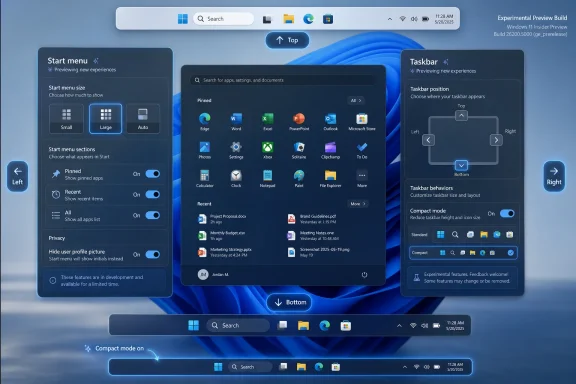
The new Insider work reverses some of that posture. In Experimental Preview Build 26300.8493, Microsoft began testing alternate taskbar positions and a smaller taskbar mode. In Build 26300.8553, it followed with Start menu improvements that include a renamed Recent section, section-level toggles, small and large Start menu choices, an option to hide the user’s name and profile picture, and a redesigned Start settings page.
That sounds like a laundry list until you remember what Windows 11 removed. The original Windows 11 taskbar could not be moved in the traditional way. The Start menu offered limited control over its shape and contents. The system looked modern, but it also made a sizable class of users feel as if their muscle memory had been traded for screenshots.
The notable part is not that Microsoft can build these features. It always could. The notable part is that the company is now spending 2026 reintroducing flexibility that Windows users considered ordinary before Windows 11 tried to simplify the desktop into a single preferred pattern.
The new Start menu controls matter because they move the interface away from one-size-fits-all design. Users can choose between small, large, and automatic sizing. They can independently show or hide Pinned, Recent, and All sections. They can also hide their name and profile picture, a small but telling privacy and presentation option for people who do not want their desktop to feel like an account billboard.
The rename from Recommended to Recent is more than copy editing. “Recommended” implied judgment and intervention, as if Windows knew what belonged in front of the user. “Recent” is humbler and more descriptive. It tells the user what the system is doing rather than pretending to be an assistant with taste.
That difference matters in 2026 because Windows is still recovering from years of features that blurred the line between helpfulness and promotion. A desktop operating system can suggest, surface, and automate, but it must not forget that the user’s tolerance for “smart” behavior collapses quickly when the basics feel constrained. A Start menu that can be shaped is less glamorous than an AI sidebar, but it may do more for trust.
Microsoft is now testing taskbar placement on the bottom, top, left, and right edges of the screen. It is also testing smaller taskbar buttons that reduce both icon size and taskbar height. Microsoft says most customization settings, including small taskbar and never-combine behavior, are intended to work across locations, though some elements such as touch gestures, the search box, Ask Copilot, auto-hide, and touch-optimized modes have had caveats or ongoing work attached to them in the preview notes.
That caveat is important. This is not a finished product announcement for every Windows 11 user. It is an Insider-stage correction being gradually rolled out, and Microsoft’s own preview language leaves room for features to change, disappear, or land differently. But the direction is unmistakable.
The company is acknowledging that the taskbar is not decorative trim. It is one of the most frequently used control surfaces in the operating system. When Microsoft makes it less adaptable, users do not merely lose a preference; they lose efficiency hundreds of times a week.
The problem was that visual calm came with functional friction. Power users were told, implicitly, that their existing workflows were edge cases. Administrators and enthusiasts learned that the new shell could be less configurable than the old one. Even casual users discovered that “simpler” often meant having fewer ways to make Windows behave like their Windows.
The smaller taskbar option is a perfect example. Microsoft says the default taskbar remains unchanged, but users who want more screen space can choose a compact mode. That is precisely the sort of compromise Windows historically did well: ship a sensible default, then allow people with different hardware and habits to move away from it.
On a 13-inch laptop, a few pixels of vertical space still matter. On a developer workstation, the ability to place the taskbar vertically can make more sense than wasting horizontal room. On a multi-monitor setup, taskbar placement can be part of a broader arrangement of windows, terminals, dashboards, and remote sessions. The desktop is not a poster; it is a workbench.
The company’s recent preview notes repeatedly emphasize gradual rollout, feedback, and feature flags. That language is familiar, but in this case it carries extra weight because Start and taskbar changes are among the most emotionally charged updates Microsoft can ship. A new API can break a workflow quietly; a changed Start menu announces itself every time the user presses the Windows key.
The Experimental channel also gives Microsoft a way to soften reversals. Rather than declaring that Windows 11’s original taskbar design was too inflexible, Microsoft can say it is “making Taskbar and Start more personal.” That is corporate language, but the product movement underneath is still meaningful.
For IT pros, the Insider framing is both promising and frustrating. Promising because Microsoft is testing changes before broad deployment. Frustrating because shell behavior that affects training, support documentation, screenshots, and user expectations remains a moving target. Windows as a service has always meant the desktop is never quite done; 2026 is making that feel especially literal.
Windows 11 narrowed that bargain at launch. The operating system looked fresher, but it also felt less deferential. For a company trying to compete with macOS polish and ChromeOS simplicity, the temptation was obvious. But Windows’ competitive advantage was never just polish. It was permission.
That is why these changes feel larger than their settings-page footprint. A movable taskbar is not technically revolutionary. A Start menu size selector is not a moonshot. Hiding profile identity in Start will not make anyone forget about Recall, Copilot, or Microsoft account nudges. But together, these changes signal that Microsoft is again treating configurability as a feature rather than a liability.
The tricky part is that Microsoft cannot simply add knobs forever. Too much configuration becomes another form of complexity, especially when settings sprawl across legacy Control Panel surfaces, modern Settings pages, group policy, registry tweaks, and feature flags. The challenge is to make Windows flexible without making it feel like a scavenger hunt.
The redesigned Start settings page is therefore as important as the toggles themselves. If Microsoft wants to restore user agency, it must make that agency discoverable. Hidden registry edits and third-party shell tools are not a healthy substitute for first-class controls.
Recent is less ambitious. It makes a narrower promise and is therefore less likely to disappoint. If a section shows recent files, recently installed apps, or recent activity, the user can judge it as a utility. If the same section calls itself Recommended, the user begins to ask who is doing the recommending and why.
This distinction has become more important as Microsoft integrates more cloud identity, account services, web suggestions, widgets, and AI affordances into Windows. The desktop increasingly acts like a negotiated space between local utility and service promotion. Users notice when the balance tilts.
By using clearer language and separate toggles, Microsoft is lowering the temperature. A user who does not want the Recent section can hide it. A user who wants pins but not the All apps list can shape the Start menu accordingly. A user who wants a compact Start menu can choose one. Control turns a potential argument into a preference.
That is the lesson Microsoft should carry into the rest of Windows. The problem is rarely that Windows offers features. The problem is when features arrive as defaults that users cannot easily refuse.
The new controls could reduce that support burden if they land with reliable management hooks and stable policy behavior. A finance department might prefer a compact taskbar on small laptops. A school lab might hide profile details from Start. A call center might care more about consistent taskbar placement than aesthetic freshness. Flexibility is useful only if it can be governed.
The risk is fragmentation. If every user can shape Start and taskbar differently, screenshots in internal documentation become less universal, and remote support sessions become a little more variable. That is not a reason to avoid user choice, but it is a reason for Microsoft to expose clear defaults, policy templates, and migration behavior before these changes move beyond preview.
There is also the question of timing. Windows 10’s consumer support era has ended, and many organizations are either completing or cleaning up their Windows 11 migrations. Changing visible shell behavior in the middle of that cycle can be a blessing if it removes objections, but a burden if it creates another round of “my Start menu looks different” tickets.
For WindowsForum readers managing fleets, the message is simple: treat these features as promising but not operationally final. They are a sign of where Windows is going, not yet a reason to rewrite every desktop standard.
Users objected because Windows 11 removed useful behaviors without replacing them with equally useful alternatives. It is one thing to redesign. It is another to remove the escape hatch. The current Insider work suggests Microsoft has finally separated resistance to change from resistance to losing control.
That distinction is important. Many users are perfectly willing to accept new defaults if the old workflow is not deliberately blocked. A centered taskbar is fine for people who like it. A bottom-only taskbar is not fine for people whose setups rely on other positions. A larger Start menu may be useful on some devices. It becomes obnoxious when it cannot be resized or simplified.
The enthusiast complaint cycle can be exhausting, but it also serves as early warning. Power users often discover friction before it reaches mainstream users, because they push the shell harder and notice when small inefficiencies compound. In this case, the grumbling was not merely aesthetic conservatism. It was product feedback arriving through the usual messy channels.
Microsoft does not need to obey every Reddit thread or forum post. It does need to recognize when persistent complaints point to a broken assumption. The assumption that Windows 11’s shell could be simplified without meaningful backlash was one of those mistakes.
That is not a contradiction. AI features depend on trust, and trust starts with basics. If users feel that Windows is taking away familiar controls, they will be less receptive when the same operating system asks to summarize, recommend, automate, or remember. The smarter Windows becomes, the more important it is that users feel in charge of the dumb parts.
The taskbar is the dumb part in the best possible sense. It launches things, shows running apps, exposes status, and anchors attention. The Start menu is similarly basic. It helps users find apps, files, settings, and power controls. If those surfaces feel wrong, no amount of intelligence elsewhere can compensate.
Microsoft’s 2026 desktop work therefore looks like an attempt to shore up the foundation before asking users to accept more ambitious layers above it. A Windows that can be personalized is more likely to be trusted. A Windows that can be trusted is more likely to be allowed to become proactive.
That sequencing matters. The company spent much of the Windows 11 era trying to make the OS feel modern. It now seems to understand that modernity without consent feels like paternalism.
Settings is where Microsoft decides whether a feature is a true user choice or merely a preview state. A visible control tells users that their preference is legitimate. A hidden flag tells them they are working around the product. A registry hack tells them they are on their own.
That is why the redesigned Start menu settings page is not just housekeeping. It is Microsoft moving formerly contested behavior into the official vocabulary of Windows. Once a user can open Settings and choose a smaller Start menu, the product no longer treats that desire as a complaint. It treats it as a supported scenario.
This is also why Microsoft should resist the urge to over-curate the final experience. If the company ships only the options that look best in marketing images, it will repeat the same mistake. Windows should have beautiful defaults, but it must also accommodate ugly productivity. The user who wants a vertical taskbar full of uncombined labels may not produce the cleanest screenshot, but that user may be getting real work done.
A successful Windows shell is not the one that wins a design award in isolation. It is the one that disappears into the user’s day.
That uncertainty should temper expectations. If you are running production systems, these builds are not a deployment plan. If you are an enthusiast, they are a chance to test and complain constructively. If you are an IT admin, they are an early signal to watch policy, documentation, and user training implications.
The Controlled Feature Rollout model also means two users on seemingly similar builds may not see the same features at the same time. Feature flags can make the experience even more variable. That is useful for telemetry and experimentation, but it can make coverage, troubleshooting, and community discussion maddening.
Still, the direction is now public enough to matter. Microsoft has placed Start and taskbar personalization back on the roadmap in a visible way. Even if individual details change, the company has conceded the principle: Windows 11 needs to become more adaptable.
That principle will be harder to walk back than any specific toggle.
 Microsoft Finally Treats the Desktop Like a Place People Work
Windows 11 launched with a confidence that bordered on stubbornness. The centered taskbar, simplified Start menu, and reduced configuration surface were framed as modernization, but for many longtime Windows users they felt like a narrowing of the contract. Microsoft had taken an operating system famous for accommodating habits, workflows, and eccentric setups, then replaced parts of that flexibility with a cleaner visual doctrine.The new Insider work reverses some of that posture. In Experimental Preview Build 26300.8493, Microsoft began testing alternate taskbar positions and a smaller taskbar mode. In Build 26300.8553, it followed with Start menu improvements that include a renamed Recent section, section-level toggles, small and large Start menu choices, an option to hide the user’s name and profile picture, and a redesigned Start settings page.
That sounds like a laundry list until you remember what Windows 11 removed. The original Windows 11 taskbar could not be moved in the traditional way. The Start menu offered limited control over its shape and contents. The system looked modern, but it also made a sizable class of users feel as if their muscle memory had been traded for screenshots.
The notable part is not that Microsoft can build these features. It always could. The notable part is that the company is now spending 2026 reintroducing flexibility that Windows users considered ordinary before Windows 11 tried to simplify the desktop into a single preferred pattern.
The Start Menu Becomes a Negotiation Instead of a Statement
The Start menu has always carried more emotional weight than its screen real estate suggests. It is not just a launcher; it is Windows’ front door, a ritual, and a memory palace. When Microsoft changes it, users do not experience the change as a mere UI update. They experience it as a change to where their hands go when they stop thinking.The new Start menu controls matter because they move the interface away from one-size-fits-all design. Users can choose between small, large, and automatic sizing. They can independently show or hide Pinned, Recent, and All sections. They can also hide their name and profile picture, a small but telling privacy and presentation option for people who do not want their desktop to feel like an account billboard.
The rename from Recommended to Recent is more than copy editing. “Recommended” implied judgment and intervention, as if Windows knew what belonged in front of the user. “Recent” is humbler and more descriptive. It tells the user what the system is doing rather than pretending to be an assistant with taste.
That difference matters in 2026 because Windows is still recovering from years of features that blurred the line between helpfulness and promotion. A desktop operating system can suggest, surface, and automate, but it must not forget that the user’s tolerance for “smart” behavior collapses quickly when the basics feel constrained. A Start menu that can be shaped is less glamorous than an AI sidebar, but it may do more for trust.
The Taskbar Retreat Is the Bigger Confession
If the Start menu changes are about presentation, the taskbar changes are about posture. Moving the taskbar was a deeply normal Windows behavior for decades, especially for users with ultrawide monitors, vertical displays, multi-monitor rigs, or simply strong preferences. Windows 11’s initial refusal to support that flexibility made the desktop feel less like a PC and more like a managed appliance.Microsoft is now testing taskbar placement on the bottom, top, left, and right edges of the screen. It is also testing smaller taskbar buttons that reduce both icon size and taskbar height. Microsoft says most customization settings, including small taskbar and never-combine behavior, are intended to work across locations, though some elements such as touch gestures, the search box, Ask Copilot, auto-hide, and touch-optimized modes have had caveats or ongoing work attached to them in the preview notes.
That caveat is important. This is not a finished product announcement for every Windows 11 user. It is an Insider-stage correction being gradually rolled out, and Microsoft’s own preview language leaves room for features to change, disappear, or land differently. But the direction is unmistakable.
The company is acknowledging that the taskbar is not decorative trim. It is one of the most frequently used control surfaces in the operating system. When Microsoft makes it less adaptable, users do not merely lose a preference; they lose efficiency hundreds of times a week.
Windows 11’s Minimalism Had a Productivity Cost
The case for Windows 11’s original design was easy to understand. A cleaner Start menu, centered taskbar, bigger touch targets, and simplified settings helped the OS look coherent in an era of hybrid laptops and tablets. Windows 10 had accumulated visual debt, and Microsoft wanted a calmer, more consistent desktop.The problem was that visual calm came with functional friction. Power users were told, implicitly, that their existing workflows were edge cases. Administrators and enthusiasts learned that the new shell could be less configurable than the old one. Even casual users discovered that “simpler” often meant having fewer ways to make Windows behave like their Windows.
The smaller taskbar option is a perfect example. Microsoft says the default taskbar remains unchanged, but users who want more screen space can choose a compact mode. That is precisely the sort of compromise Windows historically did well: ship a sensible default, then allow people with different hardware and habits to move away from it.
On a 13-inch laptop, a few pixels of vertical space still matter. On a developer workstation, the ability to place the taskbar vertically can make more sense than wasting horizontal room. On a multi-monitor setup, taskbar placement can be part of a broader arrangement of windows, terminals, dashboards, and remote sessions. The desktop is not a poster; it is a workbench.
The Insider Channel Is Becoming Microsoft’s Trust Laboratory
These changes are arriving through the Windows Insider Program’s evolving Experimental channel, which matters for two reasons. First, the features are not guaranteed to arrive unchanged in mainstream Windows 11 builds. Second, Microsoft is using the channel to test not just code, but sentiment.The company’s recent preview notes repeatedly emphasize gradual rollout, feedback, and feature flags. That language is familiar, but in this case it carries extra weight because Start and taskbar changes are among the most emotionally charged updates Microsoft can ship. A new API can break a workflow quietly; a changed Start menu announces itself every time the user presses the Windows key.
The Experimental channel also gives Microsoft a way to soften reversals. Rather than declaring that Windows 11’s original taskbar design was too inflexible, Microsoft can say it is “making Taskbar and Start more personal.” That is corporate language, but the product movement underneath is still meaningful.
For IT pros, the Insider framing is both promising and frustrating. Promising because Microsoft is testing changes before broad deployment. Frustrating because shell behavior that affects training, support documentation, screenshots, and user expectations remains a moving target. Windows as a service has always meant the desktop is never quite done; 2026 is making that feel especially literal.
The Design Team Is Learning the Old Windows Lesson Again
The old Windows bargain was messy but powerful: Microsoft provided defaults, users provided intent. That bargain produced inconsistencies, cruft, and support headaches, but it also helped Windows dominate environments where no single workflow could be assumed. Offices, schools, studios, call centers, trading desks, home labs, and gaming rigs all bent the same operating system into different shapes.Windows 11 narrowed that bargain at launch. The operating system looked fresher, but it also felt less deferential. For a company trying to compete with macOS polish and ChromeOS simplicity, the temptation was obvious. But Windows’ competitive advantage was never just polish. It was permission.
That is why these changes feel larger than their settings-page footprint. A movable taskbar is not technically revolutionary. A Start menu size selector is not a moonshot. Hiding profile identity in Start will not make anyone forget about Recall, Copilot, or Microsoft account nudges. But together, these changes signal that Microsoft is again treating configurability as a feature rather than a liability.
The tricky part is that Microsoft cannot simply add knobs forever. Too much configuration becomes another form of complexity, especially when settings sprawl across legacy Control Panel surfaces, modern Settings pages, group policy, registry tweaks, and feature flags. The challenge is to make Windows flexible without making it feel like a scavenger hunt.
The redesigned Start settings page is therefore as important as the toggles themselves. If Microsoft wants to restore user agency, it must make that agency discoverable. Hidden registry edits and third-party shell tools are not a healthy substitute for first-class controls.
The “Recent” Rename Shows Microsoft Knows Words Matter
One of the subtler changes is the renaming of Recommended to Recent. It is easy to dismiss this as cosmetic, but Windows users have spent the past several years reading between the lines of Microsoft’s interface language. Recommended can mean helpful. It can also mean promoted, inferred, sponsored, or unwanted.Recent is less ambitious. It makes a narrower promise and is therefore less likely to disappoint. If a section shows recent files, recently installed apps, or recent activity, the user can judge it as a utility. If the same section calls itself Recommended, the user begins to ask who is doing the recommending and why.
This distinction has become more important as Microsoft integrates more cloud identity, account services, web suggestions, widgets, and AI affordances into Windows. The desktop increasingly acts like a negotiated space between local utility and service promotion. Users notice when the balance tilts.
By using clearer language and separate toggles, Microsoft is lowering the temperature. A user who does not want the Recent section can hide it. A user who wants pins but not the All apps list can shape the Start menu accordingly. A user who wants a compact Start menu can choose one. Control turns a potential argument into a preference.
That is the lesson Microsoft should carry into the rest of Windows. The problem is rarely that Windows offers features. The problem is when features arrive as defaults that users cannot easily refuse.
Enterprise IT Will Care Less About Beauty Than Predictability
For administrators, Start and taskbar customization has always been a practical matter. A desktop layout is part of onboarding, training, kiosk configuration, accessibility, and support. When Microsoft changes the location, size, or behavior of core shell elements, help desks inherit the confusion.The new controls could reduce that support burden if they land with reliable management hooks and stable policy behavior. A finance department might prefer a compact taskbar on small laptops. A school lab might hide profile details from Start. A call center might care more about consistent taskbar placement than aesthetic freshness. Flexibility is useful only if it can be governed.
The risk is fragmentation. If every user can shape Start and taskbar differently, screenshots in internal documentation become less universal, and remote support sessions become a little more variable. That is not a reason to avoid user choice, but it is a reason for Microsoft to expose clear defaults, policy templates, and migration behavior before these changes move beyond preview.
There is also the question of timing. Windows 10’s consumer support era has ended, and many organizations are either completing or cleaning up their Windows 11 migrations. Changing visible shell behavior in the middle of that cycle can be a blessing if it removes objections, but a burden if it creates another round of “my Start menu looks different” tickets.
For WindowsForum readers managing fleets, the message is simple: treat these features as promising but not operationally final. They are a sign of where Windows is going, not yet a reason to rewrite every desktop standard.
Enthusiasts Were Right to Complain, Even When They Were Annoying
The Windows enthusiast community has a reputation for being impossible to satisfy, and sometimes it earns it. Every UI change produces screenshots, mockups, registry edits, third-party utilities, and long arguments about whether Microsoft has lost the plot. But the taskbar and Start menu backlash was never just nostalgia.Users objected because Windows 11 removed useful behaviors without replacing them with equally useful alternatives. It is one thing to redesign. It is another to remove the escape hatch. The current Insider work suggests Microsoft has finally separated resistance to change from resistance to losing control.
That distinction is important. Many users are perfectly willing to accept new defaults if the old workflow is not deliberately blocked. A centered taskbar is fine for people who like it. A bottom-only taskbar is not fine for people whose setups rely on other positions. A larger Start menu may be useful on some devices. It becomes obnoxious when it cannot be resized or simplified.
The enthusiast complaint cycle can be exhausting, but it also serves as early warning. Power users often discover friction before it reaches mainstream users, because they push the shell harder and notice when small inefficiencies compound. In this case, the grumbling was not merely aesthetic conservatism. It was product feedback arriving through the usual messy channels.
Microsoft does not need to obey every Reddit thread or forum post. It does need to recognize when persistent complaints point to a broken assumption. The assumption that Windows 11’s shell could be simplified without meaningful backlash was one of those mistakes.
Copilot-Era Windows Still Needs a Better Front Door
The irony of these Start and taskbar changes is that they arrive while Microsoft is trying to make Windows feel more intelligent. Copilot, on-device AI models, smarter search, voice improvements, and contextual suggestions all aim to move the OS beyond static menus and icons. Yet the work that may win back the most goodwill is old-fashioned configurability.That is not a contradiction. AI features depend on trust, and trust starts with basics. If users feel that Windows is taking away familiar controls, they will be less receptive when the same operating system asks to summarize, recommend, automate, or remember. The smarter Windows becomes, the more important it is that users feel in charge of the dumb parts.
The taskbar is the dumb part in the best possible sense. It launches things, shows running apps, exposes status, and anchors attention. The Start menu is similarly basic. It helps users find apps, files, settings, and power controls. If those surfaces feel wrong, no amount of intelligence elsewhere can compensate.
Microsoft’s 2026 desktop work therefore looks like an attempt to shore up the foundation before asking users to accept more ambitious layers above it. A Windows that can be personalized is more likely to be trusted. A Windows that can be trusted is more likely to be allowed to become proactive.
That sequencing matters. The company spent much of the Windows 11 era trying to make the OS feel modern. It now seems to understand that modernity without consent feels like paternalism.
The Screenshots Tell a Smaller Story Than the Settings Do
The Thurrott hands-on material and Microsoft’s preview notes show visible changes: Start menu sizes, section layouts, taskbar placement, and taskbar height. Screenshots are useful because they make the changes concrete. But the more important story is buried in the Settings app.Settings is where Microsoft decides whether a feature is a true user choice or merely a preview state. A visible control tells users that their preference is legitimate. A hidden flag tells them they are working around the product. A registry hack tells them they are on their own.
That is why the redesigned Start menu settings page is not just housekeeping. It is Microsoft moving formerly contested behavior into the official vocabulary of Windows. Once a user can open Settings and choose a smaller Start menu, the product no longer treats that desire as a complaint. It treats it as a supported scenario.
This is also why Microsoft should resist the urge to over-curate the final experience. If the company ships only the options that look best in marketing images, it will repeat the same mistake. Windows should have beautiful defaults, but it must also accommodate ugly productivity. The user who wants a vertical taskbar full of uncombined labels may not produce the cleanest screenshot, but that user may be getting real work done.
A successful Windows shell is not the one that wins a design award in isolation. It is the one that disappears into the user’s day.
The Rollout Caveat Is Not Fine Print
Everything here sits inside the preview caveat that Windows Insiders know by heart. Features in Experimental builds can roll out gradually, change shape, remain limited to certain users, or never make it to general release. Microsoft is testing concepts, not signing a contract in blood.That uncertainty should temper expectations. If you are running production systems, these builds are not a deployment plan. If you are an enthusiast, they are a chance to test and complain constructively. If you are an IT admin, they are an early signal to watch policy, documentation, and user training implications.
The Controlled Feature Rollout model also means two users on seemingly similar builds may not see the same features at the same time. Feature flags can make the experience even more variable. That is useful for telemetry and experimentation, but it can make coverage, troubleshooting, and community discussion maddening.
Still, the direction is now public enough to matter. Microsoft has placed Start and taskbar personalization back on the roadmap in a visible way. Even if individual details change, the company has conceded the principle: Windows 11 needs to become more adaptable.
That principle will be harder to walk back than any specific toggle.
The Windows 11 Desktop Is Learning to Bend Again
The most concrete lesson from this round of Insider builds is that Microsoft is restoring a measure of desktop elasticity after years of treating Windows 11’s shell as a finished design argument. The details matter, but the pattern matters more.- Microsoft is testing Start menu size choices, including small, large, and automatic modes, rather than forcing a single visual scale.
- Microsoft is adding independent controls for major Start sections, giving users more say over whether Pinned, Recent, and All areas appear.
- Microsoft is renaming Recommended to Recent, a small language change that makes the feature sound less promotional and more descriptive.
- Microsoft is testing taskbar placement on all four screen edges, reviving a capability many users missed after moving from earlier Windows versions.
- Microsoft is testing a smaller taskbar mode that reduces icon size and taskbar height for users who value screen space.
- Microsoft is still doing this through preview channels and gradual rollout, so the features should be treated as directionally important but not yet final for production planning.
References
- Primary source: thurrott.com
Published: Tue, 02 Jun 2026 19:26:31 GMT
taskbar-hero - Thurrott.com
 www.thurrott.com
- Related coverage: windowscentral.com
4 Start menu changes are coming to Windows 11, and they will shape how you use your PC | Windows Central
Microsoft is finally fixing some of the biggest frustrations with the Windows 11 Start menu, including resizing and better customization controls.www.windowscentral.com - Related coverage: techradar.com
Windows 11 is finally getting the Start menu changes we all wanted — and a surprise bonus | TechRadar
The new Start menu looks excellent, and Microsoft is tackling issues with rusty old parts of the Windows 11 interfacewww.techradar.com - Related coverage: notebookcheck.net
Windows 11 Insider Build 26300.8553 finally lets you customize the Start menu - Notebookcheck News
Windows 11 Insider Preview Build 26300.8553 brings a modular Start menu with Small, Large, and Automatic size presets and new privacy tools to the Experimental channel. www.notebookcheck.net
- Related coverage: windowslatest.com
Tested: Windows 11's new Start menu lets you fully customize it, and it works surprisingly well
Windows 11’s new Start menu finally adds smaller layouts, removable sections, and deeper customization after years of user complaints. www.windowslatest.com
- Related coverage: techrepublic.com
Windows 11 Start Menu, Taskbar Are Getting More Customization
Microsoft is testing Windows 11 taskbar and Start menu updates, including movable taskbar positions, cleaner Start controls, and compact layout options.www.techrepublic.com
- Related coverage: business-standard.com
Windows 11 gets taskbar customisation, Start menu changes and more: Details | Tech News - Business Standard
Microsoft Windows 11 update: Microsoft is bringing major Start menu and taskbar changes to Windows 11, including movable taskbars, smaller layouts, and improved customisation controlswww.business-standard.com
- Official source: blogs.windows.com
Releasing Windows 11 Builds 26100.7918 and 26200.7918 to the Release Preview Channel
[UPDATE 2/19] We are releasing Builds 26100.7921 and 26200.7921 (KBblogs.windows.com - Related coverage: dataconomy.com
Windows 11 update adds major Start menu customization options
Microsoft is testing updates for Windows 11 that will enhance customization options for the Start menu and taskbar, with rolloutsdataconomy.com - Official source: learn.microsoft.com
Experimental Preview Build 26300.8493 - Windows Insider Program | Microsoft Learn
Release notes for Experimental Preview Build 26300.8493learn.microsoft.com - Related coverage: pureinfotech.com
Windows 11 finally lets you resize the Start menu as part of Windows K2 (coming soon) - Pureinfotech
Windows 11 will soon let users resize the Start menu, hide sections, and separate recommendations from recent files. pureinfotech.com
- Related coverage: engadget.com
Microsoft Lets Insiders Choose Their Windows 11 Start Menu Size
The company is also testing the ability to reposition the Windows 11 taskbar.www.engadget.com - Related coverage: tomsguide.com
Microsoft reportedly redesigning Start Menu in Windows 11 after actually listening to user complaints | Tom's Guide
Microsoft is reportedly working on yet another redesign of the Start Menu in Windows.www.tomsguide.com - Related coverage: pcgamer.com
Microsoft announces plans to give you more control over the Windows 11 taskbar and Start menu | PC Gamer
Top, bottom, left and right.www.pcgamer.com - Related coverage: scscc.club
