

Microsoft says Windows 11 updates KB5083631 and KB5083769 may make some PCs restart one extra time during installation because Windows Update is applying new Secure Boot certificates, a phased maintenance step ahead of the original 2011 certificates beginning to expire in late June 2026. That explanation is more interesting than the reboot itself. The extra restart is not a random installer stumble, but a visible seam in one of the largest trust-anchor rotations the Windows ecosystem has had to perform. For users, it is a nuisance; for IT departments, it is a reminder that modern PC security now depends as much on firmware state as on the operating system above it.
The ordinary Windows update restart has become background noise: save your work, reboot, wait through the spinning percentage, get back to business. KB5083631 and April’s KB5083769 disrupt that rhythm because some machines need an additional reboot after the Secure Boot certificate update is applied. Microsoft is not treating that as a known issue because, on the affected systems, the behavior is expected.
That distinction matters. A bug is something Microsoft promises to fix; an expected extra reboot is something administrators must plan around. The company’s note says a limited number of consumer and business devices may experience one additional restart during installation over recent and upcoming updates, and that the restart occurs after a Secure Boot certificate update is applied.
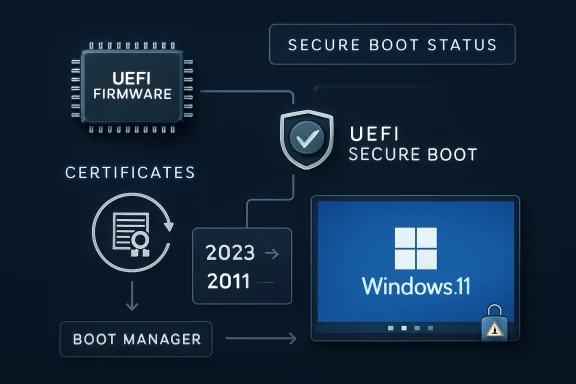
The dry wording hides a meaningful transition. Secure Boot is the chain of trust that begins before Windows itself loads, using certificates stored in UEFI firmware to decide whether early boot components should be trusted. Updating those certificates is not like updating Notepad or a printer driver. It touches the security machinery that decides whether the machine should trust the code that starts the operating system.
That is why a second reboot is unsurprising. Windows is not merely swapping files inside the OS; it is coordinating state between Windows servicing, boot manager components, firmware databases, and BitLocker expectations. The reboot is the point where that coordination becomes real.
This is not a panic patch. Microsoft began publishing guidance in early 2024 and has since expanded it into a full campaign involving Windows Update, OEM firmware vendors, server guidance, Windows Security visibility, and IT administrator playbooks. The goal is to move the installed base gradually rather than discover, in June, that millions of PCs cannot accept future boot-level security fixes.
The crucial nuance is that expiration does not mean a PC suddenly refuses to boot the morning after the certificate date passes. Microsoft has said systems without the newer certificates should continue to start and receive ordinary Windows updates. The problem is narrower and more dangerous: they may no longer be able to receive new protections for the early boot process, including boot manager updates, Secure Boot database changes, and revocation-list updates.
That makes this a slow-burn security issue rather than a Y2K-style cliff. A device left on the old trust base does not instantly die; it becomes progressively harder to protect against future boot-level attacks. That is exactly the kind of risk enterprises hate, because it looks harmless until a later vulnerability turns yesterday’s deferred maintenance into tomorrow’s incident report.
That is why Secure Boot certificate rotation is so awkward. Microsoft can deliver new certificates through Windows Update for many systems, but the certificates live in firmware databases that are not wholly controlled by Windows. Some devices need firmware updates from their manufacturers before they can accept or correctly retain the new trust material.
This is also why the reboot count matters. A double restart is the friendly version of a boot-chain transition: the system installs, reboots, applies or validates the Secure Boot state, and then reboots again. The unfriendly version is a BitLocker recovery screen, a system that cannot apply the update, or a fleet that reports mixed Secure Boot status because some firmware versions are ready and others are not.
For home users, that may look like another Windows annoyance. For admins, it is a dependency graph with a deadline. The Windows update is only one part of the chain; the firmware, device model, management policy, and recovery-key readiness matter just as much.
BitLocker is sensitive to changes in the boot environment because it is designed to detect tampering before releasing encryption keys. If the boot chain changes in a way that alters measured boot values or Secure Boot state, BitLocker may decide the safest response is to ask for the recovery key. From a security model perspective, that is defensible. From a Monday-morning helpdesk perspective, it is a ticket storm.
This is where Microsoft’s framing will frustrate some administrators. The company can accurately say that a one-time extra restart is expected, while customers accurately experience the broader update as risky because it lives next door to BitLocker recovery behavior. Users do not distinguish between “expected restart” and “known issue” when both happen during the same patch cycle.
That is the burden of boot-level servicing. The more security features Microsoft layers into startup, the more small changes at that layer can look catastrophic to the person holding a laptop that suddenly wants a recovery key. The update may be doing the right thing, but it still lands in the most anxiety-producing part of the Windows experience: the interval before the desktop appears.
The old way of checking Secure Boot status was tolerable for specialists and miserable for everyone else. PowerShell commands, firmware database inspection, event logs, and management scripts are fine in enterprise workflows, but they do little for ordinary users and small businesses. A visible indicator in Windows Security turns an obscure firmware trust problem into something closer to a normal device-health signal.
Microsoft is also implicitly acknowledging that “Windows Update installed successfully” is no longer a complete answer. A cumulative update can install while a device still lacks the firmware readiness needed for the Secure Boot transition. In that scenario, the OS servicing layer looks healthy, but the boot security posture remains unfinished.
That is a subtle but important shift in Windows administration. Patch compliance and security compliance are no longer the same thing, if they ever were. The machine may have the latest monthly update and still require an OEM firmware update before it can complete the Secure Boot certificate handoff cleanly.
Newer systems are in better shape. Microsoft and OEM partners have said many PCs built since 2024, and almost all devices shipped in 2025, already include the 2023 Secure Boot certificates. Those machines should largely avoid the messier parts of the transition.
Older supported devices are the real proving ground. They may be perfectly capable Windows 11 machines, but their firmware may need an update before the certificate change can be applied safely. Unsupported systems are worse off: if they are no longer receiving Windows updates, they will not get the new certificates through Microsoft’s normal servicing path.
That creates an uncomfortable divide. A PC may be fast enough, useful enough, and physically reliable enough to keep running, but its security trust chain may age out of the modern servicing model. Windows 11’s hardware requirements already made that argument in blunt form; the Secure Boot certificate transition makes it again from the firmware side.
That should get attention in data centers and managed environments. Secure Boot is not limited to laptops on kitchen tables; it exists across physical servers, virtual machines, and specialized deployments. Those environments are more likely to have change-control windows, recovery procedures, custom boot media, and dependencies that make a surprise boot-chain change unacceptable.
Virtualization adds its own wrinkles. A VM’s Secure Boot configuration may depend on hypervisor generation, template age, virtual firmware settings, and whether the guest has been maintained with the same assumptions as physical hardware. Admins who treat Secure Boot certificate rotation as “just another cumulative update” risk missing those layers.
The irony is that the most disciplined environments may move more slowly because they test more carefully. That is prudent, but the June 2026 certificate-expiration timeline means slow cannot become indefinite. The safe path is validation, not avoidance.
The real question is whether Microsoft can rotate a foundational PC trust mechanism across a wildly diverse hardware base without causing widespread user pain. So far, the answer appears to be “mostly, with caveats.” The extra restart is one caveat. BitLocker recovery prompts are another. Firmware readiness is the one that will linger longest.
The stakes are higher than convenience. Bootkits and early-boot attacks are dangerous precisely because they operate before ordinary security tools can fully assert control. Secure Boot is one of the mechanisms meant to shrink that attack surface. If Windows devices cannot accept future boot manager protections or revocations because they remain tied to expiring certificates, the ecosystem inherits a preventable security debt.
That is why Microsoft is right to push the transition now, even if it creates some update weirdness. Security maintenance at this layer is like bridge repair: nobody enjoys the lane closures, but postponing the work only makes the eventual failure more expensive.
Windows Update has never been especially good at explaining why it is doing something in the moment. It tells users that updates are underway, percentages are advancing, and reboots are required. It rarely says, in plain English, that the machine is updating firmware-trusted Secure Boot certificates so it can keep receiving boot-level security protections after June 2026.
That missing explanation matters because trust is reciprocal. Microsoft is asking users to trust a deeper, more complex servicing process, but the interface often communicates with the emotional range of a parking meter. The new Windows Security indicators help, but they are mostly a status check after the fact.
For enterprise IT, the communication burden shifts to administrators. They need to tell users why some machines may restart more than once, why BitLocker recovery keys must be escrowed and accessible, and why firmware updates are not optional housekeeping. The more Microsoft can standardize that message, the fewer avoidable panic moments will follow.
That is why OEM firmware support is central. If a device manufacturer has shipped the necessary firmware updates, the transition can be routine. If not, Windows Update may only be able to do part of the job. The user sees one PC; the servicing stack sees a layered system with boundaries.
This also exposes the long tail of PC support. The Windows ecosystem contains machines from countless vendors, across years of firmware revisions, with wildly different update habits. Some are business-class systems with managed BIOS updates. Others are consumer laptops whose owners have never opened the OEM support app since the day they bought the device.
Microsoft’s phased rollout is designed to manage that diversity with telemetry and targeting. But a phased rollout is not magic. It reduces blast radius; it does not eliminate incompatible firmware, missing recovery keys, neglected devices, or organizations that discover too late that their boot media and deployment images need attention.
For years, admins could think of firmware updates and Windows updates as adjacent but separate streams. Firmware was hardware maintenance; Windows Update was OS maintenance. Secure Boot certificate rotation collapses that distinction because the OS update path is now delivering trust material that only matters if firmware participates correctly.
This is not inherently bad. Centralizing as much of the transition as possible through Windows Update is probably the only realistic way to reach hundreds of millions of devices. Expecting ordinary users to manually update Secure Boot certificates would be absurd.
But it means Windows Update will increasingly be judged on ecosystem outcomes it does not fully control. If a firmware bug causes certificate application to fail, users will still blame the Windows update that exposed it. That may be unfair, but it is also inevitable.
For businesses, the bar is higher. Administrators should confirm BitLocker recovery-key escrow before broad deployment, validate Secure Boot certificate state across representative hardware models, and test update behavior on systems with Modern Standby, older firmware, and custom deployment histories. They should also include servers and virtual machines in the planning conversation rather than assuming the client rollout tells the whole story.
The worst response is to disable Secure Boot as a workaround. That may make a symptom disappear, but it removes one of the protections the entire transition is designed to preserve. It is the security equivalent of taking the batteries out of a smoke alarm because it chirped.
The better response is to treat the extra reboot as a signal. The boot chain is being modernized. If that modernization is smooth, the user sees one additional restart and moves on. If it is not smooth, the time to find out is during a controlled maintenance window, not after the old certificates have expired and a new boot-level threat forces urgency.
Source: Neowin Microsoft explains why Windows 11 KB5083631, KB5083769 are making systems restart more times
 Microsoft’s Extra Reboot Is a Security Migration Wearing an Update Costume
The ordinary Windows update restart has become background noise: save your work, reboot, wait through the spinning percentage, get back to business. KB5083631 and April’s KB5083769 disrupt that rhythm because some machines need an additional reboot after the Secure Boot certificate update is applied. Microsoft is not treating that as a known issue because, on the affected systems, the behavior is expected.That distinction matters. A bug is something Microsoft promises to fix; an expected extra reboot is something administrators must plan around. The company’s note says a limited number of consumer and business devices may experience one additional restart during installation over recent and upcoming updates, and that the restart occurs after a Secure Boot certificate update is applied.
The dry wording hides a meaningful transition. Secure Boot is the chain of trust that begins before Windows itself loads, using certificates stored in UEFI firmware to decide whether early boot components should be trusted. Updating those certificates is not like updating Notepad or a printer driver. It touches the security machinery that decides whether the machine should trust the code that starts the operating system.
That is why a second reboot is unsurprising. Windows is not merely swapping files inside the OS; it is coordinating state between Windows servicing, boot manager components, firmware databases, and BitLocker expectations. The reboot is the point where that coordination becomes real.
The 2011 Trust Anchor Has Reached Its Retirement Party
Secure Boot arrived in the Windows 8 era, and much of its current trust foundation dates back to certificates issued in 2011. Those certificates begin expiring in June 2026, after roughly 15 years of service. Microsoft has spent the past two years preparing to move devices to newer 2023 certificates before that deadline becomes an operational problem.This is not a panic patch. Microsoft began publishing guidance in early 2024 and has since expanded it into a full campaign involving Windows Update, OEM firmware vendors, server guidance, Windows Security visibility, and IT administrator playbooks. The goal is to move the installed base gradually rather than discover, in June, that millions of PCs cannot accept future boot-level security fixes.
The crucial nuance is that expiration does not mean a PC suddenly refuses to boot the morning after the certificate date passes. Microsoft has said systems without the newer certificates should continue to start and receive ordinary Windows updates. The problem is narrower and more dangerous: they may no longer be able to receive new protections for the early boot process, including boot manager updates, Secure Boot database changes, and revocation-list updates.
That makes this a slow-burn security issue rather than a Y2K-style cliff. A device left on the old trust base does not instantly die; it becomes progressively harder to protect against future boot-level attacks. That is exactly the kind of risk enterprises hate, because it looks harmless until a later vulnerability turns yesterday’s deferred maintenance into tomorrow’s incident report.
Secure Boot Is Boring Until It Fails
Secure Boot’s job is conceptually simple: prevent untrusted boot code from running before the operating system has a chance to defend itself. In practice, that simplicity rests on a messy global ecosystem of firmware implementations, OEM-specific update paths, Microsoft-signed boot components, third-party UEFI drivers, virtual machines, recovery environments, and security products that all assume the boot chain will behave predictably.That is why Secure Boot certificate rotation is so awkward. Microsoft can deliver new certificates through Windows Update for many systems, but the certificates live in firmware databases that are not wholly controlled by Windows. Some devices need firmware updates from their manufacturers before they can accept or correctly retain the new trust material.
This is also why the reboot count matters. A double restart is the friendly version of a boot-chain transition: the system installs, reboots, applies or validates the Secure Boot state, and then reboots again. The unfriendly version is a BitLocker recovery screen, a system that cannot apply the update, or a fleet that reports mixed Secure Boot status because some firmware versions are ready and others are not.
For home users, that may look like another Windows annoyance. For admins, it is a dependency graph with a deadline. The Windows update is only one part of the chain; the firmware, device model, management policy, and recovery-key readiness matter just as much.
BitLocker Turns a Maintenance Reboot Into a Helpdesk Event
The known issue attached to KB5083631 is not the extra reboot; it is forced BitLocker recovery. That separation is important. Microsoft is saying the additional restart is expected on some systems, while BitLocker recovery prompts are a bug or compatibility problem requiring a workaround.BitLocker is sensitive to changes in the boot environment because it is designed to detect tampering before releasing encryption keys. If the boot chain changes in a way that alters measured boot values or Secure Boot state, BitLocker may decide the safest response is to ask for the recovery key. From a security model perspective, that is defensible. From a Monday-morning helpdesk perspective, it is a ticket storm.
This is where Microsoft’s framing will frustrate some administrators. The company can accurately say that a one-time extra restart is expected, while customers accurately experience the broader update as risky because it lives next door to BitLocker recovery behavior. Users do not distinguish between “expected restart” and “known issue” when both happen during the same patch cycle.
That is the burden of boot-level servicing. The more security features Microsoft layers into startup, the more small changes at that layer can look catastrophic to the person holding a laptop that suddenly wants a recovery key. The update may be doing the right thing, but it still lands in the most anxiety-producing part of the Windows experience: the interval before the desktop appears.
Windows Security Finally Gets a Dashboard for the Invisible
One useful change in this rollout is Microsoft’s move to surface Secure Boot certificate status in the Windows Security app. Users and administrators can now get a clearer indication of whether a device has updated Secure Boot certificates, still relies on older certificates, or needs attention. That matters because certificate state has historically been far too invisible for something so foundational.The old way of checking Secure Boot status was tolerable for specialists and miserable for everyone else. PowerShell commands, firmware database inspection, event logs, and management scripts are fine in enterprise workflows, but they do little for ordinary users and small businesses. A visible indicator in Windows Security turns an obscure firmware trust problem into something closer to a normal device-health signal.
Microsoft is also implicitly acknowledging that “Windows Update installed successfully” is no longer a complete answer. A cumulative update can install while a device still lacks the firmware readiness needed for the Secure Boot transition. In that scenario, the OS servicing layer looks healthy, but the boot security posture remains unfinished.
That is a subtle but important shift in Windows administration. Patch compliance and security compliance are no longer the same thing, if they ever were. The machine may have the latest monthly update and still require an OEM firmware update before it can complete the Secure Boot certificate handoff cleanly.
The PC Ecosystem Has Made Microsoft’s Job Harder Than It Looks
Microsoft controls Windows, but it does not control every BIOS menu, UEFI implementation, device lifecycle policy, or firmware update utility in the PC world. That fragmentation is both the strength and weakness of the Windows ecosystem. It gives buyers choice, but it turns a cryptographic trust refresh into a negotiation among Microsoft, OEMs, firmware vendors, enterprise management tools, and end users.Newer systems are in better shape. Microsoft and OEM partners have said many PCs built since 2024, and almost all devices shipped in 2025, already include the 2023 Secure Boot certificates. Those machines should largely avoid the messier parts of the transition.
Older supported devices are the real proving ground. They may be perfectly capable Windows 11 machines, but their firmware may need an update before the certificate change can be applied safely. Unsupported systems are worse off: if they are no longer receiving Windows updates, they will not get the new certificates through Microsoft’s normal servicing path.
That creates an uncomfortable divide. A PC may be fast enough, useful enough, and physically reliable enough to keep running, but its security trust chain may age out of the modern servicing model. Windows 11’s hardware requirements already made that argument in blunt form; the Secure Boot certificate transition makes it again from the firmware side.
Servers and Virtual Machines Do Not Get to Pretend This Is a Consumer Problem
The consumer story is simple enough: keep Windows updated, install firmware updates from the manufacturer, and check Windows Security if prompted. The enterprise story is more complicated. Microsoft has warned that Windows Server systems do not receive the 2023 Secure Boot certificates through the same consumer-style controlled rollout, meaning administrators must plan and initiate updates for servers in scope.That should get attention in data centers and managed environments. Secure Boot is not limited to laptops on kitchen tables; it exists across physical servers, virtual machines, and specialized deployments. Those environments are more likely to have change-control windows, recovery procedures, custom boot media, and dependencies that make a surprise boot-chain change unacceptable.
Virtualization adds its own wrinkles. A VM’s Secure Boot configuration may depend on hypervisor generation, template age, virtual firmware settings, and whether the guest has been maintained with the same assumptions as physical hardware. Admins who treat Secure Boot certificate rotation as “just another cumulative update” risk missing those layers.
The irony is that the most disciplined environments may move more slowly because they test more carefully. That is prudent, but the June 2026 certificate-expiration timeline means slow cannot become indefinite. The safe path is validation, not avoidance.
The Extra Restart Is a Small Price for Avoiding a Larger Security Debt
It is easy to mock Windows for needing yet another reboot. The joke writes itself: the operating system that turned “restart required” into a lifestyle has found a way to ask twice. But the reboot count is the least interesting part of this story.The real question is whether Microsoft can rotate a foundational PC trust mechanism across a wildly diverse hardware base without causing widespread user pain. So far, the answer appears to be “mostly, with caveats.” The extra restart is one caveat. BitLocker recovery prompts are another. Firmware readiness is the one that will linger longest.
The stakes are higher than convenience. Bootkits and early-boot attacks are dangerous precisely because they operate before ordinary security tools can fully assert control. Secure Boot is one of the mechanisms meant to shrink that attack surface. If Windows devices cannot accept future boot manager protections or revocations because they remain tied to expiring certificates, the ecosystem inherits a preventable security debt.
That is why Microsoft is right to push the transition now, even if it creates some update weirdness. Security maintenance at this layer is like bridge repair: nobody enjoys the lane closures, but postponing the work only makes the eventual failure more expensive.
The User Experience Still Needs Less Mystery
Microsoft’s biggest challenge is not merely technical; it is communicative. A system that restarts twice without a clear explanation feels broken, even when it is behaving exactly as designed. A BitLocker recovery prompt feels like a lockout, even when it is a protective response.Windows Update has never been especially good at explaining why it is doing something in the moment. It tells users that updates are underway, percentages are advancing, and reboots are required. It rarely says, in plain English, that the machine is updating firmware-trusted Secure Boot certificates so it can keep receiving boot-level security protections after June 2026.
That missing explanation matters because trust is reciprocal. Microsoft is asking users to trust a deeper, more complex servicing process, but the interface often communicates with the emotional range of a parking meter. The new Windows Security indicators help, but they are mostly a status check after the fact.
For enterprise IT, the communication burden shifts to administrators. They need to tell users why some machines may restart more than once, why BitLocker recovery keys must be escrowed and accessible, and why firmware updates are not optional housekeeping. The more Microsoft can standardize that message, the fewer avoidable panic moments will follow.
The June 2026 Deadline Is Really a Firmware Readiness Test
The certificate expiration date has a way of making this sound like a Microsoft deadline. In practice, it is a readiness test for the whole Windows hardware ecosystem. Microsoft can ship the certificates, but every device must be able to accept them, store them, and keep booting with the updated trust chain.That is why OEM firmware support is central. If a device manufacturer has shipped the necessary firmware updates, the transition can be routine. If not, Windows Update may only be able to do part of the job. The user sees one PC; the servicing stack sees a layered system with boundaries.
This also exposes the long tail of PC support. The Windows ecosystem contains machines from countless vendors, across years of firmware revisions, with wildly different update habits. Some are business-class systems with managed BIOS updates. Others are consumer laptops whose owners have never opened the OEM support app since the day they bought the device.
Microsoft’s phased rollout is designed to manage that diversity with telemetry and targeting. But a phased rollout is not magic. It reduces blast radius; it does not eliminate incompatible firmware, missing recovery keys, neglected devices, or organizations that discover too late that their boot media and deployment images need attention.
The Patch Tuesday Model Is Being Stretched Beyond the OS
KB5083631 and KB5083769 show how Patch Tuesday has evolved from operating-system maintenance into platform maintenance. Monthly cumulative updates now carry not only bug fixes and vulnerability patches, but also staged changes to the trust fabric underneath Windows. That is a different psychological contract.For years, admins could think of firmware updates and Windows updates as adjacent but separate streams. Firmware was hardware maintenance; Windows Update was OS maintenance. Secure Boot certificate rotation collapses that distinction because the OS update path is now delivering trust material that only matters if firmware participates correctly.
This is not inherently bad. Centralizing as much of the transition as possible through Windows Update is probably the only realistic way to reach hundreds of millions of devices. Expecting ordinary users to manually update Secure Boot certificates would be absurd.
But it means Windows Update will increasingly be judged on ecosystem outcomes it does not fully control. If a firmware bug causes certificate application to fail, users will still blame the Windows update that exposed it. That may be unfair, but it is also inevitable.
A One-Time Reboot Should Trigger a One-Time Inventory
The practical response is not to panic over the extra restart. It is to use this moment as a prompt to verify that devices are ready for the 2026 trust transition. For home users, that means installing Windows updates, applying OEM firmware updates, and checking Windows Security’s Secure Boot status when available.For businesses, the bar is higher. Administrators should confirm BitLocker recovery-key escrow before broad deployment, validate Secure Boot certificate state across representative hardware models, and test update behavior on systems with Modern Standby, older firmware, and custom deployment histories. They should also include servers and virtual machines in the planning conversation rather than assuming the client rollout tells the whole story.
The worst response is to disable Secure Boot as a workaround. That may make a symptom disappear, but it removes one of the protections the entire transition is designed to preserve. It is the security equivalent of taking the batteries out of a smoke alarm because it chirped.
The better response is to treat the extra reboot as a signal. The boot chain is being modernized. If that modernization is smooth, the user sees one additional restart and moves on. If it is not smooth, the time to find out is during a controlled maintenance window, not after the old certificates have expired and a new boot-level threat forces urgency.
The Reboot Message Hides the Real Action Items
The important lessons from KB5083631 and KB5083769 are concrete, even if the underlying trust-chain mechanics are not. Microsoft’s explanation gives users and administrators enough to distinguish expected behavior from a real fault, but it also points to work that should not be deferred.- Some Windows 11 systems may restart one additional time during KB5083631, KB5083769, and related upcoming updates because Secure Boot certificates are being updated.
- The extra restart is expected behavior on affected machines, not the same thing as the forced BitLocker recovery issue Microsoft has separately acknowledged.
- The Secure Boot certificate refresh is tied to the 2011 Microsoft certificates beginning to expire in late June 2026.
- Devices without the newer certificates are expected to keep booting, but they may lose access to future boot-level security protections and revocations.
- Firmware updates from the device manufacturer may be required before some systems can apply or retain the new Secure Boot certificates correctly.
- Administrators should verify BitLocker recovery-key access, firmware readiness, Secure Boot certificate status, and server or VM exposure before treating the rollout as complete.
Source: Neowin Microsoft explains why Windows 11 KB5083631, KB5083769 are making systems restart more times
