

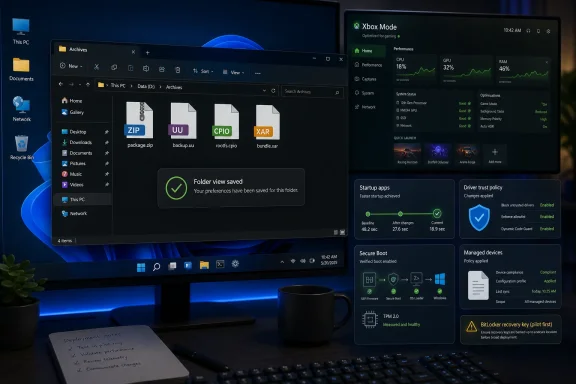
Microsoft released Windows 11 KB5083631 on April 30, 2026, as an optional non-security preview update for Windows 11 versions 24H2 and 25H2, moving systems to builds 26100.8328 and 26200.8328 respectively. The headline feature is Xbox Mode, but the more important story is quieter: Microsoft is trying to make Windows feel less like a pile of features and more like an operating system again. File Explorer, archive support, startup behavior, driver policy, and update plumbing are all being pulled into the same argument. KB5083631 is not just another preview patch; it is a small but revealing test of whether Microsoft can rebuild trust through fundamentals.
Optional Windows preview updates usually live in the dull middle ground between beta testing and Patch Tuesday bookkeeping. They are not security releases, they do not install automatically for most users, and they often serve as a staging area for fixes that will arrive more broadly in the next cumulative update. KB5083631 fits that mold formally, but not culturally.
This update arrives at a moment when Windows 11’s biggest problem is not that it lacks features. It has had plenty of features, from Copilot tie-ins to interface experiments to new security requirements. The problem is that users have been asked to tolerate rough edges in the places they touch every day: File Explorer, the taskbar, startup, context menus, settings, update reliability, and the general sense that the OS is doing too much while responding too slowly.
That is why the File Explorer work in this build matters more than the marketing-friendly Xbox Mode. A full-screen gaming shell is visible, demoable, and useful for a certain audience. But a File Explorer that preserves folder views, avoids dark-mode flashes, exits cleanly, and stops tripping over its own processes is what makes a PC feel professionally maintained.
KB5083631 is Microsoft acknowledging, in patch-note form, that polish is infrastructure. The company may not say it so bluntly, but this is what users have been telling it for years.
KB5083631 addresses several Explorer complaints that sound minor until they happen ten times a day. Folder view and sorting preferences should now persist more reliably in familiar locations such as Downloads and Documents, including when another application opens Explorer directly to those folders. That fix is aimed at a very Windows-specific irritation: the OS pretending to remember your preferences until the next workflow proves otherwise.
The update also tackles the white flash that could appear when opening “This PC” or resizing the Details pane while using dark mode. This is the kind of bug that does not corrupt data, crash a domain controller, or trigger a Sev A incident. It simply makes the interface feel unfinished every time it appears, which is almost worse for a consumer OS trying to regain confidence.
More important is the reliability work around explorer.exe itself. Microsoft says the update improves relevant Explorer processes so that they stop after File Explorer windows are closed, and adds broader reliability improvements around sign-in, taskbar menu interactions, Task View, and deselecting items from Quick Access. That cluster of fixes suggests Microsoft is not merely repainting Explorer; it is sanding down the shell’s life-cycle problems.
For IT pros, this matters because Explorer instability is often treated as user noise rather than infrastructure debt. Users say “Windows froze,” “my folders disappeared,” or “the taskbar glitched,” and help desks triage symptoms that may trace back to the shell. A more reliable explorer.exe reduces the ambient friction that never quite makes it into executive dashboards.
That trend is welcome, but it comes with tension. Native support lowers friction, reduces dependency on third-party extraction tools, and can help users avoid dubious freeware installers that bundle ads or worse. For many people, opening a package or archive should not require hunting for a utility, declining toolbar offers, or explaining to a relative why a download site has six fake buttons.
But archive support is also a security surface. Package formats are not just inert containers; they are part of developer workflows, backup systems, deployment pipelines, and supply chains. NuGet packages in particular are meaningful in .NET development environments, and the ability to inspect or extract them directly in Explorer makes Windows more convenient for developers while also making the shell responsible for parsing more formats safely.
This is the core tradeoff of modern Windows. The more the OS does natively, the less users need to bolt on. The more it does natively, the more Microsoft must get right inside the default attack surface. KB5083631 is a reminder that convenience and trust now travel together.
This is a strategic move as much as a UX feature. Microsoft knows the handheld and living-room PC markets are no longer theoretical. SteamOS has made the argument that a gaming device does not need the full Windows desktop in the foreground to feel like a PC gaming machine. If Microsoft wants Windows to remain the default substrate for PC gaming hardware, it has to make Windows disappear when the user wants a console-like session.
Still, Xbox Mode will not carry the platform by itself. A full-screen shell can hide desktop complexity, but it cannot erase scheduler overhead, background services, driver problems, update interruptions, power behavior, or the feeling that Windows is running a meeting in the next room while you are trying to play. That is why the broader performance and reliability fixes matter.
The reported connection to Microsoft’s internal Windows K2 effort is important here, even if users should be cautious about treating codenames as products. K2 has been described as a back-to-fundamentals initiative focused on performance, craft, and reliability. KB5083631 looks like exactly the kind of patch that would emerge from such a mandate: less sizzle than a keynote, more attention to the stuff users complain about after six months of daily use.
The update also introduces a taskbar experience for monitoring agents, beginning with Researcher in Microsoft 365 Copilot. When an agent is working on a report, Windows can show progress from the taskbar and notify the user when the result is ready. That sounds small, but it hints at a larger change in how Microsoft expects applications to behave.
For decades, the taskbar has represented apps, windows, progress, and notifications. Microsoft now wants it to represent delegated work. The app is no longer just something you open; it is something that may continue acting on your behalf while you move elsewhere.
That model could be genuinely useful. It could also become another layer of status badges, cloud prompts, and ambient distraction if Microsoft and third-party developers abuse it. The taskbar is prime real estate, and Windows users have long memories about features that began as helpful surfaces and became promotional territory.
That app-removal change is especially telling. One of the longest-running complaints about Windows 11 in business environments is not merely that Microsoft includes too much; it is that removing or controlling that excess can feel like a moving target. A dynamic policy mechanism gives administrators a cleaner way to keep images aligned with organizational standards, assuming Microsoft continues to document and support it properly.
The update also adds a new icon showing where a printer supports Windows Protected Print Mode, and it simplifies kiosk configuration when Microsoft Edge is one of the allowed packaged apps. These are not glamorous improvements, but they are the work of making Windows 11 easier to operate at scale.
There is a subtle shift here from Microsoft saying “Windows is modern” to Microsoft showing “Windows is governable.” For enterprises, the latter matters more. A modern OS that cannot be predictably configured is not modern in any operationally useful sense.
This is a classic Windows security move: necessary, late, and potentially messy. Drivers sit close to the kernel, and weak driver trust has long been a route for attackers, cheats, rootkits, and questionable utilities. Tightening that model is the right direction.
But driver ecosystems are where old hardware, niche business devices, industrial software, anticheat systems, VPNs, management agents, and vendor neglect all collide. A policy that is correct in principle can still break things in the field. Microsoft’s phased approach suggests it knows the blast radius must be managed carefully.
For home users, the change may pass unnoticed. For sysadmins, it is another reason not to treat this optional preview as a casual Friday install across sensitive fleets. Hardware inventories, driver provenance, and pilot rings still matter.
The conditions are narrow. The affected systems need BitLocker enabled on the OS drive, a specific TPM platform validation profile policy involving PCR7, an msinfo32 PCR7 binding state that reports as not possible, the Windows UEFI CA 2023 certificate in the Secure Boot database, and a system not already using the 2023 Windows Boot Manager. Microsoft says this is unlikely on unmanaged personal devices.
Still, “unlikely on personal devices” is not the same as irrelevant. In a managed environment, a surprise BitLocker recovery prompt is not a cosmetic problem. It can strand users, generate help-desk volume, complicate remote support, and turn a routine preview update into a recovery-key scavenger hunt.
The workaround is also not something ordinary users should improvise. It involves Group Policy changes, gpupdate, and temporarily disabling and re-enabling BitLocker protectors to update bindings. That is an IT procedure, not a consumer tip.
This is why optional preview updates should be treated as previews. KB5083631 may be a strong release, but its own documentation argues against indiscriminate deployment.
Windows 11 has often suffered from the gap between “booted” and “usable.” The desktop appears, but Teams, OneDrive, security agents, update services, widgets, launchers, cloud sync tools, and vendor utilities continue their morning commute in the background. Users click File Explorer or a browser, and the machine responds like it is still negotiating with itself.
Improving startup app performance is therefore not just a benchmark exercise. It is part of restoring the psychological contract between a user and a PC: when the desktop is visible, the computer should be ready to work.
The same applies to Delivery Optimization memory improvements and faster display of storage information for large volumes in Settings. These are not features anyone buys a PC to get. They are features people notice only when they fail.
FAT32 remains relevant because of compatibility. Cameras, embedded devices, firmware tools, game consoles, older systems, and cross-platform workflows still encounter it. Windows could read large FAT32 volumes, but its formatting tools historically imposed a much smaller ceiling in common paths.
This update does not make FAT32 modern, secure, or ideal. It simply removes a needless obstacle that pushed users toward third-party tools for a task Windows should have handled. That is the theme of KB5083631 in miniature: fewer reasons to leave the OS for basic jobs.
This is not the kind of item that excites end users, but it is enormously important. Secure Boot is part of the trust chain that helps ensure a device starts with authorized boot components. Certificate transitions are delicate because mistakes can create boot failures, recovery loops, or fleet-wide panic.
Microsoft’s cautious language reflects the stakes. Devices receive new certificates only after they show enough successful signals, which is the operating-system equivalent of checking the bridge before sending the convoy across it. That is sensible, but it also means administrators should be tracking this work now rather than treating June 2026 as a distant date.
The BitLocker known issue makes this even more relevant. Boot trust, recovery keys, Secure Boot databases, and TPM validation profiles are not separate topics in the real world. They are the same machine seen from different management consoles.
That makes the deployment decision straightforward for most people. Enthusiasts who want the Explorer fixes, Xbox Mode, expanded archive support, and performance improvements can install it now after checking recovery readiness. Everyone else can wait for the Patch Tuesday bundle, when the update will have had more real-world exposure.
For managed environments, the calculus is even clearer. Pilot it on representative hardware, especially systems with BitLocker, custom drivers, kiosks, specialty peripherals, gaming or graphics workloads, and heavy shell-extension use. Watch Explorer behavior, taskbar reliability, driver enforcement signals, and recovery prompts.
The worst way to deploy a preview update is to treat Microsoft’s “quality improvements” phrase as a warranty. The best way is to treat the release as a preview of next month’s operational reality.
Microsoft’s challenge is that Windows 11 skepticism has compounded over time. Every ad placement, forced account flow, AI prompt, broken update, sluggish menu, or unexplained UI regression has trained users to assume that Microsoft’s priorities are elsewhere. A single good cumulative update cannot reverse that.
But a run of such updates might. Windows does not need one grand apology feature. It needs dozens of visible repairs to the daily experience, delivered consistently enough that users stop bracing for annoyance.
That is a harder product discipline than shipping a new panel or assistant. It requires saying no to clutter, measuring annoyance, cutting latency, respecting admin control, and treating old paper cuts as first-class bugs. KB5083631 suggests Microsoft may understand that. The next question is whether it can keep doing it after the news cycle moves on.
Source: Ubergizmo Windows 11 KB5083631: Faster File Explorer And New Format Support
 Microsoft Ships a Preview Update That Behaves Like a Statement of Intent
Optional Windows preview updates usually live in the dull middle ground between beta testing and Patch Tuesday bookkeeping. They are not security releases, they do not install automatically for most users, and they often serve as a staging area for fixes that will arrive more broadly in the next cumulative update. KB5083631 fits that mold formally, but not culturally.This update arrives at a moment when Windows 11’s biggest problem is not that it lacks features. It has had plenty of features, from Copilot tie-ins to interface experiments to new security requirements. The problem is that users have been asked to tolerate rough edges in the places they touch every day: File Explorer, the taskbar, startup, context menus, settings, update reliability, and the general sense that the OS is doing too much while responding too slowly.
That is why the File Explorer work in this build matters more than the marketing-friendly Xbox Mode. A full-screen gaming shell is visible, demoable, and useful for a certain audience. But a File Explorer that preserves folder views, avoids dark-mode flashes, exits cleanly, and stops tripping over its own processes is what makes a PC feel professionally maintained.
KB5083631 is Microsoft acknowledging, in patch-note form, that polish is infrastructure. The company may not say it so bluntly, but this is what users have been telling it for years.
File Explorer Is Once Again the Barometer for Windows Health
There is no Windows component more symbolic than File Explorer. It is not just an app; it is the front door to the file system, the desktop, removable drives, network shares, Downloads, Documents, OneDrive integration, ZIP files, properties dialogs, shell extensions, and decades of accumulated user muscle memory. When Explorer is slow or erratic, Windows feels slow and erratic.KB5083631 addresses several Explorer complaints that sound minor until they happen ten times a day. Folder view and sorting preferences should now persist more reliably in familiar locations such as Downloads and Documents, including when another application opens Explorer directly to those folders. That fix is aimed at a very Windows-specific irritation: the OS pretending to remember your preferences until the next workflow proves otherwise.
The update also tackles the white flash that could appear when opening “This PC” or resizing the Details pane while using dark mode. This is the kind of bug that does not corrupt data, crash a domain controller, or trigger a Sev A incident. It simply makes the interface feel unfinished every time it appears, which is almost worse for a consumer OS trying to regain confidence.
More important is the reliability work around explorer.exe itself. Microsoft says the update improves relevant Explorer processes so that they stop after File Explorer windows are closed, and adds broader reliability improvements around sign-in, taskbar menu interactions, Task View, and deselecting items from Quick Access. That cluster of fixes suggests Microsoft is not merely repainting Explorer; it is sanding down the shell’s life-cycle problems.
For IT pros, this matters because Explorer instability is often treated as user noise rather than infrastructure debt. Users say “Windows froze,” “my folders disappeared,” or “the taskbar glitched,” and help desks triage symptoms that may trace back to the shell. A more reliable explorer.exe reduces the ambient friction that never quite makes it into executive dashboards.
Native Archive Support Moves from Convenience to Platform Policy
The update expands File Explorer’s archive handling to include uu, cpio, xar, and NuGet package files with the .nupkg extension. On paper, this is a convenience improvement. In practice, it continues a broader Microsoft trend: Windows is absorbing file-handling tasks that users once outsourced to utilities by default.That trend is welcome, but it comes with tension. Native support lowers friction, reduces dependency on third-party extraction tools, and can help users avoid dubious freeware installers that bundle ads or worse. For many people, opening a package or archive should not require hunting for a utility, declining toolbar offers, or explaining to a relative why a download site has six fake buttons.
But archive support is also a security surface. Package formats are not just inert containers; they are part of developer workflows, backup systems, deployment pipelines, and supply chains. NuGet packages in particular are meaningful in .NET development environments, and the ability to inspect or extract them directly in Explorer makes Windows more convenient for developers while also making the shell responsible for parsing more formats safely.
This is the core tradeoff of modern Windows. The more the OS does natively, the less users need to bolt on. The more it does natively, the more Microsoft must get right inside the default attack surface. KB5083631 is a reminder that convenience and trust now travel together.
Xbox Mode Is the Shiny Part, but Not the Only Gaming Story
Xbox Mode is the obvious headline because it changes the posture of a Windows PC. It gives Windows 11 a full-screen, console-inspired interface designed to put games first and background distractions second. Users can enter it from the Xbox app, Game Bar settings, or with Windows + F11.This is a strategic move as much as a UX feature. Microsoft knows the handheld and living-room PC markets are no longer theoretical. SteamOS has made the argument that a gaming device does not need the full Windows desktop in the foreground to feel like a PC gaming machine. If Microsoft wants Windows to remain the default substrate for PC gaming hardware, it has to make Windows disappear when the user wants a console-like session.
Still, Xbox Mode will not carry the platform by itself. A full-screen shell can hide desktop complexity, but it cannot erase scheduler overhead, background services, driver problems, update interruptions, power behavior, or the feeling that Windows is running a meeting in the next room while you are trying to play. That is why the broader performance and reliability fixes matter.
The reported connection to Microsoft’s internal Windows K2 effort is important here, even if users should be cautious about treating codenames as products. K2 has been described as a back-to-fundamentals initiative focused on performance, craft, and reliability. KB5083631 looks like exactly the kind of patch that would emerge from such a mandate: less sizzle than a keynote, more attention to the stuff users complain about after six months of daily use.
The AI Hooks Are Becoming Infrastructure, Not Decoration
KB5083631 also updates several AI components, including image search, content extraction, semantic analysis, and the settings model. Microsoft notes that these AI component updates apply to Copilot+ PCs rather than every Windows PC or Windows Server installation. That distinction matters, because “AI in Windows” is not a single feature anymore; it is becoming a hardware-dependent substrate.The update also introduces a taskbar experience for monitoring agents, beginning with Researcher in Microsoft 365 Copilot. When an agent is working on a report, Windows can show progress from the taskbar and notify the user when the result is ready. That sounds small, but it hints at a larger change in how Microsoft expects applications to behave.
For decades, the taskbar has represented apps, windows, progress, and notifications. Microsoft now wants it to represent delegated work. The app is no longer just something you open; it is something that may continue acting on your behalf while you move elsewhere.
That model could be genuinely useful. It could also become another layer of status badges, cloud prompts, and ambient distraction if Microsoft and third-party developers abuse it. The taskbar is prime real estate, and Windows users have long memories about features that began as helpful surfaces and became promotional territory.
Enterprise IT Gets More Than Consumer Polish
The consumer-facing improvements are easy to explain, but KB5083631 also contains changes that matter in managed environments. Enterprise State Roaming can now be managed through Windows Backup for Organizations policy. Windows Enterprise and Education gain support for a dynamic app removal list in the policy for removing default Microsoft Store packages, allowing administrators to specify additional MSIX and APPX package family names.That app-removal change is especially telling. One of the longest-running complaints about Windows 11 in business environments is not merely that Microsoft includes too much; it is that removing or controlling that excess can feel like a moving target. A dynamic policy mechanism gives administrators a cleaner way to keep images aligned with organizational standards, assuming Microsoft continues to document and support it properly.
The update also adds a new icon showing where a printer supports Windows Protected Print Mode, and it simplifies kiosk configuration when Microsoft Edge is one of the allowed packaged apps. These are not glamorous improvements, but they are the work of making Windows 11 easier to operate at scale.
There is a subtle shift here from Microsoft saying “Windows is modern” to Microsoft showing “Windows is governable.” For enterprises, the latter matters more. A modern OS that cannot be predictably configured is not modern in any operationally useful sense.
The Driver Policy Change Is the Quiet Security Earthquake
One of the most consequential changes in KB5083631 concerns how the Windows kernel treats third-party drivers. Microsoft is changing default trust for cross-signed drivers, while keeping drivers from the Windows Hardware Compatibility Program and trusted allow-list paths permitted. Enforcement is phased, with Windows monitoring driver compatibility for at least 100 hours and three restarts before enabling enforcement.This is a classic Windows security move: necessary, late, and potentially messy. Drivers sit close to the kernel, and weak driver trust has long been a route for attackers, cheats, rootkits, and questionable utilities. Tightening that model is the right direction.
But driver ecosystems are where old hardware, niche business devices, industrial software, anticheat systems, VPNs, management agents, and vendor neglect all collide. A policy that is correct in principle can still break things in the field. Microsoft’s phased approach suggests it knows the blast radius must be managed carefully.
For home users, the change may pass unnoticed. For sysadmins, it is another reason not to treat this optional preview as a casual Friday install across sensitive fleets. Hardware inventories, driver provenance, and pilot rings still matter.
The BitLocker Known Issue Undercuts the “Safe to Install” Narrative
Some reports around KB5083631 have framed the update as having no major known issues. That is too neat. Microsoft documents a known issue in which some devices with incomplete BitLocker Group Policy configuration may require the BitLocker recovery key at the first reboot after installing the update.The conditions are narrow. The affected systems need BitLocker enabled on the OS drive, a specific TPM platform validation profile policy involving PCR7, an msinfo32 PCR7 binding state that reports as not possible, the Windows UEFI CA 2023 certificate in the Secure Boot database, and a system not already using the 2023 Windows Boot Manager. Microsoft says this is unlikely on unmanaged personal devices.
Still, “unlikely on personal devices” is not the same as irrelevant. In a managed environment, a surprise BitLocker recovery prompt is not a cosmetic problem. It can strand users, generate help-desk volume, complicate remote support, and turn a routine preview update into a recovery-key scavenger hunt.
The workaround is also not something ordinary users should improvise. It involves Group Policy changes, gpupdate, and temporarily disabling and re-enabling BitLocker protectors to update bindings. That is an IT procedure, not a consumer tip.
This is why optional preview updates should be treated as previews. KB5083631 may be a strong release, but its own documentation argues against indiscriminate deployment.
Faster Startup Apps Are a Small Fix for a Big Perception Problem
Microsoft says KB5083631 improves the performance of startup apps after a device boots. That line deserves more attention than it will get. Boot perception is not just about how quickly the lock screen appears; it is about how soon the machine feels ready.Windows 11 has often suffered from the gap between “booted” and “usable.” The desktop appears, but Teams, OneDrive, security agents, update services, widgets, launchers, cloud sync tools, and vendor utilities continue their morning commute in the background. Users click File Explorer or a browser, and the machine responds like it is still negotiating with itself.
Improving startup app performance is therefore not just a benchmark exercise. It is part of restoring the psychological contract between a user and a PC: when the desktop is visible, the computer should be ready to work.
The same applies to Delivery Optimization memory improvements and faster display of storage information for large volumes in Settings. These are not features anyone buys a PC to get. They are features people notice only when they fail.
FAT32’s Command-Line Limit Finally Catches Up with Reality
KB5083631 raises the FAT32 formatting limit from the command line from 32 GB to 2 TB. That is a strangely satisfying change because it addresses a Windows limitation that survived long after it stopped making practical sense.FAT32 remains relevant because of compatibility. Cameras, embedded devices, firmware tools, game consoles, older systems, and cross-platform workflows still encounter it. Windows could read large FAT32 volumes, but its formatting tools historically imposed a much smaller ceiling in common paths.
This update does not make FAT32 modern, secure, or ideal. It simply removes a needless obstacle that pushed users toward third-party tools for a task Windows should have handled. That is the theme of KB5083631 in miniature: fewer reasons to leave the OS for basic jobs.
The Secure Boot Clock Is Ticking Behind the Patch Notes
KB5083631 also participates in Microsoft’s broader Secure Boot certificate transition ahead of certificate expirations beginning in June 2026. The update expands the set of highly trusted devices targeted to receive new Secure Boot certificates automatically, using a phased rollout based on successful update signals.This is not the kind of item that excites end users, but it is enormously important. Secure Boot is part of the trust chain that helps ensure a device starts with authorized boot components. Certificate transitions are delicate because mistakes can create boot failures, recovery loops, or fleet-wide panic.
Microsoft’s cautious language reflects the stakes. Devices receive new certificates only after they show enough successful signals, which is the operating-system equivalent of checking the bridge before sending the convoy across it. That is sensible, but it also means administrators should be tracking this work now rather than treating June 2026 as a distant date.
The BitLocker known issue makes this even more relevant. Boot trust, recovery keys, Secure Boot databases, and TPM validation profiles are not separate topics in the real world. They are the same machine seen from different management consoles.
Optional Does Not Mean Experimental, but It Does Mean “Pilot First”
KB5083631 is available through Windows Update as an optional update, through the Microsoft Update Catalog as offline MSU packages, and can be imported manually into WSUS. Microsoft says the changes will appear in the next Windows security update for Windows Update for Business. In ordinary terms, users who skip it now should see the content arrive later through the standard cumulative path.That makes the deployment decision straightforward for most people. Enthusiasts who want the Explorer fixes, Xbox Mode, expanded archive support, and performance improvements can install it now after checking recovery readiness. Everyone else can wait for the Patch Tuesday bundle, when the update will have had more real-world exposure.
For managed environments, the calculus is even clearer. Pilot it on representative hardware, especially systems with BitLocker, custom drivers, kiosks, specialty peripherals, gaming or graphics workloads, and heavy shell-extension use. Watch Explorer behavior, taskbar reliability, driver enforcement signals, and recovery prompts.
The worst way to deploy a preview update is to treat Microsoft’s “quality improvements” phrase as a warranty. The best way is to treat the release as a preview of next month’s operational reality.
Windows K2 Will Be Judged by Boring Wins
If KB5083631 is an early glimpse of the Windows K2 mindset, it is encouraging precisely because it is boring in the right places. File Explorer reliability, startup app performance, archive support, Delivery Optimization memory use, Store install errors, taskbar tray loading, Windows Hello reliability, and storage Settings performance are not the stuff of launch videos. They are the stuff of trust.Microsoft’s challenge is that Windows 11 skepticism has compounded over time. Every ad placement, forced account flow, AI prompt, broken update, sluggish menu, or unexplained UI regression has trained users to assume that Microsoft’s priorities are elsewhere. A single good cumulative update cannot reverse that.
But a run of such updates might. Windows does not need one grand apology feature. It needs dozens of visible repairs to the daily experience, delivered consistently enough that users stop bracing for annoyance.
That is a harder product discipline than shipping a new panel or assistant. It requires saying no to clutter, measuring annoyance, cutting latency, respecting admin control, and treating old paper cuts as first-class bugs. KB5083631 suggests Microsoft may understand that. The next question is whether it can keep doing it after the news cycle moves on.
The KB5083631 Verdict Belongs to File Explorer, Not Xbox Mode
The practical reading of this update is simple: KB5083631 is worth attention, but not blind deployment. It is a meaningful preview release because it improves the parts of Windows people actually touch, while also carrying platform changes that administrators should test deliberately.- KB5083631 was released on April 30, 2026, for Windows 11 versions 24H2 and 25H2, bringing systems to builds 26100.8328 and 26200.8328.
- File Explorer gains broader archive support for uu, cpio, xar, and nupkg files, along with fixes for folder view persistence, dark-mode flashing, and explorer.exe reliability.
- Xbox Mode extends a console-style full-screen gaming experience to more Windows 11 PCs, but the broader performance work matters more for Windows’ credibility.
- Enterprise admins get policy improvements for app removal, Enterprise State Roaming, kiosk configuration, driver trust, batch-file handling, and related manageability areas.
- The update has a documented BitLocker recovery-key known issue for a narrow set of managed configurations, so organizations should pilot before broad rollout.
- Users who skip the optional preview should receive these changes later through the normal cumulative update path.
Source: Ubergizmo Windows 11 KB5083631: Faster File Explorer And New Format Support
