

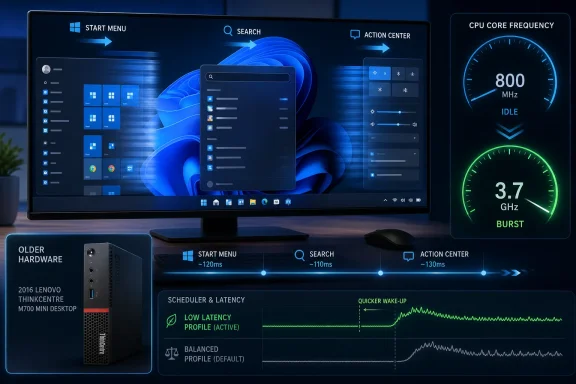
Microsoft’s June 2026 Windows 11 update, KB5094126, is rolling out a Low Latency Profile that briefly raises CPU frequency during shell interactions, and Windows Latest reports that forcing it on a 2016 Lenovo ThinkCentre M700 made Start, Search, and Action Center feel noticeably quicker. The result is not a miracle upgrade, and it does not turn a Skylake dual-core into a modern workstation. But it does expose something Microsoft has been slow to admit in public: a large part of Windows 11’s perceived sluggishness is not raw compute failure, but latency at the exact moments users notice most. That makes this small scheduler-side change more interesting than its modest name suggests.
For years, Windows performance complaints have been trapped between two unsatisfying explanations. Microsoft has tended to point at hardware age, driver quality, background load, and app complexity. Users, meanwhile, have pointed at the obvious: the Start menu sometimes hesitates, Search sometimes feels gummy, and modern flyouts can feel heavier than their Windows 7-era equivalents even on hardware that should be more than adequate.
Low Latency Profile sits squarely in that gap. It is not a benchmark feature, not a gaming mode, and not a magic switch for sustained workloads. Its purpose is narrower and more revealing: when the user interacts with core Windows shell surfaces, the system should stop behaving like it has all afternoon to wake up.
That matters because desktop responsiveness is often judged in bursts. Opening Start, typing a search query, clicking Quick Settings, launching an app, or invoking a flyout all create tiny moments where the operating system either feels immediate or feels like it is negotiating with itself. A 200-millisecond delay may not show up as a dramatic number in a review chart, but it can make a machine feel old.
The ThinkCentre M700 test is useful precisely because it is not glamorous. A 6th Gen Core i3-6100 with 8GB of RAM is the kind of machine that still lives under desks, behind monitors, in family rooms, and in small offices. It is not officially the future of Windows computing, but it is absolutely part of the real Windows installed base.
A 2016 ThinkCentre M700 Mini Desktop removes that cushion. The Core i3-6100 is a two-core, four-thread Skylake desktop chip with a fixed 3.7GHz ceiling and no Turbo Boost. It can downclock at idle, but it cannot surge above its rated top speed when Windows asks for more.
That makes the test more honest. Low Latency Profile cannot rely on a modern turbo algorithm to produce a headline-grabbing frequency spike beyond the base clock. It can only reduce the time it takes the CPU to move from a low-power idle state to the maximum speed it already has.
The surprise is that this still matters. According to Windows Latest’s testing, the machine moved from a slower ramp during shell interactions to a sharp jump from roughly 800MHz toward 3.0GHz and 3.7GHz almost immediately. In everyday terms, the Start menu appeared faster, Search felt more responsive, and Action Center looked smoother.
That is the important distinction: the feature is not adding horsepower. It is changing when Windows asks for the horsepower it already has.
The better way to understand it is race to sleep. A system that wakes quickly, finishes a tiny foreground task, and returns to idle can feel faster without necessarily using more energy over time. Modern processors and operating systems have spent years refining that tradeoff, especially on laptops, where power efficiency and instantaneous responsiveness constantly compete.
Windows has long tried to balance background efficiency against foreground responsiveness. The problem is that modern Windows 11 shell components are not featherweight. Start, Search, Widgets, Quick Settings, notification surfaces, indexing, cloud hooks, and WinUI layers all sit atop a platform that can feel expensive during small interactions.
Low Latency Profile appears to acknowledge that the first few milliseconds of a user action deserve special treatment. If the user clicks Start, Windows should not wait to see whether the workload becomes serious. It should assume the interaction matters now, lift the CPU frequency promptly, complete the work, and then back off.
That does not make the shell lean. It makes the shell less likely to trip over power-management inertia.
Yet the report says the improvement was more noticeable on the old ThinkCentre than on a modern PC. That sounds counterintuitive until you think about where the bottleneck lives. A modern system may already ramp quickly enough that the remaining delay is in the app framework, storage, graphics stack, or shell code. An older system idling at 800MHz has a bigger gap between its quiet state and its useful state.
Closing that gap quickly can make the machine feel transformed even when the actual maximum performance is unchanged. The CPU still cannot exceed 3.7GHz. It still has only two physical cores. Single-channel memory and an old platform still impose limits. But the user does not experience those limits evenly; the user experiences them most sharply at the start of an interaction.
That is why the Start menu test matters. If the pre-change system gradually climbed to 2GHz or 2.8GHz while the interface was already trying to appear, the user saw hesitation. If the post-change system hit its ceiling almost immediately, the same hardware felt more awake.
For old desktops, that is the best kind of performance improvement: not a synthetic win, but a reduction in annoyance.
Controlled rollouts make sense from Microsoft’s side. Windows runs on a chaotic universe of chipsets, firmware, drivers, OEM images, security products, and corporate policies. A staged release gives the company a way to halt or slow a feature if telemetry shows trouble.
But the experience for enthusiasts and administrators is messy. Two PCs can have the same cumulative update and different behavior. One user sees the new feature; another sees no change. A third reads about a feature, runs a command-line tool, and flips an internal feature ID that was never meant to be a normal consumer interface.
That tension is not going away. ViVeTool has become the unofficial bridge between Windows as Microsoft ships it and Windows as Microsoft is testing it. For hobbyists, that is part of the fun. For production machines, it is a warning label.
The Windows Latest report rightly advises regular users to wait if the PC is used daily. That is not cowardice; it is operational sanity. Forcing hidden feature flags can be useful for testing, but it also means stepping outside the normal support path.
Still, “safe” should not be read as “irrelevant to every environment.” On laptops, firmware, cooling design, battery age, and OEM power profiles can all influence how a system behaves under frequent bursts. A feature that is harmless on a mini desktop may be barely noticeable on a gaming laptop, useful on an ultrabook, or constrained by vendor firmware on a corporate fleet.
The more interesting point is that Low Latency Profile appears to be targeted enough to avoid the usual performance-mode tradeoff. It is not asking the CPU to run hot all day. It is not disabling power saving globally. It is not turning every background process into a priority workload.
That targeted design is why the feature deserves attention from IT pros. A broad “high performance” plan is crude. A brief latency profile tied to foreground shell interaction is much closer to how users actually judge a PC.
But administrators should still test before celebrating. If a fleet includes older hardware, unusual BIOS settings, third-party endpoint agents, or aggressive power policies, the subjective improvement may vary. And if Microsoft is still gating the feature through rollout controls, that alone says the company is not treating it as a simple universal switch.
That does not invalidate Microsoft’s hardware policy. Skylake-era machines lack some of the platform guarantees Microsoft wanted for Windows 11’s security baseline. TPM requirements, virtualization-based security, driver models, and firmware assumptions all matter in enterprise deployments.
But it does complicate the story. Users have long suspected that Windows 11’s rough edges were not always about inadequate hardware. Low Latency Profile gives that suspicion some technical shape. If a decade-old dual-core can feel meaningfully better because Windows ramps frequency sooner during shell actions, then part of the perceived performance problem was in Windows’ behavior, not just the user’s processor.
This distinction matters because Microsoft is simultaneously trying to sell a future of AI PCs, NPUs, Copilot integrations, and richer shell experiences. Those efforts may be strategically important, but they do not excuse friction in the basics. The Start menu must feel immediate before the operating system earns the right to become more ambitious.
Low Latency Profile is a small concession to that reality.
Users do not care whether a delay comes from XAML, WinUI, indexing, process startup, GPU composition, cloud integration, or CPU idle states. They care that pressing the Windows key should produce the Start menu without drama. If Low Latency Profile papers over framework overhead, it is useful; if it becomes an excuse not to reduce that overhead, it is a problem.
The Windows Latest piece mentions Microsoft’s ongoing WinUI 3 shell rewrite work alongside scheduler improvements. That pairing is important. The best version of Windows 11 performance reform is not one magic feature. It is a stack of improvements: leaner shell code, smarter scheduling, better animation discipline, faster app launch paths, and fewer background surprises.
Old hardware exposes inefficiency because it has less room to hide it. If Microsoft can make a 2016 mini PC feel cleaner in daily use, that work will also benefit modern machines. The reverse is not always true; optimizations that only shine on new silicon can leave much of the Windows base behind.
The lesson from the ThinkCentre is that latency work scales downward beautifully.
Low Latency Profile targets exactly that kind of complaint. It will not help with a spreadsheet recalculation, a browser drowning under tabs, an under-provisioned VDI session, or an antivirus scan colliding with a Teams call. But it may reduce the ambient irritation that makes users distrust a machine.
For organizations sweating Windows 10 end-of-support timelines, Windows 11 hardware eligibility, and refresh budgets, that distinction matters. Not every old PC should be kept alive. Some machines are security liabilities, power hogs, or support traps. But many business desktops are used for light office work, browser sessions, line-of-business apps, remote desktops, and email.
If those systems can feel less stale through a software update, the refresh conversation changes. Not dramatically, but enough to matter at the margins. A machine that feels tolerable for another year is a budget event.
The catch is that unsupported hardware remains unsupported. Enthusiasts may happily run Windows 11 on older CPUs, but enterprises usually cannot build policy around unofficial configurations. For them, the value of Low Latency Profile may be greatest on supported-but-aging systems that are still inside the corporate standard.
That is also where caution belongs. ViVeTool is powerful because Windows 11 contains many feature gates that can be enabled before Microsoft exposes them broadly. But a feature ID is not a product guarantee. It can change, interact badly with other staged components, or behave differently across builds.
On a spare PC, that risk is manageable. On a parent’s daily machine, a work laptop, or a small-business desktop with no backup plan, it is less charming. The article’s own note that users should wait for Microsoft to remotely enable the feature is the responsible advice.
There is also a subtle support problem. If a forced feature later misbehaves, the user may blame the update, the tool, the hardware, or Microsoft without knowing which layer caused the issue. Controlled rollout may be frustrating, but it is at least a mechanism for narrowing blast radius.
The enthusiast path is still valuable. Reports like this show Microsoft what real users notice and which old assumptions deserve revisiting. But the difference between experimentation and recommendation should remain bright.
Benchmarks are good at measuring throughput, latency under controlled conditions, and repeatable task completion. They are less good at capturing the accumulated feel of a user interface that responds a fraction sooner. A PC can benchmark the same before and after a tweak while feeling different in the hand.
This is why old hardware remains an important test bed for operating-system design. Fast machines can brute-force bad decisions. Slow machines reveal them. The ThinkCentre M700 did not become new; it became less obviously old during the interactions that frame the Windows experience.
That difference is worth taking seriously. A decade of PC performance improvements has trained software makers to assume the hardware will absorb complexity. But the Windows ecosystem is too broad for that assumption to hold everywhere.
A scheduler feature that improves perceived responsiveness on constrained hardware is not just a quality-of-life tweak. It is evidence that Microsoft still has meaningful low-level levers to pull.
 Microsoft Finally Targets the Half-Second That Users Actually Feel
For years, Windows performance complaints have been trapped between two unsatisfying explanations. Microsoft has tended to point at hardware age, driver quality, background load, and app complexity. Users, meanwhile, have pointed at the obvious: the Start menu sometimes hesitates, Search sometimes feels gummy, and modern flyouts can feel heavier than their Windows 7-era equivalents even on hardware that should be more than adequate.Low Latency Profile sits squarely in that gap. It is not a benchmark feature, not a gaming mode, and not a magic switch for sustained workloads. Its purpose is narrower and more revealing: when the user interacts with core Windows shell surfaces, the system should stop behaving like it has all afternoon to wake up.
That matters because desktop responsiveness is often judged in bursts. Opening Start, typing a search query, clicking Quick Settings, launching an app, or invoking a flyout all create tiny moments where the operating system either feels immediate or feels like it is negotiating with itself. A 200-millisecond delay may not show up as a dramatic number in a review chart, but it can make a machine feel old.
The ThinkCentre M700 test is useful precisely because it is not glamorous. A 6th Gen Core i3-6100 with 8GB of RAM is the kind of machine that still lives under desks, behind monitors, in family rooms, and in small offices. It is not officially the future of Windows computing, but it is absolutely part of the real Windows installed base.
The Old ThinkCentre Is a Better Test Than a New Flagship
Modern PCs are almost too forgiving for this kind of feature. A recent Ryzen 7, Core Ultra, or Snapdragon X-class system has enough cores, cache, burst frequency, and memory bandwidth to conceal a lot of operating-system hesitation. If a flyout opens faster on a high-end laptop, the improvement may be real, but the user’s subjective reaction is likely to be mild.A 2016 ThinkCentre M700 Mini Desktop removes that cushion. The Core i3-6100 is a two-core, four-thread Skylake desktop chip with a fixed 3.7GHz ceiling and no Turbo Boost. It can downclock at idle, but it cannot surge above its rated top speed when Windows asks for more.
That makes the test more honest. Low Latency Profile cannot rely on a modern turbo algorithm to produce a headline-grabbing frequency spike beyond the base clock. It can only reduce the time it takes the CPU to move from a low-power idle state to the maximum speed it already has.
The surprise is that this still matters. According to Windows Latest’s testing, the machine moved from a slower ramp during shell interactions to a sharp jump from roughly 800MHz toward 3.0GHz and 3.7GHz almost immediately. In everyday terms, the Start menu appeared faster, Search felt more responsive, and Action Center looked smoother.
That is the important distinction: the feature is not adding horsepower. It is changing when Windows asks for the horsepower it already has.
The Scheduler Story Is Really a User-Perception Story
Low Latency Profile is being described as a CPU boost, but that phrase can be misleading. To many users, “boost” sounds like overclocking, higher thermals, or a vendor trying to squeeze more performance out of silicon at the cost of longevity. This is not that.The better way to understand it is race to sleep. A system that wakes quickly, finishes a tiny foreground task, and returns to idle can feel faster without necessarily using more energy over time. Modern processors and operating systems have spent years refining that tradeoff, especially on laptops, where power efficiency and instantaneous responsiveness constantly compete.
Windows has long tried to balance background efficiency against foreground responsiveness. The problem is that modern Windows 11 shell components are not featherweight. Start, Search, Widgets, Quick Settings, notification surfaces, indexing, cloud hooks, and WinUI layers all sit atop a platform that can feel expensive during small interactions.
Low Latency Profile appears to acknowledge that the first few milliseconds of a user action deserve special treatment. If the user clicks Start, Windows should not wait to see whether the workload becomes serious. It should assume the interaction matters now, lift the CPU frequency promptly, complete the work, and then back off.
That does not make the shell lean. It makes the shell less likely to trip over power-management inertia.
No Turbo, No Problem — Up to a Point
The i3-6100 is an especially revealing chip because it lacks Turbo Boost. On newer CPUs, Low Latency Profile can push the processor toward a turbo ceiling that may be substantially above base frequency. On this old Skylake part, there is no such ceiling to exploit.Yet the report says the improvement was more noticeable on the old ThinkCentre than on a modern PC. That sounds counterintuitive until you think about where the bottleneck lives. A modern system may already ramp quickly enough that the remaining delay is in the app framework, storage, graphics stack, or shell code. An older system idling at 800MHz has a bigger gap between its quiet state and its useful state.
Closing that gap quickly can make the machine feel transformed even when the actual maximum performance is unchanged. The CPU still cannot exceed 3.7GHz. It still has only two physical cores. Single-channel memory and an old platform still impose limits. But the user does not experience those limits evenly; the user experiences them most sharply at the start of an interaction.
That is why the Start menu test matters. If the pre-change system gradually climbed to 2GHz or 2.8GHz while the interface was already trying to appear, the user saw hesitation. If the post-change system hit its ceiling almost immediately, the same hardware felt more awake.
For old desktops, that is the best kind of performance improvement: not a synthetic win, but a reduction in annoyance.
Controlled Rollouts Keep Turning Power Users Into Test Pilots
There is a second story here, and it is less flattering to Microsoft. Windows Latest had to force-enable the feature with ViVeTool because Microsoft’s Controlled Feature Rollout had not activated it on the older machine after KB5094126 was installed. That is now a familiar Windows 11 pattern: the bits arrive, the feature exists, but the user may or may not be allowed to use it yet.Controlled rollouts make sense from Microsoft’s side. Windows runs on a chaotic universe of chipsets, firmware, drivers, OEM images, security products, and corporate policies. A staged release gives the company a way to halt or slow a feature if telemetry shows trouble.
But the experience for enthusiasts and administrators is messy. Two PCs can have the same cumulative update and different behavior. One user sees the new feature; another sees no change. A third reads about a feature, runs a command-line tool, and flips an internal feature ID that was never meant to be a normal consumer interface.
That tension is not going away. ViVeTool has become the unofficial bridge between Windows as Microsoft ships it and Windows as Microsoft is testing it. For hobbyists, that is part of the fun. For production machines, it is a warning label.
The Windows Latest report rightly advises regular users to wait if the PC is used daily. That is not cowardice; it is operational sanity. Forcing hidden feature flags can be useful for testing, but it also means stepping outside the normal support path.
The Safety Argument Is Plausible, but It Still Needs Boundaries
The report’s conclusion that Low Latency Profile is safe for CPU, battery, and thermals is plausible, especially on a desktop like the ThinkCentre M700. A momentary frequency ramp to the processor’s rated speed is not the same thing as sustained high-load operation. If utilization remains low and the frequency drops back afterward, thermal impact should be minimal.Still, “safe” should not be read as “irrelevant to every environment.” On laptops, firmware, cooling design, battery age, and OEM power profiles can all influence how a system behaves under frequent bursts. A feature that is harmless on a mini desktop may be barely noticeable on a gaming laptop, useful on an ultrabook, or constrained by vendor firmware on a corporate fleet.
The more interesting point is that Low Latency Profile appears to be targeted enough to avoid the usual performance-mode tradeoff. It is not asking the CPU to run hot all day. It is not disabling power saving globally. It is not turning every background process into a priority workload.
That targeted design is why the feature deserves attention from IT pros. A broad “high performance” plan is crude. A brief latency profile tied to foreground shell interaction is much closer to how users actually judge a PC.
But administrators should still test before celebrating. If a fleet includes older hardware, unusual BIOS settings, third-party endpoint agents, or aggressive power policies, the subjective improvement may vary. And if Microsoft is still gating the feature through rollout controls, that alone says the company is not treating it as a simple universal switch.
Windows 11’s Real Problem Was Never Just Minimum Requirements
The irony is hard to miss. Windows 11 launched with strict CPU requirements that excluded many older systems, including large numbers of otherwise capable PCs. The official argument emphasized security, reliability, and modern platform features. Yet here we are in 2026, watching a 6th Gen Intel desktop run Windows 11 well enough that a scheduler tweak can make it feel fresher.That does not invalidate Microsoft’s hardware policy. Skylake-era machines lack some of the platform guarantees Microsoft wanted for Windows 11’s security baseline. TPM requirements, virtualization-based security, driver models, and firmware assumptions all matter in enterprise deployments.
But it does complicate the story. Users have long suspected that Windows 11’s rough edges were not always about inadequate hardware. Low Latency Profile gives that suspicion some technical shape. If a decade-old dual-core can feel meaningfully better because Windows ramps frequency sooner during shell actions, then part of the perceived performance problem was in Windows’ behavior, not just the user’s processor.
This distinction matters because Microsoft is simultaneously trying to sell a future of AI PCs, NPUs, Copilot integrations, and richer shell experiences. Those efforts may be strategically important, but they do not excuse friction in the basics. The Start menu must feel immediate before the operating system earns the right to become more ambitious.
Low Latency Profile is a small concession to that reality.
The WinUI Burden Still Has to Be Paid Down
A faster frequency ramp can make Windows 11 feel better, but it should not become a substitute for making the shell lighter. Microsoft has spent years moving Windows interface components through newer frameworks, updated design systems, web-adjacent surfaces, and modern app models. The result has often been visually coherent but mechanically heavier.Users do not care whether a delay comes from XAML, WinUI, indexing, process startup, GPU composition, cloud integration, or CPU idle states. They care that pressing the Windows key should produce the Start menu without drama. If Low Latency Profile papers over framework overhead, it is useful; if it becomes an excuse not to reduce that overhead, it is a problem.
The Windows Latest piece mentions Microsoft’s ongoing WinUI 3 shell rewrite work alongside scheduler improvements. That pairing is important. The best version of Windows 11 performance reform is not one magic feature. It is a stack of improvements: leaner shell code, smarter scheduling, better animation discipline, faster app launch paths, and fewer background surprises.
Old hardware exposes inefficiency because it has less room to hide it. If Microsoft can make a 2016 mini PC feel cleaner in daily use, that work will also benefit modern machines. The reverse is not always true; optimizations that only shine on new silicon can leave much of the Windows base behind.
The lesson from the ThinkCentre is that latency work scales downward beautifully.
IT Departments Should Care Because Perception Drives Replacement Cycles
In business environments, perceived slowness has real costs. A PC that takes an extra beat to respond dozens or hundreds of times a day becomes a morale problem, a help desk ticket, and eventually a replacement candidate. The machine may still be functionally adequate, but the user has already decided it is “slow.”Low Latency Profile targets exactly that kind of complaint. It will not help with a spreadsheet recalculation, a browser drowning under tabs, an under-provisioned VDI session, or an antivirus scan colliding with a Teams call. But it may reduce the ambient irritation that makes users distrust a machine.
For organizations sweating Windows 10 end-of-support timelines, Windows 11 hardware eligibility, and refresh budgets, that distinction matters. Not every old PC should be kept alive. Some machines are security liabilities, power hogs, or support traps. But many business desktops are used for light office work, browser sessions, line-of-business apps, remote desktops, and email.
If those systems can feel less stale through a software update, the refresh conversation changes. Not dramatically, but enough to matter at the margins. A machine that feels tolerable for another year is a budget event.
The catch is that unsupported hardware remains unsupported. Enthusiasts may happily run Windows 11 on older CPUs, but enterprises usually cannot build policy around unofficial configurations. For them, the value of Low Latency Profile may be greatest on supported-but-aging systems that are still inside the corporate standard.
Enthusiasts Get a Win, but the ViVeTool Temptation Has Limits
For Windows enthusiasts, this story has an obvious appeal. There is something satisfying about taking an old corporate mini PC, flipping a hidden feature flag, rebooting, and watching the shell snap into place. It feels like reclaiming performance Microsoft left on the table.That is also where caution belongs. ViVeTool is powerful because Windows 11 contains many feature gates that can be enabled before Microsoft exposes them broadly. But a feature ID is not a product guarantee. It can change, interact badly with other staged components, or behave differently across builds.
On a spare PC, that risk is manageable. On a parent’s daily machine, a work laptop, or a small-business desktop with no backup plan, it is less charming. The article’s own note that users should wait for Microsoft to remotely enable the feature is the responsible advice.
There is also a subtle support problem. If a forced feature later misbehaves, the user may blame the update, the tool, the hardware, or Microsoft without knowing which layer caused the issue. Controlled rollout may be frustrating, but it is at least a mechanism for narrowing blast radius.
The enthusiast path is still valuable. Reports like this show Microsoft what real users notice and which old assumptions deserve revisiting. But the difference between experimentation and recommendation should remain bright.
The ThinkCentre Test Says More Than the Benchmark Would
The most persuasive detail in the Windows Latest report is not a chart. It is the author’s insistence that screen recordings do not fully capture what the eyes perceive. That sounds subjective, because it is. It is also how desktop performance actually works.Benchmarks are good at measuring throughput, latency under controlled conditions, and repeatable task completion. They are less good at capturing the accumulated feel of a user interface that responds a fraction sooner. A PC can benchmark the same before and after a tweak while feeling different in the hand.
This is why old hardware remains an important test bed for operating-system design. Fast machines can brute-force bad decisions. Slow machines reveal them. The ThinkCentre M700 did not become new; it became less obviously old during the interactions that frame the Windows experience.
That difference is worth taking seriously. A decade of PC performance improvements has trained software makers to assume the hardware will absorb complexity. But the Windows ecosystem is too broad for that assumption to hold everywhere.
A scheduler feature that improves perceived responsiveness on constrained hardware is not just a quality-of-life tweak. It is evidence that Microsoft still has meaningful low-level levers to pull.
The Small Switch That Reveals the Bigger Windows 11 Bargain
The concrete lesson from this test is not that everyone should force-enable hidden Windows features tonight. It is that Microsoft’s performance work is most valuable when it meets users at the point of irritation rather than at the point of measurement. Low Latency Profile is modest, but it is aimed at the right target.- Low Latency Profile is designed to make Windows 11 shell interactions feel faster by raising CPU frequency quickly during short foreground actions.
- The feature appears especially noticeable on older hardware because the gap between idle frequency and usable frequency can be large.
- The ThinkCentre M700 test is significant because the Core i3-6100 has no Turbo Boost, so the improvement comes from faster ramp behavior rather than extra peak performance.
- Users should treat ViVeTool enablement as an enthusiast workaround, not a default recommendation for production PCs.
- IT administrators should test the feature on aging but supported hardware, where improved perceived responsiveness could reduce user complaints without changing hardware.
- Microsoft still needs to make the Windows 11 shell lighter, because smarter boosting improves the symptom but does not erase the cost of heavy interface code.
References
- Primary source: Windows Latest
Published: Mon, 22 Jun 2026 02:00:54 GMT
Yes, Windows 11's CPU boost revives 8GB RAM PCs, here's how to enable it right now
I tested Windows 11's Low Latency Profile on a ThinkCentre M700 with an Intel i3-6100 and 8GB RAM. Here's what it does on old hardware. www.windowslatest.com
- Related coverage: allthings.how
KB5094126 for Windows 11 (June 2026): Builds 26200.8655 and 26100.8655
The June Patch Tuesday update brings the Low Latency Profile, Shared Audio, multi-app camera streaming, and the Secure Boot certificate push.allthings.how - Related coverage: pcworld.com
Windows 11’s June update makes PCs feel faster. Here's what's new | PCWorld
Windows 11 received a host of new features and improvements in June. Here are the five most exciting ones. Be sure to give them a go!www.pcworld.com - Related coverage: windowsforum.com
Windows 11 KB5094126 (June 2026) Guide: Low Latency, Shared Audio, Secure Boot | Windows Forum
Microsoft released Windows 11 KB5094126 on June 9, 2026, as the June Patch Tuesday security update for Windows 11 versions 25H2 and 24H2, raising systems to...windowsforum.com - Related coverage: technobaboy.com
Windows drops Windows 11 KB5094126 update: Brings CPU boost, Shared Audio - Technobaboy
Windows 11 KB5094126 rolling out. adds CPU boost, shared audio, and camera support with stability fixes. Details here.www.technobaboy.com - Related coverage: windowscentral.com
Here are the 6 biggest features and improvements coming to Windows 11 in the June 2026 update on Tuesday | Windows Central
Microsoft's June 2026 Windows 11 update boosts responsiveness, adds Shared Audio, expands NPU metrics, and improves OOBE.www.windowscentral.com
- Related coverage: pcgamer.com
Microsoft rolls out Windows Low Latency Profile, giving older PCs a bit more snap when opening the Start Menu and apps | PC Gamer
Every little helps, even if it really is very little.www.pcgamer.com - Related coverage: techradar.com
Windows 11's June update is here — these are the 3 most important features, including a huge move to make apps and menus load much faster | TechRadar
Low Latency Profile, shared audio, and a boost for searchwww.techradar.com
