

Windows 11 kiosk administrators should keep their existing
Microsoft says the underlying issue is fixed in Windows 11 build 26100.7705 for version 24H2, build 26200.7705 for version 25H2, and later builds. Its documentation also makes an operationally important point: installing a fixed build is not sufficient by itself because the kiosk configuration must be redeployed before the correction takes effect.
The troublesome behavior affects kiosks where Microsoft Edge is included as an allowed application alongside one or more apps installed from MSIX or APPX packages. In that configuration, a packaged application may fail to start even though it is represented in the Assigned Access allowed-apps list.
Microsoft’s published workaround is to find the executable launched by the packaged application and add it separately to the allowed list using
That workaround is practical, but it muddies the intended configuration model. Instead of expressing access through the packaged app’s identity, administrators must also know and permit an implementation detail inside the package.
The resulting XML can become difficult to interpret during an audit. An administrator looking at the file may not immediately know whether a
Microsoft subsequently gave the change a more explicit description in the Windows Insider blog. Release Preview builds 26100.8313 and 26200.8313, distributed through KB5083631 on April 17, 2026, were described as simplifying the configuration of allowed packaged apps when Microsoft Edge is also allowed.
The same improvement appeared in the May 26, 2026 preview update for Windows 11 version 26H1. KB5089570 brought OS build 28000.2179, indicating that Microsoft is carrying the revised behavior into its newer servicing branches rather than treating it as a one-off repair for 24H2 and 25H2.
Administrators should therefore treat workaround removal as a controlled policy migration rather than routine XML cleanup.
Where the same image supports multiple kiosk profiles, each profile needs its own result. A passing test for one assigned account does not automatically validate another profile with a different package set or allowed-app list.
Testing should also include the operational launch path. If users start an app from the configured Start layout, test that route rather than relying solely on an administrator opening the executable during troubleshooting.
For every allowed packaged application, build a mapping between the package, its configured AUMID, the executable declared in
Package boundaries also matter. Microsoft explains that Assigned Access creates packaged-app restrictions dynamically when the assigned user signs in. If several applications share the same package, excluding or allowing that package affects all applications contained within it.
That means the unit of enforcement may be broader than the tile or app name visible to the kiosk user. Administrators should identify shared packages before simplifying the policy, especially when a vendor bundles several launchable applications into one MSIX or APPX package.
This is also relevant to application servicing. If a package update changes the executable declared in its manifest, an executable-based workaround may become stale even though the package identity and AUMID remain consistent. Moving back toward package-based configuration should reduce that fragility, but only after testing confirms the new behavior on the serviced image.
That does not mean every executable allowance is inherently unsafe. It means each one should have a current purpose, an owner, and evidence that it remains necessary.
The security value of retiring the workaround is therefore mostly about reducing ambiguity and policy drift. A smaller, accurately documented allowlist is easier to review than one containing entries accumulated across several Windows builds and package revisions.
There is also a risk in removing entries too aggressively. A kiosk that cannot launch its line-of-business app is not meaningfully secure or manageable; it is simply unavailable. In retail, reception, manufacturing, education, or shared-device deployments, that availability failure can immediately become an operational incident.
The retirement criterion should be concrete: the patched device has received the corrected behavior, the configuration has been redeployed, the packaged app launches without
The most useful operational signals are failed or delayed kiosk sign-ins, unexpected restriction dialogs, Start entries that no longer open, and differences between the first session after deployment and later sessions. Those symptoms should be correlated with the deployed XML revision, Windows build, installed package version, and whether the test began with a full sign-out or reboot.
Change records should identify exactly which
Organizations already reviewing Windows 11’s newer controls for removing default MSIX and APPX applications should coordinate that work with kiosk validation. Removing or reprovisioning packages while changing Assigned Access rules creates too many variables for one pilot and can obscure whether a failure came from package availability or allowlist enforcement.
Microsoft’s direction is clear: Edge should no longer force administrators to represent an allowed packaged app through its underlying executable. The practical milestone, however, is not the arrival of a particular cumulative update; it is the moment each kiosk image can pass a redeploy, cold-sign-in, and launch test with the workaround removed—and can roll back quickly if it cannot.
DesktopAppPath workarounds for now, even after moving to a build that contains Microsoft’s revised Edge allowlist behavior. The safer deployment decision is to redeploy the Assigned Access configuration, test each Edge-plus-MSIX/APPX combination from a cold sign-in, and remove redundant executable entries only after the exact production image passes.Microsoft says the underlying issue is fixed in Windows 11 build 26100.7705 for version 24H2, build 26200.7705 for version 25H2, and later builds. Its documentation also makes an operationally important point: installing a fixed build is not sufficient by itself because the kiosk configuration must be redeployed before the correction takes effect.
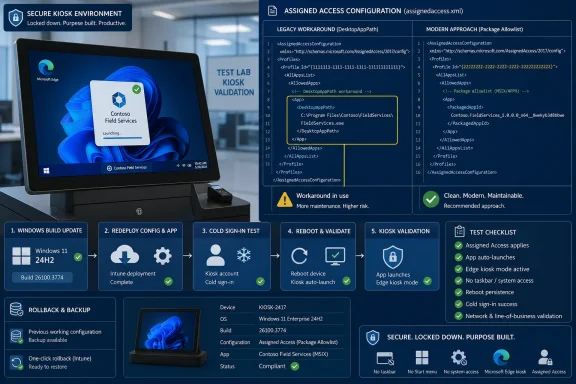 Edge Turned a Package Rule Into an Executable Rule
The troublesome behavior affects kiosks where Microsoft Edge is included as an allowed application alongside one or more apps installed from MSIX or APPX packages. In that configuration, a packaged application may fail to start even though it is represented in the Assigned Access allowed-apps list.Microsoft’s published workaround is to find the executable launched by the packaged application and add it separately to the allowed list using
DesktopAppPath. The executable can be identified by opening the package’s AppxManifest.xml file and examining the Executable attribute of its Application element.That workaround is practical, but it muddies the intended configuration model. Instead of expressing access through the packaged app’s identity, administrators must also know and permit an implementation detail inside the package.
The resulting XML can become difficult to interpret during an audit. An administrator looking at the file may not immediately know whether a
DesktopAppPath entry represents a conventional desktop program, a required packaged-app workaround, or an obsolete exception left behind by an earlier image.Microsoft subsequently gave the change a more explicit description in the Windows Insider blog. Release Preview builds 26100.8313 and 26200.8313, distributed through KB5083631 on April 17, 2026, were described as simplifying the configuration of allowed packaged apps when Microsoft Edge is also allowed.
The same improvement appeared in the May 26, 2026 preview update for Windows 11 version 26H1. KB5089570 brought OS build 28000.2179, indicating that Microsoft is carrying the revised behavior into its newer servicing branches rather than treating it as a one-off repair for 24H2 and 25H2.
Test the Simpler Policy Before Adopting It
The build numbers establish when Microsoft considers the issue fixed, but they do not prove that every organization’s existing kiosk image can immediately discard its workaround. Assigned Access combines the operating system build, installed package versions, per-user app registration, generated restrictions, XML policy, and sign-in timing.Administrators should therefore treat workaround removal as a controlled policy migration rather than routine XML cleanup.
- Record the Windows 11 version and build on the candidate kiosk device. Confirm that 24H2 is running build 26100.7705 or later, or that 25H2 is running build 26200.7705 or later.
- Export or preserve the Assigned Access XML currently used in production. This is the rollback configuration and should include every existing
DesktopAppPathentry. - Inventory every MSIX or APPX application allowed for the kiosk account. Record its package identity, the Application User Model ID used by the policy, the executable named in
AppxManifest.xml, and any correspondingDesktopAppPathworkaround. - Redeploy the existing kiosk configuration on the updated test device. Microsoft specifically says redeployment is required for the fixes to take effect, so a device that was merely patched and rebooted is not an adequate validation target.
- Sign out completely and perform a fresh kiosk-user sign-in. Assigned Access generates its packaged-app restrictions dynamically during sign-in, making a cold sign-in more meaningful than relaunching an application inside an already established session.
- Launch Microsoft Edge and every allowed packaged application. Test the applications individually and then in the sequence used by the real kiosk workflow.
- Create a second XML revision that removes only the packaged app’s workaround
DesktopAppPathentry. Do not simultaneously alter the Start layout, Edge settings, package inventory, account assignment, or unrelated allowlist entries. - Redeploy the simplified configuration and repeat the full sign-out, sign-in, and launch cycle. A successful launch from an existing session does not replace this test.
- Reboot the device and repeat the test once more. The acceptance criterion should be successful kiosk sign-in and reliable launch of Edge and every allowed packaged app without the executable exception.
- Retain the previous XML and a documented restoration path until the revised configuration has passed the organization’s normal pilot period.
A Small Matrix Exposes Image-Specific Failures
A useful pre-rollout test matrix should cover more than a single successful app launch. The point is not to produce an exhaustive application certification program, but to expose dependencies on package registration, session state, and the presence of Edge.| Test state | Edge allowed | Executable workaround | Required result |
|---|---|---|---|
| Existing production baseline | Yes | Yes | Edge and the packaged app launch successfully. |
| Updated build with redeployed baseline XML | Yes | Yes | Existing behavior remains stable after servicing. |
| Updated build with simplified XML | Yes | No | The packaged app launches through its package-based rule. |
| Updated build after reboot and cold sign-in | Yes | No | Edge and all allowed packaged apps remain available. |
| Restored production XML | Yes | Yes | The kiosk returns to its previously validated state. |
Testing should also include the operational launch path. If users start an app from the configured Start layout, test that route rather than relying solely on an administrator opening the executable during troubleshooting.
Inventory the Exception Before Deleting It
The first cleanup challenge is determining which executable entries are genuine workarounds. ADesktopAppPath may be necessary for an ordinary Win32 application and therefore must not be removed simply because its path resembles an executable found inside a package.For every allowed packaged application, build a mapping between the package, its configured AUMID, the executable declared in
AppxManifest.xml, and the relevant XML entry. Entries that cannot be mapped should be investigated rather than deleted.Package boundaries also matter. Microsoft explains that Assigned Access creates packaged-app restrictions dynamically when the assigned user signs in. If several applications share the same package, excluding or allowing that package affects all applications contained within it.
That means the unit of enforcement may be broader than the tile or app name visible to the kiosk user. Administrators should identify shared packages before simplifying the policy, especially when a vendor bundles several launchable applications into one MSIX or APPX package.
This is also relevant to application servicing. If a package update changes the executable declared in its manifest, an executable-based workaround may become stale even though the package identity and AUMID remain consistent. Moving back toward package-based configuration should reduce that fragility, but only after testing confirms the new behavior on the serviced image.
Cleaner XML Is Also a Security Decision
Removing a redundant executable allowance can make the kiosk policy easier to reason about. A package-based rule expresses the intended application identity, while aDesktopAppPath exception permits a particular executable path because of the historical Edge interaction.That does not mean every executable allowance is inherently unsafe. It means each one should have a current purpose, an owner, and evidence that it remains necessary.
The security value of retiring the workaround is therefore mostly about reducing ambiguity and policy drift. A smaller, accurately documented allowlist is easier to review than one containing entries accumulated across several Windows builds and package revisions.
There is also a risk in removing entries too aggressively. A kiosk that cannot launch its line-of-business app is not meaningfully secure or manageable; it is simply unavailable. In retail, reception, manufacturing, education, or shared-device deployments, that availability failure can immediately become an operational incident.
The retirement criterion should be concrete: the patched device has received the corrected behavior, the configuration has been redeployed, the packaged app launches without
DesktopAppPath, and the result survives a reboot followed by a fresh kiosk sign-in. If any part of that sequence fails, restore the known-good XML and keep the workaround while investigating.Watch Sign-In, Launch Failures, and Policy Drift
Post-servicing validation should focus on observable outcomes rather than the mere presence of a successful update installation. Administrators need to know whether the assigned account entered its restricted experience, whether the expected applications were visible, and whether each allowed application actually launched.The most useful operational signals are failed or delayed kiosk sign-ins, unexpected restriction dialogs, Start entries that no longer open, and differences between the first session after deployment and later sessions. Those symptoms should be correlated with the deployed XML revision, Windows build, installed package version, and whether the test began with a full sign-out or reboot.
Change records should identify exactly which
DesktopAppPath entries were removed. If a problem appears after rollout, restoring one known configuration is faster and safer than reconstructing an undocumented workaround under pressure.Organizations already reviewing Windows 11’s newer controls for removing default MSIX and APPX applications should coordinate that work with kiosk validation. Removing or reprovisioning packages while changing Assigned Access rules creates too many variables for one pilot and can obscure whether a failure came from package availability or allowlist enforcement.
Microsoft’s direction is clear: Edge should no longer force administrators to represent an allowed packaged app through its underlying executable. The practical milestone, however, is not the arrival of a particular cumulative update; it is the moment each kiosk image can pass a redeploy, cold-sign-in, and launch test with the workaround removed—and can roll back quickly if it cannot.
References
- Primary source: learn.microsoft.com
Assigned Access Policy Settings | Microsoft Learn
Learn about the policy settings enforced on a device configured with Assigned Access.learn.microsoft.com - Independent coverage: support.microsoft.com
May 26, 2026—KB5089570 (OS Build 28000.2179) Preview | Microsoft Support
May 26, 2026—KB5089570 (OS Build 28000.2179) Previewsupport.microsoft.com - Independent coverage: techcommunity.microsoft.com
- Primary source: WindowsForum
Set Up Windows 10/11 Kiosk Mode (Assigned Access) for a Single-App PC | Windows Forum
The thread focuses on how to set up Windows 10/11 “kiosk mode” using Assigned Access to run a single app on a dedicated device, including prerequisites,...windowsforum.com