
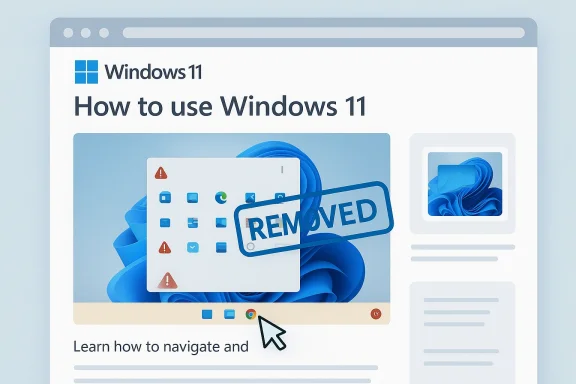
Microsoft’s latest Windows 11 learning-content misstep is a small story with a larger meaning: the company is trying to present Windows 11 as the polished, AI-forward future of the PC while still tripping over basic presentation quality in the very materials meant to teach users how the platform works. A Windows Learning Center page reportedly showed an AI-generated illustration with an obvious UI error, and the mismatch was enough to undermine the tutorial’s credibility. That matters because Microsoft has spent much of 2025 and early 2026 pushing Windows 11 as both the successor to Windows 10 and the centerpiece of its Copilot strategy, even as it tries to soften some of the rougher edges users have complained about. The result is a tension between ambition and trust: if the company wants users to believe in a smarter Windows, it has to stop illustrating the product with images that look like they were assembled by someone who has never used it. ls Windows 11 story in 2026 is defined by two competing impulses. On one hand, the company is clearly using Windows as the front door to its AI era, pushing Copilot deeper into the operating system, inbox apps, and supporting services. On the other hand, Microsoft is also facing a growing backlash from users who feel the platform has become too noisy, too opinionated, and too eager to turn basic workflows into product pitches. That clash has become visible across Windows Insider messaging, where Microsoft is now talking about being more intentional with Copilot entry points, improving reliability, and reducing the friction that has made the OS feel overstuffed.
This is why a seemingly minor content egt would in another era. A help article is supposed to establish confidence. It is the place where users go when they want the simplest possible explanation of how something works, not a reminder that the company is experimenting with generative imagery. When the tutorial itself appears to contain a mistaken interface depiction, it becomes a symbol of the broader criticism aimed at Windows 11: that Microsoft is moving too quickly to package AI into every corner of the platform, even when the output is not accurate enough for public-facing documentation. That tension is especially sharp in a desktop operating system, where users expect precision, not just polish.
The timing also matters. Windows 10 reached end of support on October 14, 2025, whn using as a hard push toward Windows 11 adoption. Microsoft’s own lifecycle messaging makes clear that Windows 10 is now out of mainstream support, while Windows 11 is the strategic focus going forward. That shift has practical implications for security, feature development, and support policy, and it effectively concentrates attention on Windows 11 whether users are enthusiastic or not. In other words, Microsoft no longer has the luxury of treating Windows 11 as merely one option among many; it is the platform users are being steered toward for the next phase of Windows computing. (support.microsoft.com)
That makes the company’s documentation quality even more important. If Windows 11 is now the default path, every support article, onboarding page, and tutorial video becomes part of the trust contract. Users who are already skeptical about Copilot, taskbar changes, and the general direction of the OS are not likely to be reassured by AI-assisted visuals that get the interface wrong. Microsoft needs its learning content to feel authoritative, not approximate. The irony is hard to miss: the company wants Windows to feel more intelligent, but the current backlash suggests it also needs Windows to feel more carefully human in the places where correct
blem is really a trust problem
Why a bad illustration lands so hard
A flawed image in a tutorial is not just a cosmetic mistake. It tells the reader that the content may have been produced without adequate review, and that is especially damaging when the topic is a user interface. In a training context, small visual inaccuracies can mislead beginners and frustrate experienced users who are checking for exact steps. A duplicated Start button, an odd taskbar arrangement, or a UI element in the wrong place is enough to make the whole page feel suspect.- Tutorial images exist to reduce uncertainty.
- Interface guides depend on visual accuracy.
- AI-generated art can look polished while still being wrong.
- Small errors become credibility failures in support content.
- The more technical the subject, the less tolerance there is for “close enough.”
Why users noticesensitive to interface mistakes because the desktop is a tool they use all day. A person who spends hours navigating Windows 11 is likely to spot an incorrectly rendered taskbar, a wrong app placement, or a duplicated control in seconds. That is especially true for power users, IT professionals, and long-time Windows veterans who know the shell well enough to identify even subtle inconsistencies.
- Daily users know the UI by muscle memory.
- Power users have a low tolerance for clutter.
- IT admins care about precision in documentation.
- Incorrect visuals create doubt about the surrounding steps.
- The audience for Windows learning content is unusually detail-oriented.
Windows 11’s AI push has become a product-story problemeo hit a ceiling
Microsoft spent a lot of time trying to make Copilot feel like a system-level companion, not just an app. That strategy made sense as branding, but it started to collide with the realities of ordinary desktop use. Users do not want an AI prompt in every context. They want the assistant to appear when it helps, not when it interrupts. Microsoft appears to be learning that lesson the hard way, and recent Insider-facing changes suggest the company is trying to reduce unnecessary Copilot entry points in apps such as Snipping Tool, Photos, Widgets, and Notepad.The correction is as important as the push
The company is not abandoning AI. It is recalibrating it.twants Windows 11 to be the home of AI on the PC, but it also seems to recognize that visible ubiquity can backfire. When Copilot appears too often, users start seeing it as branding noise instead of helpful functionality.- Copilot remains central to Microsoft’s Windows narrative.
- Selective placement is becoming the new guiding principle.
- Less clutter may improve the user experience.
- More intentional surfaces could make AI feel less forced.
- Utility over spectacle is becoming the more believable message.
The Windows 10 transition raises the stakes
Windows 10’s retirement has removed an important psychological escape hatch. For years, dissatisfienext version, or simply stay put. That option is fading fast. Microsoft’s lifecycle documentation and support policy make clear that Windows 11 is now the platform that matters most for future updates and security. As the installed base shifts, so does Microsoft’s responsibility to make the newer system feel less like a compromise and more like an upgrade. (support.microsoft.com)Market-share momentum is changing the politics of Windows
Windows 11 has crossed from contender to default
Statcounter’s recent numbers show Windows 11 climbing to roughly 72.57 percent worldwide in February 2026, with Windows 10 down to 26.45 percent. That is a major reversal from the long period when Windows 10 remained the dominant desktop OS despite Windows 11’s availability. Other coverage based on the same data has described the change as Windows 11 taking nearly three-quarters of the Windows desktop market. (pcworld.com)The United States crossed earlier
The U.S. appears to have moved ahead of the global curve, with the crossover occurring earlier in 2025 and then stabilizing before the latest rise. That pattern matters because it suggests adoption is no longer just a slow, background migration. It is becoming a normalized expectation, especially in markets where newer hardware and support deadlines have already nudged consumers and businesses into the Windows 11 camp. (pcworld.com)What market share changes in practice
Once a platform becomes dominant, its product decisions carry more weight. Microsoft can no longer treat Windows 11 as a transitional release whose rough edges users will simply tolerate until the next thing arrives. It is now the operating system most people will encounter by default, which means documentation quality, UI polish, and feature restraint all matter more than before.- Dominant platforms create stronger user expectations.
- Support pages become part of the product experience.
- Small documentation mistakes scale into brand damage.
- More users mean more visible backlash.
- The OS becomes a public-facing promise, not just software.
The support story explains the urgency
Windows 10’s end-of-support deadline reshaped the upgrade cycle
Microsoft spent months warning users that Windows 10 support would end on October 14, 2025, and it followed through. The company also offered several routes for extended security coverage, but the strategic message was unmistakable: move to Windows 11. That created pressure on users who had delayed upgrading and put extra attention on every Windows 11 change that followed. (support.microsoft.com)Extended updates do not change the strategic direction
Even with support lifelines, Windows 10 is no longer the future. Microsoft’s messaging around Microsoft 365 Apps, security updates, and transition guidance reinforces that the company intends to concentrate its engineering and support energy on Windows 11. So while Windows 10 may continue to limp along through special programs, Windows 11 is the place where Microsoft is making its bets. (support.microsoft.com)o
If the company wants users to accept Windows 11 as the new normal, it cannot afford to make the system feel pushy or sloppy. The support deadline may have driven migration, but confidence will determine satisfaction. That is why course corrections like reducing Copilot clutter, revisiting taskbar flexibility, and improving update behavior matter. They are attempts to make the upgrade feel less like compliance and more like progress.Why this small mistake fits a bigger pattern
Windows 11 has often looked cleaner than it feels
A recurring complainthn while sometimes behaving less flexibly than Windows 10. Users have objected to the locked taskbar, a more opinionated Start experience, persistent prompts, and the general feeling that Microsoft has prioritized design philosophy over workflow freedom. That does not mean the OS lacks strengths, but it does mean every extra UI flourish is judged against a backdrop of accumulated irritation.AI is making the quality bar higher, not lower
Microsoft’s AI push increases the need for precision because AI features invite skeptd accuracy. If the company wants users to rely on Copilot for summaries, search, or workflow help, then the surrounding experience has to feel carefully curated. An official tutorial with a flawed AI-generated illustration does the opposite. It suggests the company is willing to accept plausible-looking output even when it is not ideal for the task.The lesson is editorial, not just technical
This is not only a matter of machine generation. It is a matter of review standards. A support article should pass through checks that catch interface mismatches before publication. If it does not, the result is a quiet but lasting hit to credibility.- Good support content is boring in the best way.
- Accuracy is more important than flash.
- AI should not be allowed to outrun revie must reflect the product exactly.
- Trust is built in the small details, not the slogans.
The user reaction is part of the product story now
Frustration has become a feature of the conversation
Windows 11 users have not only criticized individual features; they have increasingly criticie as busier, more intrusive, and more eager to insert Microsoft services into ordinary tasks. That emotional response matters because desktop operating systems live or die on habit and comfort. A feature can be technically useful and still feel wrong if it is surfaced at the wrong moment.Microsoft seems to be listening, but selectively
Recent Insider messaging suggests the company is prepared to trim someiot entry points, improving taskbar flexibility, and making updates less disruptive. Those are not revolutionary changes, but they do signal an awareness that Windows 11 needs to feel less like a sales vehicle and more like a dependable platform.Why the learning-content blunder still matters
The problem is that trust repairs are fragile. If Microsoft says it is hearing users, but then publishes a help page that seems hastily produced or visually incorrect, the message gets undercut. Users do not need perfection, but they do need evidence that the company understands where not to improvise.- Reliability beats spectacle.
- Consistency beats novelty.
- Precision beats aesthetic flair.
- Control beats automationks relentless feature promotion.
Strengths and Opportunities
Microsoft has a real chance to reset Windows 11
The company now has an opportunity to align product reality with user expectations. With Windows 10 out of support and Windows 11 firmly in the lead, Microsoft can focus on reducing clutter and improving core usability without worrying that it is abandoning the previous generation too early. That opens the door to a more coherent Windows story centered on stability, clarity, and selective AI use. (support.microsoft.com)F
If Microsoft follows through on reducing unnecessary Copilot surfaces, it may win more goodwill than it expects. Many users do not object to AI as a tool; they object to AI as a constant reminder of the company’s strategy. A quieter Windows 11 could be a more persuasive Windows 11.Better documentation could restore confidence
There is also a straightforward opportunity here: improve the learning center, tighten editorial review, and make support content feel more authoritative. That will not solve every complaint about Windows 11, but it would help rebuild trust one page at a time.- Stronger editorial review can prevent visual errors.
- Accurate tutorials make the OS easier to learn.
- Cleaner docutter product discipline.
- Better learning content reduces support friction.
- Trust in the docs can spill over into trust in the platform.
Risks and Concerns
AI overreach remains the biggest reputational risk
If Microsoft keeps treating AI as the default answer to every product question, it risks turnino The more users feel they are being sold a strategy instead of helped with a workflow, the more resistance the company will generate. The learning-content error is dangerous precisely because it reinforces that suspicion.A single mistake can taint broader efforts
Support pages, onboarding tutorials, and help-center visuals are not isolated assets. They form part of the same trust fabric as the product itself. If those users may assume the underlying system is equally careless. That is especially risky when Microsoft is asking users to rely on new AI capabilities and accept a more cloud-connected Windows experience.Windows 11 still has to earn its mandate
Market-share dominance does not automatically equal user satisfaction. Windows 11 may now be the default for most users, but default is not the same as beloved. Microsoft has to prove that its leadership position will result in a better product, not just a more unavoidable one. (pcworld.com)What to Watch Next
Whether Microsoft revises the affected learning content
The quickest signal to watchny updates or replaces the AI-generated illustration in the Windows Learning Center. If Microsoft quietly swaps it out, that suggests the company recognizes the problem and wants to close the loop quickly. If it leaves the content untouched, the criticism is likely to linger.Whether the AI ient toward more selective Copilot placement will be closely watched. If the company keeps trimming AI from apps where it feels intrusive, that would indicate a meaningful change in product direction rather than a one-off adjustment.
Whether documentation quality improves across Windows 11
A single bad page can be dismissed as a mistake. A pattern of similar mistakes would point to a deeper editorial problem. Watch for whether Microsoft’s support and learning material becomes more standardized, more carefully reviewed, and less reliant on generated visuals.- Watch for content corrections in the Learning Center.
- Watch for broader Copilot de-emphasis in everyday apps.
- Watch for more user control in Windows shell behavior.
- Watch for stricter visual standards in how-to material.
- Watch for whether Microsoft speaks more about reliability than novelty.
Microsoft’s Windows 11 learning-content problem is not just that an image looked wrong. It is that the image appeared at exactly the moment the company needs to convince users that Windows 11 is becoming more trustworthy, not less. With Windows 10 now officially behind it, Windows 11 is no longer the ambitious successor waiting in the wings; it is the operating system people are expected to live with, learn from, and rely on. That means Microsoft cannot afford to treat documentation as an afterthought or AI as a decoration. If it wants the new era of Windows to feel credible, it has to show the same care in its tutorials that it demands users place in the platform itself.
Source: PCWorld Windows 11 has finally taken over
Last edited:
