

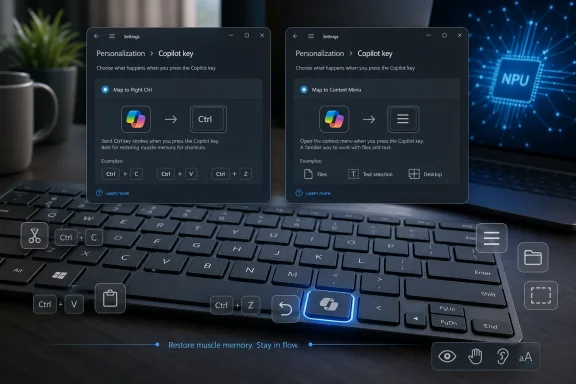
Microsoft has confirmed in May 2026 that a future Windows 11 update will let users remap the dedicated Copilot key on newer PCs so it behaves as either Right Ctrl or the Context Menu key instead. That sounds like a small concession, but it is really an admission that Microsoft overreached when it treated a physical keyboard key as a marketing surface. The company did not merely add a shortcut to Windows; it allowed OEM keyboards to delete muscle memory in service of an AI launch strategy. Now Windows is doing what Windows usually does after enough friction: turning a mandate back into a setting.
The Copilot key arrived in early 2024 with the kind of corporate flourish Microsoft reserves for platform moments. It was pitched as the first major change to the Windows PC keyboard in decades, a hardware-level sign that the “AI PC” era had begun. On paper, the symbolism was clean: one key, one assistant, one future-facing interaction model.
The problem is that keyboards are not billboards. They are tools shaped by repetition, accessibility needs, regional layouts, developer workflows, gaming habits, remote desktop sessions, terminal shortcuts, and a million unconscious taps made before coffee. A key that Microsoft viewed as underused may still have been essential to the people who used it.
That is why the new remapping promise matters. Microsoft is not removing the Copilot key branding from hardware already sold, and it is not walking away from Copilot as a central Windows idea. But by saying Windows will let the key become Right Ctrl or Context Menu, the company is tacitly acknowledging that “AI-first” hardware cannot simply bulldoze established input conventions and expect gratitude.
The distinction is important. Microsoft previously offered some Copilot key customization, but not the one many users actually wanted: the ability to get back the missing modifier or menu key that the new hardware had displaced. Opening another app is not the same as restoring a lost key.
Right Ctrl is not a glamour key. It does not get product videos. But for some users it is part of keyboard shortcuts in development tools, terminal environments, accessibility setups, keyboard-driven navigation, international input workflows, and remote systems where left and right modifiers may not be interchangeable. The Context Menu key is similarly unfashionable but useful, especially for people who navigate Windows without constantly reaching for a mouse.
Microsoft’s mistake was assuming that low mainstream visibility meant low value. That is a classic platform-owner error. The people most affected by small input changes are often the least visible in consumer marketing research: sysadmins, programmers, left-handed mouse users, accessibility users, virtualization-heavy workers, and anyone who has spent years optimizing their workflow around stable hardware behavior.
The irony is that Windows, more than macOS or ChromeOS, has historically won by accommodating messiness. It runs ancient software, supports odd peripherals, tolerates enterprise kludges, and gives users ten different ways to perform the same action. The Copilot key felt out of character because it turned that flexibility into a one-way door.
That permanence was the point. Microsoft wanted Copilot to feel native, not optional. The key gave OEMs a visible way to signal that a laptop was part of the new AI PC wave, and it gave Microsoft a daily reminder slot in the user’s peripheral vision. In branding terms, it was elegant. In usability terms, it was presumptuous.
This is where the backlash became broader than one key. Windows 11 users have spent the last few years watching Microsoft experiment with Copilot entry points across the operating system: taskbar buttons, app integrations, context menu actions, Edge tie-ins, Microsoft 365 surfaces, and keyboard hardware. Some of those integrations are useful. Some are half-baked. But the cumulative effect is that Copilot can feel less like an assistant and more like a quota.
The new remapping option does not mean Microsoft is abandoning Copilot. It means Microsoft has learned, again, that discoverability cannot be manufactured by taking away user control. If a feature is good enough, people will map a key to it themselves. If it is not, a dedicated key will not rescue it.
That is why the timing mattered. Microsoft and its partners were preparing the market for Copilot+ PCs, a category built around neural processing units, on-device AI features, and a new round of premium laptop branding. The Copilot key gave shoppers something they could see at a glance. It was the Windows equivalent of a sticker on the palm rest, except embedded into the keyboard itself.
But a keyboard key is not a sticker. It has to earn its location every day. When hardware makers used the Copilot key to replace existing keys rather than adding a harmless extra button, Microsoft’s AI branding acquired a cost. Users were not simply being offered a new shortcut; they were being asked to surrender an old one.
This is where Microsoft’s platform ambitions collided with OEM reality. Laptop keyboards are already cramped, especially on compact machines. Every added key forces a tradeoff. On some devices, the tradeoff fell on keys that power users still cared about, and Microsoft’s marketing win became a workflow regression.
Still, this is not the same as giving users full control. Microsoft is choosing a narrow set of restoration options rather than turning the key into a completely generic remappable hardware input. That tells us the company still sees the Copilot key as a special surface, not just another keycode.
There are reasonable technical explanations for caution. Keyboard firmware, scancodes, app registration, security boundaries, and enterprise management all get complicated when a special-purpose key becomes a free-for-all launcher. Microsoft also has to care about consistency across devices, especially if the key is part of a broader hardware certification story.
But from the user’s point of view, the nuance is secondary. The practical question is simple: can the key do what the missing key used to do? With Right Ctrl and Context Menu options coming, Windows is moving closer to the answer users wanted from the beginning.
The workaround culture around the Copilot key showed exactly why the official fix was needed. Remapping a normal shortcut is one thing; restoring modifier behavior across applications, remote sessions, games, elevated processes, and accessibility contexts is another. A hack that works in Notepad may fail in a terminal, a virtual machine, or a locked-down enterprise environment.
For enthusiasts, that friction becomes a weekend project. For ordinary users, it becomes resignation. For IT departments, it becomes one more support variable on a fleet of new laptops that were supposed to simplify modernization. A dedicated AI key should not require a local scripting policy discussion.
Microsoft’s official setting will not erase the annoyance of the original hardware choice, but it should reduce the need for brittle fixes. More importantly, it moves responsibility back where it belongs. If Windows and OEM partners altered the keyboard, Windows should provide a first-party way to restore expected behavior.
In managed environments, Copilot availability may depend on Microsoft 365 licensing, tenant configuration, compliance boundaries, regional policy, and whether an organization permits cloud AI tools for certain classes of work. A key that means one thing on a consumer laptop and another thing on an Entra-joined business device is not merely confusing; it creates a documentation burden.
There is also the matter of user expectation. If a fleet refresh replaces familiar keyboard layouts with Copilot-branded keys, help desks will field the fallout. Some users will ask why the key does nothing useful. Others will ask why it opens something they are not approved to use. Still others will want the missing Right Ctrl or Context Menu key because an internal workflow depends on it.
For administrators, the ideal world is boring: predictable inputs, controllable defaults, and settings that can be managed at scale. Microsoft’s remapping move is most valuable if it eventually becomes policy-friendly. A Settings toggle is good for individuals; a deployable configuration is what makes the change enterprise-ready.
Right Ctrl can matter for one-handed workflows, ergonomic layouts, adaptive input systems, and users who rely on keyboard navigation rather than pointer movement. The Context Menu key can reduce the need for precise mouse actions. In isolation, losing either key may seem minor. In practice, small input changes can cascade into real usability losses.
Microsoft has a long and often strong record on accessibility, which makes the Copilot key misstep more frustrating. The company knows better than most that input flexibility matters. Windows includes deep support for keyboard navigation, assistive technologies, remapping tools, and alternative interaction models because one size never fits all.
The coming remapping option is therefore not just a power-user olive branch. It is an accessibility correction. If Microsoft wants AI to be an assistive layer in Windows, it cannot begin by removing existing assistive affordances from the keyboard.
Windows 11 has already had a troubled relationship with context menus. The redesigned right-click menu tried to simplify an old, cluttered interface, but it also hid familiar commands behind extra clicks and forced users to learn a new visual language. Microsoft has been iterating ever since, trying to balance cleanliness with function.
Against that backdrop, restoring the Context Menu key option feels like a small act of platform humility. It acknowledges that legacy affordances are not automatically dead weight. Sometimes they are the muscle and connective tissue that lets experienced users move quickly through the system.
Copilot may be the future Microsoft wants to sell. The Context Menu key is the past Windows users still rely on. A healthy platform has room for both.
Defaults are powerful because they reveal intent. When Microsoft adds Copilot to the keyboard, users infer that Microsoft’s priority is AI adoption. When Microsoft later adds remapping, users infer that the company heard enough complaints to retreat. Both inferences can be true.
The risk for Microsoft is not that users reject every AI feature. The risk is that users begin to treat every new AI entry point as an imposition until proven otherwise. Once that skepticism sets in, even genuinely useful features arrive under suspicion. Windows users have long memories for things that feel forced.
This is why the Copilot key setting should not be treated as a minor keyboard tweak. It is a trust repair mechanism. Microsoft is telling users, belatedly, that the AI layer can coexist with traditional control rather than replace it.
A dedicated key is not inherently bad. Many laptops have special keys for search, dictation, media, screenshots, or vendor utilities. The difference is whether the key feels like an addition or a substitution. Users tolerate new controls when they do not lose old capabilities in the process.
Microsoft should take the lesson further. If the Copilot key can become Right Ctrl or Context Menu, it should eventually become a truly flexible input governed by clear, secure rules. Let users bind it to Copilot, Microsoft 365 Copilot, Windows Search, a specific app, a macro-like action, or a traditional key. Let enterprises define the default. Let accessibility tools see and use it reliably.
That approach would still serve Microsoft’s AI ambitions. In fact, it might serve them better. A user who voluntarily maps a key to Copilot is more valuable than one who resents a key they cannot reclaim.
Laptop keyboards have been getting flatter, tighter, and more stylized for years. Full-size navigation clusters disappear. Function rows are compressed. Power buttons move into keyboard grids. Fingerprint readers, vendor keys, and AI buttons compete for space. Each individual decision can be defended; together they make the keyboard less predictable.
The Windows PC ecosystem has always been chaotic, and sometimes that chaos is a strength. But there should be a baseline expectation that standard keys remain standard unless users are clearly told otherwise. A product photo should not be the only warning that a frequently used modifier key has been replaced by a cloud assistant shortcut.
Microsoft’s upcoming setting may reduce the harm, but it cannot fully fix poor physical layout choices. A remapped Copilot key with a Copilot logo is still a key that visually lies about what it does. That may be acceptable, but it is not elegant.
 Microsoft Put an AI Bet Where Muscle Memory Lives
The Copilot key arrived in early 2024 with the kind of corporate flourish Microsoft reserves for platform moments. It was pitched as the first major change to the Windows PC keyboard in decades, a hardware-level sign that the “AI PC” era had begun. On paper, the symbolism was clean: one key, one assistant, one future-facing interaction model.The problem is that keyboards are not billboards. They are tools shaped by repetition, accessibility needs, regional layouts, developer workflows, gaming habits, remote desktop sessions, terminal shortcuts, and a million unconscious taps made before coffee. A key that Microsoft viewed as underused may still have been essential to the people who used it.
That is why the new remapping promise matters. Microsoft is not removing the Copilot key branding from hardware already sold, and it is not walking away from Copilot as a central Windows idea. But by saying Windows will let the key become Right Ctrl or Context Menu, the company is tacitly acknowledging that “AI-first” hardware cannot simply bulldoze established input conventions and expect gratitude.
The distinction is important. Microsoft previously offered some Copilot key customization, but not the one many users actually wanted: the ability to get back the missing modifier or menu key that the new hardware had displaced. Opening another app is not the same as restoring a lost key.
The Missing Key Was the Story All Along
The public irritation around the Copilot key was often framed as anti-AI grumbling, but that explanation is too neat. Some users dislike Copilot, certainly. Others simply do not want a dedicated assistant key sitting where Right Ctrl or the application menu key used to live.Right Ctrl is not a glamour key. It does not get product videos. But for some users it is part of keyboard shortcuts in development tools, terminal environments, accessibility setups, keyboard-driven navigation, international input workflows, and remote systems where left and right modifiers may not be interchangeable. The Context Menu key is similarly unfashionable but useful, especially for people who navigate Windows without constantly reaching for a mouse.
Microsoft’s mistake was assuming that low mainstream visibility meant low value. That is a classic platform-owner error. The people most affected by small input changes are often the least visible in consumer marketing research: sysadmins, programmers, left-handed mouse users, accessibility users, virtualization-heavy workers, and anyone who has spent years optimizing their workflow around stable hardware behavior.
The irony is that Windows, more than macOS or ChromeOS, has historically won by accommodating messiness. It runs ancient software, supports odd peripherals, tolerates enterprise kludges, and gives users ten different ways to perform the same action. The Copilot key felt out of character because it turned that flexibility into a one-way door.
A Dedicated Key Made Copilot Feel Less Like Help and More Like Inventory
The physical Copilot key also changed the emotional meaning of Microsoft’s AI push. A taskbar icon can be ignored. A Start menu entry can be removed or buried. A browser sidebar can be disabled, hidden, or avoided. A key on the keyboard is different: it is always there, even when the service behind it changes.That permanence was the point. Microsoft wanted Copilot to feel native, not optional. The key gave OEMs a visible way to signal that a laptop was part of the new AI PC wave, and it gave Microsoft a daily reminder slot in the user’s peripheral vision. In branding terms, it was elegant. In usability terms, it was presumptuous.
This is where the backlash became broader than one key. Windows 11 users have spent the last few years watching Microsoft experiment with Copilot entry points across the operating system: taskbar buttons, app integrations, context menu actions, Edge tie-ins, Microsoft 365 surfaces, and keyboard hardware. Some of those integrations are useful. Some are half-baked. But the cumulative effect is that Copilot can feel less like an assistant and more like a quota.
The new remapping option does not mean Microsoft is abandoning Copilot. It means Microsoft has learned, again, that discoverability cannot be manufactured by taking away user control. If a feature is good enough, people will map a key to it themselves. If it is not, a dedicated key will not rescue it.
The AI PC Needed a Logo, and the Keyboard Paid the Price
The Copilot key was never only about launching Copilot. It was about giving the AI PC a visible hardware identity. Processors with NPUs are invisible to most buyers. Model execution paths, local inference, and Windows Studio Effects do not make for instant retail recognition. A new key does.That is why the timing mattered. Microsoft and its partners were preparing the market for Copilot+ PCs, a category built around neural processing units, on-device AI features, and a new round of premium laptop branding. The Copilot key gave shoppers something they could see at a glance. It was the Windows equivalent of a sticker on the palm rest, except embedded into the keyboard itself.
But a keyboard key is not a sticker. It has to earn its location every day. When hardware makers used the Copilot key to replace existing keys rather than adding a harmless extra button, Microsoft’s AI branding acquired a cost. Users were not simply being offered a new shortcut; they were being asked to surrender an old one.
This is where Microsoft’s platform ambitions collided with OEM reality. Laptop keyboards are already cramped, especially on compact machines. Every added key forces a tradeoff. On some devices, the tradeoff fell on keys that power users still cared about, and Microsoft’s marketing win became a workflow regression.
Remapping Is a Concession, Not a Reversal
The planned Windows 11 setting will reportedly allow the Copilot key to act as Right Ctrl or Context Menu. That is a practical fix, and for many users it will be enough. It also neatly avoids the messier problem of asking OEMs to redesign keyboards already in the channel.Still, this is not the same as giving users full control. Microsoft is choosing a narrow set of restoration options rather than turning the key into a completely generic remappable hardware input. That tells us the company still sees the Copilot key as a special surface, not just another keycode.
There are reasonable technical explanations for caution. Keyboard firmware, scancodes, app registration, security boundaries, and enterprise management all get complicated when a special-purpose key becomes a free-for-all launcher. Microsoft also has to care about consistency across devices, especially if the key is part of a broader hardware certification story.
But from the user’s point of view, the nuance is secondary. The practical question is simple: can the key do what the missing key used to do? With Right Ctrl and Context Menu options coming, Windows is moving closer to the answer users wanted from the beginning.
PowerToys and Workarounds Filled the Gap Microsoft Created
Windows users did not wait quietly for Microsoft. They used PowerToys, AutoHotkey, registry tricks, vendor utilities, and third-party remappers to claw back control. That is both a compliment to the Windows ecosystem and an indictment of the original decision.The workaround culture around the Copilot key showed exactly why the official fix was needed. Remapping a normal shortcut is one thing; restoring modifier behavior across applications, remote sessions, games, elevated processes, and accessibility contexts is another. A hack that works in Notepad may fail in a terminal, a virtual machine, or a locked-down enterprise environment.
For enthusiasts, that friction becomes a weekend project. For ordinary users, it becomes resignation. For IT departments, it becomes one more support variable on a fleet of new laptops that were supposed to simplify modernization. A dedicated AI key should not require a local scripting policy discussion.
Microsoft’s official setting will not erase the annoyance of the original hardware choice, but it should reduce the need for brittle fixes. More importantly, it moves responsibility back where it belongs. If Windows and OEM partners altered the keyboard, Windows should provide a first-party way to restore expected behavior.
Enterprise IT Sees the Copilot Key as a Policy Problem
Consumer coverage tends to treat the Copilot key as a personal preference fight, but enterprise IT has a different lens. A hardware key that launches an AI assistant is not just a convenience feature. It intersects with identity, licensing, data governance, user training, and support policy.In managed environments, Copilot availability may depend on Microsoft 365 licensing, tenant configuration, compliance boundaries, regional policy, and whether an organization permits cloud AI tools for certain classes of work. A key that means one thing on a consumer laptop and another thing on an Entra-joined business device is not merely confusing; it creates a documentation burden.
There is also the matter of user expectation. If a fleet refresh replaces familiar keyboard layouts with Copilot-branded keys, help desks will field the fallout. Some users will ask why the key does nothing useful. Others will ask why it opens something they are not approved to use. Still others will want the missing Right Ctrl or Context Menu key because an internal workflow depends on it.
For administrators, the ideal world is boring: predictable inputs, controllable defaults, and settings that can be managed at scale. Microsoft’s remapping move is most valuable if it eventually becomes policy-friendly. A Settings toggle is good for individuals; a deployable configuration is what makes the change enterprise-ready.
Accessibility Was Not a Side Issue
The Copilot key controversy also exposed a recurring weakness in platform design: the assumption that “most people do not use this” is a sufficient reason to remove it. Accessibility often lives in the minority use case. A key that looks redundant to one user may be central to another user’s physical setup.Right Ctrl can matter for one-handed workflows, ergonomic layouts, adaptive input systems, and users who rely on keyboard navigation rather than pointer movement. The Context Menu key can reduce the need for precise mouse actions. In isolation, losing either key may seem minor. In practice, small input changes can cascade into real usability losses.
Microsoft has a long and often strong record on accessibility, which makes the Copilot key misstep more frustrating. The company knows better than most that input flexibility matters. Windows includes deep support for keyboard navigation, assistive technologies, remapping tools, and alternative interaction models because one size never fits all.
The coming remapping option is therefore not just a power-user olive branch. It is an accessibility correction. If Microsoft wants AI to be an assistive layer in Windows, it cannot begin by removing existing assistive affordances from the keyboard.
The Context Menu Key Is a Symbol of Windows Itself
Of the two restoration options, the Context Menu key is the more philosophically interesting. It is a very Windows key: unglamorous, somewhat obscure, occasionally indispensable, and tied to the operating system’s long tradition of right-click discoverability. Removing it in favor of Copilot was almost too perfect a metaphor for Windows 11’s tension between polish and productivity.Windows 11 has already had a troubled relationship with context menus. The redesigned right-click menu tried to simplify an old, cluttered interface, but it also hid familiar commands behind extra clicks and forced users to learn a new visual language. Microsoft has been iterating ever since, trying to balance cleanliness with function.
Against that backdrop, restoring the Context Menu key option feels like a small act of platform humility. It acknowledges that legacy affordances are not automatically dead weight. Sometimes they are the muscle and connective tissue that lets experienced users move quickly through the system.
Copilot may be the future Microsoft wants to sell. The Context Menu key is the past Windows users still rely on. A healthy platform has room for both.
Microsoft’s Real Problem Is Trust in Defaults
The Copilot key backlash is part of a larger pattern in Windows 11: Microsoft changes a default, users object, and the company later adds a setting or softens the behavior. That pattern is not unique to Microsoft, but it is especially visible on Windows because the operating system serves such a wide audience. A default that delights casual users can irritate professionals; a simplification that helps new users can slow down veterans.Defaults are powerful because they reveal intent. When Microsoft adds Copilot to the keyboard, users infer that Microsoft’s priority is AI adoption. When Microsoft later adds remapping, users infer that the company heard enough complaints to retreat. Both inferences can be true.
The risk for Microsoft is not that users reject every AI feature. The risk is that users begin to treat every new AI entry point as an imposition until proven otherwise. Once that skepticism sets in, even genuinely useful features arrive under suspicion. Windows users have long memories for things that feel forced.
This is why the Copilot key setting should not be treated as a minor keyboard tweak. It is a trust repair mechanism. Microsoft is telling users, belatedly, that the AI layer can coexist with traditional control rather than replace it.
The Best Copilot Shortcut Is the One Users Choose
There is a stronger version of Microsoft’s AI strategy hiding inside this retreat. Instead of trying to make Copilot unavoidable, Microsoft could make it worth choosing. That means fewer compulsory surfaces and better contextual usefulness when users actually ask for help.A dedicated key is not inherently bad. Many laptops have special keys for search, dictation, media, screenshots, or vendor utilities. The difference is whether the key feels like an addition or a substitution. Users tolerate new controls when they do not lose old capabilities in the process.
Microsoft should take the lesson further. If the Copilot key can become Right Ctrl or Context Menu, it should eventually become a truly flexible input governed by clear, secure rules. Let users bind it to Copilot, Microsoft 365 Copilot, Windows Search, a specific app, a macro-like action, or a traditional key. Let enterprises define the default. Let accessibility tools see and use it reliably.
That approach would still serve Microsoft’s AI ambitions. In fact, it might serve them better. A user who voluntarily maps a key to Copilot is more valuable than one who resents a key they cannot reclaim.
OEMs Should Stop Treating Keyboard Space as Free Real Estate
The remapping fix also shifts attention to PC makers. Microsoft may define the platform story, but OEMs decide the physical compromises users touch. If a manufacturer removes Right Ctrl or the Context Menu key to make room for Copilot, it owns part of the backlash.Laptop keyboards have been getting flatter, tighter, and more stylized for years. Full-size navigation clusters disappear. Function rows are compressed. Power buttons move into keyboard grids. Fingerprint readers, vendor keys, and AI buttons compete for space. Each individual decision can be defended; together they make the keyboard less predictable.
The Windows PC ecosystem has always been chaotic, and sometimes that chaos is a strength. But there should be a baseline expectation that standard keys remain standard unless users are clearly told otherwise. A product photo should not be the only warning that a frequently used modifier key has been replaced by a cloud assistant shortcut.
Microsoft’s upcoming setting may reduce the harm, but it cannot fully fix poor physical layout choices. A remapped Copilot key with a Copilot logo is still a key that visually lies about what it does. That may be acceptable, but it is not elegant.
The Copilot Key Retreat Says More Than Microsoft Intended
Microsoft’s planned remapping option will be welcomed because it restores agency, but it also crystallizes several lessons about Windows, AI, and hardware design.- Microsoft is not removing the Copilot key from the Windows hardware story, but it is conceding that users need a first-party way to recover lost keyboard behavior.
- The most important new options are not novelty mappings; they are restorations of Right Ctrl and the Context Menu key for people whose workflows depended on them.
- The change matters for accessibility and enterprise support as much as it matters for enthusiasts irritated by AI branding.
- The controversy shows that Copilot’s biggest obstacle on Windows may be trust, not discoverability.
- OEMs should treat keyboard layout changes as functional decisions, not merely branding opportunities.
- The best long-term outcome would be a fully policy-manageable, user-remappable special key rather than another narrowly controlled Windows surface.
References
- Primary source: XDA
Published: Tue, 19 May 2026 05:06:04 GMT

Microsoft finally admits the Copilot key wasn't a great idea, and it'll let you change it back soon
Better late than never. www.xda-developers.com
- Independent coverage: TweakTown
Published: Tue, 19 May 2026 05:30:07 GMT

Microsoft confirms Windows 11 update will let users remap the Copilot key back to Right Ctrl or Context Menu
The hardware is already out there, so a software fix is the natural solution, and it will be a godsend for anyone who relied on the Right Ctrl key. www.tweaktown.com
- Related coverage: windowscentral.com

Don't like Windows 11's Copilot key? Microsoft confirms it will let you remap it later this year
Windows 11's special Copilot Key has not been the popular hit that Microsoft was hoping it would be, and has now confirmed plans to let users remap the button back to its old functionality. www.windowscentral.com
- Official source: microsoft.com
Unlock Productivity with the Copilot Key | Microsoft Windows
Learn how to use the new Copilot key and shortcuts on Windows PCs to unlock AI features and boost productivity.www.microsoft.com
- Official source: support.microsoft.com

Understand updates to the Copilot key on Windows devices | Microsoft Support
Understand updates to the Copilot key on Windows devices
support.microsoft.com
- Related coverage: howtogeek.com


- Official source: learn.microsoft.com

Updated Windows and Microsoft 365 Copilot Chat experience
Learn about changes to the Copilot in Windows experience for commercial environments and how to configure it for your organization.learn.microsoft.com - Related coverage: tomsguide.com
Microsoft admits Windows users 'experienced some challenges' with the forced CoPilot key — now it's finally doing something about it | Tom's Guide
Microsoft has acknowledged the dedicated Copilot key on Windows hasn't been universally loved, and a future Windows 11 update will allow users to remap it.www.tomsguide.com - Related coverage: techtimes.com

Microsoft Expands Windows 11 Copilot Key Customization After User Backlash
Microsoft will soon allow Windows 11 users to remap the Copilot key as Right Ctrl or Context Menu for better accessibility. www.techtimes.com
- Related coverage: tomshardware.com
Microsoft now allows you to reprogram the Windows Copilot key, but there's a catch
The Copilot key can finally be customized to open something other than the Copilot AI assistant, but its customization is limited.www.tomshardware.com
- Official source: blogs.windows.com

Introducing a new Copilot key to kick off the year of AI-powered Windows PCs
Today, we are excited to take the next significant step forward and introduce a new Copilot key to Windows 11 PCs. In this new year, we will be ushering in a significant shift toward a more personal and intelligent computing future where AI will be s blogs.windows.com
- Related coverage: techradar.com
Think AI actions in Windows 11 are pointless? Microsoft is letting you banish them from the right-click menu | TechRadar
If you disable all AI actions, you won't still get an empty folder for them in the right-click menuwww.techradar.com - Official source: news.microsoft.com
- Official source: download.microsoft.com
- Related coverage: cincodias.elpais.com

¿Cansado de ver a Copilot en el menú contextual de Windows 11? Así harás que desaparezca
Ideal si no utilizas la inteligencia artificial de Microsoftcincodias.elpais.com
- Related coverage: bmccprodstroac.blob.core.windows.net
