

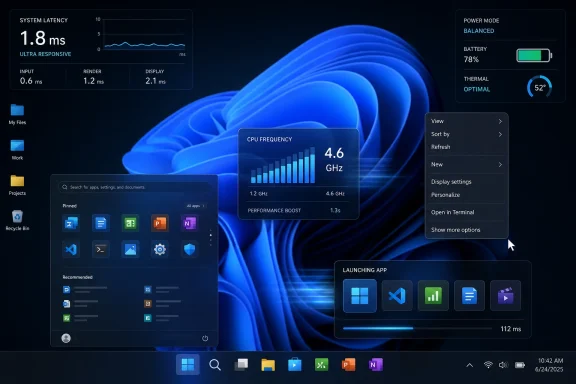
Microsoft is testing a Windows 11 “Low Latency Profile” that briefly raises CPU frequency for interactive tasks such as launching apps, opening Start, and showing context menus, with early reports in May 2026 claiming sizable responsiveness gains in Insider builds. The feature is not a new app, not a user-facing benchmark mode, and not yet a public promise. It is Microsoft’s latest admission that the operating system’s perceived speed problem is real. More importantly, it suggests Redmond has finally decided that Windows 11’s latency debt cannot be solved by design polish alone.
For years, Windows performance debates have been dominated by the wrong numbers. Boot time, benchmark scores, memory footprint, and synthetic CPU results matter, but they are not what most users experience dozens of times per hour. The irritation comes from smaller delays: the Start menu taking a beat too long, File Explorer feeling gummy, a context menu animating into place after your hand has already moved on.
That is the territory Microsoft’s reported Low Latency Profile is meant to attack. According to reporting from The Verge, Windows Central, and Windows Latest, the mechanism temporarily pushes CPU frequency upward for short bursts when Windows detects high-priority interactive actions. The claimed window is roughly one to three seconds, which is just long enough to make a menu or app launch feel immediate, but short enough to avoid acting like a permanent high-performance power plan.
The comparison to macOS is not accidental. Apple’s systems have long benefited from tight coordination between hardware, scheduling, power management, and interface behavior. Windows, by contrast, has to run across a sprawling hardware ecosystem, from bargain laptops with conservative thermal envelopes to gaming desktops that already treat power limits as a suggestion.
That complexity does not excuse sluggishness. It does, however, explain why a “simple” fix like making the CPU wake up faster becomes a platform-level engineering problem rather than a checkbox in Settings.
But the technical accusation is weaker than the frustration behind it. Modern operating systems already use dynamic frequency scaling, priority scheduling, and power policy tricks to make interactive work feel responsive. Smartphones do it. Linux systems do it. macOS does it. The idea that a CPU should sit in a low-power state until the user explicitly performs a “serious” workload is not how modern responsiveness is engineered.
Scott Hanselman, a Microsoft executive whose remit spans CoreAI, GitHub, and Windows, pushed back over the weekend by arguing that this kind of burst behavior is normal and that Windows is not doing anything scandalous by briefly boosting clocks. His blunt “let Windows cook” framing was part defense, part signal: Microsoft knows this change will be read politically by a user base that has become suspicious of Windows 11’s priorities.
The admission is not that boosting is illegitimate. The admission is that Windows 11’s interactive latency has become prominent enough that Microsoft needs a named mitigation for it.
The Start menu is not a luxury surface. It is the front door of the OS. File Explorer is not just another app. It is the mental model many users have for the machine itself. Context menus are not decorative; they are muscle memory encoded into right-clicks.
When those surfaces hesitate, users do not think, “This composited WinUI layer has a slightly higher latency profile under certain shell conditions.” They think Windows is slower. Worse, they think Windows is less respectful of their intent.
That perception is hard to reverse because it compounds. A user who has seen the Start menu stutter will notice the next delay more sharply. A sysadmin who has watched Explorer lag on a freshly imaged business laptop will distrust the next “performance improvement” bullet in a release note. A power user who restores classic menus through registry hacks is not merely changing UI preference; they are opting out of Microsoft’s judgment.
Low Latency Profile matters because it targets that trust gap. It is designed to make the system respond at the moment the user asks for something, not after Windows finishes negotiating with its own abstractions.
It indicts Windows because users have been comparing Windows 11’s feel to macOS for years, often unfavorably, even on hardware that should have no trouble drawing menus and launching inbox apps. Apple’s advantage is not just that it boosts quickly. It is that the entire stack is built around making latency feel managed, predictable, and intentional.
Microsoft does not control the PC stack in the same way. It has to accommodate firmware quirks, OEM power profiles, background utilities, third-party shell extensions, antivirus hooks, enterprise agents, and silicon from multiple vendors. In that world, a universal burst policy is both a pragmatic tool and a sign that Windows needs a broader response than telling developers to behave.
The risk is that Microsoft treats the symptom as the cure. A faster Start menu is welcome. A Start menu that needs special scheduling help because it became too layered, network-aware, promotional, or framework-heavy is still an architectural warning.
“Up to” is doing a lot of work. It usually means the best observed case, not the median user experience across hardware, battery states, thermal limits, enterprise images, and third-party software loads. A feature that makes a low-end laptop feel dramatically better may be almost invisible on a high-end desktop already running near aggressive boost behavior.
There is also the question of what exactly is being measured. App launch time can mean process start, first window paint, usable interface, restored state, or perceived readiness. Menu responsiveness can mean animation start, full layout completion, or the time until the user can click an item. The user only cares about the last meaningful moment: when the computer is ready to obey.
That does not make the early reports meaningless. It means the real test will not be a single demo but weeks of daily use across messy PCs. Windows performance lives in the long tail.
In practice, the answer depends on how often the feature triggers, how aggressively it boosts, and whether the system is already thermally constrained. On a cool laptop with headroom, a one-second burst may be barely noticeable. On a thin machine running Teams, browser tabs, endpoint security, and a background update, the same policy could add heat or fan noise at precisely the moments the user is already annoyed.
The hard part is not proving that boosting works. The hard part is deciding when not to boost. Windows must distinguish a meaningful interactive action from noisy background churn, and it must respect power mode, battery saver, thermal pressure, and enterprise policy.
This is where Microsoft’s PC ecosystem becomes both a strength and a liability. The same feature that makes a budget laptop feel premium could make a poorly cooled ultraportable feel twitchy and warm. The same burst that makes Start feel instant on AC power may be less welcome on a long-haul flight.
Enterprise fleets are full of managed power plans, security software, remote management agents, virtual desktop workloads, and carefully tuned battery policies. A performance feature that behaves beautifully on a clean Insider build can interact differently with a corporate image carrying years of accumulated requirements. The user-facing improvement may be real, but the operational question is whether it is controllable.
Microsoft will need to document whether Low Latency Profile can be governed through policy, whether it respects existing power modes, and whether administrators can disable or tune it. If the feature ships silently with no management surface, some IT teams will treat it as another Windows behavior to be discovered after the fact.
That would be a mistake. Responsiveness is a business feature. So is predictability. Microsoft needs both.
Low Latency Profile could make those menus appear faster, but it will not fully resolve the complaint if the design still interrupts workflow. Speed and layout are different dimensions of trust. A menu can be fast and still annoying.
That matters because Windows 11’s performance problem is partly aesthetic and partly procedural. Animations, rounded surfaces, modern frameworks, and simplified menus are not inherently bad. They become bad when the system feels like it is prioritizing presentation over immediacy.
A faster context menu is a win. A faster context menu that still hides what users need may only shorten the trip to irritation.
Taken together, those moves suggest a subtle but important shift. The Windows 11 conversation is moving away from “here is the next thing Microsoft wants to place in front of you” and toward “here is what Microsoft needs to fix so users stop resenting the shell.” That is a healthier product posture.
For much of the Windows 11 era, Microsoft seemed determined to treat the OS as a stage for services, recommendations, AI entry points, and cloud-connected experiences. Some of those may be useful. But none of them matter if the base interaction model feels compromised.
Performance work is not glamorous. Removing buttons is not visionary. Making updates less annoying does not produce a keynote moment. Yet these are exactly the changes that rebuild credibility.
AI features ask for trust. They ask users to let Windows observe, index, summarize, suggest, and sometimes act. A sluggish shell makes those requests feel arrogant. Before Windows can become a more agentic environment, it has to behave like a competent one.
Low Latency Profile is therefore more than a performance tweak. It is a prerequisite for Microsoft’s bigger ambitions. If Windows is going to mediate more of the user’s workflow, the mediation layer must feel instant, local, and under control.
That is the lesson Apple learned long ago. The magic is not just what the system can do. It is whether the system feels ready before the user has time to doubt it.
But Microsoft should not confuse a successful scheduling policy with a full performance strategy. If boosting masks avoidable inefficiency in Explorer, Start, Search, or shell extensions, then the boost should buy time for deeper cleanup, not replace it. Windows needs fewer pauses, but it also needs fewer reasons to pause.
The best version of this feature would be almost boring. It would arrive, make common interactions feel snappier, respect power settings, expose sensible controls for administrators, and then fade into the background. Users should not have to know it exists.
The worst version would become another Windows culture-war object: enthusiasts toggling hidden configuration IDs, laptop users arguing about battery drain, and Microsoft insisting the telemetry says everything is fine. The difference will come down to transparency and restraint.
Source: The Verge Windows 11 is getting a macOS-like speed boost
 Microsoft Has Found the Milliseconds Users Actually Feel
For years, Windows performance debates have been dominated by the wrong numbers. Boot time, benchmark scores, memory footprint, and synthetic CPU results matter, but they are not what most users experience dozens of times per hour. The irritation comes from smaller delays: the Start menu taking a beat too long, File Explorer feeling gummy, a context menu animating into place after your hand has already moved on.That is the territory Microsoft’s reported Low Latency Profile is meant to attack. According to reporting from The Verge, Windows Central, and Windows Latest, the mechanism temporarily pushes CPU frequency upward for short bursts when Windows detects high-priority interactive actions. The claimed window is roughly one to three seconds, which is just long enough to make a menu or app launch feel immediate, but short enough to avoid acting like a permanent high-performance power plan.
The comparison to macOS is not accidental. Apple’s systems have long benefited from tight coordination between hardware, scheduling, power management, and interface behavior. Windows, by contrast, has to run across a sprawling hardware ecosystem, from bargain laptops with conservative thermal envelopes to gaming desktops that already treat power limits as a suggestion.
That complexity does not excuse sluggishness. It does, however, explain why a “simple” fix like making the CPU wake up faster becomes a platform-level engineering problem rather than a checkbox in Settings.
This Is Not Cheating, But It Is an Admission
The loudest criticism of the feature is that Microsoft is papering over inefficiency by throwing CPU clocks at the problem. That argument has emotional force because Windows 11 has often felt like an operating system asking users to fund its design choices with more RAM, newer processors, and patience. When a context menu feels slower than it did on Windows 10, users reasonably ask why the answer should be more boost rather than less overhead.But the technical accusation is weaker than the frustration behind it. Modern operating systems already use dynamic frequency scaling, priority scheduling, and power policy tricks to make interactive work feel responsive. Smartphones do it. Linux systems do it. macOS does it. The idea that a CPU should sit in a low-power state until the user explicitly performs a “serious” workload is not how modern responsiveness is engineered.
Scott Hanselman, a Microsoft executive whose remit spans CoreAI, GitHub, and Windows, pushed back over the weekend by arguing that this kind of burst behavior is normal and that Windows is not doing anything scandalous by briefly boosting clocks. His blunt “let Windows cook” framing was part defense, part signal: Microsoft knows this change will be read politically by a user base that has become suspicious of Windows 11’s priorities.
The admission is not that boosting is illegitimate. The admission is that Windows 11’s interactive latency has become prominent enough that Microsoft needs a named mitigation for it.
Windows 11’s Performance Problem Was Always About Trust
Windows 11 did not fail because it was slow everywhere. On many systems, it is perfectly fast once applications are open and workloads are underway. The problem is that it has too often felt inconsistent in the exact places where an operating system should feel invisible.The Start menu is not a luxury surface. It is the front door of the OS. File Explorer is not just another app. It is the mental model many users have for the machine itself. Context menus are not decorative; they are muscle memory encoded into right-clicks.
When those surfaces hesitate, users do not think, “This composited WinUI layer has a slightly higher latency profile under certain shell conditions.” They think Windows is slower. Worse, they think Windows is less respectful of their intent.
That perception is hard to reverse because it compounds. A user who has seen the Start menu stutter will notice the next delay more sharply. A sysadmin who has watched Explorer lag on a freshly imaged business laptop will distrust the next “performance improvement” bullet in a release note. A power user who restores classic menus through registry hacks is not merely changing UI preference; they are opting out of Microsoft’s judgment.
Low Latency Profile matters because it targets that trust gap. It is designed to make the system respond at the moment the user asks for something, not after Windows finishes negotiating with its own abstractions.
The macOS Comparison Cuts Both Ways
Calling this a macOS-like speed boost flatters and indicts Microsoft at the same time. It flatters Windows because it places the feature in a familiar modern performance tradition: the machine anticipates interactive work, spends a short burst of energy, and returns to efficiency. That is good engineering when done carefully.It indicts Windows because users have been comparing Windows 11’s feel to macOS for years, often unfavorably, even on hardware that should have no trouble drawing menus and launching inbox apps. Apple’s advantage is not just that it boosts quickly. It is that the entire stack is built around making latency feel managed, predictable, and intentional.
Microsoft does not control the PC stack in the same way. It has to accommodate firmware quirks, OEM power profiles, background utilities, third-party shell extensions, antivirus hooks, enterprise agents, and silicon from multiple vendors. In that world, a universal burst policy is both a pragmatic tool and a sign that Windows needs a broader response than telling developers to behave.
The risk is that Microsoft treats the symptom as the cure. A faster Start menu is welcome. A Start menu that needs special scheduling help because it became too layered, network-aware, promotional, or framework-heavy is still an architectural warning.
The Numbers Are Impressive, But They Need Adult Supervision
The early figures being repeated are eye-catching: up to 40 percent faster launch times for some Microsoft apps and up to 70 percent faster response for Start and context menus. Those numbers are plausible enough to matter and conditional enough to avoid over-reading.“Up to” is doing a lot of work. It usually means the best observed case, not the median user experience across hardware, battery states, thermal limits, enterprise images, and third-party software loads. A feature that makes a low-end laptop feel dramatically better may be almost invisible on a high-end desktop already running near aggressive boost behavior.
There is also the question of what exactly is being measured. App launch time can mean process start, first window paint, usable interface, restored state, or perceived readiness. Menu responsiveness can mean animation start, full layout completion, or the time until the user can click an item. The user only cares about the last meaningful moment: when the computer is ready to obey.
That does not make the early reports meaningless. It means the real test will not be a single demo but weeks of daily use across messy PCs. Windows performance lives in the long tail.
Battery Life Is the Obvious Trade, Thermals Are the Subtler One
The immediate concern is battery life. If Windows boosts the CPU for every interactive twitch, will laptops drain faster? In principle, short bursts can be efficient because finishing work quickly may let the processor return to a lower-power state sooner. That is the classic “race to idle” argument.In practice, the answer depends on how often the feature triggers, how aggressively it boosts, and whether the system is already thermally constrained. On a cool laptop with headroom, a one-second burst may be barely noticeable. On a thin machine running Teams, browser tabs, endpoint security, and a background update, the same policy could add heat or fan noise at precisely the moments the user is already annoyed.
The hard part is not proving that boosting works. The hard part is deciding when not to boost. Windows must distinguish a meaningful interactive action from noisy background churn, and it must respect power mode, battery saver, thermal pressure, and enterprise policy.
This is where Microsoft’s PC ecosystem becomes both a strength and a liability. The same feature that makes a budget laptop feel premium could make a poorly cooled ultraportable feel twitchy and warm. The same burst that makes Start feel instant on AC power may be less welcome on a long-haul flight.
The Enterprise Version of This Story Is Not “Snappier Menus”
For home users, the story is simple: Windows may feel faster without buying a new PC. For IT departments, the story is more complicated. Any change to scheduling, power behavior, or foreground prioritization raises questions about predictability.Enterprise fleets are full of managed power plans, security software, remote management agents, virtual desktop workloads, and carefully tuned battery policies. A performance feature that behaves beautifully on a clean Insider build can interact differently with a corporate image carrying years of accumulated requirements. The user-facing improvement may be real, but the operational question is whether it is controllable.
Microsoft will need to document whether Low Latency Profile can be governed through policy, whether it respects existing power modes, and whether administrators can disable or tune it. If the feature ships silently with no management surface, some IT teams will treat it as another Windows behavior to be discovered after the fact.
That would be a mistake. Responsiveness is a business feature. So is predictability. Microsoft needs both.
The Context Menu Is the Perfect Crime Scene
The right-click menu is a small UI element with an outsized role in the Windows 11 backlash. It is where design ideology met power-user reality. Microsoft wanted cleaner, more modern context menus; users saw hidden commands, extra clicks, slower behavior, and a second legacy menu lurking underneath like an admission of defeat.Low Latency Profile could make those menus appear faster, but it will not fully resolve the complaint if the design still interrupts workflow. Speed and layout are different dimensions of trust. A menu can be fast and still annoying.
That matters because Windows 11’s performance problem is partly aesthetic and partly procedural. Animations, rounded surfaces, modern frameworks, and simplified menus are not inherently bad. They become bad when the system feels like it is prioritizing presentation over immediacy.
A faster context menu is a win. A faster context menu that still hides what users need may only shorten the trip to irritation.
Project K2 Sounds Like Microsoft Remembering the Product
The speed boost is reportedly part of a broader Windows 11 improvement push sometimes described as Project K2. Microsoft has also been making noise about reducing friction elsewhere: cleaning up unnecessary Copilot buttons, improving Windows Update behavior, and making core experiences feel more consistent.Taken together, those moves suggest a subtle but important shift. The Windows 11 conversation is moving away from “here is the next thing Microsoft wants to place in front of you” and toward “here is what Microsoft needs to fix so users stop resenting the shell.” That is a healthier product posture.
For much of the Windows 11 era, Microsoft seemed determined to treat the OS as a stage for services, recommendations, AI entry points, and cloud-connected experiences. Some of those may be useful. But none of them matter if the base interaction model feels compromised.
Performance work is not glamorous. Removing buttons is not visionary. Making updates less annoying does not produce a keynote moment. Yet these are exactly the changes that rebuild credibility.
The AI Era Makes Basic Responsiveness More Important, Not Less
There is an irony in Microsoft working on millisecond-level shell responsiveness while the company’s broader strategy is consumed by AI. Copilot, Recall-style experiences, local models, cloud agents, and semantic search all assume users will accept more intelligence inside the operating system. That assumption collapses if the OS cannot make a menu appear promptly.AI features ask for trust. They ask users to let Windows observe, index, summarize, suggest, and sometimes act. A sluggish shell makes those requests feel arrogant. Before Windows can become a more agentic environment, it has to behave like a competent one.
Low Latency Profile is therefore more than a performance tweak. It is a prerequisite for Microsoft’s bigger ambitions. If Windows is going to mediate more of the user’s workflow, the mediation layer must feel instant, local, and under control.
That is the lesson Apple learned long ago. The magic is not just what the system can do. It is whether the system feels ready before the user has time to doubt it.
Microsoft Should Ship the Boost, Then Keep Digging
The right response to Low Latency Profile is neither cynicism nor celebration. Microsoft should ship it if testing shows the gains hold up without unacceptable battery, heat, or stability costs. Users should welcome a Windows 11 that feels faster on the hardware they already own.But Microsoft should not confuse a successful scheduling policy with a full performance strategy. If boosting masks avoidable inefficiency in Explorer, Start, Search, or shell extensions, then the boost should buy time for deeper cleanup, not replace it. Windows needs fewer pauses, but it also needs fewer reasons to pause.
The best version of this feature would be almost boring. It would arrive, make common interactions feel snappier, respect power settings, expose sensible controls for administrators, and then fade into the background. Users should not have to know it exists.
The worst version would become another Windows culture-war object: enthusiasts toggling hidden configuration IDs, laptop users arguing about battery drain, and Microsoft insisting the telemetry says everything is fine. The difference will come down to transparency and restraint.
The Real Win Is Making Windows Feel Like It Heard the Click
The concrete story is a CPU burst feature. The bigger story is Microsoft acknowledging that perceived latency is now a first-class Windows problem. If Low Latency Profile survives testing, it could be one of the rare Windows 11 changes that helps almost everyone without demanding a new workflow.- Microsoft is reportedly testing Low Latency Profile in Windows 11 to briefly raise CPU frequency during interactive actions such as app launches, Start menu openings, and context menu use.
- Early reports claim improvements of up to 40 percent for some Microsoft app launches and up to 70 percent for certain shell interactions, though those figures should be treated as best-case early results.
- The technique is not exotic; modern operating systems and smartphones routinely use short performance bursts to improve responsiveness.
- The practical risks are battery drain, heat, fan noise, and unpredictable behavior on managed or thermally constrained PCs.
- The feature will matter most if Microsoft pairs it with deeper cleanup of Windows 11’s shell, menus, updates, and background behaviors.
- Enterprise administrators will need clear policy controls if the feature changes power or performance characteristics across managed fleets.
Source: The Verge Windows 11 is getting a macOS-like speed boost
