

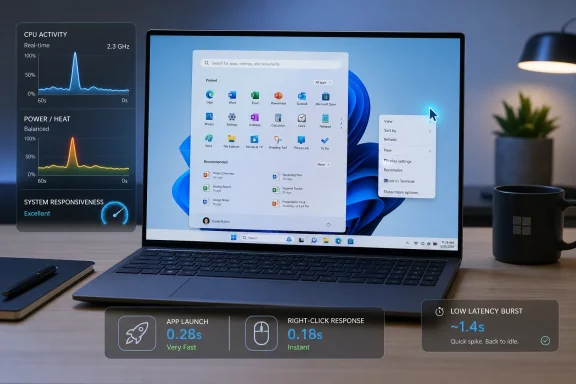
Microsoft is reportedly testing a Windows 11 “Low Latency Profile” in the Windows Insider Program that briefly drives a PC’s processor to its maximum frequency for one to three seconds during high-priority actions such as launching apps, opening Start, and showing context menus. The pitch is simple: make Windows feel faster not by asking users to buy new hardware, but by making the operating system more aggressive in the moment between a click and a visible response. The controversy is just as simple: if Windows 11 needs a hidden turbo nudge to open its own menus quickly, the feature is less a triumph than a confession.
The reported feature sounds dramatic because “automatically overclocks the processor” is the sort of phrase that makes PC builders imagine voltage sliders, warranty warnings, and motherboard firmware pages. That is almost certainly not what is happening here. Modern CPUs already boost themselves constantly inside manufacturer-defined power, thermal, and firmware limits; Windows appears to be testing a policy that asks the processor to sprint earlier and harder for short foreground tasks.
That distinction matters. This is not Windows deciding that your Ryzen or Core chip should run beyond its rated limits. It is Windows trying to reduce the lag between intent and response by temporarily biasing the system toward performance rather than efficiency.
Still, the optics are awkward. Windows 11 has spent years being criticized for interface hesitation, heavier shell components, and UI paths that feel oddly sluggish on hardware that should have no trouble drawing a menu. A hidden low-latency profile does not erase those complaints; it validates them.
The most interesting part of the report is not that Microsoft can make Edge, Outlook, Start, and context menus appear faster. The interesting part is that Microsoft apparently found enough delay in ordinary desktop interactions to justify a systemwide response mechanism.
That is why the reported numbers are attention-grabbing. App launches for Microsoft’s own bundled applications are said to improve by up to 40 percent, while shell surfaces like Start and context menus may appear up to 70 percent faster. Even if those figures are best-case internal measurements, they target exactly the places where Windows 11 has felt less immediate than it should.
The old Windows performance problem was often boot time. The modern Windows performance problem is micro-latency: small pauses, animation hitches, delayed flyouts, and foreground actions that do not quite match the pace of the user’s hands. On a fast SSD with a recent CPU, a half-second delay is not catastrophic, but it is insulting.
Microsoft’s reported Low Latency Profile seems designed for that perception gap. It does not make the system broadly faster in the way a new CPU, more RAM, or a clean install might. It makes the first second of interaction less disappointing.
That does not make it meaningless. Anyone who has switched a laptop from a battery-saver profile to a high-performance profile knows that power policy changes can transform responsiveness. The difference between “this menu opened instantly” and “this menu hesitated” can come down to whether the CPU was idling at a low frequency when the request arrived.
The reported one-to-three-second burst window is a tell. Microsoft is not trying to improve sustained workloads like rendering, compiling, encoding, or gaming. It is trying to win the race from idle to responsive, then get out before thermals and battery life become the story.
That approach is familiar in mobile computing. Phones and tablets have long used aggressive short boosts to make touch interfaces feel immediate. The user taps, the chip wakes, work finishes, and the system returns to a lower-power state. Windows, with its sprawling hardware ecosystem and legacy baggage, has never been as tightly choreographed.
If Microsoft can bring more of that responsiveness to the desktop without turning every laptop fan into a leaf blower, users will notice.
Context menus tell a similar story. Windows 11’s redesigned right-click menu was meant to simplify the user experience, but it also introduced an extra layer between the user and the full legacy menu. Even when the design is cleaner, the experience is judged by how fast the menu appears under the cursor.
That is why a CPU burst feature aimed at Start and context menus feels like a product-management flare. Microsoft knows these moments matter. It also knows that users do not care whether the delay came from shell architecture, WinUI rendering, package activation, indexing, cloud calls, security checks, or extension enumeration.
They clicked. Windows paused. That is the whole review.
The rumored Windows K2 initiative, described in reports as a broader effort to improve performance, reliability, and responsiveness while modernizing older components and moving more interface elements toward WinUI 3, gives this feature a larger context. Low Latency Profile may be the flashy mechanism, but K2’s more consequential work is likely the slow grind of removing old bottlenecks and making the shell less prone to stutter in the first place.
A CPU boost can hide a delay. Refactoring can remove it.
That appears to be Microsoft’s current direction. The reports say the profile runs automatically in the background and is being tuned by developers. That means the operating system, not the user, decides when a task qualifies as important enough for a brief frequency push.
The risk is that automatic systems are judged by their mistakes. If the profile triggers too often, laptop users may notice heat, fan noise, or reduced battery life. If it triggers too rarely, the feature becomes another internal optimization with impressive lab numbers and little street-level impact. If it favors Microsoft apps too obviously, the company will invite the familiar accusation that Windows is optimizing the house brands first.
That last point matters more than it may seem. The reported examples include Edge and Outlook, two applications deeply entangled with Microsoft’s own platform strategy. If third-party apps also benefit broadly, users will accept the feature as a Windows improvement. If the gains appear concentrated in Microsoft’s ecosystem, skepticism will be deserved.
The desktop performance contract is simple: the foreground task should feel important because the user made it important, not because the vendor owns the app.
There is also a difference between a single action and a session pattern. Opening Start once is trivial. Opening Start, File Explorer, Settings, Teams, Outlook, Edge, a dozen context menus, and several search panels in rapid succession is closer to a normal workday. If each foreground interaction gets a boost window, the cumulative effect becomes worth measuring.
Microsoft’s challenge is not merely to prove that one burst is cheap. It must prove that the policy behaves intelligently under real usage, with background tasks, antivirus scanning, browser tabs, docked monitors, low battery states, and OEM power profiles all competing for the same thermal envelope.
On desktops, this is easier. On laptops, it becomes a trust problem. Windows users have long memories of “performance improvements” that quietly cost battery life, generate heat, or wake fans at precisely the wrong moment in a meeting.
The feature’s success will depend on restraint. The profile should know when the system is plugged in, when it is thermally constrained, when battery saver is active, when the lid has just opened, and when the foreground request is genuinely latency-sensitive. A blunt “max the CPU for every click” policy would be fast, but it would also be primitive.
Enterprise Windows environments are built on predictability. A feature that changes boost behavior across fleets may affect battery life, acoustics, performance baselines, support tickets, and energy reporting. Even if the user-facing experience improves, administrators will want policy knobs, telemetry, documentation, and a staged rollout path.
That does not mean enterprises will reject it. Quite the opposite: a more responsive Windows shell could reduce help-desk noise, especially on aging fleets that are being asked to survive another refresh cycle. If a three-year-old laptop suddenly feels less sticky when opening Outlook or searching from Start, that has real value.
But admins will need to know what “maximum frequency” means in practice. Is Windows requesting higher performance through existing power-management frameworks? Does it respect OEM firmware limits? Does it interact with Intel Thread Director, AMD power management, Modern Standby, or vendor utilities? Can it be disabled for thermal-sensitive deployments, kiosks, shared devices, or regulated environments?
The consumer story is “Windows feels faster.” The enterprise story is “Windows changed its power behavior.” Those are not the same sentence.
The most dangerous performance improvement is the one that raises everyone’s tolerance for waste. If Windows makes app launches 40 percent faster, developers may feel less pressure to remove avoidable startup work. Two years later, the same apps will have grown to consume the recovered headroom.
Microsoft itself is not exempt. Windows 11 has often felt like an operating system where interface ambition outran latency discipline. Fluent visuals, web-connected search, recommendation surfaces, account integrations, and modern frameworks all have costs. The user may like some of those features, but the bill arrives in milliseconds.
A better Windows cannot simply boost through the problem. It has to make the common path leaner.
That is where the reported K2 work matters. If Microsoft is genuinely modernizing old code, reducing shell overhead, and improving WinUI 3 performance, Low Latency Profile becomes a useful complement. If the profile becomes the headline while architectural cleanup lags behind, it becomes a cosmetic turbo button.
For a desktop interaction, the workload is typically bursty. The user clicks, the system resolves resources, initializes UI, performs layout, reads from storage or memory, and paints the result. Once the menu or app window appears, the heavy work often drops sharply. A short boost targets exactly that front-loaded phase.
The challenge is prediction. Windows must know which tasks deserve the sprint. Launching an app does. Opening Start probably does. Rendering a context menu does. But what about background indexing, notification processing, cloud sync, widgets, update services, or a web page that happens to be doing heavy JavaScript work in the foreground?
Latency-sensitive work is not the same as important work. The user’s visible action should get priority; invisible churn should not.
If Microsoft gets that distinction right, the feature could make Windows 11 feel more modern. If it gets it wrong, it could simply teach the CPU to panic more often.
Microsoft can reduce that suspicion by being explicit. If Low Latency Profile ships, the company should document what it does, when it operates, what hardware it supports, and how it interacts with power modes. A short technical post would do more good than a vague promise that Windows is now smoother.
Users do not need a giant dashboard. But they deserve to know whether a new Windows build has changed foreground boosting behavior. Admins deserve policy. Reviewers deserve a way to test it. Hardware vendors deserve guidance.
The old Microsoft might have buried this as an implementation detail. The modern Microsoft should understand that power behavior is user experience. On laptops especially, performance, heat, and battery life are not separate categories; they are the same bargain.
Transparency would also help kill the misleading “automatic overclocking” framing. If the feature operates within standard boost limits, Microsoft should say so plainly. If it relies on existing processor performance states, say that too. Letting the phrase “hidden overclock” define the news cycle would be an avoidable communications failure.
But the deeper competition is not just the previous version of Windows. It is the instant feel of phones, tablets, Chromebooks, and Macs, where foreground responsiveness is treated as a first-order design constraint. Users have been trained by other devices to expect animation, launch, search, and menu response to happen almost before thought completes.
Windows has a harder job because it carries decades of compatibility, third-party shell extensions, varied hardware, enterprise controls, and endless driver combinations. That complexity is real. It is also not the user’s problem.
The Low Latency Profile is a sign that Microsoft is trying to compete at the perceptual layer. Not frames per second. Not benchmark throughput. Not boot time. The click-to-result interval.
That is the right battleground. It is also one Windows should have taken more seriously before now.
The feature may shine most on lower-end and midrange systems where CPUs spend more time idling conservatively and where the gap between low-power and boost states is obvious. On high-end desktops already running aggressive performance plans, the difference may be smaller. On gaming rigs with tuned power settings, it may be almost invisible.
That does not make the feature less valuable. In fact, if budget PCs benefit most, this could be one of the more meaningful Windows 11 improvements for ordinary users. A cheap laptop that feels less cheap is a bigger win than a workstation that shaves a few milliseconds off a menu.
But Microsoft should be careful with the marketing. If users expect every app to launch 40 percent faster and every UI surface to appear 70 percent faster, disappointment will follow. The more honest promise is also the better one: Windows may become noticeably more responsive during common foreground actions, especially on systems where power management currently delays the first burst of work.
That is less flashy. It is also more believable.
Some costs come from legacy code. Some come from modern UI frameworks that have not always matched native expectations. Some come from the desire to make Windows a cloud-connected, account-aware, service-backed platform. Some come from security hardening. Some come from the sheer variety of hardware and software that Windows must support.
A low-latency CPU profile can address only one class of problem: the delay caused or worsened by conservative power ramping during bursty foreground work. It cannot fix inefficient shell code, slow network-dependent features, bloated app startup sequences, broken drivers, or badly behaved context-menu extensions.
That is why K2’s broader modernization work will decide whether this feature is remembered as a turning point or a meme. If users receive a Windows build where Start opens faster, File Explorer stutters less, context menus appear immediately, and app launches feel sharper, they will not care which internal project deserves credit. If they receive a CPU burst feature but the shell still feels heavy, the internet will write the jokes itself.
Microsoft does not need Windows 11 to win a benchmark contest. It needs Windows 11 to stop feeling like it is thinking about ordinary requests.
Could a malicious or poorly written application trigger frequent boost windows by simulating foreground interactions? Could shell extensions cause repeated bursts through context-menu activity? Could background services masquerade as user-important work? These are implementation questions, not accusations, but Microsoft will need answers.
Reliability is another angle. Short boost bursts are normal for CPUs, but Windows runs on systems with marginal cooling, aging thermal paste, dust-clogged vents, degraded batteries, and OEM firmware of varying quality. A good policy should degrade gracefully. If the system is hot, constrained, or on battery saver, responsiveness should improve only within sensible limits.
The worst possible version of this feature would chase snappiness at the expense of stability. The best version would respect the system’s current condition and use boost only where the payoff is obvious.
For IT pros and enthusiasts, that means early Insider testing should focus less on whether the Start menu feels fast on day one and more on behavior over time. Watch fan curves. Watch battery drain. Watch event logs. Watch responsiveness under load. Watch whether third-party apps benefit or whether the improvement is concentrated in Microsoft’s preferred surfaces.
A fast menu is nice. A predictable machine is better.
That culture of excuses is corrosive. The operating system’s job is to protect the user’s attention, not spend it casually. If Microsoft is now treating foreground responsiveness as a strategic priority, that is welcome.
But responsiveness cannot be bolted on only through power policy. It has to be designed into the shell, frameworks, app lifecycle, background-task model, and default service behavior. It has to shape what loads at startup, what waits for the network, what blocks UI rendering, and what gets deferred until after the user sees a result.
Low Latency Profile may be the most visible symbol of that shift because it is easy to describe: click something, CPU boosts, Windows responds faster. The less visible work will matter more. Faster code beats faster clocks every time, because faster code helps all systems while faster clocks depend on thermal and power headroom.
Microsoft should use the CPU burst as a bridge, not a crutch.
The concrete implications are already clear enough to sketch:
Microsoft’s task now is to make the generous reading win. If Low Latency Profile arrives as part of a broader cleanup that makes Windows 11 feel consistently sharper without punishing battery life or hiding behind vague claims, it could become one of the rare performance tweaks that ordinary users actually notice. If it arrives as a secretive boost bandage over the same old shell hesitation, it will be remembered less as innovation than as an admission that the world’s most important desktop operating system had to floor the CPU just to open the menu on time.
Source: GameGPU https://en.gamegpu.com/news/zhelezo...dows-11-avtomaticheski-razgonyaet-protsessor/
 Microsoft’s New Speed Trick Is Really a Latency Admission
The reported feature sounds dramatic because “automatically overclocks the processor” is the sort of phrase that makes PC builders imagine voltage sliders, warranty warnings, and motherboard firmware pages. That is almost certainly not what is happening here. Modern CPUs already boost themselves constantly inside manufacturer-defined power, thermal, and firmware limits; Windows appears to be testing a policy that asks the processor to sprint earlier and harder for short foreground tasks.That distinction matters. This is not Windows deciding that your Ryzen or Core chip should run beyond its rated limits. It is Windows trying to reduce the lag between intent and response by temporarily biasing the system toward performance rather than efficiency.
Still, the optics are awkward. Windows 11 has spent years being criticized for interface hesitation, heavier shell components, and UI paths that feel oddly sluggish on hardware that should have no trouble drawing a menu. A hidden low-latency profile does not erase those complaints; it validates them.
The most interesting part of the report is not that Microsoft can make Edge, Outlook, Start, and context menus appear faster. The interesting part is that Microsoft apparently found enough delay in ordinary desktop interactions to justify a systemwide response mechanism.
The Desktop Is a Place Where Milliseconds Become Reputation
Operating system performance is not measured only by benchmark charts. Most people do not experience Windows as a synthetic test score; they experience it as a chain of tiny negotiations. Click Start. Wait. Right-click a file. Wait. Open a built-in app. Wait just long enough to notice.That is why the reported numbers are attention-grabbing. App launches for Microsoft’s own bundled applications are said to improve by up to 40 percent, while shell surfaces like Start and context menus may appear up to 70 percent faster. Even if those figures are best-case internal measurements, they target exactly the places where Windows 11 has felt less immediate than it should.
The old Windows performance problem was often boot time. The modern Windows performance problem is micro-latency: small pauses, animation hitches, delayed flyouts, and foreground actions that do not quite match the pace of the user’s hands. On a fast SSD with a recent CPU, a half-second delay is not catastrophic, but it is insulting.
Microsoft’s reported Low Latency Profile seems designed for that perception gap. It does not make the system broadly faster in the way a new CPU, more RAM, or a clean install might. It makes the first second of interaction less disappointing.
Calling It Overclocking Misses the Point
The word “overclocking” is emotionally useful and technically imprecise. Overclocking traditionally means running a component beyond its vendor-specified operating parameters, usually through firmware, voltage, multiplier, or power-limit changes. What is being described here is closer to a scheduler and power-management policy that encourages the CPU to hit its existing boost behavior quickly.That does not make it meaningless. Anyone who has switched a laptop from a battery-saver profile to a high-performance profile knows that power policy changes can transform responsiveness. The difference between “this menu opened instantly” and “this menu hesitated” can come down to whether the CPU was idling at a low frequency when the request arrived.
The reported one-to-three-second burst window is a tell. Microsoft is not trying to improve sustained workloads like rendering, compiling, encoding, or gaming. It is trying to win the race from idle to responsive, then get out before thermals and battery life become the story.
That approach is familiar in mobile computing. Phones and tablets have long used aggressive short boosts to make touch interfaces feel immediate. The user taps, the chip wakes, work finishes, and the system returns to a lower-power state. Windows, with its sprawling hardware ecosystem and legacy baggage, has never been as tightly choreographed.
If Microsoft can bring more of that responsiveness to the desktop without turning every laptop fan into a leaf blower, users will notice.
Windows 11’s Shell Has Become the Performance Battleground
The Start menu is not just an app launcher anymore. It is a search box, a recommendation surface, a document history panel, a cloud-aware index, a settings gateway, and increasingly a place where Microsoft tries to connect local computing to web-backed services. That complexity may be strategic, but it is also expensive.Context menus tell a similar story. Windows 11’s redesigned right-click menu was meant to simplify the user experience, but it also introduced an extra layer between the user and the full legacy menu. Even when the design is cleaner, the experience is judged by how fast the menu appears under the cursor.
That is why a CPU burst feature aimed at Start and context menus feels like a product-management flare. Microsoft knows these moments matter. It also knows that users do not care whether the delay came from shell architecture, WinUI rendering, package activation, indexing, cloud calls, security checks, or extension enumeration.
They clicked. Windows paused. That is the whole review.
The rumored Windows K2 initiative, described in reports as a broader effort to improve performance, reliability, and responsiveness while modernizing older components and moving more interface elements toward WinUI 3, gives this feature a larger context. Low Latency Profile may be the flashy mechanism, but K2’s more consequential work is likely the slow grind of removing old bottlenecks and making the shell less prone to stutter in the first place.
A CPU boost can hide a delay. Refactoring can remove it.
The Best Version of This Feature Is Invisible
For mainstream users, the best performance feature is the one they never have to manage. Nobody wants another control panel toggle named after latency, performance, boost state, turbo policy, or foreground priority. If this feature ships, it should simply make Windows feel less sluggish.That appears to be Microsoft’s current direction. The reports say the profile runs automatically in the background and is being tuned by developers. That means the operating system, not the user, decides when a task qualifies as important enough for a brief frequency push.
The risk is that automatic systems are judged by their mistakes. If the profile triggers too often, laptop users may notice heat, fan noise, or reduced battery life. If it triggers too rarely, the feature becomes another internal optimization with impressive lab numbers and little street-level impact. If it favors Microsoft apps too obviously, the company will invite the familiar accusation that Windows is optimizing the house brands first.
That last point matters more than it may seem. The reported examples include Edge and Outlook, two applications deeply entangled with Microsoft’s own platform strategy. If third-party apps also benefit broadly, users will accept the feature as a Windows improvement. If the gains appear concentrated in Microsoft’s ecosystem, skepticism will be deserved.
The desktop performance contract is simple: the foreground task should feel important because the user made it important, not because the vendor owns the app.
Battery Life Is the Feature’s Hardest Test
The claim that short bursts have minimal battery and thermal impact is plausible, but not guaranteed across the Windows hardware zoo. A premium ultrabook, a gaming laptop, a passively cooled tablet, a mini PC, and a four-year-old budget notebook all respond differently to boost behavior. The same policy that feels wonderful on one machine can produce fan spikes on another.There is also a difference between a single action and a session pattern. Opening Start once is trivial. Opening Start, File Explorer, Settings, Teams, Outlook, Edge, a dozen context menus, and several search panels in rapid succession is closer to a normal workday. If each foreground interaction gets a boost window, the cumulative effect becomes worth measuring.
Microsoft’s challenge is not merely to prove that one burst is cheap. It must prove that the policy behaves intelligently under real usage, with background tasks, antivirus scanning, browser tabs, docked monitors, low battery states, and OEM power profiles all competing for the same thermal envelope.
On desktops, this is easier. On laptops, it becomes a trust problem. Windows users have long memories of “performance improvements” that quietly cost battery life, generate heat, or wake fans at precisely the wrong moment in a meeting.
The feature’s success will depend on restraint. The profile should know when the system is plugged in, when it is thermally constrained, when battery saver is active, when the lid has just opened, and when the foreground request is genuinely latency-sensitive. A blunt “max the CPU for every click” policy would be fast, but it would also be primitive.
IT Departments Will Ask the Questions Enthusiasts Skip
Enthusiasts will argue about whether this is clever engineering or a bandage for bloat. IT administrators will ask a more practical question: can it be controlled?Enterprise Windows environments are built on predictability. A feature that changes boost behavior across fleets may affect battery life, acoustics, performance baselines, support tickets, and energy reporting. Even if the user-facing experience improves, administrators will want policy knobs, telemetry, documentation, and a staged rollout path.
That does not mean enterprises will reject it. Quite the opposite: a more responsive Windows shell could reduce help-desk noise, especially on aging fleets that are being asked to survive another refresh cycle. If a three-year-old laptop suddenly feels less sticky when opening Outlook or searching from Start, that has real value.
But admins will need to know what “maximum frequency” means in practice. Is Windows requesting higher performance through existing power-management frameworks? Does it respect OEM firmware limits? Does it interact with Intel Thread Director, AMD power management, Modern Standby, or vendor utilities? Can it be disabled for thermal-sensitive deployments, kiosks, shared devices, or regulated environments?
The consumer story is “Windows feels faster.” The enterprise story is “Windows changed its power behavior.” Those are not the same sentence.
Developers Should Read This as a Warning, Not a Gift
A systemwide low-latency profile can improve app launch perception, but it should not become an excuse for lazy startup paths. Developers have spent the last decade stuffing first-run experiences, telemetry initialization, update checks, embedded web views, licensing calls, plug-in scans, and cloud sync handshakes into the cold-start window. A CPU burst may make some of that less painful, but it does not make it good engineering.The most dangerous performance improvement is the one that raises everyone’s tolerance for waste. If Windows makes app launches 40 percent faster, developers may feel less pressure to remove avoidable startup work. Two years later, the same apps will have grown to consume the recovered headroom.
Microsoft itself is not exempt. Windows 11 has often felt like an operating system where interface ambition outran latency discipline. Fluent visuals, web-connected search, recommendation surfaces, account integrations, and modern frameworks all have costs. The user may like some of those features, but the bill arrives in milliseconds.
A better Windows cannot simply boost through the problem. It has to make the common path leaner.
That is where the reported K2 work matters. If Microsoft is genuinely modernizing old code, reducing shell overhead, and improving WinUI 3 performance, Low Latency Profile becomes a useful complement. If the profile becomes the headline while architectural cleanup lags behind, it becomes a cosmetic turbo button.
The Race-to-Idle Argument Is Stronger Than It Sounds
There is a defensible engineering theory behind this. In many short tasks, finishing quickly and returning to idle can be more efficient than spending longer at a lower frequency. This is often described as “race to idle,” and it is one reason modern devices can feel fast without constantly burning maximum power.For a desktop interaction, the workload is typically bursty. The user clicks, the system resolves resources, initializes UI, performs layout, reads from storage or memory, and paints the result. Once the menu or app window appears, the heavy work often drops sharply. A short boost targets exactly that front-loaded phase.
The challenge is prediction. Windows must know which tasks deserve the sprint. Launching an app does. Opening Start probably does. Rendering a context menu does. But what about background indexing, notification processing, cloud sync, widgets, update services, or a web page that happens to be doing heavy JavaScript work in the foreground?
Latency-sensitive work is not the same as important work. The user’s visible action should get priority; invisible churn should not.
If Microsoft gets that distinction right, the feature could make Windows 11 feel more modern. If it gets it wrong, it could simply teach the CPU to panic more often.
The Hidden Nature of the Feature Invites Suspicion
There is a reason users react badly to hidden performance behavior. Windows already feels, to many people, like an operating system with too many background motives: updates, indexing, telemetry, Defender scans, OneDrive sync, Store maintenance, widgets, search, Copilot hooks, driver services, and OEM utilities. A hidden CPU boost may be benign, but it arrives in a climate of suspicion.Microsoft can reduce that suspicion by being explicit. If Low Latency Profile ships, the company should document what it does, when it operates, what hardware it supports, and how it interacts with power modes. A short technical post would do more good than a vague promise that Windows is now smoother.
Users do not need a giant dashboard. But they deserve to know whether a new Windows build has changed foreground boosting behavior. Admins deserve policy. Reviewers deserve a way to test it. Hardware vendors deserve guidance.
The old Microsoft might have buried this as an implementation detail. The modern Microsoft should understand that power behavior is user experience. On laptops especially, performance, heat, and battery life are not separate categories; they are the same bargain.
Transparency would also help kill the misleading “automatic overclocking” framing. If the feature operates within standard boost limits, Microsoft should say so plainly. If it relies on existing processor performance states, say that too. Letting the phrase “hidden overclock” define the news cycle would be an avoidable communications failure.
The Real Competition Is Not Windows 10
Whenever Windows 11 performance comes up, the obvious comparison is Windows 10. Many users still believe Windows 10 feels lighter, quicker, or more predictable on the same hardware. That perception is a serious problem for Microsoft as Windows 10 exits mainstream comfort and Windows 11 becomes the default destination.But the deeper competition is not just the previous version of Windows. It is the instant feel of phones, tablets, Chromebooks, and Macs, where foreground responsiveness is treated as a first-order design constraint. Users have been trained by other devices to expect animation, launch, search, and menu response to happen almost before thought completes.
Windows has a harder job because it carries decades of compatibility, third-party shell extensions, varied hardware, enterprise controls, and endless driver combinations. That complexity is real. It is also not the user’s problem.
The Low Latency Profile is a sign that Microsoft is trying to compete at the perceptual layer. Not frames per second. Not benchmark throughput. Not boot time. The click-to-result interval.
That is the right battleground. It is also one Windows should have taken more seriously before now.
The Numbers Sound Great, but the Distribution Will Matter
“Up to 40 percent” and “up to 70 percent” are classic performance-reporting phrases. They may be true and still not describe what most people will see. The upper bound is not the median. The demo machine is not the fleet. A clean Insider build is not a corporate laptop with three security agents, two VPN clients, browser extensions, Teams, OneDrive, and vendor management tools.The feature may shine most on lower-end and midrange systems where CPUs spend more time idling conservatively and where the gap between low-power and boost states is obvious. On high-end desktops already running aggressive performance plans, the difference may be smaller. On gaming rigs with tuned power settings, it may be almost invisible.
That does not make the feature less valuable. In fact, if budget PCs benefit most, this could be one of the more meaningful Windows 11 improvements for ordinary users. A cheap laptop that feels less cheap is a bigger win than a workstation that shaves a few milliseconds off a menu.
But Microsoft should be careful with the marketing. If users expect every app to launch 40 percent faster and every UI surface to appear 70 percent faster, disappointment will follow. The more honest promise is also the better one: Windows may become noticeably more responsive during common foreground actions, especially on systems where power management currently delays the first burst of work.
That is less flashy. It is also more believable.
The Windows K2 Angle Is the Bigger Story
The reported connection to Windows K2 is important because it suggests Microsoft sees this as part of a broader repair campaign, not a standalone trick. Windows 11’s performance complaints are not caused by a single bad setting. They are the product of many small costs layered over time.Some costs come from legacy code. Some come from modern UI frameworks that have not always matched native expectations. Some come from the desire to make Windows a cloud-connected, account-aware, service-backed platform. Some come from security hardening. Some come from the sheer variety of hardware and software that Windows must support.
A low-latency CPU profile can address only one class of problem: the delay caused or worsened by conservative power ramping during bursty foreground work. It cannot fix inefficient shell code, slow network-dependent features, bloated app startup sequences, broken drivers, or badly behaved context-menu extensions.
That is why K2’s broader modernization work will decide whether this feature is remembered as a turning point or a meme. If users receive a Windows build where Start opens faster, File Explorer stutters less, context menus appear immediately, and app launches feel sharper, they will not care which internal project deserves credit. If they receive a CPU burst feature but the shell still feels heavy, the internet will write the jokes itself.
Microsoft does not need Windows 11 to win a benchmark contest. It needs Windows 11 to stop feeling like it is thinking about ordinary requests.
The Security and Reliability Questions Are Subtle but Real
A feature that changes CPU frequency behavior is not inherently a security risk. But any operating-system mechanism that classifies tasks as high priority and grants them preferential performance treatment deserves scrutiny. Attackers and nuisance software are good at finding ways to make platforms do expensive things repeatedly.Could a malicious or poorly written application trigger frequent boost windows by simulating foreground interactions? Could shell extensions cause repeated bursts through context-menu activity? Could background services masquerade as user-important work? These are implementation questions, not accusations, but Microsoft will need answers.
Reliability is another angle. Short boost bursts are normal for CPUs, but Windows runs on systems with marginal cooling, aging thermal paste, dust-clogged vents, degraded batteries, and OEM firmware of varying quality. A good policy should degrade gracefully. If the system is hot, constrained, or on battery saver, responsiveness should improve only within sensible limits.
The worst possible version of this feature would chase snappiness at the expense of stability. The best version would respect the system’s current condition and use boost only where the payoff is obvious.
For IT pros and enthusiasts, that means early Insider testing should focus less on whether the Start menu feels fast on day one and more on behavior over time. Watch fan curves. Watch battery drain. Watch event logs. Watch responsiveness under load. Watch whether third-party apps benefit or whether the improvement is concentrated in Microsoft’s preferred surfaces.
A fast menu is nice. A predictable machine is better.
The Right Lesson Is That Responsiveness Must Be Designed In
Windows users have become too accustomed to explaining away sluggishness. Maybe the machine is indexing. Maybe Defender is scanning. Maybe OneDrive is syncing. Maybe Teams is updating. Maybe the Store is doing something. Maybe the shell is rebuilding a cache. Maybe the right-click menu is waiting on an extension.That culture of excuses is corrosive. The operating system’s job is to protect the user’s attention, not spend it casually. If Microsoft is now treating foreground responsiveness as a strategic priority, that is welcome.
But responsiveness cannot be bolted on only through power policy. It has to be designed into the shell, frameworks, app lifecycle, background-task model, and default service behavior. It has to shape what loads at startup, what waits for the network, what blocks UI rendering, and what gets deferred until after the user sees a result.
Low Latency Profile may be the most visible symbol of that shift because it is easy to describe: click something, CPU boosts, Windows responds faster. The less visible work will matter more. Faster code beats faster clocks every time, because faster code helps all systems while faster clocks depend on thermal and power headroom.
Microsoft should use the CPU burst as a bridge, not a crutch.
The Snappier Windows Promise Comes With Fine Print
If the reported Low Latency Profile ships broadly, it will be one of those Windows changes that users feel before they understand. That is good. The practical test will be whether the machine seems more immediate in the first five minutes after an update, not whether a settings page boasts about latency.The concrete implications are already clear enough to sketch:
- Windows 11 is reportedly testing a foreground responsiveness feature that boosts CPU frequency briefly during actions such as app launches, Start menu opening, and context-menu display.
- The feature appears to use short one-to-three-second bursts rather than sustained high-performance operation, which makes it closer to aggressive power management than traditional overclocking.
- Reported gains of up to 40 percent for some app launches and up to 70 percent for certain shell interactions should be treated as best-case figures until broader testing confirms real-world results.
- Laptop users and IT departments should watch battery life, fan behavior, thermals, and policy controls if the feature moves from Insider builds into mainstream Windows releases.
- The broader Windows K2 effort may matter more than the boost mechanism itself, because lasting responsiveness requires leaner shell code and fewer avoidable delays.
Microsoft’s task now is to make the generous reading win. If Low Latency Profile arrives as part of a broader cleanup that makes Windows 11 feel consistently sharper without punishing battery life or hiding behind vague claims, it could become one of the rare performance tweaks that ordinary users actually notice. If it arrives as a secretive boost bandage over the same old shell hesitation, it will be remembered less as innovation than as an admission that the world’s most important desktop operating system had to floor the CPU just to open the menu on time.
Source: GameGPU https://en.gamegpu.com/news/zhelezo...dows-11-avtomaticheski-razgonyaet-protsessor/
