

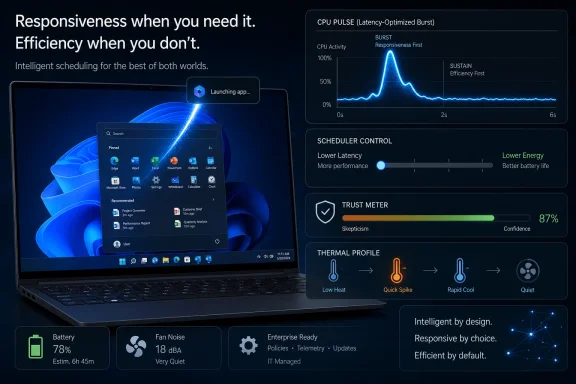
Microsoft is defending a leaked Windows 11 “Low Latency Profile,” reportedly in Insider testing in May 2026, that briefly raises CPU clock speeds during app launches, Start menu actions, and other interactive tasks to make the operating system feel faster. The company’s argument is simple: this is not a cheat, but a belated adoption of a standard trick used by modern operating systems and phones. The backlash, however, is not really about dynamic frequency scaling. It is about whether Windows 11 has earned enough trust for users to accept another performance abstraction instead of demanding deeper repairs.
The technical premise behind Low Latency Profile is almost boring. When a user clicks something that should respond immediately, Windows can tell the system to favor latency over energy savings for a short burst, raising CPU frequency long enough to finish the work and then letting the processor fall back into lower-power states. That is the world modern CPUs were built for: sleep aggressively, wake violently, finish quickly, sleep again.
Scott Hanselman’s public defense of the idea landed because it refused to treat the criticism as a mystery. Phones do this. macOS does this. Linux does this. The idea that an operating system should temporarily prioritize an interactive foreground action over background thrift is not new computer science, nor is it some uniquely Windows form of benchmark theater.
But the reaction was never going to be judged purely on scheduler theory. Windows 11 users are not responding to a white paper; they are responding to years of menus that animate oddly, context menus that arrive in stages, File Explorer windows that feel heavier than they should, and UI surfaces that look modern while behaving as if they are negotiating with a committee. In that climate, even a reasonable optimization can look like an admission that the machine underneath has grown lazy.
That is Microsoft’s central problem. Low Latency Profile may be defensible engineering, but it is being introduced into a trust deficit. The company is asking users to accept a clever fix in a period when many users suspect clever fixes are how Windows became frustrating in the first place.
That matters because the criticism often treats “boosting the CPU” as synonymous with wasting power. It can be, if implemented badly. But as a general strategy, waking a core, finishing a UI task, and letting the silicon park again is exactly how modern devices preserve the illusion of instant response without burning battery continuously.
Windows has always been more complicated than a phone OS, of course. It runs ancient Win32 applications, modern packaged apps, Electron clients, driver stacks of varying quality, security software, overlays, shell extensions, corporate agents, and gaming utilities that all believe they are special. Any scheduler behavior that touches interactive responsiveness has to survive that zoo.
That is why the outrage is partly misplaced. If Windows can more accurately recognize moments when the user is waiting on the system, prioritizing those moments is not a Band-Aid by itself. It is operating-system work. It is also the sort of work users should want Microsoft doing, assuming it is transparent, measurable, reversible, and not used as an excuse to avoid cleaning up the rest of the house.
Performance complaints around Windows 11 are rarely about one thing. They are about the cumulative irritation of small delays: opening Start, right-clicking in Explorer, waiting for search, watching Settings replace Control Panel one uneven panel at a time, and discovering that a new UI path often has fewer controls than the old one. These are not catastrophic failures. They are worse in a daily driver because they are tiny betrayals repeated constantly.
Microsoft has also spent several years asking users to care about Copilot, cloud integration, account nudges, recommendations, ads, widgets, and services that many enthusiasts see as peripheral to the operating system’s core job. That does not mean every complaint is fair. It does mean Windows 11’s performance narrative has become inseparable from a broader sense that Microsoft prioritized surfaces and strategy over craft.
So when a feature appears that says, in effect, “we can make common interactions faster by pushing the CPU harder for a moment,” users hear something else: “the shell is still too slow, but we found a turbo button.” That may be an unfair reading of the engineering. It is not an irrational reading of the product history.
Microsoft’s March 2026 quality messaging was unusually direct by Windows standards. The company acknowledged that users care about responsiveness, reliability, resource usage, update quality, driver stability, and the everyday feel of the OS. That acknowledgement was necessary because Windows 11’s critics have not merely been asking for new features; they have been asking Microsoft to make the existing ones stop feeling unfinished.
The hard part is that “quality” is not a single deliverable. It is a discipline. Faster app launches are good, but so are fewer services waking in the background, fewer inexplicable UI stalls, cleaner update recovery, lower memory overhead, saner defaults, less promotional chrome, and a shell that does not feel like several generations of design language sharing custody of the same desktop.
K2’s credibility will therefore depend on whether Microsoft attacks the boring layers. Users will notice if Start opens faster. Administrators will notice if updates fail less often. Developers will notice if shell and app frameworks behave more predictably. Gamers will notice if background tasks stop stealing frame-time consistency. Security teams will notice if additional optimization does not make behavior harder to reason about.
But “everyone does this” is not a complete defense. The same technique can be elegant in one environment and compensatory in another. A phone boosting on touch input is expected because the entire device is built around immediate interaction. A desktop OS boosting because its Start menu or shell flyout has become too sluggish on powerful hardware invites a harsher question: why does that interaction need rescuing?
The answer may be reasonable. Modern Windows does more than older Windows did. It carries stronger security boundaries, richer rendering, accessibility layers, cloud-aware search, indexing, telemetry, virtualization-based protections, and compatibility obligations that lighter systems do not carry in the same way. The desktop is not a benchmark fantasy; it is a messy service platform.
Still, users are entitled to judge the result. If a six-core or eight-core modern PC hesitates while opening a menu, “other operating systems also boost clocks” does not fully answer the complaint. The complaint is not that the CPU changed frequency. The complaint is that the OS made the user think about CPU frequency while performing a basic interaction.
In the bad version, it becomes a way to paper over architectural drag. The shell remains heavy, bundled experiences keep waking up, web-based components continue to sprawl, and the CPU burst merely makes the first half-second less embarrassing. Users get a snappier illusion, while the underlying system still consumes more memory, attention, and background energy than it should.
The difference will show up in measurements that matter outside demos. Does battery life improve, decline, or stay neutral on common laptops? Do handheld gaming PCs see fewer stutters, or just different ones? Does the feature help on older supported machines, or mainly on high-end processors that already mask Windows 11’s rough edges? Does it behave well under corporate security agents, VPN clients, endpoint detection tools, and management software?
The enterprise angle is especially important. IT departments do not just care that a menu opens faster on a clean test build. They care whether the optimization changes thermals, fan behavior, battery estimates, user complaints, help desk tickets, and performance baselines across fleets. If Low Latency Profile is opaque, administrators will want policy controls. If it is default-on, they will want documentation. If it is optional, Microsoft will need to explain who should use it and why.
Microsoft should resist the temptation to sell this as magic. The more honest pitch is narrower: Windows can do a better job recognizing when the user is waiting and temporarily bias the system toward responsiveness. That is a respectable claim. It becomes dangerous only if it is used to imply that the deeper work is no longer necessary.
That is why Microsoft is chasing the right target. Windows 11 does not need only higher benchmark numbers; it needs more consistent interaction. A system that opens Start instantly nine times and stalls on the tenth feels less reliable than one that is merely average but predictable. Micro-latency is emotional because it interrupts intention.
But enthusiasts have also learned to distrust synthetic smoothness. Animations can hide delay. Preloading can move cost elsewhere. Background services can make the system feel ready while consuming resources the user did not consent to spend. A short CPU boost is not inherently guilty of any of that, but it belongs to the same family of techniques: making the user experience feel better by managing when and where cost is paid.
The right question, then, is not whether “feel faster” matters. It does. The question is whether Microsoft is reducing the cost or just financing it differently. If Low Latency Profile cuts latency without worsening thermals, power, noise, or background contention, users will eventually accept it. If it merely transfers Windows 11’s overhead into less visible places, the backlash will age well.
It is also why the operating system can feel less coherent than platforms with tighter control. Apple can align hardware, firmware, OS policy, app frameworks, and power management with a severity Microsoft cannot impose on the entire PC ecosystem. Linux can be tuned aggressively by users who accept sharper edges or narrower hardware expectations. Windows has to run the accounting department’s ancient scanner utility and the gamer’s RGB stack while pretending this is normal.
That context should temper some criticism. If Microsoft can use modern scheduler hints and power policy to make a wildly heterogeneous ecosystem feel more responsive, that is not shameful. It is arguably one of the operating system’s core responsibilities.
But compatibility cannot excuse everything. Windows 11’s most visible delays are not always the fault of ancient software. Many are in Microsoft-owned surfaces: Start, Search, Settings, File Explorer, context menus, widgets, and bundled services. When first-party experiences feel heavy, the old compatibility argument loses force.
This is where K2 has to be more than performance theater. Microsoft needs to prove it can make modern Windows feel modern without sacrificing the compatibility that makes Windows valuable. Low Latency Profile may help, but it cannot be the flagship evidence. The flagship evidence has to be a desktop that stops reminding users how much machinery sits between a click and a result.
That perception may be reductive, but product narratives matter. When a user sees AI buttons, account prompts, recommendations, and cloud-connected panels while basic shell interactions remain inconsistent, they build a theory of the company’s priorities. Low Latency Profile is now being judged inside that theory.
The irony is that AI PCs and local inference make performance discipline more important, not less. If Microsoft wants Windows to host background agents, on-device models, semantic indexes, recall-like memory systems, and richer automation, it needs an OS that is ruthlessly careful about latency, power, and user intent. Otherwise, every new intelligent layer will be perceived as another tax.
This is why the backlash should be useful to Microsoft rather than merely annoying. Users are not saying responsiveness does not matter. They are saying responsiveness should not arrive only after the OS has been loaded with features they did not ask for. That is a product management problem as much as a kernel or scheduler problem.
A user-facing toggle would satisfy enthusiasts who want control, but it could also make the feature feel experimental or suspicious. A default-on policy would benefit more people, but it raises the bar for testing and documentation. A power-mode integration may be the cleanest route, letting Windows balance responsiveness and efficiency according to existing user intent.
The more important issue is observability. Windows has too often made performance decisions invisible until something goes wrong. If the system is going to boost for short interactive bursts, administrators and advanced users should be able to understand when it happens, what triggers it, and whether it correlates with battery drain, fan noise, or latency improvements.
That does not mean Microsoft needs to turn every laptop into a lab instrument. It does mean the company should avoid asking for blind faith. Enthusiasts do not need a sermon about how phones work; they need evidence that Windows is applying the principle carefully.
Microsoft also needs to be clear about hardware variation. A modern Intel, AMD, or Arm laptop with strong firmware support may benefit differently than an older desktop, a thermally constrained mini PC, or a handheld gaming device. The PC ecosystem is not one machine. A Windows feature that touches CPU behavior has to respect that diversity or risk being blamed for every fan spin and battery dip that follows.
That is why Hanselman’s defense is both useful and insufficient. It usefully punctures the idea that frequency boosting is inherently illegitimate. But it does not answer why so many Windows users were primed to assume the worst. That answer lies in the accumulated experience of Windows 11 as a product that has too often felt like it was asking for patience while spending attention elsewhere.
The company’s challenge is to connect the CPU burst to a broader quality campaign users can feel. If File Explorer gets faster, Start becomes consistent, Search stops feeling like an online service wearing a local mask, updates become less disruptive, and background processes quiet down, Low Latency Profile will fade into the plumbing. That would be success.
If those things do not happen, LLP will become a meme: the turbocharger bolted onto an OS users believe should have gone on a diet first. In technology, perception often follows performance. In Windows 11’s case, Microsoft may need sustained performance before perception moves at all.
Windows 11 does not need to win an argument on social media about whether dynamic frequency scaling is normal; it needs to win back the mundane confidence that clicking a menu, opening a folder, resuming a laptop, or launching an app will feel immediate on hardware that is already powerful enough. If Low Latency Profile becomes one quiet layer in that recovery, users will forget they were angry about it. If it becomes the recovery plan itself, they will remember exactly why they were.
Source: Tom's Hardware Microsoft staunchly defends its new 'Low Latency Profile' for Windows 11 after community backlash — says every other OS already boosts CPU speeds for quicker load times
 Microsoft Discovers That Responsiveness Is Political
The technical premise behind Low Latency Profile is almost boring. When a user clicks something that should respond immediately, Windows can tell the system to favor latency over energy savings for a short burst, raising CPU frequency long enough to finish the work and then letting the processor fall back into lower-power states. That is the world modern CPUs were built for: sleep aggressively, wake violently, finish quickly, sleep again.Scott Hanselman’s public defense of the idea landed because it refused to treat the criticism as a mystery. Phones do this. macOS does this. Linux does this. The idea that an operating system should temporarily prioritize an interactive foreground action over background thrift is not new computer science, nor is it some uniquely Windows form of benchmark theater.
But the reaction was never going to be judged purely on scheduler theory. Windows 11 users are not responding to a white paper; they are responding to years of menus that animate oddly, context menus that arrive in stages, File Explorer windows that feel heavier than they should, and UI surfaces that look modern while behaving as if they are negotiating with a committee. In that climate, even a reasonable optimization can look like an admission that the machine underneath has grown lazy.
That is Microsoft’s central problem. Low Latency Profile may be defensible engineering, but it is being introduced into a trust deficit. The company is asking users to accept a clever fix in a period when many users suspect clever fixes are how Windows became frustrating in the first place.
The CPU Burst Is Not the Scandal
The strongest case for Microsoft is that short, aggressive bursts can be more efficient than slow, timid work. A processor idling at a low frequency for a long time is not automatically better than a processor sprinting for a fraction of a second and returning to deep sleep. On laptops and handhelds especially, race to idle has long been a practical design principle rather than a marketing slogan.That matters because the criticism often treats “boosting the CPU” as synonymous with wasting power. It can be, if implemented badly. But as a general strategy, waking a core, finishing a UI task, and letting the silicon park again is exactly how modern devices preserve the illusion of instant response without burning battery continuously.
Windows has always been more complicated than a phone OS, of course. It runs ancient Win32 applications, modern packaged apps, Electron clients, driver stacks of varying quality, security software, overlays, shell extensions, corporate agents, and gaming utilities that all believe they are special. Any scheduler behavior that touches interactive responsiveness has to survive that zoo.
That is why the outrage is partly misplaced. If Windows can more accurately recognize moments when the user is waiting on the system, prioritizing those moments is not a Band-Aid by itself. It is operating-system work. It is also the sort of work users should want Microsoft doing, assuming it is transparent, measurable, reversible, and not used as an excuse to avoid cleaning up the rest of the house.
The Backlash Is Really a Review of Windows 11
The community response makes more sense if Low Latency Profile is read as a referendum on Windows 11 rather than a discrete feature. Windows 11 arrived with high hardware requirements, a redesigned shell, a centered taskbar, a new Start menu, and a promise that modern Windows would feel calmer and more coherent. Instead, many power users experienced a platform that sometimes felt visually newer and operationally heavier.Performance complaints around Windows 11 are rarely about one thing. They are about the cumulative irritation of small delays: opening Start, right-clicking in Explorer, waiting for search, watching Settings replace Control Panel one uneven panel at a time, and discovering that a new UI path often has fewer controls than the old one. These are not catastrophic failures. They are worse in a daily driver because they are tiny betrayals repeated constantly.
Microsoft has also spent several years asking users to care about Copilot, cloud integration, account nudges, recommendations, ads, widgets, and services that many enthusiasts see as peripheral to the operating system’s core job. That does not mean every complaint is fair. It does mean Windows 11’s performance narrative has become inseparable from a broader sense that Microsoft prioritized surfaces and strategy over craft.
So when a feature appears that says, in effect, “we can make common interactions faster by pushing the CPU harder for a moment,” users hear something else: “the shell is still too slow, but we found a turbo button.” That may be an unfair reading of the engineering. It is not an irrational reading of the product history.
Windows K2 Is a Repair Campaign, Not a Feature Drop
Low Latency Profile is reportedly part of Microsoft’s broader Windows K2 effort, the internal push to improve performance, reliability, and craft across Windows 11 during 2026 and beyond. That framing matters more than the specific CPU behavior. If K2 is real as a cultural correction, LLP is one tool among many. If K2 becomes a branding wrapper for isolated patches, LLP will become a symbol of the problem.Microsoft’s March 2026 quality messaging was unusually direct by Windows standards. The company acknowledged that users care about responsiveness, reliability, resource usage, update quality, driver stability, and the everyday feel of the OS. That acknowledgement was necessary because Windows 11’s critics have not merely been asking for new features; they have been asking Microsoft to make the existing ones stop feeling unfinished.
The hard part is that “quality” is not a single deliverable. It is a discipline. Faster app launches are good, but so are fewer services waking in the background, fewer inexplicable UI stalls, cleaner update recovery, lower memory overhead, saner defaults, less promotional chrome, and a shell that does not feel like several generations of design language sharing custody of the same desktop.
K2’s credibility will therefore depend on whether Microsoft attacks the boring layers. Users will notice if Start opens faster. Administrators will notice if updates fail less often. Developers will notice if shell and app frameworks behave more predictably. Gamers will notice if background tasks stop stealing frame-time consistency. Security teams will notice if additional optimization does not make behavior harder to reason about.
The Industry Standard Defense Is True but Incomplete
Hanselman is right that Windows is not inventing an exotic sin. Interactive boosting is part of modern computing. Apple’s tight hardware-software integration, Linux’s scheduler and governor ecosystem, Android’s touch responsiveness paths, and iOS’s aggressive burst-and-idle behavior all reflect the same basic reality: users perceive latency more painfully than throughput.But “everyone does this” is not a complete defense. The same technique can be elegant in one environment and compensatory in another. A phone boosting on touch input is expected because the entire device is built around immediate interaction. A desktop OS boosting because its Start menu or shell flyout has become too sluggish on powerful hardware invites a harsher question: why does that interaction need rescuing?
The answer may be reasonable. Modern Windows does more than older Windows did. It carries stronger security boundaries, richer rendering, accessibility layers, cloud-aware search, indexing, telemetry, virtualization-based protections, and compatibility obligations that lighter systems do not carry in the same way. The desktop is not a benchmark fantasy; it is a messy service platform.
Still, users are entitled to judge the result. If a six-core or eight-core modern PC hesitates while opening a menu, “other operating systems also boost clocks” does not fully answer the complaint. The complaint is not that the CPU changed frequency. The complaint is that the OS made the user think about CPU frequency while performing a basic interaction.
The Real Test Is Whether the Boost Hides or Reveals Waste
There are two versions of Low Latency Profile that could ship. In the good version, Windows identifies genuinely latency-sensitive foreground tasks, gives them a short priority and frequency assist, and pairs that with deeper cleanup of shell code, background work, app framework overhead, and driver behavior. In that version, the feature is a finishing move, not a crutch.In the bad version, it becomes a way to paper over architectural drag. The shell remains heavy, bundled experiences keep waking up, web-based components continue to sprawl, and the CPU burst merely makes the first half-second less embarrassing. Users get a snappier illusion, while the underlying system still consumes more memory, attention, and background energy than it should.
The difference will show up in measurements that matter outside demos. Does battery life improve, decline, or stay neutral on common laptops? Do handheld gaming PCs see fewer stutters, or just different ones? Does the feature help on older supported machines, or mainly on high-end processors that already mask Windows 11’s rough edges? Does it behave well under corporate security agents, VPN clients, endpoint detection tools, and management software?
The enterprise angle is especially important. IT departments do not just care that a menu opens faster on a clean test build. They care whether the optimization changes thermals, fan behavior, battery estimates, user complaints, help desk tickets, and performance baselines across fleets. If Low Latency Profile is opaque, administrators will want policy controls. If it is default-on, they will want documentation. If it is optional, Microsoft will need to explain who should use it and why.
Microsoft should resist the temptation to sell this as magic. The more honest pitch is narrower: Windows can do a better job recognizing when the user is waiting and temporarily bias the system toward responsiveness. That is a respectable claim. It becomes dangerous only if it is used to imply that the deeper work is no longer necessary.
Enthusiasts Are Right to Be Suspicious of “Feel Faster”
The phrase “feel faster” is both important and slippery. Responsiveness is often about perception because the human brain punishes delay unevenly. A 200-millisecond hitch in the wrong place can make a system feel broken, while a longer operation with honest progress feedback can feel acceptable. Operating systems are judged by rhythm as much as raw speed.That is why Microsoft is chasing the right target. Windows 11 does not need only higher benchmark numbers; it needs more consistent interaction. A system that opens Start instantly nine times and stalls on the tenth feels less reliable than one that is merely average but predictable. Micro-latency is emotional because it interrupts intention.
But enthusiasts have also learned to distrust synthetic smoothness. Animations can hide delay. Preloading can move cost elsewhere. Background services can make the system feel ready while consuming resources the user did not consent to spend. A short CPU boost is not inherently guilty of any of that, but it belongs to the same family of techniques: making the user experience feel better by managing when and where cost is paid.
The right question, then, is not whether “feel faster” matters. It does. The question is whether Microsoft is reducing the cost or just financing it differently. If Low Latency Profile cuts latency without worsening thermals, power, noise, or background contention, users will eventually accept it. If it merely transfers Windows 11’s overhead into less visible places, the backlash will age well.
Windows Still Carries the Weight of Its Own Success
Part of the Windows 11 debate is unfair because Windows is punished for being Windows. It supports decades of applications, strange peripherals, corporate images, third-party shell hooks, anti-cheat drivers, accessibility tools, automation scripts, and workflows that would be considered legacy debt anywhere else. That compatibility is why Windows remains indispensable.It is also why the operating system can feel less coherent than platforms with tighter control. Apple can align hardware, firmware, OS policy, app frameworks, and power management with a severity Microsoft cannot impose on the entire PC ecosystem. Linux can be tuned aggressively by users who accept sharper edges or narrower hardware expectations. Windows has to run the accounting department’s ancient scanner utility and the gamer’s RGB stack while pretending this is normal.
That context should temper some criticism. If Microsoft can use modern scheduler hints and power policy to make a wildly heterogeneous ecosystem feel more responsive, that is not shameful. It is arguably one of the operating system’s core responsibilities.
But compatibility cannot excuse everything. Windows 11’s most visible delays are not always the fault of ancient software. Many are in Microsoft-owned surfaces: Start, Search, Settings, File Explorer, context menus, widgets, and bundled services. When first-party experiences feel heavy, the old compatibility argument loses force.
This is where K2 has to be more than performance theater. Microsoft needs to prove it can make modern Windows feel modern without sacrificing the compatibility that makes Windows valuable. Low Latency Profile may help, but it cannot be the flagship evidence. The flagship evidence has to be a desktop that stops reminding users how much machinery sits between a click and a result.
The AI Detour Made Every Performance Claim Harder to Sell
The timing of this debate is awkward because Windows users have spent the last few years watching Microsoft pour enormous energy into AI experiences. Copilot was added, repositioned, integrated, pulled back, and re-explained across Windows and Microsoft 365. For some users, it became a symbol of the company’s wandering attention: plenty of intelligence layered on top, not enough care applied underneath.That perception may be reductive, but product narratives matter. When a user sees AI buttons, account prompts, recommendations, and cloud-connected panels while basic shell interactions remain inconsistent, they build a theory of the company’s priorities. Low Latency Profile is now being judged inside that theory.
The irony is that AI PCs and local inference make performance discipline more important, not less. If Microsoft wants Windows to host background agents, on-device models, semantic indexes, recall-like memory systems, and richer automation, it needs an OS that is ruthlessly careful about latency, power, and user intent. Otherwise, every new intelligent layer will be perceived as another tax.
This is why the backlash should be useful to Microsoft rather than merely annoying. Users are not saying responsiveness does not matter. They are saying responsiveness should not arrive only after the OS has been loaded with features they did not ask for. That is a product management problem as much as a kernel or scheduler problem.
The Toggle Will Matter Less Than the Defaults
If Low Latency Profile ships, the implementation details will decide whether it becomes a quiet improvement or another Windows argument. Microsoft could expose it as a visible setting, hide it behind power modes, roll it into default behavior, or reserve it for certain hardware profiles. Each choice sends a signal.A user-facing toggle would satisfy enthusiasts who want control, but it could also make the feature feel experimental or suspicious. A default-on policy would benefit more people, but it raises the bar for testing and documentation. A power-mode integration may be the cleanest route, letting Windows balance responsiveness and efficiency according to existing user intent.
The more important issue is observability. Windows has too often made performance decisions invisible until something goes wrong. If the system is going to boost for short interactive bursts, administrators and advanced users should be able to understand when it happens, what triggers it, and whether it correlates with battery drain, fan noise, or latency improvements.
That does not mean Microsoft needs to turn every laptop into a lab instrument. It does mean the company should avoid asking for blind faith. Enthusiasts do not need a sermon about how phones work; they need evidence that Windows is applying the principle carefully.
Microsoft also needs to be clear about hardware variation. A modern Intel, AMD, or Arm laptop with strong firmware support may benefit differently than an older desktop, a thermally constrained mini PC, or a handheld gaming device. The PC ecosystem is not one machine. A Windows feature that touches CPU behavior has to respect that diversity or risk being blamed for every fan spin and battery dip that follows.
This Is a Scheduler Story, but Also a Trust Story
The technical story of Low Latency Profile belongs to CPU governors, thread priorities, foreground boosts, parked cores, C-states, P-states, and the eternal tradeoff between latency and efficiency. The public story belongs to trust. Microsoft can be right about the engineering and still wrong about how users will receive it.That is why Hanselman’s defense is both useful and insufficient. It usefully punctures the idea that frequency boosting is inherently illegitimate. But it does not answer why so many Windows users were primed to assume the worst. That answer lies in the accumulated experience of Windows 11 as a product that has too often felt like it was asking for patience while spending attention elsewhere.
The company’s challenge is to connect the CPU burst to a broader quality campaign users can feel. If File Explorer gets faster, Start becomes consistent, Search stops feeling like an online service wearing a local mask, updates become less disruptive, and background processes quiet down, Low Latency Profile will fade into the plumbing. That would be success.
If those things do not happen, LLP will become a meme: the turbocharger bolted onto an OS users believe should have gone on a diet first. In technology, perception often follows performance. In Windows 11’s case, Microsoft may need sustained performance before perception moves at all.
The Snappier Start Menu Is Only the First Receipt
Microsoft does not have to apologize for using modern CPU behavior to reduce latency, but it does have to prove that the feature is part of a larger repair job rather than a substitute for one. For Windows users, the practical read is straightforward:- Low Latency Profile is reportedly designed to improve short interactive actions, such as app launches and shell flyouts, by temporarily raising CPU frequency.
- The underlying concept is standard across modern operating systems and mobile devices, where brief bursts can be more efficient than slow work that keeps hardware awake longer.
- The backlash reflects years of frustration with Windows 11’s perceived heaviness, inconsistent shell performance, and Microsoft’s focus on AI and services.
- The feature’s real-world value will depend on battery impact, thermals, fan behavior, enterprise manageability, and whether gains survive beyond clean test systems.
- Microsoft’s broader Windows K2 effort will be judged less by one CPU policy than by whether Windows 11 becomes consistently faster, quieter, and more reliable across everyday use.
Windows 11 does not need to win an argument on social media about whether dynamic frequency scaling is normal; it needs to win back the mundane confidence that clicking a menu, opening a folder, resuming a laptop, or launching an app will feel immediate on hardware that is already powerful enough. If Low Latency Profile becomes one quiet layer in that recovery, users will forget they were angry about it. If it becomes the recovery plan itself, they will remember exactly why they were.
Source: Tom's Hardware Microsoft staunchly defends its new 'Low Latency Profile' for Windows 11 after community backlash — says every other OS already boosts CPU speeds for quicker load times
