

Windows 11’s long-term, stripped-down sibling—Windows 11 LTSC—delivers a shockingly quiet, low‑maintenance Windows experience in 2026: an OS that intentionally omits Copilot, many modern Store apps, and the persistent promotional noise that has bloated the consumer builds over the past three years. My hands‑on testing of Windows 11 IoT Enterprise LTSC 2024 confirms why a growing number of enthusiasts, administrators, and embedded‑device teams treat LTSC as the “pure” Windows 11 experience: minimal background services, small disk footprint, and a servicing model built around stability rather than feature churn. m]
Windows has always shipped in multiple editions aimed at different audiences: Home for mainstream consumers, Pro and Enterprise for business, and specialized SKUs for workstations and embedded devices. The Long‑Term Servicing Channel (LTSC) is Microsoft’s answer for environments that cannot tolerate frequent feature updates—think ATMs, medical devices, kiosks, and control‑room PCs. LTSC freezes the user‑visible feature surface and receives security and quality updates on a long horizon rather than the twice‑a‑year feature cadence used for consumer Windows. For IoT Enterprise LTSC the lifecycle is deliberately long: the IoT LTSC 2024 release is treated as a decade‑long support platform in some channels, making it attractive for devices meant to stay unchanged for years.
Microsoft’s documentation for Windows 11 IoT Enterprise 24H2 and the LTSC‑branded release shows the release cadence and the servicing model, and it enumerates the features that are not part of the LTSC experience—this is intentional and central to the product’s design. In short: LTSC strips consumer‑facing UX surfaces and freezes the feature set so organizations can lock an environment down for long periods.
If you want a clean, quiet Windows without Copilot and the modern app churn—test the LTSC evaluation in a VM and make an informed decision about licensing before you commit. The payoff is a leaner, quieter desktop that, for the right workload, is the closest thing to a no‑nonsense Windows 11 you can legally run today.
Source: Windows Latest I tested Windows 11 LTSC in 2026, and it's the best version of Windows 11 without Copilot, AI and other bloat
 Background / Overview
Windows has always shipped in multiple editions aimed at different audiences: Home for mainstream consumers, Pro and Enterprise for business, and specialized SKUs for workstations and embedded devices. The Long‑Term Servicing Channel (LTSC) is Microsoft’s answer for environments that cannot tolerate frequent feature updates—think ATMs, medical devices, kiosks, and control‑room PCs. LTSC freezes the user‑visible feature surface and receives security and quality updates on a long horizon rather than the twice‑a‑year feature cadence used for consumer Windows. For IoT Enterprise LTSC the lifecycle is deliberately long: the IoT LTSC 2024 release is treated as a decade‑long support platform in some channels, making it attractive for devices meant to stay unchanged for years.Microsoft’s documentation for Windows 11 IoT Enterprise 24H2 and the LTSC‑branded release shows the release cadence and the servicing model, and it enumerates the features that are not part of the LTSC experience—this is intentional and central to the product’s design. In short: LTSC strips consumer‑facing UX surfaces and freezes the feature set so organizations can lock an environment down for long periods.
What Windows 11 LTSC actually is (and what it isn’t)
- Not a “light” consumer edition. LTSC is a specialist SKU intended for specialized devices and enterprise scenarios. It’s legal for general users to evaluate via Microsoft’s evaluation media, but long‑term use requires the appropriate volume or OEM licensing.
- Feature‑frozen, update‑stable. LTSC receives security and quality patches but not the constant slate of feature updates rolled into Semi‑Annual Channel (SAC) Windows 11. That means the UI and built‑in apps that ship with a LTSC image will remain frozen for years.
- Less “bloat,” fewer modern apps. LTSC deliberately removes the Microsoft Store and many UWP/WinRT apps from the out‑of‑box image; the result is a smaller install size and fewer background processes. You can add components later in some scenarios, but the default image is intentionally sparse.
- Two LTSC flavors. There’s the standard Enterprise LTSC (volume licensing channel) and the IoT Enterprise LTSC (OEM/distributor channel) that targets embedded devices and can have different activation and support terms. IoT LTSC editions are often the ones with extended 10‑year servicing windows.
The install experience and minimum requirements — what I verified
Installing the LTSC evaluation ISO is uneventful: mount the evaluation ISO or boot it from a USB and run the installer just like any other Windows 11 image. A few practical notes and verified facts:- Microsoft provides a public evaluation ISO of Windows 11 IoT Enterprise LTSC through its evaluation center; the evaluation image is time‑limited (commonly 90 days) and explicitly intended for testing, not long‑term production use without a proper license. The Eval Center experience matches the hands‑on trial behavior most testers report.
- Microsoft’s published minimum and optional hardware requirements for Windows IoT Enterprise show that OEM/IoT configurations can run with considerably smaller resources than consumer builds. The documented “preferred” minimum for IoT Enterprise is similar to mainstream Windows 11 (e.g., 4 GB RAM / 64 GB storage), but the optional minimums list 2 GB RAM and 16 GB storage for certain embedded scenarios—important context for deployers of thin clients and kiosk devices. These lowered optional minima are part of the IoT Enterprise specification.
- The IoT/LTSC installer can be used in a virtual machine for testing; the evaluation ISO does not require a product key for the trial period. After the trial ends, the Eval edition will present activation warnings and restrictions unless converted to a licensed, non‑evaluation image.
Hands‑on impressions: what feels different, and why it matters
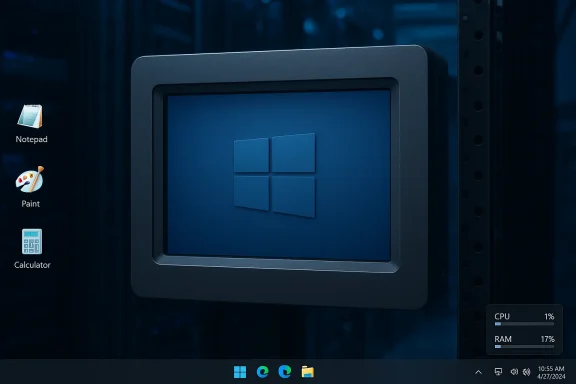
After a clean install of Windows 11 IoT Enterprise LTSC 2024, several things stand out immediately:- Minimal Start menu and taskbar. The taskbar feels deliberately blank. There’s no Copilot icon, no Widgets flyout, and no persistent Store promotions. That emptiness translates to fewer background services and a calmer desktop. This is the crux of LTSC’s appeal for users tired of persistent OS nudges.
- Classic apps, not modernized ones. The image includes classic Win32 versions of Notepad, Paint, Calculator and Snipping Tool rather than the modern UWP/WinUI apps. These apps are lean, fast, and free from AI integrations and telemetry features that ship in consumer builds.
- Smaller disk footprint and lower idle CPU use. On a fresh image the disk usage is notably lower than a consumer Windows 11 image. Background CPU and RAM usage are reduced because several consumer services and telemetry collectors are absent. My own measurements reflected a lighter idle profile, which is why many hobbyists and admins covet LTSC. (This behavior is consistent with community testing and forum reports.)
- Edge is present—still a vector for marketing. LTSC does ship Edge (as the supported browser), and Edge’s new‑tab and default home experience in 2026 still surface news and promotional content unless you tweak settings. That means LTSC is not a browser‑free box: Edge remains a first‑party path to the web and, by extension, to Microsoft’s services. Edge is not removed in LTSC by default; it’s retained as the supported modern browser.
Installation caveats, licensing and activation realities
The technical joy of LTSC is tempered by real licensing mechanics. These are non‑negotiable operational facts you must accept before adopting LTSC as a daily driver.- Evaluation vs production media. Microsoft’s Eval Center offers a 90‑day trial ISO for Windows 11 IoT Enterprise LTSC. That trial is intentionally time‑bounded; evaluation builds cannot be activated past the trial with retail or OEM keys. If you install the evaluation image on real hardware, plan to convert or reinstall with the correct licensed media before the trial expires.
- Licensing channels differ. Windows 11 Enterprise LTSC standard is distributed via Volume Licensing (and tied to Software Assurance and enterprise agreements); IoT Enterprise LTSC is typically distributed through OEMs and IoT channel partners. That means purchasing an LTSC license as an individual is possible but not straightforward—you usually must go through a reseller or OEM channel.
- You generally cannot upgrade an existing Pro/Home install to LTSC in‑place. Microsoft’s upgrade guidance and community testing indicate that channel/edition changes into LTSC are either unsupported or require special upgrade paths; a clean install is commonly recommended when moving from consumer SKUs to LTSC. This is a concrete, practical blocker if you expected to “convert” your daily Pro machine without wiping and reinstalling.
- Evaluation images may show activation errors if you try to use non‑matching keys. Install the correct channel image for your license to avoid activation issues—OEM keys will not activate an Eval ISO and vice versa. Microsoft Q&A and support threads contain real‑world examples of users hitting this mismatch.
Strengths: where LTSC truly outshines standard Windows 11
- Deterministic stability. For machines that run a fixed workload (medical imaging, point‑of‑sale, industrial controllers), LTSC’s frozen feature set is a huge win. No surprise UX changes, no unexpected feature update breaking a pipe.
- Lower maintenance surface. Fewer components to patch functionally; admins can focus on security updates rather than testing features. That reduces validation work and the risk of regressions after updates.
- Smaller disk footprint and fewer background processes. Practical benefits on low‑storage or low‑memory devices; optional minimums (2 GB RAM / 16 GB storage) enable use on constrained embedded platforms where consumer Windows would not be permitted.
- Reduced telemetry and consumer services. LTSC removes many consumer UIs, advertising surfaces, and modern app telemetry by design. For privacy‑conscious deployments or air‑gapped devices, this is valuable.
Risks and trade‑offs: what you lose by choosing LTSC
LTSC’s advantages come with nontrivial trade‑offs; understanding them is essential before adoption.- No continuous feature improvements. If Microsoft introduces system‑level gaming optimizations or security hardening delivered through feature updates (not just cumulative patches), LTSC devices won’t receive them until you deploy a later LTSC release. Gamers and power users may miss optimizations delivered to SAC builds.
- Compatibility gaps with modern apps. Some modern apps and Microsoft 365 features (especially Copilot‑enabled experiences) assume a GA consumer Windows build. Copilot and many subscription‑tied AI features are not part of LTSC by design; if you need those experiences, LTSC is not the right choice.
- Driver and hardware support over time. LTSC images are tied to silicon available at release. New hardware released years later may not have drivers or certified support for an older LTSC image, so long‑term hardware refreshes are more complicated. Planning spares and validated hardware stacks is essential.
- Licensing complexity and procurement friction. The cost and channels for LTSC are not the same as retail Windows; organizations must plan licensing and activation accordingly. Using Eval ISOs indefinitely is not supported or safe.
Practical use cases: when LTSC is the right call
- Devices that must remain unchanged for regulatory reasons (medical equipment, industrial controls).
- Kiosks, digital signage, and retail POS appliances where the system’s UI must not mutate mid‑life.
- Thin clients, single‑purpose terminals, and constrained embedded platforms where reduced resource usage matters.
- Older hardware that meets IoT optional minima—where using a SAC consumer Windows build is impossible or impractical.
How to approach evaluating LTSC on a personal machine (step‑by‑step)
- Obtain the evaluation ISO from Microsoft’s Evaluation Center and use a VM or spare disk—don’t install on your daily production machine. The evaluation is time‑limited (commonly 90 days).
- Test your core apps and drivers in the LTSC image; note app installers that rely on the Microsoft Store or WinRT components. //licendi.com/en/blog/differences-windows-11-enterprise-Iot-ltsc-vs-ltsc%20/)
- Validate hardware drivers and firmware behavior. If you rely on Surface‑specific features or recent peripheral drivers, verify they work with the 24H2 base.
- If you decide to adopt LTSC in production, procure appropriate licenses from your OEM or volume reseller—not the Eval ISO. Plan a clean deployment image with the correct license channel.
The long view: LTSC and the future of “minimal Windows”
LTSC is not a nostalgic backdoor to “Windows 7 again” but rather a formal Microsoft product that codifies the idea that some devices should be kept unchanged. The market response from enthusiasts and admins reveals two truths:- There is a real user desire for a quieter, minimal Windows without subscription prompts and pervasive AI surfaces.
- Microsoft will continue to provide a split strategy: SAC Windows for cutting‑edge features (including Copilot) and LTSC for stable, long‑lifecycle deployments. That division is intentional and, for a defined subset of scenarios, valuable.
Final verdict: who should switch, who should stay put
- Choose Windows 11 LTSC if you manage devices that must remain consistent for years, if you run single‑purpose machines with tight hardware constraints, or if you must eliminate UX and feature churn for certification reasons.
- Avoid LTSC if you want the latest Windows features, seamless Microsoft 365/Copilot integration, or if you’re a gamer who benefits from the continuous hardware and software optimizations Microsoft is increasingly shipping to SAC Windows 11.
If you want a clean, quiet Windows without Copilot and the modern app churn—test the LTSC evaluation in a VM and make an informed decision about licensing before you commit. The payoff is a leaner, quieter desktop that, for the right workload, is the closest thing to a no‑nonsense Windows 11 you can legally run today.
Source: Windows Latest I tested Windows 11 LTSC in 2026, and it's the best version of Windows 11 without Copilot, AI and other bloat
