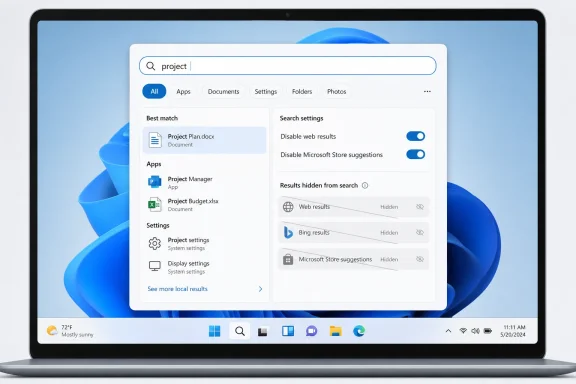
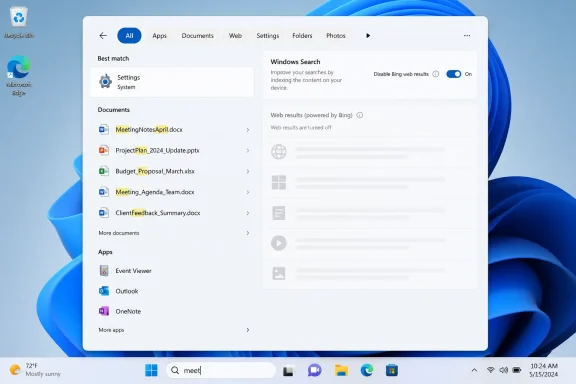
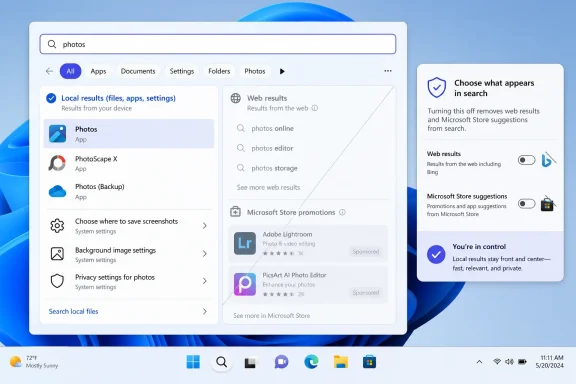
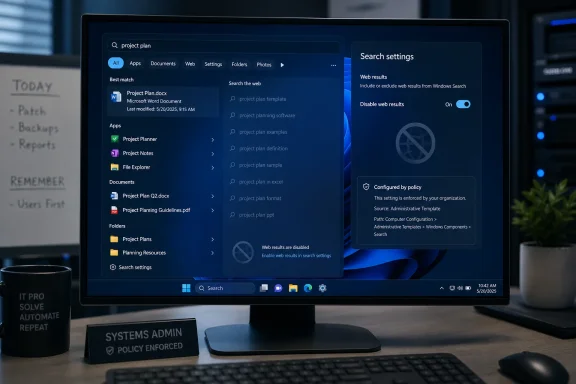
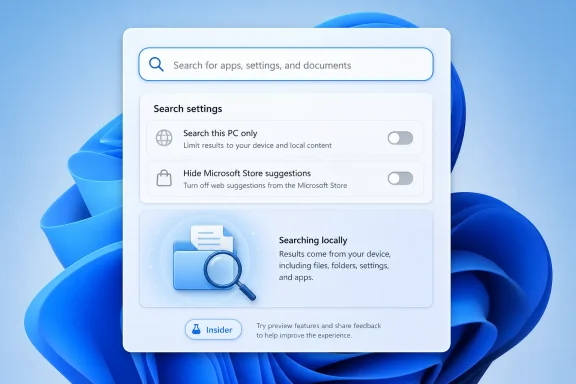
Microsoft is preparing a Windows 11 Search option that would let users disable Bing-powered web results and Microsoft Store suggestions directly, with testing reportedly beginning for Windows Insiders in the coming weeks after years of registry workarounds. The change is small in interface terms and large in meaning: Microsoft appears ready to admit that the Start menu search box is first and foremost a PC search box. If it ships broadly, it will mark a rare retreat from one of Windows 11’s most persistent engagement funnels.
That does not mean Windows Search is suddenly fixed. It means Microsoft has finally separated two problems it has too often treated as one: finding things on your own computer, and routing idle curiosity through Bing, MSN, Rewards, Store listings, and now Copilot-adjacent experiences. The former is an operating system feature. The latter is a business strategy wearing the clothes of convenience.
The Windows Search dispute has always sounded more trivial than it is. On paper, the Start menu search field is just a launcher: type “Word,” “Device Manager,” “invoice,” or “Bluetooth,” and Windows should take you where you meant to go. In practice, it became a crowded little billboard where local apps, settings, files, Bing results, Microsoft Store prompts, newsy web suggestions, and account-linked services all fought for the top slot.
That fight is what users noticed. Nobody objects to a web search feature existing somewhere in Windows. The anger came from the mismatch between intent and result: a user opens Start, types a few characters looking for a file, and gets a web suggestion that feels less like help than interception.
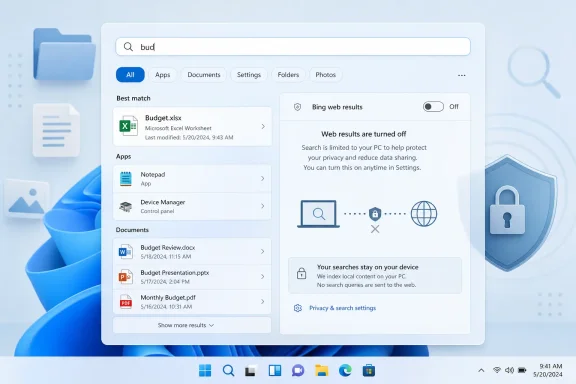
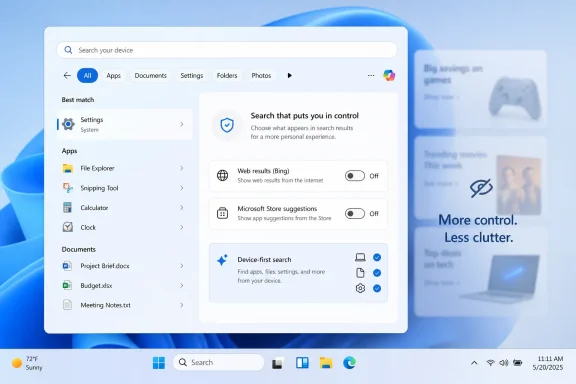
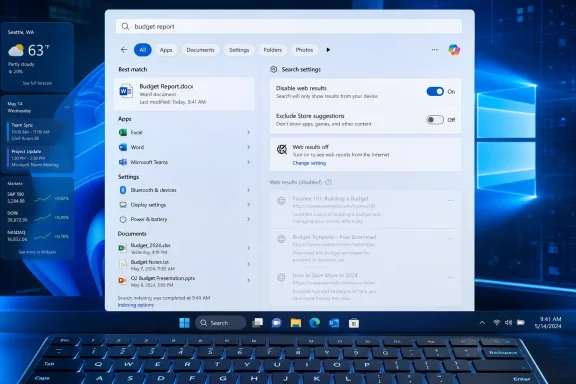
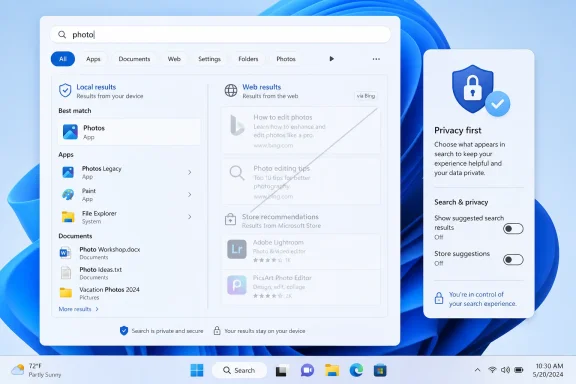
Windows Latest now reports that Microsoft is testing a local-only mode for Windows Search. The reported toggle would disable web searches inside Windows Search entirely, and a separate control would suppress Store results for apps that are not installed. That matters because Store suggestions are not quite web results, yet they serve the same purpose from the user’s point of view: they interrupt the act of finding what is already on the machine.
Microsoft has not turned Windows Search into a clean local index overnight. The company is instead testing an opt-out from some of the most complained-about intrusions. That distinction is important, because Windows users have learned the hard way that a toggle in preview is not the same thing as a durable product policy.
Registry-based fixes are not just inconvenient; they reveal where Microsoft placed the boundary of legitimacy. A feature exposed in Settings is a preference. A feature controlled through obscure policy keys is something Microsoft permits only for the stubborn, the technical, or the managed.
That was always the wrong model for Windows Search. We are not talking about a niche kernel behavior or a compatibility switch for legacy software. We are talking about whether typing into the operating system’s launcher should query the internet. That choice belongs in the interface, not in a hidden administrative maze.
The reported new toggle would not merely save users a trip through
But Windows Search developed a trust problem because the blending did not feel neutral. Bing results were not simply one class of answer among many. They were also a route into Microsoft’s advertising and services ecosystem, a way to promote Edge-era web habits, and a source of Microsoft Rewards engagement. The user might have wanted
That is where the annoyance became structural. When the local index misses a file, the right answer is “I cannot find it,” or better, “I am still indexing it.” The wrong answer is a web search that looks suspiciously like the operating system monetizing failure.
The Store suggestions fall into the same category. If a user searches for Spotify and does not have it installed, a Store listing with a “Get” button may be useful. If a user is trying to find a local shortcut, script, document, or setting, it can feel like another layer of promotional clutter. A separate control for Store results is therefore not cosmetic; it acknowledges that installation discovery and local search are different tasks.
One change tied to the current Windows 11 update cycle lowers the threshold for local results, allowing searches with as few as two characters to surface local files and apps more reliably. Previously, short queries could push users toward web suggestions if Windows did not quickly identify a close local match. That was exactly the kind of behavior that made Search feel slippery.
Another preview improvement adds substring matching. If a file is named
These improvements attack the problem from the other side. Disabling Bing removes noise. Better local ranking and substring matching improve signal. Windows Search needs both, because a local-only search engine that still cannot find the file you just saved will merely fail more quietly.
That is not inherently illegitimate. Windows is a commercial platform, and Microsoft is allowed to integrate its services. The problem is priority. When the shell’s most basic affordances feel like they are optimizing for engagement instead of user intent, every search miss becomes evidence in a larger case against the operating system.
Search is particularly sensitive because it is a moment of impatience. Users do not open Search to admire Microsoft’s ecosystem. They open it because they want to launch something, change a setting, recover a document, or complete a task. Inject friction there and the whole OS feels worse.
This is why longtime Windows users can sound disproportionally angry about Bing in Search. They are not merely complaining about a few web links. They are objecting to the feeling that Windows has become less direct, less respectful, and less theirs.
Many organizations already restrict consumer web integrations, cloud content suggestions, and uncontrolled data flows from managed endpoints. A Start menu search box that can send queries to Bing is not automatically a compliance disaster, but it is another behavior to document, configure, and explain. If Microsoft exposes a clean setting and backs it with policy controls, IT departments get a simpler story: local search can be local.
The Store toggle may matter just as much in managed environments. Store discovery can conflict with application control, packaging strategy, licensing rules, and help desk expectations. If employees search for an app and Windows offers a Store install path, that may bypass the organization’s preferred deployment model or create confusion when permissions block installation.
Microsoft’s challenge is consistency. A consumer-facing toggle is useful, but enterprise administrators will want durable controls that survive feature updates, apply per device or per user, and integrate with existing management channels. The worst outcome would be a visible consumer switch while enterprise policy remains fragmented across old registry keys, CSPs, and shell behaviors.
But privacy alone does not explain the frustration. Even users who are not especially worried about telemetry hate being misdirected. The deeper complaint is agency. If I ask my PC for a local file, the PC should not answer with the web unless I clearly ask for the web.
That distinction matters because Microsoft often uses “personalization” and “connected experiences” to describe features that users experience as loss of control. A Bing result in Search may be personalized. It may even be relevant occasionally. But when it appears in a context where the user expected a local answer, relevance is not enough.
A real local-only mode would be valuable because it restores a crisp boundary. The machine can still offer web search elsewhere. Edge can still search the web. Bing can still exist. But the Windows launcher can once again behave like a launcher.
Windows Insider features can change channels, slip schedules, arrive behind controlled feature rollouts, or disappear after telemetry review. Microsoft may alter the wording, split the controls across Settings pages, limit availability by region, or tie behavior to account and policy state. The company may also decide that some Bing-backed “suggestions” are not technically web search and therefore remain visible unless another switch is disabled.
That last point is worth watching. Windows has accumulated overlapping categories: web results, search suggestions, highlights, cloud content, Store listings, Copilot surfaces, and account-connected recommendations. Users will judge the toggle by outcome, not taxonomy. If they turn off web search and still see web-shaped clutter, the backlash will be immediate.
Microsoft therefore needs to make the control plain. “Search this PC only” is a user expectation. Anything more lawyerly risks repeating the mistake.
The new two-character and substring improvements are evidence that Microsoft understands at least part of this. Search quality begins with matching the thing the user remembers, not the thing the system wishes the user had typed. If someone remembers the middle of a filename, a fragment of a compound word, or a partial setting name, Search should meet them there.
But local search also needs transparency. If a folder is not indexed, Windows should make that obvious. If a file is still being processed, Search should say so. If a result comes from the web, Store, OneDrive, SharePoint, or the local disk, the interface should clearly distinguish it without making the user decode tabs and icons.
The great irony is that Microsoft knows how to build powerful search when it wants to. Microsoft 365 search, SharePoint indexing, Windows file indexing, and Bing’s web systems all solve hard retrieval problems at massive scale. The Start menu’s failures are not proof that Microsoft lacks search expertise. They are proof that product incentives can make a simple experience worse.
If Windows Search cannot reliably find Notepad, a PDF, or a network setting without shoving web content into the path, users will be less patient with a richer assistant layered nearby. Copilot cannot be the answer to a launcher that has forgotten its job. In fact, the more ambitious Microsoft becomes with AI in Windows, the more important it is that basic local workflows feel fast and deterministic.
There is also a branding risk. Users already conflate Bing, Copilot, Edge, MSN, Rewards, and Windows suggestions into one mental bucket: Microsoft stuff that appears when they did not ask for it. A clean local Search toggle could help separate useful platform intelligence from unwanted promotion.
That separation is essential if Microsoft wants Copilot to be seen as a tool rather than another intrusion. The first step is allowing users to say no to the web in places where the web was never the point.
A good Search toggle would not be anti-Bing. It would be pro-Windows. It would recognize that the operating system’s first obligation is to the task the user is performing, not to the service Microsoft would prefer the user to sample next.
Near term, the things to watch are concrete:
That does not mean Windows Search is suddenly fixed. It means Microsoft has finally separated two problems it has too often treated as one: finding things on your own computer, and routing idle curiosity through Bing, MSN, Rewards, Store listings, and now Copilot-adjacent experiences. The former is an operating system feature. The latter is a business strategy wearing the clothes of convenience.
 Microsoft Finally Blinks on the Search Box
The Windows Search dispute has always sounded more trivial than it is. On paper, the Start menu search field is just a launcher: type “Word,” “Device Manager,” “invoice,” or “Bluetooth,” and Windows should take you where you meant to go. In practice, it became a crowded little billboard where local apps, settings, files, Bing results, Microsoft Store prompts, newsy web suggestions, and account-linked services all fought for the top slot.That fight is what users noticed. Nobody objects to a web search feature existing somewhere in Windows. The anger came from the mismatch between intent and result: a user opens Start, types a few characters looking for a file, and gets a web suggestion that feels less like help than interception.
Windows Latest now reports that Microsoft is testing a local-only mode for Windows Search. The reported toggle would disable web searches inside Windows Search entirely, and a separate control would suppress Store results for apps that are not installed. That matters because Store suggestions are not quite web results, yet they serve the same purpose from the user’s point of view: they interrupt the act of finding what is already on the machine.
Microsoft has not turned Windows Search into a clean local index overnight. The company is instead testing an opt-out from some of the most complained-about intrusions. That distinction is important, because Windows users have learned the hard way that a toggle in preview is not the same thing as a durable product policy.
The Registry Hack Was an Admission of Failure
For years, the standard advice for disabling Bing in Windows Search has read like a parody of modern consumer software: open Registry Editor, navigate through policy keys, create or modify DWORD values, restart Explorer, and hope the next update does not reinterpret your preference. Enthusiasts can do that. Administrators can automate it. Ordinary users should never have needed to.Registry-based fixes are not just inconvenient; they reveal where Microsoft placed the boundary of legitimacy. A feature exposed in Settings is a preference. A feature controlled through obscure policy keys is something Microsoft permits only for the stubborn, the technical, or the managed.
That was always the wrong model for Windows Search. We are not talking about a niche kernel behavior or a compatibility switch for legacy software. We are talking about whether typing into the operating system’s launcher should query the internet. That choice belongs in the interface, not in a hidden administrative maze.
The reported new toggle would not merely save users a trip through
regedit. It would move the decision from the realm of hacks into the realm of consent. That is why this change, if it survives preview testing, deserves more attention than its modest UI footprint suggests.Bing Was Never Just a Search Result
Microsoft’s defense of web integration has long rested on the idea that search should be universal. From that perspective, it is reasonable for one box to find apps, documents, settings, web pages, contacts, and answers. Apple’s Spotlight, GNOME’s overview, Android’s launcher search, and countless third-party tools all blur these lines to some extent.But Windows Search developed a trust problem because the blending did not feel neutral. Bing results were not simply one class of answer among many. They were also a route into Microsoft’s advertising and services ecosystem, a way to promote Edge-era web habits, and a source of Microsoft Rewards engagement. The user might have wanted
services.msc; the platform saw an opportunity to turn a failed local match into a web query.That is where the annoyance became structural. When the local index misses a file, the right answer is “I cannot find it,” or better, “I am still indexing it.” The wrong answer is a web search that looks suspiciously like the operating system monetizing failure.
The Store suggestions fall into the same category. If a user searches for Spotify and does not have it installed, a Store listing with a “Get” button may be useful. If a user is trying to find a local shortcut, script, document, or setting, it can feel like another layer of promotional clutter. A separate control for Store results is therefore not cosmetic; it acknowledges that installation discovery and local search are different tasks.
Local Results Are Being Promoted Because They Should Have Won All Along
The timing of this reported Bing toggle is not isolated. Microsoft has already been testing and rolling out smaller Search improvements intended to make Windows behave more like users expect.One change tied to the current Windows 11 update cycle lowers the threshold for local results, allowing searches with as few as two characters to surface local files and apps more reliably. Previously, short queries could push users toward web suggestions if Windows did not quickly identify a close local match. That was exactly the kind of behavior that made Search feel slippery.
Another preview improvement adds substring matching. If a file is named
MeetingNotesApril or ProjectStatusReport, Windows Search should be able to find it when the user types “April” or “Status,” not only when the query starts from the beginning of the filename. This is basic modern search behavior, and its arrival in Windows 11 preview builds is welcome precisely because it should not be remarkable.These improvements attack the problem from the other side. Disabling Bing removes noise. Better local ranking and substring matching improve signal. Windows Search needs both, because a local-only search engine that still cannot find the file you just saved will merely fail more quietly.
The Start Menu Became a Product Surface Before It Finished Being a Tool
Windows 11’s Search controversy sits inside a broader design pattern: Microsoft keeps treating the shell as a discovery surface for company services before it has fully earned that privilege as a dependable tool. The Start menu, Widgets board, account prompts, Edge handoffs, OneDrive nudges, Copilot entry points, and Store recommendations all reflect a company that sees the desktop as a distribution channel.That is not inherently illegitimate. Windows is a commercial platform, and Microsoft is allowed to integrate its services. The problem is priority. When the shell’s most basic affordances feel like they are optimizing for engagement instead of user intent, every search miss becomes evidence in a larger case against the operating system.
Search is particularly sensitive because it is a moment of impatience. Users do not open Search to admire Microsoft’s ecosystem. They open it because they want to launch something, change a setting, recover a document, or complete a task. Inject friction there and the whole OS feels worse.
This is why longtime Windows users can sound disproportionally angry about Bing in Search. They are not merely complaining about a few web links. They are objecting to the feeling that Windows has become less direct, less respectful, and less theirs.
Enterprise IT Will Read the Toggle Differently
For home users, the reported toggle is a quality-of-life improvement. For administrators, it could become a policy conversation.Many organizations already restrict consumer web integrations, cloud content suggestions, and uncontrolled data flows from managed endpoints. A Start menu search box that can send queries to Bing is not automatically a compliance disaster, but it is another behavior to document, configure, and explain. If Microsoft exposes a clean setting and backs it with policy controls, IT departments get a simpler story: local search can be local.
The Store toggle may matter just as much in managed environments. Store discovery can conflict with application control, packaging strategy, licensing rules, and help desk expectations. If employees search for an app and Windows offers a Store install path, that may bypass the organization’s preferred deployment model or create confusion when permissions block installation.
Microsoft’s challenge is consistency. A consumer-facing toggle is useful, but enterprise administrators will want durable controls that survive feature updates, apply per device or per user, and integrate with existing management channels. The worst outcome would be a visible consumer switch while enterprise policy remains fragmented across old registry keys, CSPs, and shell behaviors.
Privacy Is Part of the Story, But Control Is the Bigger One
It is tempting to frame this entire issue as privacy: local queries should not leave the device. That argument has force, especially for users who type filenames, project names, client names, or internal terms into Search without thinking of them as web queries. The operating system should be conservative about turning local intent into network activity.But privacy alone does not explain the frustration. Even users who are not especially worried about telemetry hate being misdirected. The deeper complaint is agency. If I ask my PC for a local file, the PC should not answer with the web unless I clearly ask for the web.
That distinction matters because Microsoft often uses “personalization” and “connected experiences” to describe features that users experience as loss of control. A Bing result in Search may be personalized. It may even be relevant occasionally. But when it appears in a context where the user expected a local answer, relevance is not enough.
A real local-only mode would be valuable because it restores a crisp boundary. The machine can still offer web search elsewhere. Edge can still search the web. Bing can still exist. But the Windows launcher can once again behave like a launcher.
Preview Features Have a Way of Changing Shape
The reported toggle is not yet a finished public promise. Windows Latest says the capability was quietly teased at a private Windows Insider meet-up and that testing should begin in the coming weeks. That puts the feature in the realm of credible preview reporting, not guaranteed servicing reality.Windows Insider features can change channels, slip schedules, arrive behind controlled feature rollouts, or disappear after telemetry review. Microsoft may alter the wording, split the controls across Settings pages, limit availability by region, or tie behavior to account and policy state. The company may also decide that some Bing-backed “suggestions” are not technically web search and therefore remain visible unless another switch is disabled.
That last point is worth watching. Windows has accumulated overlapping categories: web results, search suggestions, highlights, cloud content, Store listings, Copilot surfaces, and account-connected recommendations. Users will judge the toggle by outcome, not taxonomy. If they turn off web search and still see web-shaped clutter, the backlash will be immediate.
Microsoft therefore needs to make the control plain. “Search this PC only” is a user expectation. Anything more lawyerly risks repeating the mistake.
Better Search Requires More Than Removing Bing
Killing Bing inside Windows Search would solve one visible annoyance, but it would not solve the underlying reputation problem. Windows Search has long struggled with freshness, indexing scope, ranking, and discoverability. Users complain that files they just created do not appear, that settings are inconsistently named, that Control Panel-era tools compete with Settings pages, and that indexed locations do not behave intuitively.The new two-character and substring improvements are evidence that Microsoft understands at least part of this. Search quality begins with matching the thing the user remembers, not the thing the system wishes the user had typed. If someone remembers the middle of a filename, a fragment of a compound word, or a partial setting name, Search should meet them there.
But local search also needs transparency. If a folder is not indexed, Windows should make that obvious. If a file is still being processed, Search should say so. If a result comes from the web, Store, OneDrive, SharePoint, or the local disk, the interface should clearly distinguish it without making the user decode tabs and icons.
The great irony is that Microsoft knows how to build powerful search when it wants to. Microsoft 365 search, SharePoint indexing, Windows file indexing, and Bing’s web systems all solve hard retrieval problems at massive scale. The Start menu’s failures are not proof that Microsoft lacks search expertise. They are proof that product incentives can make a simple experience worse.
Copilot Raises the Stakes for Getting the Basics Right
The reported local-only Search work also arrives as Microsoft continues to weave Copilot more deeply into Windows. That creates a delicate balance. AI entry points may be genuinely useful for some tasks, but they will inherit the trust level of the shell around them.If Windows Search cannot reliably find Notepad, a PDF, or a network setting without shoving web content into the path, users will be less patient with a richer assistant layered nearby. Copilot cannot be the answer to a launcher that has forgotten its job. In fact, the more ambitious Microsoft becomes with AI in Windows, the more important it is that basic local workflows feel fast and deterministic.
There is also a branding risk. Users already conflate Bing, Copilot, Edge, MSN, Rewards, and Windows suggestions into one mental bucket: Microsoft stuff that appears when they did not ask for it. A clean local Search toggle could help separate useful platform intelligence from unwanted promotion.
That separation is essential if Microsoft wants Copilot to be seen as a tool rather than another intrusion. The first step is allowing users to say no to the web in places where the web was never the point.
The Small Switch That Says Microsoft Heard the Complaint
The practical lesson from this episode is not that Microsoft has abandoned Bing. It has not. Bing remains central to Microsoft’s search, advertising, AI, and browser strategies. The lesson is that Windows users can still force a boundary when a platform integration becomes too obviously hostile to everyday workflow.A good Search toggle would not be anti-Bing. It would be pro-Windows. It would recognize that the operating system’s first obligation is to the task the user is performing, not to the service Microsoft would prefer the user to sample next.
Near term, the things to watch are concrete:
- Microsoft is reportedly preparing a Windows 11 Search setting that disables Bing-powered web results without requiring Registry edits.
- The company is also reportedly testing a way to hide Microsoft Store app suggestions from Search results.
- Recent Windows 11 preview work includes substring matching, so files with compound names can be found from words in the middle of the name.
- Current Windows 11 Search improvements are intended to rank local files and apps above web suggestions, even for very short queries.
- The feature will matter most if Microsoft exposes it clearly in Settings and supports it with reliable administrative policy controls.
- Users should treat the report as promising but provisional until the toggle appears in public Insider builds and survives the trip toward general release.
References
- Primary source: Windows Latest
Published: Sat, 06 Jun 2026 23:44:23 GMT
Microsoft is letting you kill Bing in Windows 11 Search, after years of forcing it on every PC
Microsoft is testing a new Windows 11 Search toggle that disables Bing, MSN, and Microsoft Store results, ending years of forced web results. www.windowslatest.com
- Related coverage: techradar.com
Windows 11 search is getting a fix for a glaring issue that really bugs me — and it's about time | TechRadar
Long compound file names will no longer confuse the search function (hopefully)www.techradar.com - Related coverage: windowscentral.com
I dug into the Windows 11 features insiders got in May 2026 and here’s what matters most | Windows Central
May 2026 brought a wave of Windows 11 improvements, focusing on accessibility, productivity, personalization, and system modernization.www.windowscentral.com - Official source: support.microsoft.com
Windows Search and privacy - Microsoft Support
Learn how to connect Windows Search with your accounts in the cloud, manage your Windows Search and SafeSearch settings, clear search history, and more.support.microsoft.com - Related coverage: pcworld.com
How to disable Bing web results in Windows 10's search | PCWorld
Windows 10 has the annoying habit of favoring Bing web search results over local file searches. Here's how to stop it. www.pcworld.com
- Related coverage: tomshardware.com
How to Disable Windows Web Search and Speed Up Your PC | Tom's Hardware
Stop Windows from showing you web results when you just want files and apps.www.tomshardware.com
- Related coverage: windowsforum.com
Windows 11 Search Gets Smarter: Two-Character & Substring Fix (KB5089573) | Windows Forum
Microsoft began rolling out Windows 11 Search improvements in late May 2026, with optional update KB5089573 letting regular PCs find and prioritize files...windowsforum.com - Official source: learn.microsoft.com
Windows 11 - release information | Microsoft Learn
Learn release information for Windows 11 releaseslearn.microsoft.com - Related coverage: techrepublic.com
How to disable Bing results from searches in Windows 10 - TechRepublic
To disable Bing results from your Windows 10 desktop searches you will have to edit the Windows Registry file. But the edit is different depending on your current Windows version.www.techrepublic.com
- Related coverage: techyorker.com
How to Uninstall Bing from Windows 11: A Step-by-Step Guide - TechYorker
Many Windows 11 users search for ways to uninstall Bing because it appears deeply integrated across the operating system. Bing shows up… techyorker.com
- Related coverage: techbaked.com
How To Disable Windows 11 AI Tools Search
Disable Windows 11 AI tools search easily. Learn how to turn off Copilot, Bing AI search, web results, and cloud suggestions using settings, registry, and Group Policy.techbaked.com - Related coverage: techlasi.com
How to Get Rid of Bing in Windows 11/10 (2026 Step-by-Step Guide)
Bing keeps showing up where you did not put it. Your browser homepage changed. Your search engine switched. Edge keeps pushing Bing even when you picktechlasi.com - Related coverage: cincodias.elpais.com
Microsoft separará los resultados de las búsquedas entre los de Windows 11 y los de Bing | Lifestyle | SmartLife | Cinco Días
Los cambios aumentarán las opciones de personalización del sistema operativocincodias.elpais.com