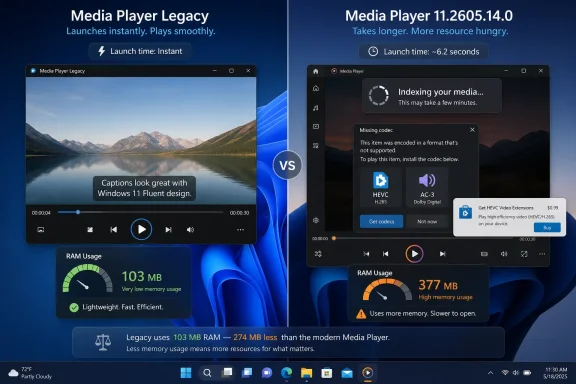
Microsoft’s Windows 11 Media Player is under renewed scrutiny after third-party testing reported roughly 377MB of idle RAM use versus about 103MB for classic Windows Media Player, while Windows 11 24H2 also drops built-in AC-3 playback and still routes HEVC support through a paid Store extension. The numbers are not catastrophic on a modern PC, but they are symbolically brutal. A basic local media player is supposed to be one of the last places where Windows feels light, predictable, and boring. Instead, Microsoft has turned playback into another small example of Windows 11’s larger problem: the default app is prettier, heavier, more dependent on Store plumbing, and less trustworthy than the thing it replaced.
A media player does not need to win a benchmark suite. It needs to open quickly, play the file, consume little memory, and stay out of the way. That is why the reported comparison between the modern Windows 11 Media Player and the classic Windows Media Player has landed with more force than the raw numbers might suggest.
On paper, a few hundred megabytes of RAM is not a crisis. Many users are running Windows 11 machines with 16GB or 32GB of memory, and a single idle app consuming 377MB will not sink a workstation. But a media player idling at more than three times the memory footprint of its predecessor is an uncomfortable reminder of how much overhead now comes bundled with “modern” Windows experiences.
The classic Windows Media Player was never perfect, and nostalgia should not turn it into a saint. It was cluttered, at times awkward, and visibly from another era. But it was also a native-feeling utility that carried the old Windows bargain: if you double-clicked a local file, the system would probably do the obvious thing without demanding attention.
The new Media Player weakens that bargain. If the old app took around two seconds to open a local video and the new one takes around three, that one-second gap is not just a stopwatch result. It is the difference between a utility that feels instantaneous enough to disappear and a utility that reminds you it has a framework, a design language, a Store dependency, and a product strategy behind it.
Media Player sits right at that fault line. It replaced Groove Music as Microsoft’s consolidated music and video app, while the classic Windows Media Player remains available as an optional feature. That phrasing matters. Optional features are where Microsoft puts yesterday’s Windows: still present, still supported enough to avoid a revolt, but no longer treated as the future.
The difficulty is that local media playback is not a lifestyle app category. It is infrastructure. Users do not open a media player because they are excited by Microsoft’s design refresh; they open it because they have a file, a meeting recording, a training clip, a ripped disc, a downloaded lecture, or a home video that needs to play now.
That is why the RAM figure feels so damning. A heavier Photos app is annoying, but at least photo management has acquired cloud, search, editing, and AI expectations. A heavier media player doing nothing is harder to defend. The job is narrower, the user tolerance is lower, and the comparison with the old binary is sitting right there in Windows’ own history.
Microsoft’s answer, implicitly, is that the new app belongs to the modern Windows app model. It integrates with Windows 11’s interface, libraries, metadata, accessibility expectations, and Store-delivered components. That may be true. It also does not absolve Microsoft from the responsibility to make the default utility feel like a utility rather than a dressed-up web-adjacent container.
HEVC, also known as H.265, is not obscure. It is widely used for high-efficiency video, especially in phone recordings, 4K content, and files where storage or bandwidth matters. On Windows, Microsoft’s official route for HEVC playback has long involved the HEVC Video Extensions package in the Microsoft Store, commonly sold for a small one-time fee.
There are licensing reasons for this. HEVC is patent-encumbered, and companies shipping decoders may owe royalties depending on how and where the technology is distributed. Microsoft is not uniquely villainous for treating HEVC differently from older formats.
But user experience does not care about licensing nuance in the moment of failure. The user sees a video file, double-clicks it on a paid operating system, and gets nudged toward a Store add-on. The fee is small, but the friction is large because it violates the expectation that a modern OS can play modern media.
AC-3 makes the situation worse because it changes the direction of travel. Windows 11 version 24H2 no longer includes the AC-3 codec by default, though upgraded systems may retain it and OEMs can still provide it. AC-3, better known as Dolby Digital, is not a fashionable new format chasing tomorrow’s royalty stream. It is a long-lived surround audio format embedded in years of media libraries, DVD-era files, home theater workflows, broadcast captures, and archival content.
The result is a peculiar squeeze. Newer efficient video can require a paid extension, while older surround audio support is being removed from fresh Windows installs. Microsoft can argue that media formats evolve and that third-party apps can fill the gap. Users can fairly respond that the default Windows player is less capable than it used to be.
That framing misses the institutional cost. In a managed environment, “just buy the codec” is not always simple. Procurement policies, Store restrictions, offline imaging, virtual desktops, shared devices, and license tracking can turn a tiny purchase into a help desk ticket generator.
Even at home, the Store handoff is a trust boundary. Users must distinguish Microsoft’s official extension from third-party codec packs, lookalike apps, dubious “HEVC players,” and search-result sludge. The more Windows outsources basic file compatibility to the Store, the more it asks ordinary users to make software supply-chain decisions they are not equipped to make.
This is the same reason codec-pack culture on older Windows versions became such a mess. When the system does not play the file, users go hunting. When users go hunting, they install things. When they install things, security and stability risks multiply.
Microsoft knows this better than anyone. It has spent years hardening Windows, tightening driver models, sandboxing apps, and warning users away from unsigned downloads. Yet the modern media experience still creates a predictable pathway from “my video has no audio” to “I searched the web and installed something.”
That does not mean every Windows user should reflexively install VLC. In some corporate environments, bundling decoders can raise its own licensing and compliance questions. Some users prefer the native look and simpler library model of Microsoft’s app. Others want hardware acceleration behavior tuned through the Windows media stack.
But VLC’s popularity exposes the weakness of Microsoft’s position. When the default app cannot reliably play the files users already have, the default app stops being the default in practice. It becomes the thing people try before installing the thing that works.
For enthusiasts, the alternative ecosystem is rich. MPC-HC derivatives, mpv-based players, Plex, Kodi, and other tools cover different parts of the local playback world. For ordinary users, though, choice is less charming. They did not ask for a media-player comparison chart; they asked Windows to open a file.
That is the reputational risk. Microsoft does not lose because a power user installs VLC. Microsoft loses because the user’s first contact with Windows media playback is a failure message, a paid extension, or a heavier app that feels slower than the relic it replaced.
Microsoft often keeps legacy components around because enterprise customers demand continuity. Control Panel has survived repeated attempts to bury it. Old management consoles coexist with Settings. Compatibility shims, optional features, and ancient dialogs remain because Windows is not just an operating system; it is an archaeological site with service-level agreements.
That history is usually a strength. Windows endures because it does not casually break the past. But Media Player shows the awkwardness of Microsoft’s current transition strategy: the company wants to push polished modern defaults while relying on legacy components to preserve credibility when the modern versions fall short.
The result is a two-tier Windows experience. The new app is what Microsoft wants users to see. The old app is what knowledgeable users keep around because it is faster, lighter, or more predictable. That split is familiar across Windows 11, and it is not healthy.
A platform should not train its most loyal users to distrust its defaults. Once that habit forms, every redesign starts from a deficit. The user does not ask, “What did Microsoft improve?” The user asks, “What did Microsoft remove, slow down, monetize, or hide this time?”
That means two PCs both labeled “Windows 11 24H2” can behave differently when asked to play the same file. In a consumer setting, that is confusing. In an enterprise, school, media shop, legal office, or training department, it is the kind of inconsistency that creates avoidable support work.
The practical failures may be narrow but irritating. A training video with AC-3 audio may appear to play silently. A court exhibit, archived meeting, surveillance export, or old DVD rip may fail in the native player. A user may assume the file is corrupt when the real issue is an absent system codec.
This is where Microsoft’s documentation-first approach often falls flat. A support page can say that AC-3 is no longer included beginning with Windows 11 24H2, and technically that is disclosure. But users experience the change at the file level, not the release-note level.
Administrators will adapt. They always do. They will standardize on third-party players, bake extensions into images where licensing permits, document exceptions, or tell users not to rely on Media Player for anything beyond mainstream formats. But every workaround quietly narrows the role of Windows’ own defaults.
The deeper complaint is that Windows keeps asking users to accept heavier defaults while offering less certainty. The new app may look more at home in Windows 11, but it reportedly opens files more slowly. The new media stack may be more modular, but popular formats can require add-ons. The OS may be more polished, but the old tool remains appealing because it does the simple thing with less drama.
This matters because Windows 11 has never fully escaped the sense that it is a negotiated upgrade. Hardware requirements cut off older but usable PCs. Interface changes rearranged long-standing workflows. Default app behavior, Start menu design, account pressure, Edge promotion, and Store integration all contributed to a feeling that Microsoft was optimizing for its own product roadmap as much as for the user’s task.
Media Player is a small app, but small apps are where operating systems earn affection. Notepad, Paint, Calculator, Snipping Tool, File Explorer, Photos, and Media Player are not prestige software. They are the front desk. If they are fast, dependable, and respectful, the whole system feels better.
When one of those front-desk apps becomes slower, heavier, and more conditional about what it can open, users notice. They may not write a manifesto. They just install something else.
But Microsoft is not a small developer trying to avoid a ruinous royalty bill. It sells Windows licenses, collects OEM revenue, monetizes Microsoft 365, operates the Store, promotes OneDrive, embeds ads and recommendations in parts of the shell, and uses Windows as a strategic platform for Edge, Copilot, Xbox, and Azure-adjacent identity. Users are entitled to ask what the base platform includes in exchange.
The company’s current answer feels increasingly modular: the OS provides the shell, the Store supplies extensions, OEMs fill gaps, and third-party apps handle edge cases. That architecture may be rational from Redmond’s balance sheet. It is less satisfying from the user’s desk.
There is also a competitive optics problem. Apple has its own codec and licensing constraints, but users generally expect iPhones and Macs to handle the media those devices create. Android device support varies, but phone vendors understand that camera formats must play back seamlessly. Windows, by contrast, often looks like the platform where compatibility is technically possible but procedurally annoying.
That is a dangerous brand position for the world’s dominant desktop OS. Windows should be the place where files open. If it becomes the place where users diagnose extensions, compare codec coverage, and choose between old and new players, Microsoft has ceded a core part of the PC’s promise.
That blur has consequences. Store availability can vary by region, policy, account state, device configuration, or enterprise lockdown. Some organizations disable consumer Store access entirely. Some users run local accounts and avoid Microsoft account sign-ins where possible. Others simply do not trust Store search results enough to know which package is official.
The HEVC extension is therefore not just a codec. It is a test of whether Microsoft’s modern Windows distribution model can gracefully handle low-level capability. Too often, the answer feels like “yes, if you already understand the model.”
The AC-3 removal points in the same direction. If Microsoft wants codecs to be modular, it must make missing-codec experiences exceptionally clear, safe, and admin-friendly. A user should not need to know what AC-3 means to understand why their file has no audio. An administrator should not need to reverse-engineer which machines retained the codec after upgrade and which clean installs lack it.
Windows has the telemetry, UI surface, and enterprise tooling to do better. It could identify missing formats more clearly, route users only to verified Microsoft or OEM packages, expose codec state in Settings, and give admins clean policy controls. Instead, the current experience too often feels like a shrug dressed as modularity.
The average user does not know the difference between a container and a codec. They do not know that an MKV file may contain HEVC video, AC-3 audio, subtitles, and metadata, each with separate support implications. They do not care whether the failure belongs to Media Foundation, a Store extension, Dolby licensing, or Microsoft’s app team.
Nor should they. The operating system’s job is to turn those details into a simple outcome. If the answer is “this format requires an additional component,” the path should be obvious, safe, and consistent. If the answer is “Microsoft no longer includes this decoder,” the explanation should be plain.
The current controversy shows that Microsoft has not earned that simplicity. The company has built a modern player that looks cleaner but may run heavier. It has preserved the classic player but hidden it behind optional-feature status. It has codec explanations in support documents but still leaves users to collide with format gaps one file at a time.
That is not a disaster. It is worse in a quieter way: it is erosion. Each small papercut teaches users that Windows’ built-in answer is provisional.
Microsoft can still fix the story without resurrecting every legacy component forever. It can reduce the new Media Player’s idle footprint, improve startup time, make missing-codec prompts clearer, give administrators better controls, and stop treating “available somewhere in the Store” as equivalent to “supported by Windows.” The company does not need to make Media Player beloved; it needs to make it boring again. In the long run, that may be the real test for Windows 11’s default apps: not whether they look modern in screenshots, but whether they quietly preserve the confidence that a PC will open the file in front of you.
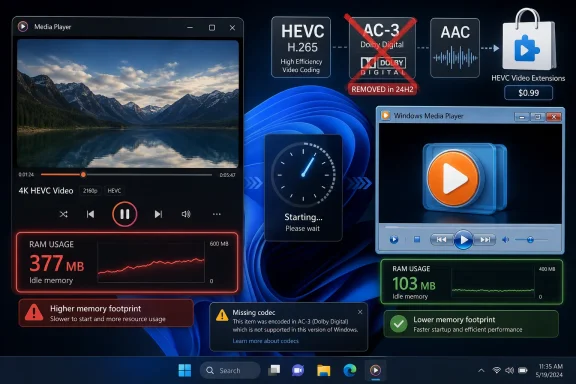 The New Player Loses the One Test a Media App Must Pass
A media player does not need to win a benchmark suite. It needs to open quickly, play the file, consume little memory, and stay out of the way. That is why the reported comparison between the modern Windows 11 Media Player and the classic Windows Media Player has landed with more force than the raw numbers might suggest.On paper, a few hundred megabytes of RAM is not a crisis. Many users are running Windows 11 machines with 16GB or 32GB of memory, and a single idle app consuming 377MB will not sink a workstation. But a media player idling at more than three times the memory footprint of its predecessor is an uncomfortable reminder of how much overhead now comes bundled with “modern” Windows experiences.
The classic Windows Media Player was never perfect, and nostalgia should not turn it into a saint. It was cluttered, at times awkward, and visibly from another era. But it was also a native-feeling utility that carried the old Windows bargain: if you double-clicked a local file, the system would probably do the obvious thing without demanding attention.
The new Media Player weakens that bargain. If the old app took around two seconds to open a local video and the new one takes around three, that one-second gap is not just a stopwatch result. It is the difference between a utility that feels instantaneous enough to disappear and a utility that reminds you it has a framework, a design language, a Store dependency, and a product strategy behind it.
Microsoft Modernized the Shell, Then Forgot the Utility
Windows 11’s app redesigns have always had two audiences. One is the consumer who wants Windows to look contemporary next to macOS, iPadOS, Android, and ChromeOS. The other is the administrator who has to support the resulting stack when the pretty new defaults behave differently from the old ones.Media Player sits right at that fault line. It replaced Groove Music as Microsoft’s consolidated music and video app, while the classic Windows Media Player remains available as an optional feature. That phrasing matters. Optional features are where Microsoft puts yesterday’s Windows: still present, still supported enough to avoid a revolt, but no longer treated as the future.
The difficulty is that local media playback is not a lifestyle app category. It is infrastructure. Users do not open a media player because they are excited by Microsoft’s design refresh; they open it because they have a file, a meeting recording, a training clip, a ripped disc, a downloaded lecture, or a home video that needs to play now.
That is why the RAM figure feels so damning. A heavier Photos app is annoying, but at least photo management has acquired cloud, search, editing, and AI expectations. A heavier media player doing nothing is harder to defend. The job is narrower, the user tolerance is lower, and the comparison with the old binary is sitting right there in Windows’ own history.
Microsoft’s answer, implicitly, is that the new app belongs to the modern Windows app model. It integrates with Windows 11’s interface, libraries, metadata, accessibility expectations, and Store-delivered components. That may be true. It also does not absolve Microsoft from the responsibility to make the default utility feel like a utility rather than a dressed-up web-adjacent container.
The Codec Story Is Where Annoyance Becomes Distrust
The performance complaint is only half the story. The more consequential issue is codec support, because that is where ordinary users stop thinking “this app is inefficient” and start thinking “Windows is nickel-and-diming me.”HEVC, also known as H.265, is not obscure. It is widely used for high-efficiency video, especially in phone recordings, 4K content, and files where storage or bandwidth matters. On Windows, Microsoft’s official route for HEVC playback has long involved the HEVC Video Extensions package in the Microsoft Store, commonly sold for a small one-time fee.
There are licensing reasons for this. HEVC is patent-encumbered, and companies shipping decoders may owe royalties depending on how and where the technology is distributed. Microsoft is not uniquely villainous for treating HEVC differently from older formats.
But user experience does not care about licensing nuance in the moment of failure. The user sees a video file, double-clicks it on a paid operating system, and gets nudged toward a Store add-on. The fee is small, but the friction is large because it violates the expectation that a modern OS can play modern media.
AC-3 makes the situation worse because it changes the direction of travel. Windows 11 version 24H2 no longer includes the AC-3 codec by default, though upgraded systems may retain it and OEMs can still provide it. AC-3, better known as Dolby Digital, is not a fashionable new format chasing tomorrow’s royalty stream. It is a long-lived surround audio format embedded in years of media libraries, DVD-era files, home theater workflows, broadcast captures, and archival content.
The result is a peculiar squeeze. Newer efficient video can require a paid extension, while older surround audio support is being removed from fresh Windows installs. Microsoft can argue that media formats evolve and that third-party apps can fill the gap. Users can fairly respond that the default Windows player is less capable than it used to be.
A One-Dollar Codec Can Still Be Bad Product Design
The temptation is to dismiss the HEVC complaint because the Store extension is inexpensive. In many regions, it is roughly the cost of a vending-machine snack. For an individual enthusiast who knows exactly what is happening, paying once and moving on may be the path of least resistance.That framing misses the institutional cost. In a managed environment, “just buy the codec” is not always simple. Procurement policies, Store restrictions, offline imaging, virtual desktops, shared devices, and license tracking can turn a tiny purchase into a help desk ticket generator.
Even at home, the Store handoff is a trust boundary. Users must distinguish Microsoft’s official extension from third-party codec packs, lookalike apps, dubious “HEVC players,” and search-result sludge. The more Windows outsources basic file compatibility to the Store, the more it asks ordinary users to make software supply-chain decisions they are not equipped to make.
This is the same reason codec-pack culture on older Windows versions became such a mess. When the system does not play the file, users go hunting. When users go hunting, they install things. When they install things, security and stability risks multiply.
Microsoft knows this better than anyone. It has spent years hardening Windows, tightening driver models, sandboxing apps, and warning users away from unsigned downloads. Yet the modern media experience still creates a predictable pathway from “my video has no audio” to “I searched the web and installed something.”
VLC Wins Because It Refuses the Premise
The predictable recommendation is VLC, and that recommendation is predictable because VLC has spent decades solving exactly this problem. It ships with broad codec support, plays an absurd range of files, and does not depend on Windows’ native codec inventory in the same way Microsoft’s own player does.That does not mean every Windows user should reflexively install VLC. In some corporate environments, bundling decoders can raise its own licensing and compliance questions. Some users prefer the native look and simpler library model of Microsoft’s app. Others want hardware acceleration behavior tuned through the Windows media stack.
But VLC’s popularity exposes the weakness of Microsoft’s position. When the default app cannot reliably play the files users already have, the default app stops being the default in practice. It becomes the thing people try before installing the thing that works.
For enthusiasts, the alternative ecosystem is rich. MPC-HC derivatives, mpv-based players, Plex, Kodi, and other tools cover different parts of the local playback world. For ordinary users, though, choice is less charming. They did not ask for a media-player comparison chart; they asked Windows to open a file.
That is the reputational risk. Microsoft does not lose because a power user installs VLC. Microsoft loses because the user’s first contact with Windows media playback is a failure message, a paid extension, or a heavier app that feels slower than the relic it replaced.
The Classic Player’s Survival Is an Accidental Indictment
The classic Windows Media Player remains available as an optional component, which is both a mercy and an indictment. It is a mercy because users and administrators still have a fallback. It is an indictment because its continued presence makes the comparison unavoidable.Microsoft often keeps legacy components around because enterprise customers demand continuity. Control Panel has survived repeated attempts to bury it. Old management consoles coexist with Settings. Compatibility shims, optional features, and ancient dialogs remain because Windows is not just an operating system; it is an archaeological site with service-level agreements.
That history is usually a strength. Windows endures because it does not casually break the past. But Media Player shows the awkwardness of Microsoft’s current transition strategy: the company wants to push polished modern defaults while relying on legacy components to preserve credibility when the modern versions fall short.
The result is a two-tier Windows experience. The new app is what Microsoft wants users to see. The old app is what knowledgeable users keep around because it is faster, lighter, or more predictable. That split is familiar across Windows 11, and it is not healthy.
A platform should not train its most loyal users to distrust its defaults. Once that habit forms, every redesign starts from a deficit. The user does not ask, “What did Microsoft improve?” The user asks, “What did Microsoft remove, slow down, monetize, or hide this time?”
24H2 Turns Codec Drift Into a Deployment Issue
For IT administrators, Windows 11 24H2’s AC-3 change is not merely a media inconvenience. It is a deployment variable. A machine upgraded from an earlier Windows version may retain AC-3 support, while a clean install may not have it. An OEM image may differ from a vanilla Microsoft image.That means two PCs both labeled “Windows 11 24H2” can behave differently when asked to play the same file. In a consumer setting, that is confusing. In an enterprise, school, media shop, legal office, or training department, it is the kind of inconsistency that creates avoidable support work.
The practical failures may be narrow but irritating. A training video with AC-3 audio may appear to play silently. A court exhibit, archived meeting, surveillance export, or old DVD rip may fail in the native player. A user may assume the file is corrupt when the real issue is an absent system codec.
This is where Microsoft’s documentation-first approach often falls flat. A support page can say that AC-3 is no longer included beginning with Windows 11 24H2, and technically that is disclosure. But users experience the change at the file level, not the release-note level.
Administrators will adapt. They always do. They will standardize on third-party players, bake extensions into images where licensing permits, document exceptions, or tell users not to rely on Media Player for anything beyond mainstream formats. But every workaround quietly narrows the role of Windows’ own defaults.
The Real Cost Is Not Memory, It Is Confidence
It would be easy to reduce the controversy to a single benchmark: 377MB versus 103MB. That number is useful because it gives the frustration a shape. But the deeper complaint is not that Windows 11 cannot spare 274MB of RAM.The deeper complaint is that Windows keeps asking users to accept heavier defaults while offering less certainty. The new app may look more at home in Windows 11, but it reportedly opens files more slowly. The new media stack may be more modular, but popular formats can require add-ons. The OS may be more polished, but the old tool remains appealing because it does the simple thing with less drama.
This matters because Windows 11 has never fully escaped the sense that it is a negotiated upgrade. Hardware requirements cut off older but usable PCs. Interface changes rearranged long-standing workflows. Default app behavior, Start menu design, account pressure, Edge promotion, and Store integration all contributed to a feeling that Microsoft was optimizing for its own product roadmap as much as for the user’s task.
Media Player is a small app, but small apps are where operating systems earn affection. Notepad, Paint, Calculator, Snipping Tool, File Explorer, Photos, and Media Player are not prestige software. They are the front desk. If they are fast, dependable, and respectful, the whole system feels better.
When one of those front-desk apps becomes slower, heavier, and more conditional about what it can open, users notice. They may not write a manifesto. They just install something else.
Microsoft Is Still Thinking Like a Platform Tax Collector
Microsoft’s defenders have a fair point: codecs are not free magic. Patent pools, Dolby licensing, hardware decoder rights, regional terms, OEM deals, and Store distribution all complicate what can be bundled with Windows. The old dream that an OS should include every decoder for every format runs into legal and economic reality.But Microsoft is not a small developer trying to avoid a ruinous royalty bill. It sells Windows licenses, collects OEM revenue, monetizes Microsoft 365, operates the Store, promotes OneDrive, embeds ads and recommendations in parts of the shell, and uses Windows as a strategic platform for Edge, Copilot, Xbox, and Azure-adjacent identity. Users are entitled to ask what the base platform includes in exchange.
The company’s current answer feels increasingly modular: the OS provides the shell, the Store supplies extensions, OEMs fill gaps, and third-party apps handle edge cases. That architecture may be rational from Redmond’s balance sheet. It is less satisfying from the user’s desk.
There is also a competitive optics problem. Apple has its own codec and licensing constraints, but users generally expect iPhones and Macs to handle the media those devices create. Android device support varies, but phone vendors understand that camera formats must play back seamlessly. Windows, by contrast, often looks like the platform where compatibility is technically possible but procedurally annoying.
That is a dangerous brand position for the world’s dominant desktop OS. Windows should be the place where files open. If it becomes the place where users diagnose extensions, compare codec coverage, and choose between old and new players, Microsoft has ceded a core part of the PC’s promise.
The Store Cannot Be the Answer to Every Missing Piece
The Microsoft Store has improved over the years, but it remains an awkward place to resolve basic system capability. Users do not think of codecs as apps. They think of them as invisible plumbing. When that plumbing is sold or installed through an app storefront, the boundary between operating system and add-on becomes blurry.That blur has consequences. Store availability can vary by region, policy, account state, device configuration, or enterprise lockdown. Some organizations disable consumer Store access entirely. Some users run local accounts and avoid Microsoft account sign-ins where possible. Others simply do not trust Store search results enough to know which package is official.
The HEVC extension is therefore not just a codec. It is a test of whether Microsoft’s modern Windows distribution model can gracefully handle low-level capability. Too often, the answer feels like “yes, if you already understand the model.”
The AC-3 removal points in the same direction. If Microsoft wants codecs to be modular, it must make missing-codec experiences exceptionally clear, safe, and admin-friendly. A user should not need to know what AC-3 means to understand why their file has no audio. An administrator should not need to reverse-engineer which machines retained the codec after upgrade and which clean installs lack it.
Windows has the telemetry, UI surface, and enterprise tooling to do better. It could identify missing formats more clearly, route users only to verified Microsoft or OEM packages, expose codec state in Settings, and give admins clean policy controls. Instead, the current experience too often feels like a shrug dressed as modularity.
The Enthusiast Workaround Is Not a Consumer Strategy
Windows enthusiasts will solve this in minutes. They will enable the classic player, install VLC, use mpv, check MediaInfo, deploy a known codec package, or avoid Microsoft’s player entirely. That competence is real, but it should not be mistaken for product success.The average user does not know the difference between a container and a codec. They do not know that an MKV file may contain HEVC video, AC-3 audio, subtitles, and metadata, each with separate support implications. They do not care whether the failure belongs to Media Foundation, a Store extension, Dolby licensing, or Microsoft’s app team.
Nor should they. The operating system’s job is to turn those details into a simple outcome. If the answer is “this format requires an additional component,” the path should be obvious, safe, and consistent. If the answer is “Microsoft no longer includes this decoder,” the explanation should be plain.
The current controversy shows that Microsoft has not earned that simplicity. The company has built a modern player that looks cleaner but may run heavier. It has preserved the classic player but hidden it behind optional-feature status. It has codec explanations in support documents but still leaves users to collide with format gaps one file at a time.
That is not a disaster. It is worse in a quieter way: it is erosion. Each small papercut teaches users that Windows’ built-in answer is provisional.
The File Still Has to Play
The concrete lesson for Windows users and administrators is not complicated, even if the codec politics are. Microsoft’s new Media Player may be the default, but it should not be treated as the only playback plan, especially on Windows 11 24H2 systems or freshly imaged PCs.- Windows 11 users who regularly play local video libraries should keep a third-party player available, especially for HEVC, AC-3, E-AC-3, MKV, and archived DVD-era content.
- Administrators deploying Windows 11 24H2 should test clean installs separately from upgraded machines because codec availability can differ.
- Users who prefer Microsoft’s native apps should expect HEVC playback to depend on the official Store extension unless their device already includes suitable OEM support.
- Anyone troubleshooting silent video playback on Windows 11 24H2 should consider missing AC-3 support before assuming the file is damaged.
- The classic Windows Media Player remains useful as a fallback, but its optional status signals that Microsoft’s investment is elsewhere.
Microsoft can still fix the story without resurrecting every legacy component forever. It can reduce the new Media Player’s idle footprint, improve startup time, make missing-codec prompts clearer, give administrators better controls, and stop treating “available somewhere in the Store” as equivalent to “supported by Windows.” The company does not need to make Media Player beloved; it needs to make it boring again. In the long run, that may be the real test for Windows 11’s default apps: not whether they look modern in screenshots, but whether they quietly preserve the confidence that a PC will open the file in front of you.
References
- Primary source: extremetech.com
Published: Thu, 18 Jun 2026 16:38:22 GMT
Windows 11's New Media Player Uses 3.5x More RAM, Charges for Popular Video Codecs | Extremetech
It replaces Groove Music and the classic Windows Media Player.www.extremetech.com - Related coverage: gizmochina.com
Windows 11 24H2 will no longer support AC-3 audio codec (Dolby Digital) - Gizmochina
In a quarterly support document Microsoft has confirmed that starting from version 24H2, Windows 11 will no longer support the AC-3 audio codec. For those unfamiliar, it is an audio codec that supports multi-channel (“surround sound”) audio, which is also known as Dolby Digital. However, OEMs... www.gizmochina.com
- Related coverage: windowslatest.com
Microsoft confirms Windows 11 24H2 ditches AC-3 codec (Dolby Digital)
You won't be able to play AC-3 music in native Windows apps with Windows 11 24H2. The update won't include the AC-3 codec.www.windowslatest.com - Related coverage: windowsreport.com
Microsoft confirms that Windows 11 24H2 will not have AC-3 codec
Microsoft updated the support page and confirms that starting from Windows 11 24H2, the AC-3 codec (Dolby Digital) is no longer included. windowsreport.com
- Related coverage: ghacks.net
Microsoft drops AC-3 (Dolby Digital) Codec support in Windows 11 version 24H2 - gHacks Tech News
Microsoft's Windows 11 operating system will not support the Ac-3 codec by default going forward, but there is a way to restore support.www.ghacks.net - Related coverage: pcgameshardware.de
- Related coverage: pcworld.com
Dolby Digital audio support is disappearing from Windows 11 | PCWorld
If you need to reinstall Windows 11 from scratch, you can no longer play files with Dolby Digital's AC-3 codec.nwww.pcworld.com - Official source: support.microsoft.com
Photos app Video Editor error: Can’t view this file type - Microsoft Support
Learn how to convert your photos if the Video Editor in the Photos app can't view the file type.support.microsoft.com - Official source: answers.microsoft.com
Is the HEVC video extension a yearly/monthly payment or is it a one-time payment? - Microsoft Q&A
I went to play a video and it would not allow me to play it unless I bought this HEVC video extension for $0.99. Before I purchase this, I would like to know/make sure if this payment is a monthly/yearly payment or if it's a one-time payment. It would…answers.microsoft.com - Related coverage: videoproc.com
HEVC Codec for Windows 11: Free Download & Install (2026)
To play HEVC files on Windows 11, getting HEVC codec for Windows 11 is necessary. Here I share with you 8 ways to download HEVC codec (extension) on Windows 11.www.videoproc.com - Official source: learn.microsoft.com
HEVC Video Extensions - Microsoft Q&A
Hi All i have the below vulnerability on Windows 11 VM hosted in Azure. The Windows 'HEVC Video Extensions' or 'HEVC from Device Manufacturer' app installed on the remote host is affected by a remote code execution vulnerability Upgrade to app version…learn.microsoft.com - Related coverage: solvemix.com
Windows 11 24H2 Drops AC-3 (Dolby Digital) Codec: Causes, Impact, and Solutions
Your go-to source for tech guides, how-tos, and the latest news. From smartphones and PCs to consoles and mobility—master your gear with our expert tips.www.solvemix.com
- Official source: microsoft.com