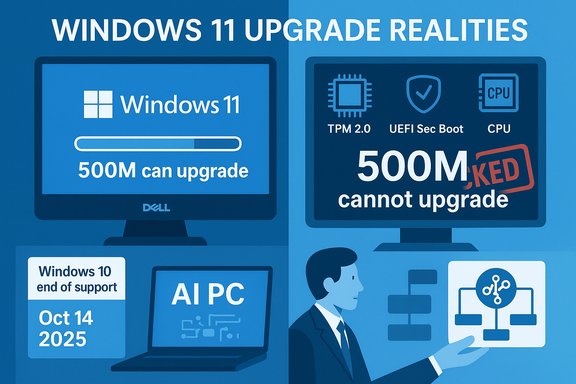
Windows users are not rushing to the Windows 11 upgrade party, and the headline numbers driving that story come straight from an investor briefing that reframes the migration as a patchwork of technical limits, economic choices, and plain user inertia. Dell’s COO told investors that roughly 500 million PCs that can run Windows 11 haven’t upgraded, and that roughly another 500 million devices can’t run Windows 11 at all under Microsoft’s hardware rules — a blunt split that adds up to a massive addressable market but also exposes how messy the transition really is.
Microsoft’s Windows 10 reached its official end-of-support milestone this year, creating an urgency counterpoint to the slow upgrade rate. The company’s lifecycle documentation confirms that Windows 10’s support ended on October 14, 2025, and Microsoft has offered a limited consumer Extended Security Updates (ESU) program as a bridge through October 13, 2026. Those ESU terms — including free enrollment in some circumstances and a paid option — are documented on Microsoft’s support pages. At the same time, Microsoft executives have used large-scale marketing language around Windows 11 — notably that “nearly a billion people rely on Windows 11” — language that media outlets repeated but that Microsoft did not quantify in simple, auditable terms. That ambiguity has helped fuel the contrast between the company’s platform messaging and datapoints reported by OEMs like Dell.
For consumers and IT leaders the actionable takeaway is straightforward: build an accurate inventory, quantify the security and financial trade-offs of ESU versus hardware refresh, and prioritize sustainability as part of any upgrade program. The migration’s economic and environmental consequences are as important as its technical mechanics — and they’re the parts that will determine whether the remaining Windows 10 installed base upgrades, replaces, or adopts alternatives in the years ahead.
Conclusion
Dell’s investor remarks forced a necessary reality check: the Windows ecosystem is bigger and more heterogeneous than a single headline metric suggests. The split between the “can but won’t” and the “can’t” is a pragmatic way to understand why Windows 11 adoption is slower than many expected. The path forward will be multifaceted — security patches, staged migrations, responsible hardware refreshes, and clearer vendor communication — and each organization must plan according to its own inventory, budget, and risk tolerance.
Source: techcityng.com Microsoft Says 500 Million PCs Can Upgrade to Windows 11 But Users Aren’t Interested
 Background
Microsoft’s Windows 10 reached its official end-of-support milestone this year, creating an urgency counterpoint to the slow upgrade rate. The company’s lifecycle documentation confirms that Windows 10’s support ended on October 14, 2025, and Microsoft has offered a limited consumer Extended Security Updates (ESU) program as a bridge through October 13, 2026. Those ESU terms — including free enrollment in some circumstances and a paid option — are documented on Microsoft’s support pages. At the same time, Microsoft executives have used large-scale marketing language around Windows 11 — notably that “nearly a billion people rely on Windows 11” — language that media outlets repeated but that Microsoft did not quantify in simple, auditable terms. That ambiguity has helped fuel the contrast between the company’s platform messaging and datapoints reported by OEMs like Dell. What Dell Actually Said — and why it matters
The numbers, plainly stated
- Dell’s installed-base framing: an estimated installed Windows PC base of roughly 1.5 billion devices.
- Of that universe, Dell’s COO Jeffrey Clarke said about 500 million devices can run Windows 11 but remain on Windows 10.
- A comparable cohort — about 500 million devices — are, in Dell’s view, too old or otherwise incompatible to run Windows 11 under Microsoft’s current requirements.
How Dell’s framing reshapes the migration story
Dell’s split converts a single narrative — “Windows 11 is being adopted” — into three actionable cohorts:- Devices already on Windows 11.
- Devices that are eligible but haven’t been upgraded (the 500M “sticky” group).
- Devices ineligible without hardware replacement (the 500M “blocked” group).
Why users and businesses are sticking with Windows 10
There are several strong, overlapping reasons adoption is slow — and most are rooted in rational trade-offs rather than ignorance.1. Familiarity and risk calculus
Windows 10 has been widely used for a decade and earned trust for stability and compatibility. For many enterprises, the cost and risk of testing, validating, and rolling out a new OS across thousands of endpoints is measured in months and millions of dollars. Users and IT teams often ask: If it isn’t broken, why fix it now? That calculus explains much of the “can but won’t” cohort.2. Strict hardware requirements
Windows 11’s baseline intentionally raised hardware and firmware expectations: TPM 2.0 (or fTPM), UEFI Secure Boot, and support for specific CPU generations, alongside minimum RAM and storage. That gate left a large swath of machines — often only a few years old — officially ineligible. For many users, the only practical path to Windows 11 is buying a new machine. This is the core reason Dell and others describe a large “can’t” bucket.3. Lack of compelling, universal features
For many users the new features — centered taskbar, aesthetic changes, integrated Copilot AI, and a handful of security enhancements — feel incremental versus transformative. The perceived value of switching simply isn’t high enough for a large group of consumers and businesses, especially once hardware costs and migration work are factored in. Multiple outlets have noted that Windows 11’s strong security posture and AI integration appeal to some, but they do not constitute a universal upgrade catalyst.4. Slow enterprise adoption cycles
Enterprises test thoroughly for application compatibility, driver validation, and management tooling. Many delay until a migration is operationally cheap and risk-controlled. That means enterprise rollouts often lag consumer momentum by years, further depressing overall adoption velocity.5. Alternatives and workarounds
Some users simply choose alternatives: extend Windows 10 via ESU, switch to Linux distributions where appropriate, or continue using working hardware indefinitely. For the subset who want Windows 11 on older hardware, unsupported workarounds exist — but they carry security and warranty risks and are not recommended for business environments.Microsoft’s “Nearly a Billion” claim: marketing shorthand or data point?
At Ignite and associated coverage, Microsoft’s Windows leadership used large-scale language about Windows 11’s reach. Press reporting captured phrases like “nearly a billion people rely on Windows 11”, but Microsoft did not publish a single, unambiguous metric tying that phrase to a specific, publicly auditable definition (monthly active devices, daily active users, or licensed seats). Multiple regional outlets covered the language, but the ambiguity remains. That ambiguity creates two important realities:- From a marketing standpoint, the phrasing communicates scale and momentum.
- From an operational and procurement standpoint, it’s insufficient for planning — organizations and analysts still need telemetry, measured device counts, or independent market-share numbers to plan migrations or budgets.
Security implications and the ESU bridge
What end-of-support actually means
When Microsoft ended mainstream support for Windows 10 on October 14, 2025, it stopped delivering routine security and feature updates for the general consumer lifecycle. The company made clear that systems would continue to function, but without ongoing patches they would be progressively more vulnerable. Microsoft’s official guidance and the ESU program specifics are available on its support pages.ESU mechanics and limits
The Consumer Extended Security Updates program provides a practical, time-limited bridge:- ESU coverage extends security updates through October 13, 2026.
- Enrollment options include a free path when syncing settings and signing in with a Microsoft account, a one-time $30 paid option, or redeeming Microsoft Rewards points.
- ESU is security-only (no feature updates) and is intended as a transition mechanism, not a permanent solution.
Risk trade-offs for organizations and consumers
- Short-term mitigation: ESU buys time to plan migrations and fleet refreshes without immediate exposure to unpatched vulnerabilities.
- Long-term exposure: ESU isn’t indefinite, and the underlying risks of running an unsupported OS accelerate over time as threat actors shift focus.
- Cost vs. hardware replacement: For fleets of older devices, the choice is often between a year of ESU costs or capital investment in new hardware — a tough decision for constrained budgets.
OEM strategy: AI PCs, trade-ins, and the upgrade funnel
OEMs like Dell are viewing the Windows 10-to-11 migration not just as a software transition but as a multi-year hardware opportunity. Dell explicitly pitched the existence of large groups of non-upgraded and non-upgradable devices as a runway for selling new AI-capable hardware and services. That line of reasoning is straightforward: if users must buy new machines to get Windows 11 and AI features, OEMs can monetize refresh cycles, trade-in programs, and lifecycle services. But that strategy has limits:- If consumers resist buying new hardware for environmental or budgetary reasons, refresh volumes can stall.
- Aggressive upselling risks regulatory and reputational backlash if perceived as forced obsolescence.
- The PC market’s long-term unit growth is still uncertain; OEMs can extract more profit from higher ASPs (average selling prices), but they need buyers to accept the ROI on new features like local AI acceleration.
The environmental and e‑waste angle
Raising hardware baselines can accelerate device churn. Several analyst and advocacy voices warned early that a strict hardware gate could create environmental downstream effects: functioning hardware may be discarded not because it’s broken, but because it’s unsupported. That risk has fueled calls for better trade-in, refurbishment, and circular-economy programs to mitigate the environmental impact of forced refresh cycles. OEMs and retailers have programs, but they don’t fully neutralize the potential e‑waste surge.Practical guidance: what consumers and IT teams should do now
These steps balance security, cost, and practical constraints for most users and organizations.- Inventory: Produce a reliable device inventory (model, CPU generation, TPM status, BIOS/UEFI capabilities). This is non-negotiable for sound planning.
- Test: Pilot Windows 11 on representative hardware images and validate application compatibility, drivers, and endpoint management tooling.
- ESU planning: For devices that will remain on Windows 10 through October 13, 2026, evaluate ESU enrollment for security continuity and budget accordingly. Remember ESU is temporary and has enrollment constraints.
- Cost analysis: Compare the total cost of ownership between paying for ESU and staged fleet refresh. Include potential productivity gains from modern hardware and AI features if these deliver measurable value.
- Sustainability: Prioritize trade-in, refurbishment, and donation programs over landfill disposal. Work with vendors that provide certified recycling and reuse channels.
- Alternatives: For some use cases, consider validated Linux distributions or Chrome OS Flex as a lower-cost path to extended utility for ineligible hardware — but validate application requirements first.
What this means for Microsoft, OEMs, and the broader ecosystem
- Microsoft: Messaging that emphasizes scale must be paired with clarity — when public phrases like “nearly a billion” are used, backing them with clear definitions helps IT buyers make decisions. Microsoft’s ESU program is a pragmatic stopgap, but the company’s longer-term policy choices (hardware gates, account requirements) shape how quickly the install base modernizes.
- OEMs: Vendor-read narratives like Dell’s are useful to sellers because they reframe migration friction as opportunity. But OEMs must also address affordability and sustainability concerns to convert potential into actual purchases.
- Enterprises and public sector: The slow migration highlights why large organizations should own their telemetry: public vendor statements are directional, but procurement and compliance decisions must be driven by inventory-level facts and risk assessments.
What’s verifiable — and what remains fuzzy
- Verifiable: Windows 10’s official end-of-support date (October 14, 2025) and the ESU program terms are published by Microsoft. Dell’s comments to investors were recorded and reported across major outlets; the basic 500M/500M split is a public claim from Dell’s earnings call.
- Ambiguous or marketing-led: Microsoft’s phrase “nearly a billion people rely on Windows 11” is accurate as marketing language but remains ambiguous without a precise telemetry definition. Treat that phrasing as a high-level indicator of scale rather than a raw, comparable metric to Dell’s installed-base estimate.
- Caution flagged: Dell’s 500M counts are useful directional signals but are vendor-provided estimates from an investor call; they should not be treated as auditor-style device censuses without independent corroboration or the underlying methodology disclosed.
Bottom line
The Windows 11 migration is not a single binary moment; it’s a multiyear process shaped by hardware compatibility, cost, corporate risk tolerance, and real user preferences. Dell’s blunt 500M/500M framing crystallizes that reality: there’s a vast pool of devices that could upgrade but haven’t, and another large pool that physically can’t without replacement. Microsoft’s marketing about scale reflects platform momentum but does not negate the tangible frictions that slow mass adoption.For consumers and IT leaders the actionable takeaway is straightforward: build an accurate inventory, quantify the security and financial trade-offs of ESU versus hardware refresh, and prioritize sustainability as part of any upgrade program. The migration’s economic and environmental consequences are as important as its technical mechanics — and they’re the parts that will determine whether the remaining Windows 10 installed base upgrades, replaces, or adopts alternatives in the years ahead.
Conclusion
Dell’s investor remarks forced a necessary reality check: the Windows ecosystem is bigger and more heterogeneous than a single headline metric suggests. The split between the “can but won’t” and the “can’t” is a pragmatic way to understand why Windows 11 adoption is slower than many expected. The path forward will be multifaceted — security patches, staged migrations, responsible hardware refreshes, and clearer vendor communication — and each organization must plan according to its own inventory, budget, and risk tolerance.
Source: techcityng.com Microsoft Says 500 Million PCs Can Upgrade to Windows 11 But Users Aren’t Interested