

Windows 11 has finally taken the lead in the global Windows desktop market, crossing the majority threshold while Windows 10’s installed base continues a marked decline as Microsoft’s end‑of‑support deadline reshapes upgrade decisions worldwide.
The competition between Windows 10 and Windows 11 has been the defining product lifecycle story for Microsoft in 2024–2025. For most of the last decade Windows 10 dominated the desktop landscape; 2025 became the year that momentum shifted decisively toward Windows 11 as the company and OEMs pushed upgrades and new hardware shipments. That change accelerated sharply around Microsoft’s announced end‑of‑support for Windows 10 — a hard operational deadline that converted what had been a slow migration into a time‑sensitive migration wave. StatCounter’s October 2025 snapshot of desktop Windows version market share — the public, pageview‑weighted dataset journalists commonly cite — shows Windows 11 at 55.17% and Windows 10 at 41.74%, with legacy versions (Windows 7, XP, 8/8.1) occupying the remainder. Those are the headline numbers shaping the recent coverage.
In short: the headline is correct — Windows 11 has taken the lead in the public web‑analytics snapshot — but the deeper reality is a complex, regionally varied migration that still leaves meaningful pockets of Windows 10 in active service. Readers should treat the October 2025 StatCounter milestone as an important barometer of market direction, and use it to accelerate sound, security‑first migration planning rather than as a single definitive measure of every Windows device in operation.
Source: Новини Live Windows 11 now dominates the market — Windows 10 declines globally
 Background
The competition between Windows 10 and Windows 11 has been the defining product lifecycle story for Microsoft in 2024–2025. For most of the last decade Windows 10 dominated the desktop landscape; 2025 became the year that momentum shifted decisively toward Windows 11 as the company and OEMs pushed upgrades and new hardware shipments. That change accelerated sharply around Microsoft’s announced end‑of‑support for Windows 10 — a hard operational deadline that converted what had been a slow migration into a time‑sensitive migration wave. StatCounter’s October 2025 snapshot of desktop Windows version market share — the public, pageview‑weighted dataset journalists commonly cite — shows Windows 11 at 55.17% and Windows 10 at 41.74%, with legacy versions (Windows 7, XP, 8/8.1) occupying the remainder. Those are the headline numbers shaping the recent coverage. What the October 2025 numbers actually say
The headline: Windows 11 > 55%
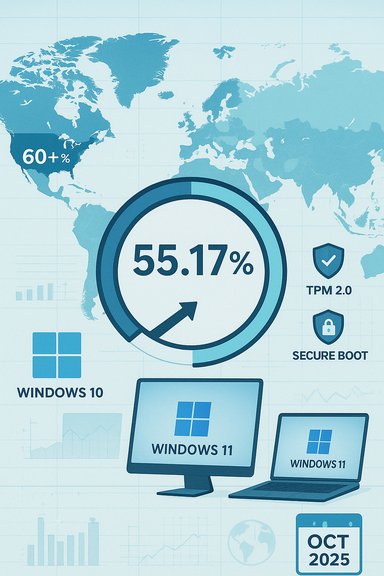
StatCounter’s “Desktop Windows Version Market Share Worldwide” for October 2025 lists Windows 11 at 55.17%, making it the majority desktop Windows version by this measurement. Windows 10 is shown at 41.74%, and Windows 7 lingers at roughly 2.5%. These figures reflect pageviews recorded by StatCounter’s global panel and are updated daily; they are the basis for most media reporting that Windows 11 has “taken the lead.”What that metric measures — and what it doesn’t
StatCounter’s dataset is pageview‑weighted, meaning it measures the operating system versions that are generating web traffic in its sample, not the raw installed base of every Windows device on the planet. That difference matters in interpretation: a tracker that samples web activity can reflect changes in active web usage faster than installed‑base inventories (such as corporate asset lists or shipment‑based industry estimates), and might over‑ or under‑represent certain sectors or regions depending on traffic patterns. Multiple industry observers have noted that a single StatCounter snapshot is directional rather than definitive, and different StatCounter datasets (desktop vs. all devices) or other trackers can yield different headline percentages.Regional and segment differences
Geography matters
The global average masks sharp regional variation. In North and South America, Windows 11 adoption runs well ahead of the global mean; some StatCounter regional breakdowns recorded Windows 11 market share above 60% in North America at the end of October 2025. By contrast, Europe and parts of Asia show much tighter races between Windows 10 and Windows 11, with some countries still exhibiting a sizable Windows 10 footprint due to slower hardware refresh cycles and corporate procurement practices. The statistical pattern is therefore heterogeneous: Windows 11 leads globally by StatCounter’s web‑activity measure, but pockets of Windows 10 resilience remain.Consumer vs. enterprise splits
Enterprise and institutional fleets tend to lag consumer devices in OS migrations. Analyst and industry data suggest a very large corporate install base remained on Windows 10 well into 2025, driven by procurement cycles, application compatibility testing, and hardware eligibility constraints for Windows 11. That means the “installed base” measured by corporate inventories can diverge from pageview trackers that overrepresent consumer browsing behavior. Treat the StatCounter majority as an important signal about user activity and migration momentum — not an absolute count of every device in operation.Why Windows 11 adoption accelerated in 2025
Several converging forces propelled Windows 11 past Windows 10 on StatCounter’s October chart:- End of Support for Windows 10: Microsoft’s scheduled end of mainstream security updates for Windows 10 (October 14, 2025) created a firm deadline for risk‑averse users and IT teams. The calendar alone drove migration urgency.
- OEM preloads and hardware refreshes: New PC shipments in 2024–2025 increasingly came with Windows 11 preinstalled. When consumers and businesses buy new machines, they overwhelmingly receive the latest OS, which ratchets adoption upward without direct user action.
- Upgrade nudges and incentives: Microsoft intensified upgrade prompts, offered enrollment paths for consumer Extended Security Updates (ESU), and made targeted incentives available that reduced friction for some users. Those nudges, combined with marketing for Copilot‑enabled hardware, contributed to incremental migration.
- Security and feature promises: Windows 11’s stricter baseline (TPM 2.0, Secure Boot, UEFI, modern CPU families) is marketed as raising security posture; for many organizations, hardware‑backed protections and AI features became selling points to justify device replacements.
The hardware compatibility cliff and migration friction
One of the central friction points for Windows 11 adoption remains the platform’s minimum hardware requirements. Windows 11 requires:- A compatible 64‑bit processor on Microsoft’s supported CPU list,
- TPM 2.0 enabled,
- UEFI with Secure Boot,
- 4 GB RAM and 64 GB storage minimum, plus DirectX 12 / WDDM 2.x graphics support for some features.
Security, risk, and Extended Security Updates (ESU)
What ESU buys — and what it doesn’t
Extended Security Updates (ESU) exist to buy time, not to be a long‑term solution. For organizations, ESU supplies security‑only fixes for critical and important vulnerabilities — not feature updates or ongoing product support — and is priced at a premium with options for multi‑year coverage for enterprise customers. Microsoft also offered a consumer ESU pathway through 2026 under specific enrollment rules, which softened the immediate pressure for some home users. ESU helps large organizations run thorough application compatibility testing and staged rollouts, but relying on ESU as a permanent strategy increases long‑term cost and technical debt.Security posture after end‑of‑support
Once mainstream support ends for an OS, unpatched vulnerabilities accumulate and risk rises for internet‑connected devices. Security vendors and governments warned that large populations remaining on unsupported Windows 10 could create exploitable attack surfaces, regulatory compliance issues, and operational exposure for critical infrastructure and small businesses alike. The prudent enterprise strategy uses ESU only as a bridge to a tested upgrade or device refresh program.Enterprise implications: planning, testing, and costs
For IT leaders the migration was never simply “flip the switch.” Key enterprise concerns include:- Application compatibility testing: Legacy line‑of‑business apps may depend on behaviors or older runtime components that require remediation before a Windows 11 rollout.
- Hardware lifecycle management: Replacing devices en masse is capital‑intensive; many organizations aligned OS refreshes with normal hardware replacement cycles.
- Security validation: Newer hardware and Windows 11 features can improve security but also add complexity to identity, policy, and endpoint management tooling.
- Procurement and compliance costs: ESU purchases, new device procurement, and project staffing all contribute to migration budgets.
Strengths of the Windows 11 shift
- Tighter security baseline: The hardware requirements enforce a minimum security posture that enables modern mitigations across a broad swath of devices.
- Ecosystem modernization: Developers and ISVs will increasingly optimize for Windows 11, expanding app capabilities and ensuring better compatibility with new features such as AI integration.
- Improved UX and productivity features: For many users the UI changes, Snap Layouts, and virtualization features offer tangible daily benefits.
- OEM momentum: With PCs shipping with Windows 11 by default, the OS benefits from the natural cadence of consumer upgrades.
Notable risks and criticisms
- E‑waste and sustainability concerns: The compatibility requirements effectively force hardware turnover for some users, raising questions about sustainability and consumer cost burden.
- Fragmentation and legacy dependencies: Critical infrastructure and specialized devices that run legacy Windows versions pose an ongoing security and operational risk if migration is delayed.
- Measurement ambiguity: Public trackers like StatCounter are valuable but imperfect proxies for the installed base; reliance on pageview metrics alone can overstate or understate adoption in specific sectors.
- User experience complaints: Some users and community voices continue to criticize aspects of Windows 11’s design, perceived bloat, or the business model around ESU and upgrade nudges. Those criticisms shape sentiment and can influence adoption choices in consumer segments.
Practical guidance for readers and IT teams
For individual users
- Check hardware eligibility: Run Microsoft’s device health tools or the PC Health Check to confirm upgrade paths. If your device is compatible, back up data and plan a staged upgrade when convenient.
- Use ESU as a last resort: If you can’t upgrade immediately, enroll in consumer ESU options only as a short‑term mitigation while you plan hardware replacement or consider alternative OS choices.
- Prioritize backups and recovery: Before any OS upgrade or hardware change, make reliable backups of files and configuration.
For IT teams and administrators
- Inventory and prioritize: Map applications and devices to upgrade eligibility and business criticality.
- Pilot and validate: Run pilot groups to validate key business applications on Windows 11 images before mass deployment.
- Budget for lifecycle: Factor ESU costs, device refreshes, and migration labor into multi‑year budgets.
- Use telemetry wisely: Don’t treat public web trackers as a substitute for internal asset inventories; use both to build a complete migration plan.
How to read the headlines — and what to watch next
Public metrics will continue to swing month‑to‑month. The key signals to monitor are:- Cross‑tracker confirmation: Does StatCounter’s majority show up in other independent trackers and vendor telemetry?
- Regional breakdowns: Are key markets and enterprise verticals completing migrations at similar rates?
- ESU enrollment trends: Uptake (or lack thereof) in ESU is an early indicator of how many devices will remain supported into 2026.
- Hardware shipment patterns: OEM preloads and retail sales data will sustain the adoption trend or slow it depending on market demand.
Final analysis: momentum, nuance, and what this means for Windows users
Windows 11 crossing the 50% mark in StatCounter’s October 2025 dataset is a milestone that reflects genuine momentum: calendar pressure from Windows 10’s end of support, OEM preloads, and targeted upgrade campaigns together pushed a large number of users and pageviews onto the newer OS. The shift strengthens Microsoft’s case to prioritize Windows 11 features, developer focus, and platform investments. At the same time, the migration is not uniform. Regional differences, enterprise procurement cycles, and a hardware eligibility gap mean that many devices — especially in institutional fleets — will continue to run Windows 10 or even older versions for a time, with ESU acting as a patching bridge where necessary. That fractured transition creates both operational risk and opportunity: risk for organizations that delay without mitigation, and opportunity for IT teams that use the window to modernize app stacks and security architectures.In short: the headline is correct — Windows 11 has taken the lead in the public web‑analytics snapshot — but the deeper reality is a complex, regionally varied migration that still leaves meaningful pockets of Windows 10 in active service. Readers should treat the October 2025 StatCounter milestone as an important barometer of market direction, and use it to accelerate sound, security‑first migration planning rather than as a single definitive measure of every Windows device in operation.
Source: Новини Live Windows 11 now dominates the market — Windows 10 declines globally
