

A forthcoming TechMentor session is putting a practical enterprise question around Windows 11’s AI push: what does the NPU actually do, and which Windows features or applications genuinely use it?
As reported by Virtualization & Cloud Review, Michael Niehaus of 2Pint Software will present “Windows 11: Using Local AI Silicon” on Wednesday, August 5, at TechMentor & CyberSecurity Live! at Microsoft headquarters in Redmond, Washington. The 75-minute session is aimed at IT pros trying to distinguish endpoint AI hardware from the broader cloud-Copilot conversation.
Neural processing units are dedicated accelerators intended for machine-learning inference. In Windows terms, the NPU is particularly relevant to Copilot+ PCs, whose hardware baseline calls for more than 40 TOPS of AI performance.
Microsoft’s Windows AI documentation positions the NPU alongside the CPU, GPU, and cloud rather than as a universal replacement for them. A workload may be local, remote, or hybrid; local does not automatically mean NPU-powered. Hardware support varies by API and device class.
That distinction matters in fleet planning. A PC with an NPU may offer better efficiency for compatible workloads, but it does not make every AI feature offline, private by default, or faster. IT buyers should ask which feature, model, and execution backend are involved before treating NPU performance as a blanket capability metric.
Phi Silica is the most obvious example. Microsoft describes it as a local small language model for tasks such as text generation, summarization, rewriting, and text-to-table conversion. On a Copilot+ PC, it is designed to use the NPU. Microsoft has also expanded Phi Silica support to some non-Copilot+ systems, where it can run on supported GPUs instead.
That development reinforces the core enterprise message: the useful procurement question is not simply “does this PC have an NPU?” It is whether the organization’s target Windows features and in-house applications support the local AI APIs, and which hardware path those apps will use.
For administrators, the near-term work is familiar: inventory hardware, validate OS and driver prerequisites, test real workloads, and avoid assuming marketing labels translate into measurable productivity gains. Task Manager can show NPU utilization on compatible systems, which gives support teams a basic way to verify that an application is using the accelerator.
The session takes place August 5, with its practical value resting on whether attendees can map local AI claims to the Windows features and applications they actually intend to deploy.
As reported by Virtualization & Cloud Review, Michael Niehaus of 2Pint Software will present “Windows 11: Using Local AI Silicon” on Wednesday, August 5, at TechMentor & CyberSecurity Live! at Microsoft headquarters in Redmond, Washington. The 75-minute session is aimed at IT pros trying to distinguish endpoint AI hardware from the broader cloud-Copilot conversation.
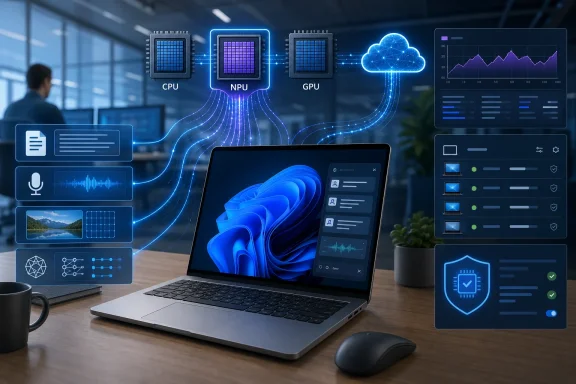 Local inference is becoming a Windows platform feature
Neural processing units are dedicated accelerators intended for machine-learning inference. In Windows terms, the NPU is particularly relevant to Copilot+ PCs, whose hardware baseline calls for more than 40 TOPS of AI performance.Microsoft’s Windows AI documentation positions the NPU alongside the CPU, GPU, and cloud rather than as a universal replacement for them. A workload may be local, remote, or hybrid; local does not automatically mean NPU-powered. Hardware support varies by API and device class.
That distinction matters in fleet planning. A PC with an NPU may offer better efficiency for compatible workloads, but it does not make every AI feature offline, private by default, or faster. IT buyers should ask which feature, model, and execution backend are involved before treating NPU performance as a blanket capability metric.
What developers can use
Microsoft is building out Windows AI APIs through Microsoft Foundry on Windows. These APIs expose local capabilities including text recognition, image features, speech-related functions, and local language-model tasks, without requiring every developer to package and tune a model independently.Phi Silica is the most obvious example. Microsoft describes it as a local small language model for tasks such as text generation, summarization, rewriting, and text-to-table conversion. On a Copilot+ PC, it is designed to use the NPU. Microsoft has also expanded Phi Silica support to some non-Copilot+ systems, where it can run on supported GPUs instead.
That development reinforces the core enterprise message: the useful procurement question is not simply “does this PC have an NPU?” It is whether the organization’s target Windows features and in-house applications support the local AI APIs, and which hardware path those apps will use.
The enterprise angle
Niehaus is well known in Windows management circles for work spanning deployment, Windows servicing, Autopilot, and endpoint management. His session is expected to cover local AI features in Windows 11, the workloads NPUs suit best, and how developers can begin targeting the hardware.For administrators, the near-term work is familiar: inventory hardware, validate OS and driver prerequisites, test real workloads, and avoid assuming marketing labels translate into measurable productivity gains. Task Manager can show NPU utilization on compatible systems, which gives support teams a basic way to verify that an application is using the accelerator.
The session takes place August 5, with its practical value resting on whether attendees can map local AI claims to the Windows features and applications they actually intend to deploy.
References
- Primary source: Virtualization Review
Published: 2026-07-13T15:11:10.773098
Windows 11 Local AI Brings the NPU into the Enterprise Conversation -- Virtualization Review
At TechMentor & CyberSecurity Live! @ Microsoft HQ, Michael Niehaus will explain what today's local AI silicon can do, which Windows 11 features use it, and how developers and IT pros should think about on-device AI capabilities.virtualizationreview.com - Official source: learn.microsoft.com
Ready-to-use local LLMs on Windows | Microsoft Learn
Learn how your Windows app can leverage ready-to-use local Large Language Models (LLMs) via Windows AI APIs and Foundry Local.learn.microsoft.com
