

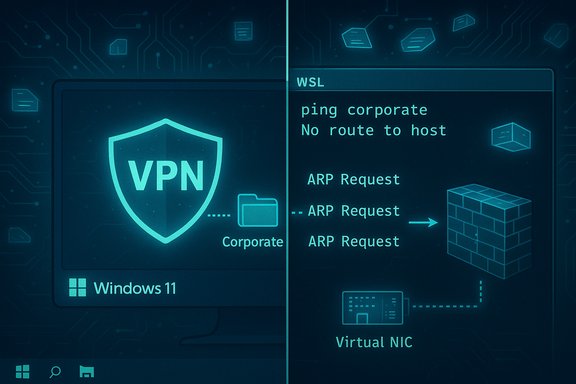
Microsoft has confirmed that a Windows 11 update introduced in October 2025 can break VPN connectivity for Windows Subsystem for Linux (WSL) when using mirrored networking, producing “No route to host” errors inside WSL even though the Windows host itself can still reach the same destinations.
Background / Overview
Mirrored networking for WSL is a relatively recent addition that lets a WSL2 distribution share the host’s network interfaces and IP addresses, rather than running behind the traditional NAT used by earlier WSL2 defaults. Mirrored mode fixes a lot of historical WSL pain—better IPv6 support, fewer localhost surprises, and improved compatibility with many networked workflows. Community documentation and configuration guidance explain how to enable mirrored mode through .wslconfig and why many developers choose it.Microsoft’s advisory is explicit: after installing the October 28, 2025 non-security update (identified as KB5067036) or a later update, mirrored networking in WSL may fail to work with some third‑party VPN clients, showing “No route to host” inside WSL while the Windows host remains functional. Microsoft calls out Cisco Secure Client (formerly AnyConnect) and OpenVPN as reported examples. Independent coverage from community and regional tech outlets has echoed the same symptoms and timeline, confirming the problem surfaced after the October update and persisted through subsequent cumulative packages.
What the official notice says — the essentials
- The symptom: WSL in mirrored networking mode reports “No route to host” to destinations that the Windows host can access normally.
- Root cause (as Microsoft describes it): the VPN application's virtual interface does not respond to ARP requests from the mirrored WSL guest, which prevents the guest from resolving link-layer addresses and therefore from sending packets to the intended gateway.
- Vendors affected (reported): Cisco Secure Client and OpenVPN have been cited by users and by Microsoft. Microsoft does not provide an exhaustive list.
- Scope: Microsoft characterizes the problem as primarily affecting enterprise VPN connectivity to corporate resources (including DirectAccess), and says home users running consumer Home/Pro installations are unlikely to be affected—but also acknowledges the issue exists and is under investigation.
How mirrored networking and the ARP failure produce the symptom
Mirrored networking: short technical primer
Mirrored networking makes the WSL virtual NIC appear as if it’s on the same physical network as the host. The guest can see the host’s interfaces and IPs and behaves much more like a directly-attached device than a NATed VM. That change solves numerous developer headaches (localhost symmetry, multicast, direct LAN reachability) but also changes the packet flows and the assumptions made by VPN and security stacks.Why ARP matters here
When WSL uses mirrored networking, the guest issues ARP (Address Resolution Protocol) requests on the local segment to map IP addresses to MAC addresses for next-hop delivery. If the VPN client on the Windows host installs or exposes a virtual interface (a TAP/TUN adapter, or a protected virtual NIC) that does not respond to ARP requests from the mirrored guest, the guest can’t learn the MAC address of the gateway or the VPN virtual peer. The result: the guest reports “No route to host” because the link-layer address resolution failed, even though Windows itself (which talks to the VPN interface through a different stack path) works fine. Microsoft puts the cause exactly this way in its advisory.The practical consequence
- Applications inside WSL that need to reach corporate hosts, package repositories, or other services over the VPN fail; services dependent on VPN connectivity stop working for developers and automation inside WSL.
- The Windows host and other non-WSL apps remain connected through the VPN—making the failure appear inconsistent and confusing.
Who is actually affected?
Microsoft frames the issue as mostly an enterprise problem, but the real-world picture is more nuanced:- Managed corporate devices are the obvious high-risk group: enterprise VPNs, DirectAccess, and security stacks are commonly used there and the breakage affects business-critical access. Microsoft has provided Known Issue Rollback (KIR) guidance targeted at enterprise management.
- Home and power-user machines: while Microsoft says Home/Pro users are unlikely to see the issue, many home users do run corporate VPN clients (for remote work, freelance access, or VPN-based cloud access). If those home users have mirrored networking enabled in WSL, they can experience the same failures. Community posts show home power users reporting similar symptoms after applying the same Windows updates.
Real-world impact and reports
Multiple community threads and vendor knowledge-base posts show the issue has real operational impact for developers and sysadmins:- Developers relying on WSL for local builds, container orchestration, or remote testing can lose CI and debugging access when WSL cannot reach package servers or remote services over corporate VPNs. Community troubleshooting threads cite broken apt, pip, and internal API calls failing with “No route to host.”
- IT teams encounter helpdesk tickets where users claim the PC "still has internet" but WSL containers and developer tooling cannot reach the corporate network. This creates a time-consuming support burden: verifying WSL settings, hunting VPN client versions, and — in enterprise environments — deploying policy-based rollbacks.
What Microsoft has made available (and what it hasn’t)
- Microsoft has published an acknowledgement in the Windows update / KB release notes describing the issue and the suspected ARP behavior of VPN virtual interfaces.
- For enterprise-managed environments, Microsoft provides a Known Issue Rollback (KIR) policy package that can be deployed via Group Policy or Intune to temporarily disable the change that introduced the regression; Microsoft documents how enterprises should install and apply KIR MSI ADMX policy files and how to scope them to affected systems. IT admins must install the KIR MSI and configure the supplied Group Policy, then restart affected devices to apply the rollback.
- For consumer users (Home/Pro) Microsoft indicates the Windows Update process applies KIRs automatically where applicable, but the company also notes the issue is “primarily” enterprise-facing and that further information will follow as the investigation continues. Officially, Microsoft currently lists no universal workaround for unmanaged consumer devices other than staying tuned for a future fix.
Workarounds, mitigations and practical steps
The available options vary by environment (enterprise vs home) and by how your VPN stack is configured.Immediate actions for enterprise admins
- Review Microsoft’s KB for the affected update and the December cumulative (KB5072033) which includes the KIR guidance and the downloadable KIR policy MSI. Apply the KIR via Group Policy or Intune to targeted OUs/devices. A restart is required after the policy is applied.
- Test the rollback on a small pilot group first, verify WSL + mirrored networking + VPN functionality returns, and then widen deployment. Microsoft’s guidance explains how to install the MSI, create a GPO, set a WMI filter for targeted OS builds, and disable the problematic change via the administrative template.
Actions for home users and power users
- If you depend on mirrored networking in WSL but are now seeing failures, the pragmatic temporary fix is to revert WSL to NAT mode until Microsoft issues a permanent correction or until your VPN vendor releases a compatible client. You can remove or change the networkingMode setting in your .wslconfig (or set networkingMode=nat), restart WSL with wsl --shutdown, and test connectivity. Community guidance documents the use of .wslconfig for switching modes and other WSL networking tweaks.
- Where your workflow tolerates it, you can run critical VPN‑dependent processes on the Windows host side rather than inside WSL; for instance, do remote Git fetches or package installs on the host and share the files into WSL as a temporary pattern.
- Check for updates from your VPN vendor (Cisco Secure Client, OpenVPN, etc.. Vendors frequently issue compatibility updates, and you may be able to upgrade to a client build that responds correctly in mirrored scenarios. Microsoft’s advisory names Cisco Secure Client and OpenVPN as examples of impacted stacks.
Short checklist (practical, ordered)
- Confirm Windows update level (did you install KB5067036 or a later cumulative?.
- If enterprise-managed: obtain and deploy the KIR MSI (KB5072033) and apply the GPO/Intune profile; restart devices.
- If unmanaged and affected: switch WSL back to NAT (or remove networkingMode=mirrored) and restart WSL.
- Update VPN clients to the latest vendor-recommended builds and check vendor forums for compatibility notes.
- If immediate VPN access from within WSL is critical and no fix is available, consider running the specific workloads on the Windows host or on a separate VM where the VPN behaves predictably.
Critical analysis — strengths and weaknesses of Microsoft’s approach
Strengths
- Transparency: Microsoft has publicly acknowledged the regression in its KB release notes and included a clear symptom description and a likely technical cause (ARP behavior), which helps triage and vendor coordination.
- Enterprise tooling: The Known Issue Rollback mechanism and associated Group Policy/Intune deployment path gives IT admins a controlled way to temporarily disable a change until an issued fix arrives—this minimizes widespread disruption for managed fleets. Microsoft documented granular steps for applying KIRs via GPO and Intune.
Weaknesses and risks
- No immediate universal consumer workaround: Microsoft’s messaging that “Home users are unlikely to be affected” is technically defensible but understates the reality for many remote workers and freelancers who use corporate VPNs from Home/Pro devices. That leaves a non-trivial set of home users with broken workflows and no simple consumer-side remediation from Microsoft.
- Dependency on vendors to fix virtual interfaces: The root trigger here is the VPN virtual interface’s ARP behavior. Fixing that may require changes in vendor clients, kernel-mode components, or driver logic—coordination that can take weeks or months. In the interim, the rollback is a blunt instrument that reverts behavior rather than surgically fixing the compatibility.
- Operational friction: For teams that have already standardized on mirrored mode to solve other WSL networking problems, asking them to revert to NAT or to reconfigure builds introduces duplication of work and risk—particularly for CI and reproducibility. Community guidance about mirroring and DNS tunneling underlines that mirrored mode is often an intentional choice to solve prior pain points. Reverting undermines that investment.
Vendor and community coordination — practical expectations
- Expect VPN vendors (Cisco, OpenVPN community, and others) to investigate whether the VPN virtual adapters can be adjusted to respond to ARP requests from virtualized guests, or whether a new compatibility layer is needed for mirrored WSL scenarios. In many past endpoints, vendors issued client updates to reintroduce compatibility after similar Windows networking changes. Microsoft’s advisory, by naming specific affected clients, should accelerate that vendor-side work.
- Meanwhile, forums, vendor KB articles, and vendor support portals will be the first place to look for client-specific mitigations. Community-run troubleshooting posts and vendor help pages have already started to document both the problem and practical workarounds (including switching to mirrored mode before this regression, and now the reverse when compatibility breaks).
Recommendations — what IT teams and power users should do now
- For IT managers: treat this as a high-priority compatibility incident for any teams that use WSL + mirrored networking + corporate VPNs. Test the KIR on a pilot group and prepare communications explaining the temporary nature of the rollback and the restart requirement. Apply KIR only to affected OUs and monitor for side effects.
- For developers and power users: if you require immediate WSL VPN access and cannot rely on enterprise-managed rollbacks, switch WSL back to NAT mode temporarily, or run the VPN-dependent commands on the Windows host. Document the switch to avoid accidental exposure of services and to maintain reproducibility.
- For security teams: evaluate the security trade-offs of applying a KIR. Known Issue Rollbacks disable the change that caused the regression and are temporary by design; coordinate with patch and vulnerability management teams to ensure you don’t unintentionally reintroduce a risk that the original non-security update corrected. Use a narrowly-targeted GPO/WMI filter rather than a blanket rollout.
- For everyone: track updates from Microsoft and your VPN vendor. A permanent fix will likely arrive via a future Windows cumulative update or vendor client update—once available, remove KIR policies and validate behavior across a representative set of devices.
Conclusion
The October 2025 Windows non-security update (KB5067036) produced a subtle but consequential interaction between WSL’s mirrored networking mode and several VPN virtual interfaces that do not respond to ARP requests. Microsoft has acknowledged the problem, named impacted VPN stacks, and provided enterprise rollbacks via Known Issue Rollback (KIR) that can be deployed through Group Policy or Intune while a long-term fix is developed. The technical lesson is straightforward: network virtualizations and security stacks touch the same low-level behaviors (ARP, virtual NICs, driver responses) that virtualization features depend upon. When one party changes behavior, the other components can break in ways that are hard to predict and sometimes hard to test at scale. Until a robust fix from Microsoft and/or VPN vendors arrives, the safest play for affected users is to use the KIR in managed environments or to revert WSL to NAT mode on unmanaged systems and prioritize vendor updates.If mirrored networking and WSL’s improved network semantics were part of your day-to-day toolkit, treat any rollback as a short-term necessary trade-off—but plan to re-enable mirrored mode once a definitive fix is released and validated.
Source: BetaNews Windows 11 updates are breaking VPN access to WSL
