

Microsoft’s Windows 11 passkey system, documented by Microsoft and surfaced for enthusiasts in Paul Thurrott’s Windows 11 Field Guide coverage on January 4, 2024, lets users create, store, manage, and use passwordless sign-ins through Windows Hello, security keys, phones, and newer third-party passkey providers. The story is not that Windows suddenly discovered passwordless authentication. It is that Microsoft is trying to make Windows itself the broker for a post-password web, and that changes the trust model for every user and administrator who signs in from a PC.
As Thurrott.com’s field-guide material made clear, passkeys arrived in Windows 11 not as a flashy consumer feature but as a quiet security substrate, tucked under Settings, Windows Security, Edge, Microsoft accounts, and the broader FIDO ecosystem. Microsoft’s own documentation frames passkeys as phishing-resistant replacements for passwords, while the FIDO Alliance describes them as cryptographic credentials bound to a service rather than secrets typed into a box. That distinction sounds academic until you remember that most modern account takeovers still begin with a human being tricked into entering the right password in the wrong place.
The real Windows 11 passkey question, then, is not whether passkeys are “better than passwords.” In the abstract, they are. The harder question is whether Microsoft can make them understandable, portable, manageable, and boring enough that users stop treating them like yet another authentication experiment.
For decades, Windows was where users typed passwords, not where the web’s authentication model was meaningfully reinvented. Browsers remembered credentials, password managers filled forms, Active Directory handled corporate identity, and hardware security keys remained the province of security teams and people who read threat-modeling papers for fun. Passkeys collapse those boundaries.
In Windows 11, a passkey can be created and used with Windows Hello, meaning the user proves presence with a PIN, fingerprint, or face recognition instead of typing a reusable password. The private cryptographic key stays with the authenticator, while the online service stores a public key. When the user signs in, the site receives proof that the private key exists without the secret itself crossing the network.
That is why Microsoft, Google, Apple, and the FIDO Alliance all use similar language around phishing resistance. A passkey is designed for a particular website or app, so a fake login page should not be able to harvest a credential that works somewhere else. The user may still be fooled, the device may still be compromised, and account recovery may still be messy, but the classic “type your password into this convincing imitation” attack loses much of its power.
Windows 11 matters because it is the place where this security model meets the average desktop user. Phones already made biometric approval feel normal. The PC, by contrast, has always been the stubborn edge case: multiple browsers, legacy apps, enterprise controls, local accounts, Microsoft accounts, domain joins, remote sessions, hardware keys, and users who do not know whether their PIN belongs to Windows, their browser, or their bank.
Microsoft’s bet is that Windows can hide enough of that complexity behind a familiar Windows Security dialog. That is sensible product design. It is also a massive concentration of trust.
Passkeys do not merely ask users to choose a stronger secret. They remove the shared secret from the sign-in ceremony. The user’s device signs a challenge, the service verifies it, and the human experience becomes something like unlocking the PC. This is not magic, but it is a better primitive than asking humans to memorize or manage dozens of high-value strings.
The problem is that authentication is not judged by its cryptographic elegance. It is judged by what happens when someone loses a laptop, changes phones, switches browsers, joins a new company, leaves an old one, or tries to sign in on a hotel business-center PC. Passwords are weak, but they are portable in the bluntest possible way. Passkeys are stronger, but their strength comes from being tied to devices, accounts, or managers that must be trusted and recovered.
That is where Windows 11’s implementation becomes more than a checkbox. If a passkey is saved only to a local Windows device, it can be very secure and very inconvenient. If it is synced through a cloud account or stored by a third-party manager, it becomes more convenient but depends on the security and recovery model of that provider. If it lives on a hardware security key, it may satisfy high-assurance requirements but introduces procurement, backup, and user-training problems.
The password has lost the technical argument. It has not yet lost the operational one.
There is a charitable interpretation of that design. Security features succeed when they are automatic, and Microsoft has spent years trying to make Windows Hello feel like the normal way to unlock and authenticate on a PC. If the system can create a safer credential without asking users to understand FIDO terminology, that may be a win.
But the less charitable interpretation is also important. Authentication is one of the few areas where users deserve to know what changed. A passkey is not just a saved password with a nicer icon. It affects where sign-in authority lives, how account recovery works, and what happens when the user moves to another device.
Microsoft has often struggled with this boundary between helpful automation and opaque account behavior. Windows 11 already nudges users toward Microsoft accounts, cloud backup, Edge, OneDrive, and Microsoft 365 services. Passkeys can look like part of that same funnel if Microsoft does not explain clearly whether a credential is local, synced, stored by Edge, stored by Windows Hello, or managed by a third-party provider.
That ambiguity matters because trust is the product. A passkey system that users do not understand may still be secure, but it will not feel secure when something goes wrong.
Windows 11 supports external security keys, and that remains important. A hardware key can be preferable for administrators, journalists, executives, developers with production access, and anyone whose account is worth targeted attention. It is less convenient than a synced passkey, but inconvenience is sometimes the point.
The friction is education. Microsoft’s interfaces and many service providers still blur the line between a passkey saved on a PC, a passkey stored in a password manager, a phone-based sign-in flow, and a hardware security key. To a normal user, these all appear as variations of “use a passkey.” To an administrator, they represent different assurance levels, lifecycle controls, and failure modes.
That distinction is not pedantry. A device-bound credential protected by Windows Hello is not operationally identical to a cloud-synced credential available across multiple platforms. A hardware-backed key in a safe is not the same as a passkey recoverable through a consumer account. The user experience may converge, but the risk models do not.
Microsoft’s challenge is to simplify the ceremony without flattening the security meaning. If every authentication method is presented as the same friendly passkey button, Windows will be easier to use and harder to govern.
Microsoft’s newer passkey direction leans heavily on Microsoft Password Manager in Edge, including synced passkeys across Windows desktop devices. That is a practical improvement over device-bound credentials that strand users on one PC. It also reveals the strategic angle: the post-password future is not just a security feature but another reason for Microsoft to keep users inside its account and browser ecosystem.
That does not make it bad. Apple uses iCloud Keychain. Google uses Google Password Manager. 1Password and Bitwarden want their vaults to be the neutral layer across devices and browsers. Everyone agrees passwords are broken; everyone also wants to be the place where the replacement lives.
For Windows users, this competition can be both liberating and confusing. If a user creates a passkey for a site in Edge on Windows, will it appear in Chrome? If it is in a third-party manager, will native Windows apps see it? If it is created on an iPhone, can Windows use it conveniently? If the answer is “sometimes,” the help desk is going to hear about it.
The web’s passwordless transition will be won not by the strongest white paper but by the least surprising recovery path.
This matters because no single platform owns modern identity. A Windows user may carry an iPhone, use Chrome, keep passwords in Bitwarden, authenticate to Microsoft Entra ID at work, and maintain personal accounts through Google or Apple. A passkey system that assumes one vendor’s stack will work beautifully for loyalists and poorly for everyone else.
Third-party provider support gives Windows a better shot at becoming a useful broker rather than a walled garden. If a password manager can register as a passkey provider and surface through the Windows Security experience, users get portability without abandoning the OS-level authentication ceremony. Developers get a more consistent target. Administrators get fewer browser-specific workarounds.
The catch is maturity. Plugin models need reliable APIs, clear UI, version compatibility, and predictable deployment controls. Early user reports around passkeys often show the same pattern as every new Windows security feature: it works elegantly in the demo path and becomes mysterious when browser versions, Windows builds, account types, and vendor apps do not line up.
That is not an argument against the model. It is the price of making passkeys real on Windows.
The enterprise concern is not whether passkeys are strong. It is whether they can be enrolled, audited, restricted, revoked, backed up, and explained. A security team may welcome phishing-resistant authentication while still rejecting unmanaged synced passkeys for privileged accounts. A regulated organization may prefer hardware security keys or managed device-bound credentials over consumer cloud sync.
Windows 11 sits in the middle of this tension. Microsoft wants the same broad passwordless architecture to serve home users and organizations. But enterprises need policy boundaries: which providers are allowed, whether passkeys may sync, how Windows Hello is configured, what recovery methods remain, and whether fallback methods undermine the whole point.
Fallback is the uncomfortable part. A passkey-protected account is only as strong as the weakest recovery or alternate sign-in path. If an attacker cannot phish a passkey but can trigger an SMS reset, persuade support, or abuse an OAuth consent flow, the organization has not eliminated account takeover. It has moved the fight.
That means passkey deployment is not a Windows setting so much as an identity program. The PC is one endpoint in a chain that includes the identity provider, browser, password manager, mobile device, recovery policy, and user training.
This is where Microsoft’s Settings app helps and hurts. Accounts > Passkeys gives Windows 11 users a place to view and manage credentials, which is far better than pretending passkeys are invisible plumbing. But management screens are only useful if the labels map to user reality. “Saved to this Windows device” and “synced with this provider” are not cosmetic distinctions; they are the difference between a smooth new laptop setup and a locked account.
Microsoft also has to fight the legacy of password managers. Users have been trained that credentials are things they can reveal, copy, paste, export, or reset. Passkeys deliberately do not behave that way. A user who asks “what is my passkey?” is asking a sensible question from the password era and getting an answer from the cryptographic era.
The industry’s messaging often jumps too quickly to “no more passwords.” That sells the destination but undersells the transition. For years, users will live in a hybrid world where some accounts support passkeys, some require passwords, some use passkeys as a second factor, and some botch the implementation entirely.
Windows 11 can make that hybrid world less painful, but it cannot wish it away.
That is why passkeys should be treated as a major improvement, not a force field. If a Microsoft account, Google account, or enterprise identity can fall back to weaker methods, attackers will look for the weakest door. The passkey may be excellent while the recovery chain remains mediocre.
For Windows users, this creates a practical rule: turning on a passkey should trigger a review of account recovery. Backup codes should be stored securely. Phone numbers should not be the only lifeline. Old email addresses should be removed. Hardware security keys should have spares. Administrators should test lockout and recovery before making passkeys mandatory.
Microsoft’s own security posture has increasingly moved toward phishing-resistant methods, and the industry is broadly right to deprecate SMS-based authentication. But the migration will be uneven. A service that adds passkeys while keeping password reset unchanged has improved the front door and left the side window open.
The security story only works when passkeys are part of a cleaned-up account model.
Developers must decide whether passkeys are a first factor, a second factor, or an account recovery option. They must handle username-first and usernameless flows, multiple authenticators, lost devices, cross-device sign-in, enterprise restrictions, and browsers that expose different UI. They must also avoid training users to click through confusing prompts without understanding which authenticator is being used.
Windows adds its own wrinkles. Native apps may rely on Windows APIs, web apps may rely on browser behavior, and enterprise environments may restrict providers. A passkey created through one path may not appear where the user expects in another. If the developer’s sign-in page gives poor guidance, Windows will get blamed even when the service designed the confusing flow.
The best implementations will explain the credential at creation time: where it is being saved, how it can be used again, and what the user should do if the device is lost. The worst will replace “enter password” with “use passkey” and assume the platform will handle the rest.
Passkeys reduce one class of security failure. They do not absolve developers from designing humane account systems.
Passwordless computing is not a state Windows reaches after one feature update. It is a long migration in which identity providers, browsers, device makers, password managers, enterprises, and users slowly agree on new defaults. Windows 11 is important because it gives the PC a native role in that migration, not because it finishes the job.
The best way to think about passkeys in Windows today is as layered authentication infrastructure. Windows Hello provides local user verification. The passkey provider stores or brokers the credential. The browser or app invokes the flow. The online service decides whether to trust it and what fallbacks to allow. The user experiences all of that as a small dialog and a PIN prompt.
That mismatch between complexity and interface is both the triumph and danger of the design. If everything works, passkeys feel almost too easy. If anything breaks, the user has very little vocabulary for diagnosing the failure.
The password era was insecure but legible. The passkey era is more secure but more abstract.
As Thurrott.com’s field-guide material made clear, passkeys arrived in Windows 11 not as a flashy consumer feature but as a quiet security substrate, tucked under Settings, Windows Security, Edge, Microsoft accounts, and the broader FIDO ecosystem. Microsoft’s own documentation frames passkeys as phishing-resistant replacements for passwords, while the FIDO Alliance describes them as cryptographic credentials bound to a service rather than secrets typed into a box. That distinction sounds academic until you remember that most modern account takeovers still begin with a human being tricked into entering the right password in the wrong place.
The real Windows 11 passkey question, then, is not whether passkeys are “better than passwords.” In the abstract, they are. The harder question is whether Microsoft can make them understandable, portable, manageable, and boring enough that users stop treating them like yet another authentication experiment.
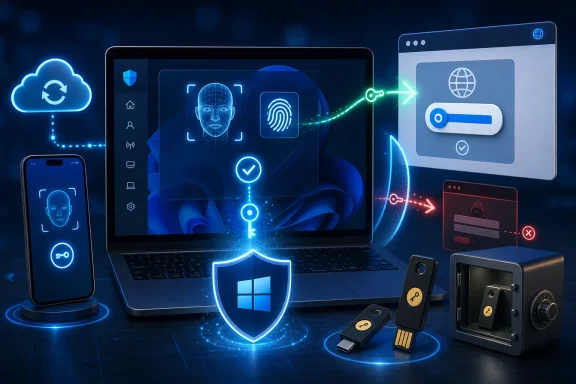 Windows Becomes the Doorman for the Passwordless Web
For decades, Windows was where users typed passwords, not where the web’s authentication model was meaningfully reinvented. Browsers remembered credentials, password managers filled forms, Active Directory handled corporate identity, and hardware security keys remained the province of security teams and people who read threat-modeling papers for fun. Passkeys collapse those boundaries.In Windows 11, a passkey can be created and used with Windows Hello, meaning the user proves presence with a PIN, fingerprint, or face recognition instead of typing a reusable password. The private cryptographic key stays with the authenticator, while the online service stores a public key. When the user signs in, the site receives proof that the private key exists without the secret itself crossing the network.
That is why Microsoft, Google, Apple, and the FIDO Alliance all use similar language around phishing resistance. A passkey is designed for a particular website or app, so a fake login page should not be able to harvest a credential that works somewhere else. The user may still be fooled, the device may still be compromised, and account recovery may still be messy, but the classic “type your password into this convincing imitation” attack loses much of its power.
Windows 11 matters because it is the place where this security model meets the average desktop user. Phones already made biometric approval feel normal. The PC, by contrast, has always been the stubborn edge case: multiple browsers, legacy apps, enterprise controls, local accounts, Microsoft accounts, domain joins, remote sessions, hardware keys, and users who do not know whether their PIN belongs to Windows, their browser, or their bank.
Microsoft’s bet is that Windows can hide enough of that complexity behind a familiar Windows Security dialog. That is sensible product design. It is also a massive concentration of trust.
The Password Is Not Dead, but It Has Lost the Argument
The password has survived because it is universal, cheap, and comprehensible. It is also a disaster. Users reuse passwords, attackers buy them, phishers steal them, and help desks spend untold hours resetting them.Passkeys do not merely ask users to choose a stronger secret. They remove the shared secret from the sign-in ceremony. The user’s device signs a challenge, the service verifies it, and the human experience becomes something like unlocking the PC. This is not magic, but it is a better primitive than asking humans to memorize or manage dozens of high-value strings.
The problem is that authentication is not judged by its cryptographic elegance. It is judged by what happens when someone loses a laptop, changes phones, switches browsers, joins a new company, leaves an old one, or tries to sign in on a hotel business-center PC. Passwords are weak, but they are portable in the bluntest possible way. Passkeys are stronger, but their strength comes from being tied to devices, accounts, or managers that must be trusted and recovered.
That is where Windows 11’s implementation becomes more than a checkbox. If a passkey is saved only to a local Windows device, it can be very secure and very inconvenient. If it is synced through a cloud account or stored by a third-party manager, it becomes more convenient but depends on the security and recovery model of that provider. If it lives on a hardware security key, it may satisfy high-assurance requirements but introduces procurement, backup, and user-training problems.
The password has lost the technical argument. It has not yet lost the operational one.
Microsoft’s First Passkey Experience Was Too Quiet for Its Own Good
One of the most interesting details in Thurrott’s coverage was how quietly Windows could create and expose passkeys associated with a Microsoft account. For users signed into Windows 11 with a Microsoft account and Windows Hello, the passkey experience could feel less like a deliberate security upgrade and more like something discovered after the fact in Settings.There is a charitable interpretation of that design. Security features succeed when they are automatic, and Microsoft has spent years trying to make Windows Hello feel like the normal way to unlock and authenticate on a PC. If the system can create a safer credential without asking users to understand FIDO terminology, that may be a win.
But the less charitable interpretation is also important. Authentication is one of the few areas where users deserve to know what changed. A passkey is not just a saved password with a nicer icon. It affects where sign-in authority lives, how account recovery works, and what happens when the user moves to another device.
Microsoft has often struggled with this boundary between helpful automation and opaque account behavior. Windows 11 already nudges users toward Microsoft accounts, cloud backup, Edge, OneDrive, and Microsoft 365 services. Passkeys can look like part of that same funnel if Microsoft does not explain clearly whether a credential is local, synced, stored by Edge, stored by Windows Hello, or managed by a third-party provider.
That ambiguity matters because trust is the product. A passkey system that users do not understand may still be secure, but it will not feel secure when something goes wrong.
Security Keys Remain the Grown-Up Option Nobody Wants to Explain
Before passkeys became a consumer branding exercise, FIDO2 hardware security keys were the cleanest expression of phishing-resistant authentication. A YubiKey or similar device is understandable in a physical way: plug it in, tap it, keep a spare. It gives enterprises strong control and gives users a tangible object that represents access.Windows 11 supports external security keys, and that remains important. A hardware key can be preferable for administrators, journalists, executives, developers with production access, and anyone whose account is worth targeted attention. It is less convenient than a synced passkey, but inconvenience is sometimes the point.
The friction is education. Microsoft’s interfaces and many service providers still blur the line between a passkey saved on a PC, a passkey stored in a password manager, a phone-based sign-in flow, and a hardware security key. To a normal user, these all appear as variations of “use a passkey.” To an administrator, they represent different assurance levels, lifecycle controls, and failure modes.
That distinction is not pedantry. A device-bound credential protected by Windows Hello is not operationally identical to a cloud-synced credential available across multiple platforms. A hardware-backed key in a safe is not the same as a passkey recoverable through a consumer account. The user experience may converge, but the risk models do not.
Microsoft’s challenge is to simplify the ceremony without flattening the security meaning. If every authentication method is presented as the same friendly passkey button, Windows will be easier to use and harder to govern.
The Browser Is Still the Battlefield
Microsoft would like Windows to be the platform layer for passkeys, but browsers remain where many passkeys are created and used. Edge, Chrome, Firefox, and app-embedded web views all shape the experience. That creates the old Windows problem in a new costume: the operating system can provide capability, but the browser decides whether the user ever sees it cleanly.Microsoft’s newer passkey direction leans heavily on Microsoft Password Manager in Edge, including synced passkeys across Windows desktop devices. That is a practical improvement over device-bound credentials that strand users on one PC. It also reveals the strategic angle: the post-password future is not just a security feature but another reason for Microsoft to keep users inside its account and browser ecosystem.
That does not make it bad. Apple uses iCloud Keychain. Google uses Google Password Manager. 1Password and Bitwarden want their vaults to be the neutral layer across devices and browsers. Everyone agrees passwords are broken; everyone also wants to be the place where the replacement lives.
For Windows users, this competition can be both liberating and confusing. If a user creates a passkey for a site in Edge on Windows, will it appear in Chrome? If it is in a third-party manager, will native Windows apps see it? If it is created on an iPhone, can Windows use it conveniently? If the answer is “sometimes,” the help desk is going to hear about it.
The web’s passwordless transition will be won not by the strongest white paper but by the least surprising recovery path.
Third-Party Passkey Providers Are the Feature Windows Needed
The most important evolution since Windows 11’s early passkey management is Microsoft’s move toward third-party passkey provider support. Microsoft’s documentation describes a plugin model that allows passkey managers to integrate with Windows, and reporting from Windows-focused outlets has highlighted support from names such as 1Password and Bitwarden. That changes the story from “Windows can store passkeys” to “Windows can participate in an ecosystem.”This matters because no single platform owns modern identity. A Windows user may carry an iPhone, use Chrome, keep passwords in Bitwarden, authenticate to Microsoft Entra ID at work, and maintain personal accounts through Google or Apple. A passkey system that assumes one vendor’s stack will work beautifully for loyalists and poorly for everyone else.
Third-party provider support gives Windows a better shot at becoming a useful broker rather than a walled garden. If a password manager can register as a passkey provider and surface through the Windows Security experience, users get portability without abandoning the OS-level authentication ceremony. Developers get a more consistent target. Administrators get fewer browser-specific workarounds.
The catch is maturity. Plugin models need reliable APIs, clear UI, version compatibility, and predictable deployment controls. Early user reports around passkeys often show the same pattern as every new Windows security feature: it works elegantly in the demo path and becomes mysterious when browser versions, Windows builds, account types, and vendor apps do not line up.
That is not an argument against the model. It is the price of making passkeys real on Windows.
Enterprises Will Care Less About Convenience Than Control
For consumers, passkeys are usually sold as easier sign-ins. For enterprises, the more important promise is phishing resistance. Microsoft Entra ID, Windows Hello for Business, conditional access, and FIDO2 security keys already fit into the larger enterprise identity story, but passkeys add a consumerized vocabulary to an admin-controlled problem.The enterprise concern is not whether passkeys are strong. It is whether they can be enrolled, audited, restricted, revoked, backed up, and explained. A security team may welcome phishing-resistant authentication while still rejecting unmanaged synced passkeys for privileged accounts. A regulated organization may prefer hardware security keys or managed device-bound credentials over consumer cloud sync.
Windows 11 sits in the middle of this tension. Microsoft wants the same broad passwordless architecture to serve home users and organizations. But enterprises need policy boundaries: which providers are allowed, whether passkeys may sync, how Windows Hello is configured, what recovery methods remain, and whether fallback methods undermine the whole point.
Fallback is the uncomfortable part. A passkey-protected account is only as strong as the weakest recovery or alternate sign-in path. If an attacker cannot phish a passkey but can trigger an SMS reset, persuade support, or abuse an OAuth consent flow, the organization has not eliminated account takeover. It has moved the fight.
That means passkey deployment is not a Windows setting so much as an identity program. The PC is one endpoint in a chain that includes the identity provider, browser, password manager, mobile device, recovery policy, and user training.
The Consumer Experience Still Has a Naming Problem
“Passkey” is a friendly word that hides too much. It can mean a credential stored in Windows Hello, synced through a browser account, saved in a password manager, used from a phone, or held on a physical security key. The user does not need to understand elliptic-curve cryptography, but they do need to know where their access lives.This is where Microsoft’s Settings app helps and hurts. Accounts > Passkeys gives Windows 11 users a place to view and manage credentials, which is far better than pretending passkeys are invisible plumbing. But management screens are only useful if the labels map to user reality. “Saved to this Windows device” and “synced with this provider” are not cosmetic distinctions; they are the difference between a smooth new laptop setup and a locked account.
Microsoft also has to fight the legacy of password managers. Users have been trained that credentials are things they can reveal, copy, paste, export, or reset. Passkeys deliberately do not behave that way. A user who asks “what is my passkey?” is asking a sensible question from the password era and getting an answer from the cryptographic era.
The industry’s messaging often jumps too quickly to “no more passwords.” That sells the destination but undersells the transition. For years, users will live in a hybrid world where some accounts support passkeys, some require passwords, some use passkeys as a second factor, and some botch the implementation entirely.
Windows 11 can make that hybrid world less painful, but it cannot wish it away.
The Real Risk Is Not Passkeys Failing, but Fallbacks Winning
Passkeys are resistant to phishing because the authentication is bound to the legitimate service. But most account systems are not made of one authentication method. They are messy collections of password reset emails, recovery codes, backup phone numbers, remembered devices, customer support procedures, OAuth grants, and legacy app passwords.That is why passkeys should be treated as a major improvement, not a force field. If a Microsoft account, Google account, or enterprise identity can fall back to weaker methods, attackers will look for the weakest door. The passkey may be excellent while the recovery chain remains mediocre.
For Windows users, this creates a practical rule: turning on a passkey should trigger a review of account recovery. Backup codes should be stored securely. Phone numbers should not be the only lifeline. Old email addresses should be removed. Hardware security keys should have spares. Administrators should test lockout and recovery before making passkeys mandatory.
Microsoft’s own security posture has increasingly moved toward phishing-resistant methods, and the industry is broadly right to deprecate SMS-based authentication. But the migration will be uneven. A service that adds passkeys while keeping password reset unchanged has improved the front door and left the side window open.
The security story only works when passkeys are part of a cleaned-up account model.
Developers Now Have Fewer Excuses and More Edge Cases
For app and website developers, Windows 11 passkey support raises expectations. If Windows, macOS, Android, iOS, Chrome, Edge, Safari, major password managers, and hardware keys all support FIDO-based authentication, users will increasingly expect the passkey button to work. That does not mean implementation is trivial.Developers must decide whether passkeys are a first factor, a second factor, or an account recovery option. They must handle username-first and usernameless flows, multiple authenticators, lost devices, cross-device sign-in, enterprise restrictions, and browsers that expose different UI. They must also avoid training users to click through confusing prompts without understanding which authenticator is being used.
Windows adds its own wrinkles. Native apps may rely on Windows APIs, web apps may rely on browser behavior, and enterprise environments may restrict providers. A passkey created through one path may not appear where the user expects in another. If the developer’s sign-in page gives poor guidance, Windows will get blamed even when the service designed the confusing flow.
The best implementations will explain the credential at creation time: where it is being saved, how it can be used again, and what the user should do if the device is lost. The worst will replace “enter password” with “use passkey” and assume the platform will handle the rest.
Passkeys reduce one class of security failure. They do not absolve developers from designing humane account systems.
Enthusiasts Should Stop Treating Passwordless as a Binary Switch
The Windows enthusiast instinct is to look for the toggle. Is passkey support on or off? Does this build have the feature? Does Edge sync it? Does 1Password integrate? Does Bitwarden appear in the dialog? Those are useful questions, but they miss the larger transition.Passwordless computing is not a state Windows reaches after one feature update. It is a long migration in which identity providers, browsers, device makers, password managers, enterprises, and users slowly agree on new defaults. Windows 11 is important because it gives the PC a native role in that migration, not because it finishes the job.
The best way to think about passkeys in Windows today is as layered authentication infrastructure. Windows Hello provides local user verification. The passkey provider stores or brokers the credential. The browser or app invokes the flow. The online service decides whether to trust it and what fallbacks to allow. The user experiences all of that as a small dialog and a PIN prompt.
That mismatch between complexity and interface is both the triumph and danger of the design. If everything works, passkeys feel almost too easy. If anything breaks, the user has very little vocabulary for diagnosing the failure.
The password era was insecure but legible. The passkey era is more secure but more abstract.
The Windows 11 Passkey Era Has Practical Rules Already
The move to passkeys is far enough along that Windows users and administrators do not need to wait for a perfect future. They need to make better decisions now. The practical lesson from Microsoft’s documentation, Thurrott’s Windows-focused coverage, and the broader FIDO ecosystem is that passkeys are ready for use, but not ready for blind faith.- Users should create passkeys first for high-value accounts such as Microsoft, Google, Apple, banking, email, developer, and password-manager accounts.
- Anyone using device-bound passkeys should maintain a recovery plan before replacing a PC, reinstalling Windows, or resetting Windows Hello.
- Administrators should decide which passkey providers are acceptable before users create credentials across unmanaged browsers and personal vaults.
- Hardware security keys still deserve a place for privileged, regulated, or high-risk accounts, especially when backed by a spare key stored safely.
- Passkeys should be paired with a cleanup of weaker recovery methods, because SMS codes and neglected backup email accounts can undercut the whole security gain.
- Developers should tell users where a passkey is being saved instead of assuming the Windows prompt makes the trust decision obvious.
References
- Primary source: thurrott.com
Published: Tue, 07 Jul 2026 14:33:18 GMT
Loading…
www.thurrott.com - Official source: support.microsoft.com
Loading…
support.microsoft.com - Official source: microsoft.com
Loading…
www.microsoft.com - Related coverage: techpp.com
Loading…
techpp.com - Related coverage: allthings.how
Loading…
allthings.how - Official source: learn.microsoft.com
Loading…
learn.microsoft.com
- Related coverage: elhacker.info
Loading…
elhacker.info - Related coverage: renemayrhofer.com
Loading…
www.renemayrhofer.com - Related coverage: fidoalliance.org
Loading…
fidoalliance.org - Related coverage: techspot.com
Loading…
www.techspot.com - Related coverage: techrepublic.com
Loading…
www.techrepublic.com - Related coverage: windowscentral.com
Windows 11 25H2: Settings app redesign and new features explained | Windows Central
Windows 11's Settings app in 2025 introduced a slew of changes, including a new "Advanced" page and an AI agent for search. Key additions include Quick Machine Recovery, the ability to show the clock in the Notification Center, more Recall controls, and more.www.windowscentral.com - Related coverage: techradar.com
Windows 11 boosts security even further by adding native 1Password passkey support | TechRadar
Windows Hello now supports passkeys stored in 1Passwordwww.techradar.com - Related coverage: itpro.com
Loading…
www.itpro.com