

Microsoft is reportedly developing a deeper Windows 11 Phone Link experience built around a taskbar smartphone flyout, a dedicated Messages app for synchronized SMS conversations, and a more interactive Start menu companion. Microsoft has not announced these features or provided a release timetable.
If the report proves accurate, the meaningful change is not a major expansion of Phone Link’s underlying capabilities. It is the movement of familiar connected-phone tasks closer to the Windows shell, reducing the need to open and navigate the standalone Phone Link application.
A taskbar control could provide immediate phone status and notifications. Start could act as a recent-activity hub. A separate Messages app could provide a focused interface for SMS synchronized from the connected smartphone. Together, those surfaces would make the phone connection feel less like a utility running beside Windows and more like part of Windows itself.
The idea is promising, but it would also make connection failures, stale information, and overly revealing previews much more visible. Deeper shell integration could magnify both Phone Link’s usefulness and its weaknesses.
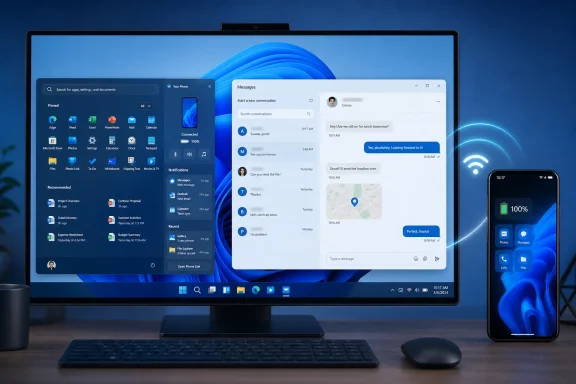
According to WinCentral, Microsoft is preparing several integrations intended to make a connected smartphone feel like a native Windows 11 component. The reported work includes a dedicated smartphone flyout in the taskbar, a Windows Messages app that synchronizes SMS conversations from a connected smartphone, and upgrades to the Phone Link Companion associated with the Start menu.
None of these changes has been officially announced. Individual elements could change, arrive separately, appear only in limited testing, or never reach stable Windows 11 installations. The report should therefore be treated as an early description of work that may be in development rather than as a product roadmap or release commitment.
The taskbar flyout would likely be the most visible change because the taskbar is persistent. Start is an intentional destination that users open when they want to launch or find something. A taskbar control, by contrast, can make the connected phone an ambient part of the desktop: always nearby and capable of exposing status or recent information without requiring the full Phone Link window.
WinCentral describes the proposed flyout as a place for the connected phone, notifications, battery status, recent activity, and other controls. Although those items sound modest individually, their placement could change how people interact with Phone Link. Instead of thinking, “I need to open Phone Link,” a user could go directly to a familiar Windows surface.
That is the strongest argument for the reported design. Frequently used functions generally become more convenient when they are available at the point where users already work. A person checking phone battery status does not necessarily need the same full interface as someone browsing recent photos or managing the connection.
The reported Start changes would address a different level of attention. Start could provide a broader activity view, including quicker access to recent phone information and richer previews. It would sit between the immediacy of a taskbar flyout and the more complete controls of the Phone Link application.
The reported Messages app would be more focused still. Based on the available description, it would synchronize SMS conversations from a connected smartphone. The report does not establish that the app would create an independent messaging service, maintain a complete offline archive, support every messaging platform, or match all features of the phone’s own messaging software.
This division could make the overall experience feel simpler. Phone Link serves as a broad device dashboard, but not every phone-related task requires that complete interface. Checking connection status, reading a recent alert, reviewing activity, and writing an SMS message are different jobs.
The taskbar flyout could handle interactions that take only a few seconds. Start could provide context and recent items. The Messages app could provide space for conversations that benefit from a physical keyboard and a larger display. Phone Link could remain the central location for pairing, permissions, broader device functions, and troubleshooting.
That arrangement would resemble other parts of Windows, where quick controls coexist with complete applications or configuration interfaces. The key difference is that the reported phone surfaces would depend on a connected external device. A Windows-native appearance would not necessarily mean that the PC had become independent of the phone.
That dependency is especially important for the proposed Messages app. The limited description supports one clear characterization: it would synchronize SMS from a connected smartphone. Anything beyond that—including offline behavior, the amount of available message history, attachment support, archive behavior, platform compatibility, and feature parity—remains unknown unless Microsoft announces and documents it.
A taskbar flyout would be most useful if it allowed common actions without repeatedly opening the full Phone Link application. That is an editorial assessment, not a reported feature commitment. The report does not establish precisely which actions would occur inside the flyout and which would redirect elsewhere.
The same caution applies to Start. Richer previews could help users decide whether an item deserves attention, but Microsoft has not said what those previews would contain or how much control users would have over them. Suggestions that Windows should hide sensitive content, display clear synchronization states, or allow the phone panel to be disabled are editorial recommendations rather than descriptions of announced product behavior.
WinCentral describes it as an application that synchronizes SMS conversations from a connected smartphone. That wording should define expectations until Microsoft provides more information. It does not confirm a new Microsoft messaging network, an independent cellular endpoint on the PC, integration with every internet messaging service, or a complete replacement for the phone’s default messaging application.
Windows users can already benefit from handling phone messages on a PC, where a physical keyboard, larger display, and desktop multitasking can make conversations more convenient. A separate application could make that experience easier to find and give SMS a more focused interface than a tab within a broader connected-device dashboard.
However, the report does not answer several practical questions:
The safest current description is narrow: a reported Windows 11 app for SMS conversations synchronized from a connected smartphone.
For people who want early access, the relevant place to watch is the Windows Insider Program. Even there, however, a feature may be introduced gradually, limited to a subset of testers, changed during development, or removed after evaluation. Appearance in an Insider build would be evidence of testing, not a guarantee of general release.
A user deliberately opens Phone Link. The taskbar is continuously visible, and Start may be opened while colleagues, family members, customers, or strangers are nearby. A useful preview might reveal an SMS excerpt, caller identity, notification title, recent photo, account alert, appointment, or other personal information.
Microsoft has not announced privacy behavior for the reported interfaces. It is therefore unknown whether previews would be hidden by default, follow existing Windows notification preferences, offer separate content controls, or behave differently on shared and managed PCs.
From an editorial design perspective, users should be able to distinguish basic device status from sensitive content. Showing that a phone is connected is not equivalent to showing the text of a message. Likewise, displaying a battery percentage carries different privacy implications from displaying recent photos or notification details.
Those are recommendations, not Microsoft commitments. Until official documentation appears, readers should not assume that existing notification choices will map directly to the reported flyout, Start companion, or Messages application.
Reliability presents a similar issue. A standalone companion app can display an error without affecting the perceived stability of Windows. A taskbar flyout or Start panel occupies a more trusted position. If it shows stale phone activity, an old battery level, or an unclear disconnected state, users may reasonably interpret that as a shell problem.
The report does not explain how Microsoft would indicate delayed synchronization, unavailable phone data, revoked permissions, or unsupported functions. It also does not establish the underlying technical dependencies of the proposed interfaces. Detailed claims about networking, Bluetooth, background services, mobile operating-system restrictions, or other components would be speculative without documentation.
The broader point does not require those assumptions: any shell surface displaying information from another device needs to make the freshness and availability of that information understandable.
Several details would determine whether this is a substantial Windows improvement or primarily a visual reorganization:
The concept is easy to understand: put routine phone tasks where Windows users already look. The execution will depend on whether Microsoft can make those surfaces useful without making the taskbar crowded, Start overly revealing, or SMS synchronization appear more independent and universal than it really is.
Promising if true, but this remains a report; wait for Insider evidence and Microsoft documentation before relying on it for workflow or enterprise planning.
Microsoft is reportedly considering a full cross-device clipboard history as well. This would expand synchronization beyond the most recently copied item, allowing copied content from both the PC and phone to appear in a shared history.
The report also says the standalone Messages app could let users read, reply to, and begin SMS conversations, while an expanded Start companion may provide longer activity feeds and hover previews for messages and photos.
These capabilities remain experimental and may initially appear through Windows Insider testing. Microsoft has not confirmed availability, supported devices, privacy controls, or whether any of the features will reach stable Windows 11.
If the report proves accurate, the meaningful change is not a major expansion of Phone Link’s underlying capabilities. It is the movement of familiar connected-phone tasks closer to the Windows shell, reducing the need to open and navigate the standalone Phone Link application.
That distinction matters because Phone Link already centers functions such as phone notifications, calls, messages, photos, clipboard synchronization, and—on some supported devices—mobile app access. Availability differs by phone, platform, and configuration, but the broader concept is established. Microsoft’s reported bet appears to be that the remaining usability problem is distance: too many clicks, too much context switching, and too much dependence on a standalone application that users must remember to open.What this means now
These features are reported, not announced. There is no confirmed release date, and readers should not expect the taskbar flyout, Messages app, or upgraded Start experience in stable Windows 11 yet. Anyone hoping to try them early should watch upcoming Windows Insider Preview builds and wait for Microsoft to document availability, requirements, and limitations.
A taskbar control could provide immediate phone status and notifications. Start could act as a recent-activity hub. A separate Messages app could provide a focused interface for SMS synchronized from the connected smartphone. Together, those surfaces would make the phone connection feel less like a utility running beside Windows and more like part of Windows itself.
The idea is promising, but it would also make connection failures, stale information, and overly revealing previews much more visible. Deeper shell integration could magnify both Phone Link’s usefulness and its weaknesses.
 Microsoft May Be Moving the Phone Out of the App Window
According to WinCentral, Microsoft is preparing several integrations intended to make a connected smartphone feel like a native Windows 11 component. The reported work includes a dedicated smartphone flyout in the taskbar, a Windows Messages app that synchronizes SMS conversations from a connected smartphone, and upgrades to the Phone Link Companion associated with the Start menu.None of these changes has been officially announced. Individual elements could change, arrive separately, appear only in limited testing, or never reach stable Windows 11 installations. The report should therefore be treated as an early description of work that may be in development rather than as a product roadmap or release commitment.
The taskbar flyout would likely be the most visible change because the taskbar is persistent. Start is an intentional destination that users open when they want to launch or find something. A taskbar control, by contrast, can make the connected phone an ambient part of the desktop: always nearby and capable of exposing status or recent information without requiring the full Phone Link window.
WinCentral describes the proposed flyout as a place for the connected phone, notifications, battery status, recent activity, and other controls. Although those items sound modest individually, their placement could change how people interact with Phone Link. Instead of thinking, “I need to open Phone Link,” a user could go directly to a familiar Windows surface.
That is the strongest argument for the reported design. Frequently used functions generally become more convenient when they are available at the point where users already work. A person checking phone battery status does not necessarily need the same full interface as someone browsing recent photos or managing the connection.
The reported Start changes would address a different level of attention. Start could provide a broader activity view, including quicker access to recent phone information and richer previews. It would sit between the immediacy of a taskbar flyout and the more complete controls of the Phone Link application.
The reported Messages app would be more focused still. Based on the available description, it would synchronize SMS conversations from a connected smartphone. The report does not establish that the app would create an independent messaging service, maintain a complete offline archive, support every messaging platform, or match all features of the phone’s own messaging software.
Three Reported Surfaces, Three Different Jobs
The three reported integrations overlap, but each appears intended for a different kind of interaction: the taskbar for quick status, Start for recent activity and shortcuts, and Messages for sustained SMS conversations.| Reported integration | Primary role | Reported or described content | Relationship to Phone Link | Current status |
|---|---|---|---|---|
| Taskbar smartphone flyout | Quick status and action surface | Connected phone, notifications, battery status, recent activity, and other controls | Could reduce the need to open the full Phone Link app for routine checks | Reported, not announced |
| Windows 11 Messages app | Focused SMS interface | SMS conversations synchronized from a connected smartphone | Could separate SMS conversations from the broader Phone Link dashboard | Reported, not announced |
| Upgraded Start companion | Activity and shortcut hub | More interactive recent activity, previews, and access to connected-phone information | Could expand the phone surface already associated with Start | Reported, not announced |
The taskbar flyout could handle interactions that take only a few seconds. Start could provide context and recent items. The Messages app could provide space for conversations that benefit from a physical keyboard and a larger display. Phone Link could remain the central location for pairing, permissions, broader device functions, and troubleshooting.
That arrangement would resemble other parts of Windows, where quick controls coexist with complete applications or configuration interfaces. The key difference is that the reported phone surfaces would depend on a connected external device. A Windows-native appearance would not necessarily mean that the PC had become independent of the phone.
That dependency is especially important for the proposed Messages app. The limited description supports one clear characterization: it would synchronize SMS from a connected smartphone. Anything beyond that—including offline behavior, the amount of available message history, attachment support, archive behavior, platform compatibility, and feature parity—remains unknown unless Microsoft announces and documents it.
Benefits and Caveats
The reported design has a clear appeal, but shell integration raises practical questions that do not arise as sharply when the same functions remain inside a standalone application.- Faster access could make Phone Link more useful. A visible taskbar surface would give users a predictable place to check the phone connection, battery status, notifications, or recent activity. Start could provide a broader view without requiring users to locate and open Phone Link first.
- The three surfaces could reduce interface overload. A quick flyout, an activity-oriented Start companion, and a focused SMS application would let each interface serve a narrower purpose. The full Phone Link app could remain the comprehensive management environment rather than the required destination for every small interaction.
- More prominent integration makes reliability more important. If information shown in the taskbar or Start is delayed, unavailable, or out of date, users may perceive the problem as a Windows shell failure rather than a companion-app issue. Microsoft has not announced how the reported interfaces would communicate connection state, refresh status, or errors.
- More convenient previews can expose more personal information. Message excerpts, caller identities, phone notifications, recent photos, and activity details may be visible when another person can see the PC screen. Microsoft has not described the privacy controls for these reported features, so no assumptions should be made about preview defaults or content filtering.
- Capabilities may not be identical on every phone. Phone Link functionality already varies by phone platform, device support, and configuration. A common Windows interface could make the experience look uniform even when the available actions differ. Microsoft has not documented support boundaries for the reported flyout, Start changes, or Messages app.
- The taskbar and Start menu have limited space. A phone surface may be valuable to frequent Phone Link users but unnecessary to people who do not connect a phone. Whether these elements would be optional, configurable, automatically enabled, or limited to eligible devices is not known.
A taskbar flyout would be most useful if it allowed common actions without repeatedly opening the full Phone Link application. That is an editorial assessment, not a reported feature commitment. The report does not establish precisely which actions would occur inside the flyout and which would redirect elsewhere.
The same caution applies to Start. Richer previews could help users decide whether an item deserves attention, but Microsoft has not said what those previews would contain or how much control users would have over them. Suggestions that Windows should hide sensitive content, display clear synchronization states, or allow the phone panel to be disabled are editorial recommendations rather than descriptions of announced product behavior.
The Messages App Is a Connected-Phone SMS Interface
The reported Messages app may attract the most attention because its name could imply broader capabilities than the report actually establishes.WinCentral describes it as an application that synchronizes SMS conversations from a connected smartphone. That wording should define expectations until Microsoft provides more information. It does not confirm a new Microsoft messaging network, an independent cellular endpoint on the PC, integration with every internet messaging service, or a complete replacement for the phone’s default messaging application.
Windows users can already benefit from handling phone messages on a PC, where a physical keyboard, larger display, and desktop multitasking can make conversations more convenient. A separate application could make that experience easier to find and give SMS a more focused interface than a tab within a broader connected-device dashboard.
However, the report does not answer several practical questions:
- Whether the app would work when the connected phone is unavailable.
- How much SMS history it would display or retain.
- Whether it would support attachments, group conversations, or other message types.
- Which phone platforms and models would be eligible.
- Whether capabilities would differ between Android phones and iPhones.
- How the app would handle multiple paired phones.
- Whether notifications would come from Messages, Phone Link, Windows, or a combination of those surfaces.
The safest current description is narrow: a reported Windows 11 app for SMS conversations synchronized from a connected smartphone.
What Windows 11 Users Can Do Today
Users do not need to wait for the reported interfaces to evaluate the existing Phone Link experience. The practical starting point is the Phone Link application already available on Windows 11.- Open Phone Link on the PC. Review the functions it currently offers for the phone and Windows configuration in use.
- Pair the smartphone if it is not already connected. Follow the instructions shown by Phone Link and the phone’s companion experience. Requirements and available capabilities may vary.
- Review notification permissions on both devices. Decide whether phone notifications should appear on the PC and whether their contents are appropriate for the environment in which the computer is used.
- Test the functions that matter to the workflow. Confirm that calls, messages, photos, notifications, or other available features behave as expected before depending on them.
- Treat new taskbar, Start, or Messages surfaces as unannounced. Screenshots, reports, or references to unreleased interfaces do not establish stable availability. Wait for Microsoft documentation or an identifiable Windows Insider Preview build before assuming a feature is coming to a particular PC.
- Recheck privacy before pairing a personal phone with a shared or work computer. Consider what another user, coworker, administrator, or nearby observer might be able to see when phone information appears on the PC.
For people who want early access, the relevant place to watch is the Windows Insider Program. Even there, however, a feature may be introduced gradually, limited to a subset of testers, changed during development, or removed after evaluation. Appearance in an Insider build would be evidence of testing, not a guarantee of general release.
Privacy and Reliability Questions Remain Open
Moving connected-phone information into Start and the taskbar would make that information easier to reach—and easier to expose accidentally.A user deliberately opens Phone Link. The taskbar is continuously visible, and Start may be opened while colleagues, family members, customers, or strangers are nearby. A useful preview might reveal an SMS excerpt, caller identity, notification title, recent photo, account alert, appointment, or other personal information.
Microsoft has not announced privacy behavior for the reported interfaces. It is therefore unknown whether previews would be hidden by default, follow existing Windows notification preferences, offer separate content controls, or behave differently on shared and managed PCs.
From an editorial design perspective, users should be able to distinguish basic device status from sensitive content. Showing that a phone is connected is not equivalent to showing the text of a message. Likewise, displaying a battery percentage carries different privacy implications from displaying recent photos or notification details.
Those are recommendations, not Microsoft commitments. Until official documentation appears, readers should not assume that existing notification choices will map directly to the reported flyout, Start companion, or Messages application.
Reliability presents a similar issue. A standalone companion app can display an error without affecting the perceived stability of Windows. A taskbar flyout or Start panel occupies a more trusted position. If it shows stale phone activity, an old battery level, or an unclear disconnected state, users may reasonably interpret that as a shell problem.
The report does not explain how Microsoft would indicate delayed synchronization, unavailable phone data, revoked permissions, or unsupported functions. It also does not establish the underlying technical dependencies of the proposed interfaces. Detailed claims about networking, Bluetooth, background services, mobile operating-system restrictions, or other components would be speculative without documentation.
The broader point does not require those assumptions: any shell surface displaying information from another device needs to make the freshness and availability of that information understandable.
Enterprise and Administrator Checklist
Organizations should not plan deployments around an unannounced report. They can, however, evaluate the questions that would matter if Microsoft begins testing these features publicly.- Wait for official documentation. Do not treat the report as confirmation of availability, licensing, support, or policy controls.
- Identify current Phone Link use. Determine whether employees already pair personal or company phones with managed Windows PCs and whether that behavior is permitted.
- Review visible-content risks. Consider whether SMS previews, phone notifications, recent activity, caller information, or photos would be appropriate on workplace displays.
- Separate existing behavior from reported behavior. Current Phone Link capabilities can be tested now. The taskbar flyout, dedicated Messages app, and upgraded Start surfaces cannot be assumed until Microsoft documents them.
- Look for management controls if Insider testing begins. Administrators will need clear information about enablement, user choice, supported devices, data handling, and policy configuration.
- Avoid workflow dependencies during preview. If the features appear in Insider builds, testing should focus on suitability and reliability rather than production reliance.
- Reassess support procedures. A phone feature distributed across Start, the taskbar, Messages, and Phone Link could change where users report problems, but the actual troubleshooting model remains unknown.
What to Watch Next
The clearest evidence would be the appearance of one or more reported surfaces in a Windows Insider Preview build, accompanied by Microsoft release notes or documentation.Several details would determine whether this is a substantial Windows improvement or primarily a visual reorganization:
- Whether the taskbar flyout supports meaningful actions or mainly links back to Phone Link.
- Whether the Start companion can be configured, minimized, or disabled.
- Whether sensitive previews are controllable separately from basic connection status.
- Whether Windows clearly identifies information that may be delayed or unavailable.
- Which phone platforms, models, and capabilities are supported.
- Whether the Messages app is limited to synchronized SMS or supports any additional message types.
- How Microsoft explains differences between devices without making unavailable functions look broken.
- Whether enterprise policies are available before broad deployment.
The concept is easy to understand: put routine phone tasks where Windows users already look. The execution will depend on whether Microsoft can make those surfaces useful without making the taskbar crowded, Start overly revealing, or SMS synchronization appear more independent and universal than it really is.
Promising if true, but this remains a report; wait for Insider evidence and Microsoft documentation before relying on it for workflow or enterprise planning.
Update: Testing reportedly includes clipboard history and taskbar file transfers (July 12, 2026)
Tbreak has reported additional details about Microsoft’s experimental Windows 11 phone integration. The proposed system-tray flyout could include quick controls for Do Not Disturb, vibrate mode, and finding a connected phone. Users may also be able to drag files onto the phone icon to transfer them directly to the device.Microsoft is reportedly considering a full cross-device clipboard history as well. This would expand synchronization beyond the most recently copied item, allowing copied content from both the PC and phone to appear in a shared history.
The report also says the standalone Messages app could let users read, reply to, and begin SMS conversations, while an expanded Start companion may provide longer activity feeds and hover previews for messages and photos.
These capabilities remain experimental and may initially appear through Windows Insider testing. Microsoft has not confirmed availability, supported devices, privacy controls, or whether any of the features will reach stable Windows 11.
References
- Primary source: thewincentral.com
Published: 2026-07-12T04:10:09.672670
Windows 11 may get deeper Phone Link integration - WinCentral
Microsoft is reportedly testing a Phone Link taskbar flyout, SMS syncing, and smarter Windows 11 phone integration. - Read in Leaks & Rumors on WinCentral thewincentral.com
- Official source: support.microsoft.com
Phone Link requirements and setup | Microsoft Support
System requirements and setup steps for the Phone Link appsupport.microsoft.com - Official source: blogs.windows.com
- Official source: learn.microsoft.com
Unable to Select Phone Link to Open SMS Links - Microsoft Q&A
I received a message on Phone Link, with an SMS link. I clicked ont the link and I got a screen that said "Choose an application to open the SMS Link". See SMS Link Open Screen.jpg When you click "Choose Other application" it opens…learn.microsoft.com - Related coverage: mslinkphoneqr.com
- Related coverage: windowscentral.com
Best features Microsoft rolled out in 2025 for Windows 11 versions 25H2 and 24H2 | Windows Central
Check out the best features and changes that Microsoft rolled out in 2025 for Windows 11, which are now available for version 25H2 and 24H2.www.windowscentral.com
- Related coverage: online-tech-tips.com
How to Send Free Text Messages to Cell Phones from Your PC
Tired of sketchy SMS sites that never work? Here are the best free, reliable ways to text from your PC in 2026 — no shady websites needed. www.online-tech-tips.com
- Official source: microsoft.com
OOBE Privacy Statement
www.microsoft.com
Last edited:

