

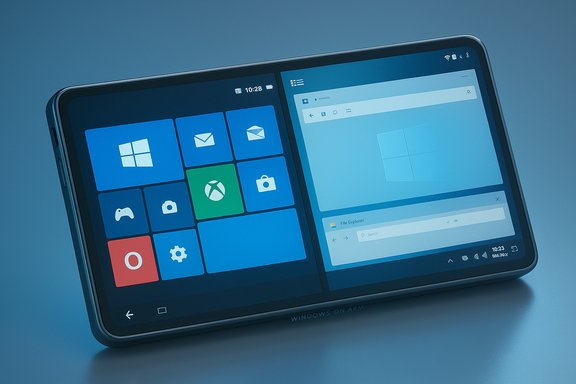
Microsoft’s new Xbox “Full Screen Experience” (FSE) has crystallized a simple but powerful idea: you don’t need a separate operating system to deliver a console-like, controller-first experience — you can layer a full-screen shell on top of Windows 11 and selectively suppress desktop subsystems to make a handheld or living-room device feel like a console. That same layering technique is what stirs the recurring question: if Microsoft can ship a Windows 11 shell for Xbox-style gaming, why can’t we plausibly get a Windows 11 phone shell — a pocketable, phone-first Windows Full Screen Experience that turns a Windows-on-Arm device into a usable smartphone that can also act like a PC when docked?
The Xbox Full Screen Experience (FSE) debuted as a preinstalled shell on the ASUS ROG Xbox Ally family and has been rolled into Windows 11 preview channels as a controlled, layered session that boots into the Xbox PC app rather than Explorer. The design goal is explicit: create a controller-first, console-like launcher that reduces background services, reclaims runtime memory, and offers a thumb-friendly navigation surface while leaving the full Windows desktop available underneath when users need it. Early previews and OEM rollouts — including MSI Claw models — show Microsoft is pushing this experience beyond a single partner and into a broader class of Windows handhelds. The technical approach matters: FSE is not a new kernel, distro, or fork of Windows. It’s a session posture — an alternate shell and a set of policy tweaks that change what components initialize and which services remain active for the session. That means the Windows compatibility model, drivers, and third-party storefronts (Steam, Epic, GOG, Battle.net, and the Microsoft Store) remain available in principle, but the default user experience becomes console-like. This layered model is central to why the idea of a phone shell running on Windows 11 is technically plausible.
But feasible ≠ likely. The commercial hurdles — carrier certification, OEM economics, developer ecosystem, and Microsoft’s strategic focus — are large and historically decisive. The sober view is that Microsoft will continue to extend Windows’ presence incrementally across form factors (handheld gaming PCs, consoles with a Windows-like shell, cloud/AI services) rather than relaunch a full consumer phone platform today.
Still, the idea deserves attention: a Windows phone shell is the kind of bold systems engineering Microsoft used to do when it prioritized platform innovation. If Microsoft ever decides to pursue a phone play again, the FSE’s layered approach gives it a practical, lower-risk template — and one that could hypothetically deliver a device both different and useful enough to matter.
Bold thinking is not the same as bad engineering. The Xbox Full Screen Experience shows the path; the rest is a question of priorities, partnerships, and whether the market rewards a phone that behaves like a PC as much as it behaves like a phone.
Source: Windows Central https://www.windowscentral.com/micr...hy-cant-we-get-a-windows-11-shell-for-phones/
 Background / Overview
The Xbox Full Screen Experience (FSE) debuted as a preinstalled shell on the ASUS ROG Xbox Ally family and has been rolled into Windows 11 preview channels as a controlled, layered session that boots into the Xbox PC app rather than Explorer. The design goal is explicit: create a controller-first, console-like launcher that reduces background services, reclaims runtime memory, and offers a thumb-friendly navigation surface while leaving the full Windows desktop available underneath when users need it. Early previews and OEM rollouts — including MSI Claw models — show Microsoft is pushing this experience beyond a single partner and into a broader class of Windows handhelds. The technical approach matters: FSE is not a new kernel, distro, or fork of Windows. It’s a session posture — an alternate shell and a set of policy tweaks that change what components initialize and which services remain active for the session. That means the Windows compatibility model, drivers, and third-party storefronts (Steam, Epic, GOG, Battle.net, and the Microsoft Store) remain available in principle, but the default user experience becomes console-like. This layered model is central to why the idea of a phone shell running on Windows 11 is technically plausible.Why the Xbox FSE matters as precedent
The FSE proves three interlocking points that are relevant to any conversation about a Windows 11 phone shell:- A layered shell can change UX without changing the OS. By replacing Explorer with a different “home app” session, Microsoft can present radically different form-factor-specific designs while preserving Windows compatibility underneath.
- System posture and process policy can reclaim resources. The shell reduces desktop overhead (notably, suppressing Explorer UI and deferring or suspending non-essential services), which yields measurable gains in free RAM and smoother frame times on constrained devices — a playbook that translates to battery- and thermal-limited phone hardware as well. Independent testing and early hands-on reports indicate tangible improvements on handheld APUs when FSE is active.
- OEM partnership and server-side gating let Microsoft scale selectively. FSE is gate-enabled via Insider builds, OEM entitlements, and server-side flags. That makes it possible to ship the necessary binaries broadly while controlling which devices expose the feature. The same mechanism could enable a phone shell for selected devices without a full ecosystem replatform.
Technical feasibility: what would a Windows 11 phone shell look like?
A realistic Windows phone shell built on the FSE model is conceptually simple and can reuse much of the plumbing Microsoft already has in play:- Boot into a phone-optimized shell (Start Menu / Launcher in full screen) that replaces Explorer visuals and adapts input models for touch and tiny keyboards.
- Tune session-level policies to defer desktop services, reduce background waking, and optimize battery and memory usage for phone-class SoCs.
- Provide a streamlined app model surface that favors web apps and reprovisioned WinUI/MAUI/Prism apps, while offering a docked or external display Continuum-like mode to expose the full Windows desktop when needed.
- Include telephony stacks, carrier integrations, and modem drivers that work with Windows on Arm devices (this is the biggest new engineering area).
- Ship developer guidance and optional compatibility shims to make touch-first and power-aware behaviour easier for existing Win32/UWP developers.
Windows on Arm: is the platform ready?
Windows on Arm has matured significantly in recent years. Qualcomm’s Snapdragon X Elite and similar silicon brought major performance and energy improvements that materially close the gap to x86 in many workloads. Microsoft’s translation layers (x86/x64 emulation), Windows 11 “Prism” optimizations, and increased native Arm builds for popular apps have improved viability for consumer devices. That’s why the recent interest in Arm-based laptops and handhelds is no longer speculative — hardware partners and Microsoft have invested in the stack. That said, phone hardware has different constraints and expectations than laptops or handheld consoles:- Telephony stacks and cellular modem drivers are specialized and historically device- and vendor-specific.
- Tight battery budgets, mobile carrier certification, and radio/hardware integration are non-trivial engineering projects.
- App experience expectations on phones (fast foreground launch, background task lifecycle, push notifications, and low-latency telephony) differ from desktop apps.
App ecosystem: the long pole in the tent
The primary historical obstacle to Windows on phones was the app ecosystem. Windows Phone faltered not because the underlying UI was bad, but because developers didn’t commit the same level of effort or revenue as on iOS/Android. The modern landscape is different in important ways:- Web apps are stronger and more capable. Progressive Web Apps (PWAs) and modern browser engines can deliver many consumer scenarios without native binaries.
- Cross-platform frameworks and desktop apps have moved toward adaptive design. Many major vendors now ship web-first or cross-platform clients that could work across phone and desktop.
- Windows 11’s compatibility with desktop apps remains a double-edged sword: it provides breadth (Adobe, Office, Visual Studio, full PC apps) but also encourages legacy, heavy experiences ill-suited to mobile.
- Encourage PWAs and adaptive native apps for day-to-day phone experiences (messaging, maps, social).
- Provide a “PC apps when you need them” value proposition for users who want full desktop apps when docked (Blender, Visual Studio Code, Photoshop).
- Offer developer tools, templates, and incentives to make common phone patterns simple to implement on Windows UI frameworks.
UX lineage: Continuum, DeX and the Surface Duo lesson
Microsoft has tried convergence before. Continuum (the Windows 10 Mobile feature that let phones surface a desktop-like environment when docked) and experiments like the Surface Duo taught two lessons:- Convergence is technically and conceptually compelling — moving from phone to PC-like experience is valuable and desired by some users. Continuum itself was widely admired as a concept.
- Execution and ecosystem matter. Surface Duo’s Android-based compromise, limited OEM and developer support, and inconsistent OS integration meant users often saw a product that was conceptually strong but tactically underpowered.
Business reality: why it probably won’t happen at scale (today)
Even if the engineering case is plausible, large practical and business obstacles make a mainstream Windows phone shell unlikely in the near term:- Microsoft’s strategic priorities have shifted. The company’s recent focus — from shareholder optics to AI cloud services, Copilot, and enterprise-first plays — channels investment into areas with clearer near-term returns than building a new phone ecosystem.
- Carrier and OEM economics are hostile. Building a phone ecosystem requires subsidized hardware economics (or at least tight carrier relationships), user acquisition investments, and agreements that Microsoft no longer seems inclined to subsidize at the scale required.
- App store economics and platform lock-in. iOS and Android dominate with deep platform hooks and user behaviors. Even if Microsoft offered a differentiated product, breaking the two-platform duopoly is a multiyear, multibillion-dollar effort.
- Brand baggage. Microsoft’s last consumer-era push on phones ended poorly in market share terms; convincing consumers, carriers, and developers to take another chance requires an unusually strong incentive that the proposed product would need to deliver.
Security, privacy, and anti-cheat concerns
Running a phone shell on Windows 11 would change the threat surface in specific ways:- Anti-cheat and DRM compatibility. Games and some apps rely on driver-level anti-cheat; shipments of shell experiences must maintain compatibility or implement controlled fallbacks. The FSE team already needs to navigate these complexities on handhelds.
- Mobile privacy expectations. Phones demand tighter lifecycle controls for location, camera, microphone, and background activity. Windows’ desktop heritage would need clear mobile-first permission models and OS-level enforcement.
- Carrier and regulatory security. Telephony integration brings regulatory and security compliance obligations that a desktop OS rarely faces — emergency call handling, lawful intercept, and SIM provisioning are non-trivial.
Developer and enterprise play
If Microsoft framed a Windows phone shell as an enterprise-first productivity tool (a “PC-in-your-pocket” proposition), it would:- Appeal to verticals that value full Windows apps on the go (field engineers, healthcare, government).
- Leverage existing enterprise Windows management tools (Intune, Group Policy) for device management and security enforcement.
- Provide an easier migration route for enterprise apps that are already Windows-native.
What would Microsoft need to ship a viable phone shell?
- Hardware partners and reference designs with integrated modems and optimized Arm SoCs.
- A dedicated telephony/modem driver program and a carrier certification pipeline.
- A polished, touch-first full-screen shell (Start/Launcher), notification model, and low-latency foreground behaviour.
- Developer SDKs, templates, and incentive programs to encourage adaptive apps (PWAs and native).
- A business model (enterprise-first, niche power-user, or subsidized consumer hardware) with clear paths to customer acquisition.
- Privacy and security certification for mobile networks and emergency services.
Risks and caveats (what to watch for)
- Claims that “the next Xbox will ship as Windows 11” or that Microsoft will pivot to a phone OS remain reported or speculative unless Microsoft issues a clear consumer roadmap. Treat such claims cautiously.
- Early FSE community experiments sometimes require feature-flag hacks (ViVeTool) and can be unstable. Unsupported activation paths demonstrate interest but also the fragility of preview-stage features. Anyone attempting to enable preview features should expect regressions and be prepared to roll back.
- The technical gains from shell-level optimization are meaningful for constrained hardware but are not a silver bullet. If the underlying SoC, drivers, or thermal envelope are insufficient, UX benefits will be limited. Benchmarks show mid-single- to low-double-digit improvements in many scenarios, with variability by title and device.
- Rolling out a phone-capable modem/drivers package at scale entails complex carrier and regulatory work that is fundamentally different from rolling out a shell for handheld gaming PCs.
How Microsoft could phase this to minimize risk
- Phase 1 — Enterprise / Niche: Release a dock-first device aimed at enterprises and power users: a Windows-on-Arm pocket PC with an optional modem and a full-screen phone shell as an enterprise SKU. This reduces carrier complexity while proving the UX and hardware model.
- Phase 2 — OEM partnerships and carrier pilots: Partner with a small set of OEMs and regional carriers for controlled trials; iterate modem stacks and certification.
- Phase 3 — Consumer launch for enthusiasts: If Phase 1 and 2 reveal a strong market signal, expand to consumer devices with retail availability and dedicated developer incentives.
Conclusion — Dream, but read the balance sheet
The Xbox Full Screen Experience proves the central technical idea: a full-screen, form-factor-optimized shell layered on Windows 11 can change how the platform feels and performs without rewriting the platform. That same engineering pattern could be applied to phones: a Windows 11 phone shell using Windows on Arm hardware is technically feasible and would unlock a unique product differentiation — a PC in your pocket that becomes a full desktop when docked.But feasible ≠ likely. The commercial hurdles — carrier certification, OEM economics, developer ecosystem, and Microsoft’s strategic focus — are large and historically decisive. The sober view is that Microsoft will continue to extend Windows’ presence incrementally across form factors (handheld gaming PCs, consoles with a Windows-like shell, cloud/AI services) rather than relaunch a full consumer phone platform today.
Still, the idea deserves attention: a Windows phone shell is the kind of bold systems engineering Microsoft used to do when it prioritized platform innovation. If Microsoft ever decides to pursue a phone play again, the FSE’s layered approach gives it a practical, lower-risk template — and one that could hypothetically deliver a device both different and useful enough to matter.
Bold thinking is not the same as bad engineering. The Xbox Full Screen Experience shows the path; the rest is a question of priorities, partnerships, and whether the market rewards a phone that behaves like a PC as much as it behaves like a phone.
Source: Windows Central https://www.windowscentral.com/micr...hy-cant-we-get-a-windows-11-shell-for-phones/
