

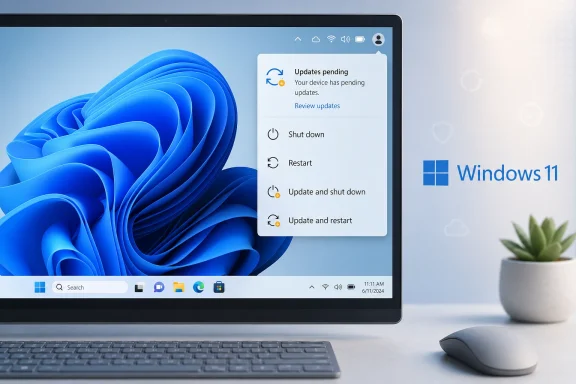
Microsoft is preparing one of the most quietly important Windows 11 usability changes in years: the ability to shut down or restart without installing pending updates. The change, highlighted by PCWorld and tested by Windows Latest, separates ordinary power actions from update actions so users can choose Shut down, Restart, Update and shut down, or Update and restart when updates are waiting. It is a small menu change with a large trust dividend, because Windows will finally do what the power button says rather than turning an urgent shutdown into an unexpected maintenance window.
For much of the Windows 10 and Windows 11 era, Microsoft treated updates as a security obligation first and a user preference second. That posture was understandable after years of unpatched PCs fueling malware outbreaks, botnets, ransomware, and enterprise compromises. But the practical result was an update experience that often felt less like a partnership and more like a negotiation with the operating system.
The old bargain was simple: Windows would keep itself safer, but users would surrender some control over timing. In theory, active hours, pause controls, restart notifications, and scheduled maintenance were supposed to soften that trade-off. In practice, many users still encountered the familiar moment when they needed to leave, close a laptop, join a call, or reboot quickly, only to find Windows steering them toward an update cycle.
The frustration was never really about updates existing. Most users accept that security patches, driver fixes, firmware updates, and servicing stack improvements are necessary. The deeper problem was that Windows blurred the meaning of basic commands, making “shut down” feel conditional and “restart” feel like a trap.
Microsoft’s latest Windows Insider changes suggest the company has finally absorbed that lesson. The new behavior is being tested as part of a broader Windows Update overhaul that includes repeatable pause controls, clearer driver update labels, update coordination across components, and a push toward fewer disruptive restarts. If Microsoft delivers the feature broadly and consistently, it could mark a meaningful reset in the relationship between Windows Update and the people who depend on Windows every day.
The expected choices are:
Microsoft’s own framing emphasizes predictability. The company is not abandoning updates or weakening the security model; it is separating commands so the interface better reflects user intent. That is the right design philosophy for an operating system used on everything from gaming rigs and student laptops to hospital workstations and enterprise fleets.
The change also preserves the update path for users who are ready. Update and shut down and Update and restart remain visible when applicable, so Windows is not hiding maintenance. It is simply making the user’s choice explicit rather than implied.
That real-world context is why small UI changes can carry outsized importance. Windows Update has improved technically over the years, but the emotional memory of surprise reboots and forced waits remains strong. Microsoft is dealing not only with software behavior, but with years of accumulated user suspicion.
The change helps several groups immediately:
The update experience is also gaining clearer information about driver updates. Driver entries have historically been cryptic, repetitive, or too vague to help users make decisions. Adding device-class context, such as display, audio, battery, or similar categories, gives users and administrators a better chance of understanding what is about to change.
The broader package includes several themes:
That unified perception is important. Microsoft can optimize individual update types, but the user judges the whole chain. Fewer update moments, clearer choices, and more predictable restarts are exactly the areas Windows has needed to improve.
Cumulative updates simplified some aspects of maintenance because each package included prior fixes. Yet cumulative servicing also meant every monthly update carried importance, and the system had strong incentives to complete installation. From Microsoft’s perspective, a partially updated ecosystem is harder to support and harder to defend.
The problem was that security logic did not always translate into human-centered design. The system could be technically correct and still feel rude. When a PC has to reboot at the wrong time, the user remembers the interruption, not the threat model.
The historical arc looks like this:
This matters for both consumers and enterprises. A user may be more willing to install updates at the end of the day if the update usually finishes quickly. An IT department may be more willing to accelerate deployment if update payloads are smaller and restart windows are easier to predict.
The technical improvements sit underneath the new user-facing controls:
The important point is direction. Microsoft is pairing more user choice with continued servicing optimization. That is the only sustainable path: make updates easier to accept, not merely harder to avoid.
This is especially useful for systems with unpredictable update histories. Some PCs update quickly, while others spend long periods at “working on updates” screens. Users often cannot know in advance whether a pending update will take two minutes or twenty, so the safest choice is to defer until they have time.
The consumer benefits include:
There is a behavioral upside as well. If users trust that Windows will not hijack a shutdown, they may be less likely to disable updates or avoid restarts entirely. Respectful defaults often produce better compliance than coercive ones.
At the same time, enterprise users are the people most likely to suffer from poorly timed updates. A field engineer, clinician, salesperson, factory operator, or executive in a board meeting may have far less flexibility than a home user. The ability to shut down without triggering maintenance can be valuable even inside a strictly managed patch program.
Enterprise priorities will likely include:
Microsoft’s broader strategy appears to be coordination rather than chaos. If driver, .NET, firmware, and quality updates can be aligned into fewer restart events, enterprise admins gain a cleaner communication model. One predictable maintenance rhythm is easier to defend than a scatter of unrelated prompts.
Windows has the hardest job because it supports a vast hardware ecosystem. It must update countless combinations of CPUs, GPUs, storage controllers, firmware implementations, drivers, peripherals, corporate agents, accessibility tools, and legacy applications. That complexity explains some of Windows Update’s caution, but it does not erase user frustration.
The competitive stakes are clear:
This also has reputational value. Many Windows complaints are not about deep kernel architecture or servicing mechanics; they are about moments of annoyance that become memes. Fixing those moments can do more for perception than a dozen obscure platform improvements.
The Insider Program is useful precisely because Windows runs on messy real-world systems. Lab testing can validate expected cases, but public preview rings reveal hardware quirks, localization issues, third-party software conflicts, and policy interactions that engineers may not see internally. That is especially important for a feature whose value depends on trust.
A sensible rollout should follow several steps:
Microsoft cannot afford a half-fix here. If the new menu says one thing and the PC does another, the trust damage could be worse than before. The feature’s success depends on consistency.
Key developments to monitor include:
If Microsoft follows through, this Power menu change could become one of those improvements that feels obvious in hindsight. Windows 11 does not become secure by surprising users; it becomes healthier when users trust it enough to keep it updated on reasonable terms. The best version of this future is a Windows PC that patches promptly, restarts less often, explains itself clearly, and still shuts down the moment its owner says the day is done.
Source: PCWorld Microsoft finally lets Windows 11 shut down without installing updates
 Background
For much of the Windows 10 and Windows 11 era, Microsoft treated updates as a security obligation first and a user preference second. That posture was understandable after years of unpatched PCs fueling malware outbreaks, botnets, ransomware, and enterprise compromises. But the practical result was an update experience that often felt less like a partnership and more like a negotiation with the operating system.The old bargain was simple: Windows would keep itself safer, but users would surrender some control over timing. In theory, active hours, pause controls, restart notifications, and scheduled maintenance were supposed to soften that trade-off. In practice, many users still encountered the familiar moment when they needed to leave, close a laptop, join a call, or reboot quickly, only to find Windows steering them toward an update cycle.
The frustration was never really about updates existing. Most users accept that security patches, driver fixes, firmware updates, and servicing stack improvements are necessary. The deeper problem was that Windows blurred the meaning of basic commands, making “shut down” feel conditional and “restart” feel like a trap.
Microsoft’s latest Windows Insider changes suggest the company has finally absorbed that lesson. The new behavior is being tested as part of a broader Windows Update overhaul that includes repeatable pause controls, clearer driver update labels, update coordination across components, and a push toward fewer disruptive restarts. If Microsoft delivers the feature broadly and consistently, it could mark a meaningful reset in the relationship between Windows Update and the people who depend on Windows every day.
What Microsoft Is Changing in the Power Menu
The headline change is easy to understand: when an update is pending, Windows 11 will still show normal power options. Instead of replacing or overshadowing routine choices with update-focused prompts, the Power menu can present both categories side by side. That means users should be able to choose a plain shutdown without accidentally starting an update installation.Four choices, four meanings
The new menu is designed around clear intent. If the user wants to power off, the PC powers off. If the user wants to update, the update options remain available and explicit.The expected choices are:
- Shut down
- Restart
- Update and shut down
- Update and restart
Microsoft’s own framing emphasizes predictability. The company is not abandoning updates or weakening the security model; it is separating commands so the interface better reflects user intent. That is the right design philosophy for an operating system used on everything from gaming rigs and student laptops to hospital workstations and enterprise fleets.
The change also preserves the update path for users who are ready. Update and shut down and Update and restart remain visible when applicable, so Windows is not hiding maintenance. It is simply making the user’s choice explicit rather than implied.
Why This Fix Feels Bigger Than It Looks
On paper, this is a Power menu adjustment. In daily use, it is a fix for a long-running confidence problem. An operating system earns trust when its buttons mean what they say, and Windows has too often failed that simple test around updates.Predictability is a feature
For a laptop user at an airport gate, “Shut down” is not a philosophical statement. It means the machine should turn off now, safely and quickly. If the PC instead starts installing updates, the user may be forced to keep the lid open, drain battery, delay boarding, or risk interrupting a servicing process.That real-world context is why small UI changes can carry outsized importance. Windows Update has improved technically over the years, but the emotional memory of surprise reboots and forced waits remains strong. Microsoft is dealing not only with software behavior, but with years of accumulated user suspicion.
The change helps several groups immediately:
- Travelers who need to power down before flights or commutes
- Remote workers who need quick restarts between meetings
- Gamers who want control over sessions and driver timing
- Students who cannot lose time before exams or presentations
- Technicians who reboot repeatedly while troubleshooting
- Developers who manage virtual machines, debuggers, and long-running builds
The Broader Windows Update Overhaul
The shutdown change is part of a larger package of Windows Update improvements now appearing through the Windows Insider Program. Microsoft is addressing multiple pain points at once: timing, visibility, pause duration, setup behavior, and restart frequency. That broader context makes the Power menu change look less like an isolated tweak and more like a strategic course correction.More control without abandoning security
One notable change is the ability to extend update pauses repeatedly in 35-day increments. Windows has long allowed temporary pausing, but the practical limits often frustrated users who had legitimate reasons to defer updates. Microsoft now appears more willing to acknowledge that there are times when stability, bandwidth, travel, or workload constraints justify delay.The update experience is also gaining clearer information about driver updates. Driver entries have historically been cryptic, repetitive, or too vague to help users make decisions. Adding device-class context, such as display, audio, battery, or similar categories, gives users and administrators a better chance of understanding what is about to change.
The broader package includes several themes:
- Skip updates during setup in supported consumer scenarios
- Pause updates more flexibly with repeatable 35-day windows
- Separate shutdown and restart actions from update actions
- Clarify driver update labels with device-class information
- Coordinate updates to reduce repeated restart prompts
- Improve recovery when update installations fail
That unified perception is important. Microsoft can optimize individual update types, but the user judges the whole chain. Fewer update moments, clearer choices, and more predictable restarts are exactly the areas Windows has needed to improve.
How Windows Got Here
Windows Update became more assertive because the old model failed at scale. In the Windows XP and Windows 7 eras, too many devices remained unpatched for too long, creating a dangerous installed base of vulnerable systems. Microsoft’s answer, especially beginning with Windows 10, was to make updating a core part of the service model.From optional maintenance to continuous servicing
The shift to Windows as a service changed expectations. Instead of waiting years for major service packs or feature releases, Windows began receiving cumulative monthly updates and more frequent feature delivery. That model improved consistency for Microsoft, developers, and enterprise security teams, but it also made update behavior more visible to ordinary users.Cumulative updates simplified some aspects of maintenance because each package included prior fixes. Yet cumulative servicing also meant every monthly update carried importance, and the system had strong incentives to complete installation. From Microsoft’s perspective, a partially updated ecosystem is harder to support and harder to defend.
The problem was that security logic did not always translate into human-centered design. The system could be technically correct and still feel rude. When a PC has to reboot at the wrong time, the user remembers the interruption, not the threat model.
The historical arc looks like this:
- Older Windows versions gave users more discretion but left many systems unpatched
- Windows 10 pushed harder on automatic maintenance and cumulative updates
- Windows 11 refined update delivery but inherited trust issues
- Recent servicing changes focused on smaller packages and faster restarts
- The new Power menu behavior targets user intent directly
Smaller, Faster Updates Still Matter
The Power menu fix will get the attention because everyone understands it. But Microsoft has also spent years improving the mechanics of Windows Update under the hood. Those investments matter because giving users more choice is safer when updates are less painful to install later.Servicing improvements reduce the cost of waiting
Windows 11 version 24H2 introduced update fundamentals designed to reduce installation time, restart time, and CPU usage during monthly updates. Microsoft has also promoted checkpoint cumulative updates, which allow newer updates to build from more recent checkpoints rather than dragging ever-growing payload assumptions forward from the original release baseline. The goal is smaller downloads, less bandwidth waste, and faster application on devices that are already reasonably current.This matters for both consumers and enterprises. A user may be more willing to install updates at the end of the day if the update usually finishes quickly. An IT department may be more willing to accelerate deployment if update payloads are smaller and restart windows are easier to predict.
The technical improvements sit underneath the new user-facing controls:
- Reduced installation time makes deferred updates less intimidating
- Shorter restart phases reduce offline disruption
- Lower CPU usage helps older or heavily loaded systems
- Smaller feature update downloads help constrained networks
- Checkpoint cumulative updates reduce repeated payload overhead
- Coordinated update timing can cut down on multiple monthly reboot prompts
The important point is direction. Microsoft is pairing more user choice with continued servicing optimization. That is the only sustainable path: make updates easier to accept, not merely harder to avoid.
Consumer Impact: A More Respectful PC
For everyday Windows 11 users, this change lands as a quality-of-life improvement. It removes one of those small irritations that can define the personality of an operating system. A PC that shuts down when told to shut down feels more personal, more predictable, and less adversarial.Home users gain timing control
The most obvious benefit is speed at the moment of decision. If someone is leaving home, packing a laptop, restarting before a game, or shutting down before bed, they can choose not to install updates immediately. That does not mean they should ignore updates forever; it means they can pick a better moment.This is especially useful for systems with unpredictable update histories. Some PCs update quickly, while others spend long periods at “working on updates” screens. Users often cannot know in advance whether a pending update will take two minutes or twenty, so the safest choice is to defer until they have time.
The consumer benefits include:
- Clearer Power menu choices with less guesswork
- Less pressure to force power off during unwanted update starts
- Better laptop behavior before travel or storage
- Fewer interruptions during gaming, streaming, or creative work
- More confidence that Windows will respect immediate intent
There is a behavioral upside as well. If users trust that Windows will not hijack a shutdown, they may be less likely to disable updates or avoid restarts entirely. Respectful defaults often produce better compliance than coercive ones.
Enterprise Impact: Control Meets Policy
For businesses, the change is welcome but more complicated. Enterprises already manage updates through tools such as Windows Update for Business, Microsoft Intune, Windows Autopatch, WSUS in some environments, and third-party management platforms. The key question is how the new user-facing controls will interact with administrative policy.Admins need predictable governance
Microsoft has said more information is coming about commercial controls. That caveat matters. In a managed environment, allowing users to indefinitely defer critical updates without policy guardrails could create compliance issues, audit failures, and uneven patch baselines.At the same time, enterprise users are the people most likely to suffer from poorly timed updates. A field engineer, clinician, salesperson, factory operator, or executive in a board meeting may have far less flexibility than a home user. The ability to shut down without triggering maintenance can be valuable even inside a strictly managed patch program.
Enterprise priorities will likely include:
- Policy controls for whether normal shutdown can bypass pending updates
- Deadline enforcement for security and compliance requirements
- User notifications that clearly explain when deferral ends
- Reporting visibility into devices repeatedly avoiding installation
- Integration with maintenance windows and restart grace periods
- Exceptions for urgent out-of-band security fixes
Microsoft’s broader strategy appears to be coordination rather than chaos. If driver, .NET, firmware, and quality updates can be aligned into fewer restart events, enterprise admins gain a cleaner communication model. One predictable maintenance rhythm is easier to defend than a scatter of unrelated prompts.
Competitive Implications for Windows
Windows is not judged in isolation. It competes with macOS, ChromeOS, Linux desktops, tablets, and increasingly cloud-managed workspaces. Update experience is part of that competitive landscape because it shapes how modern an operating system feels.Windows must reduce friction to defend its scale
ChromeOS built much of its reputation on background updates and fast, low-friction reboots. macOS gives users a different update cadence and a strong brand perception around controlled system experiences, even if major upgrades can still be disruptive. Linux distributions vary widely, but many desktop users value explicit package-management control.Windows has the hardest job because it supports a vast hardware ecosystem. It must update countless combinations of CPUs, GPUs, storage controllers, firmware implementations, drivers, peripherals, corporate agents, accessibility tools, and legacy applications. That complexity explains some of Windows Update’s caution, but it does not erase user frustration.
The competitive stakes are clear:
- ChromeOS benefits from simpler hardware and update architecture
- macOS benefits from Apple’s tighter control of hardware and software
- Linux desktops appeal to users who want explicit update control
- Windows must serve the broadest compatibility matrix
- Cloud PCs shift some update burdens away from local devices
- Mobile platforms have trained users to expect smoother background maintenance
This also has reputational value. Many Windows complaints are not about deep kernel architecture or servicing mechanics; they are about moments of annoyance that become memes. Fixing those moments can do more for perception than a dozen obscure platform improvements.
Why the Insider Rollout Matters
The feature is currently tied to Windows Insider testing rather than immediate universal availability. That matters because Insider features can change, roll out gradually, or arrive in stages depending on telemetry, build quality, and feedback. Users should be encouraged, but not assume every Windows 11 PC will receive identical behavior overnight.Testing is where edge cases surface
Power and update flows are deceptively complex. A simple menu choice may interact with encryption, pending file operations, firmware updates, driver staging, BitLocker recovery conditions, fast startup behavior, application restoration, and enterprise restart policies. Microsoft needs broad test coverage before making promises across the entire Windows ecosystem.The Insider Program is useful precisely because Windows runs on messy real-world systems. Lab testing can validate expected cases, but public preview rings reveal hardware quirks, localization issues, third-party software conflicts, and policy interactions that engineers may not see internally. That is especially important for a feature whose value depends on trust.
A sensible rollout should follow several steps:
- Validate the menu behavior across consumer Insider builds with pending quality updates.
- Test driver and firmware edge cases where restart sequencing may be more sensitive.
- Confirm enterprise policy behavior for managed devices and compliance deadlines.
- Measure update deferral patterns to ensure security posture does not degrade.
- Ship gradually through servicing once telemetry shows the experience is reliable.
Microsoft cannot afford a half-fix here. If the new menu says one thing and the PC does another, the trust damage could be worse than before. The feature’s success depends on consistency.
Strengths and Opportunities
Microsoft’s update changes show a more mature understanding of how people actually use PCs. The company is not simply making Windows Update quieter; it is trying to make it more understandable, more deliberate, and more aligned with user timing.Upside snapshot
- Clearer user intent means power commands and update commands no longer have to be conflated.
- Better trust in Windows 11 could reduce the urge to disable services or use unsupported workarounds.
- Repeatable update pauses give users flexibility during travel, exams, deadlines, and unstable work periods.
- Coordinated monthly restarts could make the servicing rhythm easier for both consumers and IT departments.
- Improved driver labeling helps users understand whether an update affects display, audio, battery, or another device class.
- Smaller and faster updates reduce the pain associated with choosing to install patches later.
- Enterprise policy opportunities could let admins combine user flexibility with compliance enforcement.
Risks and Concerns
The same flexibility that makes this change attractive also introduces real risks. Windows Update exists because unpatched systems create danger, and Microsoft must prevent convenience from becoming a pathway to long-term neglect.Where the plan could stumble
- Users may defer too often if shutdown without updating becomes the habitual choice.
- Security deadlines may feel unclear unless Windows communicates when updates become urgent.
- Enterprise controls may lag behind consumer features, creating confusion for managed fleets.
- Firmware or driver updates may still require special handling that complicates the clean four-option model.
- Inconsistent rollout timing could frustrate users who read about the feature but do not yet see it.
- Legacy habits may persist because years of Windows Update frustration will not disappear quickly.
- Poorly explained exceptions could undermine the entire promise of predictable power actions.
What to Watch Next
The first thing to watch is how quickly the feature moves beyond Insider testing. Microsoft often stages Windows 11 changes through preview channels, optional updates, controlled feature rollouts, and then broader monthly security releases. That means the feature may arrive unevenly across devices, regions, editions, and managed environments.Signals that matter
The second thing to watch is how Microsoft handles commercial policy. Businesses will want to know whether administrators can configure the behavior, enforce update deadlines, and report on devices that repeatedly shut down without installing. If Microsoft gets that right, the feature becomes not just a consumer convenience but an enterprise productivity improvement.Key developments to monitor include:
- General availability timing for mainstream Windows 11 users
- Windows 11 Home versus Pro behavior and whether controls differ
- Intune and Windows Update for Business policy documentation
- Telemetry-driven changes to pause limits and restart coordination
- User reports from Insider builds about whether shutdown truly bypasses updates
If Microsoft follows through, this Power menu change could become one of those improvements that feels obvious in hindsight. Windows 11 does not become secure by surprising users; it becomes healthier when users trust it enough to keep it updated on reasonable terms. The best version of this future is a Windows PC that patches promptly, restarts less often, explains itself clearly, and still shuts down the moment its owner says the day is done.
Source: PCWorld Microsoft finally lets Windows 11 shut down without installing updates
