

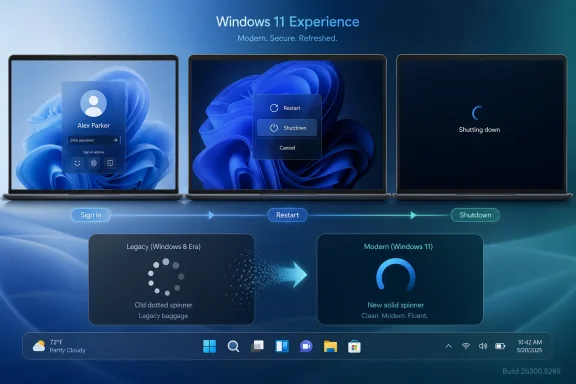
Microsoft’s latest Windows 11 preview quietly replaces one of the operating system’s most stubborn visual leftovers: the Windows 8-era loading spinner shown during sign-in, sign-out, restart, and shutdown flows. The change, spotted in Windows 11 Insider Experimental Preview Build 26300.8289, aligns those transition screens with the newer boot animation already used elsewhere in Windows 11. It is a small visual tweak on paper, but it lands at a moment when Microsoft is trying to prove that Windows 11 can become more coherent, more controllable, and less haunted by legacy design decisions.
Windows users have lived with mismatched interface elements for so long that many no longer notice them. Windows 11 launched with rounded corners, Mica materials, centered taskbar icons, redesigned Settings pages, and a renewed emphasis on Fluent Design, yet parts of the operating system still look like they were pulled from earlier eras of Windows. The loading spinner is one of those elements: a tiny animation, but one that appears at emotionally significant moments when the user is waiting for the system to complete a task.
The old spinner traces back to the Windows 8 design language, when Microsoft pushed hard into flat geometry, full-screen transitions, and a tablet-first interface. That era gave Windows a distinctive look, but it also left behind components that became increasingly awkward as Windows 10 and Windows 11 moved in different visual directions. A decade later, these remnants are less about nostalgia and more about inconsistency.
The newly surfaced spinner is not being advertised as a headline feature. Microsoft’s official build notes for 26300.8289 focus on the Insider channel transition, Windows Update controls, print driver preparation, Start menu click detection, Group Policy fixes, and font support improvements. The spinner change appears to be part of the broader class of hidden or staged Windows 11 features that Microsoft tests behind feature IDs before deciding whether to roll them out more widely.
That distinction matters. Windows 11’s next phase is not only about splashy AI features, Copilot integrations, or new hardware requirements. It is also about whether Microsoft can fix the small, daily frictions that shape how users feel about the operating system.
This change is currently not a mainstream Windows 11 feature. It appears in the latest Experimental-era preview environment and reportedly requires a feature enablement tool to activate. That means most users should not expect to see it immediately on production machines.
The important point is not that Microsoft changed a spinner. The important point is that the company is still auditing low-level shell experiences that many users assumed would never be touched. If an animation buried in logon and shutdown paths is now fair game, other neglected pieces of the interface may be next.
The spinner is therefore best understood as part of a larger reorganization. Microsoft is not only changing what Windows previews contain; it is changing how those previews are categorized, communicated, and staged. That makes hidden changes easier to test without promising them too early.
Windows users encounter these screens during moments of vulnerability. They have just entered a password, clicked restart before a meeting, or asked the system to shut down at the end of a long day. The visual signal shown during that wait becomes part of the perceived reliability of the platform.
This is why UI consistency matters. A coherent animation language makes the system feel intentional, while a mismatched one implies that no single team owns the whole experience. Microsoft has struggled with that perception for years.
This is also where Windows competes with itself. Windows 11 asks users to accept a stricter hardware baseline and a more opinionated interface than Windows 10. In return, users expect the operating system to feel more modern across the board, not only in marketing screenshots.
The smallest inconsistencies become disproportionately visible when the platform sells itself as refined. That is the real story behind this spinner.
Windows 10 softened that approach by restoring the Start menu and blending the old desktop with modern app concepts. Windows 11 went further by presenting itself as a cleaner, calmer, more centered system. Yet the codebase still carries artifacts from each generation.
The spinner is a perfect symbol of that layered history. It is not broken enough to demand urgent repair, but it is visible enough to remind users that Windows design has often advanced unevenly. Microsoft has modernized some surfaces repeatedly while leaving others unchanged for years.
Microsoft also has to support a vast range of hardware, firmware behavior, display configurations, and deployment scenarios. A seemingly simple animation can cross boundaries between shell components, logon processes, graphics initialization, and accessibility states. That complexity helps explain why low-level visuals often lag behind.
Still, longevity becomes a liability. When old UI elements persist too long, they send the message that Windows modernization is selective rather than systemic. Replacing them helps Microsoft argue that Windows 11’s redesign is finally moving below the surface.
This is not just branding. The old Insider structure often confused users because Dev builds could contain features that were not tied to a specific Windows release. Microsoft’s new language makes that uncertainty more explicit. Experimental means exactly what it says: some features may ship, some may change dramatically, and some may disappear.
That framing is useful for hidden UI work like the spinner. Microsoft can expose or stage changes without implying that every visual tweak is guaranteed for a stable release. For enthusiasts, that creates a more honest test environment.
For power users, tools such as ViVeTool have turned hidden Windows features into a community sport. Enthusiasts discover IDs, test unfinished interfaces, and share screenshots long before official announcements. That dynamic gives Microsoft free feedback, but it also creates expectations around features that may not be ready.
The spinner change sits neatly in that culture. It is visible, easy to understand, and low enough in complexity for enthusiasts to test. But it still deserves caution because hidden features can break, regress, or vanish.
The spinner change matters because it targets a symbolic inconsistency rather than a functional checkbox. Microsoft is acknowledging, implicitly, that users care about polish. The company may not announce every cleanup item, but the pattern is becoming easier to see.
Recent preview work also points to a broader sweep of refinements. A redesigned Run dialog, new Storage settings options, taskbar relocation experiments, and update experience improvements all suggest that Microsoft is revisiting everyday surfaces. These are not all equal in maturity, but together they indicate a renewed focus on the desktop fundamentals.
For Windows 11, this is especially challenging because Microsoft wants the platform to carry new AI experiences and next-generation PC features. If the surrounding shell still feels fragmented, those additions can appear bolted on rather than integrated. A modern assistant inside an inconsistent desktop is not enough to make Windows feel modern.
The path to credibility runs through the boring details. That is why a spinner deserves attention.
The ability to skip updates during the out-of-box experience is especially meaningful for consumers setting up a new PC. For years, a new device could become trapped in update installation before the user ever reached the desktop. Giving users a clearer choice respects time without removing the security benefits of updating later.
The updated power menu behavior is equally important. If Windows can consistently separate standard restart and shutdown actions from update-specific actions, users regain confidence that the system will do what they selected. That sounds obvious, but Windows has trained many users to distrust update prompts.
Microsoft’s update changes suggest a more user-centered posture. The company still wants devices secure by default, but it appears more willing to acknowledge that timing matters. That is a welcome shift after years of complaints about unexpected restarts and opaque update queues.
For WindowsForum readers, the message is clear: the spinner is the fun detail, but the update model is the practical development to watch. Together, they show Microsoft working on trust from both ends of the experience.
The bigger enterprise story is Microsoft’s promise of more information and control around Windows Update. Businesses need predictable restart behavior, clear driver classifications, policy-aware setup flows, and reliable communication about Insider-to-retail feature movement. Build 26300.8289 hints at those priorities, even if many controls are still aimed first at Insider testing.
Commercial devices often have managed setup and update policies, so not every consumer-facing change applies directly. Still, the direction matters. Microsoft is trying to reduce the sense that Windows Update is a black box.
Microsoft’s cleanup work can therefore reduce ambient dissatisfaction. It will not replace proper endpoint management, but it supports the impression that the environment is current. That is particularly important as organizations prepare for Windows 10’s post-support reality and continue migrating fleets to Windows 11.
The opportunity for Microsoft is to pair cosmetic coherence with operational credibility. If Windows 11 looks cleaner and behaves more predictably under policy control, enterprise resistance becomes easier to overcome.
A unified spinner can improve the first impression of Windows 11, especially on new hardware. The boot animation, lock screen, sign-in transition, and desktop arrival should feel like one continuous journey. When they do not, the experience feels cheaper than the device around it.
The new update controls may matter even more. A consumer who can skip setup updates, pause updates around travel, and shut down without being dragged into installation is less likely to see Windows as adversarial. That emotional shift is valuable.
Anyone testing Build 26300.8289 should treat it as a lab environment. Backups, restore points, and secondary devices remain the sensible path. A prettier spinner is not worth destabilizing a production PC.
The best role for enthusiasts is to test carefully and report issues. Microsoft’s current development model depends heavily on staged feedback, and small UI changes can expose edge cases that internal testing misses.
That puts pressure on Windows 11. Microsoft’s strongest advantage remains compatibility: decades of apps, games, drivers, peripherals, and enterprise workflows. But compatibility alone does not guarantee affection. Users increasingly expect the world’s dominant desktop operating system to feel as cohesive as the devices and apps they use elsewhere.
The spinner cleanup is therefore part of a larger competitive story. It suggests Microsoft understands that polish is no longer optional. A platform can be powerful and still lose mindshare if it feels messy.
The company seems aware of that tension. Recent Insider activity shows attention to practical desktop issues alongside AI work. That balance is important because users do not want futuristic features sitting on top of unresolved basics.
A coherent Windows shell gives AI features a stronger foundation. Without it, the future feels unevenly distributed across the operating system.
The Run dialog is especially notable because it is one of Windows’ oldest power-user affordances. A modern version with better spacing, recent commands, search-style suggestions, and theme awareness would show that Microsoft is willing to update classic workflows rather than bury them. That is the right instinct.
Taskbar relocation is even more politically charged. Windows 11’s fixed bottom taskbar frustrated users who had relied on top, left, or right placement for years. If Microsoft is genuinely working toward more flexible placement, it would represent a major concession to user feedback.
Microsoft benefits from this discovery culture because it creates excitement around incremental improvements. But the company also risks backlash when hidden features fail to ship. The more users see, the more they expect.
The safest interpretation is cautious optimism. Build 26300.8289 shows promising work, but only official rollout decisions will determine what mainstream users actually receive.
More important, Microsoft needs to apply the same discipline to the rest of Windows. The operating system still contains too many moments where the user falls through a modern surface into an older layer. Each of those moments weakens Windows 11’s claim to be a cohesive platform.
The spinner change is a useful metaphor for the work ahead. Microsoft must keep removing old seams, one visible transition at a time. If it combines that attention to detail with faster core experiences and more respectful update behavior, Windows 11 could finally feel less like a redesign layered over history and more like a unified operating system.
A better loading spinner will not rescue Windows 11 by itself, but it shows Microsoft looking in the right places. The future of Windows depends not only on spectacular new features, but on whether the ordinary moments between those features feel smooth, modern, and trustworthy. If Build 26300.8289 is a sign of sustained cleanup rather than a one-off cosmetic pass, Windows users may finally see the platform’s long-promised coherence arrive through hundreds of small, deliberate fixes.
Source: Neowin Microsoft is finally removing another Windows 8 UI relic from Windows 11
 Overview
Windows users have lived with mismatched interface elements for so long that many no longer notice them. Windows 11 launched with rounded corners, Mica materials, centered taskbar icons, redesigned Settings pages, and a renewed emphasis on Fluent Design, yet parts of the operating system still look like they were pulled from earlier eras of Windows. The loading spinner is one of those elements: a tiny animation, but one that appears at emotionally significant moments when the user is waiting for the system to complete a task.The old spinner traces back to the Windows 8 design language, when Microsoft pushed hard into flat geometry, full-screen transitions, and a tablet-first interface. That era gave Windows a distinctive look, but it also left behind components that became increasingly awkward as Windows 10 and Windows 11 moved in different visual directions. A decade later, these remnants are less about nostalgia and more about inconsistency.
The newly surfaced spinner is not being advertised as a headline feature. Microsoft’s official build notes for 26300.8289 focus on the Insider channel transition, Windows Update controls, print driver preparation, Start menu click detection, Group Policy fixes, and font support improvements. The spinner change appears to be part of the broader class of hidden or staged Windows 11 features that Microsoft tests behind feature IDs before deciding whether to roll them out more widely.
That distinction matters. Windows 11’s next phase is not only about splashy AI features, Copilot integrations, or new hardware requirements. It is also about whether Microsoft can fix the small, daily frictions that shape how users feel about the operating system.
What Is Actually Changing
A small animation with a large visibility footprint
The update replaces the older dotted animation seen during sign-in, sign-out, restart, and shutdown with a newer solid spinning indicator that better matches the Windows 11 boot experience. Instead of switching visual styles depending on where the user is in the system lifecycle, Windows begins to look more like one product moving through different states. That kind of continuity is subtle, but it reduces the sense that users are passing through stitched-together layers of old and new code.This change is currently not a mainstream Windows 11 feature. It appears in the latest Experimental-era preview environment and reportedly requires a feature enablement tool to activate. That means most users should not expect to see it immediately on production machines.
The important point is not that Microsoft changed a spinner. The important point is that the company is still auditing low-level shell experiences that many users assumed would never be touched. If an animation buried in logon and shutdown paths is now fair game, other neglected pieces of the interface may be next.
- The old indicator appears during high-attention waiting moments.
- The new indicator more closely matches the Windows 11 boot animation.
- The change is not yet broadly documented as a public feature.
- It appears to be controlled through feature flags.
- Its presence suggests continued cleanup of legacy shell visuals.
Why this was noticed now
The timing is tied to Build 26300.8289, one of the first builds associated with Microsoft’s shift from the old Dev Channel naming toward the new Experimental model. In that build, Microsoft also began moving release notes into a documentation hub and introducing a clearer channel structure. That administrative reset gives the company a useful moment to test both visible and hidden changes.The spinner is therefore best understood as part of a larger reorganization. Microsoft is not only changing what Windows previews contain; it is changing how those previews are categorized, communicated, and staged. That makes hidden changes easier to test without promising them too early.
Why a Spinner Matters More Than It Sounds
Waiting screens define user trust
A loading animation is not merely decorative. It tells the user that Windows has not frozen, that the system is still working, and that patience is likely to be rewarded. When that animation feels old, mismatched, or out of place, it can make the operating system feel less polished even if the underlying operation is functioning correctly.Windows users encounter these screens during moments of vulnerability. They have just entered a password, clicked restart before a meeting, or asked the system to shut down at the end of a long day. The visual signal shown during that wait becomes part of the perceived reliability of the platform.
This is why UI consistency matters. A coherent animation language makes the system feel intentional, while a mismatched one implies that no single team owns the whole experience. Microsoft has struggled with that perception for years.
- Consistency helps users feel the system is unified.
- Motion design signals progress and responsiveness.
- Legacy visuals can make modern components feel superficial.
- Transition screens carry more emotional weight than ordinary controls.
- Polish becomes especially important when users cannot interact.
The psychology of operating system polish
Users rarely judge an operating system only by benchmark results or feature lists. They judge it by accumulated micro-moments: how quickly File Explorer opens, whether dark mode flashes white, whether the Start menu responds predictably, and whether shutdown feels clean. A spinner lives in that same category of experience.This is also where Windows competes with itself. Windows 11 asks users to accept a stricter hardware baseline and a more opinionated interface than Windows 10. In return, users expect the operating system to feel more modern across the board, not only in marketing screenshots.
The smallest inconsistencies become disproportionately visible when the platform sells itself as refined. That is the real story behind this spinner.
The Windows 8 Legacy Still Inside Windows 11
A design era that never fully disappeared
Windows 8 arrived in 2012 with a radical bet: the future of personal computing would converge around touch-first, full-screen, tile-based interfaces. The Start screen replaced the Start menu, app chrome was minimized, and system transitions leaned heavily on flat motion. Some of those ideas were forward-looking, but many clashed with how desktop users actually worked.Windows 10 softened that approach by restoring the Start menu and blending the old desktop with modern app concepts. Windows 11 went further by presenting itself as a cleaner, calmer, more centered system. Yet the codebase still carries artifacts from each generation.
The spinner is a perfect symbol of that layered history. It is not broken enough to demand urgent repair, but it is visible enough to remind users that Windows design has often advanced unevenly. Microsoft has modernized some surfaces repeatedly while leaving others unchanged for years.
- Windows 8 introduced a dramatic visual break from Windows 7.
- Windows 10 restored desktop familiarity while keeping many modern components.
- Windows 11 rebuilt major shell surfaces but left legacy elements scattered throughout.
- Some old assets remain because they are stable, low-risk, and deeply integrated.
- Users notice inconsistencies most when old and new elements appear seconds apart.
Why old UI elements survive
Legacy UI survives for practical reasons. Authentication, shutdown, restart, recovery, and setup flows are sensitive parts of the operating system. Changing them is riskier than redesigning a Settings subpage because failures can affect boot reliability, accessibility, localization, enterprise policy, and recovery paths.Microsoft also has to support a vast range of hardware, firmware behavior, display configurations, and deployment scenarios. A seemingly simple animation can cross boundaries between shell components, logon processes, graphics initialization, and accessibility states. That complexity helps explain why low-level visuals often lag behind.
Still, longevity becomes a liability. When old UI elements persist too long, they send the message that Windows modernization is selective rather than systemic. Replacing them helps Microsoft argue that Windows 11’s redesign is finally moving below the surface.
The Experimental Channel Reset
More than a renamed Dev Channel
Build 26300.8289 arrives during Microsoft’s transition from the familiar Insider channel structure toward a new Experimental and Beta arrangement. Dev Channel users are being moved toward Experimental, while Beta becomes more closely associated with features expected to reach retail users in the nearer term. Canary users are also being sorted into specific Experimental tracks depending on their build series.This is not just branding. The old Insider structure often confused users because Dev builds could contain features that were not tied to a specific Windows release. Microsoft’s new language makes that uncertainty more explicit. Experimental means exactly what it says: some features may ship, some may change dramatically, and some may disappear.
That framing is useful for hidden UI work like the spinner. Microsoft can expose or stage changes without implying that every visual tweak is guaranteed for a stable release. For enthusiasts, that creates a more honest test environment.
- Microsoft stages a feature behind an internal flag.
- Insiders or watchers discover the feature in preview builds.
- Feedback, telemetry, and internal testing shape whether it advances.
- The feature may roll out gradually to more testers.
- Only later does Microsoft decide whether it belongs in retail Windows.
Feature flags as the new Windows workshop
Feature flags have become central to Windows development. They allow Microsoft to place code in public builds while controlling who sees it, when it activates, and how quickly it expands. This method reduces the need for separate code branches and gives the company more flexibility.For power users, tools such as ViVeTool have turned hidden Windows features into a community sport. Enthusiasts discover IDs, test unfinished interfaces, and share screenshots long before official announcements. That dynamic gives Microsoft free feedback, but it also creates expectations around features that may not be ready.
The spinner change sits neatly in that culture. It is visible, easy to understand, and low enough in complexity for enthusiasts to test. But it still deserves caution because hidden features can break, regress, or vanish.
Windows 11’s Larger Cohesion Problem
The mismatch users keep pointing out
Windows 11 has improved since launch, but its design consistency remains uneven. Users still encounter older dialog boxes, legacy Control Panel areas, mixed context menus, varied icon styles, and management consoles that look untouched by modern Windows design. Some of that is unavoidable in an operating system with decades of compatibility requirements, but not all of it is acceptable.The spinner change matters because it targets a symbolic inconsistency rather than a functional checkbox. Microsoft is acknowledging, implicitly, that users care about polish. The company may not announce every cleanup item, but the pattern is becoming easier to see.
Recent preview work also points to a broader sweep of refinements. A redesigned Run dialog, new Storage settings options, taskbar relocation experiments, and update experience improvements all suggest that Microsoft is revisiting everyday surfaces. These are not all equal in maturity, but together they indicate a renewed focus on the desktop fundamentals.
- File Explorer performance remains a key perception issue.
- Taskbar flexibility continues to be a top user request.
- Update predictability affects both home and business users.
- Settings modernization still has unfinished edges.
- Legacy dialogs undermine the Windows 11 visual promise.
Why visual debt becomes product debt
Visual inconsistency is often dismissed as cosmetic, but it can become product debt. When users see old UI, they assume the underlying system is also old, even when that is not technically fair. Design becomes a proxy for maintenance.For Windows 11, this is especially challenging because Microsoft wants the platform to carry new AI experiences and next-generation PC features. If the surrounding shell still feels fragmented, those additions can appear bolted on rather than integrated. A modern assistant inside an inconsistent desktop is not enough to make Windows feel modern.
The path to credibility runs through the boring details. That is why a spinner deserves attention.
Windows Update Improvements Steal the Bigger Spotlight
Control is the real headline
As charming as the spinner story is, Build 26300.8289’s more consequential changes involve Windows Update. Microsoft is testing more user control over setup updates, pause behavior, restart options, and update information. These changes respond to one of the longest-running complaints about Windows: updates often feel disruptive and insufficiently transparent.The ability to skip updates during the out-of-box experience is especially meaningful for consumers setting up a new PC. For years, a new device could become trapped in update installation before the user ever reached the desktop. Giving users a clearer choice respects time without removing the security benefits of updating later.
The updated power menu behavior is equally important. If Windows can consistently separate standard restart and shutdown actions from update-specific actions, users regain confidence that the system will do what they selected. That sounds obvious, but Windows has trained many users to distrust update prompts.
- Skip updates during setup when appropriate.
- Pause updates with more flexible timing.
- Restart or shut down without being forced into an update path.
- View clearer information about available driver updates.
- Coordinate more update types around fewer monthly restarts.
Why this matters to the spinner story
The spinner and Windows Update improvements intersect because both deal with waiting. One is a visual signal, the other is a control model, but both shape how users experience downtime. Windows feels better when it both explains what is happening and avoids forcing users into unwanted delays.Microsoft’s update changes suggest a more user-centered posture. The company still wants devices secure by default, but it appears more willing to acknowledge that timing matters. That is a welcome shift after years of complaints about unexpected restarts and opaque update queues.
For WindowsForum readers, the message is clear: the spinner is the fun detail, but the update model is the practical development to watch. Together, they show Microsoft working on trust from both ends of the experience.
Enterprise Impact
Admins care about predictability, not animations
For enterprise IT teams, the new spinner itself is unlikely to drive deployment decisions. A cleaner sign-in animation will not change a servicing ring, endpoint management policy, or Windows Autopilot workflow. However, it does contribute to the professional feel of managed devices, especially in environments where Windows 11 is being rolled out after years of Windows 10 stability.The bigger enterprise story is Microsoft’s promise of more information and control around Windows Update. Businesses need predictable restart behavior, clear driver classifications, policy-aware setup flows, and reliable communication about Insider-to-retail feature movement. Build 26300.8289 hints at those priorities, even if many controls are still aimed first at Insider testing.
Commercial devices often have managed setup and update policies, so not every consumer-facing change applies directly. Still, the direction matters. Microsoft is trying to reduce the sense that Windows Update is a black box.
- Managed OOBE scenarios may not receive the same skip-update behavior.
- Driver update clarity can help troubleshooting and compliance.
- Restart predictability reduces disruption for frontline workers.
- Feature flag staging requires careful evaluation before broad deployment.
- Insider channel clarity helps test teams understand preview risk.
The desktop experience as a workplace signal
A polished Windows sign-in experience matters in workplaces more than many administrators admit. Employees judge corporate IT by the daily device experience. If a machine feels slow, inconsistent, or visually outdated, frustration often gets directed at the IT department even when the root cause is platform design.Microsoft’s cleanup work can therefore reduce ambient dissatisfaction. It will not replace proper endpoint management, but it supports the impression that the environment is current. That is particularly important as organizations prepare for Windows 10’s post-support reality and continue migrating fleets to Windows 11.
The opportunity for Microsoft is to pair cosmetic coherence with operational credibility. If Windows 11 looks cleaner and behaves more predictably under policy control, enterprise resistance becomes easier to overcome.
Consumer Impact
A better first impression for everyday users
Consumers are more likely than enterprises to notice the spinner directly. They restart laptops, install updates, switch accounts, and set up new PCs without thinking in terms of shell components or feature IDs. To them, the operating system simply looks either polished or inconsistent.A unified spinner can improve the first impression of Windows 11, especially on new hardware. The boot animation, lock screen, sign-in transition, and desktop arrival should feel like one continuous journey. When they do not, the experience feels cheaper than the device around it.
The new update controls may matter even more. A consumer who can skip setup updates, pause updates around travel, and shut down without being dragged into installation is less likely to see Windows as adversarial. That emotional shift is valuable.
- Faster access to the desktop during setup can reduce frustration.
- Clearer restart choices make Windows feel more respectful.
- A consistent animation improves perceived polish.
- Fewer forced-feeling interruptions may reduce update avoidance.
- Better UI cohesion supports the case for upgrading from Windows 10.
Enthusiasts should still be cautious
Power users may be tempted to enable the new spinner immediately using feature tools. That is understandable, but preview flags are not the same as supported settings. Hidden features can be incomplete, inaccessible, unlocalized, or incompatible with other staged changes.Anyone testing Build 26300.8289 should treat it as a lab environment. Backups, restore points, and secondary devices remain the sensible path. A prettier spinner is not worth destabilizing a production PC.
The best role for enthusiasts is to test carefully and report issues. Microsoft’s current development model depends heavily on staged feedback, and small UI changes can expose edge cases that internal testing misses.
Competitive Implications
Windows is competing with polish-heavy platforms
Microsoft does not operate in a vacuum. macOS, ChromeOS, iPadOS, and Linux desktop environments all compete for user attention in different ways. Some offer less compatibility than Windows, but many feel more visually consistent because they carry less legacy surface area.That puts pressure on Windows 11. Microsoft’s strongest advantage remains compatibility: decades of apps, games, drivers, peripherals, and enterprise workflows. But compatibility alone does not guarantee affection. Users increasingly expect the world’s dominant desktop operating system to feel as cohesive as the devices and apps they use elsewhere.
The spinner cleanup is therefore part of a larger competitive story. It suggests Microsoft understands that polish is no longer optional. A platform can be powerful and still lose mindshare if it feels messy.
- Apple emphasizes end-to-end hardware and software cohesion.
- Google prioritizes simplified update and setup flows in ChromeOS.
- Linux desktops increasingly offer polished, theme-consistent environments.
- Windows retains the broadest compatibility advantage.
- Microsoft must close the perception gap without breaking legacy support.
The AI era raises the bar
Microsoft is investing heavily in AI-native Windows concepts, Copilot experiences, and new PC hardware capabilities. Those efforts will invite scrutiny. If Windows adds intelligent agents while old UI fragments remain untouched, critics will argue that Microsoft is decorating rather than rebuilding.The company seems aware of that tension. Recent Insider activity shows attention to practical desktop issues alongside AI work. That balance is important because users do not want futuristic features sitting on top of unresolved basics.
A coherent Windows shell gives AI features a stronger foundation. Without it, the future feels unevenly distributed across the operating system.
The Hidden Feature Pipeline
What else Build 26300.8289 appears to signal
The spinner is not the only interesting hidden development around this build. Reports point to work on a modernized Run dialog, Storage settings refinements, and early taskbar relocation hooks. Some of these changes are more mature than others, and not all are necessarily available to normal Insiders without flags.The Run dialog is especially notable because it is one of Windows’ oldest power-user affordances. A modern version with better spacing, recent commands, search-style suggestions, and theme awareness would show that Microsoft is willing to update classic workflows rather than bury them. That is the right instinct.
Taskbar relocation is even more politically charged. Windows 11’s fixed bottom taskbar frustrated users who had relied on top, left, or right placement for years. If Microsoft is genuinely working toward more flexible placement, it would represent a major concession to user feedback.
- A redesigned Run dialog could modernize a classic keyboard workflow.
- Storage unit switching can reduce friction in disk management tasks.
- Taskbar relocation would answer one of Windows 11’s loudest complaints.
- Hidden implementation does not guarantee retail release.
- Feature maturity varies widely across preview builds.
The value and danger of discovery culture
The Windows enthusiast community has become very good at finding unfinished work. That gives readers early insight into Microsoft’s direction, but it can also blur the line between roadmap and experiment. A discovered feature is not a promise.Microsoft benefits from this discovery culture because it creates excitement around incremental improvements. But the company also risks backlash when hidden features fail to ship. The more users see, the more they expect.
The safest interpretation is cautious optimism. Build 26300.8289 shows promising work, but only official rollout decisions will determine what mainstream users actually receive.
Strengths and Opportunities
A promising sign of renewed attention
Microsoft’s spinner replacement is small, but it fits a healthier Windows 11 pattern: clean up neglected surfaces, improve user control, and make the Insider program easier to understand. The opportunity is to turn scattered refinements into a sustained campaign of desktop trust-building.- Visual cohesion improves when boot, sign-in, and shutdown states share the same motion language.
- User trust grows when Windows Update offers clearer restart and pause choices.
- Insider clarity improves as Experimental and Beta channels get sharper definitions.
- Power-user goodwill can recover if Microsoft modernizes classic tools like Run without removing their speed.
- Enterprise confidence increases when update behavior becomes more predictable and policy-friendly.
- Consumer satisfaction benefits from fewer jarring setup and restart experiences.
- Windows 11 modernization becomes more credible when Microsoft addresses small legacy details as well as major features.
Risks and Concerns
Hidden polish cannot substitute for hard fixes
The risk is that Microsoft treats visual refinement as a substitute for deeper work. Windows 11 still faces criticism around performance, hardware requirements, taskbar limitations, File Explorer responsiveness, update reliability, default app friction, and advertising-like surfaces. A new spinner helps polish the shell, but it does not solve those larger problems.- Preview features may never ship, leaving users disappointed after early discovery.
- Feature flag testing can encourage risky behavior on production PCs.
- UI consistency work may remain uneven if legacy dialogs and tools are not addressed systematically.
- Update control changes must preserve security outcomes while reducing disruption.
- Enterprise policy gaps could limit the value of consumer-facing improvements.
- Taskbar experiments may frustrate users if they appear in unfinished or buggy form.
- AI investment could overshadow the practical desktop fixes users keep requesting.
Looking Ahead
The next test is consistency at scale
The next question is whether Microsoft moves this spinner change from hidden preview behavior into a documented, broadly available Windows 11 update. If it does, users may never think deeply about the animation, and that would be a success. Good system design often disappears into a feeling that everything belongs.More important, Microsoft needs to apply the same discipline to the rest of Windows. The operating system still contains too many moments where the user falls through a modern surface into an older layer. Each of those moments weakens Windows 11’s claim to be a cohesive platform.
- Watch whether the spinner appears in future Experimental, Beta, or Release Preview builds.
- Watch whether Microsoft documents the change or keeps it as a quiet rollout.
- Watch for continued modernization of Run, taskbar settings, and storage management.
- Watch how Windows Update controls evolve for commercial customers.
- Watch whether Microsoft reduces legacy UI in security, recovery, and setup flows.
A credibility moment for Windows 11
Windows 11 is entering a crucial period. Windows 10’s long tail remains significant, AI PCs are pushing new hardware narratives, and Microsoft needs users to believe that the platform is improving in practical ways. The company cannot rely only on Copilot branding or new silicon requirements.The spinner change is a useful metaphor for the work ahead. Microsoft must keep removing old seams, one visible transition at a time. If it combines that attention to detail with faster core experiences and more respectful update behavior, Windows 11 could finally feel less like a redesign layered over history and more like a unified operating system.
A better loading spinner will not rescue Windows 11 by itself, but it shows Microsoft looking in the right places. The future of Windows depends not only on spectacular new features, but on whether the ordinary moments between those features feel smooth, modern, and trustworthy. If Build 26300.8289 is a sign of sustained cleanup rather than a one-off cosmetic pass, Windows users may finally see the platform’s long-promised coherence arrive through hundreds of small, deliberate fixes.
Source: Neowin Microsoft is finally removing another Windows 8 UI relic from Windows 11
