

Microsoft and its channel partners are pitching Windows 11 Pro, Copilot, and Copilot+ PCs as the business upgrade path for teams still standardising their post-Windows 10 workplace in 2026, with Tarsus Distribution framing the move as a productivity, security, and AI-readiness decision for organisations buying new PCs. The sales message is simple enough: modern work is fragmented, employees waste time looking for information, and AI can turn the operating system from a passive launcher into an active assistant. The more important story is that Microsoft is trying to make the PC refresh cycle feel less like hardware replacement and more like a strategic reset. That is both the promise and the pressure point.
For most of Windows’ history, a business OS upgrade was sold on compatibility, manageability, security, and support deadlines. Windows 11 Pro still leans heavily on those pillars, but the rhetoric around it has changed. The operating system is now being packaged with Copilot and Copilot+ PCs as part of a broader workplace transformation narrative, where the endpoint is not merely a secured device but an AI workstation.
That matters because Windows 10’s end of support has already passed. The date, October 14, 2025, was the hard line Microsoft had been warning about for years, and it changed the upgrade conversation from “should we move?” to “what should the next managed PC estate look like?” For businesses that delayed migration, Windows 11 Pro is no longer just the successor OS. It is the default platform on which Microsoft wants the next decade of commercial computing to run.
Tarsus Distribution’s argument follows that logic closely. The pitch is not that Windows 11 Pro gives workers a nicer Start menu or a cleaner desktop. It is that businesses can use the refresh to bring Copilot, local AI acceleration, stronger device security, and newer management assumptions into the same procurement motion.
That framing is convenient for Microsoft and its partners, but it is not meaningless. Many organisations really are carrying device fleets assembled under very different assumptions: hybrid work was a contingency, AI was not part of the desktop workflow, and endpoint security often meant layering tools on top of ageing hardware. Windows 11 Pro and Copilot+ PCs offer a chance to revisit those assumptions. The risk is that buyers mistake the bundle for the strategy.
Copilot is designed to attack precisely that layer of work. In Microsoft’s telling, it can summarise long documents, pull useful points out of meetings, help draft communications, generate proposals, and make information easier to find. Those are not exotic AI use cases. They are the repetitive middle of knowledge work, where a small reduction in friction can feel disproportionately valuable.
Windows 11 Pro’s role in that story is partly as platform and partly as packaging. The OS gives businesses the supported desktop environment, identity integration, security controls, and device-management baseline needed to roll out these experiences at scale. Copilot and Microsoft 365 provide much of the assistant layer. Copilot+ PCs add the hardware foundation for AI features that benefit from an on-device neural processing unit.
The business case therefore depends less on whether AI can magically transform productivity and more on whether it can reliably shorten common tasks. A worker who saves ten minutes finding the right file before a customer call has not experienced a revolution. A department that saves those ten minutes thousands of times a month has found a measurable operational gain.
That is where the strongest version of the Windows 11 Pro argument sits. Not in the vague promise of “AI-powered work,” but in the accumulation of small moments where the computer stops acting like a filing cabinet and starts acting like a contextual system.
This is important because AI on the PC is not only about chatbot prompts. Local processing can support experiences that need to be fast, persistent, private, or tightly integrated with what is happening on screen. Microsoft has used features such as Recall, Click to Do, improved Windows Search, Live Captions with translation, and Windows Studio Effects to demonstrate why a modern endpoint might need AI acceleration rather than simply a web connection.
Recall is the most controversial and revealing example. The idea is attractive: if a user can find something they previously saw on screen by describing it, the PC becomes far better at recovering lost context. In theory, that solves one of the great annoyances of modern work, where the thing you need might have been in a browser tab, PDF, Teams chat, slide deck, or app window hours or days earlier.
But Recall also shows why the move to AI PCs is not just a productivity question. A feature that indexes prior activity across a device raises obvious privacy, security, governance, and employee-trust issues. Microsoft revised the feature after backlash, added controls, and positioned it as a managed experience, but the lesson remains: AI features that understand the user’s work surface are powerful precisely because they are close to sensitive data.
Click to Do is less culturally explosive but strategically similar. It is meant to let users act on content directly from the screen, turning visible text or images into possible next steps. That sounds small until one considers how much enterprise work consists of copying, pasting, saving, translating, searching, scheduling, summarising, and escalating. If Microsoft can make the screen itself actionable, Windows becomes less of a container for apps and more of an orchestration layer.
Live Captions with translation points to another practical use case. International teams, multilingual meetings, distributed support desks, and cross-border sales operations all benefit when language barriers are reduced at the endpoint. Again, the headline is AI, but the operational benefit is more prosaic: fewer meetings misunderstood, fewer follow-up clarifications, and less dependence on perfect language fluency in every interaction.
Security is one of the few areas where the upgrade argument does not need much embellishment. Unsupported operating systems become harder to defend over time because vulnerabilities keep being discovered after patches stop arriving. Even where extended security updates are available, they are a bridge, not a destination. They buy time for migration; they do not turn Windows 10 into a modern long-term endpoint strategy.
Windows 11 Pro also reflects a different baseline for hardware-backed security. Requirements around TPM 2.0, Secure Boot-capable systems, virtualization-based security, and modern identity protections were contentious when Windows 11 arrived, especially for users with otherwise functional older PCs. For businesses, however, those requirements align with where endpoint security has been heading: stronger roots of trust, better isolation, and tighter assumptions about device integrity.
That does not mean Windows 11 Pro is magically secure by default. Misconfigured identity, weak conditional access, unmanaged local admin rights, poor patch discipline, vulnerable third-party software, and sloppy data governance can undermine any OS. But starting from a modern, supported Windows baseline gives IT teams a better foundation than trying to compensate indefinitely for ageing platforms.
The deeper point is that AI does not reduce the need for endpoint discipline. It increases it. If users are going to summarise documents, query work content, search across device history, and interact with AI features embedded in the workflow, organisations need more confidence in device trust, data boundaries, auditability, and policy enforcement. The smarter the endpoint becomes, the more consequential endpoint governance becomes.
This is where Windows 11 Pro earns its place in the commercial conversation. Domain join, Microsoft Entra ID integration, BitLocker, Hyper-V, Remote Desktop host capability, Windows Update for Business, mobile device management support, and policy control are not glamorous. They are the reasons businesses buy Pro instead of treating Windows as a consumer shell with office apps installed.
Copilot+ features add another management dimension. Organisations will not all want the same AI capabilities enabled in the same way. A marketing team may embrace Recall-like discovery if policy and privacy concerns are addressed. A legal department may reject it entirely. A regulated financial services environment may need stricter controls than a small design studio. The value of Windows 11 Pro in this environment is not just access to new features; it is the ability to decide how those features are introduced.
That is also where distribution partners such as Tarsus fit into the picture. Many small and midsize organisations do not have the luxury of large transformation teams. They need help choosing devices, matching workloads to hardware, understanding licensing, and avoiding refresh decisions that look cheap in year one but become expensive by year three. A Windows 11 Pro migration tied to Copilot+ PCs is not just a software upgrade. It is a procurement, training, security, and change-management exercise.
The danger for buyers is treating the phrase “AI-ready” as a substitute for requirements. Not every employee needs a Copilot+ PC on day one. Not every AI feature will be useful in every role. Not every workflow gains enough from local AI acceleration to justify an immediate premium. The smarter move is segmentation: identify which teams benefit from AI-enhanced endpoints now, which can use conventional Windows 11 Pro hardware, and which legacy workloads require special handling before migration.
That makes the Windows 11 Pro transition uncomfortable but useful. If a business cannot easily answer which devices it owns, which apps are business-critical, which users require elevated privileges, and which workloads are candidates for cloud or virtual desktop delivery, the problem is bigger than the operating system. The migration simply makes it visible.
The AI layer sharpens that test. Before a company tells employees to use Copilot to draft emails, summarise documents, and extract insights, it needs to understand data classification and access permissions. If workers can ask an assistant to summarise information they should not have been able to access in the first place, AI has not created the governance failure. It has exposed it at machine speed.
This is why the best Windows 11 Pro projects will not be framed as “install the new OS everywhere.” They will look more like endpoint modernisation programs. Hardware readiness, identity controls, application rationalisation, user training, device management, data governance, and AI policy all belong in the same conversation.
The organisations that treat this as a procurement event will still get newer PCs. The organisations that treat it as a systems audit may get something more valuable: a clearer picture of how work actually happens.
Yet Recall also forces businesses to confront the difference between personal productivity and institutional risk. A tool that helps users rediscover past activity may touch confidential files, customer records, internal strategy, HR material, credentials displayed in error, or regulated data. Even if snapshots are protected locally and managed through policy, the feature changes the threat model because it creates a new index of user activity.
Microsoft’s revised approach, including opt-in flows and administrative controls, is an acknowledgment that trust is now part of the product. Businesses will need to evaluate not merely whether Recall works, but whether it fits their culture, regulatory obligations, and employee expectations. In some environments, it may be disabled. In others, it may be piloted with specific groups. In a few, it may become indispensable.
That uneven adoption should not be seen as failure. It is what mature AI deployment looks like. The idea that every feature should be switched on for every user is a consumer-software instinct, not an enterprise strategy. Windows 11 Pro’s job is to make selective adoption possible.
Click to Do and Live Captions are likely to encounter less resistance because they feel more immediate and less archival. But they still participate in the same shift: Windows is watching more context, interpreting more content, and offering more actions. That can be empowering. It also demands clearer rules.
Some of the gains will come from the operating system and hardware refresh rather than AI itself. Newer PCs boot faster, handle video calls better, offer improved battery life, support newer security features, and reduce the support burden created by ageing devices. In a hybrid workforce, those basics matter. A laptop with poor battery life and unreliable camera performance is a productivity tax long before Copilot enters the story.
Other gains may come from Microsoft 365 integration. If employees already live in Outlook, Teams, Word, Excel, PowerPoint, SharePoint, and OneDrive, Copilot’s ability to operate across those surfaces may be more valuable than a standalone AI tool. The advantage is not that Microsoft has invented workplace assistance from scratch. It is that Microsoft owns much of the terrain where office work already happens.
Copilot+ PCs then add a narrower but potentially important layer: local AI experiences tied to the device. That distinction should be preserved in purchasing conversations. Windows 11 Pro is the commercial OS. Copilot is the assistant layer. Copilot+ PC hardware enables specific local AI capabilities. Blurring those categories may help marketing, but it can confuse planning.
The best business case will map roles to benefits. Executives may value meeting summaries and fast briefing generation. Sales teams may value proposal drafts and customer context retrieval. Support teams may benefit from translation and knowledge discovery. Developers may care more about performance, virtualization, and secure dev environments than Recall. Frontline managers may need reliable devices and simplified access more than AI-heavy workflows.
Windows 10’s support milestone removed the comfortable ambiguity that often surrounds OS migrations. Security teams cannot indefinitely accept “we’ll get to it next quarter” as a plan. Procurement teams cannot assume existing hardware will remain viable for the next refresh cycle. Business leaders cannot treat AI readiness as an abstract future concern when the devices being purchased now may remain in service for years.
At the same time, urgency is not an excuse for indiscriminate buying. A rushed fleet-wide refresh can lock in poor device choices, overbuy AI hardware for users who do not need it, underinvest in training, or deploy features before policies are ready. The fact that Windows 11 Pro is the right general direction does not mean every AI-branded purchase is automatically strategic.
Partners can help here if they behave like advisers rather than brochure amplifiers. A useful partner will ask about application compatibility, identity architecture, device management maturity, user roles, security requirements, and refresh timelines. A less useful partner will simply equate modernisation with buying the newest category of machine.
The Windows 11 Pro migration is therefore a test for the channel as well as customers. The winners will not merely sell Copilot+ PCs. They will help organisations decide where those machines make sense, where standard Windows 11 Pro systems are sufficient, and where cloud or virtualised options may be a better fit.
After Windows 10 support ended, that cost became more explicit. Organisations can pursue extended security updates in some cases, but doing so should be treated as a temporary risk-management measure. It gives IT breathing room; it does not erase the need to modernise. The longer a business stretches an ageing estate, the more likely it is to accumulate brittle workarounds.
Windows 11 Pro also raises the baseline expectation for what a business PC should be. Hardware-backed security, better support for modern management, stronger integration with cloud identity, and AI-ready configurations are becoming the default assumptions around commercial endpoints. Machines that cannot meet those assumptions may still function, but they increasingly sit outside the design centre of the Windows ecosystem.
This is where the emotional resistance to upgrades collides with operational reality. Many users dislike change, and many businesses would rather avoid refresh spending. But a stagnant PC estate eventually becomes a drag on security, manageability, and employee experience. The question is not whether migration has a cost. It is whether delaying migration has become more expensive.
That means involving security early. Features that touch screen content, documents, meetings, and search need review before broad deployment. Legal, compliance, HR, and works councils may also need a voice depending on jurisdiction and industry. If those conversations happen after rollout, the organisation has already lost control of the narrative.
Training is another underrated variable. Copilot and related AI features are not self-explanatory just because they are conversational. Employees need to understand what the tools are good at, where outputs require verification, what data they may use, and which tasks remain inappropriate. Without that guidance, businesses risk both underuse and misuse.
There is also a cultural dimension. If employees see AI features as surveillance, job-threat theatre, or another management fad, adoption will suffer. If they see them as practical tools that remove drudgery while respecting boundaries, adoption has a chance. The difference is not only technical. It is managerial.
Windows 11 Pro gives organisations a platform. Copilot+ PCs give them hardware headroom. Neither gives them judgment. That remains the customer’s job.
That planning should begin with a clear inventory. Which Windows 10 devices remain? Which are eligible for Windows 11? Which must be replaced? Which applications still block migration? Which departments have the highest productivity upside from Copilot or Copilot+ features? Which environments require the strictest controls?
Only after that should the organisation decide how aggressively to buy Copilot+ PCs. Some teams may benefit immediately from Recall, Click to Do, Live Captions, and improved search. Others may need Windows 11 Pro primarily for supportability and security, with AI adoption phased in later. A mixed estate is not a failure if it is intentional.
The worst outcome would be treating AI readiness as a sticker on a box. The best outcome is using the Windows 11 Pro transition to rationalise the endpoint estate, improve security posture, modernise management, and selectively introduce AI where it changes actual work.
That is the difference between buying into a campaign and executing a strategy.
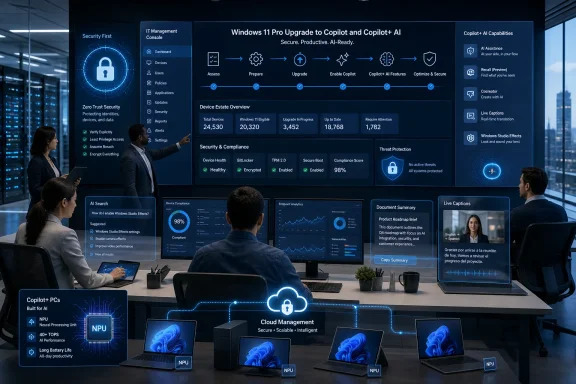 Microsoft Turns the Windows Upgrade Into an AI Procurement Decision
For most of Windows’ history, a business OS upgrade was sold on compatibility, manageability, security, and support deadlines. Windows 11 Pro still leans heavily on those pillars, but the rhetoric around it has changed. The operating system is now being packaged with Copilot and Copilot+ PCs as part of a broader workplace transformation narrative, where the endpoint is not merely a secured device but an AI workstation.That matters because Windows 10’s end of support has already passed. The date, October 14, 2025, was the hard line Microsoft had been warning about for years, and it changed the upgrade conversation from “should we move?” to “what should the next managed PC estate look like?” For businesses that delayed migration, Windows 11 Pro is no longer just the successor OS. It is the default platform on which Microsoft wants the next decade of commercial computing to run.
Tarsus Distribution’s argument follows that logic closely. The pitch is not that Windows 11 Pro gives workers a nicer Start menu or a cleaner desktop. It is that businesses can use the refresh to bring Copilot, local AI acceleration, stronger device security, and newer management assumptions into the same procurement motion.
That framing is convenient for Microsoft and its partners, but it is not meaningless. Many organisations really are carrying device fleets assembled under very different assumptions: hybrid work was a contingency, AI was not part of the desktop workflow, and endpoint security often meant layering tools on top of ageing hardware. Windows 11 Pro and Copilot+ PCs offer a chance to revisit those assumptions. The risk is that buyers mistake the bundle for the strategy.
The Productivity Claim Is Plausible Because the Friction Is Real
The most persuasive part of the Windows 11 Pro pitch is not the futurism. It is the mundane observation that office work is full of hidden drag. Employees search for old documents, rewrite similar emails, summarise meetings, compile status updates, move information between applications, and lose context whenever a workflow crosses the boundary between browser, chat, document, and line-of-business app.Copilot is designed to attack precisely that layer of work. In Microsoft’s telling, it can summarise long documents, pull useful points out of meetings, help draft communications, generate proposals, and make information easier to find. Those are not exotic AI use cases. They are the repetitive middle of knowledge work, where a small reduction in friction can feel disproportionately valuable.
Windows 11 Pro’s role in that story is partly as platform and partly as packaging. The OS gives businesses the supported desktop environment, identity integration, security controls, and device-management baseline needed to roll out these experiences at scale. Copilot and Microsoft 365 provide much of the assistant layer. Copilot+ PCs add the hardware foundation for AI features that benefit from an on-device neural processing unit.
The business case therefore depends less on whether AI can magically transform productivity and more on whether it can reliably shorten common tasks. A worker who saves ten minutes finding the right file before a customer call has not experienced a revolution. A department that saves those ten minutes thousands of times a month has found a measurable operational gain.
That is where the strongest version of the Windows 11 Pro argument sits. Not in the vague promise of “AI-powered work,” but in the accumulation of small moments where the computer stops acting like a filing cabinet and starts acting like a contextual system.
Copilot+ PCs Move the AI Story From Cloud Feature to Local Capability
Copilot+ PCs are Microsoft’s attempt to draw a line between ordinary Windows 11 devices and machines built for a more AI-heavy desktop. The key technical distinction is the inclusion of neural processing hardware powerful enough to run certain AI workloads locally. Qualcomm Snapdragon X systems launched the category, followed by newer Intel and AMD platforms built around the same idea.This is important because AI on the PC is not only about chatbot prompts. Local processing can support experiences that need to be fast, persistent, private, or tightly integrated with what is happening on screen. Microsoft has used features such as Recall, Click to Do, improved Windows Search, Live Captions with translation, and Windows Studio Effects to demonstrate why a modern endpoint might need AI acceleration rather than simply a web connection.
Recall is the most controversial and revealing example. The idea is attractive: if a user can find something they previously saw on screen by describing it, the PC becomes far better at recovering lost context. In theory, that solves one of the great annoyances of modern work, where the thing you need might have been in a browser tab, PDF, Teams chat, slide deck, or app window hours or days earlier.
But Recall also shows why the move to AI PCs is not just a productivity question. A feature that indexes prior activity across a device raises obvious privacy, security, governance, and employee-trust issues. Microsoft revised the feature after backlash, added controls, and positioned it as a managed experience, but the lesson remains: AI features that understand the user’s work surface are powerful precisely because they are close to sensitive data.
Click to Do is less culturally explosive but strategically similar. It is meant to let users act on content directly from the screen, turning visible text or images into possible next steps. That sounds small until one considers how much enterprise work consists of copying, pasting, saving, translating, searching, scheduling, summarising, and escalating. If Microsoft can make the screen itself actionable, Windows becomes less of a container for apps and more of an orchestration layer.
Live Captions with translation points to another practical use case. International teams, multilingual meetings, distributed support desks, and cross-border sales operations all benefit when language barriers are reduced at the endpoint. Again, the headline is AI, but the operational benefit is more prosaic: fewer meetings misunderstood, fewer follow-up clarifications, and less dependence on perfect language fluency in every interaction.
The Security Argument Is Stronger Than the Productivity Slogan
The easiest critique of the Windows 11 Pro upgrade campaign is that it bundles genuine security necessity with glossy AI marketing. That critique is fair, but it should not obscure the security issue. Windows 10 is no longer the mainstream supported platform, and organisations that continue running it without extended security arrangements are accepting an expanding risk profile.Security is one of the few areas where the upgrade argument does not need much embellishment. Unsupported operating systems become harder to defend over time because vulnerabilities keep being discovered after patches stop arriving. Even where extended security updates are available, they are a bridge, not a destination. They buy time for migration; they do not turn Windows 10 into a modern long-term endpoint strategy.
Windows 11 Pro also reflects a different baseline for hardware-backed security. Requirements around TPM 2.0, Secure Boot-capable systems, virtualization-based security, and modern identity protections were contentious when Windows 11 arrived, especially for users with otherwise functional older PCs. For businesses, however, those requirements align with where endpoint security has been heading: stronger roots of trust, better isolation, and tighter assumptions about device integrity.
That does not mean Windows 11 Pro is magically secure by default. Misconfigured identity, weak conditional access, unmanaged local admin rights, poor patch discipline, vulnerable third-party software, and sloppy data governance can undermine any OS. But starting from a modern, supported Windows baseline gives IT teams a better foundation than trying to compensate indefinitely for ageing platforms.
The deeper point is that AI does not reduce the need for endpoint discipline. It increases it. If users are going to summarise documents, query work content, search across device history, and interact with AI features embedded in the workflow, organisations need more confidence in device trust, data boundaries, auditability, and policy enforcement. The smarter the endpoint becomes, the more consequential endpoint governance becomes.
For IT Departments, the Real Product Is Manageability
End users experience Windows 11 Pro as an interface and a set of features. IT departments experience it as a management surface. The success or failure of a migration depends on deployment tooling, application compatibility, identity integration, policy controls, support workflows, and the cost of keeping the estate patched and understood.This is where Windows 11 Pro earns its place in the commercial conversation. Domain join, Microsoft Entra ID integration, BitLocker, Hyper-V, Remote Desktop host capability, Windows Update for Business, mobile device management support, and policy control are not glamorous. They are the reasons businesses buy Pro instead of treating Windows as a consumer shell with office apps installed.
Copilot+ features add another management dimension. Organisations will not all want the same AI capabilities enabled in the same way. A marketing team may embrace Recall-like discovery if policy and privacy concerns are addressed. A legal department may reject it entirely. A regulated financial services environment may need stricter controls than a small design studio. The value of Windows 11 Pro in this environment is not just access to new features; it is the ability to decide how those features are introduced.
That is also where distribution partners such as Tarsus fit into the picture. Many small and midsize organisations do not have the luxury of large transformation teams. They need help choosing devices, matching workloads to hardware, understanding licensing, and avoiding refresh decisions that look cheap in year one but become expensive by year three. A Windows 11 Pro migration tied to Copilot+ PCs is not just a software upgrade. It is a procurement, training, security, and change-management exercise.
The danger for buyers is treating the phrase “AI-ready” as a substitute for requirements. Not every employee needs a Copilot+ PC on day one. Not every AI feature will be useful in every role. Not every workflow gains enough from local AI acceleration to justify an immediate premium. The smarter move is segmentation: identify which teams benefit from AI-enhanced endpoints now, which can use conventional Windows 11 Pro hardware, and which legacy workloads require special handling before migration.
The Upgrade Is Also a Test of Organisational Honesty
A Windows migration has a way of exposing what businesses have postponed. Unsupported applications suddenly matter. Informal file stores become migration blockers. Old peripherals reveal their dependency on outdated drivers. Departments that bought their own tools outside IT’s view discover that “it works on my machine” is not a lifecycle plan.That makes the Windows 11 Pro transition uncomfortable but useful. If a business cannot easily answer which devices it owns, which apps are business-critical, which users require elevated privileges, and which workloads are candidates for cloud or virtual desktop delivery, the problem is bigger than the operating system. The migration simply makes it visible.
The AI layer sharpens that test. Before a company tells employees to use Copilot to draft emails, summarise documents, and extract insights, it needs to understand data classification and access permissions. If workers can ask an assistant to summarise information they should not have been able to access in the first place, AI has not created the governance failure. It has exposed it at machine speed.
This is why the best Windows 11 Pro projects will not be framed as “install the new OS everywhere.” They will look more like endpoint modernisation programs. Hardware readiness, identity controls, application rationalisation, user training, device management, data governance, and AI policy all belong in the same conversation.
The organisations that treat this as a procurement event will still get newer PCs. The organisations that treat it as a systems audit may get something more valuable: a clearer picture of how work actually happens.
Recall Remains the Feature That Defines the Trust Boundary
No Copilot+ PC feature better captures the trade-off than Recall. It promises a useful capability almost everyone can understand: finding something you saw before without remembering where it lived. In an era of endless tabs, chats, dashboards, and documents, that is not a gimmick. It is a direct attack on cognitive overload.Yet Recall also forces businesses to confront the difference between personal productivity and institutional risk. A tool that helps users rediscover past activity may touch confidential files, customer records, internal strategy, HR material, credentials displayed in error, or regulated data. Even if snapshots are protected locally and managed through policy, the feature changes the threat model because it creates a new index of user activity.
Microsoft’s revised approach, including opt-in flows and administrative controls, is an acknowledgment that trust is now part of the product. Businesses will need to evaluate not merely whether Recall works, but whether it fits their culture, regulatory obligations, and employee expectations. In some environments, it may be disabled. In others, it may be piloted with specific groups. In a few, it may become indispensable.
That uneven adoption should not be seen as failure. It is what mature AI deployment looks like. The idea that every feature should be switched on for every user is a consumer-software instinct, not an enterprise strategy. Windows 11 Pro’s job is to make selective adoption possible.
Click to Do and Live Captions are likely to encounter less resistance because they feel more immediate and less archival. But they still participate in the same shift: Windows is watching more context, interpreting more content, and offering more actions. That can be empowering. It also demands clearer rules.
The Business Case Depends on Measuring Boring Wins
The grand language around AI productivity can make it harder to evaluate the investment. “Unlocking efficiency” is not a metric. “Helping employees work smarter” is not a deployment plan. If Windows 11 Pro and Copilot+ PCs are to justify themselves, businesses need to measure the dull things: time saved in document retrieval, help-desk ticket reduction, meeting follow-up speed, device failure rates, patch compliance, onboarding time, and user satisfaction.Some of the gains will come from the operating system and hardware refresh rather than AI itself. Newer PCs boot faster, handle video calls better, offer improved battery life, support newer security features, and reduce the support burden created by ageing devices. In a hybrid workforce, those basics matter. A laptop with poor battery life and unreliable camera performance is a productivity tax long before Copilot enters the story.
Other gains may come from Microsoft 365 integration. If employees already live in Outlook, Teams, Word, Excel, PowerPoint, SharePoint, and OneDrive, Copilot’s ability to operate across those surfaces may be more valuable than a standalone AI tool. The advantage is not that Microsoft has invented workplace assistance from scratch. It is that Microsoft owns much of the terrain where office work already happens.
Copilot+ PCs then add a narrower but potentially important layer: local AI experiences tied to the device. That distinction should be preserved in purchasing conversations. Windows 11 Pro is the commercial OS. Copilot is the assistant layer. Copilot+ PC hardware enables specific local AI capabilities. Blurring those categories may help marketing, but it can confuse planning.
The best business case will map roles to benefits. Executives may value meeting summaries and fast briefing generation. Sales teams may value proposal drafts and customer context retrieval. Support teams may benefit from translation and knowledge discovery. Developers may care more about performance, virtualization, and secure dev environments than Recall. Frontline managers may need reliable devices and simplified access more than AI-heavy workflows.
The Channel Pitch Is Right About Timing, but Buyers Still Need Discipline
Tarsus Distribution’s promotional framing is unsurprising: businesses should move now, choose Windows 11 Pro, adopt Copilot+ PCs where appropriate, and rely on a Microsoft partner to guide the transition. That is what a distributor is supposed to say. The interesting part is that the timing argument is stronger than usual.Windows 10’s support milestone removed the comfortable ambiguity that often surrounds OS migrations. Security teams cannot indefinitely accept “we’ll get to it next quarter” as a plan. Procurement teams cannot assume existing hardware will remain viable for the next refresh cycle. Business leaders cannot treat AI readiness as an abstract future concern when the devices being purchased now may remain in service for years.
At the same time, urgency is not an excuse for indiscriminate buying. A rushed fleet-wide refresh can lock in poor device choices, overbuy AI hardware for users who do not need it, underinvest in training, or deploy features before policies are ready. The fact that Windows 11 Pro is the right general direction does not mean every AI-branded purchase is automatically strategic.
Partners can help here if they behave like advisers rather than brochure amplifiers. A useful partner will ask about application compatibility, identity architecture, device management maturity, user roles, security requirements, and refresh timelines. A less useful partner will simply equate modernisation with buying the newest category of machine.
The Windows 11 Pro migration is therefore a test for the channel as well as customers. The winners will not merely sell Copilot+ PCs. They will help organisations decide where those machines make sense, where standard Windows 11 Pro systems are sufficient, and where cloud or virtualised options may be a better fit.
Windows 11 Pro Makes the Old PC Estate Look More Expensive
One reason the Windows 11 Pro conversation is gaining force is that the cost of staying put is becoming easier to see. Old PCs are not free just because they are depreciated. They consume support time, complicate patching, frustrate users, and may force security exceptions that outlive their original justification.After Windows 10 support ended, that cost became more explicit. Organisations can pursue extended security updates in some cases, but doing so should be treated as a temporary risk-management measure. It gives IT breathing room; it does not erase the need to modernise. The longer a business stretches an ageing estate, the more likely it is to accumulate brittle workarounds.
Windows 11 Pro also raises the baseline expectation for what a business PC should be. Hardware-backed security, better support for modern management, stronger integration with cloud identity, and AI-ready configurations are becoming the default assumptions around commercial endpoints. Machines that cannot meet those assumptions may still function, but they increasingly sit outside the design centre of the Windows ecosystem.
This is where the emotional resistance to upgrades collides with operational reality. Many users dislike change, and many businesses would rather avoid refresh spending. But a stagnant PC estate eventually becomes a drag on security, manageability, and employee experience. The question is not whether migration has a cost. It is whether delaying migration has become more expensive.
The AI PC Refresh Will Reward the Shops That Pilot Before They Standardise
A sensible Windows 11 Pro and Copilot+ PC strategy starts with pilots, not slogans. IT teams should identify user groups with different workloads and test the new platform against real tasks. The aim is not to prove the marketing right. It is to discover where the technology produces measurable gains, where it creates new support questions, and where policies need refinement.That means involving security early. Features that touch screen content, documents, meetings, and search need review before broad deployment. Legal, compliance, HR, and works councils may also need a voice depending on jurisdiction and industry. If those conversations happen after rollout, the organisation has already lost control of the narrative.
Training is another underrated variable. Copilot and related AI features are not self-explanatory just because they are conversational. Employees need to understand what the tools are good at, where outputs require verification, what data they may use, and which tasks remain inappropriate. Without that guidance, businesses risk both underuse and misuse.
There is also a cultural dimension. If employees see AI features as surveillance, job-threat theatre, or another management fad, adoption will suffer. If they see them as practical tools that remove drudgery while respecting boundaries, adoption has a chance. The difference is not only technical. It is managerial.
Windows 11 Pro gives organisations a platform. Copilot+ PCs give them hardware headroom. Neither gives them judgment. That remains the customer’s job.
The Upgrade Path Is Clearest When the Hype Is Stripped Away
The core argument for moving to Windows 11 Pro is not that every business must immediately become an AI-first enterprise. It is that the supported Windows endpoint has moved on, and the next commercial PC cycle will be shaped by security baselines, cloud identity, AI-assisted workflows, and local acceleration. Businesses should plan accordingly.That planning should begin with a clear inventory. Which Windows 10 devices remain? Which are eligible for Windows 11? Which must be replaced? Which applications still block migration? Which departments have the highest productivity upside from Copilot or Copilot+ features? Which environments require the strictest controls?
Only after that should the organisation decide how aggressively to buy Copilot+ PCs. Some teams may benefit immediately from Recall, Click to Do, Live Captions, and improved search. Others may need Windows 11 Pro primarily for supportability and security, with AI adoption phased in later. A mixed estate is not a failure if it is intentional.
The worst outcome would be treating AI readiness as a sticker on a box. The best outcome is using the Windows 11 Pro transition to rationalise the endpoint estate, improve security posture, modernise management, and selectively introduce AI where it changes actual work.
That is the difference between buying into a campaign and executing a strategy.
The Windows 11 Pro Pitch Comes Down to Five Practical Bets
The Windows 11 Pro and Copilot+ PC message is broad, but the decision for IT leaders is narrower than the marketing suggests. The real question is whether the next PC refresh can reduce risk, simplify support, and make employees faster without creating new governance problems. That is a practical bet, not a leap of faith.- Windows 10’s end of support makes migration planning a security requirement, not merely a user-experience preference.
- Windows 11 Pro is most valuable to businesses when its security, identity, and management features are treated as part of an endpoint-modernisation program.
- Copilot can reduce everyday knowledge-work friction, but organisations need role-based use cases rather than a generic promise of productivity.
- Copilot+ PCs make the most sense for users who will benefit from local AI features such as Recall, Click to Do, improved search, Live Captions, and camera or audio enhancements.
- Recall should be evaluated as a trust and governance decision before it is evaluated as a convenience feature.
- Partners such as Tarsus Distribution can add value if they help customers segment devices, manage migration risk, and align AI features with business policy.
References
- Primary source: MyBroadband
Published: 2026-06-03T12:57:28.442238
What Your Team Gains When You Shift to Windows 11 Pro
For South African businesses looking to improve productivity, strengthen security, and embrace AI-driven innovation, one move stands above the rest: upgrading to Windows 11 Pro. mybroadband.co.za
- Related coverage: windowscentral.com
HP’s Windows 10 holdouts show just how hard Microsoft’s Windows 11 upgrade push really is | Windows Central
Three out of ten HP PCs are still running Windows 10.www.windowscentral.com - Official source: support.microsoft.com
Windows 10 support has ended on October 14, 2025 | Microsoft Support
Windows 10 support ends on October 14, 2025. Upgrade to Windows 11 now to ensure continued security and feature updates. Learn more about the transition.support.microsoft.com - Official source: learn.microsoft.com
Windows 10 reaching end of support - Microsoft Lifecycle | Microsoft Learn
Announcing Windows 10 reaching end of support.learn.microsoft.com - Related coverage: tomshardware.com
Windows 10 support ends today — here's who's affected and what you need to do | Tom's Hardware
Update if you can, upgrade if you can't, or at least get the extended support license.www.tomshardware.com - Official source: microsoft.com
Copilot+ PCs and AI Features for Businesses | Microsoft
Discover Microsoft Copilot+ PCs for your business. Learn how these AI-powered computers and laptops deliver business solutions with Copilot+ PC AI features that streamline work.www.microsoft.com
- Related coverage: techradar.com
Windows 10 End of Life live: everything you need to know | TechRadar
Today's the day when Microsoft drops support for Windows 10www.techradar.com - Related coverage: tomsguide.com
Windows 10 support officially ends — are you upgrading to Windows 11? | Tom's Guide
Windows 10 has reached its end of life, but millions of PCs are still using Microsoft's older OS. Tell us if you're upgrading to Windows 11 or keeping your Windows 10 PC!www.tomsguide.com - Official source: news.microsoft.com
Bleiben Sie sicher: mit Windows 11, Copilot+ PCs und Windows 365, bevor der Support für Windows 10 endet | News Center Microsoft
Der Support für Windows 10 endet am 14. Oktober 2025. Microsoft hat im Windows-Blog Aktualisierungen zum Extended Security Updates (ESU)-Programm für Windows 10 veröffentlicht, das im Oktober 2024 angekündigt wurde. Die Aktualisierungen sind: Für Privatnutzer*innen...news.microsoft.com - Official source: blogs.windows.com
Stay secure with Windows 11, Copilot+ PCs and Windows 365 before support ends for Windows 10
When we launched Windows in 1985, we set out to revolutionize computing—guided by the belief that technology should be accessible, intuitive and powerful for everyone. Nearly 40 years later, that same vision continues to drive us forward. Today, Wiblogs.windows.com - Related coverage: pcworld.com
Windows Recall is too risky for your PC. I can't recommend it | PCWorld
Windows Recall offers an easy way to search your history on your PC. It's simple and convenient -- both for you as well as bad actors. Remove it.www.pcworld.com - Related coverage: delltechnologies.com
