

Microsoft is testing Windows 11 changes that make the Widgets board open to user-selected widgets instead of the MSN news feed by default, beginning with Insider preview builds released on May 1, 2026, as part of a broader push to make the operating system quieter. That sounds like a small interface tweak, and in one sense it is. But the change lands because Widgets became a symbol of everything Windows 11 users have come to resent: unsolicited content, accidental flyouts, promotional surfaces, and a creeping sense that the desktop was being rented back to them. Microsoft is not just hiding a feed; it is admitting, carefully and belatedly, that attention is now a Windows resource too.
The Windows 11 Widgets panel was supposed to be a glanceable dashboard. In practice, it often behaved like a news portal welded to the taskbar. A user could move a mouse too close to the weather icon and suddenly be staring at a board full of headlines, recommendations, market cards, sports updates, and whatever else Microsoft’s feed machinery thought might earn a click.
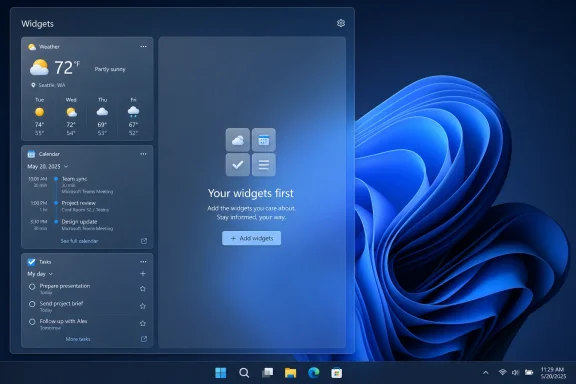
The new test flips the default posture. Widgets are meant to open first to the actual widget surface, not the MSN-powered Discover feed. Microsoft is also disabling open-on-hover by default, turning off taskbar badging by default, and limiting taskbar alerts until the user actively opens and engages with the experience.
That last clause matters. The old model treated the Widgets board as something Windows could summon at the edge of the user’s attention. The new model, at least in Microsoft’s preview language, treats it as something the user must ask for.
This is not the same thing as removing MSN from Windows. The feed is being demoted, not abolished. Users who want more proactive updates can turn some of this behavior back on, and Microsoft still has plenty of incentive to keep feed surfaces available somewhere inside the OS.
Still, defaults are policy. For most people, the default Windows experience is the Windows experience. By changing what appears first, Microsoft is changing the balance of power between utility and engagement bait.
That distinction is why the feature attracted such disproportionate irritation. Users tolerate noise differently depending on where it appears. A promotional card in a web portal is one thing; the same card in the desktop shell feels like a boundary violation.
Windows has always included bundled experiences. Solitaire, Internet Explorer, Edge, OneDrive, Teams, Copilot, Microsoft account prompts, Start menu recommendations, and lock screen content all belong to a long lineage of Microsoft trying to turn Windows into a distribution channel. The difference with Widgets was that the pitch was productivity, while the payoff often looked like traffic routing.
For IT pros, this made the feature especially awkward. A personal user might simply disable the Widgets button and move on. An administrator managing hundreds or thousands of machines sees something else: another surface that may produce user confusion, support tickets, policy questions, and inconsistent behavior across builds.
The irony is that widgets themselves are not a bad idea. Weather, calendar, tasks, package tracking, system health, storage, meetings, reminders, and device status all make sense as lightweight desktop surfaces. The problem was that Microsoft put the feed in the foreground and made the useful parts feel like supporting actors.
The actual changes are concrete enough to take seriously. Disabling hover activation removes one of the board’s worst habits. Turning off taskbar badges reduces the sense that Windows is constantly tapping the user on the shoulder. Opening to widgets on first launch gives the feature a chance to justify its name.
But this is still an Insider test, not a guarantee for every stable Windows 11 PC tomorrow. Microsoft’s preview channels exist partly to test concepts, and features can shift, pause, or disappear before broad release. The company is rolling these changes out gradually, which means even Insiders may not see identical behavior at the same time.
That caveat should not obscure the larger signal. Microsoft is responding to years of criticism that Windows 11 has become too promotional, too needy, and too willing to interrupt. The widget change is modest, but it is aligned with other recent messaging around performance, memory usage, File Explorer polish, and reducing unnecessary Copilot buttons in app interfaces.
The interesting question is whether Microsoft sees “quiet” as a constraint across Windows or merely as a repair job for one particularly disliked panel. If the former, Windows 11 could become calmer without becoming less modern. If the latter, Widgets may simply become the sacrificial cleanup while other surfaces keep pushing.
This is where Microsoft’s desktop strategy repeatedly collides with Microsoft’s services strategy. Windows is both a platform and a funnel. The platform wants stability, speed, clarity, and administrator control. The funnel wants engagement, account sign-ins, subscriptions, cloud storage, search traffic, news clicks, and AI usage.
Most users are not opposed to Microsoft services on principle. They object when the operating system behaves as if every idle surface must be monetized, personalized, or converted into a recommendation slot. A PC is not a phone home screen. A workstation is not a captive audience.
The Widgets board became a neat case study because the mismatch was so visible. Microsoft gave users a feature named for small utilities, then made a news feed the star of the show. The name promised control; the interface delivered content.
Quiet defaults help restore trust only if they are durable. The desktop has to feel like a place where user intent matters more than growth metrics. Otherwise, every improvement will be interpreted as tactical retreat rather than cultural change.
Widgets have always been easy to dismiss as a consumer feature, but default shell behavior matters in managed environments. Even if administrators can remove or restrict the feature, the existence of another attention surface creates another decision point. Should it be allowed? Should it be hidden? Does it leak content into regulated settings? Does it confuse users moving between home and corporate devices?
The new defaults reduce some of that friction. A widget surface that opens only when called, shows user-selected cards first, and avoids badges is easier to defend than a feed-first panel that launches by accident. It becomes closer to a dashboard and less like a web property embedded in the shell.
There is also a performance dimension. Widgets have been criticized not only for content quality but also for feeling heavier than their value justified. If Microsoft is serious about reducing memory footprint and reclaiming resources when the board is not active, the feature becomes less offensive even to users who never open it.
The best Windows shell features fade into muscle memory. Snap layouts, clipboard history, search, virtual desktops, quick settings, and notification controls all work best when they are available without demanding loyalty. Widgets will earn acceptance the same way: by being useful, quiet, and optional.
The danger is that the old MSN problem reappears in new clothes. A feed of news headlines is easy to criticize. A Copilot-powered discovery surface can be presented as intelligent, personalized, and helpful, even if it still competes for attention in the same way.
This is why the Widgets change should be read as a test of principles rather than a narrow product update. If Microsoft’s standard becomes “the user asks first,” then Copilot can be powerful without being invasive. If the standard becomes “AI justifies more interruptions,” then the company will recreate the same resentment under a more fashionable brand.
Windows does not need to become silent. A modern operating system should surface relevant information, warn about risks, summarize activity, and help users find what they need. But it must distinguish between relevance and promotion, between assistance and activation, between a notification and an advertisement wearing a productivity badge.
The Copilot era will make that distinction harder because every surface can be described as context-aware. That is exactly why Microsoft needs strong defaults now. Once every part of the OS can generate, recommend, summarize, and nudge, restraint becomes an architectural requirement.
The missing ingredient has been credibility. Users need to believe that adding a calendar card will not also enroll them in a content funnel. Developers need to believe that building widgets is worth the effort. Administrators need to believe the feature will not become another consumer channel to suppress.
Microsoft has tried various widget concepts across Windows history, from desktop gadgets to live tiles to News and Interests to the Windows 11 board. The pattern is familiar: the idea starts as glanceable utility, then becomes entangled with content distribution, branding strategy, or platform ambitions. Eventually users tune out, and Microsoft rethinks the surface again.
This time, the company has a chance to do something simpler. Make the panel fast. Make it modular. Make it respect the default browser and regional rules. Make third-party widgets viable. Make removal easy. Make the feed opt-in, not ambient.
That sounds less exciting than an AI-curated discovery surface, but Windows does not suffer from a shortage of ambition. It suffers from a shortage of restraint. The widget board can succeed if Microsoft lets it be a tool instead of a billboard.
Microsoft now has to prove that “quiet by default” is more than a phrase attached to one Insider build. If the company follows through, Widgets may become the first visible sign of a Windows 11 course correction: less shove, more service, and a desktop that remembers the user’s attention is not an endless renewable resource.
Source: Mezha Less chaos in Windows 11: Microsoft to disable MSN feed in widgets by default
 Microsoft Finally Notices the Widget Board Was Shouting
The Windows 11 Widgets panel was supposed to be a glanceable dashboard. In practice, it often behaved like a news portal welded to the taskbar. A user could move a mouse too close to the weather icon and suddenly be staring at a board full of headlines, recommendations, market cards, sports updates, and whatever else Microsoft’s feed machinery thought might earn a click.The new test flips the default posture. Widgets are meant to open first to the actual widget surface, not the MSN-powered Discover feed. Microsoft is also disabling open-on-hover by default, turning off taskbar badging by default, and limiting taskbar alerts until the user actively opens and engages with the experience.
That last clause matters. The old model treated the Widgets board as something Windows could summon at the edge of the user’s attention. The new model, at least in Microsoft’s preview language, treats it as something the user must ask for.
This is not the same thing as removing MSN from Windows. The feed is being demoted, not abolished. Users who want more proactive updates can turn some of this behavior back on, and Microsoft still has plenty of incentive to keep feed surfaces available somewhere inside the OS.
Still, defaults are policy. For most people, the default Windows experience is the Windows experience. By changing what appears first, Microsoft is changing the balance of power between utility and engagement bait.
The Feed Was Never Just a Feed
The backlash against Widgets was not only about low-quality headlines. It was about placement. The MSN feed did not live in a browser tab that users chose to open; it lived in the operating system shell, next to the taskbar, in a place historically reserved for launching apps, checking status, and managing work.That distinction is why the feature attracted such disproportionate irritation. Users tolerate noise differently depending on where it appears. A promotional card in a web portal is one thing; the same card in the desktop shell feels like a boundary violation.
Windows has always included bundled experiences. Solitaire, Internet Explorer, Edge, OneDrive, Teams, Copilot, Microsoft account prompts, Start menu recommendations, and lock screen content all belong to a long lineage of Microsoft trying to turn Windows into a distribution channel. The difference with Widgets was that the pitch was productivity, while the payoff often looked like traffic routing.
For IT pros, this made the feature especially awkward. A personal user might simply disable the Widgets button and move on. An administrator managing hundreds or thousands of machines sees something else: another surface that may produce user confusion, support tickets, policy questions, and inconsistent behavior across builds.
The irony is that widgets themselves are not a bad idea. Weather, calendar, tasks, package tracking, system health, storage, meetings, reminders, and device status all make sense as lightweight desktop surfaces. The problem was that Microsoft put the feed in the foreground and made the useful parts feel like supporting actors.
Quiet by Default Is a Design Philosophy, Not a Toggle
Microsoft’s phrase, quiet by default, deserves scrutiny because it is both welcome and slippery. It can mean a real design shift toward consent, restraint, and predictable behavior. It can also mean a temporary concession while the company looks for less annoying ways to route users into the same content ecosystem.The actual changes are concrete enough to take seriously. Disabling hover activation removes one of the board’s worst habits. Turning off taskbar badges reduces the sense that Windows is constantly tapping the user on the shoulder. Opening to widgets on first launch gives the feature a chance to justify its name.
But this is still an Insider test, not a guarantee for every stable Windows 11 PC tomorrow. Microsoft’s preview channels exist partly to test concepts, and features can shift, pause, or disappear before broad release. The company is rolling these changes out gradually, which means even Insiders may not see identical behavior at the same time.
That caveat should not obscure the larger signal. Microsoft is responding to years of criticism that Windows 11 has become too promotional, too needy, and too willing to interrupt. The widget change is modest, but it is aligned with other recent messaging around performance, memory usage, File Explorer polish, and reducing unnecessary Copilot buttons in app interfaces.
The interesting question is whether Microsoft sees “quiet” as a constraint across Windows or merely as a repair job for one particularly disliked panel. If the former, Windows 11 could become calmer without becoming less modern. If the latter, Widgets may simply become the sacrificial cleanup while other surfaces keep pushing.
Windows 11’s Real Problem Is Trust, Not Clutter
The emotional charge around the MSN feed comes from a deeper trust problem. Windows users do not only ask whether a feature can be disabled; they ask whether it will stay disabled. They remember toggles that move, settings that reset after updates, defaults that return under new names, and consumer features that appear on professional machines.This is where Microsoft’s desktop strategy repeatedly collides with Microsoft’s services strategy. Windows is both a platform and a funnel. The platform wants stability, speed, clarity, and administrator control. The funnel wants engagement, account sign-ins, subscriptions, cloud storage, search traffic, news clicks, and AI usage.
Most users are not opposed to Microsoft services on principle. They object when the operating system behaves as if every idle surface must be monetized, personalized, or converted into a recommendation slot. A PC is not a phone home screen. A workstation is not a captive audience.
The Widgets board became a neat case study because the mismatch was so visible. Microsoft gave users a feature named for small utilities, then made a news feed the star of the show. The name promised control; the interface delivered content.
Quiet defaults help restore trust only if they are durable. The desktop has to feel like a place where user intent matters more than growth metrics. Otherwise, every improvement will be interpreted as tactical retreat rather than cultural change.
The Enterprise Case for Boring Defaults
For enterprise IT, boring is not an insult. Boring means fewer surprises after Patch Tuesday. Boring means policies behave predictably. Boring means the taskbar does not become a training issue, a compliance concern, or an avoidable distraction during a screen share with a client.Widgets have always been easy to dismiss as a consumer feature, but default shell behavior matters in managed environments. Even if administrators can remove or restrict the feature, the existence of another attention surface creates another decision point. Should it be allowed? Should it be hidden? Does it leak content into regulated settings? Does it confuse users moving between home and corporate devices?
The new defaults reduce some of that friction. A widget surface that opens only when called, shows user-selected cards first, and avoids badges is easier to defend than a feed-first panel that launches by accident. It becomes closer to a dashboard and less like a web property embedded in the shell.
There is also a performance dimension. Widgets have been criticized not only for content quality but also for feeling heavier than their value justified. If Microsoft is serious about reducing memory footprint and reclaiming resources when the board is not active, the feature becomes less offensive even to users who never open it.
The best Windows shell features fade into muscle memory. Snap layouts, clipboard history, search, virtual desktops, quick settings, and notification controls all work best when they are available without demanding loyalty. Widgets will earn acceptance the same way: by being useful, quiet, and optional.
The Copilot Era Makes Restraint Harder, Not Easier
Microsoft’s decision to quiet Widgets arrives as the company is still trying to make Copilot feel native to Windows. That creates an obvious tension. On one hand, Microsoft has heard the complaints about clutter and unsolicited surfaces. On the other, it is under enormous pressure to prove that AI belongs in every corner of the PC.The danger is that the old MSN problem reappears in new clothes. A feed of news headlines is easy to criticize. A Copilot-powered discovery surface can be presented as intelligent, personalized, and helpful, even if it still competes for attention in the same way.
This is why the Widgets change should be read as a test of principles rather than a narrow product update. If Microsoft’s standard becomes “the user asks first,” then Copilot can be powerful without being invasive. If the standard becomes “AI justifies more interruptions,” then the company will recreate the same resentment under a more fashionable brand.
Windows does not need to become silent. A modern operating system should surface relevant information, warn about risks, summarize activity, and help users find what they need. But it must distinguish between relevance and promotion, between assistance and activation, between a notification and an advertisement wearing a productivity badge.
The Copilot era will make that distinction harder because every surface can be described as context-aware. That is exactly why Microsoft needs strong defaults now. Once every part of the OS can generate, recommend, summarize, and nudge, restraint becomes an architectural requirement.
The Widget Board Can Still Be Saved
There is a good product hiding inside Widgets. A small, fast, customizable panel for glanceable information belongs on a desktop OS. It could be especially useful on ultrawide monitors, touch devices, tablets, and workstations where users want lightweight status without opening full applications.The missing ingredient has been credibility. Users need to believe that adding a calendar card will not also enroll them in a content funnel. Developers need to believe that building widgets is worth the effort. Administrators need to believe the feature will not become another consumer channel to suppress.
Microsoft has tried various widget concepts across Windows history, from desktop gadgets to live tiles to News and Interests to the Windows 11 board. The pattern is familiar: the idea starts as glanceable utility, then becomes entangled with content distribution, branding strategy, or platform ambitions. Eventually users tune out, and Microsoft rethinks the surface again.
This time, the company has a chance to do something simpler. Make the panel fast. Make it modular. Make it respect the default browser and regional rules. Make third-party widgets viable. Make removal easy. Make the feed opt-in, not ambient.
That sounds less exciting than an AI-curated discovery surface, but Windows does not suffer from a shortage of ambition. It suffers from a shortage of restraint. The widget board can succeed if Microsoft lets it be a tool instead of a billboard.
The Small Switch That Says Microsoft Heard the Groans
The practical lessons from this change are straightforward, but the meaning is larger than the settings themselves. Microsoft is not abandoning its content or services strategy. It is acknowledging that Windows users have a lower tolerance for noisy defaults than the company’s recent designs assumed.- Windows 11 Insider builds from May 1, 2026 are testing a Widgets experience that opens first to user-selected widgets rather than the MSN feed.
- Microsoft is disabling open-on-hover by default, which should reduce accidental flyouts from the taskbar weather area.
- Taskbar badges and some widget alerts are being turned off by default until users engage with the Widgets board.
- The MSN feed is being pushed out of the foreground, not necessarily removed from Windows.
- The change matters most if Microsoft applies the same quiet-by-default discipline to Copilot, Start, Edge, Search, and other promotional surfaces.
- For IT administrators, calmer defaults mean fewer distractions to manage and fewer consumer-facing surprises in professional environments.
Microsoft now has to prove that “quiet by default” is more than a phrase attached to one Insider build. If the company follows through, Widgets may become the first visible sign of a Windows 11 course correction: less shove, more service, and a desktop that remembers the user’s attention is not an endless renewable resource.
Source: Mezha Less chaos in Windows 11: Microsoft to disable MSN feed in widgets by default
