

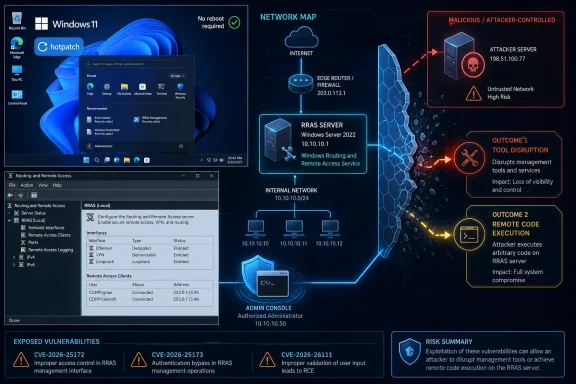
Microsoft has issued an out-of-band hotpatch for Windows 11 to fix three critical vulnerabilities in the Windows Routing and Remote Access Service management tool, a remote-access component used for VPN connectivity, routing functions, and remote administration, without requiring affected hotpatch-enabled systems to restart. The important detail is not simply that RRAS has bugs; it is that the attack path runs through a trusted administrative tool. Microsoft’s warning is blunt: if a user connects to a malicious remote server, “an attacker could disrupt the tool or run code on your device.” That makes this less like a drive-by consumer panic and more like an enterprise hygiene test: who is allowed to manage remote access, from which machines, and to which servers?
The vulnerable surface here is Windows Routing and Remote Access Service, better known as RRAS, but the more precise risk sits in the RRAS management workflow. RRAS is one of those infrastructure features many users never knowingly touch and many administrators only think about when VPNs, routing, or remote management stop behaving. That obscurity is exactly why this patch matters.
As TechRepublic reported in an article that originally appeared on eSecurityPlanet, Microsoft issued an out-of-band security update for Windows 11 because the RRAS management tool can be abused when a user or administrator connects to a malicious remote server. That phrase is doing a lot of work. The vulnerable system is not necessarily being attacked merely because RRAS exists somewhere in the environment; the disclosed scenario centers on an interaction initiated through the management interface.
That distinction should calm down home users while sharpening attention for IT teams. This is not described as active exploitation in the wild, and Microsoft did not report any active exploitation in its advisory. But the advisory’s shape tells administrators where the risk concentrates: privileged remote-access management, elevated tooling, and the possibility that a malicious or rogue server can answer a connection in a way that turns an administrative act into code execution or service disruption.
The emergency nature of the release is still significant. Microsoft does not normally interrupt the monthly Windows servicing rhythm unless the company sees a reason to move faster than the next scheduled update. In this case, the company chose a hotpatch delivery path, allowing eligible systems to receive the fix without the operational tax that so often slows security deployment: the reboot.
That is the central trade-off in the story. Hotpatching makes the fix easier to absorb, but it does not make the vulnerability irrelevant. A no-restart patch is only a deployment mechanism; the security question is whether organizations know which systems use RRAS management tools, which administrators can initiate remote connections, and whether those endpoints are restricted to trusted infrastructure.
CVE-2026-25172 is the clearest case in the public description. It is a remote code execution vulnerability that can be triggered when a user or administrator connects to a malicious server through the RRAS interface. In a realistic enterprise scenario, that could mean an administrator troubleshooting, validating, or connecting to infrastructure that is not what it appears to be.
CVE-2026-25173 affects the same RRAS management component and follows a similar exploitation model. According to the source material, exploitation occurs when a user or administrator connects to an attacker-controlled server. Once that connection occurs, the attacker may be able to execute code or trigger a denial-of-service condition that disrupts RRAS functionality.
CVE-2026-26111 adds another pathway through the same management tool. The source material describes it as an additional vulnerability in the RRAS management tool that further increases the risk of remote code execution during interactions with malicious servers. That is why the three flaws should be treated as a cluster rather than as isolated trivia for a vulnerability spreadsheet.
The comparison matters because it shows the operational lesson: this is not merely a patch-and-forget defect in a single binary. It is a reminder that management tools are themselves attack surfaces. When a privileged console reaches out to a remote endpoint, the remote endpoint gets a chance to speak a protocol, return data, and exercise parser and state-handling code on the administrator’s device.
That is the uncomfortable inversion at the heart of the issue. Administrators usually think of management tools as instruments of control. Vulnerabilities like these show how the tool can become the thing being controlled, especially if it processes hostile responses while running with permissions that ordinary user applications do not have.
The attacker’s burden is also not necessarily to convince a random employee to click a link. The relevant target may be a help desk operator, a network administrator, a systems engineer, or a contractor with permission to use RRAS tools. A targeted lure that looks like a broken VPN endpoint, a new branch-office server, a migration test host, or a vendor-provided remote access target is much more plausible than a generic phishing page.
This is where the TechRepublic and eSecurityPlanet account is useful but incomplete on its own. It correctly foregrounds malicious remote servers and the RRAS management tool, but the practical enterprise implication is broader: any workflow that normalizes connecting admin consoles to unfamiliar or lightly verified infrastructure becomes more dangerous when the console itself is vulnerable. The safest administrator is not merely a patched administrator; it is an administrator whose tools are fenced into known-good destinations.
That point also explains why RRAS’s role matters. RRAS supports VPN connectivity, routing functions, and remote administration. Those are not decorative services; they sit close to identity, remote access, network reachability, and the pathways users and administrators rely on to move between systems. A compromise at that layer can become a launchpad for configuration tampering, credential exposure, malware staging, or lateral movement.
Microsoft’s advisory language says an attacker could disrupt the tool or run code on the device. Those are different outcomes with overlapping consequences. A disrupted RRAS management workflow can break operations at exactly the moment an administrator is trying to repair or inspect remote access. Code execution is worse, because it can turn an administrative workstation into a foothold with privileged network visibility.
The combination is why this patch deserves urgency even without reported active exploitation. Attackers do not need every vulnerability to be wormable. A flaw that requires the right administrator to connect to the wrong server can still be valuable in targeted intrusions, red-team operations, and post-compromise escalation paths.
For years, Microsoft’s Windows security story has had two separate clocks. One is the disclosure clock: vulnerabilities are published, scored, categorized, and assigned CVEs. The other is the enterprise deployment clock: change windows, maintenance freezes, reboot scheduling, help desk readiness, executive exceptions, and the quiet spreadsheet archaeology required to discover which endpoints actually need the fix. Hotpatching is Microsoft’s attempt to bring those clocks closer together.
In this case, the fit is obvious. Remote access management infrastructure often belongs to systems and workstations that administrators are reluctant to interrupt. If patching requires a restart, the fix can be delayed because someone wants to avoid breaking an active support session, a VPN troubleshooting effort, or a management workflow tied to production connectivity. A hotpatch removes one of the most convenient excuses for delay.
But hotpatching does not eliminate change management. Administrators still need to know whether the patch reached eligible systems, whether vulnerable tools exist outside the hotpatch population, and whether standard Windows update paths have already delivered equivalent protection to other machines. Microsoft’s own messaging distinguishes hotpatch-enabled devices from systems that receive standard Windows updates, and that distinction is where many inventories get messy.
The operational risk is not that hotpatching is bad. It is that hotpatching can create false confidence if teams treat “no reboot required” as “no verification required.” A patch that takes effect silently still needs evidence: update compliance, endpoint inventory, control validation, and monitoring for the behaviors the vulnerability would enable.
Hotpatching is best understood as a speed multiplier, not a security strategy by itself. It helps Microsoft and administrators compress the time between advisory and protection. It does not decide who can use RRAS, whether management traffic is segmented, whether administrators can connect to arbitrary servers, or whether outbound connections from privileged workstations are logged and constrained.
Modern enterprises have spent years hardening servers, segmenting networks, and centralizing identity. Yet many still allow administrators to perform sensitive work from general-purpose endpoints that browse the web, read email, run collaboration apps, and connect to production systems. That model is especially fragile when the vulnerable component is a management tool that may operate with elevated privileges.
A privileged access workstation model exists precisely for scenarios like this. It is not glamorous, and it is often resisted because it slows down administrators who are used to doing everything from one machine. But separating administrative activity from ordinary user activity means fewer opportunities for an attacker-controlled server, malicious link, compromised vendor portal, or rogue internal host to collide with privileged tooling.
RRAS management should be treated as part of a privileged workflow. That means limiting who can launch it, where it can run, and what it can talk to. It also means assuming that a malicious endpoint may be deliberately crafted to look like a legitimate remote access target in a ticket, chat message, documentation page, or vendor handoff.
The least mature response to this vulnerability is to ask whether RRAS is “enabled” somewhere and stop there. The better question is whether RRAS management tools exist on endpoints that do not need them. The best question is whether those tools can reach only trusted servers from hardened administrative networks.
That is the difference between patch compliance and attack-path reduction. Compliance asks whether the fix is installed. Attack-path reduction asks why a vulnerable or high-privilege tool could talk to an untrusted server in the first place.
Remote access is also one of the least forgiving areas of IT. VPN connectivity, routing, and remote administration underpin hybrid work, branch access, contractor support, emergency troubleshooting, and business continuity. When those systems break, the pressure to restore service can overpower careful security behavior.
That creates fertile ground for exploitation scenarios that require interaction. An attacker does not necessarily need a zero-click worm if the environment already encourages administrators to connect tools to remote targets during outages. In a crisis, “connect to this server and check the RRAS configuration” may not sound suspicious, especially if the attacker has compromised an internal communication channel or understands the organization’s naming conventions.
The lesson is not that RRAS is uniquely doomed. It is that old, trusted, privileged management surfaces are often more valuable than shiny new attack surfaces. They run in places defenders care about, they are used by people with privileges attackers want, and they often receive less security attention than internet-facing applications.
Microsoft’s hotpatch response suggests the company sees the practical risk in closing the gap quickly. TechRepublic’s coverage appropriately notes that RRAS operates with elevated privileges and that successful compromise could allow malware deployment, network configuration changes, or lateral movement. That is the right frame: the vulnerability is not just about the affected process; it is about what an attacker can do after landing on a system used to administer remote access.
For Windows administrators, the uncomfortable question is how many tools in the environment share this pattern. Management consoles, VPN clients, remote server snap-ins, legacy MMC components, proprietary vendor utilities, and cloud connectors all process data from systems they manage. Every one of them deserves to be evaluated not only as a tool for administration but as a parser for potentially hostile input.
But “no active exploitation” is a snapshot, not a permanent condition. Once CVEs are public and patches exist, attackers can analyze update behavior, compare patched and unpatched components, and decide whether the exploitation path is worth pursuing. The fact that exploitation requires a user or administrator to connect to a malicious server may reduce mass exploitation potential, but it does not eliminate targeted value.
This is particularly true for attacks against IT administrators. Attackers do not need millions of victims if the goal is one administrator in one network with access to remote access infrastructure. A vulnerability chain that looks too narrow for commodity malware can still be highly attractive for intrusion operators who already have reconnaissance, credentials, and a reason to target a specific enterprise.
The absence of reported exploitation should therefore affect prioritization, not justify indifference. An organization with no RRAS management use, no hotpatch-enabled Windows 11 exposure, and strong admin workstation controls can treat this as routine verification. An organization with distributed admins, unmanaged tools, weak outbound controls, and remote-access infrastructure under active change should move faster.
This is also where security teams should avoid the trap of CVE theater. The three identifiers matter, but the operational pattern matters more. If your environment allows privileged consoles to connect to arbitrary remote endpoints, this patch closes one known hole while leaving the broader habit intact.
That does not make the patch irrelevant. Consumer and small-business machines can still accumulate Windows components, administrative tools, VPN software, and remote support utilities over time. A machine that was once used casually can become a management endpoint without anyone formally declaring it one.
The correct consumer posture is simple: keep Windows updated, do not install remote access administration tools unless you need them, and be skeptical of instructions that ask you to connect management software to a server you do not control. The correct small-business posture is only slightly more involved: know who manages VPN and routing functions, verify that those machines are patched, and avoid turning every owner or office manager into an ad hoc administrator.
The bigger audience is still enterprise IT. This is a vulnerability class that rewards disciplined administration. Patching helps, but the most important controls are boring: least privilege, tool minimization, network segmentation, outbound filtering, and logging that makes privileged remote connections visible.
But it also widens the gap between well-managed fleets and everyone else. A highly managed organization with Windows update policies, device inventory, privileged access workstations, and centralized logging can absorb a hotpatch quickly and verify the result. A less mature organization may read “no restart required” and assume the problem solved itself.
This is the old Windows problem in a new form. Microsoft can ship the fix, improve the delivery mechanism, and publish the advisory. It cannot force every organization to inventory RRAS usage, remove unnecessary tools, restrict administrative destinations, or notice suspicious outbound connections from a management workstation.
That is why the advisory’s narrow exploitation scenario should not lull defenders into a narrow response. The issue sits at the intersection of three persistent enterprise weaknesses: privileged tools installed too widely, administrative endpoints allowed to reach too much, and patch compliance measured without validating the surrounding controls. Hotpatching solves only one part of that triangle.
The most mature organizations will use this event as a prompt to inspect their remote access management model. They will ask whether RRAS administration is limited to hardened endpoints, whether those endpoints are protected from arbitrary outbound connections, whether admin access is time-bound, and whether logs would show an administrator’s tool connecting to a suspicious server before code execution became an incident.
The least mature organizations will wait for a scanner to turn green. That may satisfy a dashboard, but it misses the lesson Microsoft’s advisory is quietly teaching.
Microsoft’s RRAS hotpatch is a reminder that the most consequential Windows vulnerabilities are not always the ones that scream across the internet unaided; sometimes they wait inside the trusted tools administrators use to keep networks running. The no-restart fix lowers the barrier to doing the right thing, but the durable defense is architectural: fewer privileged tools, fewer arbitrary connections, better management segmentation, and a Windows fleet where emergency patches confirm discipline rather than compensate for its absence.
 Microsoft’s Emergency Fix Targets the Admin Console, Not Just the Network Edge
The vulnerable surface here is Windows Routing and Remote Access Service, better known as RRAS, but the more precise risk sits in the RRAS management workflow. RRAS is one of those infrastructure features many users never knowingly touch and many administrators only think about when VPNs, routing, or remote management stop behaving. That obscurity is exactly why this patch matters.As TechRepublic reported in an article that originally appeared on eSecurityPlanet, Microsoft issued an out-of-band security update for Windows 11 because the RRAS management tool can be abused when a user or administrator connects to a malicious remote server. That phrase is doing a lot of work. The vulnerable system is not necessarily being attacked merely because RRAS exists somewhere in the environment; the disclosed scenario centers on an interaction initiated through the management interface.
That distinction should calm down home users while sharpening attention for IT teams. This is not described as active exploitation in the wild, and Microsoft did not report any active exploitation in its advisory. But the advisory’s shape tells administrators where the risk concentrates: privileged remote-access management, elevated tooling, and the possibility that a malicious or rogue server can answer a connection in a way that turns an administrative act into code execution or service disruption.
The emergency nature of the release is still significant. Microsoft does not normally interrupt the monthly Windows servicing rhythm unless the company sees a reason to move faster than the next scheduled update. In this case, the company chose a hotpatch delivery path, allowing eligible systems to receive the fix without the operational tax that so often slows security deployment: the reboot.
That is the central trade-off in the story. Hotpatching makes the fix easier to absorb, but it does not make the vulnerability irrelevant. A no-restart patch is only a deployment mechanism; the security question is whether organizations know which systems use RRAS management tools, which administrators can initiate remote connections, and whether those endpoints are restricted to trusted infrastructure.
The Three CVEs Share One Dangerous Pattern
Microsoft’s update addresses three vulnerabilities in the Windows RRAS management tool: CVE-2026-25172, CVE-2026-25173, and CVE-2026-26111. The source coverage describes all three as clustered around the same broad failure mode: the RRAS management tool interacts with a malicious or attacker-controlled server, and that interaction can lead to disruption or code execution.CVE-2026-25172 is the clearest case in the public description. It is a remote code execution vulnerability that can be triggered when a user or administrator connects to a malicious server through the RRAS interface. In a realistic enterprise scenario, that could mean an administrator troubleshooting, validating, or connecting to infrastructure that is not what it appears to be.
CVE-2026-25173 affects the same RRAS management component and follows a similar exploitation model. According to the source material, exploitation occurs when a user or administrator connects to an attacker-controlled server. Once that connection occurs, the attacker may be able to execute code or trigger a denial-of-service condition that disrupts RRAS functionality.
CVE-2026-26111 adds another pathway through the same management tool. The source material describes it as an additional vulnerability in the RRAS management tool that further increases the risk of remote code execution during interactions with malicious servers. That is why the three flaws should be treated as a cluster rather than as isolated trivia for a vulnerability spreadsheet.
| Vulnerability | Affected component | Trigger described | Primary risk | Exploitation status |
|---|---|---|---|---|
| CVE-2026-25172 | Windows RRAS management tool | User or administrator connects to a malicious server through the RRAS interface | Remote code execution or tool disruption | Microsoft did not report active exploitation |
| CVE-2026-25173 | Same RRAS management component | User or administrator connects to an attacker-controlled server | Code execution or denial-of-service condition | Microsoft did not report active exploitation |
| CVE-2026-26111 | Additional vulnerability in the RRAS management tool | Interaction with malicious servers during remote management | Another pathway for code execution or service destabilization | Microsoft did not report active exploitation |
That is the uncomfortable inversion at the heart of the issue. Administrators usually think of management tools as instruments of control. Vulnerabilities like these show how the tool can become the thing being controlled, especially if it processes hostile responses while running with permissions that ordinary user applications do not have.
User Interaction Does Not Make This Low Risk
The natural temptation is to downrank the issue because exploitation requires a user or administrator to connect to a malicious server. That is a mistake. User interaction is not the same thing as implausibility, especially in enterprise networks where administrators regularly connect to remote systems, review suspected infrastructure, test VPN paths, validate routing behavior, and respond under time pressure.The attacker’s burden is also not necessarily to convince a random employee to click a link. The relevant target may be a help desk operator, a network administrator, a systems engineer, or a contractor with permission to use RRAS tools. A targeted lure that looks like a broken VPN endpoint, a new branch-office server, a migration test host, or a vendor-provided remote access target is much more plausible than a generic phishing page.
This is where the TechRepublic and eSecurityPlanet account is useful but incomplete on its own. It correctly foregrounds malicious remote servers and the RRAS management tool, but the practical enterprise implication is broader: any workflow that normalizes connecting admin consoles to unfamiliar or lightly verified infrastructure becomes more dangerous when the console itself is vulnerable. The safest administrator is not merely a patched administrator; it is an administrator whose tools are fenced into known-good destinations.
That point also explains why RRAS’s role matters. RRAS supports VPN connectivity, routing functions, and remote administration. Those are not decorative services; they sit close to identity, remote access, network reachability, and the pathways users and administrators rely on to move between systems. A compromise at that layer can become a launchpad for configuration tampering, credential exposure, malware staging, or lateral movement.
Microsoft’s advisory language says an attacker could disrupt the tool or run code on the device. Those are different outcomes with overlapping consequences. A disrupted RRAS management workflow can break operations at exactly the moment an administrator is trying to repair or inspect remote access. Code execution is worse, because it can turn an administrative workstation into a foothold with privileged network visibility.
The combination is why this patch deserves urgency even without reported active exploitation. Attackers do not need every vulnerability to be wormable. A flaw that requires the right administrator to connect to the wrong server can still be valuable in targeted intrusions, red-team operations, and post-compromise escalation paths.
Hotpatching Changes the Deployment Politics
The most strategically interesting part of Microsoft’s response is the delivery method. The patch is being delivered as a hotpatch, allowing systems to receive the fix without requiring a restart. That is a major operational advantage, because reboots remain one of the most persistent reasons security updates stall in enterprise environments.For years, Microsoft’s Windows security story has had two separate clocks. One is the disclosure clock: vulnerabilities are published, scored, categorized, and assigned CVEs. The other is the enterprise deployment clock: change windows, maintenance freezes, reboot scheduling, help desk readiness, executive exceptions, and the quiet spreadsheet archaeology required to discover which endpoints actually need the fix. Hotpatching is Microsoft’s attempt to bring those clocks closer together.
In this case, the fit is obvious. Remote access management infrastructure often belongs to systems and workstations that administrators are reluctant to interrupt. If patching requires a restart, the fix can be delayed because someone wants to avoid breaking an active support session, a VPN troubleshooting effort, or a management workflow tied to production connectivity. A hotpatch removes one of the most convenient excuses for delay.
But hotpatching does not eliminate change management. Administrators still need to know whether the patch reached eligible systems, whether vulnerable tools exist outside the hotpatch population, and whether standard Windows update paths have already delivered equivalent protection to other machines. Microsoft’s own messaging distinguishes hotpatch-enabled devices from systems that receive standard Windows updates, and that distinction is where many inventories get messy.
The operational risk is not that hotpatching is bad. It is that hotpatching can create false confidence if teams treat “no reboot required” as “no verification required.” A patch that takes effect silently still needs evidence: update compliance, endpoint inventory, control validation, and monitoring for the behaviors the vulnerability would enable.
Hotpatching is best understood as a speed multiplier, not a security strategy by itself. It helps Microsoft and administrators compress the time between advisory and protection. It does not decide who can use RRAS, whether management traffic is segmented, whether administrators can connect to arbitrary servers, or whether outbound connections from privileged workstations are logged and constrained.
The Real Boundary Is the Administrative Workstation
The source material rightly emphasizes RRAS, but in practice the asset to scrutinize is the administrative workstation. If exploitation begins when a user or administrator connects to a malicious server through the RRAS interface, then the administrative endpoint becomes the blast-radius governor. A compromised admin workstation is rarely just one compromised workstation.Modern enterprises have spent years hardening servers, segmenting networks, and centralizing identity. Yet many still allow administrators to perform sensitive work from general-purpose endpoints that browse the web, read email, run collaboration apps, and connect to production systems. That model is especially fragile when the vulnerable component is a management tool that may operate with elevated privileges.
A privileged access workstation model exists precisely for scenarios like this. It is not glamorous, and it is often resisted because it slows down administrators who are used to doing everything from one machine. But separating administrative activity from ordinary user activity means fewer opportunities for an attacker-controlled server, malicious link, compromised vendor portal, or rogue internal host to collide with privileged tooling.
RRAS management should be treated as part of a privileged workflow. That means limiting who can launch it, where it can run, and what it can talk to. It also means assuming that a malicious endpoint may be deliberately crafted to look like a legitimate remote access target in a ticket, chat message, documentation page, or vendor handoff.
The least mature response to this vulnerability is to ask whether RRAS is “enabled” somewhere and stop there. The better question is whether RRAS management tools exist on endpoints that do not need them. The best question is whether those tools can reach only trusted servers from hardened administrative networks.
That is the difference between patch compliance and attack-path reduction. Compliance asks whether the fix is installed. Attack-path reduction asks why a vulnerable or high-privilege tool could talk to an untrusted server in the first place.
Why RRAS Still Deserves Attention in 2026
RRAS is not the newest or flashiest part of Windows networking. That is exactly why it can become a blind spot. Mature infrastructure components tend to persist inside enterprise environments because they solve practical problems, integrate with older architecture, and sit beneath layers of process that nobody wants to rewrite unless forced.Remote access is also one of the least forgiving areas of IT. VPN connectivity, routing, and remote administration underpin hybrid work, branch access, contractor support, emergency troubleshooting, and business continuity. When those systems break, the pressure to restore service can overpower careful security behavior.
That creates fertile ground for exploitation scenarios that require interaction. An attacker does not necessarily need a zero-click worm if the environment already encourages administrators to connect tools to remote targets during outages. In a crisis, “connect to this server and check the RRAS configuration” may not sound suspicious, especially if the attacker has compromised an internal communication channel or understands the organization’s naming conventions.
The lesson is not that RRAS is uniquely doomed. It is that old, trusted, privileged management surfaces are often more valuable than shiny new attack surfaces. They run in places defenders care about, they are used by people with privileges attackers want, and they often receive less security attention than internet-facing applications.
Microsoft’s hotpatch response suggests the company sees the practical risk in closing the gap quickly. TechRepublic’s coverage appropriately notes that RRAS operates with elevated privileges and that successful compromise could allow malware deployment, network configuration changes, or lateral movement. That is the right frame: the vulnerability is not just about the affected process; it is about what an attacker can do after landing on a system used to administer remote access.
For Windows administrators, the uncomfortable question is how many tools in the environment share this pattern. Management consoles, VPN clients, remote server snap-ins, legacy MMC components, proprietary vendor utilities, and cloud connectors all process data from systems they manage. Every one of them deserves to be evaluated not only as a tool for administration but as a parser for potentially hostile input.
“No Active Exploitation” Is a Status, Not a Strategy
Microsoft did not report any active exploitation of the RRAS vulnerabilities in its advisory. That is good news, and it should be stated plainly. It means this is not, based on the advisory, a case where defenders are already racing a known campaign abusing these exact CVEs in the wild.But “no active exploitation” is a snapshot, not a permanent condition. Once CVEs are public and patches exist, attackers can analyze update behavior, compare patched and unpatched components, and decide whether the exploitation path is worth pursuing. The fact that exploitation requires a user or administrator to connect to a malicious server may reduce mass exploitation potential, but it does not eliminate targeted value.
This is particularly true for attacks against IT administrators. Attackers do not need millions of victims if the goal is one administrator in one network with access to remote access infrastructure. A vulnerability chain that looks too narrow for commodity malware can still be highly attractive for intrusion operators who already have reconnaissance, credentials, and a reason to target a specific enterprise.
The absence of reported exploitation should therefore affect prioritization, not justify indifference. An organization with no RRAS management use, no hotpatch-enabled Windows 11 exposure, and strong admin workstation controls can treat this as routine verification. An organization with distributed admins, unmanaged tools, weak outbound controls, and remote-access infrastructure under active change should move faster.
This is also where security teams should avoid the trap of CVE theater. The three identifiers matter, but the operational pattern matters more. If your environment allows privileged consoles to connect to arbitrary remote endpoints, this patch closes one known hole while leaving the broader habit intact.
Action Checklist for Admins
- Confirm which Windows 11 systems have the RRAS role or RRAS management tools installed.
- Apply the latest Microsoft security update or verify that the hotpatch has installed on eligible systems.
- Restrict RRAS management access to authorized administrators using role-based access control, privileged access management, or just-in-time access.
- Remove or disable RRAS roles and management tools on systems where they are not required.
- Limit RRAS management connections to trusted remote servers using outbound firewall rules or network filtering.
- Place remote access infrastructure and administrative workstations on dedicated management networks where possible.
- Review EDR and centralized logs for unusual RRAS activity, unexpected outbound connections, or suspicious process execution tied to remote access tools.
- Test incident response playbooks for scenarios involving malicious remote management endpoints.
Standard Users Should Not Ignore It, But They Should Not Panic
For ordinary Windows 11 users, this story is mostly about the value of staying current. RRAS is an enterprise-oriented remote access and routing feature, and the exploitation scenario described by Microsoft centers on connecting to a malicious remote server through the RRAS management interface. Most home users are not administering RRAS servers from their laptops.That does not make the patch irrelevant. Consumer and small-business machines can still accumulate Windows components, administrative tools, VPN software, and remote support utilities over time. A machine that was once used casually can become a management endpoint without anyone formally declaring it one.
The correct consumer posture is simple: keep Windows updated, do not install remote access administration tools unless you need them, and be skeptical of instructions that ask you to connect management software to a server you do not control. The correct small-business posture is only slightly more involved: know who manages VPN and routing functions, verify that those machines are patched, and avoid turning every owner or office manager into an ad hoc administrator.
The bigger audience is still enterprise IT. This is a vulnerability class that rewards disciplined administration. Patching helps, but the most important controls are boring: least privilege, tool minimization, network segmentation, outbound filtering, and logging that makes privileged remote connections visible.
The Patch Exposes a Bigger Windows Servicing Divide
Microsoft’s use of hotpatching is both a technical mitigation and a product signal. The company is increasingly building a Windows servicing model where managed, eligible, policy-driven enterprise endpoints can receive certain security fixes with less disruption than the traditional reboot-centered update cycle. That is a meaningful improvement for environments that qualify and have the operational maturity to use it.But it also widens the gap between well-managed fleets and everyone else. A highly managed organization with Windows update policies, device inventory, privileged access workstations, and centralized logging can absorb a hotpatch quickly and verify the result. A less mature organization may read “no restart required” and assume the problem solved itself.
This is the old Windows problem in a new form. Microsoft can ship the fix, improve the delivery mechanism, and publish the advisory. It cannot force every organization to inventory RRAS usage, remove unnecessary tools, restrict administrative destinations, or notice suspicious outbound connections from a management workstation.
That is why the advisory’s narrow exploitation scenario should not lull defenders into a narrow response. The issue sits at the intersection of three persistent enterprise weaknesses: privileged tools installed too widely, administrative endpoints allowed to reach too much, and patch compliance measured without validating the surrounding controls. Hotpatching solves only one part of that triangle.
The most mature organizations will use this event as a prompt to inspect their remote access management model. They will ask whether RRAS administration is limited to hardened endpoints, whether those endpoints are protected from arbitrary outbound connections, whether admin access is time-bound, and whether logs would show an administrator’s tool connecting to a suspicious server before code execution became an incident.
The least mature organizations will wait for a scanner to turn green. That may satisfy a dashboard, but it misses the lesson Microsoft’s advisory is quietly teaching.
What This RRAS Hotpatch Should Change This Week
The practical read is straightforward: Microsoft has closed a specific RRAS management-tool risk, but administrators should treat the event as a test of how tightly remote access administration is controlled. The patch is important because it is fast and restart-free for eligible systems; the controls around the patch are important because the exploitation scenario depends on trust, access, and administrative behavior.- The three tracked flaws are CVE-2026-25172, CVE-2026-25173, and CVE-2026-26111.
- The shared risk centers on the RRAS management tool connecting to a malicious or attacker-controlled server.
- Microsoft says an attacker could disrupt the tool or run code on the device.
- Microsoft did not report active exploitation in its advisory.
- Hotpatch delivery reduces reboot friction but does not replace verification, segmentation, or access control.
- Administrative workstations and remote access management paths deserve the highest scrutiny.
Microsoft’s RRAS hotpatch is a reminder that the most consequential Windows vulnerabilities are not always the ones that scream across the internet unaided; sometimes they wait inside the trusted tools administrators use to keep networks running. The no-restart fix lowers the barrier to doing the right thing, but the durable defense is architectural: fewer privileged tools, fewer arbitrary connections, better management segmentation, and a Windows fleet where emergency patches confirm discipline rather than compensate for its absence.
References
- Primary source: TechRepublic
Published: 2026-07-08T14:10:18.494824
Microsoft Issues Emergency Patch for Critical Windows 11 RRAS Vulnerabilities
Microsoft releases an out-of-band hotpatch for critical Windows 11 RRAS vulnerabilities that could allow remote code execution through malicious remote servers.www.techrepublic.com
- Related coverage: rapid7.com
Rapid7 Vulnerability Database
Rapid7's VulnDB is curated repository of vetted computer software exploits and exploitable vulnerabilities.www.rapid7.com - Official source: learn.microsoft.com
- Related coverage: fidelissecurity.com
CVE-2026-25172: Windows RRAS RCE Vulnerability | Fidelis Security
CVE-2026-25172 RCE in Windows Routing and Remote Access Service via integer overflow. Impact, affected systems, and patch guidance.fidelissecurity.com - Related coverage: windowsforum.com
CVE-2026-25172: Unauthenticated RRAS Remote Code Execution via Integer Overflow | Windows Forum
Microsoft has published an advisory for CVE-2026-25172 — a high‑severity remote code execution flaw in the Windows Routing and Remote Access Service (RRAS)...windowsforum.com - Related coverage: notebookcheck.net
Windows 11 KB5084597 arrives as an out-of-band security fix for managed devices - Notebookcheck News
Microsoft has released out-of-band Windows 11 hotpatch KB5084597 for an RRAS security issue, with no restart required on eligible hotpatch-enabled devices. www.notebookcheck.net
