

Microsoft is finally moving to repair one of the most criticized parts of Windows 11, and the timing could matter more than the feature itself. After years of complaints about slow, cluttered, and overly web-driven Search results, the Windows team is now acknowledging that major improvements are in development, including simpler presentation and better ranking of local results such as installed apps and system items like the Recycle Bin. That is a meaningful admission because it suggests Microsoft is not treating Search as a side issue anymore, but as a core user-experience problem that has damaged trust across the platform. The real question now is whether this becomes a genuine redesign of Windows discovery or just another round of promises that never fully restore confidence.
Windows Search has been a quiet source of frustration for a long time, but the complaints reached a new level in Windows 11 because the feature often feels less like a launcher and more like a content feed. Users regularly report that it is slower than expected, unreliable for local file discovery, and too eager to surface web suggestions and recommendations instead of the things sitting on the PC itself. That matters because Search is one of the few Windows features that everybody touches, whether they think of themselves as power users or not.
The deeper problem is that Windows Search no longer behaves like a simple local index. It still relies on the Windows Search Indexer service, but modern Windows layers in ranking systems, cloud signals, and Bing-powered content in ways that often blur the line between finding a file and browsing the internet. Once the system starts mixing those categories, users stop trusting the results, especially when an obvious local hit is buried beneath a web suggestion or promotional tile.
Microsoft has been hinting for months that it knows the platform needs a reset. The company has already framed its 2026 Windows direction around performance, reliability, and a less intrusive overall experience, including refinements to File Explorer, updates, and other shell surfaces. In that context, Search is not just another annoyance to patch. It is part of the broader argument that Windows 11 must become more predictable if Microsoft wants people to view it as a polished desktop platform rather than a billboard for Microsoft services.
What makes the current moment interesting is the tone of the response. Rather than defending the existing design, Windows leadership is acknowledging user complaints in public and promising that search will become “simpler and less distracting” while ranking changes are being made so that installed apps and core components appear where they should. That is the kind of language companies use when they know a product has drifted too far from user intent.
The meme status of Windows Search is not accidental. The repeated examples of local results being buried, web suggestions appearing too aggressively, and the general feed-like layout turning Search into something closer to Bing have all contributed to the perception that Microsoft lost sight of the feature’s original purpose. Once a feature becomes a joke, it takes more than a patch to restore credibility.
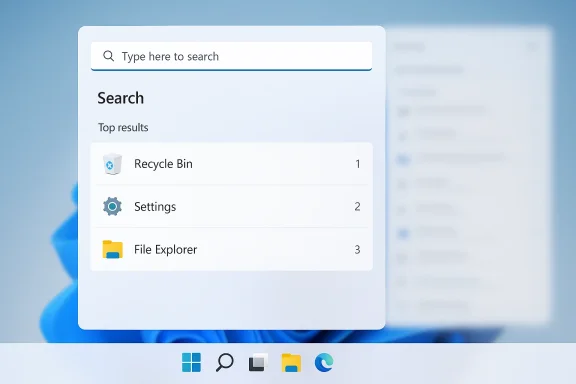
A second response went straight at ranking quality. Roth said Microsoft is working on adjusting the rankers so apps, including the Recycle Bin, appear where they should compared with other suggestions . That is a crucial detail because ranking is the invisible layer that decides whether Search feels helpful or hostile. If the rankers are wrong, the entire UX becomes frustrating no matter how polished the surface looks.
This also suggests Microsoft is addressing Search as a systems problem, not just a UI problem. Rankers, local indexing, app visibility, and suggestion weighting all shape the outcome, which means the fix has to be more than a cosmetic cleanup. In practice, that means Microsoft has to make Search more deterministic: if users type a local app, they should get the local app, not a randomized mix of content types.
Microsoft’s own explanation implies that search output is influenced by multiple internal signals. That is not unusual in modern software, but Windows 11 appears to have over-optimized for breadth and relevance diversity at the expense of simple intent matching. The more a search system tries to be helpful in every direction, the more it risks becoming unhelpful in the one direction the user actually wants.
Older versions of Windows did not have the same issue because they behaved more locally and more predictably. Windows 7 was aggressively local-first, while Windows 10 began blending in web results but usually still respected user intent better than Windows 11 does today . Windows 11 pushed the integration further, and in doing so, it blurred the boundary between a computer search box and a Microsoft content surface.
That blur has practical costs. Users waste time scanning irrelevant results, administrators get more support friction, and the overall system feels less polished. When basic discovery becomes unpredictable, people stop exploring and start using third-party tools instead. That is a bad outcome for Microsoft because it weakens one of the most central parts of the OS.
That trust angle is why these improvements matter more than they might first appear. A small improvement in ranking quality or result clarity can have an outsized effect on the feeling of the entire OS. When people trust Search, they trust the platform; when they do not, every other promise Microsoft makes becomes harder to believe.
A quality-first posture is a meaningful strategic shift because Windows 11 has often been accused of adding friction where it should have removed it. Microsoft now appears to be saying that smoother behavior, cleaner defaults, and less visual noise are not polish items but core product priorities. That is the right diagnosis, even if the execution still has to prove itself.
The Search work also fits into a broader enterprise narrative. IT departments care less about flashy AI entry points than about predictable behavior, manageable support load, and a desktop that does not constantly surprise users. If Microsoft can make Search calmer and more local-first, it strengthens the case for Windows 11 as a dependable enterprise platform, not just a consumer-facing showcase.
The same logic explains why Microsoft’s recent work on less intrusive Copilot placement matters. Fewer interruptions in inbox apps create a quieter shell overall, and quieter shells feel faster even when raw performance does not change dramatically. That psychological effect is a real part of usability.
The contradiction is obvious. People open Search because they want something specific, not because they want to browse Microsoft’s content strategy. When the interface mixes launcher behavior, recommendation systems, and web curation, it becomes harder to understand what the feature is for. That confusion is exactly why people describe Search as “cluttered” even when the underlying index might be functioning correctly.
Microsoft’s forthcoming changes appear to be aimed at shrinking that confusion. The promise of “simpler and less distracting” Search suggests less emphasis on surface noise and more focus on results users can act on immediately . That is not merely a visual cleanup; it is an attempt to restore the original mental model of Windows Search as a practical tool.
That matters because empty utility creates resentment. Users are willing to accept some promotion in a free service or a cloud app, but not when it appears inside the operating system’s core search layer. Windows should feel like an assistant for the machine in front of you, not a billboard for other Microsoft properties.
A better File Explorer would amplify the impact of better Search. If users can reliably find files, launch apps, and move through folders without delay, the OS feels much more coherent. That is why improvements to search ranking and Explorer responsiveness matter even if they look incremental on paper.
There is also a broader competitive point here. Many Windows users adopt third-party file managers because the built-in one feels undercooked. If Microsoft can make Explorer faster, cleaner, and more reliable, it reduces the incentive to leave the first-party path. That is good for user satisfaction and good for platform control.
That comparison is embarrassing for the default shell, but it is also useful. It shows that Microsoft knows how to build a better search and command experience when it chooses to keep the scope tight. The challenge is bringing some of that discipline into the default Windows experience without turning Search into yet another overloaded surface.
For consumers, the obvious wins are easier app launching, less web clutter, and a more predictable interface. For enterprises, the deeper value lies in reduced support calls, fewer complaints about missing local results, and less training friction when users move between Windows 10 habits and Windows 11 behavior. Search is so central that even small improvements can produce noticeable time savings across a large fleet.
Microsoft also has an image problem to solve. When the default operating system feels less intuitive than PowerToys or a browser-based search field, enterprise buyers notice the gap. The company’s recent willingness to discuss improvements publicly is a sign that it understands Search is now part of the broader trust conversation around Windows 11 .
That is why Microsoft has to be careful not to overpromise. Even a better ranker will not help if the UI remains visually noisy or if web content still fights too hard for space. Consumers are often forgiving of bugs but less forgiving of design choices that seem intentionally obstructive.
A good redesign would also reduce the number of competing messages on the screen. If the user wants a file or app, that should dominate the top of the panel. Web suggestions and content recommendations should be secondary, clearly separated, and ideally easier to suppress than they are today.
Microsoft should also treat the search layer as part of a larger shell philosophy. If File Explorer, Start, Settings, and taskbar search all behave differently, users will continue to experience inconsistency even if one piece improves. Unified behavior across these surfaces would do more for trust than a dozen unrelated feature additions.
What matters now is follow-through. Windows 11 has spent too much time appearing to prioritize surface-level AI visibility over basic usability, and Search has become one of the clearest examples of that imbalance. If Microsoft really wants 2026 to be the year Windows feels coherent again, the company has to keep choosing clarity over clutter.
Watch for whether Microsoft reduces the amount of web content shown in the default search pane. Watch for stronger local-app ranking in Start and the taskbar search box. Watch for whether File Explorer search becomes faster and more consistent. Watch for clearer user controls around recommendations and web suggestions. Watch for whether the final release feels native, simple, and fast rather than merely rearranged.
The best-case scenario is not flashy. It is a Windows Search that finally behaves like users expect: local first, relevant, quick, and quiet. If Microsoft can deliver that, it will not just fix a bugbear. It will restore confidence in one of the most fundamental interactions in Windows, and that may matter more than any headline feature the company ships this year.
Source: Windows Latest Microsoft confirms major Windows 11 Search improvements after years of complaints
 Background
Windows Search has been a quiet source of frustration for a long time, but the complaints reached a new level in Windows 11 because the feature often feels less like a launcher and more like a content feed. Users regularly report that it is slower than expected, unreliable for local file discovery, and too eager to surface web suggestions and recommendations instead of the things sitting on the PC itself. That matters because Search is one of the few Windows features that everybody touches, whether they think of themselves as power users or not.The deeper problem is that Windows Search no longer behaves like a simple local index. It still relies on the Windows Search Indexer service, but modern Windows layers in ranking systems, cloud signals, and Bing-powered content in ways that often blur the line between finding a file and browsing the internet. Once the system starts mixing those categories, users stop trusting the results, especially when an obvious local hit is buried beneath a web suggestion or promotional tile.
Microsoft has been hinting for months that it knows the platform needs a reset. The company has already framed its 2026 Windows direction around performance, reliability, and a less intrusive overall experience, including refinements to File Explorer, updates, and other shell surfaces. In that context, Search is not just another annoyance to patch. It is part of the broader argument that Windows 11 must become more predictable if Microsoft wants people to view it as a polished desktop platform rather than a billboard for Microsoft services.
What makes the current moment interesting is the tone of the response. Rather than defending the existing design, Windows leadership is acknowledging user complaints in public and promising that search will become “simpler and less distracting” while ranking changes are being made so that installed apps and core components appear where they should. That is the kind of language companies use when they know a product has drifted too far from user intent.
Why Search Became a Symbol
Search became a symbol because it is where the wider Windows 11 experience is easiest to feel. If a user types a basic app name and gets web clutter, that does not feel like a minor bug; it feels like the operating system itself is resisting the task. A broken search flow is especially damaging because it affects both casual users and people who live in Windows all day.The meme status of Windows Search is not accidental. The repeated examples of local results being buried, web suggestions appearing too aggressively, and the general feed-like layout turning Search into something closer to Bing have all contributed to the perception that Microsoft lost sight of the feature’s original purpose. Once a feature becomes a joke, it takes more than a patch to restore credibility.
What Microsoft Has Confirmed
The clearest new signal is that Microsoft’s Windows Shell leadership is publicly responding to criticism and saying search improvements are already in the pipeline. In one reply, Tali Roth said the team has “a lot of improvements coming for search” and that “simpler and less distracting” is part of the plan . That is not a vague “we’re looking into it” response; it reads like an explicit admission that the current experience is too noisy.A second response went straight at ranking quality. Roth said Microsoft is working on adjusting the rankers so apps, including the Recycle Bin, appear where they should compared with other suggestions . That is a crucial detail because ranking is the invisible layer that decides whether Search feels helpful or hostile. If the rankers are wrong, the entire UX becomes frustrating no matter how polished the surface looks.
This also suggests Microsoft is addressing Search as a systems problem, not just a UI problem. Rankers, local indexing, app visibility, and suggestion weighting all shape the outcome, which means the fix has to be more than a cosmetic cleanup. In practice, that means Microsoft has to make Search more deterministic: if users type a local app, they should get the local app, not a randomized mix of content types.
The Ranking Problem
The ranking complaint may sound technical, but it is really about user confidence. If something as basic as the Recycle Bin can be hidden behind unrelated results, then the feature has failed at its first job: obvious discovery . Search should not feel like a lottery.Microsoft’s own explanation implies that search output is influenced by multiple internal signals. That is not unusual in modern software, but Windows 11 appears to have over-optimized for breadth and relevance diversity at the expense of simple intent matching. The more a search system tries to be helpful in every direction, the more it risks becoming unhelpful in the one direction the user actually wants.
Why Windows 11 Search Feels Broken
At the surface level, the complaints are easy to understand: Search is slow, cluttered, and too eager to show web results. Underneath that, the bigger issue is that Windows 11 Search no longer has a clear identity. Is it a launcher, a file finder, a settings shortcut, a Bing endpoint, or a content surface? The answer sometimes feels like “all of the above,” which is exactly the problem.Older versions of Windows did not have the same issue because they behaved more locally and more predictably. Windows 7 was aggressively local-first, while Windows 10 began blending in web results but usually still respected user intent better than Windows 11 does today . Windows 11 pushed the integration further, and in doing so, it blurred the boundary between a computer search box and a Microsoft content surface.
That blur has practical costs. Users waste time scanning irrelevant results, administrators get more support friction, and the overall system feels less polished. When basic discovery becomes unpredictable, people stop exploring and start using third-party tools instead. That is a bad outcome for Microsoft because it weakens one of the most central parts of the OS.
Search as a Trust Feature
Search is not just a utility; it is a trust feature. If users can rely on it, they use it constantly and unconsciously. If they cannot, they retreat to mouse navigation, pinned apps, or PowerToys alternatives such as Command Palette.That trust angle is why these improvements matter more than they might first appear. A small improvement in ranking quality or result clarity can have an outsized effect on the feeling of the entire OS. When people trust Search, they trust the platform; when they do not, every other promise Microsoft makes becomes harder to believe.
Microsoft’s Broader Shell Reset
Search is not being fixed in isolation. The Windows team has been previewing a wider quality-first direction that includes File Explorer, Start, taskbar behavior, update friction, and reduced Copilot intrusions across the shell. That matters because the complaints about Windows 11 have rarely been about one single feature. They have been about the cumulative annoyance of too many little irritants.A quality-first posture is a meaningful strategic shift because Windows 11 has often been accused of adding friction where it should have removed it. Microsoft now appears to be saying that smoother behavior, cleaner defaults, and less visual noise are not polish items but core product priorities. That is the right diagnosis, even if the execution still has to prove itself.
The Search work also fits into a broader enterprise narrative. IT departments care less about flashy AI entry points than about predictable behavior, manageable support load, and a desktop that does not constantly surprise users. If Microsoft can make Search calmer and more local-first, it strengthens the case for Windows 11 as a dependable enterprise platform, not just a consumer-facing showcase.
Why This Is Bigger Than Search
If Microsoft succeeds on Search, it will likely improve confidence in other shell components too. Search is the first place users notice friction, but it is also part of a larger pattern of whether Windows respects intent. A user who trusts Search is more likely to trust Start, File Explorer, and Settings.The same logic explains why Microsoft’s recent work on less intrusive Copilot placement matters. Fewer interruptions in inbox apps create a quieter shell overall, and quieter shells feel faster even when raw performance does not change dramatically. That psychological effect is a real part of usability.
Search Versus the Web Feed Problem
One of the most controversial parts of Windows 11 Search is that it often behaves like a feed rather than a tool. If you open Search without typing anything, you do not get a blank, neutral space; you get a feed-like panel with top apps, AI tools, trending searches, gaming suggestions, web news, and even recipes in some configurations . That design choice may make sense from a Microsoft services perspective, but it is deeply at odds with what most users expect from a search box.The contradiction is obvious. People open Search because they want something specific, not because they want to browse Microsoft’s content strategy. When the interface mixes launcher behavior, recommendation systems, and web curation, it becomes harder to understand what the feature is for. That confusion is exactly why people describe Search as “cluttered” even when the underlying index might be functioning correctly.
Microsoft’s forthcoming changes appear to be aimed at shrinking that confusion. The promise of “simpler and less distracting” Search suggests less emphasis on surface noise and more focus on results users can act on immediately . That is not merely a visual cleanup; it is an attempt to restore the original mental model of Windows Search as a practical tool.
AI Tools, or Disguised Web Shortcuts?
The “AI tools” section is one of the more revealing examples of the problem. According to the criticism in the source material, those tiles do not perform meaningful system-level actions and instead route users to Bing in a browser . If that is the user experience, then the tile is not a tool so much as a disguised promotional surface.That matters because empty utility creates resentment. Users are willing to accept some promotion in a free service or a cloud app, but not when it appears inside the operating system’s core search layer. Windows should feel like an assistant for the machine in front of you, not a billboard for other Microsoft properties.
Search, File Explorer, and Local Discovery
Windows Search cannot be judged independently from File Explorer because the two are tightly connected in everyday use. Microsoft is already working on search behavior inside File Explorer and in the taskbar search box, including fixes related to lag and discovery issues. That is encouraging because it implies a more unified approach to local discovery across the shell.A better File Explorer would amplify the impact of better Search. If users can reliably find files, launch apps, and move through folders without delay, the OS feels much more coherent. That is why improvements to search ranking and Explorer responsiveness matter even if they look incremental on paper.
There is also a broader competitive point here. Many Windows users adopt third-party file managers because the built-in one feels undercooked. If Microsoft can make Explorer faster, cleaner, and more reliable, it reduces the incentive to leave the first-party path. That is good for user satisfaction and good for platform control.
The PowerToys Comparison
The most flattering comparison for Microsoft’s Search ambitions is not another Windows build, but PowerToys Command Palette. The source material describes it as faster, keyboard-first, and focused on actions rather than content clutter . In other words, it behaves more like what users think Windows Search should be.That comparison is embarrassing for the default shell, but it is also useful. It shows that Microsoft knows how to build a better search and command experience when it chooses to keep the scope tight. The challenge is bringing some of that discipline into the default Windows experience without turning Search into yet another overloaded surface.
Enterprise and Consumer Impact
The impact of these improvements will not be identical for home users and IT-managed environments, and that distinction matters. Consumers mostly care about speed, cleanliness, and whether the OS gets out of the way. Enterprise buyers care about supportability, predictability, and whether search results can be trusted as part of daily workflow.For consumers, the obvious wins are easier app launching, less web clutter, and a more predictable interface. For enterprises, the deeper value lies in reduced support calls, fewer complaints about missing local results, and less training friction when users move between Windows 10 habits and Windows 11 behavior. Search is so central that even small improvements can produce noticeable time savings across a large fleet.
Microsoft also has an image problem to solve. When the default operating system feels less intuitive than PowerToys or a browser-based search field, enterprise buyers notice the gap. The company’s recent willingness to discuss improvements publicly is a sign that it understands Search is now part of the broader trust conversation around Windows 11 .
Consumer Experience in Practice
For home users, the biggest change will be emotional rather than technical. People do not benchmark Search; they feel whether it works. If a search for an installed app is immediate and obvious, the OS feels calmer. If the results page is still crowded with web suggestions, the frustration will remain.That is why Microsoft has to be careful not to overpromise. Even a better ranker will not help if the UI remains visually noisy or if web content still fights too hard for space. Consumers are often forgiving of bugs but less forgiving of design choices that seem intentionally obstructive.
How Microsoft Could Fix This Properly
The most effective fix would be a combination of ranking changes, clearer separation of local and web results, and a simplified search surface. That would align with what Microsoft is already saying publicly about making Search simpler and less distracting while adjusting rankers so local apps rise properly . The company does not need to reinvent search from scratch; it needs to remember what users expect from a desktop search box.A good redesign would also reduce the number of competing messages on the screen. If the user wants a file or app, that should dominate the top of the panel. Web suggestions and content recommendations should be secondary, clearly separated, and ideally easier to suppress than they are today.
Microsoft should also treat the search layer as part of a larger shell philosophy. If File Explorer, Start, Settings, and taskbar search all behave differently, users will continue to experience inconsistency even if one piece improves. Unified behavior across these surfaces would do more for trust than a dozen unrelated feature additions.
A Practical Fix List
- Prioritize installed apps and local files by default.
- Separate web suggestions from core local results.
- Reduce promotional or feed-like material in the empty search state.
- Make ranking behavior more deterministic across Start, Taskbar, and Explorer.
- Keep the visual surface native, simple, and fast.
- Expose clearer controls for users who want local-only behavior.
- Align Search with File Explorer and Settings so the experience feels unified.
Strengths and Opportunities
Microsoft’s decision to confront Search complaints directly gives the company a real opportunity to reset one of the most disliked parts of Windows 11. The strength of this moment is that Search is not an isolated issue; it sits at the center of a broader push to make Windows calmer, faster, and less intrusive, which could restore some of the platform’s lost credibility.- Microsoft is publicly acknowledging that Search needs work.
- Ranking fixes can deliver visible improvements without a full rewrite.
- Cleaner Search would improve Start, File Explorer, and taskbar workflows.
- A less distracting interface would reduce user frustration.
- Better local discovery could rebuild trust in the shell.
- Enterprise users would benefit from fewer support complaints.
- Microsoft can use Search improvements to reinforce a quality-first Windows narrative.
Why the Opportunity Is Real
The opportunity is real because user expectations are not high anymore; they are just frustrated. That is a winnable state for Microsoft. If the company delivers even modest improvements, many users will notice immediately because the baseline has been so weak.Risks and Concerns
The biggest risk is that Microsoft improves the ranking logic without truly fixing the experience people see. If the surface still looks like a content feed, or if web suggestions still crowd out local intent, then the underlying complaints will survive even if the engineering has improved underneath.- Improvements may arrive gradually and inconsistently across builds.
- Web and promotional elements could still dominate the interface.
- Search may remain fragmented across different Windows surfaces.
- Users may not notice backend improvements if the UI stays cluttered.
- Enterprise customers may want clearer policy controls.
- Microsoft could overcorrect and hide too much useful functionality.
- Performance perception may remain weak if broader shell latency is not addressed.
The Biggest Product Risk
The biggest product risk is credibility. Windows users have heard promises before, and they have watched some features arrive half-fixed or with too many caveats. If Microsoft wants this time to feel different, the improvements need to be visible, consistent, and durable.Looking Ahead
The next few months will tell us whether this is a genuine Windows Search course correction or simply one part of a broader round of shell refinements. Microsoft’s own language suggests that the team is still actively tuning ranking behavior and reducing clutter, which means the work is underway, not just conceptual . That is encouraging, but it also means the final product is not yet settled.What matters now is follow-through. Windows 11 has spent too much time appearing to prioritize surface-level AI visibility over basic usability, and Search has become one of the clearest examples of that imbalance. If Microsoft really wants 2026 to be the year Windows feels coherent again, the company has to keep choosing clarity over clutter.
Watch for whether Microsoft reduces the amount of web content shown in the default search pane. Watch for stronger local-app ranking in Start and the taskbar search box. Watch for whether File Explorer search becomes faster and more consistent. Watch for clearer user controls around recommendations and web suggestions. Watch for whether the final release feels native, simple, and fast rather than merely rearranged.
The best-case scenario is not flashy. It is a Windows Search that finally behaves like users expect: local first, relevant, quick, and quiet. If Microsoft can deliver that, it will not just fix a bugbear. It will restore confidence in one of the most fundamental interactions in Windows, and that may matter more than any headline feature the company ships this year.
Source: Windows Latest Microsoft confirms major Windows 11 Search improvements after years of complaints
Last edited:
