

Windows 11’s newly improved Search experience is also quietly gaining a modern power dialog, replacing the familiar legacy window when users launch Shut down or Restart from a search result. The change is presently limited to Windows Insiders in the Experimental channel, and it does not extend to the equally familiar Alt+F4 shutdown path.
Microsoft announced the broader Search refresh on July 13, not July 15. Its Windows Insider Blog describes cleaner search results, fewer promotions, better local-result ranking, typo tolerance, and controls for web and Microsoft Store suggestions. The company did not call out the shutdown dialog in that announcement.
As reported by IT Home, Windows watcher PhantomOfEarth spotted the additional UI change in the same experimental rollout: selecting shutdown or restart through Search now calls up a Windows 11-style confirmation interface rather than the old “Shut Down Windows” dialog that has survived through several generations of the OS.
The refreshed window uses the current Windows 11 visual language and presents the available power choices in a more modern layout. Depending on the device and account state, those include shutdown, restart, sleep, and sign-out-related actions.
It is a small change, but it is notable precisely because the traditional shutdown dialog has long been one of Windows’ most conspicuous pieces of older UI. The original control is functional and familiar, but its compact dropdown-and-button design is visually disconnected from Settings, Start, and the newer shell surfaces Microsoft has redesigned since Windows 11 launched.
For now, the modern interface appears to be linked to the Search result action rather than a wholesale replacement of the underlying power dialog.
That means Windows 11 currently has two visibly different shutdown dialogs, selected purely by how the action is initiated. Search users may encounter the new experience, while users relying on the desktop shortcut will continue to see the older one.
Microsoft has not announced a redesign of the Alt+F4 dialog or said that the new Search-triggered window will replace it elsewhere. Given the Experimental channel status, the feature is also subject to change before any wider release.
There is no operational change for Windows administrators: power actions, policies, and the established Start menu controls are unaffected. This is a shell-level presentation update, not a new shutdown mechanism or a change to command-line power management.
For most users, the practical result is simple: Search may soon look more like Windows 11 when it is used to shut down or restart, while Alt+F4 remains resolutely old-school.
Microsoft announced the broader Search refresh on July 13, not July 15. Its Windows Insider Blog describes cleaner search results, fewer promotions, better local-result ranking, typo tolerance, and controls for web and Microsoft Store suggestions. The company did not call out the shutdown dialog in that announcement.
As reported by IT Home, Windows watcher PhantomOfEarth spotted the additional UI change in the same experimental rollout: selecting shutdown or restart through Search now calls up a Windows 11-style confirmation interface rather than the old “Shut Down Windows” dialog that has survived through several generations of the OS.
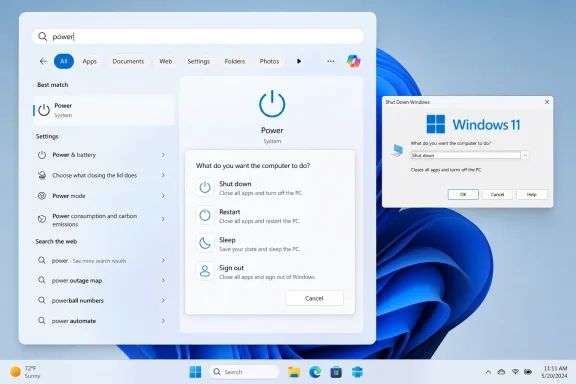 A new dialog, but only from Search
The refreshed window uses the current Windows 11 visual language and presents the available power choices in a more modern layout. Depending on the device and account state, those include shutdown, restart, sleep, and sign-out-related actions.It is a small change, but it is notable precisely because the traditional shutdown dialog has long been one of Windows’ most conspicuous pieces of older UI. The original control is functional and familiar, but its compact dropdown-and-button design is visually disconnected from Settings, Start, and the newer shell surfaces Microsoft has redesigned since Windows 11 launched.
For now, the modern interface appears to be linked to the Search result action rather than a wholesale replacement of the underlying power dialog.
Alt+F4 remains untouched
Pressing Alt+F4 from an active desktop still opens the classic “Shut Down Windows” dialog, complete with its legacy dropdown. Alt+F4 normally closes the focused application; when the desktop has focus, it exposes the power menu instead.That means Windows 11 currently has two visibly different shutdown dialogs, selected purely by how the action is initiated. Search users may encounter the new experience, while users relying on the desktop shortcut will continue to see the older one.
Microsoft has not announced a redesign of the Alt+F4 dialog or said that the new Search-triggered window will replace it elsewhere. Given the Experimental channel status, the feature is also subject to change before any wider release.
Availability and admin impact
The Search improvements are rolling out gradually through Microsoft’s Controlled Feature Rollout mechanism, so not every Experimental-channel Insider will receive them immediately. Microsoft says the capabilities can also be enabled through feature flags, but that route is intended for testing rather than managed deployment.There is no operational change for Windows administrators: power actions, policies, and the established Start menu controls are unaffected. This is a shell-level presentation update, not a new shutdown mechanism or a change to command-line power management.
For most users, the practical result is simple: Search may soon look more like Windows 11 when it is used to shut down or restart, while Alt+F4 remains resolutely old-school.
References
- Primary source: thewincentral.com
Published: 2026-07-15T11:07:49+00:00
Windows Search Gets Modern Shutdown Dialog in Windows 11 - WinCentral
Windows Search now uses a modern shutdown dialog in Windows 11, while the classic Alt + F4 power menu remains unchanged. - Read in Windows 11 News on WinCentral thewincentral.com
- Official source: techcommunity.microsoft.com
- Official source: blogs.windows.com
Improving Windows Search Box, with less clutter and more control
Hello Windows Insiders, You’ve been asking for search that is faster, more relevant, and easier to use—whether you’re opening an app, finding a file, or changing a setting. Because the Windows Search Box is where many people start, we focusedblogs.windows.com - Official source: learn.microsoft.com
Alt+F4 Shutdown Dialog Defaults to "Switch User" Instead of "Shut Down" in Windows 11 - Microsoft Q&A
On my Windows 11 PC, the classic Alt+F4 "Shut Down Windows" dialog no longer defaults to the "Shut down" option. Instead, the dropdown is preselected to "Switch user". Previously, I could shut down the computer by pressing…learn.microsoft.com
