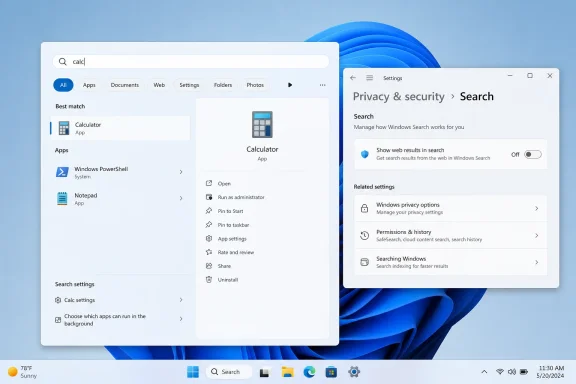
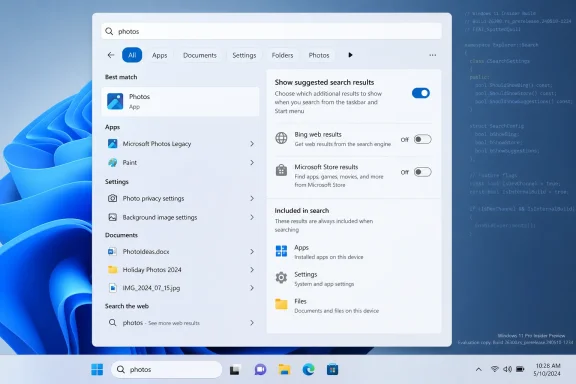
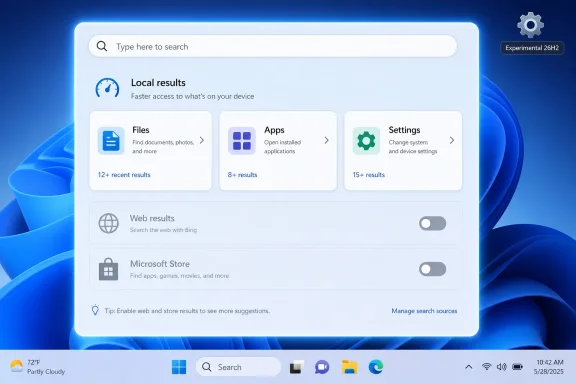
Microsoft is testing Windows 11 Search changes for Insiders in June 2026 that would let users suppress Bing-powered web results and give local files, apps, and settings priority in the Start and taskbar search experience. The move is small in interface terms but large in symbolism. After years of treating Windows Search as a traffic ramp to Bing, Microsoft appears to be conceding that a PC search box should first behave like a PC search box. That is not a revolution, but for Windows users who have memorized registry hacks just to keep web clutter out of Start, it is a meaningful retreat.
The Windows Search box has long suffered from an identity crisis. Users press the Windows key, type the name of an app, a document, or a setting, and expect the operating system to find the thing already on the machine. Microsoft, too often, has treated the same gesture as an opportunity to open Bing, advertise Edge, suggest web answers, or route a mistyped local query into a browser.
That tension is what makes the current Insider work more interesting than the usual preview-build housekeeping. The reported changes are not merely about ranking one result above another. They point toward a more explicit distinction between local search and web search, a distinction Windows users have wanted for years and Microsoft has resisted because the confusion was commercially useful.
The company’s framing, where public, has been careful. Microsoft has talked about making Search more relevant, ensuring files and apps appear ahead of web suggestions when they are stronger matches, and improving fuzzy matching so partial names and typos do not derail a local lookup. That sounds like usability polish. In practice, it is an admission that Windows Search has been failing the most basic test of an operating system feature: understanding user intent.
The search box is not just another widget. It sits at the center of daily Windows muscle memory. When that path becomes unreliable, users do not merely dislike Bing; they stop trusting Windows to respect the boundary between their machine and Microsoft’s services.
But Windows Search did not earn that trust. It frequently blurred intent instead of clarifying it. A query that looked like an app name could become a Bing query. A system setting could be outranked by a web suggestion. A typo could send the user into Edge rather than toward the file they were trying to open.
This is where Microsoft’s product strategy collided with user patience. Bing is not an incidental dependency in Windows; it is one of Microsoft’s strategic platforms, bound up with advertising, Edge, Copilot, and the company’s long campaign to make its search engine harder to ignore. Windows is the distribution channel every rival would love to have, and Microsoft has used that channel aggressively.
The result has been a familiar form of Windows resentment. Users may tolerate preinstalled apps, taskbar experiments, and service prompts when they feel optional. They become much less forgiving when a core navigation feature behaves as if the user’s local intent is merely a hint, not a command.
For enthusiasts and administrators, this is why the issue has always felt bigger than Bing. It is about whether Windows is a general-purpose operating system configured for the user, or a Microsoft-owned attention surface configured for Microsoft’s ecosystem.
A visible setting changes the social contract. It tells users that disabling web results is not a broken configuration or an enterprise-only exception. It is a legitimate preference. That matters especially on Windows Home, where Microsoft has historically offered fewer management controls while still pushing consumer services heavily.
The timing also fits a broader pattern. Microsoft has spent the last few Windows 11 cycles trying to repair Search’s reputation with more relevant local ranking, better typo handling, and new semantic-search features on Copilot+ PCs. Some of that work is genuinely useful. Being able to find a file without remembering its exact name is the kind of AI-assisted feature that makes sense on a personal computer.
But better search intelligence does not solve the trust problem if the interface still funnels unwanted queries to Bing. In fact, the smarter Search becomes, the more important boundaries become. If Windows is going to interpret more natural language, index more context, and eventually mediate more of the user’s workflow, then users need clearer control over where queries go and what services receive them.
That is the quiet significance of a Bing suppression option. It is not anti-AI, anti-cloud, or anti-search. It is pro-boundary.
That bargain becomes harder to sustain when the default experience feels visibly worse. If a user types “Notepad,” “Device Manager,” or part of a file name and receives a web suggestion before the local target, the system looks incompetent. Worse, it looks deliberately incompetent, as though the product has been made less useful to serve a business goal.
This is the danger of over-monetizing operating-system surfaces. Advertising and service promotion may produce measurable engagement, but they also create suspicion. Once users believe a result is present because it benefits Microsoft rather than because it helps them, every search miss becomes evidence of bad faith.
The reported changes suggest Microsoft understands at least part of that risk. Prioritizing local results over web suggestions is not a radical design doctrine; it is the behavior users assumed they were getting all along. The surprise is that it took this long to become a visible priority.
There is also competitive pressure in the background. Apple’s Spotlight is not perfect, and macOS has its own service entanglements, but its core promise is clear: type, find, launch. Linux desktop search varies by environment, but it generally does not try to turn local queries into a first-party search-engine campaign. Windows, the dominant desktop platform, has too often made the simplest path feel like the least respectful one.
Enterprise administrators have spent years navigating a Windows client that increasingly mixes productivity features, cloud hooks, consumer prompts, AI surfaces, account nudges, and advertising-adjacent placements. Each individual change may be defensible. Together, they create operational drag, particularly in regulated environments where search behavior, data flow, and user training matter.
A clean setting for web results would be welcome, but administrators will want more than a consumer toggle. They will want policy controls, defaults they can enforce, documentation for telemetry and query routing, and clarity about how the feature behaves across Windows editions. They will also want assurance that future Copilot integrations will not reintroduce the same problem under a different name.
This is where Microsoft’s Insider testing should be judged harshly but fairly. Preview builds are experiments, and not every setting ships. Yet the direction of travel matters. If Microsoft provides a supported way to keep Windows Search local-first, it reduces the need for brittle scripts, registry baselines, and help-desk explanations about why the Start menu opened a browser.
The administrative benefit is not aesthetic cleanliness. It is predictability. A managed desktop should not surprise users by turning local navigation into web navigation unless the organization has chosen that behavior.
That ambition makes old Search complaints newly relevant. If users did not like Bing appearing when they searched for a local app, they will be even less forgiving if future AI features blur the boundary between local commands, cloud inference, Microsoft account data, and web services. The more intelligent the interface becomes, the more visible its loyalties become.
Microsoft often presents AI integration as a productivity upgrade, and sometimes it is. Natural-language search for settings could help ordinary users who do not know Windows’ internal vocabulary. Semantic file search could rescue people from chaotic Downloads folders and project directories. On-device models could make local discovery faster and more private.
But none of that works if users suspect every query is another opportunity for Microsoft to promote a service. AI assistants require more trust than traditional search boxes because they sit closer to intent. They do not merely retrieve; they interpret. If the interpreter is perceived as a salesman, the feature loses before it begins.
That is why a mundane Windows Search setting may be more strategically important than it looks. Microsoft needs users to believe Windows can be smart without being pushy. Letting people turn off Bing results is a small way to prove that intelligence and restraint can coexist.
Windows Search is a natural target for scrutiny because it combines operating-system dominance with a Microsoft-owned search service. If the Start menu and taskbar route users to Bing by default, rivals can argue that Microsoft is using Windows distribution to preference its own downstream product. Microsoft can argue that integrated search improves the user experience. Both claims can be true, which is precisely why user choice matters.
A toggle is the minimum viable answer to that tension. It does not remove Bing from Windows. It does not force Microsoft to abandon integrated web search. It simply gives users a way to say that the local search box should stay local.
The more interesting question is whether Microsoft will make that choice universal or region-specific. Windows has already seen features vary by market because of regulatory obligations. If a cleaner Search experience appears only in certain jurisdictions, Microsoft will invite the obvious conclusion: users get respect where regulators demand it.
That would be a mistake. The complaint is not European, American, or Australian. It is universal among people who use Windows as a working environment rather than a Microsoft services showroom.
The web-result problem is especially irritating because it punishes speed. A person who knows exactly what they want presses the Windows key and types quickly. If Search hesitates, misranks, or interprets the query as web intent, the fluent user is slowed down by a feature allegedly designed for convenience.
That has driven many enthusiasts toward alternatives. Some rely on PowerToys Run, Everything, Flow Launcher, Start menu replacements, or browser-based workflows. Others disable web search through registry changes and forget the feature exists until a Windows update or new machine setup brings it back.
The tragedy for Microsoft is that Windows Search could be excellent. The operating system has access to local files, installed apps, settings, indexed locations, recent activity, OneDrive content, and work identity when configured. It should be the fastest route to the user’s stuff. Instead, years of Bing-first behavior trained many of Microsoft’s most loyal users to distrust it.
If the Insider changes ship broadly, they will not instantly undo that history. But they could stop the bleeding. A local-first Search that respects a user’s chosen scope is the kind of Windows improvement that does not need a launch event. It just makes every day slightly less annoying.
That matters because Bing is no longer merely the perennial Google alternative. It is tied to Microsoft’s AI ambitions, advertising business, browser strategy, and consumer identity stack. Microsoft wants Bing to be perceived as capable, modern, and useful. A resentful Start menu handoff does the opposite.
A more restrained approach might serve Microsoft better. If users choose web search from Windows intentionally, the result has a better chance of feeling relevant. If Bing appears when the user asks for the web, rather than when Windows fails to find Device Manager, the service is no longer introduced as an interruption.
This is basic product discipline. Defaults are powerful, but coerced defaults can poison the experience they are meant to promote. Microsoft learned versions of this lesson during browser-choice fights, Edge nagging controversies, and backlash over account requirements. Search is another instance of the same pattern.
The lesson is not that Microsoft should hide its services. It is that Windows users can tell the difference between integration and hijacking.
Microsoft has a habit of technically offering choice while steering users through design. A setting can be buried. A prompt can be framed asymmetrically. A reset can occur after a feature update. A “recommended” configuration can quietly re-enable behavior the user previously rejected. Windows veterans have seen enough of this to be skeptical.
For the change to matter, Microsoft should treat it as a first-class preference. Search settings should plainly distinguish local results, web results, Store suggestions, work and school content, and cloud files. Users should be able to understand the consequences without deciphering Microsoft’s internal taxonomy.
The company should also avoid bundling the setting with unrelated service prompts. If disabling web results produces warnings about reduced functionality, Edge integration, Copilot quality, or Microsoft account benefits, the trust gain will evaporate. Respectful software lets the user make a choice and then honors it quietly.
There is a clean version of this future. Windows Search becomes modular. Local search is fast, private, and default-prioritized. Web search is available but optional. Copilot-enhanced search is clear about what it can access and where processing happens. Administrators get policy. Consumers get plain language. Everyone gets fewer surprises.
That would be a Windows feature worth applauding, precisely because it would not try so hard to be noticed.
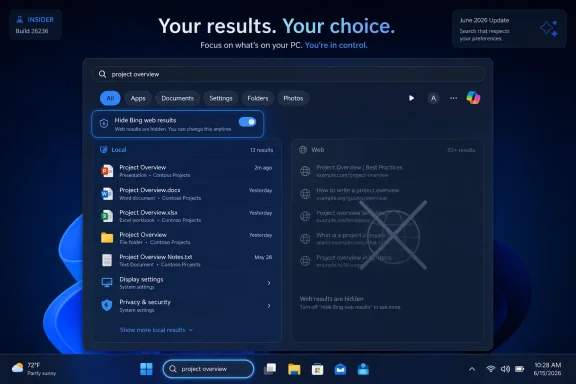 Microsoft Finally Admits the Search Box Has a Job to Do
The Windows Search box has long suffered from an identity crisis. Users press the Windows key, type the name of an app, a document, or a setting, and expect the operating system to find the thing already on the machine. Microsoft, too often, has treated the same gesture as an opportunity to open Bing, advertise Edge, suggest web answers, or route a mistyped local query into a browser.That tension is what makes the current Insider work more interesting than the usual preview-build housekeeping. The reported changes are not merely about ranking one result above another. They point toward a more explicit distinction between local search and web search, a distinction Windows users have wanted for years and Microsoft has resisted because the confusion was commercially useful.
The company’s framing, where public, has been careful. Microsoft has talked about making Search more relevant, ensuring files and apps appear ahead of web suggestions when they are stronger matches, and improving fuzzy matching so partial names and typos do not derail a local lookup. That sounds like usability polish. In practice, it is an admission that Windows Search has been failing the most basic test of an operating system feature: understanding user intent.
The search box is not just another widget. It sits at the center of daily Windows muscle memory. When that path becomes unreliable, users do not merely dislike Bing; they stop trusting Windows to respect the boundary between their machine and Microsoft’s services.
Bing Was Never Just a Search Result
Microsoft’s defense of web results in Windows has always had a plausible version. Modern users move constantly between local files, cloud documents, work data, apps, settings, and the open web. A unified search surface can be genuinely helpful if it understands context and gives the user control.But Windows Search did not earn that trust. It frequently blurred intent instead of clarifying it. A query that looked like an app name could become a Bing query. A system setting could be outranked by a web suggestion. A typo could send the user into Edge rather than toward the file they were trying to open.
This is where Microsoft’s product strategy collided with user patience. Bing is not an incidental dependency in Windows; it is one of Microsoft’s strategic platforms, bound up with advertising, Edge, Copilot, and the company’s long campaign to make its search engine harder to ignore. Windows is the distribution channel every rival would love to have, and Microsoft has used that channel aggressively.
The result has been a familiar form of Windows resentment. Users may tolerate preinstalled apps, taskbar experiments, and service prompts when they feel optional. They become much less forgiving when a core navigation feature behaves as if the user’s local intent is merely a hint, not a command.
For enthusiasts and administrators, this is why the issue has always felt bigger than Bing. It is about whether Windows is a general-purpose operating system configured for the user, or a Microsoft-owned attention surface configured for Microsoft’s ecosystem.
The Insider Fix Is a Toggle With a History
The reported Insider-facing change matters because it moves the problem out of the realm of hacks and into the realm of settings. Power users have long known that web search could be suppressed through registry edits, Group Policy in certain Windows editions, third-party tools, or shell replacements. Those workarounds were never the same as consent.A visible setting changes the social contract. It tells users that disabling web results is not a broken configuration or an enterprise-only exception. It is a legitimate preference. That matters especially on Windows Home, where Microsoft has historically offered fewer management controls while still pushing consumer services heavily.
The timing also fits a broader pattern. Microsoft has spent the last few Windows 11 cycles trying to repair Search’s reputation with more relevant local ranking, better typo handling, and new semantic-search features on Copilot+ PCs. Some of that work is genuinely useful. Being able to find a file without remembering its exact name is the kind of AI-assisted feature that makes sense on a personal computer.
But better search intelligence does not solve the trust problem if the interface still funnels unwanted queries to Bing. In fact, the smarter Search becomes, the more important boundaries become. If Windows is going to interpret more natural language, index more context, and eventually mediate more of the user’s workflow, then users need clearer control over where queries go and what services receive them.
That is the quiet significance of a Bing suppression option. It is not anti-AI, anti-cloud, or anti-search. It is pro-boundary.
Microsoft Is Fixing Relevance Because Relevance Became a Liability
For years, Microsoft could treat Search complaints as enthusiast grumbling. Registry hacks and forum threads were irritating but manageable. Most users, the thinking likely went, would accept the default experience and perhaps even discover Bing or Edge along the way.That bargain becomes harder to sustain when the default experience feels visibly worse. If a user types “Notepad,” “Device Manager,” or part of a file name and receives a web suggestion before the local target, the system looks incompetent. Worse, it looks deliberately incompetent, as though the product has been made less useful to serve a business goal.
This is the danger of over-monetizing operating-system surfaces. Advertising and service promotion may produce measurable engagement, but they also create suspicion. Once users believe a result is present because it benefits Microsoft rather than because it helps them, every search miss becomes evidence of bad faith.
The reported changes suggest Microsoft understands at least part of that risk. Prioritizing local results over web suggestions is not a radical design doctrine; it is the behavior users assumed they were getting all along. The surprise is that it took this long to become a visible priority.
There is also competitive pressure in the background. Apple’s Spotlight is not perfect, and macOS has its own service entanglements, but its core promise is clear: type, find, launch. Linux desktop search varies by environment, but it generally does not try to turn local queries into a first-party search-engine campaign. Windows, the dominant desktop platform, has too often made the simplest path feel like the least respectful one.
The Enterprise Angle Is Less About Bing Than Predictability
For IT departments, the most important part of this story is not whether Bing appears in Start. It is whether Microsoft is willing to make consumer-facing behavior manageable, documented, and stable.Enterprise administrators have spent years navigating a Windows client that increasingly mixes productivity features, cloud hooks, consumer prompts, AI surfaces, account nudges, and advertising-adjacent placements. Each individual change may be defensible. Together, they create operational drag, particularly in regulated environments where search behavior, data flow, and user training matter.
A clean setting for web results would be welcome, but administrators will want more than a consumer toggle. They will want policy controls, defaults they can enforce, documentation for telemetry and query routing, and clarity about how the feature behaves across Windows editions. They will also want assurance that future Copilot integrations will not reintroduce the same problem under a different name.
This is where Microsoft’s Insider testing should be judged harshly but fairly. Preview builds are experiments, and not every setting ships. Yet the direction of travel matters. If Microsoft provides a supported way to keep Windows Search local-first, it reduces the need for brittle scripts, registry baselines, and help-desk explanations about why the Start menu opened a browser.
The administrative benefit is not aesthetic cleanliness. It is predictability. A managed desktop should not surprise users by turning local navigation into web navigation unless the organization has chosen that behavior.
Copilot Makes the Boundary Problem Harder, Not Easier
The Bing toggle arrives in a Windows era increasingly defined by Copilot. Microsoft’s long-term interface ambition is clear enough: Windows should not merely launch apps and index files; it should understand tasks, summarize context, automate workflows, and connect local and cloud data through AI agents.That ambition makes old Search complaints newly relevant. If users did not like Bing appearing when they searched for a local app, they will be even less forgiving if future AI features blur the boundary between local commands, cloud inference, Microsoft account data, and web services. The more intelligent the interface becomes, the more visible its loyalties become.
Microsoft often presents AI integration as a productivity upgrade, and sometimes it is. Natural-language search for settings could help ordinary users who do not know Windows’ internal vocabulary. Semantic file search could rescue people from chaotic Downloads folders and project directories. On-device models could make local discovery faster and more private.
But none of that works if users suspect every query is another opportunity for Microsoft to promote a service. AI assistants require more trust than traditional search boxes because they sit closer to intent. They do not merely retrieve; they interpret. If the interpreter is perceived as a salesman, the feature loses before it begins.
That is why a mundane Windows Search setting may be more strategically important than it looks. Microsoft needs users to believe Windows can be smart without being pushy. Letting people turn off Bing results is a small way to prove that intelligence and restraint can coexist.
The EU Shadow Hangs Over Every Windows Choice
Microsoft’s Windows unbundling decisions no longer happen in a vacuum. European regulators have already pushed large platform holders toward more explicit user choice around browsers, search, app stores, and default services. Even when a change is not directly attributed to regulation, the regulatory climate shapes what is considered sustainable.Windows Search is a natural target for scrutiny because it combines operating-system dominance with a Microsoft-owned search service. If the Start menu and taskbar route users to Bing by default, rivals can argue that Microsoft is using Windows distribution to preference its own downstream product. Microsoft can argue that integrated search improves the user experience. Both claims can be true, which is precisely why user choice matters.
A toggle is the minimum viable answer to that tension. It does not remove Bing from Windows. It does not force Microsoft to abandon integrated web search. It simply gives users a way to say that the local search box should stay local.
The more interesting question is whether Microsoft will make that choice universal or region-specific. Windows has already seen features vary by market because of regulatory obligations. If a cleaner Search experience appears only in certain jurisdictions, Microsoft will invite the obvious conclusion: users get respect where regulators demand it.
That would be a mistake. The complaint is not European, American, or Australian. It is universal among people who use Windows as a working environment rather than a Microsoft services showroom.
The Home User Finally Gets the Argument IT Has Made for Years
For ordinary Windows users, the annoyance is simple. They want to find things. They do not want Start menu roulette.The web-result problem is especially irritating because it punishes speed. A person who knows exactly what they want presses the Windows key and types quickly. If Search hesitates, misranks, or interprets the query as web intent, the fluent user is slowed down by a feature allegedly designed for convenience.
That has driven many enthusiasts toward alternatives. Some rely on PowerToys Run, Everything, Flow Launcher, Start menu replacements, or browser-based workflows. Others disable web search through registry changes and forget the feature exists until a Windows update or new machine setup brings it back.
The tragedy for Microsoft is that Windows Search could be excellent. The operating system has access to local files, installed apps, settings, indexed locations, recent activity, OneDrive content, and work identity when configured. It should be the fastest route to the user’s stuff. Instead, years of Bing-first behavior trained many of Microsoft’s most loyal users to distrust it.
If the Insider changes ship broadly, they will not instantly undo that history. But they could stop the bleeding. A local-first Search that respects a user’s chosen scope is the kind of Windows improvement that does not need a launch event. It just makes every day slightly less annoying.
A Better Search Box Would Also Be a Better Bing Strategy
There is an irony here: forcing Bing into Windows Search may have hurt Bing’s reputation more than helped it. Users who encounter Bing after a failed local search do not experience it as a useful search engine. They experience it as the thing that got in the way.That matters because Bing is no longer merely the perennial Google alternative. It is tied to Microsoft’s AI ambitions, advertising business, browser strategy, and consumer identity stack. Microsoft wants Bing to be perceived as capable, modern, and useful. A resentful Start menu handoff does the opposite.
A more restrained approach might serve Microsoft better. If users choose web search from Windows intentionally, the result has a better chance of feeling relevant. If Bing appears when the user asks for the web, rather than when Windows fails to find Device Manager, the service is no longer introduced as an interruption.
This is basic product discipline. Defaults are powerful, but coerced defaults can poison the experience they are meant to promote. Microsoft learned versions of this lesson during browser-choice fights, Edge nagging controversies, and backlash over account requirements. Search is another instance of the same pattern.
The lesson is not that Microsoft should hide its services. It is that Windows users can tell the difference between integration and hijacking.
The Setting Will Matter Less Than the Default
The real test will not be whether a Bing suppression option exists somewhere in Settings. The test will be how discoverable it is, how durable it is, and what Windows does by default.Microsoft has a habit of technically offering choice while steering users through design. A setting can be buried. A prompt can be framed asymmetrically. A reset can occur after a feature update. A “recommended” configuration can quietly re-enable behavior the user previously rejected. Windows veterans have seen enough of this to be skeptical.
For the change to matter, Microsoft should treat it as a first-class preference. Search settings should plainly distinguish local results, web results, Store suggestions, work and school content, and cloud files. Users should be able to understand the consequences without deciphering Microsoft’s internal taxonomy.
The company should also avoid bundling the setting with unrelated service prompts. If disabling web results produces warnings about reduced functionality, Edge integration, Copilot quality, or Microsoft account benefits, the trust gain will evaporate. Respectful software lets the user make a choice and then honors it quietly.
There is a clean version of this future. Windows Search becomes modular. Local search is fast, private, and default-prioritized. Web search is available but optional. Copilot-enhanced search is clear about what it can access and where processing happens. Administrators get policy. Consumers get plain language. Everyone gets fewer surprises.
That would be a Windows feature worth applauding, precisely because it would not try so hard to be noticed.
The Start Menu’s Bing Retreat Marks a Line in the Sand
The practical consequences are straightforward, but the strategic implications are larger than the UI suggests. If Microsoft ships the change broadly, Windows Search could become a test case for whether the company can integrate cloud and AI features without making users feel trapped inside a funnel.- Microsoft is reportedly testing Windows 11 Search controls that would let users disable Bing-powered web results rather than relying on registry edits or third-party tools.
- The broader Search work appears aimed at making local files, apps, and settings appear ahead of web suggestions when they are the better match.
- The change matters most because it recognizes that Start and taskbar search are operating-system navigation tools before they are web discovery surfaces.
- IT administrators should watch for policy support, edition differences, telemetry details, and whether the setting survives feature updates cleanly.
- The same boundary problem will become more important as Copilot and semantic search features expand deeper into Windows.
- Microsoft’s best long-term Bing strategy may be to make Bing optional enough that users stop experiencing it as an intrusion.
References
- Primary source: PCMag Australia
Published: Wed, 17 Jun 2026 15:11:56 GMT
Want to Banish Bing Results? Microsoft Launches Search Fix for Windows Insiders
The update can also better interpret your typos and partial-word searches.au.pcmag.com - Independent coverage: PCMag
Published: Tue, 16 Jun 2026 07:00:00 GMT
Want to Banish Bing Results? Microsoft Launches Search Fix for Windows Insiders | PCMag
The update can also better interpret your typos and partial-word searches.www.pcmag.com - Related coverage: windowscentral.com
I dug through the Windows 11 Insider builds for June 2026 and found 7 features worth paying attention to | Windows Central
Microsoft's June Insider preview builds show a growing focus on polishing the OS experience across accessibility, updates, and performance.www.windowscentral.com - Related coverage: techcrunch.com
Microsoft launches the new Bing, with ChatGPT built in | TechCrunch
Microsoft today launched a new version of its Bing search engine with built-in support for OpenAI's ChatGPT.techcrunch.com - Related coverage: windowslatest.com
Microsoft is letting you kill Bing in Windows 11 Search, after years of forcing it on every PC
Microsoft is testing a new Windows 11 Search toggle that disables Bing, MSN, and Microsoft Store results, ending years of forced web results. www.windowslatest.com
- Related coverage: pcworld.com
Microsoft begins testing its next-gen smart search on Windows | PCWorld
Microsoft has begun rolling out semantic search options for File Explorer on Window PCs. Forget keywords. Just describe what you're looking for.www.pcworld.com
- Related coverage: techrepublic.com
Windows 11 Search Could Get a Bing Results Toggle - TechRepublic
Microsoft is testing a Windows 11 Search toggle for Bing web results and Store suggestions, but the setting is not publicly available yet.www.techrepublic.com
- Related coverage: techspot.com
Windows 11 will soon have an option for removing web results from local search queries | TechSpot
During a recent meetup with Windows enthusiasts enrolled in the Windows Insiders program, Microsoft showcased several search-related changes that are expected to arrive in a future update...www.techspot.com - Related coverage: ubergizmo.com
Microsoft Introduces Option To Disable Bing Web Results In Windows 11 | Ubergizmo
Microsoft has announced a long-awaited update for Windows 11 that addresses a persistent user complaint: the forced integration of Bing web results...www.ubergizmo.com - Related coverage: digitaltrends.com
Microsoft rolls out a fix for the broken Windows Start Menu search - Digital Trends
A rogue Bing update took Windows 11 Start Menu search offline for some users since April 6, and Microsoft's fix is as hands-off as the bug was unexpected.www.digitaltrends.com - Related coverage: howtogeek.com
Microsoft’s Spammy Bing Popups on Windows Are Back
Windows is showing alerts to Chrome users asking them to switch to Bing. www.howtogeek.com
- Related coverage: computerworld.com
Microsoft starts testing an AI-based search engine in Windows 11 – Computerworld
The new search tool works only on Copilot+ computers and is part of the Windows Insider program. www.computerworld.com
- Related coverage: techradar.com
Microsoft is fixing one of the most baffling things about Windows 11 — 'spam' in search results | TechRadar
Why didn't this happen long before now? Search mewww.techradar.com - Related coverage: tomshardware.com
How to Disable Windows Web Search and Speed Up Your PC | Tom's Hardware
Stop Windows from showing you web results when you just want files and apps.www.tomshardware.com - Related coverage: tomsguide.com
Searching for Chrome on Bing? Microsoft has a new clingy tactic to beg you to stay | Tom's Guide
Microsoft's latest move to convince Bing users to stop switching to Google Chrome includes a new comparison banner promoting the perks of using the default Windows browser.www.tomsguide.com - Related coverage: cincodias.elpais.com
Microsoft separará los resultados de las búsquedas entre los de Windows 11 y los de Bing | Lifestyle | SmartLife | Cinco Días
Los cambios aumentarán las opciones de personalización del sistema operativocincodias.elpais.com